
 Bitaigen Research
 How to Buy Cryptocurrency on Binance?
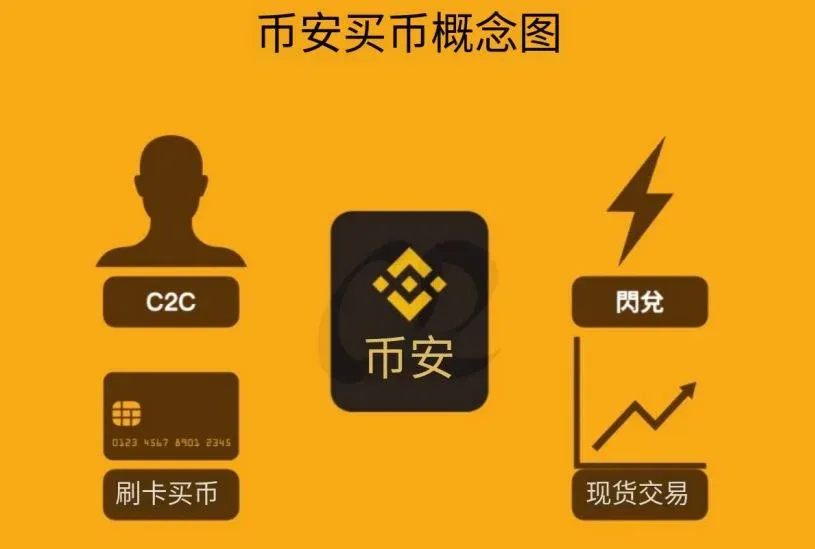
Binance offers four primary methods for purchasing crypto: Credit‑Card, C2C (peer‑to‑peer), Instant Exchange, and Spot Trading. Users can select the approach that best fits their cost tolerance, ease‑of‑use preference, and required market depth.
In this article we systematically review Binance’s various purchase channels, breaking down each one from user‑friendliness to fee structure. The goal is to help newcomers quickly pinpoint the method that suits them best, and to provide step‑by‑step illustrated instructions so that even first‑time entrants can complete a trade smoothly. For detailed procedures and important tips, keep reading.

How to Buy Bitcoin on Binance
There are many avenues to acquire Bitcoin on Binance, and the basic workflow mirrors that of a stock trade: open the app, input a purchase price, and once the market reaches that price the order is filled automatically. Most users buy Bitcoin with the expectation of profiting from price appreciation; after a rise they can reverse the process and sell using the same interface to realize gains.

The Four Ways to Purchase Crypto on Binance
| Method | Overview | Main Pros & Cons | Who It Fits |
|---|---|---|---|
| **Credit‑Card Purchase** | Directly buy crypto with a credit or debit card | Higher fees, but extremely convenient | Users who want a fast, hands‑off deposit |
| **C2C Purchase** | Peer‑to‑peer trades with other Binance members | Wide range of fees and options, higher counter‑party risk | Small‑scale or first‑time investors |
| **Instant Exchange** | Immediate swap at a fixed rate for a selected coin | Roughly 0.2 % fee, very simple workflow | Users who prioritize speed over cost |
| **Spot Trading** | Place your own orders on Binance’s spot market | Low fees, full control over entry price | Experienced traders seeking the best price |
Note: Credit‑Card and C2C purchases are essentially deposit methods; the actual “buy” action usually refers to swapping USDT for another cryptocurrency on the spot market.
1. Credit‑Card Purchase
- Open the Buy Crypto section in the app, choose Credit‑Card Purchase, enter the amount you wish to spend, and complete the payment.
- Fees are comparatively high, but the entire process is automated, making it ideal for users who prefer to avoid any manual steps.
2. C2C Purchase
- Navigate to the C2C Trading page, select a seller, confirm the quoted price, and then pay the seller directly.
- Prices can fluctuate considerably; you must assess the seller’s reputation and creditworthiness yourself.
3. Instant Exchange: Quick Swap for a Specific Coin
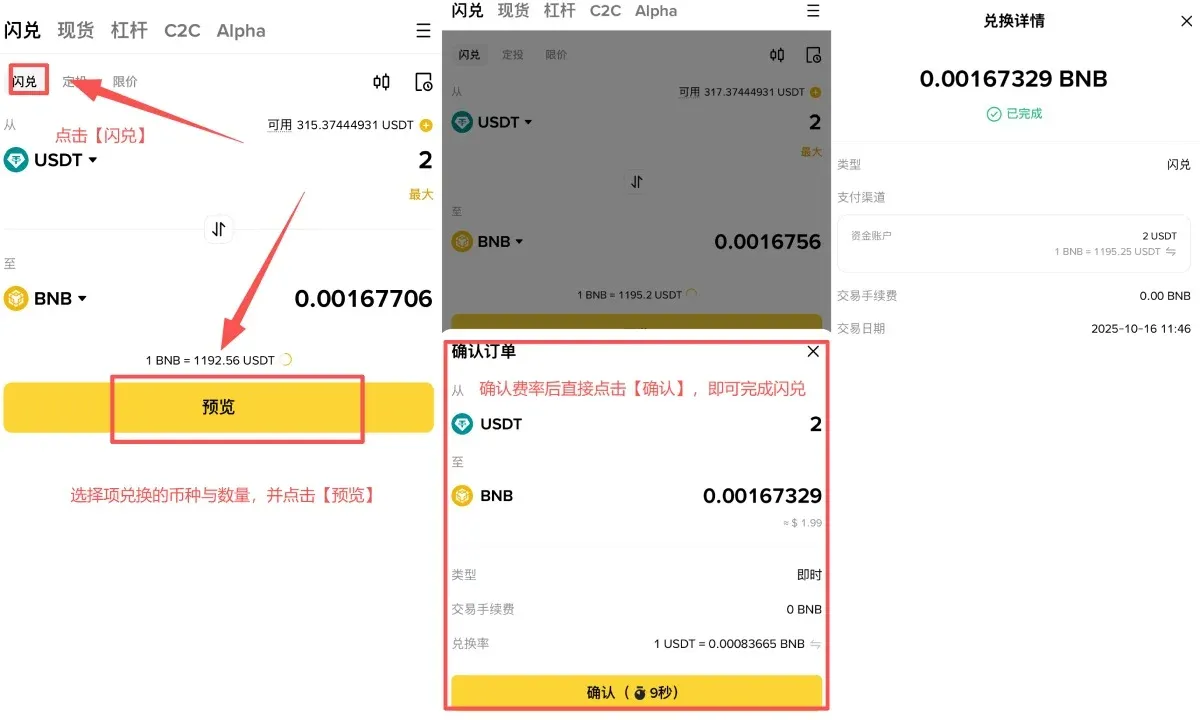
The core values of Instant Exchange are speed and simplicity. It does not involve a bid‑ask spread; you simply confirm the source coin, target coin, and quantity, and the transaction is executed instantly.
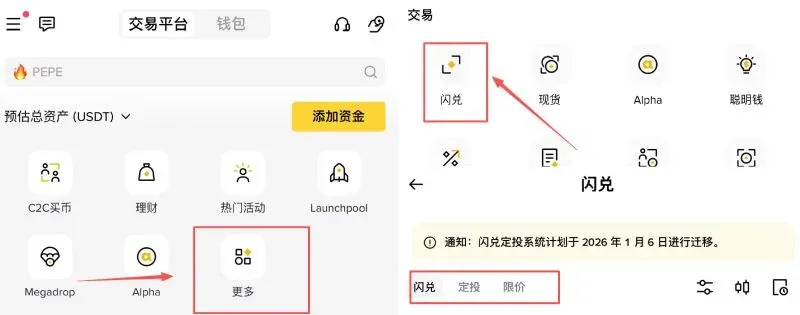
- Open the Binance app, then tap More → Trade → Instant Exchange in that order.
- On the Instant Exchange screen you can choose between Instant Exchange, Recurring Buy, or Limit Order.
- When using a Market Order, input the amount of the source coin, the desired target coin, and the quantity. The platform will complete the swap in roughly one minute.
- If you opt for a Limit Order, you must set a target exchange rate and an expiration time. This mode is a bit more involved but suits users who have a clear price expectation.
4. Spot Trading: Professional‑Grade Buying
Spot Trading means placing a buy or sell order for a cryptocurrency pair (e.g., USDT → BTC) on Binance’s spot market at a price you specify. Once the order is filled, the purchased coins appear instantly in your spot wallet and can be withdrawn at any time.
- Order Types: Market orders, limit orders, stop‑loss/take‑profit orders, etc.
- Execution Speed: If your limit price is close to the current market price, the trade usually completes within seconds. If your price is far from the market, you may need to wait for price movement to reach your level.
Below is a comprehensive, step‑by‑step guide to buying crypto on the spot market.
Complete Spot‑Trading Purchase Flow on Binance
Step 1: Register and Deposit Funds
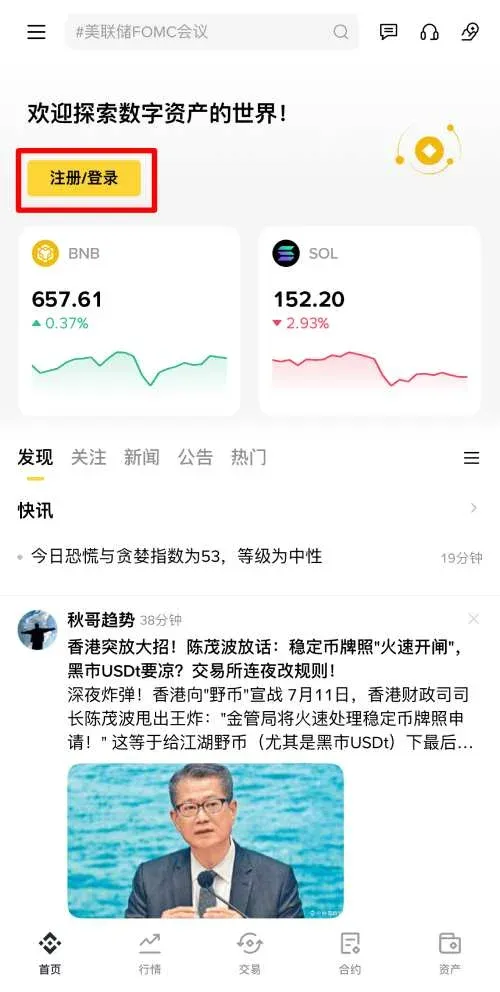
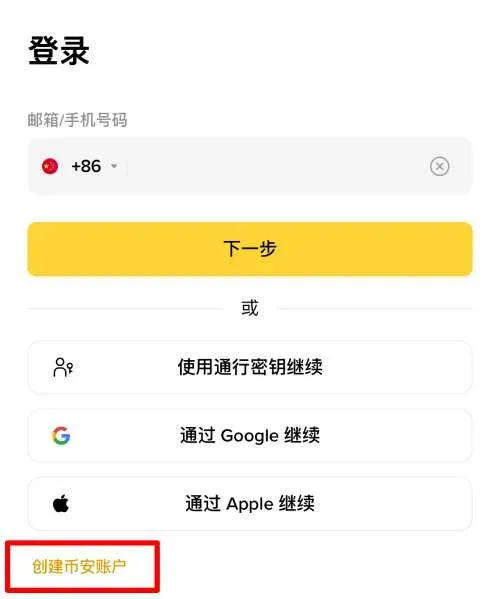
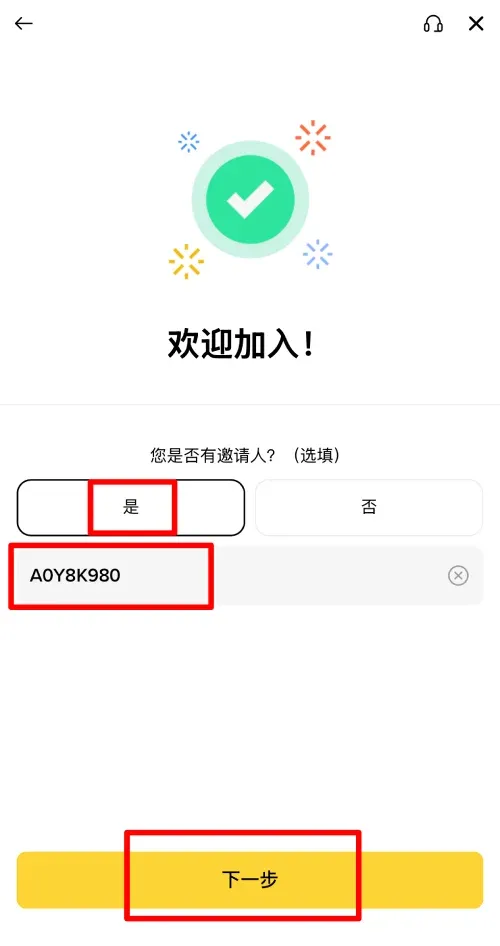
- Go to the official Binance registration page and click the bright yellow 【Register / Log In】 button.
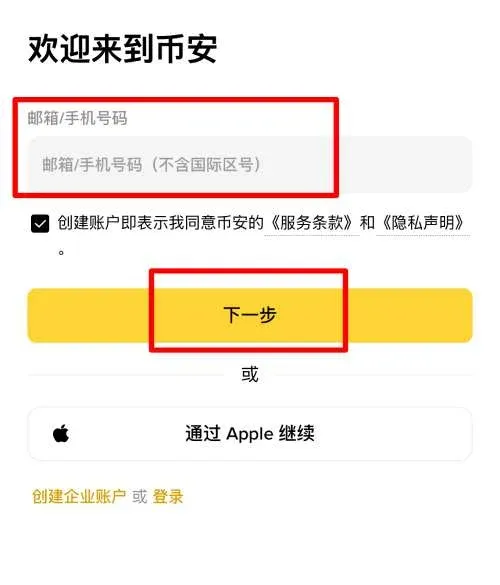
- Choose 【Create Binance Account】, then sign up with an email address or mobile number (email is recommended for global users).
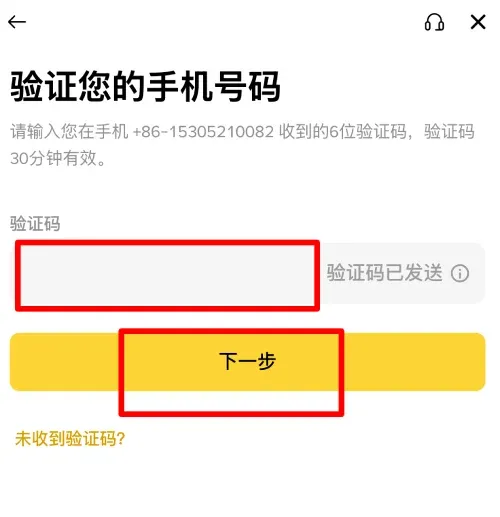
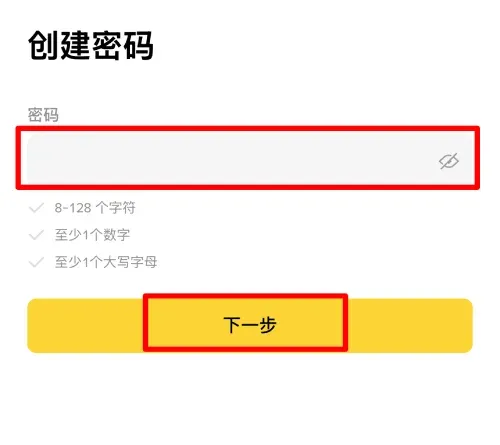
- Enter the 6‑digit verification code you receive, and set a strong login password (minimum 8 characters, including numbers and uppercase letters).
- If you have an invitation code, input B2345 to receive a 20 % fee rebate on future trades.
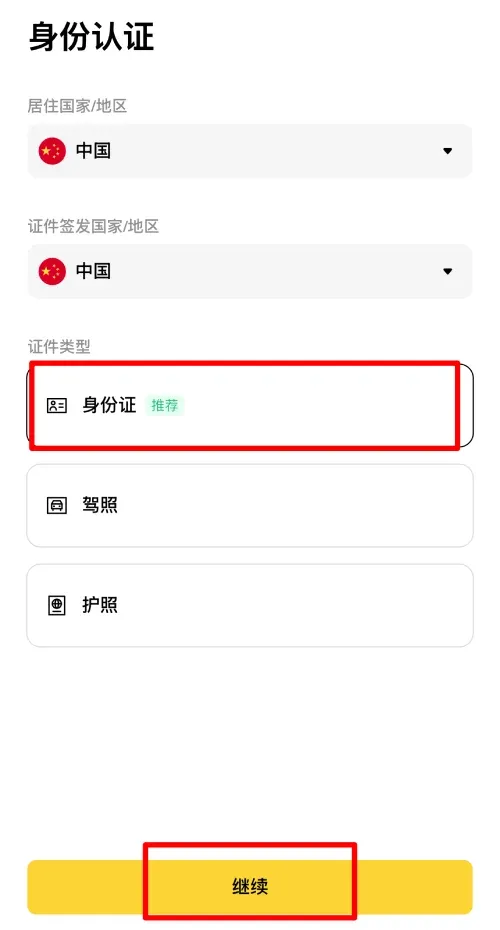
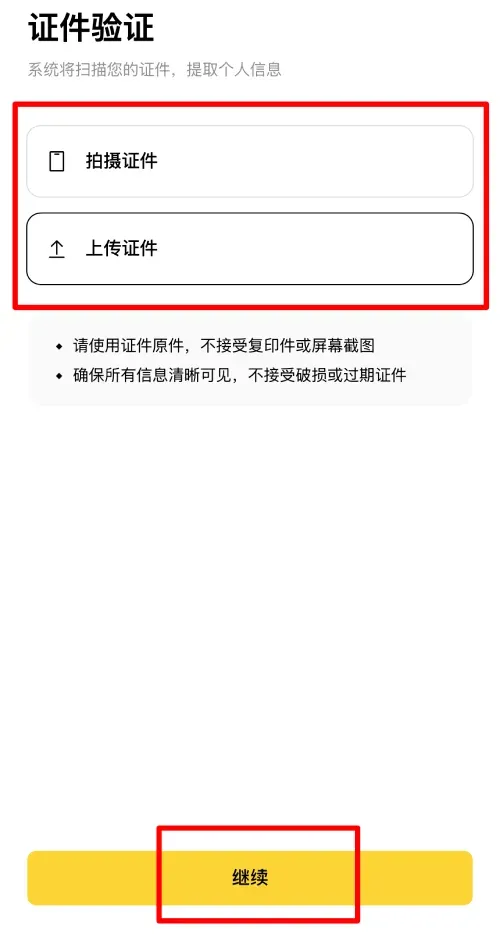
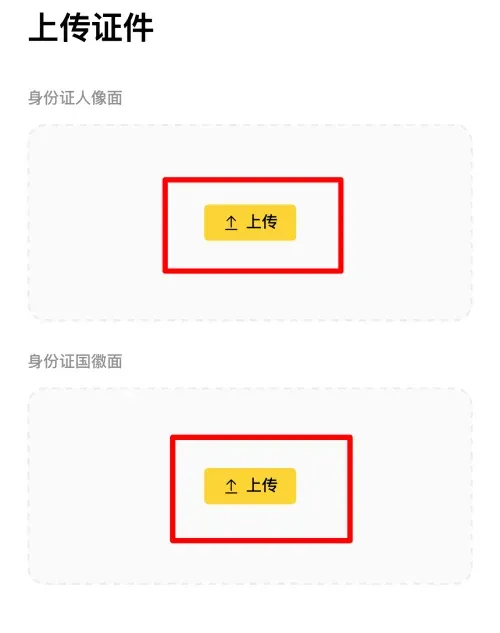
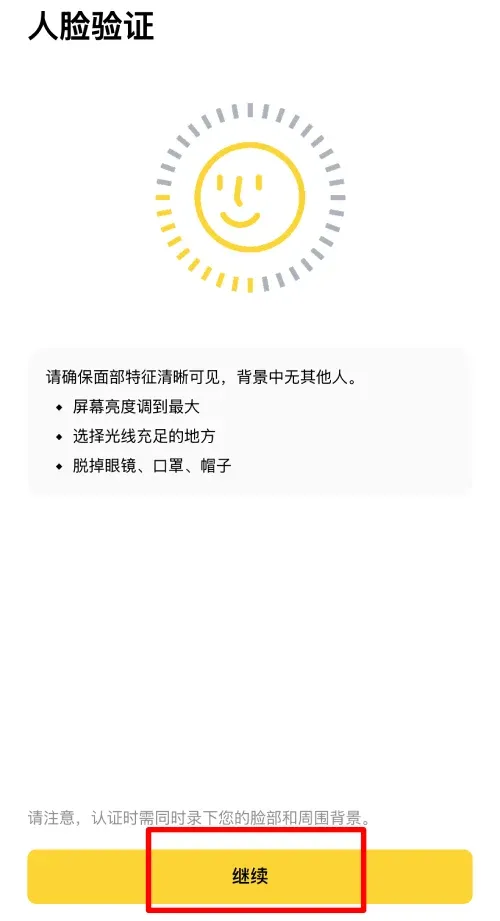
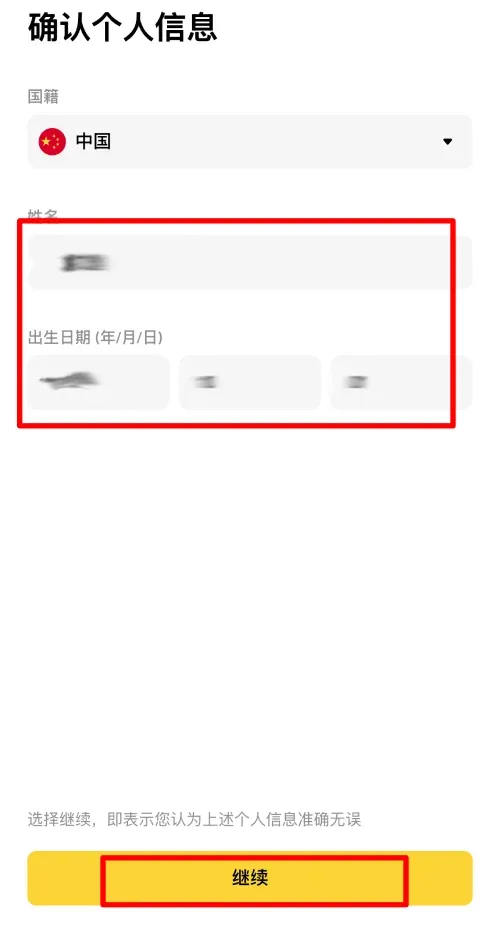
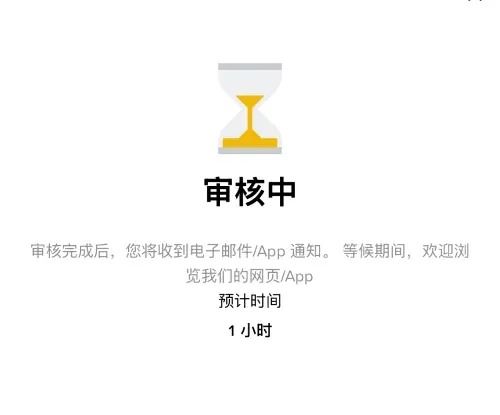
After registration, you must complete the KYC (Know‑Your‑Customer) verification: upload both sides of a government‑issued ID and pass a facial‑recognition check. Accurate personal information is required to unlock full trading functionality.
Step 2: Open the Spot‑Trading Interface
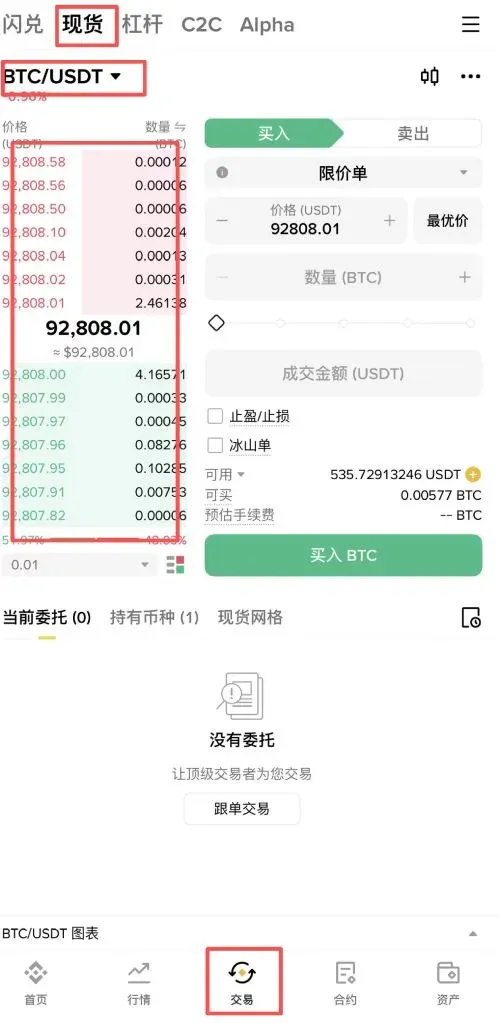
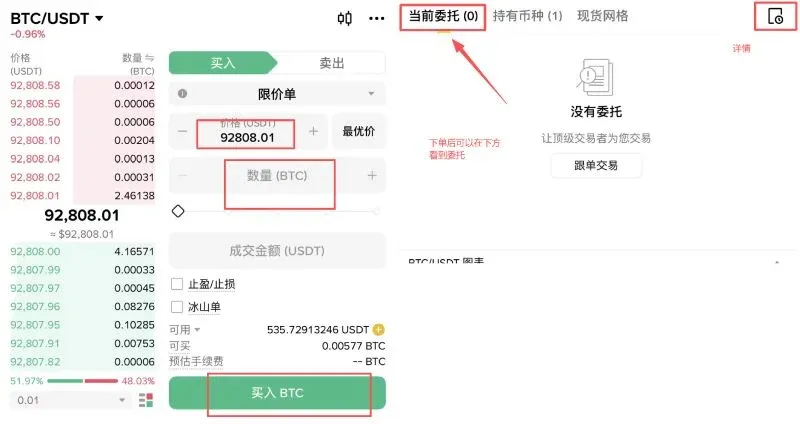
- In the Binance mobile app, tap the Trade tab at the bottom of the screen to reach the spot‑trading page.
- Use the pair‑selection button in the upper‑left corner to pick BTC/USDT (if you want to buy Bitcoin) or any other trading pair you need.
- The central area displays the latest trade price; the upper section shows the current ask (sell) quotes, while the lower section shows the bid (buy) quotes.
Step 3: Place and Manage Your Order
- Price – Enter the exact price at which you wish to buy or sell. For a market order you can simply use the displayed market price.
- Quantity – Three input styles are supported: “Use X USDT”, “Use X % of your balance”, or “Buy X BTC”. The platform automatically calculates the corresponding value for the other field.
- Submit – After double‑checking the details, tap Buy or Sell to send the order to the order book.
- If the order does not fill immediately, you can find it in the Open Orders list and tap Cancel to withdraw it, adjust the parameters, and resubmit.
- By tapping the Details button in the top‑right corner you can view order status, execution history, and related metrics.
Step 4: Verify Your Position
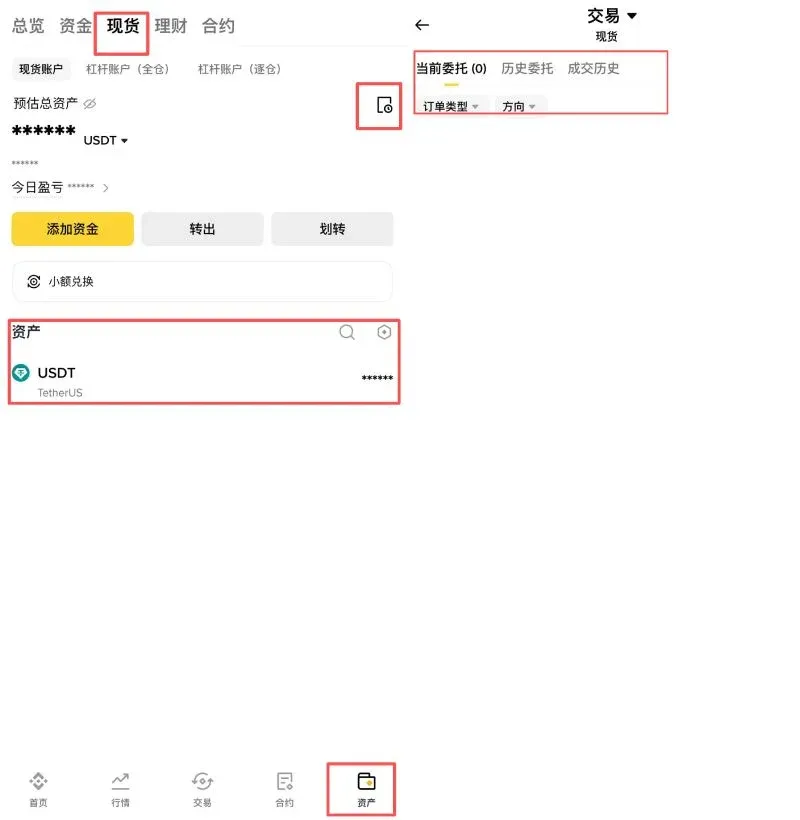
Once the trade is complete, go to Wallet → Spot. Your newly‑acquired cryptocurrency will appear in the list. Tapping the Details button next to a coin reveals:
- Current Orders – Open orders that have not been fully executed.
- Order History – Records of orders that were cancelled or fully filled.
- Trade History – Completed trades, including the fee charged for each.
Spot Wallet vs. Funding Wallet
- Spot Wallet – Used for spot‑market buying and selling, participating in savings products, and withdrawing crypto to external addresses.
- Funding Wallet – Supports C2C trades, Binance Pay, gift‑card purchases, mining pool payouts, and other ancillary services.
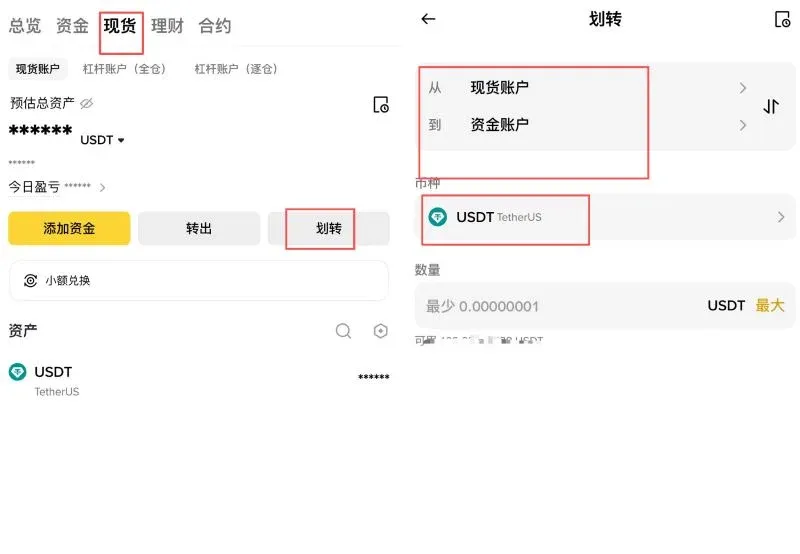
Transfers between the two wallets are free of charge. Simply navigate to Wallet → Spot → Transfer, choose the source and destination wallets, and confirm. The multi‑wallet design helps isolate risk, preventing a loss in one area from contaminating the entire portfolio.
Binance Spot‑Trading Fees
| Fee Type | Rate | Explanation |
|---|---|---|
| **Maker** | 0.10 % | Placing a limit order that adds liquidity to the order book (i.e., does not match immediately). |
| **Taker** | 0.10 % | Executing a market order or a limit order that matches instantly, thereby removing liquidity. |
Three Ways to Reduce Your Fees
- Enter the B2345 referral code during sign‑up to obtain a 20 % discount on the standard fee.
- Enable BNB Fee Discount, which automatically deducts 25 % of the fee in Binance Coin (BNB).
- Reach higher VIP tiers by increasing your 30‑day trading volume, unlocking even lower rates.
Fee Calculation Example (Trading 1,000 USDT)
- Base Fee: 1,000 × 0.10 % = 1 USDT.
- Referral Discount: Pay 0.80 USDT (0.20 USDT rebate).
- BNB Discount (25 %): Further reduce by 0.20 USDT, leaving an effective cost of roughly 0.60 USDT (valued in BNB).
How to Activate BNB Fee Discount
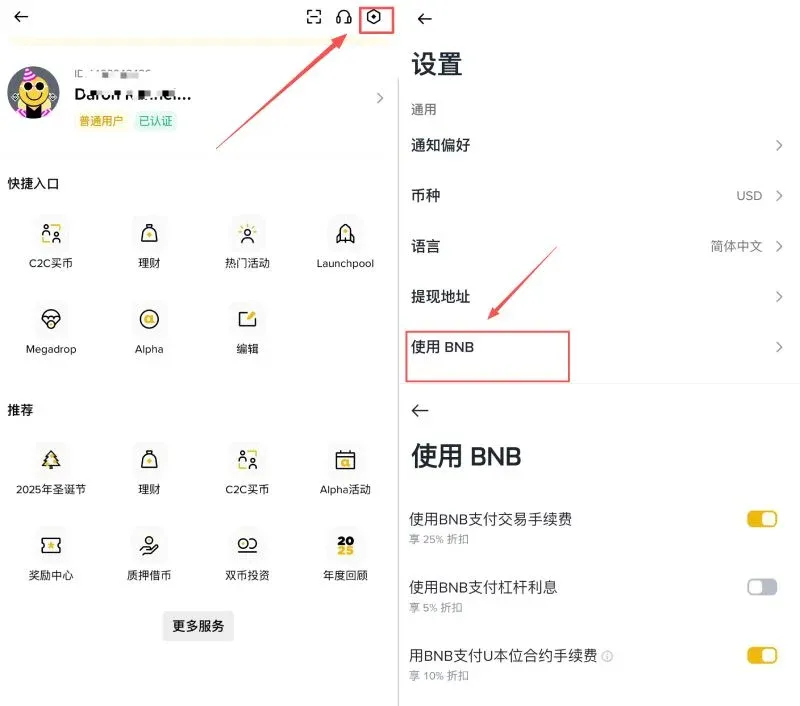
- Go to Profile → Settings → Use BNB, then toggle Use BNB to Pay Transaction Fees to ON.
- Ensure you hold a sufficient amount of BNB in your spot wallet; the system will automatically deduct the discount on every trade.
Pros and Cons of Buying Crypto on Binance
- Advantages: A wide variety of purchase channels lets users tailor the experience to their specific needs; the spot market is the world’s largest, offering deep liquidity and tight spreads.
- Disadvantages: Certain channels—especially Credit‑Card purchases and Instant Exchange—carry higher fees, so users who do not compare costs carefully may end up paying more than necessary.
Frequently Asked Questions (FAQ)
- Which method should I use to buy crypto?
Spot trading generally offers the lowest fees and the most market‑accurate pricing, making it a solid default for most investors.
- What is the spot‑trading fee?
Both Maker and Taker fees start at 0.10 %; they can be reduced further with a referral code, BNB fee discount, or by attaining a higher VIP level.
Summary
The essential step on Binance is converting USDT (or another stablecoin) into the cryptocurrency you wish to hold. Spot trading is the most commonly used and cost‑effective method. By mastering the four purchase pathways described above, following the detailed spot‑order workflow, and applying the three fee‑saving techniques, you can better manage transaction costs and streamline your trading experience.
For additional Binance tutorials, search for historical articles from Bitaigen or continue exploring the recommended topics below. Happy trading on Binance!
Important Note for U.S. Residents: U.S. users must access Binance US (https://www.binance.us) rather than the global Binance platform, as regulatory requirements differ.
Tax Reminder: Cryptocurrency gains may be taxable in your jurisdiction. Consult a qualified tax professional to understand your reporting obligations.
Related Reading
- Best Platforms to Buy Bitcoin (BTC) for Beginners in 2024
- Top 3 Secure Cryptocurrency Exchanges 2026: Binance, OKX & More
- Binance Wealth Tools: Earn, Smart-Arbitrage & Dual
💡 Register on Binance with referral code B2345 for the maximum trading fee discount. See Binance complete guide.



