
 Bitaigen Research
 In the domestic market, when you first encounter crypto assets you are often faced with the most immediate need: you only have Chinese yuan (CNY), so how can you obtain USDT on the OKX platform? Whether you want to buy Bitcoin, engage in futures contracts, or participate in staking and savings products, USDT is the first stepping stone into the world of digital currencies. The following sections provide a detailed, end‑to‑end guide covering account preparation, identity verification, order placement, and fund management, helping you successfully acquire USDT in 2026.

1️⃣ Register and Complete KYC
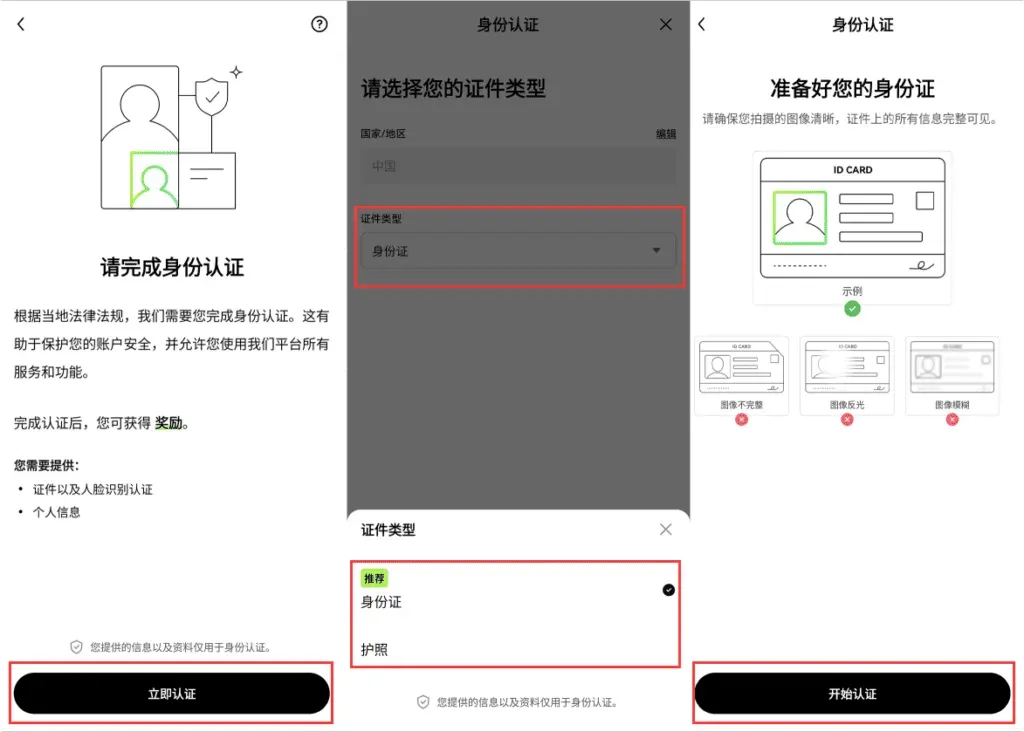
Before you can purchase crypto with fiat, you must first register an account on OKX and complete real‑name verification (KYC). This is not only a basic compliance requirement of the platform but also a prerequisite for safeguarding your funds.
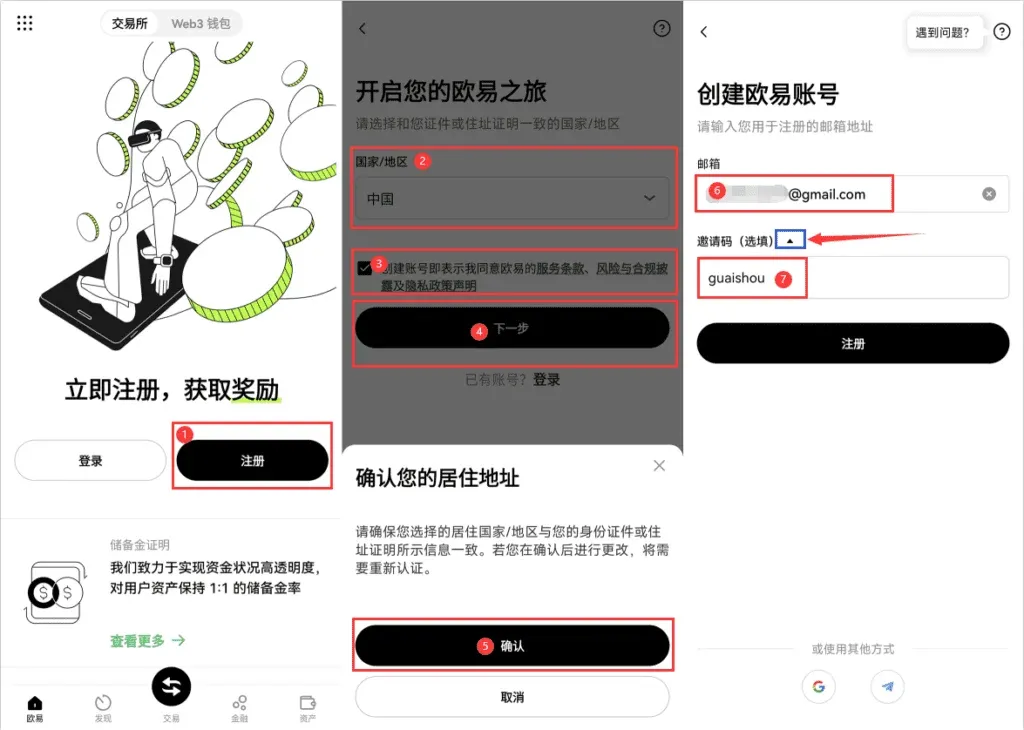
- Download and open the official app (link provided below), tap [Register], select the appropriate country/region document type in the pop‑up, check the Terms of Service, and confirm.
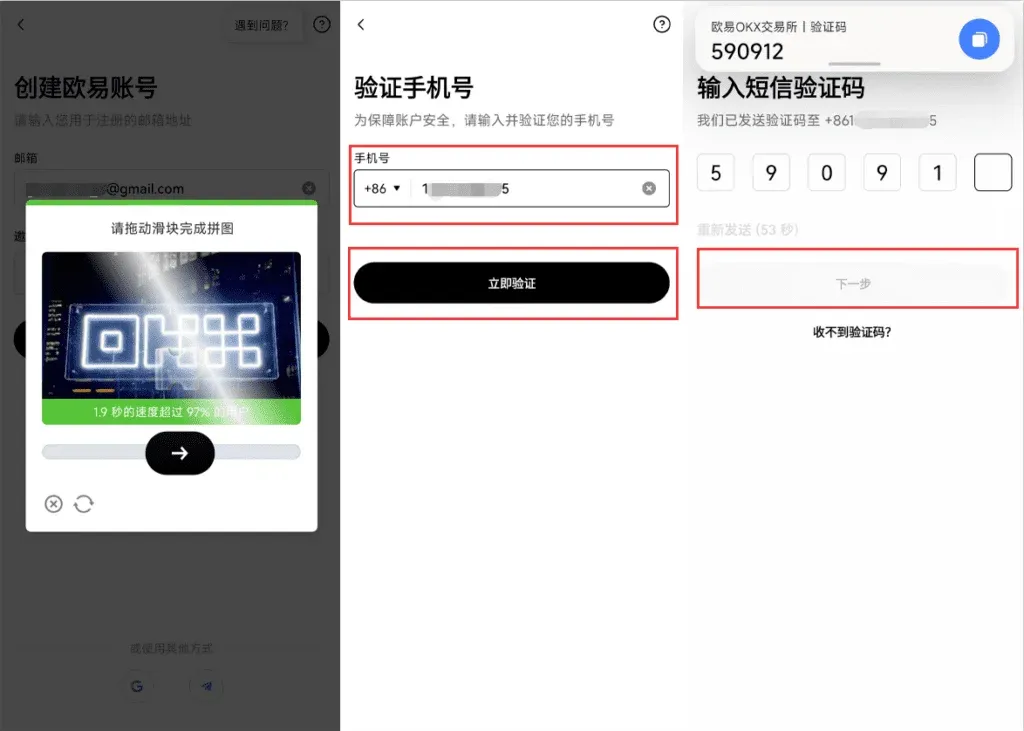
- Enter your mobile number (choose +86 for mainland China), solve the graphic captcha, receive the SMS code, and proceed to the next step.
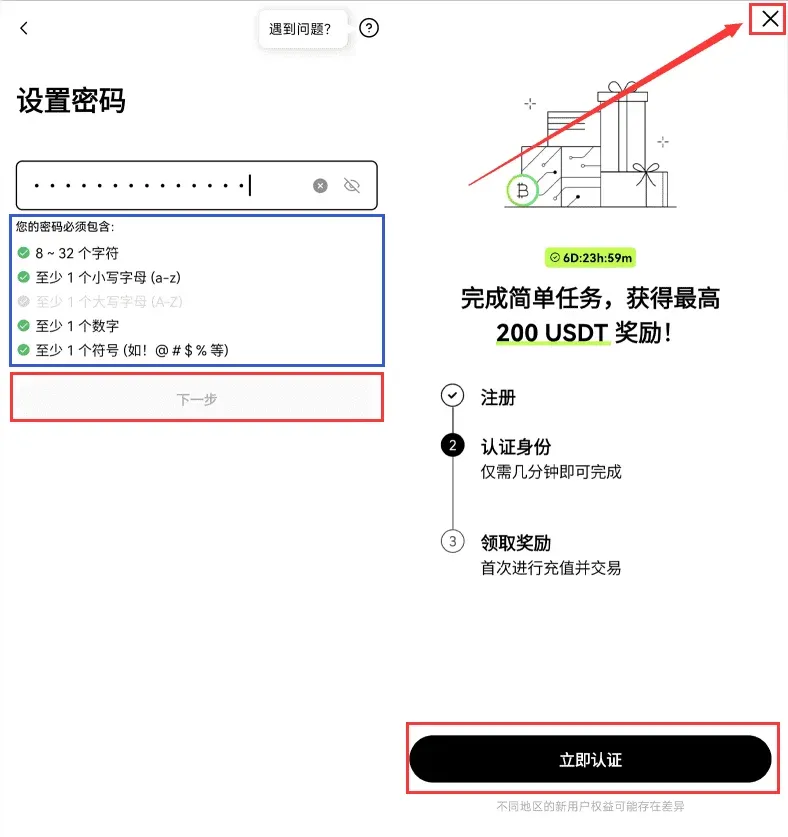
- Set a login password to finish creating the account. At this point you can either start identity verification immediately, or enter the main interface and later start the verification process by tapping the × icon in the upper‑right corner.
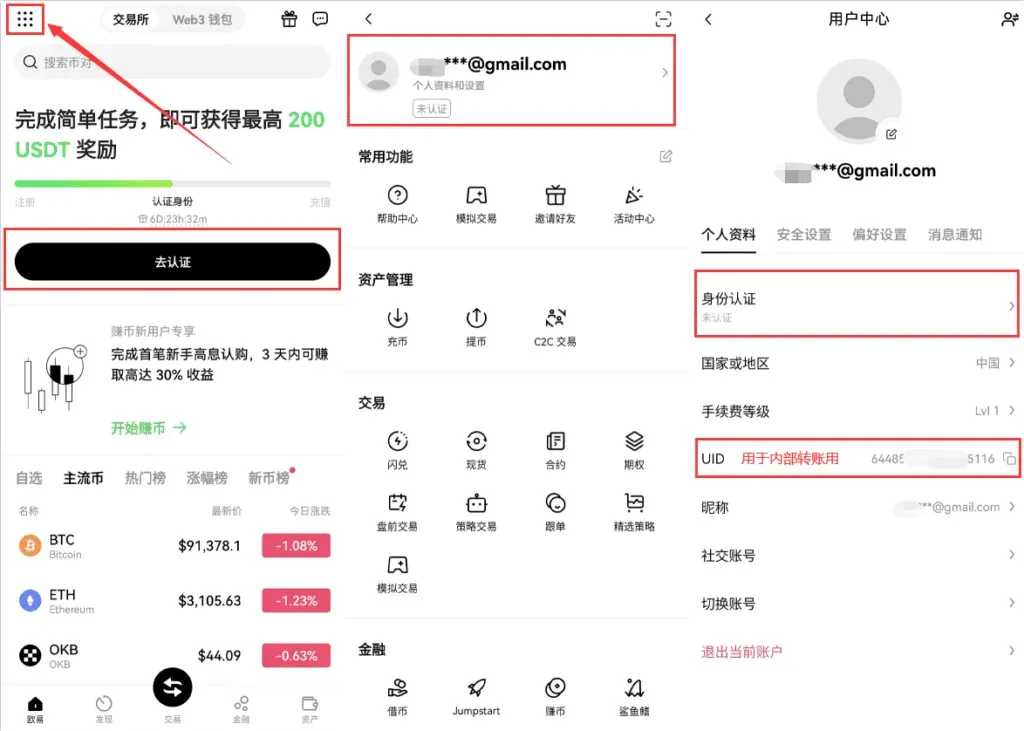
After registration, go to [Profile & Settings] → [Identity Verification], tap [Start Verification], choose the document type, upload the required files, and then complete facial recognition. The current version uses a one‑time verification; once completed, the fiat‑trading restriction is lifted.
Tip: Accounts that have not completed KYC cannot use the C2C fiat‑trading feature. Be sure to finish this step before your first purchase.
---
2️⃣ Go to the C2C Trading Page to Purchase USDT
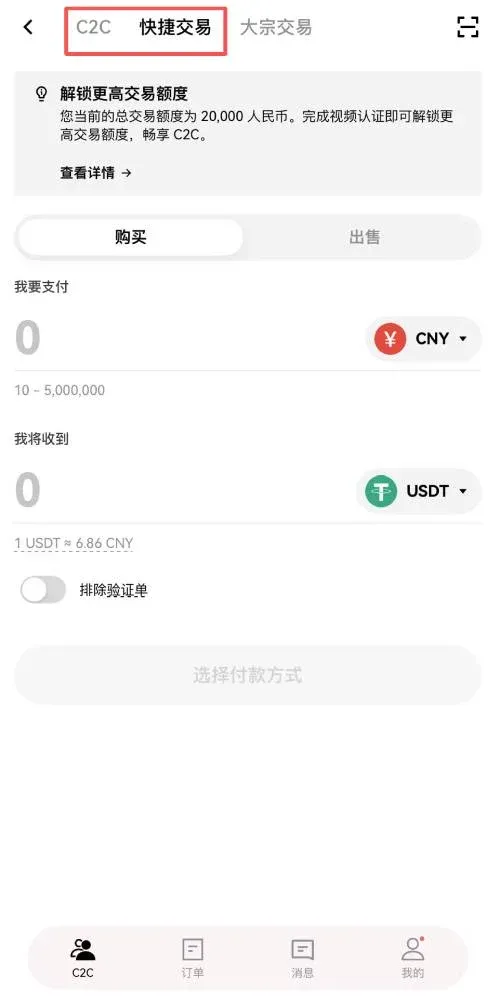
Once verification is approved, return to the home screen and tap [C2C Buy] to open the fiat‑trading interface. OKX offers two common pathways: Quick Trade and C2C Direct Purchase. The following sections demonstrate the key steps for each.
2.1 Quick Trade
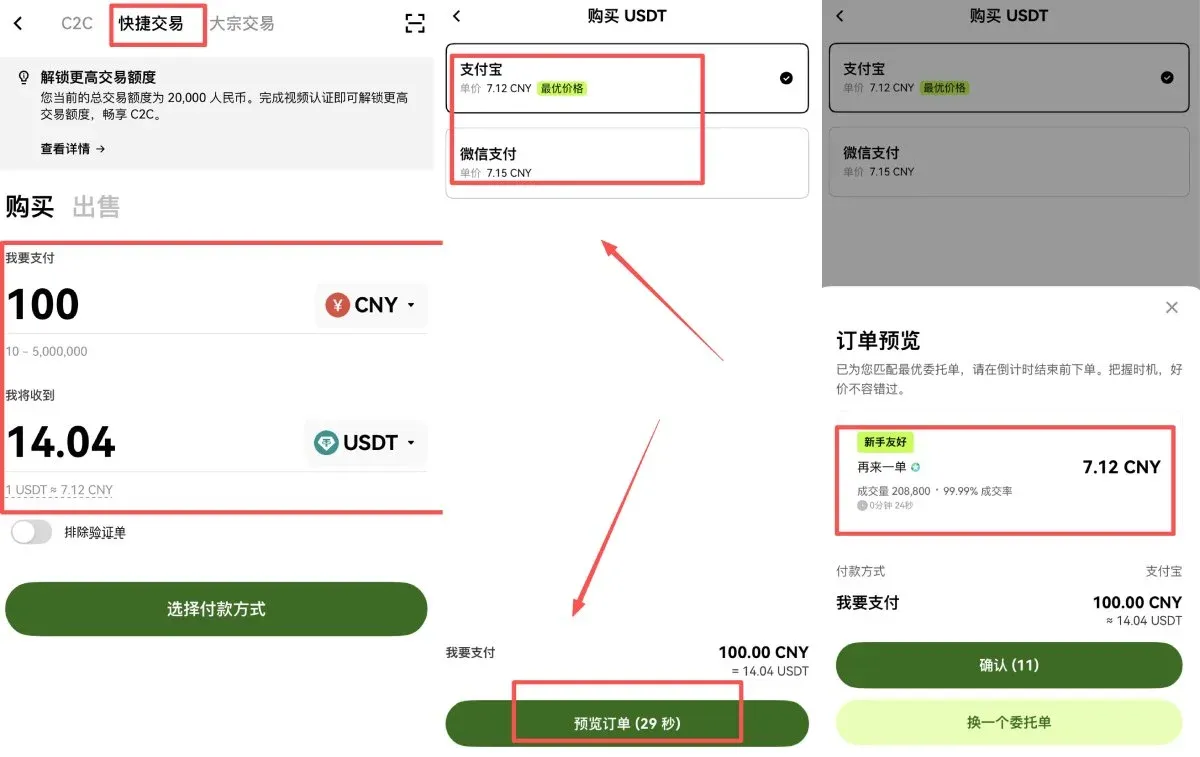
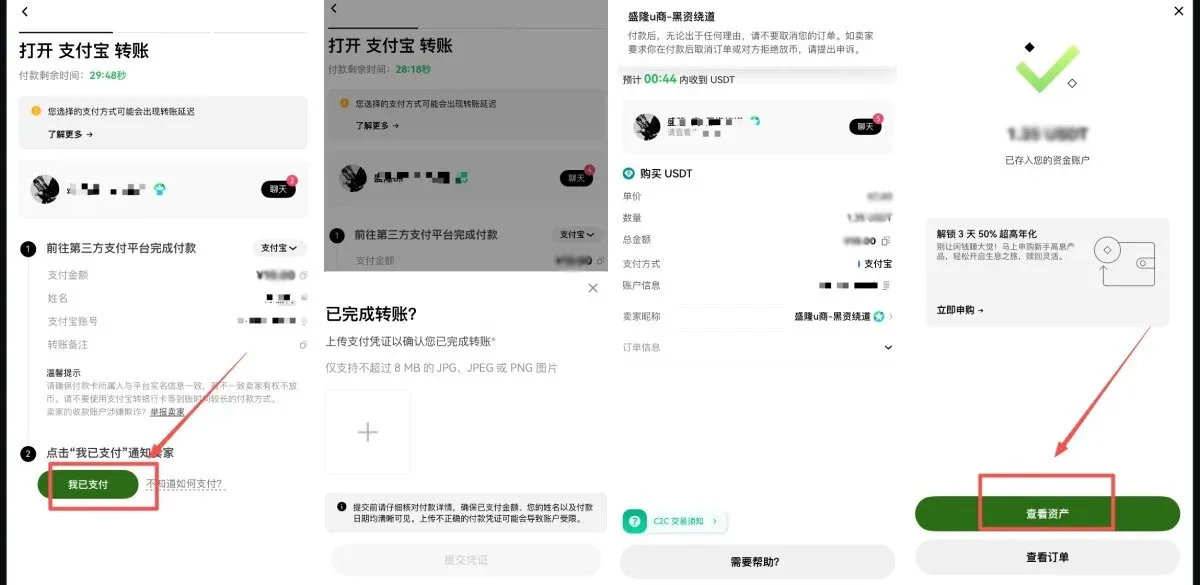
- Navigate to [Quick Trade] → [Buy], enter the amount of CNY you wish to spend and select the cryptocurrency USDT in the pop‑up, then click [Select Payment Method] → [Preview Order].
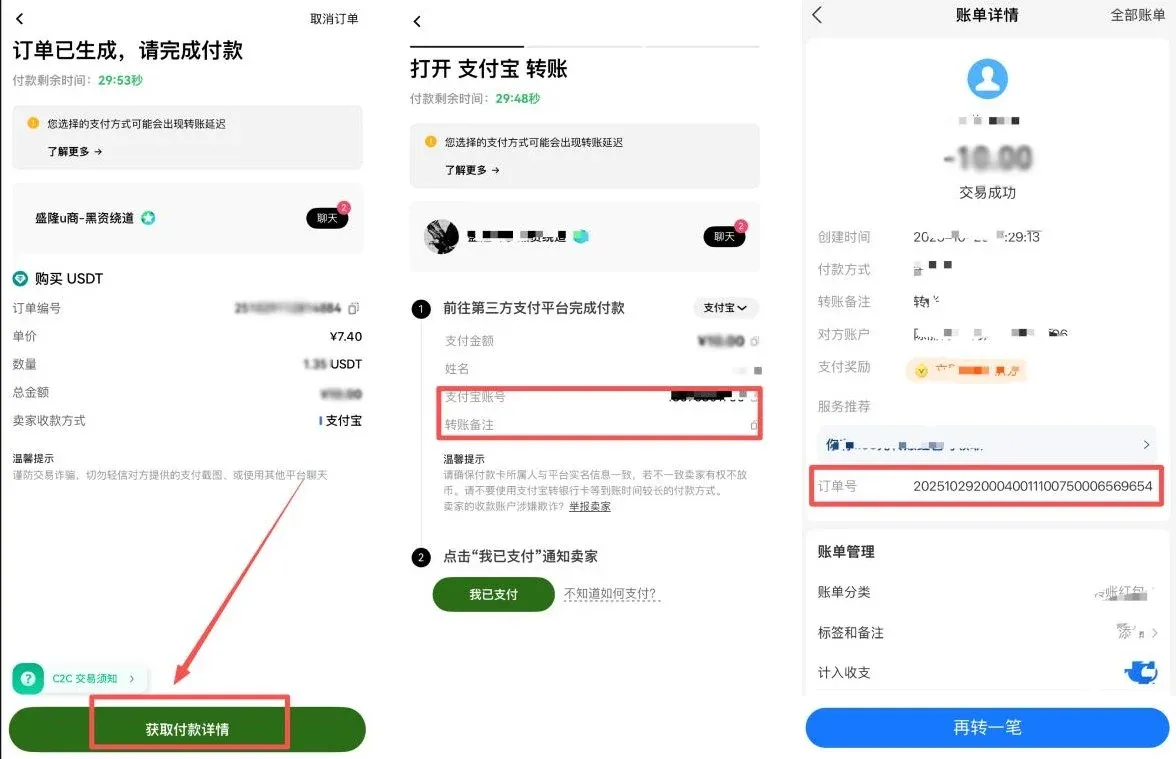
- After confirming the seller’s information, tap [Confirm]. The system will generate payment details.
- Transfer the funds according to the displayed receipt information. Once the transfer is successful, click [I Have Paid] in the app and upload the payment proof. After the seller confirms receipt, the USDT will be credited to your account.
2.2 C2C Direct Purchase
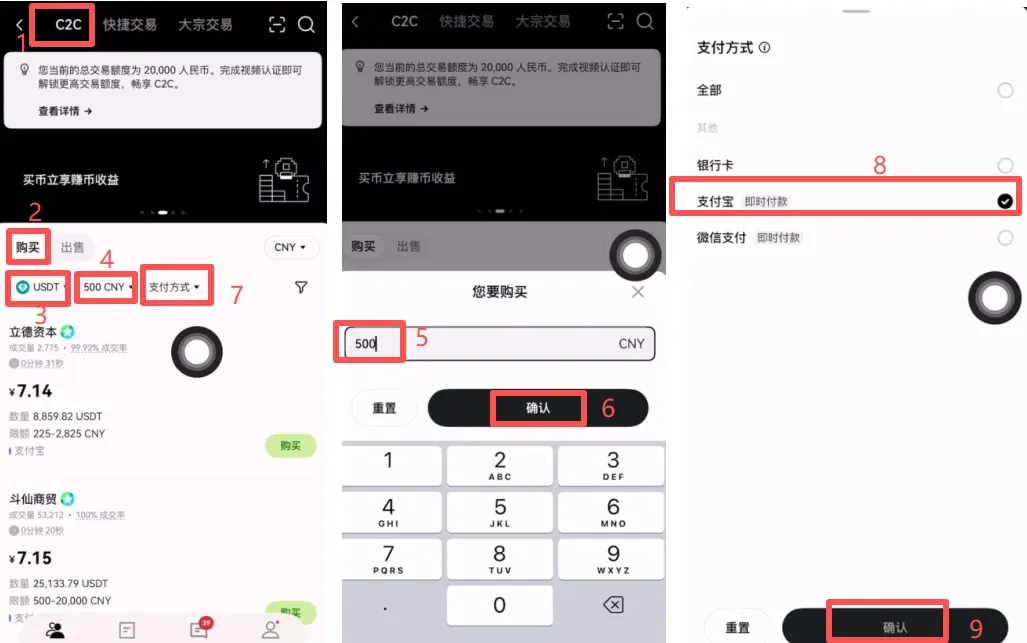
- Switch to the [C2C] tab at the top, select [Buy], and confirm the cryptocurrency is USDT.
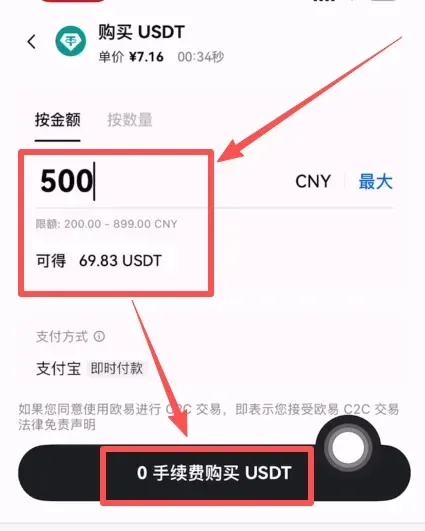
- Input the purchase amount (e.g., 500 CNY) and tap [Confirm]. In the payment‑method section you can tick Alipay, WeChat Pay, or Bank Card, choosing whichever is most convenient for you.
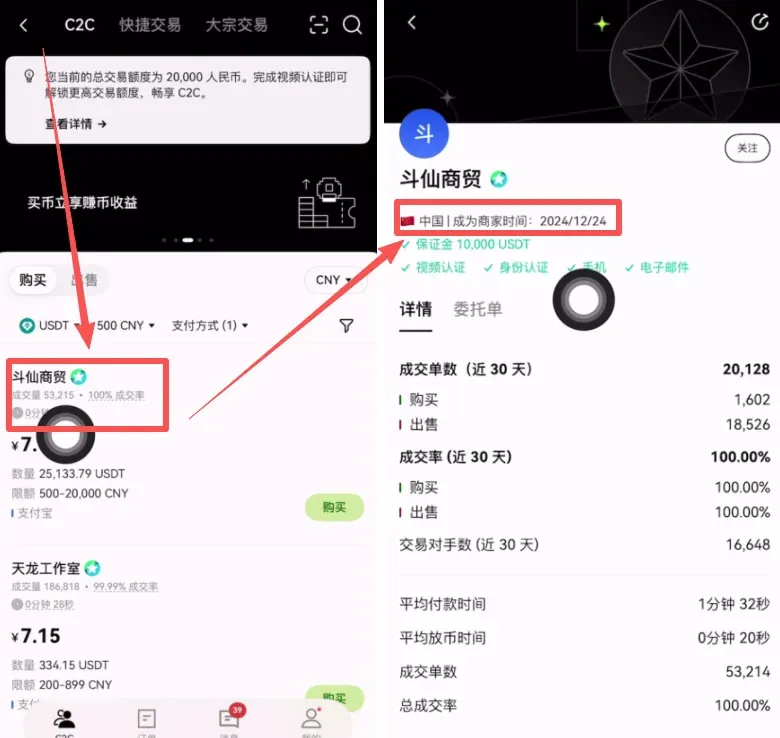
- The system will filter sellers that meet your criteria. It is advisable to prioritize the following factors:
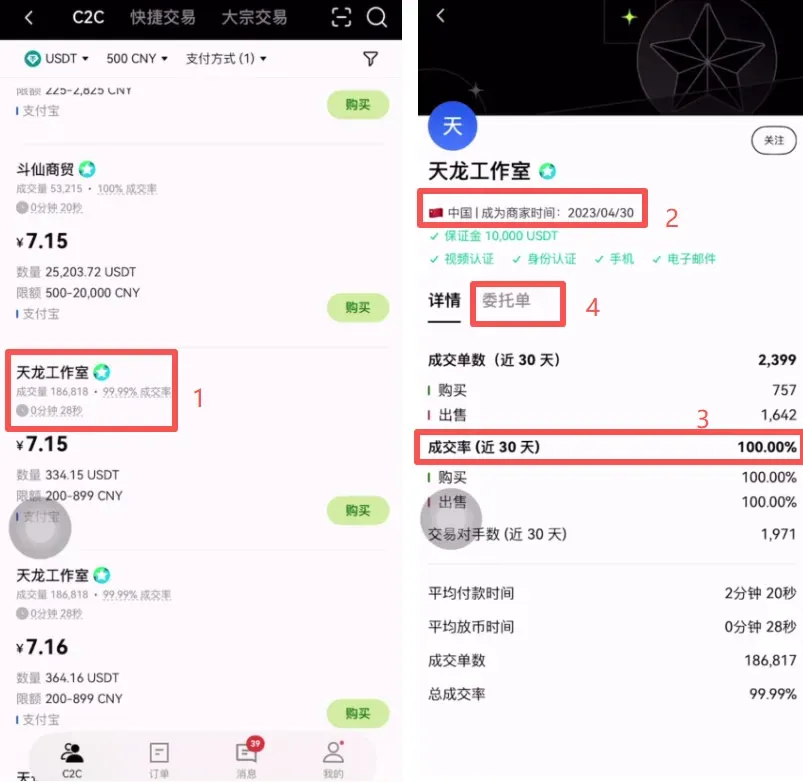
- High transaction volume and completion rate
- Long registration history (generally more than one year)
- Positive transaction reviews
In the example, “Tianlong Studio” registered on 2023‑04‑30, has a 100 % completion rate over the past 30 days, and maintains stable single‑order volumes, making it a solid first choice.
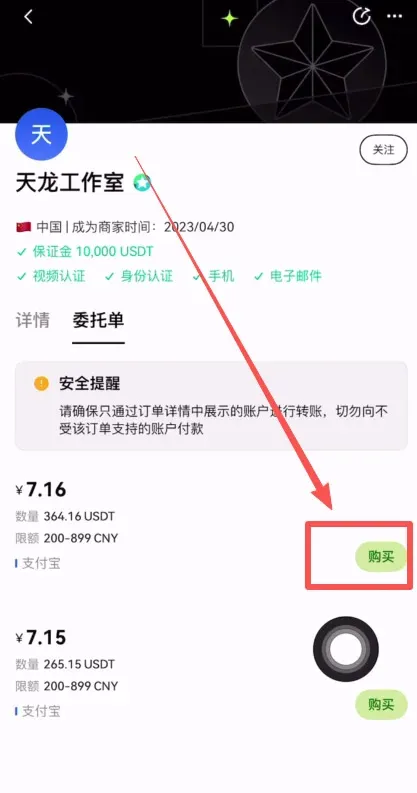
- Re‑confirm the purchase amount; the system will automatically calculate the corresponding USDT quantity (e.g., 500 CNY ≈ 69.83 USDT). Click [Buy USDT With 0% Fee].
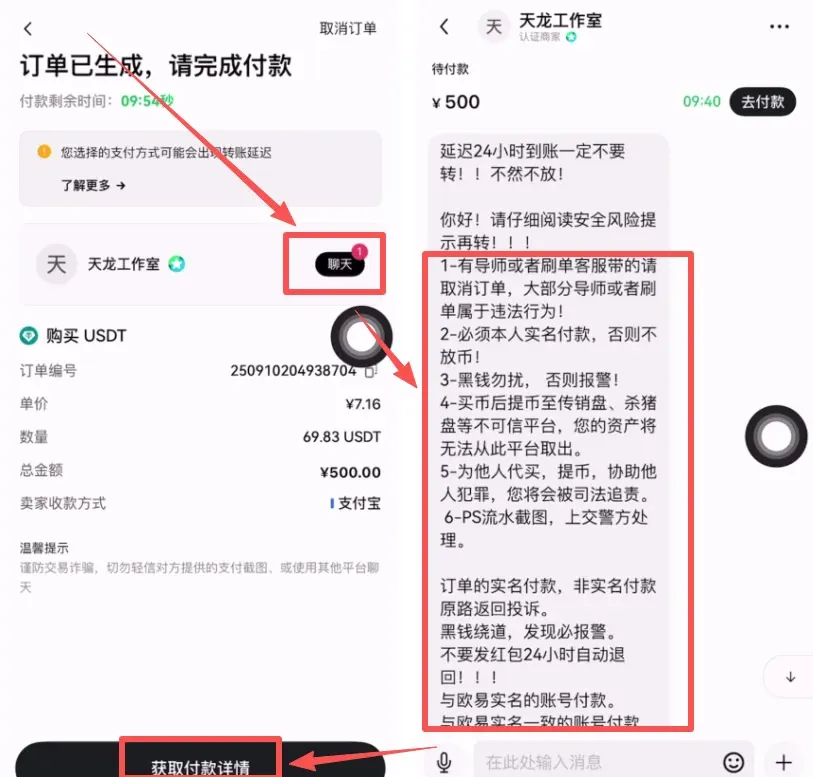
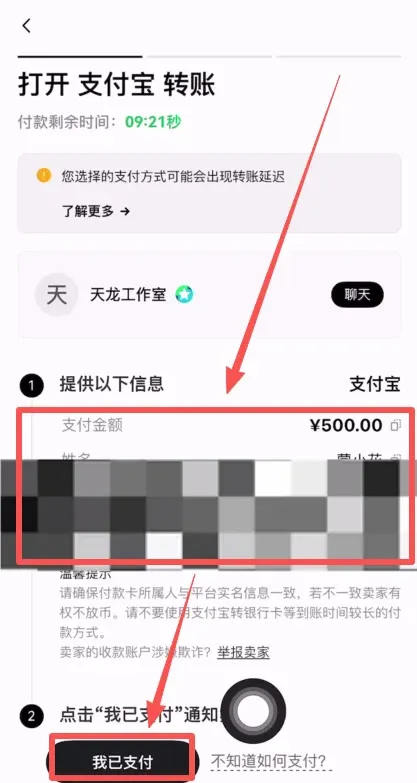
- Retrieve the payment details from the seller’s chat window, complete the transfer, then tap [I Have Paid]. Once the seller confirms receipt, the USDT will be delivered instantly.
---
3️⃣ View Your Assets and Subsequent Use Cases
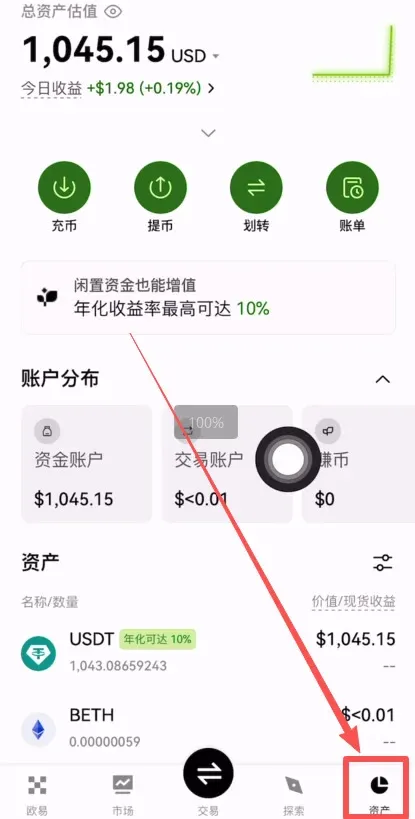
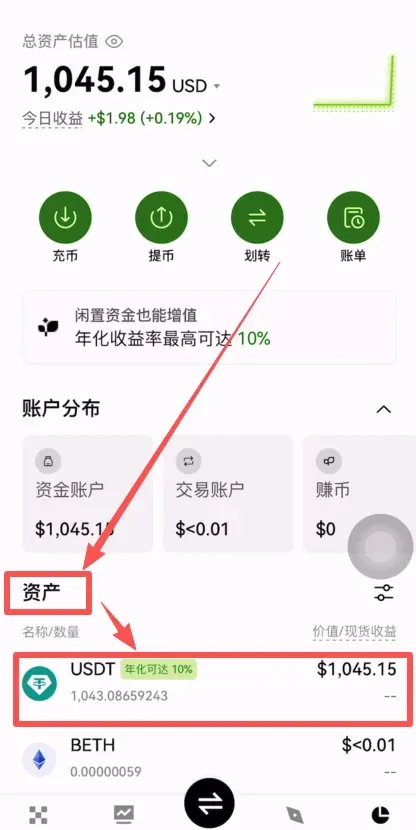
After a successful purchase, the USDT is automatically deposited into your [Funding Account]. You can tap the [Assets] button in the lower‑right corner to open the assets page and view your latest holdings.
Holding USDT allows you to:
- Transfer to the Trading Account: Use it for spot purchases or futures contracts.
- Participate in Platform Savings: Access staking, grid‑trading, or other yield‑generating products offered by OKX.
- Withdraw to a Personal Wallet: Move the assets to a self‑custodied cold wallet or another exchange, adhering to the non‑custodial principle.
Internal transfers between OKX accounts are fee‑free and complete within seconds, making the process extremely convenient.
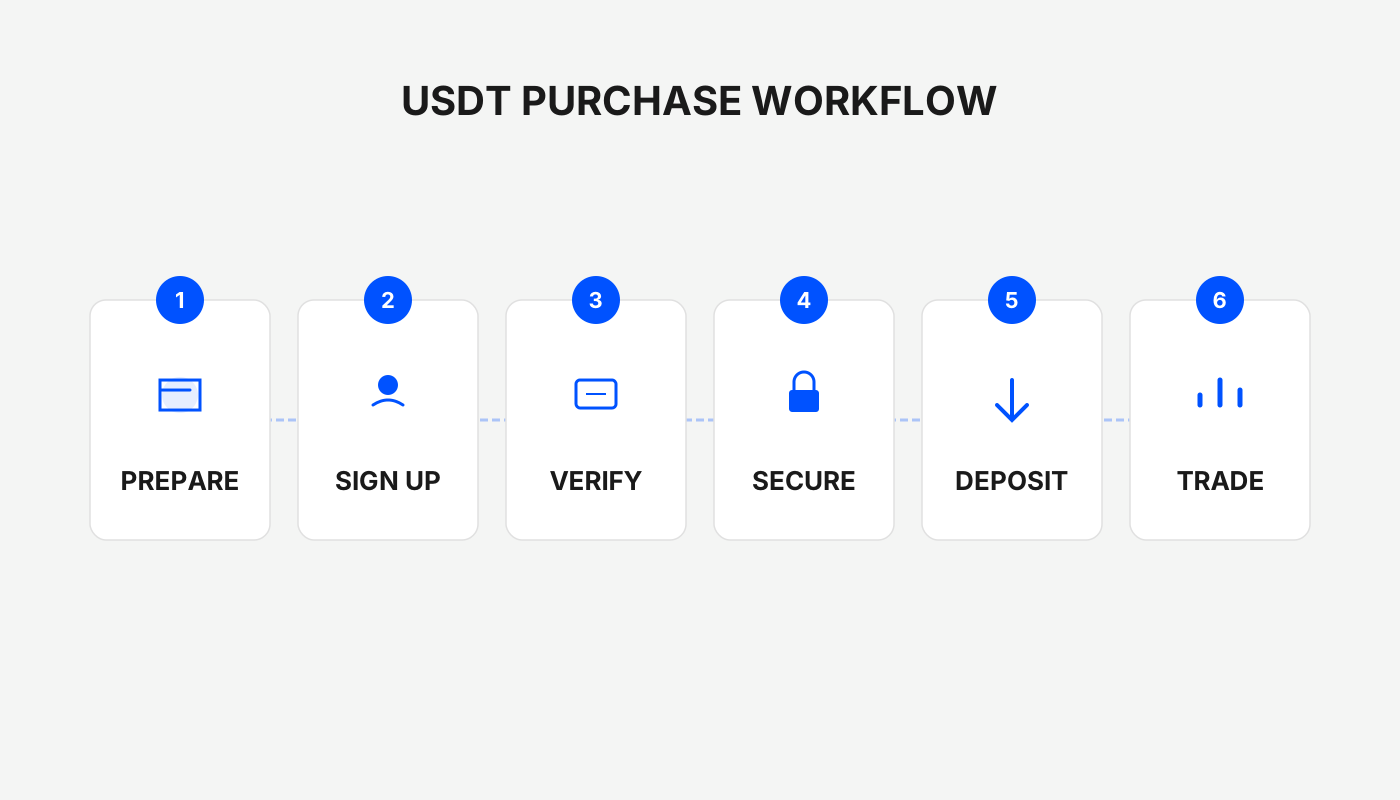
This guide consolidates the full‑chain process for domestic users to safely acquire USDT via the OKX platform. From account registration and KYC to fiat order placement and fund transfer, each step is illustrated with screenshots and risk warnings, helping you avoid common pitfalls and quickly prepare your assets. Subsequent sections will dive deeper into each workflow; stay tuned for more details.
Practical Tips and Risk Warnings
- Compare Sellers: The same amount may be quoted differently by various sellers; prioritize those with high reputation and fast response times.
- Payment Remarks: Avoid writing “USDT” in the bank‑transfer remark field, as it could trigger anti‑money‑laundering controls.
- Official Verified Sellers: Sellers marked as “Verified” by the platform are generally more reliable; consider transacting with them first.
- Start Small: For your first trade, try a modest amount to confirm that the workflow runs smoothly before scaling up.
---
Asset Management Recommendations
- Continue Trading: If you plan to acquire other crypto assets (e.g., BTC), first move the USDT from the Funding account to the Trading account.
Regulatory Note: Crypto‑related gains may be subject to taxation in your jurisdiction. Please consult a tax professional or local regulations to ensure compliance.
---
Related Reading
- Buy USDT on OKX with the Beginner‑Friendly Order
- OKX One-Click Copy-Trade: Follow Top Traders & Earn
- Top 10 Beginner‑Friendly Cryptocurrency Exchanges with Strong Security
💡 Register on Binance with referral code B2345 for the maximum trading fee discount. See Binance complete guide.



