
 Bitaigen Research
 For newcomers stepping into the cryptocurrency world, the greatest fear is often falling into an unregulated platform, which can result in assets being locked or impossible to withdraw. OKX, one of the world’s two largest, long‑established exchanges, has survived multiple bull‑and‑bear cycles. With deep liquidity and a rigorous security framework, it enjoys widespread praise across the global crypto community.
By registering through the official OKX invitation link https://www.bitaigen.com/binance or using the invitation code `jbzj999`, you can be sure you are entering a legitimate channel and permanently enjoy a 20 % reduction on trading fees—a cost saving that becomes noticeable when you trade frequently.
Below we present the complete, step‑by‑step process for buying Bitcoin on OKX safely and efficiently, so you can follow along with confidence.
In this article we walk beginners through the entire workflow of purchasing Bitcoin on OKX, highlighting security checkpoints and fee advantages to help you avoid common pitfalls and get started quickly. By completing registration via the official Bitaigen invitation link you will lock in permanent fee discounts, further reducing your trading costs. The guide is fully illustrated with screenshots, ensuring every step is transparent and verifiable. Keep reading for the complete tutorial.
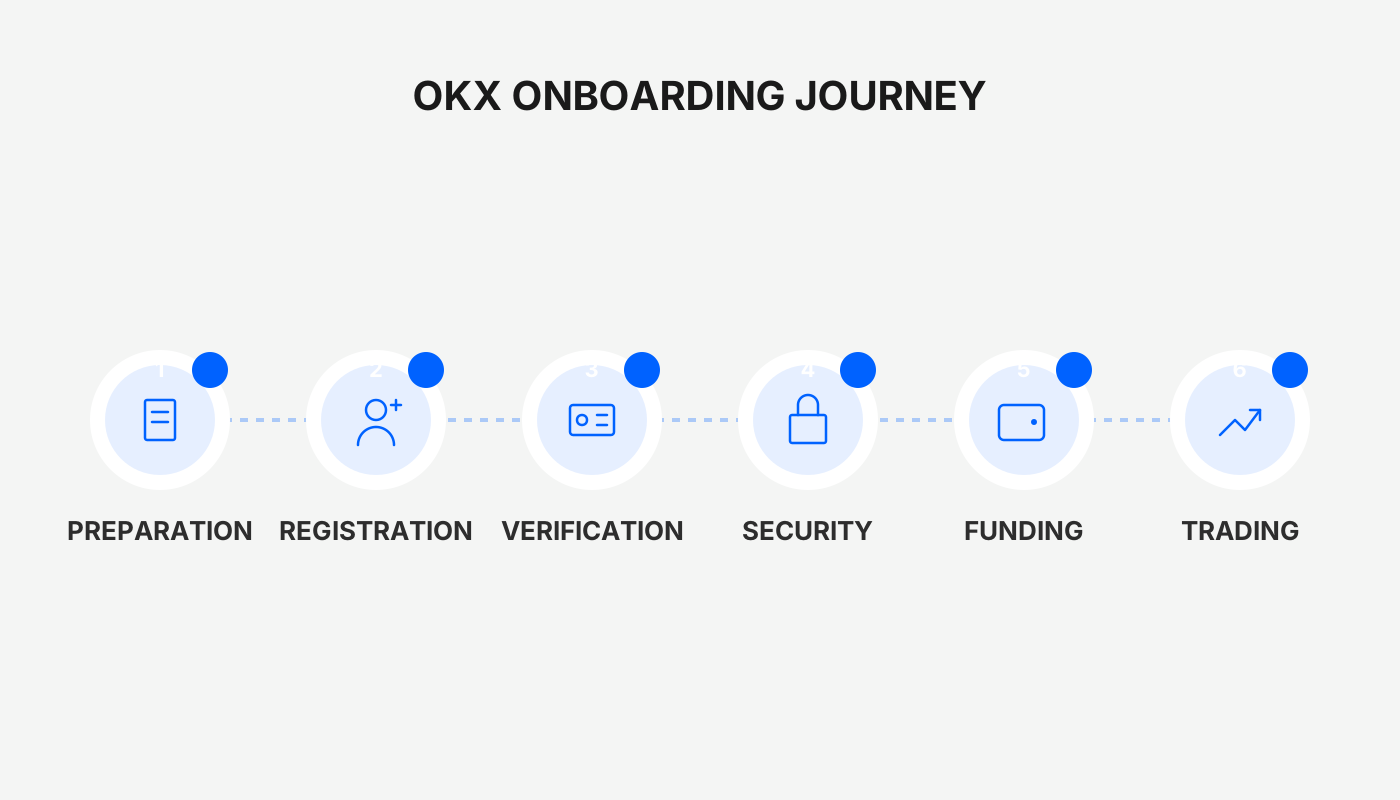
How to Purchase Bitcoin on OKX Safely and Quickly?
Key Security Points Overview
Before you start clicking, familiarize yourself with a few risk‑mitigation principles:
- Payment Phase
- Use a payment method that is real‑name verified and matches the name on your OKX account.
- Transfer funds exactly as shown on the order page; do not alter the recipient details.
- After payment, keep the transaction receipt. Do not confirm payment prematurely or contact the seller privately, as this can expose you to charge‑back fraud or scams.
- Choosing a Counterparty
- Prefer merchants that have been certified by the platform and have a completion rate of 99.5 % or higher.
- Avoid newly‑joined sellers or those offering unusually low prices, which increase the likelihood of malicious behavior.
- Funds Management
- Consider buying in small, repeated amounts rather than a single large transaction, to limit exposure.
- Once you have received Bitcoin, transfer it promptly to your personal cold wallet (hardware or software) and retain control of the private key or seed phrase, reducing platform‑ and hacker‑related risks.
- Post‑Purchase Operations
- Be cautious when clicking unfamiliar links and stay alert to unsolicited “customer‑service” contacts.
- Regularly review login activity and asset movements in your account to spot abnormal behavior early.
Tax reminder: Crypto gains may be taxable in your jurisdiction. Consult a tax professional to ensure compliance with local regulations.
Step 1: Acquire USDT on the C2C Marketplace
To trade on the spot market you first need a mainstream stablecoin such as USDT.
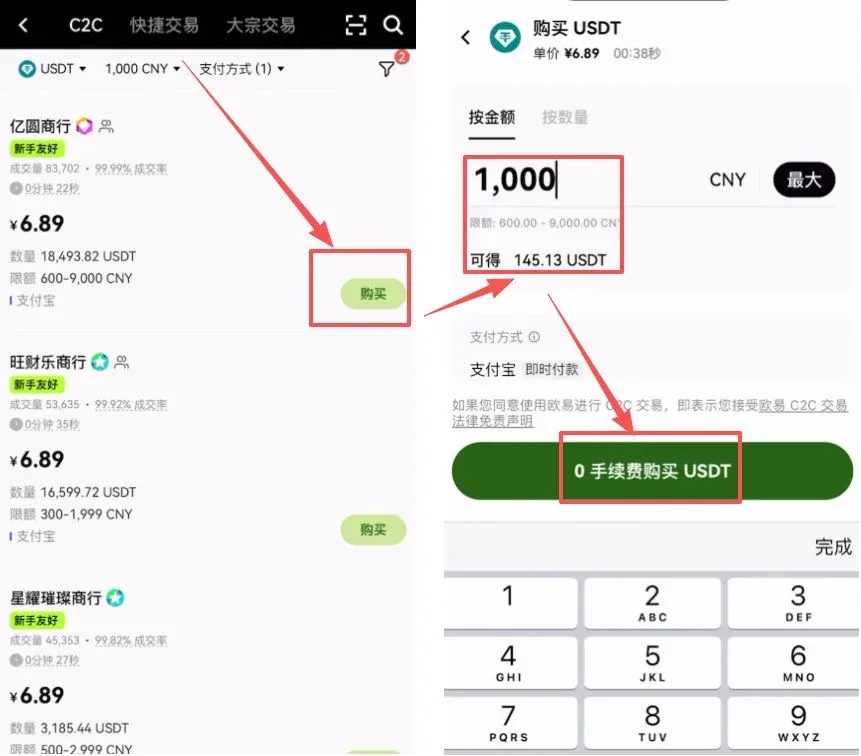
1. Select a Suitable Merchant
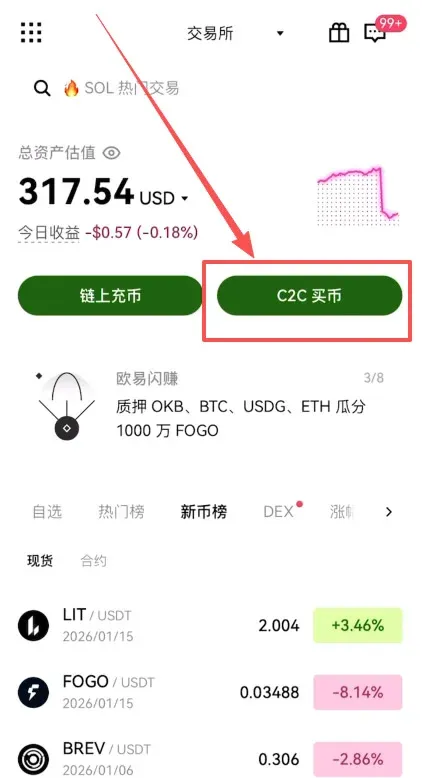
Open the OKX app (register via the official link https://www.bitaigen.com/binance or download the app https://www.bitaigen.com/binance/download), then navigate to the “C2C Buy” section.
We recommend checking the “Show only non‑verified orders” and “Beginner‑friendly orders” filters. This removes unnecessary identity‑verification steps and presents offers that are easier for newcomers.
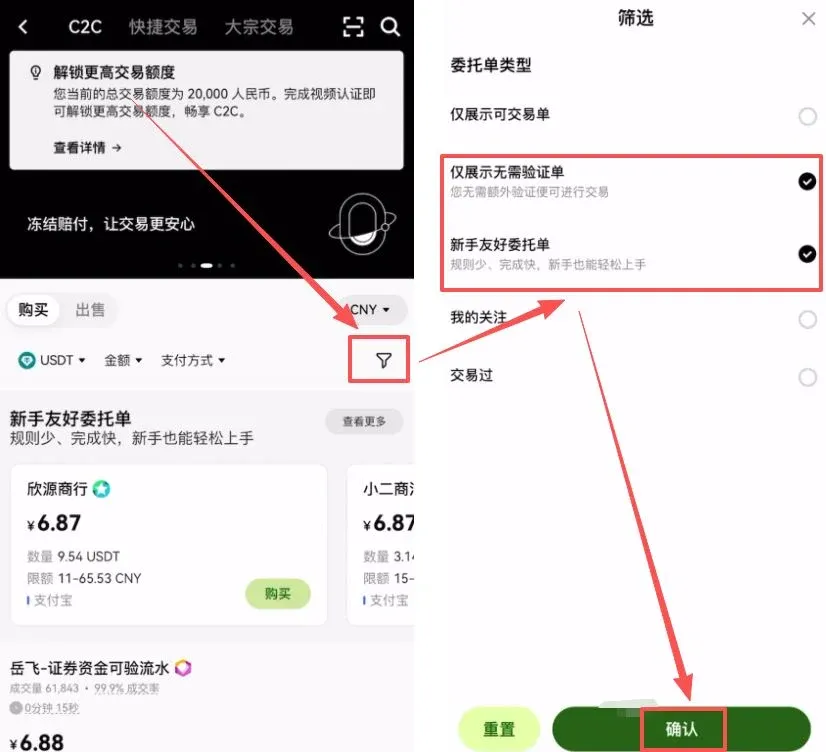
2. Choose a Payment Method
Select a method that matches your region—SEPA bank transfer, SWIFT, or a local fiat gateway (e.g., a USD‑based ACH transfer for US users). Enter the desired amount range (for example $200) to filter the list.
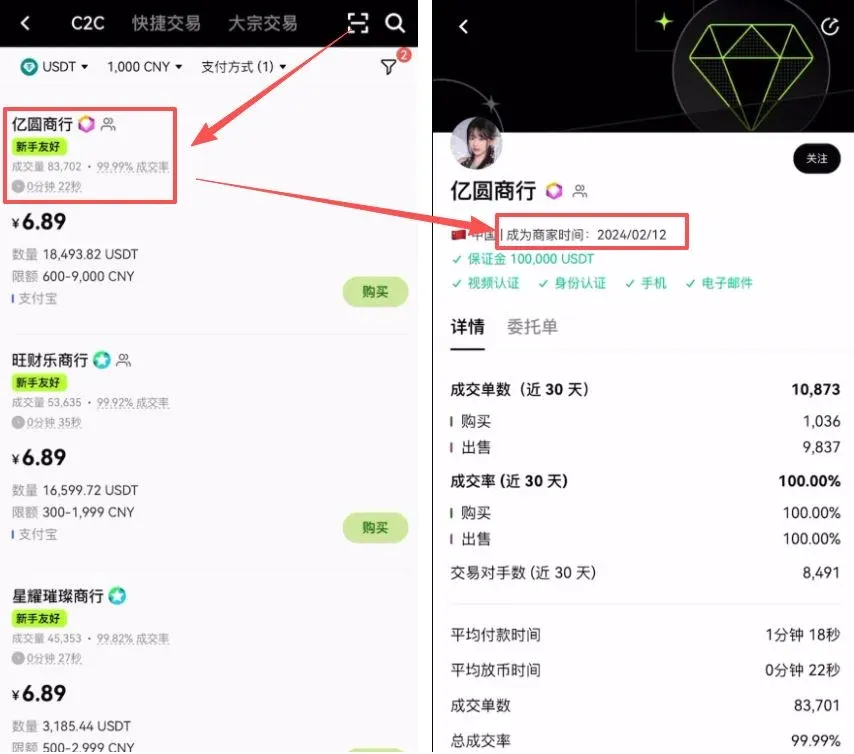
3. Assess Merchant Reliability
Pay close attention to the merchant’s historical volume and completion rate. Prioritize sellers that have been on the platform for more than six months—their longer track record generally indicates more experience handling funds and a higher safety profile.
Step 2: Complete Payment While Mitigating Risks
After you have identified a trustworthy merchant, click “Buy”. The system will generate an order automatically.
During this phase, watch the following details carefully:
- Real‑Name Transfer – Use the bank account or payment method that is registered under your own name.
- No Payment Remarks – Do not add any notes mentioning “Bitcoin”, “crypto”, or similar keywords.
- Instant Settlement – Do not select any delayed‑payment option; the funds should arrive instantly.
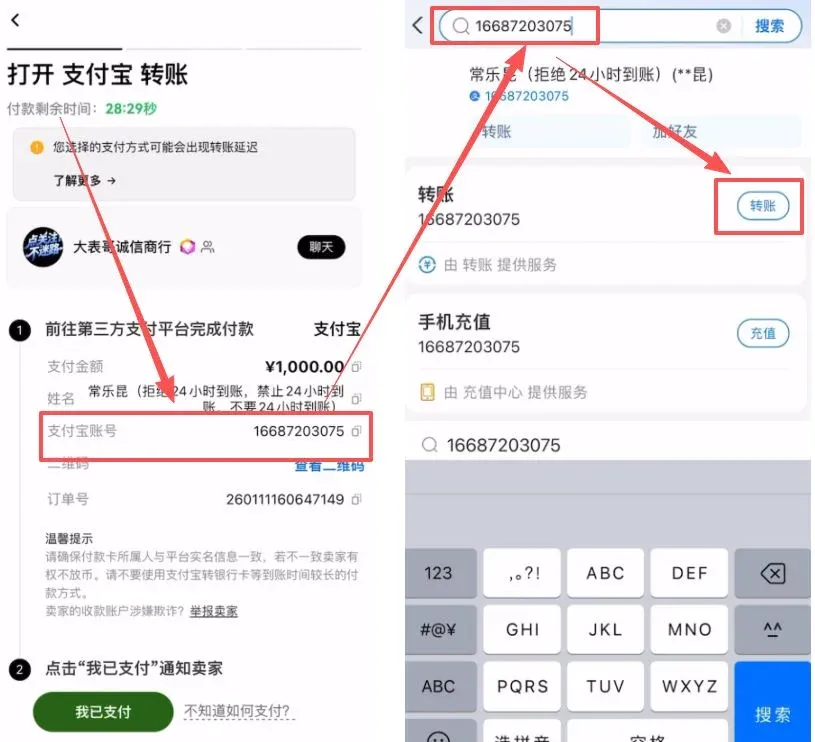
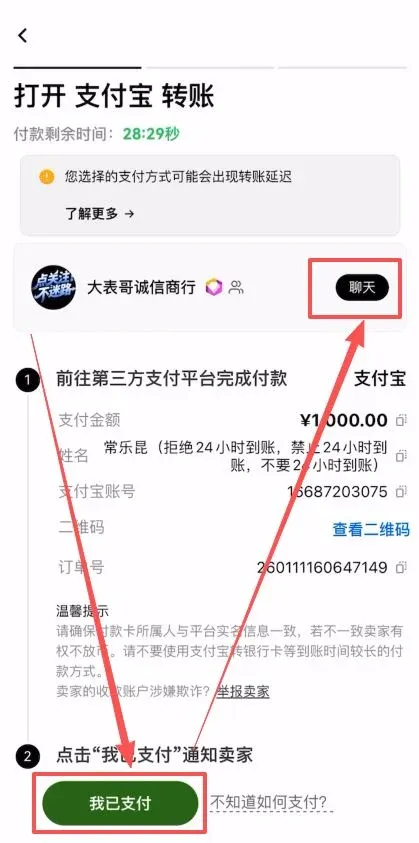
Once the transfer is completed, return to the OKX interface and click “I have paid”. After the seller confirms receipt, the USDT will be credited to your OKX wallet automatically.
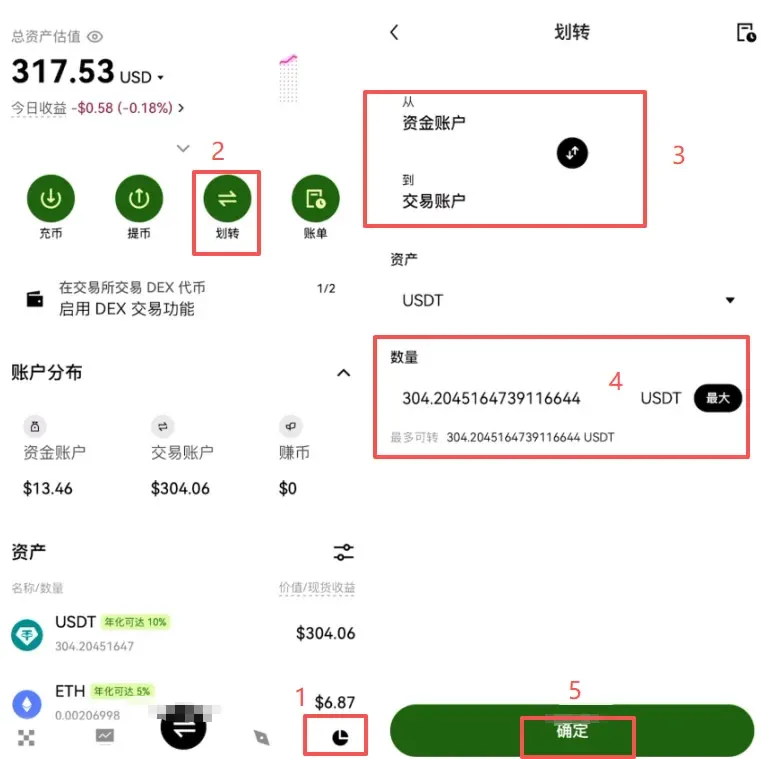
Step 3: Transfer Funds from the “Funding” Account to the “Spot Trading” Account
Initially, the USDT lands in your Funding Account. To trade on the spot market you must move it to the Spot Trading Account.
Navigate to the “Assets” page and tap “Transfer”. Move USDT from [Funding Account] → [Spot Trading Account]. This is an internal transfer—no fees are incurred and it is completed almost instantly.
Step 4: Purchase Bitcoin on the Spot Market
With USDT now in your trading account, you can proceed to the actual Bitcoin purchase.
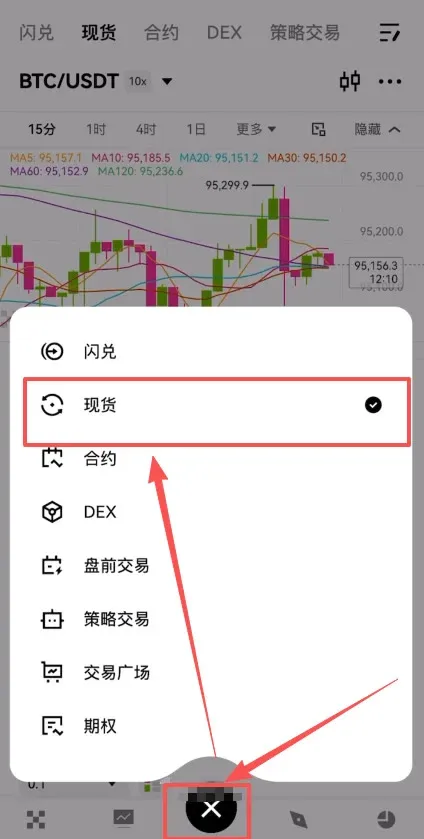
1. Open the Trading Interface
Tap the central “Trade” button at the bottom of the app and select “Spot” trading mode.
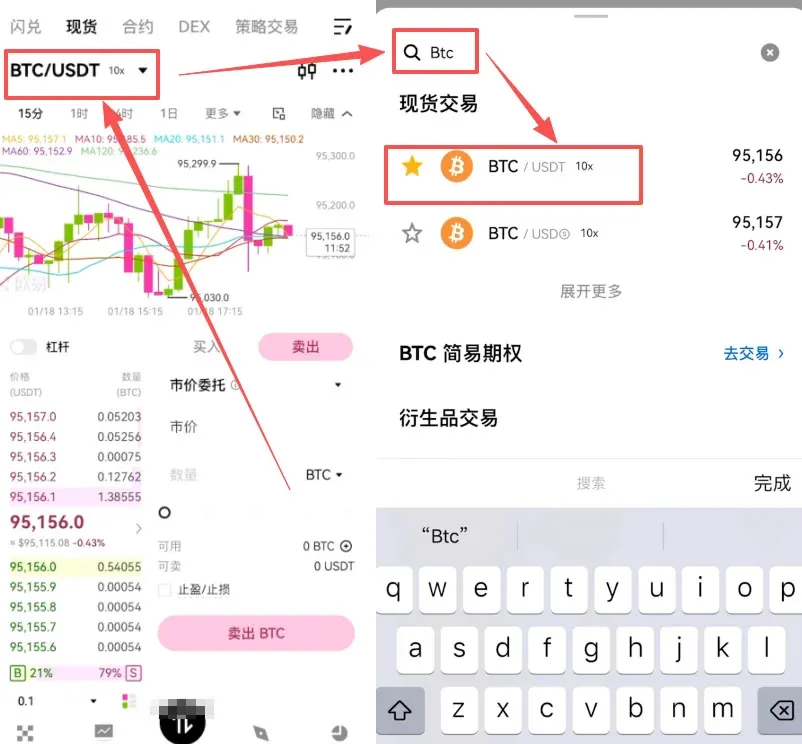
2. Choose the Trading Pair
In the search box at the top‑left, type BTC/USDT and confirm the pair.
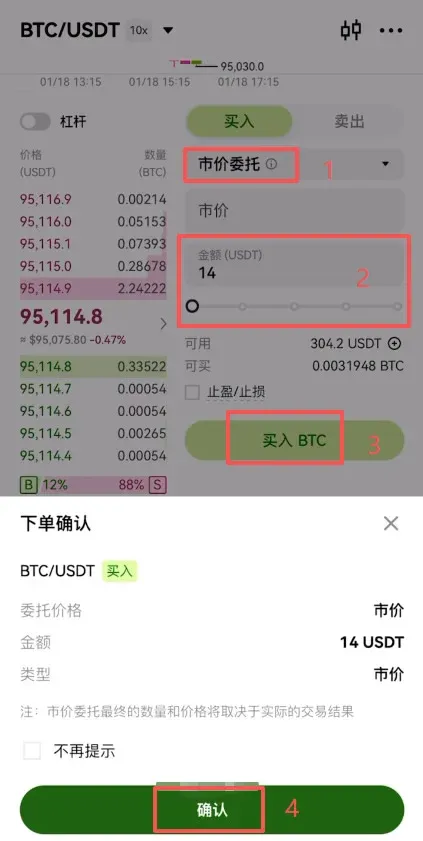
3. Execute the Purchase
For beginners, the “Market Order” is recommended. The system will fill the order at the best available price instantly. Enter the amount of USDT you wish to spend, then press “Buy BTC”.
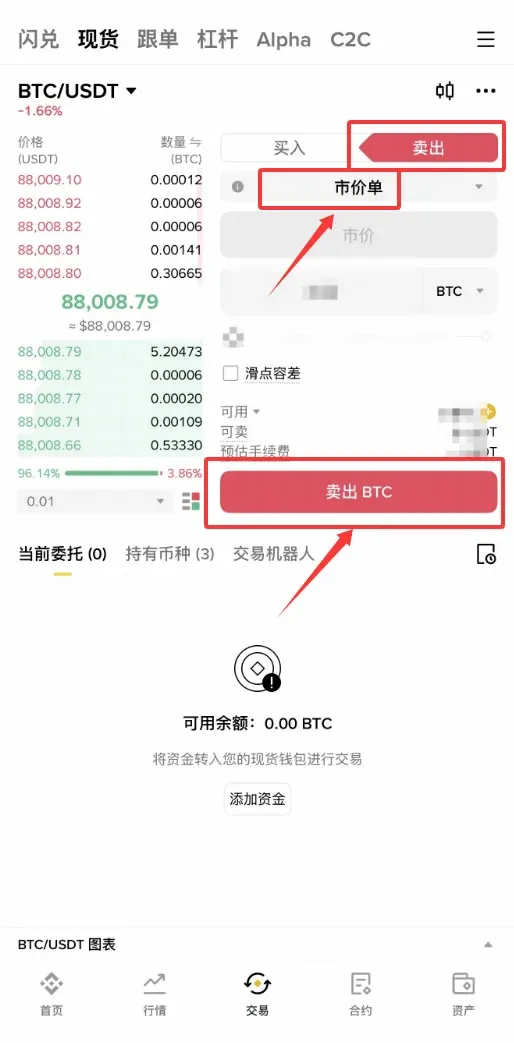
4. Selling Bitcoin
The selling process mirrors buying. Switch to the “Sell” tab, adjust the quantity slider, and confirm to convert BTC back to USDT.
Frequently Asked Questions & Solutions
1. I have paid but the seller has not released the coins
- First, ensure you have clicked “I have paid” on the order page.
- If the coins are still not released, contact OKX online support and provide the order number together with the payment receipt. Support typically intervenes within 15 minutes.
2. My purchase limit is insufficient
- Completing a higher‑level KYC (uploading passport, driver’s license, etc.) raises both single‑transaction and cumulative limits.
- Alternatively, split the purchase into several smaller transactions to stay within the existing limits.
3. Payment failed
- Verify that the funding source has enough balance and that you are within any bank‑imposed payment caps.
- Confirm that your bank or payment processor does not block crypto‑related transfers (some institutions prohibit them).
- If needed, switch to a different payment method or choose another merchant and place a new order.
Ultimate Asset‑Safety Recommendations
Long‑Term Holding – Use a Cold Wallet
- Transfer the purchased BTC from your OKX account to a hardware wallet (e.g., Ledger, Trezor) or a reputable software wallet (e.g., imToken).
- Keep the private key or seed phrase offline, preferably on paper stored in a secure location, and never share it.
Short‑Term Holding – Platform Management
- Enable all available security features (2FA, anti‑phishing code, withdrawal whitelist).
- Change login and withdrawal passwords regularly.
- Keep only the amount needed for active trading on the exchange; avoid leaving large sums idle on the platform.
- Remain vigilant against any “airdrop” or “rebate” scams that claim to be from OKX.
---
This guide provides a complete, secure, and efficient workflow for buying Bitcoin on OKX. For additional tips on using OKX and optimizing your crypto activities, stay tuned to future articles from Bitaigen.
*Note for U.S. residents:* The invitation link above points to the global OKX platform. U.S. users who require a regulated environment should use Binance.US (or another U.S.-compliant exchange) for fiat on‑ramps, while still being able to transfer assets to OKX for spot trading if desired.
Related Reading
- Top 10 Cryptocurrency Exchanges Used in Hong Kong 2024
- TAC Platform Fees & Trading Pairs: Discount Guide
- 2026 Guide: Register OKX, KYC, Deposit & Trade Bitcoin
💡 Register on Binance with referral code B2345 for the maximum trading fee discount. See Binance complete guide.



