
 Bitaigen Research
 This article provides a comprehensive overview of Binance Pay, covering its features and step‑by‑step usage, including peer‑to‑peer transfers, receiving payments, red‑packet (gift) distribution, fiat withdrawals, and a low‑stakes mini‑game. The guide is designed to help readers quickly master this free crypto‑payment tool.
In this article we systematically outline the core functions and usage flow of Binance Pay, enabling users to get started with this zero‑fee crypto payment solution. From account registration and KYC verification to transfers, receiving, red‑packet creation, and other scenarios, each step is illustrated with screenshots, so you can learn without sifting through lengthy documentation. Continue reading for detailed instructions.
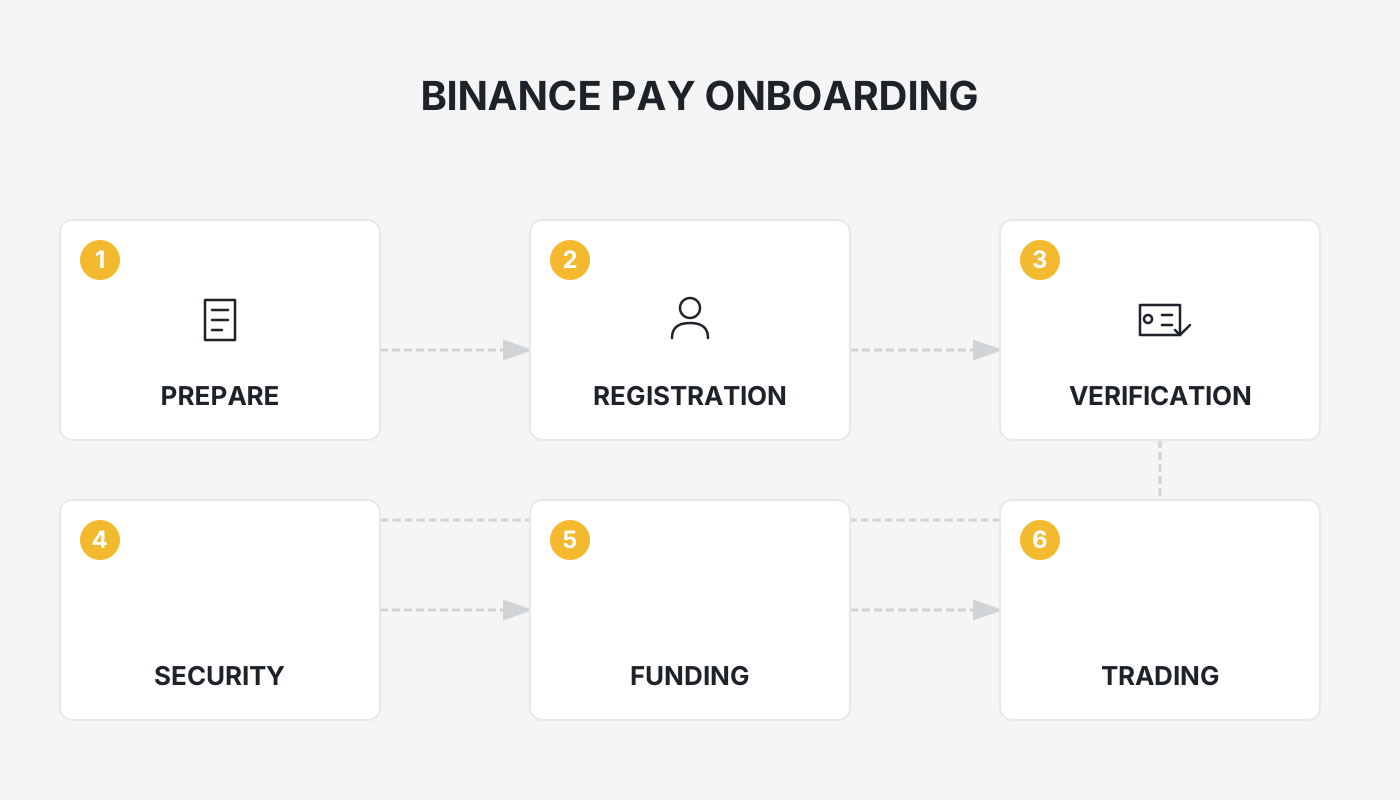
What Is Binance Pay?
Binance Pay is an integrated, fee‑free transfer service built into the Binance platform. After completing KYC verification, users can send instant cryptocurrency payments using a mobile phone number, email address, or a dedicated Binance Pay ID.
Binance Pay incurs no fees and works much like an internal bank transfer: as long as both parties hold Binance accounts, the transaction is completed instantly. Unlike traditional on‑chain transfers that require a long alphanumeric wallet address, Binance Pay only needs the recipient’s phone number, email, or Binance Pay ID, and it even supports scanning a QR code for one‑click payments.
Note: Users who have not finished KYC should refer to the Binance new‑user account registration and buying guide (2025 edition).
For U.S. residents: Binance Pay is only available on Binance.US; the global Binance platform is not supported for U.S. customers.
Fee Structure
| Monthly payment limit | Fee |
|---|---|
| ≤ 75,000 USDT | Free |
| > 75,000 USDT | 1 USDT per transaction |
The vast majority of users keep their monthly transfer volume below 75,000 USDT (approximately USD 2.5 million), thus enjoying a completely fee‑free experience.
How to Use Binance Pay
Binance Pay offers a rich set of functions. Below are the detailed procedures for each operation.
1. Transfer Tutorial
As long as both the sender and the recipient are Binance account holders, transfers can be made within the platform at no cost.
Steps
- Navigate to the Binance Pay page.
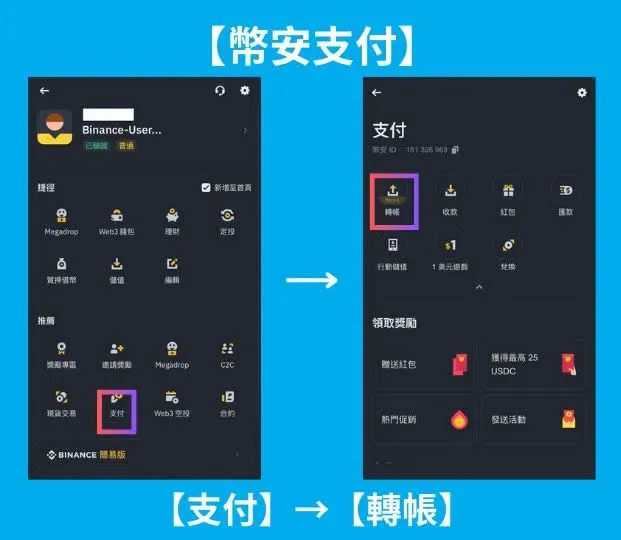
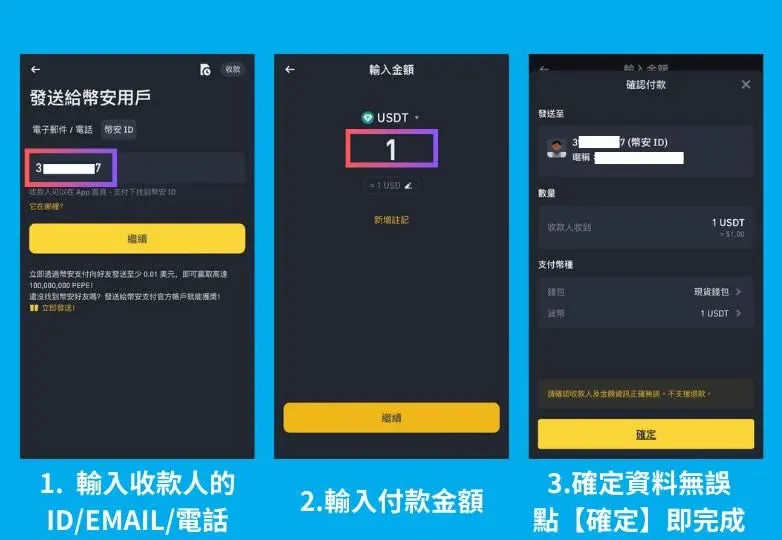
- Enter the recipient’s ID / Email / Phone.
- Specify the amount to send.
- Review the details and click [Confirm].
- Complete the 2FA verification to finalize the transfer.
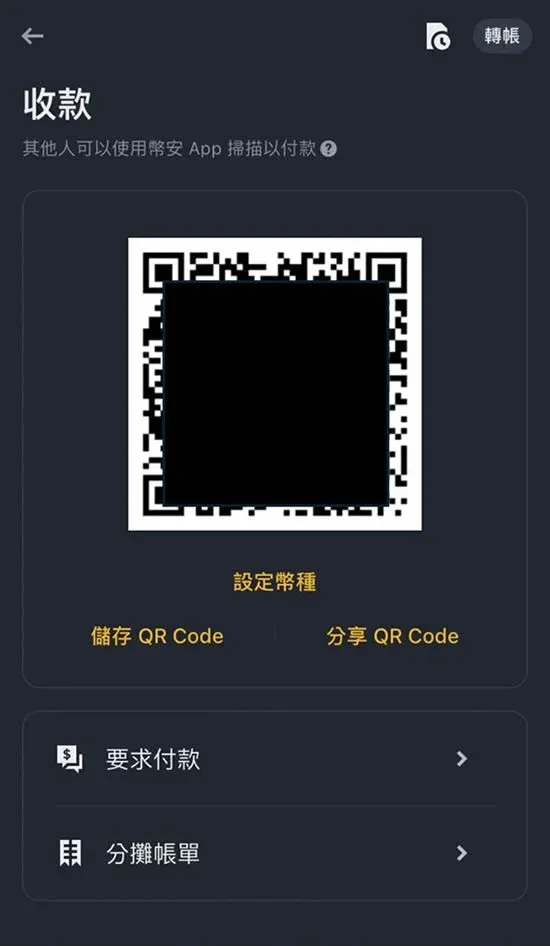
2. Receiving Tutorial
The recipient only needs to display a QR code; the payer scans it to complete the payment.
Steps
- Open the Binance Pay page.
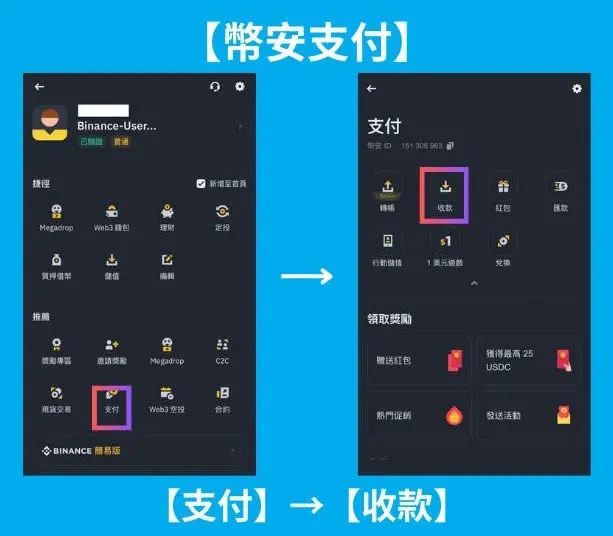
- Generate and display the QR Code (this is the recipient’s payment address).
- Share the QR code with the payer, who scans it to send the funds.
In merchants that support Binance Pay, customers simply scan the shop’s QR code to pay, without any restrictions on geography or business hours.
3. Red‑Packet (Gift) Tutorial
The feature works similarly to Line’s red‑packet function, allowing you to set a total amount and distribute it to multiple recipients at once.
Steps
- Go to the Binance Pay page.
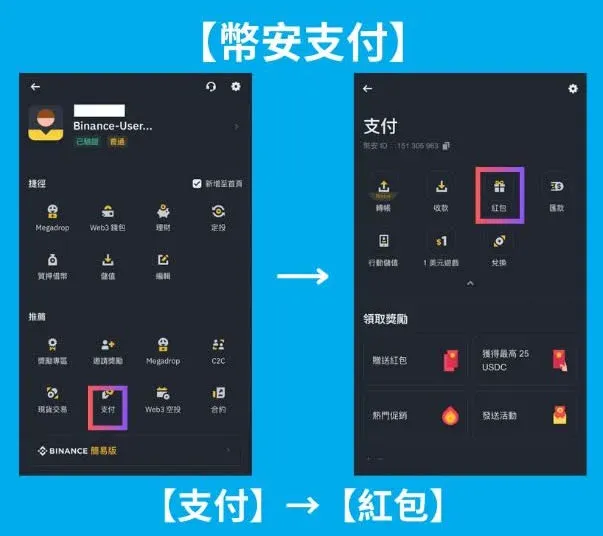
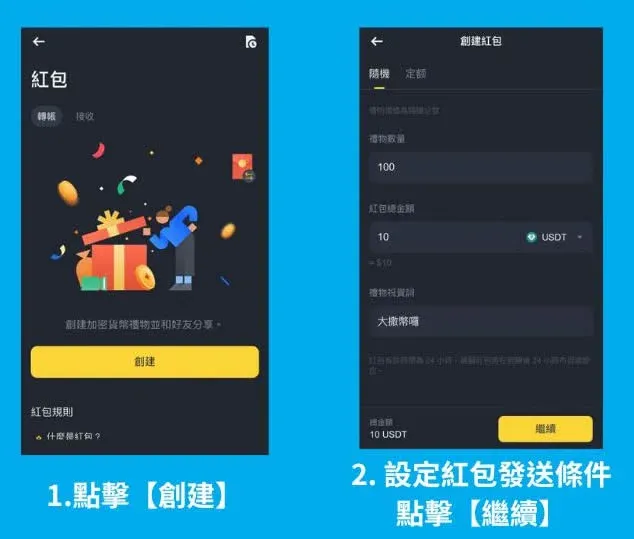
- Tap Create Red‑Packet.
- Enter the total amount and define the distribution conditions (e.g., number of recipients, random vs. equal shares).
- Click [Continue]; the system generates a unique link and a QR code for the red‑packet.
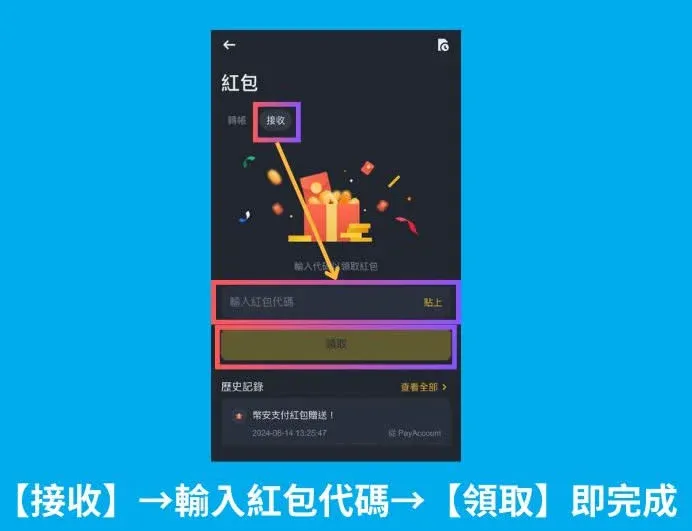
Receiving a red‑packet
- Open the link or scan the QR code.
- Input the red‑packet code if required.
- Click [Claim] to receive the funds.
4. Fiat Withdrawal (Remittance) Tutorial
Convert your crypto assets into fiat (e.g., USD) and transfer the proceeds to a personal bank account. Supported channels include traditional bank transfers via SEPA or SWIFT, as well as regional e‑payment services such as Line Pay or JKoPay.
Procedure (illustrated with a bank‑transfer example)
- Open the Binance Pay page.
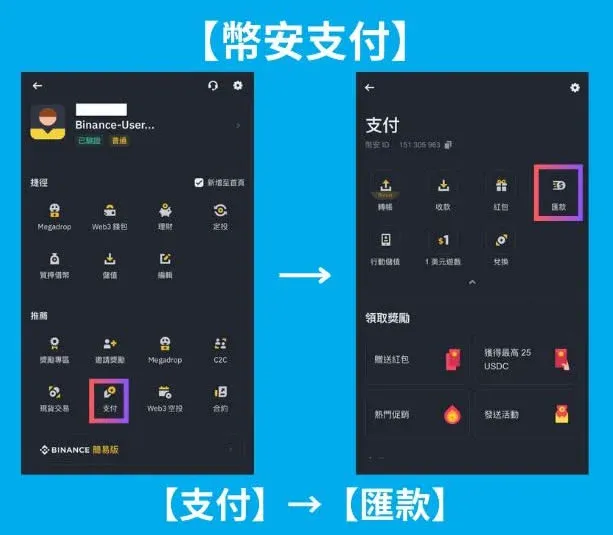
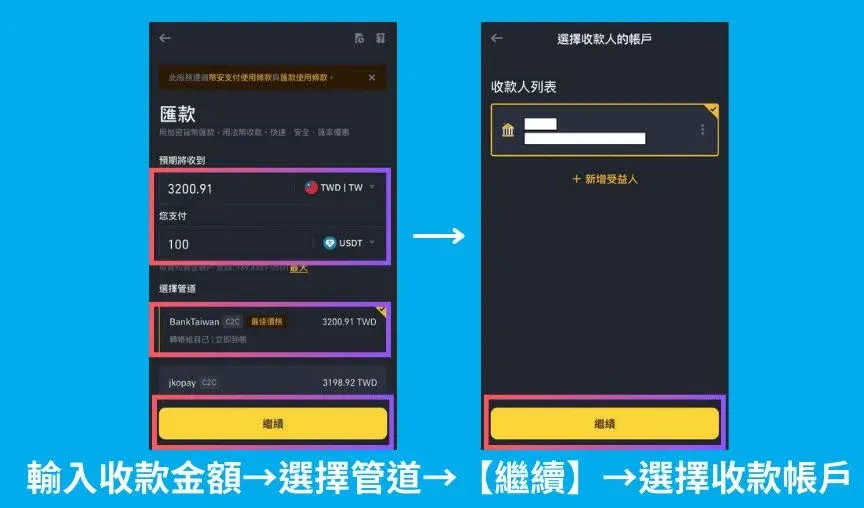
- Enter the withdrawal amount, choose Bank Transfer, and click [Continue].
- Select the destination bank account from the list and click [Continue].
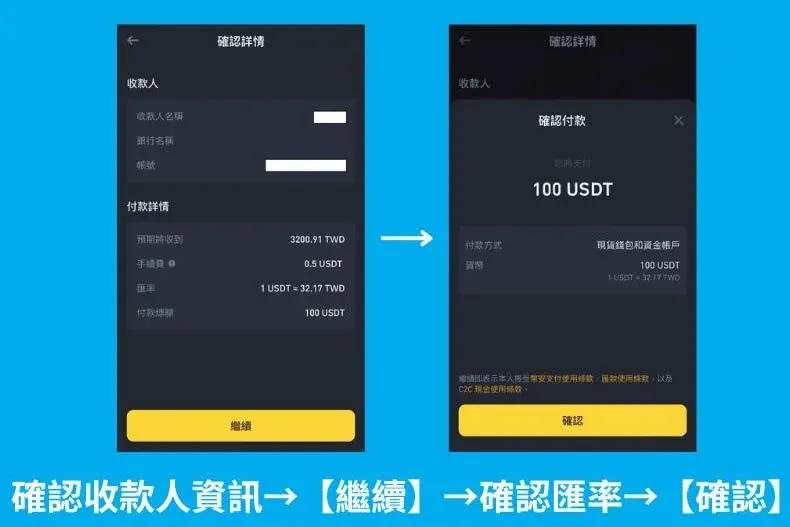
- Review the exchange rate and bank details, then click [Confirm] to finalize the fiat outflow.
5. $1 Mini‑Game Tutorial
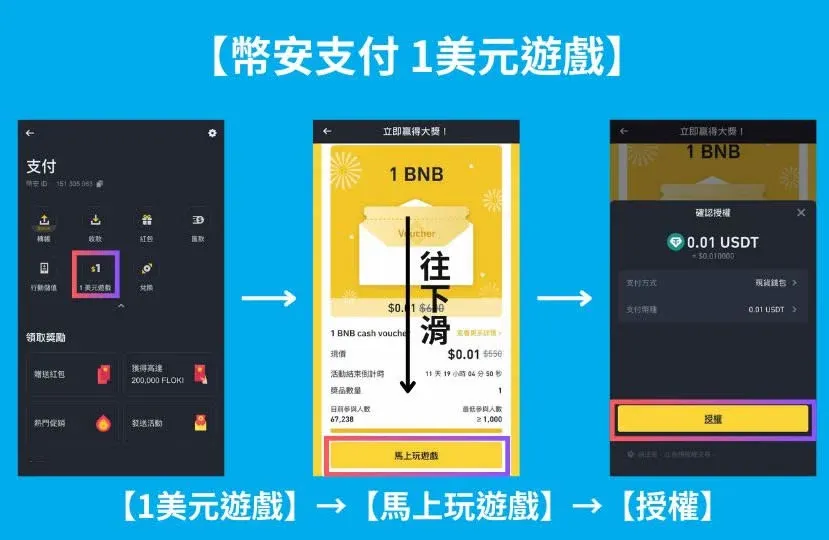
Participate in a low‑stakes lottery; if you do not win, the system automatically refunds the amount you staked.
How to Play
- Navigate to the [$1 Game] page.
- Click [Play Now].
- Authorize the transaction, and you are entered into the draw.
Frequently Asked Questions (FAQ)
Q1: Which cryptocurrencies are supported by Binance Pay?
A: Major assets such as BTC, ETH, BNB, USDT, FDUSD and several other widely used tokens are supported.
Q2: What are the transaction limits for Binance Pay?
A: After completing KYC, limits depend on the user’s VIP tier. The daily limits (denominated in USDT) are:
| VIP Tier | Daily payment limit (USDT) |
|---|---|
| VIP 0 | 8,000,000 |
| VIP 1 | 18,000,000 |
| VIP 2 | 28,000,000 |
| VIP 3 | 38,000,000 |
| VIP 4 | 416,000,000 |
| VIP 5 | 524,000,000 |
| VIP 6 | 640,000,000 |
| VIP 7 | 764,000,000 |
| VIP 8 | 880,000,000 |
| VIP 9 | 996,000,000 |
Q3: Does Binance Pay support fiat‑currency payments directly?
A: Currently only cryptocurrency payments are accepted. Fiat can be used after converting via a peer‑to‑peer (C2C) trade or the withdrawal feature described above.
Q4: Can a completed payment be cancelled?
A: No. Once a transaction is sent, it cannot be reversed; always double‑check the recipient details before confirming.
Closing Remarks
Binance Pay provides Binance account holders with a convenient, free, and secure way to move crypto assets. After mastering the procedures outlined above, you can seamlessly conduct transfers, receive payments, send red‑packets, withdraw fiat, and even enjoy the $1 mini‑game—all within the Binance ecosystem. For more tips and advanced tricks on using Binance Pay, stay tuned to Bitaigen’s upcoming articles.
Related Reading
- Binance Pay: Quick Guide to Fast Crypto Transfers
- Binance Pay: Send to Contacts & On‑Chain Send Guide (2024)
- Litecoin (LTC) Price Sep 2025 - Leading Crypto Payment Method
💡 Register on Binance with referral code B2345 for the maximum trading fee discount. See Binance complete guide.



