
 Bitaigen Research
 We analyze Binance Pay’s newest features from a product‑centric perspective, helping you quickly get started with “Send to Contacts” and “On‑chain Send.” Learn how these innovations simplify everyday peer‑to‑peer transfers and merchant payments, and grasp the essential usage points to save time and effort. Keep reading for a step‑by‑step guide and security tips.
Note: Users residing in the United States must use Binance.US to access these features; the global Binance platform is not available for U.S. customers. Fiat settlements, when applicable, are processed in USD via SEPA/SWIFT channels.
Overview of Binance Pay’s New Features
In 2025 Binance added two major highlights to its payment product: “Send to Contacts” and “On‑chain Send.” These upgrades aim to make the transfer of crypto assets more intuitive and less error‑prone. Whether you’re splitting a dinner bill with friends or completing an on‑chain payment to a merchant, the process can be finished in just a few steps.
Key Points
- Binance Pay: An instant, gas‑fee‑free payment system built into the Binance app, now expanded with two new transfer methods.
- Send to Contacts: Choose a recipient directly from your phone’s address book—no need to type a wallet address or Binance ID.
- On‑chain Send: Simply scan a QR code or upload a screenshot that contains wallet information; the system automatically recognizes the data and completes the on‑chain payment, eliminating the manual network‑selection step.
---
What Is Binance Pay
Binance Pay is a contact‑less cryptocurrency payment channel available on the Binance mobile app. Users can send and receive funds instantly using a phone number, email address, Binance ID, or QR code, and all transactions are free of gas fees. The service currently supports over 300 digital assets and is designed around a “simplify‑the‑workflow” philosophy.
Building on this foundation, Binance has introduced two AI‑enhanced, address‑book‑driven features that further reduce friction, bringing crypto usage closer to everyday life.
---
Send to Contacts: Convenient Transfers Without Manual Address Entry
Feature Summary
“Send to Contacts” lets users pull up their phone’s contact list directly inside Binance Pay. After selecting a recipient, the transfer is completed without ever typing a wallet address, Binance ID, or email—greatly reducing the risk of copy‑and‑paste mistakes.
Step‑by‑Step Procedure
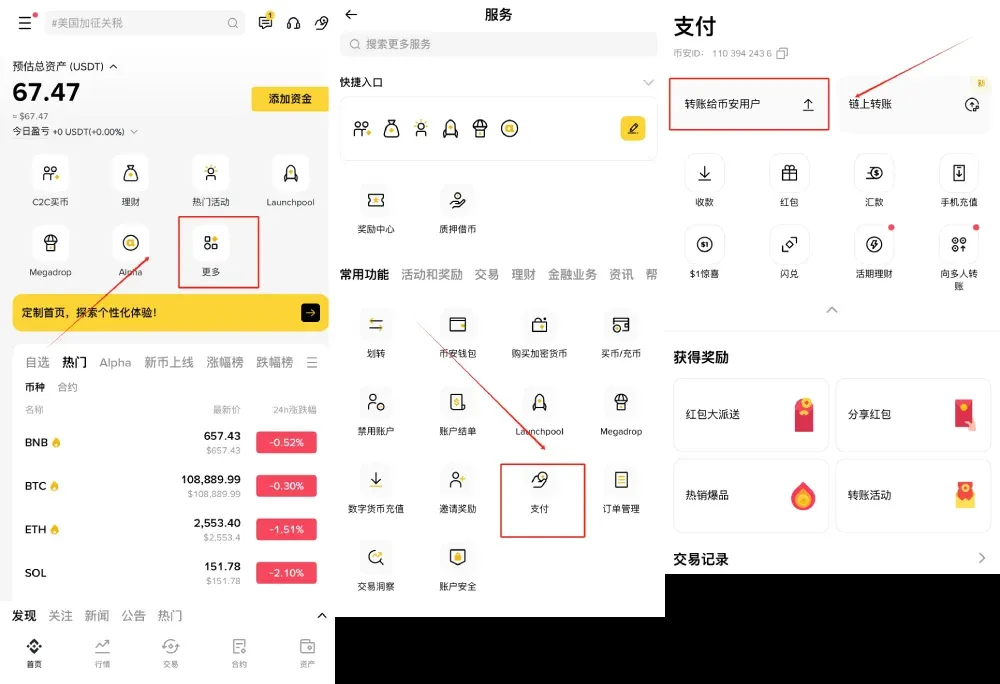
- Open the Binance app → tap More at the bottom → go to the Pay section and select “Transfer to Binance User.”
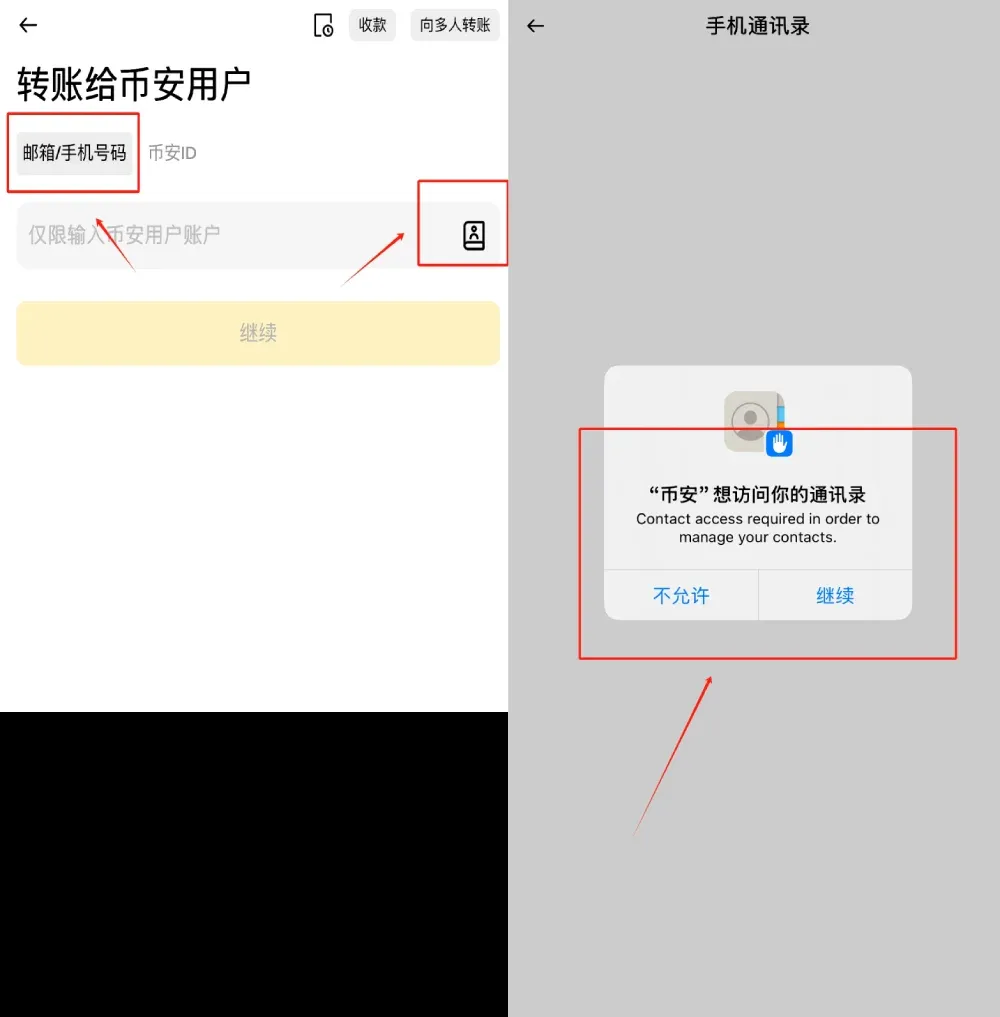
- In the “Recipient” field, tap the address‑book icon. After the system prompts for permission, choose “Continue” to grant access to your device’s contacts.
- Browse the contact list, tap the person you wish to pay, and then click “Continue.”
- Pick one of the 300+ supported cryptocurrencies, enter the amount, and confirm the transaction.
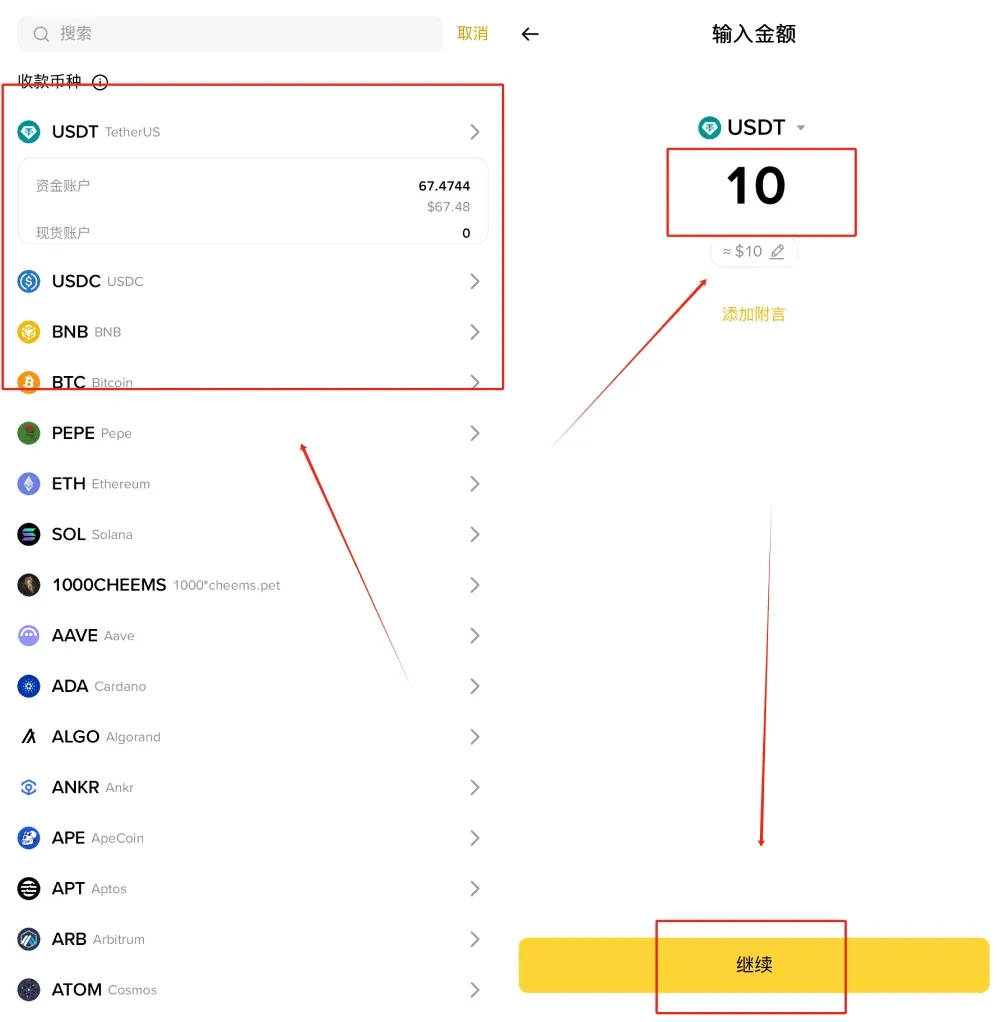
Once confirmed, the funds arrive instantly and no gas fees are charged.
If the intended recipient does not appear in the list, it may be because (1) they have not yet created a Binance account, or (2) they are registered with an email or Binance ID rather than a phone number. In such cases you can use an invitation link or provide the recipient’s Binance ID/email to complete the transfer.
---
On‑chain Send: AI‑Powered Automatic On‑chain Payments
Feature Summary
On‑chain Send streamlines the traditionally cumbersome on‑chain transfer workflow: users only need to provide a QR code or a screenshot that contains the destination wallet address. Binance’s AI extracts the necessary information—address, network, etc.—and auto‑fills the payment fields, completely removing the need for manual entry.
Step‑by‑Step Procedure
- Open the Binance app → go to More → select Pay and then tap “On‑chain Transfer.”
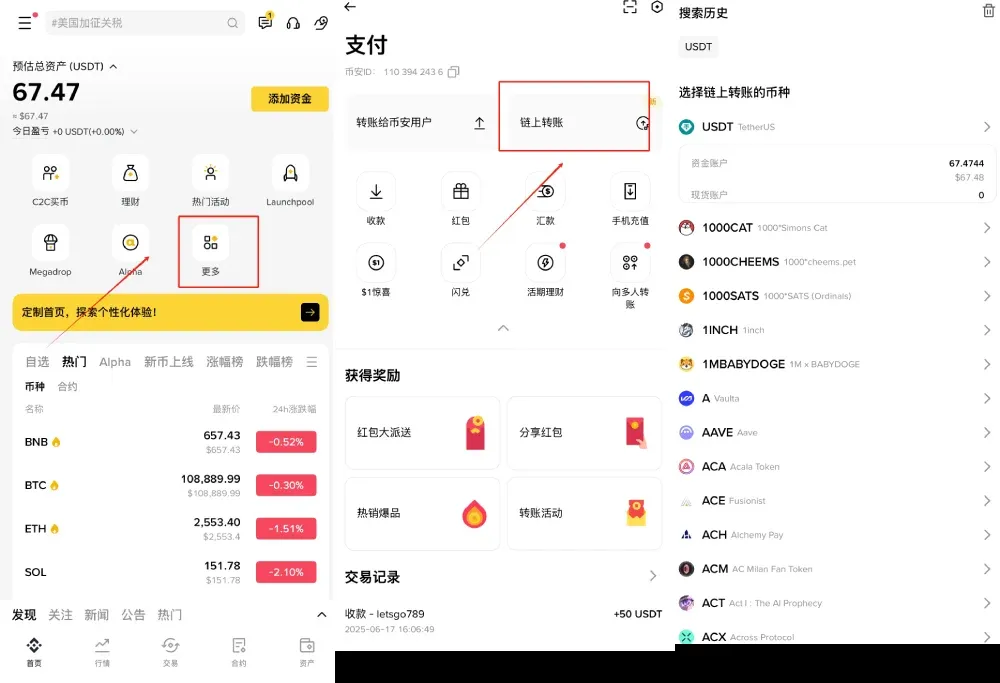
- Scan the QR code supplied by the payee, or upload a screenshot that includes the wallet details.
- The system automatically parses the data and presents the payment details; you simply verify that everything looks correct and proceed.
- Choose the appropriate asset, input the amount, and hit Confirm to finalize the on‑chain payment.
To prevent accidental transfers, Binance Pay highlights characters that look similar and shows an additional confirmation prompt the first time you send to a new address, helping you avoid costly mistakes.
---
Combined Benefits of the Two New Features
| Dimension | Send to Contacts | On‑chain Send |
|---|---|---|
| **Input Requirement** | Directly pick a phone contact; no address needed | Scan QR code or upload screenshot; system auto‑fills |
| **Error Probability** | Eliminates manual copy‑paste; near‑zero mistype risk | AI recognition with confirmation step reduces errors |
| **Time to Complete** | Seconds: select contact → confirm amount | Scan/upload → auto‑recognize → confirm |
| **Typical Use Cases** | Splitting bills, gifting, small everyday payments among friends | Merchant payments, cross‑wallet transfers, on‑chain invoice settlement |
The two methods complement each other: “Send to Contacts” excels in social, quick‑pick scenarios, while “On‑chain Send” covers precise, network‑specific payments. Together they create a smoother, more mobile‑friendly experience.
---
Closing Thoughts
Binance Pay now supports over 300 cryptocurrencies while maintaining its hallmark zero‑gas‑fee advantage. The addition of “Send to Contacts” and “On‑chain Send” enables everything from casual peer‑to‑peer micro‑transfers to enterprise‑level on‑chain settlements in just a few taps.
Whether you prefer selecting a recipient from your address book or leveraging AI to read a QR code for an on‑chain transaction, these innovations lower the barrier to everyday crypto usage, making digital asset circulation feel as natural as sending a text message. Open the Binance app today, try the new payment options, and experience how simple cryptocurrency can be.
This article is intended to help readers understand Binance Pay and its 2025 feature updates. For more details, consult previous Bitaigen (比特根) articles or follow the related links below. We appreciate your continued interest and support for Bitaigen.
*Disclaimer: Cryptocurrency gains may be subject to tax in your jurisdiction. Please consult a tax professional for advice relevant to your local laws.*
💡 Register on Binance with referral code B2345 for the maximum trading fee discount. See Binance complete guide.
⚠️ Risk Disclaimer: Crypto prices are highly volatile. This is not investment advice.



