
 Bitaigen Research
 In the Solana network, each token or NFT occupies its own independent account, and these accounts must pre‑deposit a certain amount of SOL to keep them active on‑chain. If an account remains unused for a long period, the deposited SOL becomes locked, resulting in idle capital. Binance Wallet’s newly launched “Solana Account Rent Recovery” feature lets users view and withdraw these locked SOL with a single click, improving the efficiency of asset utilization.
In this article we explain the principle behind Solana account rent, how it is calculated, and the one‑click recovery process in Binance Wallet. By following the guide you will discover and release idle SOL on the blockchain, thereby increasing the efficiency of your holdings. Continue reading for detailed steps and important considerations.
Why Solana Accounts Must Pay Rent
You can think of each account as a warehouse that stores your NFT, gaming item, or token data. Blockchain storage is a shared resource; if someone opens a warehouse and never moves anything, the space is wasted. To prevent the emergence of “zombie warehouses,” Solana enforces a rent system that forces the cleanup of long‑term idle accounts.
- Data occupies space: Whether it’s an image or contract state, it consumes on‑chain storage.
- Resources are finite: The total network storage capacity is limited and must be protected from being filled by inactive accounts.
- Automatic reclamation: When an account’s balance drops to zero and it fails to pay rent, the system will reclaim its occupied space after a defined period.
How Rent Is Calculated
1. Basic Formula: Data Size × Time
The rent cost for an account is influenced by two main factors:
- Account capacity: The more data stored, the higher the rent (e.g., a 1 MB NFT costs far more than a 100 KB text file).
- Duration of occupancy: The longer the days of storage, the larger the total fee.
Currently, Solana’s annual rent rate is approximately 6.96 SOL per MB, which can be simplified to:
```
Rent = Data Size (MB) × 6.96 SOL × Number of Years
```
2. Deposit‑Based Rent Waiver: Pay Two Years Up‑Front
If you deposit SOL equivalent to two years’ worth of rent into an account, the rent becomes permanently waived. For example:
- An NFT occupying 1 MB requires two‑year rent of 6.96 × 2 = 13.92 SOL; as long as the account balance exceeds this amount, no further rent payments are needed.
- A typical SPL token occupies about 200 bytes, which translates to roughly 0.002 SOL for two years (200 bytes ÷ 1 MB × 6.96 SOL × 2).
What Is Solana Account Rent
To manage on‑chain storage efficiently, Solana introduced a rent mechanism. When a token or NFT account is created, a minimum amount of SOL must be pre‑deposited (default 0.00203928 SOL) as a rent guarantee. This SOL remains locked as long as the account holds assets; once the assets are completely cleared and the reclamation conditions are met, the user can withdraw the rent deposit and redeploy it for staking, trading, or other purposes.
How to Recover SOL Rent in Binance Wallet
Before you begin, make sure the account you intend to close holds zero balance of any token or NFT. Also, keep enough SOL in your wallet to cover on‑chain gas fees (Binance Wallet itself does not charge additional fees).
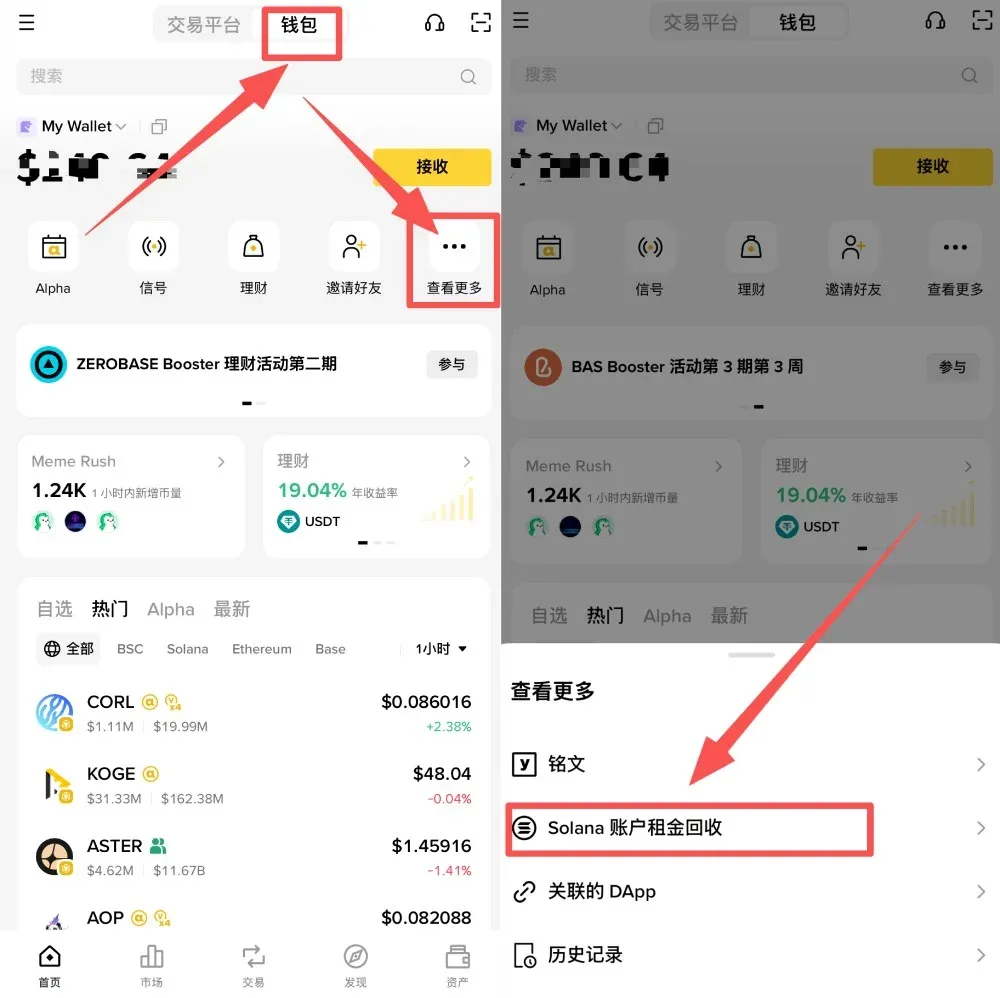
- Open the Binance App (official registration | official download), go to the [Wallet] tab, and tap [More] → [Solana Account Rent Recovery]. If your current wallet does not support Solana, you will be prompted to switch to a compatible version.
Note for U.S. users: Use Binance.US instead of the global Binance platform to access the same functionality, as regulatory requirements differ.
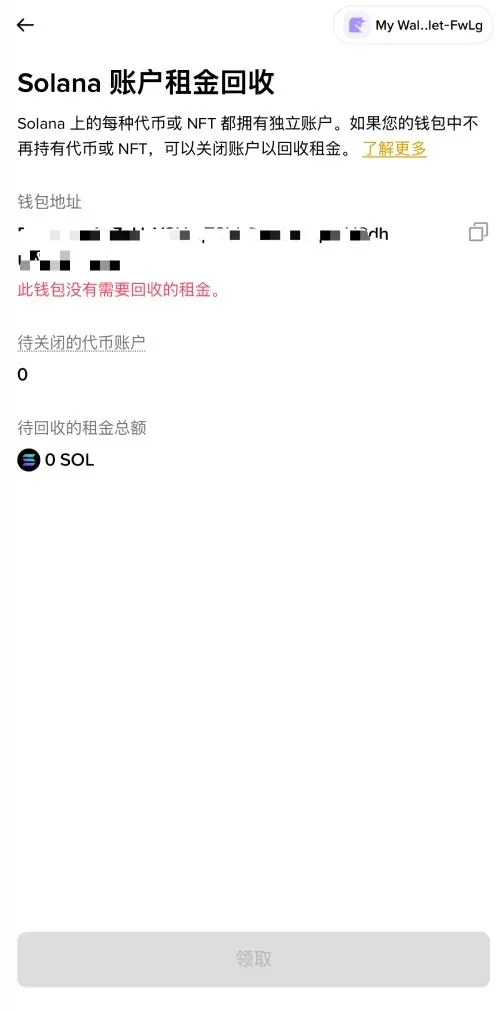
- The page will display the amount of SOL locked under the current address and the list of recoverable accounts, including:
- The associated wallet address;
- The number of token accounts that meet the closure condition (zero balance);
- The total recoverable amount calculated at roughly 0.00203928 SOL per account.
If no qualifying accounts are found, a message stating “No rent to recover for this wallet” will appear. You can also switch to another wallet address to perform the same check.
- Tap [Claim] to initiate the recovery. According to Solana’s transaction rules:
- A single transaction can process a maximum of 24 accounts;
- If the number of accounts to be closed exceeds 24, the process will be split into multiple signatures;
- Each signature must be confirmed within the wallet.
After completing all required signatures, the recovered SOL will be deposited directly into your wallet balance.
Frequently Asked Questions
1. Will closing zero‑balance token accounts affect my main wallet or other assets?
The operation only closes accounts with a zero balance and does not cause any token or NFT loss. Your main wallet address remains unchanged, and accounts that still hold assets are untouched, ensuring safety.
2. Are there any extra fees for recovering rent?
Binance Wallet does not charge a fee for the rent recovery itself, but you still need to pay Solana’s standard network gas fees. Make sure you have enough SOL in the wallet to cover these costs.
3. Why might the recovery require multiple transactions?
For efficiency and security, Solana limits the number of accounts that can be handled in a single transaction to 24. When the number of recoverable accounts exceeds this limit, the system automatically splits the process into several transactions and displays progress, e.g., “2 of 4 signatures,” allowing you to confirm each step individually.
4. What does it mean when the tool shows no recoverable rent?
It indicates that, under the current address, there are no zero‑balance accounts that satisfy the closure criteria, so no action is needed. You can switch to another wallet address and run the check again if desired.
---
By following the steps above, you can easily retrieve locked SOL and redeploy it for staking, trading, or exploring new investment opportunities. For more practical tips on recovering Solana account rent with Binance Wallet, search the Bitaigen (比特根) archives or continue browsing the related content below. Enjoy your experience in the Solana ecosystem!
Tax reminder: Crypto gains, including any profit realized from reclaimed SOL, may be taxable in your jurisdiction. Consider consulting a tax professional and keep records of all transactions for accurate reporting.
💡 Register on Binance with referral code B2345 for the maximum trading fee discount. See Binance complete guide.



