
 Bitaigen Research
 In this article we outline the complete process for cryptocurrency newcomers to purchase Bitcoin, with a focus on comparing the fee differences between “Instant Buy” and C2C (peer‑to‑peer) marketplace trades. The goal is to help you acquire Bitcoin at a lower cost while maintaining security. Continue reading for step‑by‑step instructions and cost‑saving tips.
All information about buying and selling Bitcoin is recorded on a public ledger called the blockchain. The blockchain is a global network of computers operated and maintained by Bitcoin miners, who receive newly minted Bitcoin as a reward. As a beginner, you must first have a digital wallet and a Bitcoin address. The address is the sole location where funds are received and stored; it can appear as a long string of alphanumeric characters or as a QR code.
Beginners looking to acquire Bitcoin at a lower cost can do so by selecting C2C marketplace trades, comparing Instant‑Buy prices, or using the “Custom Buy” feature on exchanges such as OKX.
How Can a Beginner Buy Bitcoin Cheaply?
For newcomers to the crypto space, it is common to be unsure how to purchase Bitcoin with the lowest possible fees. Buying methods fall mainly into two categories: Instant Buy and C2C (peer‑to‑peer) basic trading. Instant Buy generally carries higher fees, whereas C2C basic trading tends to be more economical.
Illustration of Price Differences (see images below)
!Bitcoin price comparison across exchanges – bar chart
!Exchange purchase page with Instant Buy and Custom Buy options
On most exchanges, the purchase interface displays two options: Instant Buy and Custom Buy. By default, the system highlights Instant Buy as the primary choice; it automatically matches you with a platform‑recommended seller and the price is relatively fixed. When you switch to the Custom Buy page, you can manually select sellers offering better quotes, thereby reducing your acquisition cost.
Detailed Bitcoin Purchase Tutorial
The following example uses OKX exchange to buy USDT (a USD‑pegged stablecoin), illustrating the complete workflow.
- Open the OKX app. If you do not have an account, click here to register.
- On the home screen, tap 【Instant Buy】.
- Enter the purchase amount or the quantity of the asset (USDT is used in this example).
- Tap 【Buy USDT】 → 【Confirm】.
- After selecting a payment method, tap 【Confirm Purchase】.
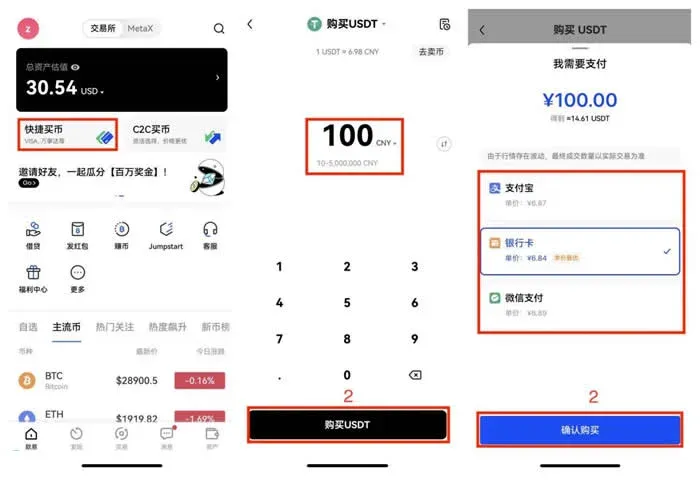
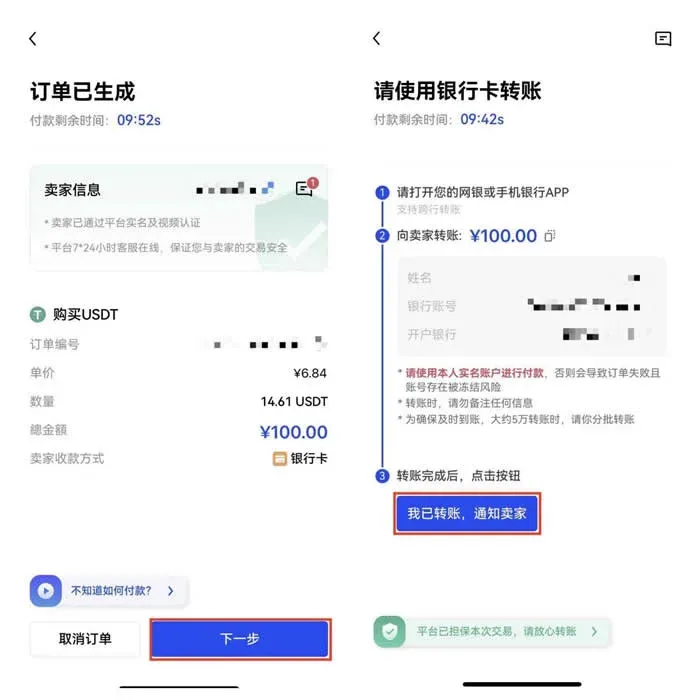
- Once the order is confirmed, click 【Next】.
- Open your mobile banking app, or a SEPA/SWIFT‑compatible service (e.g., your bank’s online portal), and fill in the seller’s account details to complete the wire transfer.
- After the payment is sent, tap 【I have transferred, notify the seller】.
When the seller verifies the receipt of funds, the purchased digital asset is automatically credited to your account and can be viewed under the 【Assets】 tab.
Important Notes
- Some sellers may request a bank statement screenshot for verification; comply to ensure transaction security.
- The payment bank card must be a KYC‑verified, personally‑named card belonging to you.
- Instant Buy single‑transaction limits are $1 – $140,000 USD (approximately 10 – 1,000,000 CNY).
- Outside of regular business hours (holidays and weekdays 5:00 PM – 8:00 AM UTC), if a cross‑border wire exceeds $7,000 USD (≈ 5 万元 CNY), it is advisable to split the payment into multiple batches to avoid delays that could affect the trade.
- Orders can be cancelled within the stipulated time window after placement, but repeated cancellations or multiple overdue payments may affect your reputation score, preventing further orders on the same day.
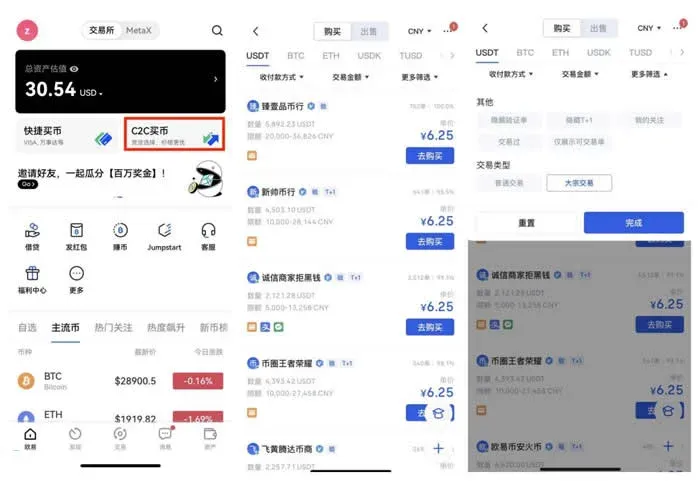
Tip: In addition to the Instant Buy section, you may also choose the C2C marketplace area to browse and select more favorable offers. For trades of $14,000 USD (≈ 10 万元 CNY) or higher, use the Advanced Filters to select Large‑Volume Trades.
Because Bitcoin is a digital asset, the risk of fraud is relatively low compared with physical commodities. For very large investments (e.g., purchasing real estate), it is still advisable to consult a lawyer or other professional advisers. In the crypto space, however, there is no mandatory requirement to involve a third‑party intermediary. Most people now own a desktop computer or a smartphone, and using a digital wallet feels as seamless as using mobile payment services such as M‑Pay.
This concludes the guide “How Can a Beginner Buy Bitcoin Cheaply? – Detailed Bitcoin Purchase Tutorial for Newcomers.” For more practical resources on buying Bitcoin as a beginner, please follow other articles published by Bitaigen.
Note for U.S. users: When selecting an exchange, make sure to use Binance.US (or another U.S.-licensed platform) rather than the global Binance site, to comply with local regulations.
Tax reminder: Cryptocurrency gains may be subject to taxation in your jurisdiction; consult a tax professional to understand your obligations.
Related Reading
- TRC20 USDT vs ERC20 & Omni: Speed, Cost, and Security Compared
- How to Buy Bitcoin in 2026: A Beginner’s Step‑by‑Step Guide
- Can I Buy Only 0.0001 BTC? Complete Guide for Beginners 2026
💡 Register on Binance with referral code B2345 for the maximum trading fee discount. See Binance complete guide.



