
 Bitaigen Research
 According to blockchain data, ZB Exchange has total assets of approximately USD 300 million, offers 177 trading pairs, recorded a 24‑hour trading volume of USD 543 million, and experienced a 24‑hour decline of 10.24%. Although ZB Exchange showed an intraday drop, this has not diminished investors’ interest in ZB. For investors, the core goal of digital currencies is to realize profit, and profit or loss can only be confirmed after a successful withdrawal. So, how long does a ZB withdrawal take? Below we will explain in detail and provide a tutorial for withdrawing fiat (USD) from ZB.
Our Bitaigen editorial team has thoroughly examined ZB’s withdrawal process, focusing on arrival time, fee structure, and common bottlenecks. By following this guide, you can quickly master the key points of fiat (USD) withdrawal, avoid unnecessary waiting and fee losses. For the complete steps and practical tips, continue reading.
How long does a ZB withdrawal take?
- Withdrawal arrival time: After approval, blockchain confirmation time generally ranges from 10 minutes to 1 hour.
- Fiat (USD) withdrawal arrival time: The platform supports 24⁄7 withdrawals, with funds arriving within 24 hours after withdrawal (via SEPA/SWIFT).
- Fiat (USD) withdrawal fee: Charged according to user level; regular users pay 0.5%.
- Bitcoin withdrawal fee: Network transaction fee ranges from 0.001 to 0.002 BTC; recommended fee is 0.0015 BTC. Since miners prioritize transactions by fee, a lower fee may cause delays in confirmation.
ZB Fiat (USD) Withdrawal Tutorial
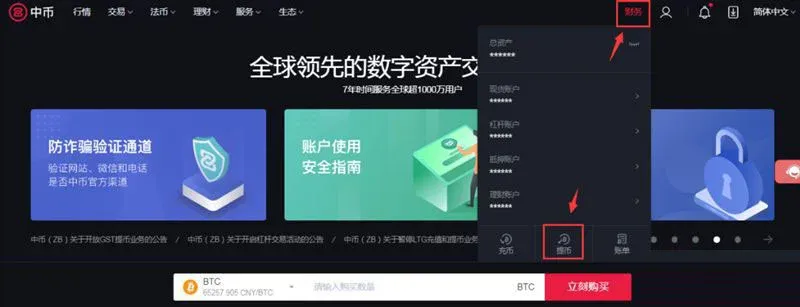
- Open the ZB official website www.zb.land, log in or register a ZB account, then click “Finance” → “Withdraw” in sequence.
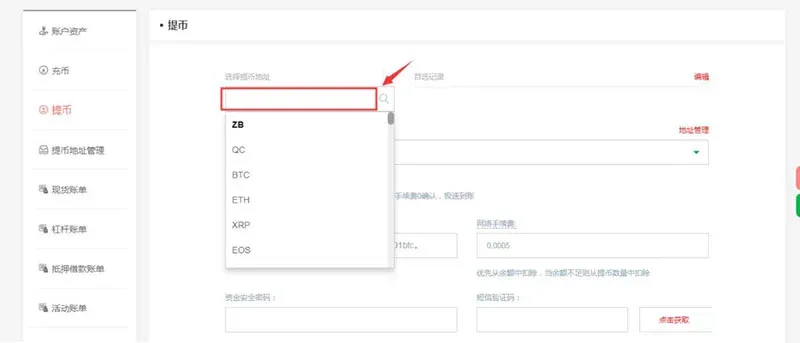
- After entering the withdrawal page, input or select the currency you wish to withdraw.
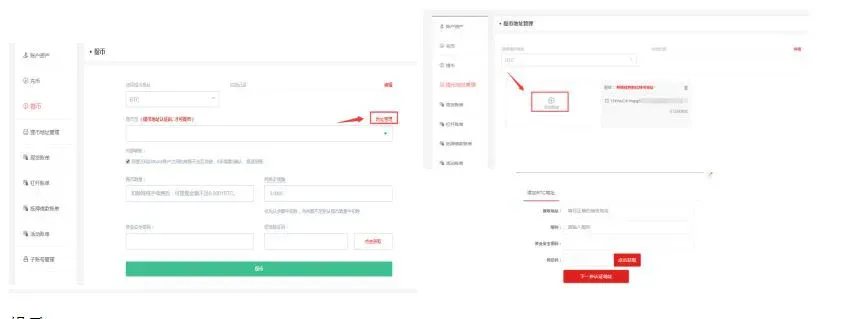
- Taking Bitcoin (BTC) as an example, when using a new address for the first time you need to add and verify the receiving address. The operation path is “Address Management” → “Add Address”, fill in the receiving address, nickname, fund security password, obtain and input the dynamic verification code, then click “Next to verify address”.
Tips
- You must first have a corresponding asset deposit (recharge) on the platform.
- Do not withdraw assets to a deposit address of a mismatched currency; incorrect deposits cannot be recovered.
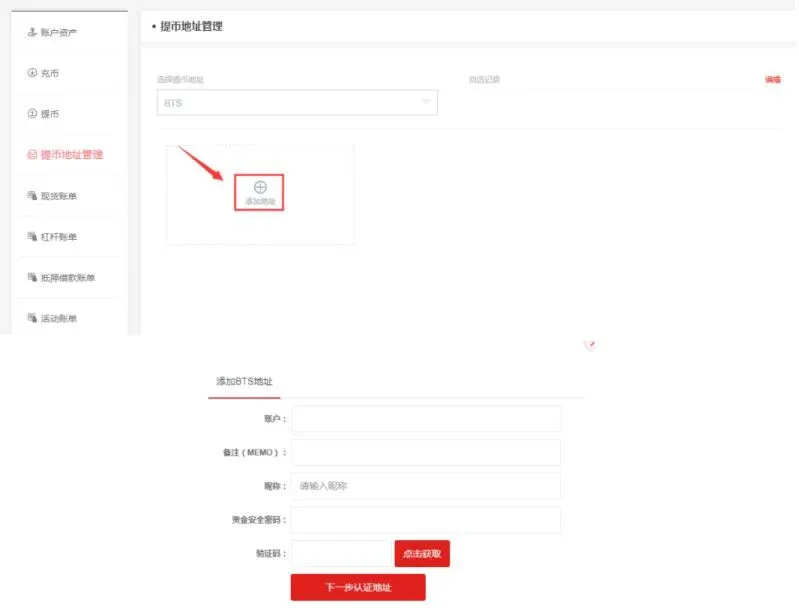
- For some currencies, when adding a withdrawal address you also need to fill in Account and Memo (MEMO) (different platforms may display this as Tag or Payment ID).
- Taking BitShares (BTS) as an example, click “Add Address”, copy and paste the “Account” and “Memo (MEMO)” from the corresponding asset deposit platform into the respective fields, fill in the nickname, fund security password, obtain and input the dynamic verification code, then click “Next to verify address”.
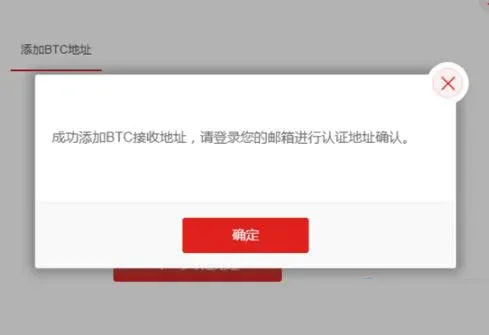
- After successfully adding the receiving address, the system will send a withdrawal address verification email to your mailbox.
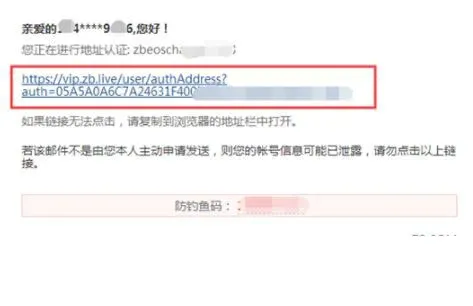
- Log in to your email, open the message, carefully check the information, and click the link in the email to verify; if the link is not clickable, please copy the link into a browser to open.
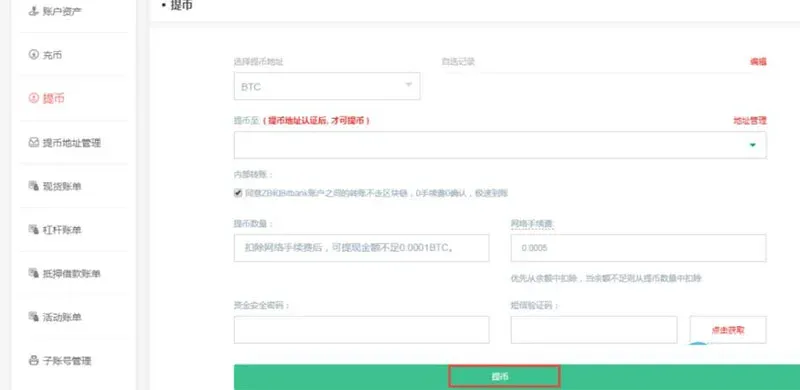
- After address verification succeeds, you can select the verified address on the withdrawal page to proceed with the withdrawal.

- Return to the withdrawal page, select the verified receiving address, fill in the withdrawal amount, fund security password, and SMS verification code; the system will automatically calculate the fee, confirm and click “Withdraw”.
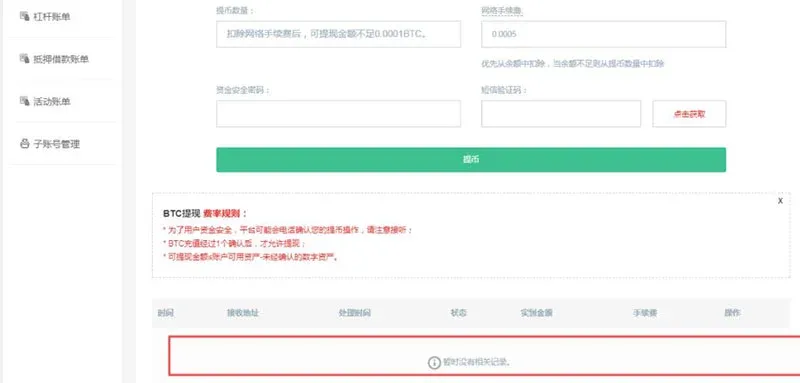
- After the withdrawal is successful, you can view the progress of this withdrawal at the bottom of the withdrawal page.
This completes the explanation of how long a ZB withdrawal takes and the full tutorial for withdrawing fiat (USD) from ZB. For more information about ZB Exchange, please follow Bitaigen (BitGen) and its related columns.
💡 Register on Binance with referral code B2345 for the maximum trading fee discount. See Binance complete guide.



