
 Bitaigen Research
 In this article we provide a comprehensive breakdown of the core features and workflow of the Rainbow wallet, covering multi‑chain support, staking and governance, as well as practical use‑cases such as sending “red packets”. The guide is aimed at newcomers who want to get started quickly and improve the efficiency of asset management. Please continue reading for the full details.
Overview of the Rainbow Wallet
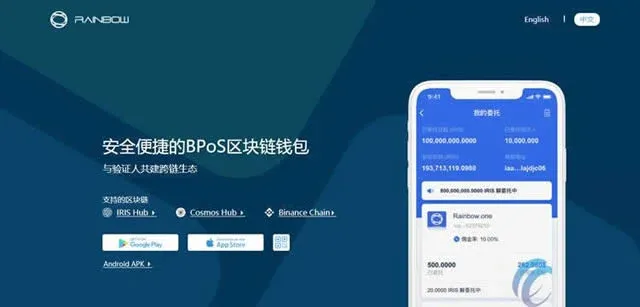
Rainbow is the first lightweight mobile digital wallet built for IRISnet. Compared with traditional wallets, the 2.0 version added support for both the IRIS Hub and the Cosmos Hub, and it also offers staking functionality based on a Bonded Proof‑of‑Stake (PoS) model. Users can directly manage transfers of tokens such as IRIS and ATOM, and they can delegate to trusted validators to participate in network security and governance, thereby earning the associated rewards. For more advanced needs, Rainbow includes both watch‑only and cold‑storage modes, giving users flexible options for asset management.
The application currently provides interfaces in both Simplified Chinese and English, and it supports rapid sharing of multi‑chain wallet addresses via QR codes.
Steps to Send a Red Packet with Rainbow
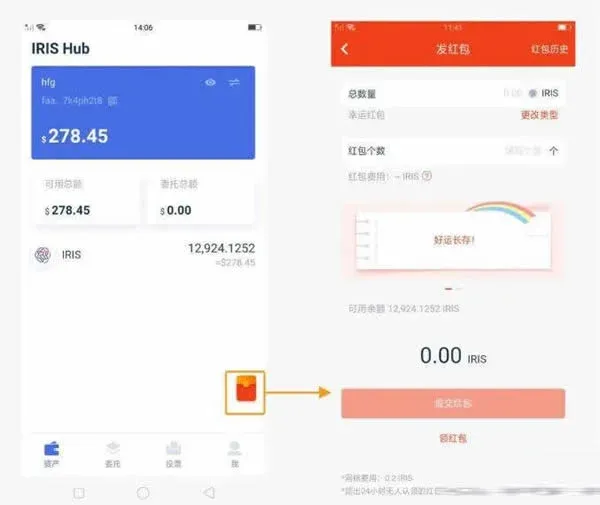
- On the wallet’s home screen tap the Event Red Packet icon to open the creation page;
- Enter the total amount of IRIS you wish to send and specify the number of red packets. You can then use the Change Type button to switch between:
- Lucky Red Packet – each packet receives a random amount of IRIS (you must enter the total amount);
- Fixed Red Packet – each packet receives the same amount (you must enter the amount per packet);
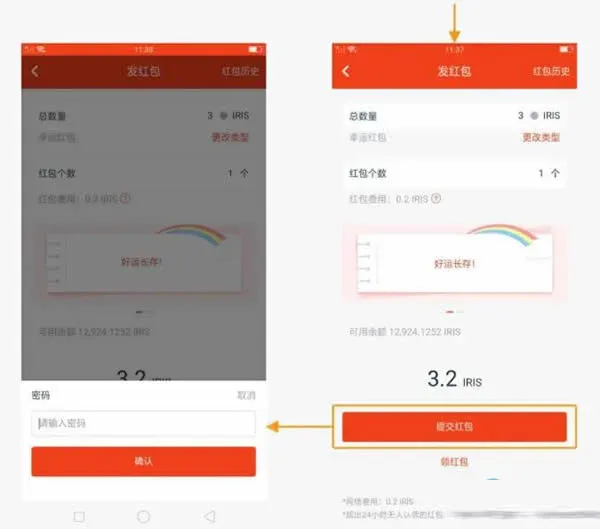
- After confirming the details, tap Submit Red Packet and enter your wallet password to finalize the transaction;
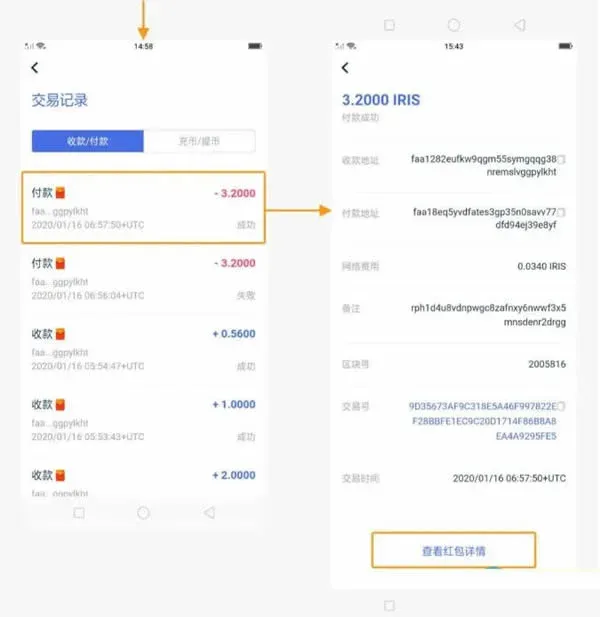
- The transaction history will display a new entry marked with a red‑packet icon; tapping it reveals the full transaction details;
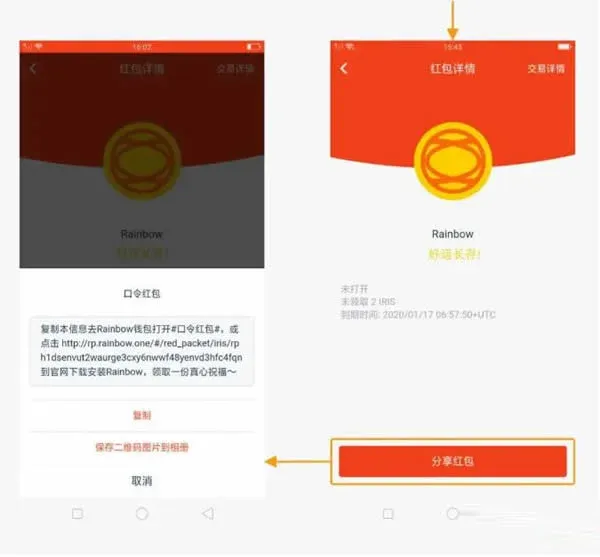
- In the transaction detail view, select View Red Packet Data Bundle to see the number of packets, the total amount, and the expiration time;
- Finally, copy the red‑packet password or save the QR‑code image so you can share the packet information with other users.
Tip: Make sure you leave enough balance to cover network fees. If a single red‑packet transaction costs 0.1 IRIS in gas, sending ten packets will require an additional 1 IRIS as a fee. Keep a small reserve in your account to avoid transaction failures.
Two Ways to Receive a Red Packet
1. Automatic Claim
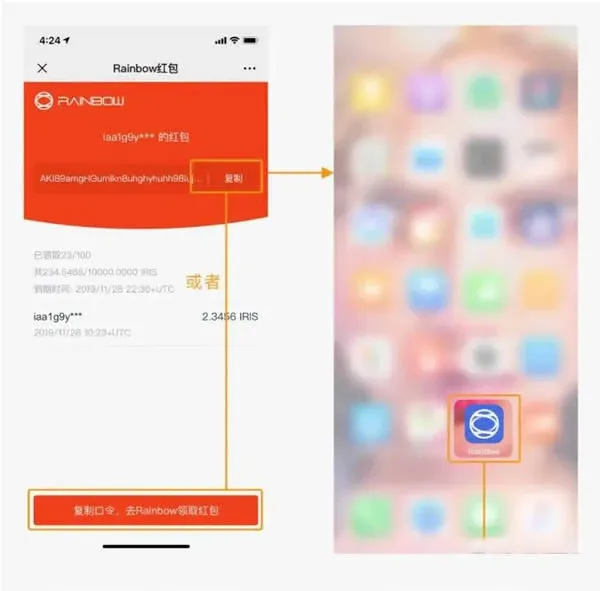
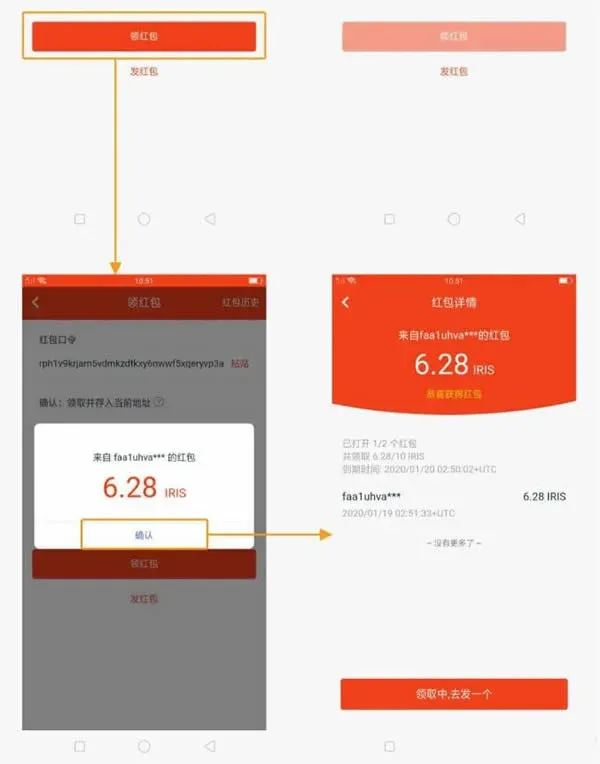
- Copy the received red‑packet password or QR code and open Rainbow;
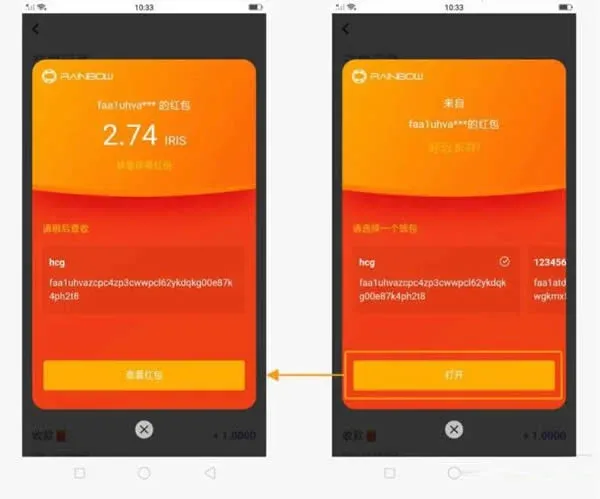
- The app will automatically redirect to the red‑packet claim page, where you select the target wallet and tap Open;
- In the pop‑up window you can view the amount of IRIS contained in the packet;
- Tap View Red Packet to see the exact number of packets, the total amount, and the validity period;
- When finished, tap Claim, Send One to return to the red‑packet list.
2. Manual Claim
If copying the password does not trigger an automatic redirect, follow these steps:
- Open the link you received and copy the red‑packet password inside;
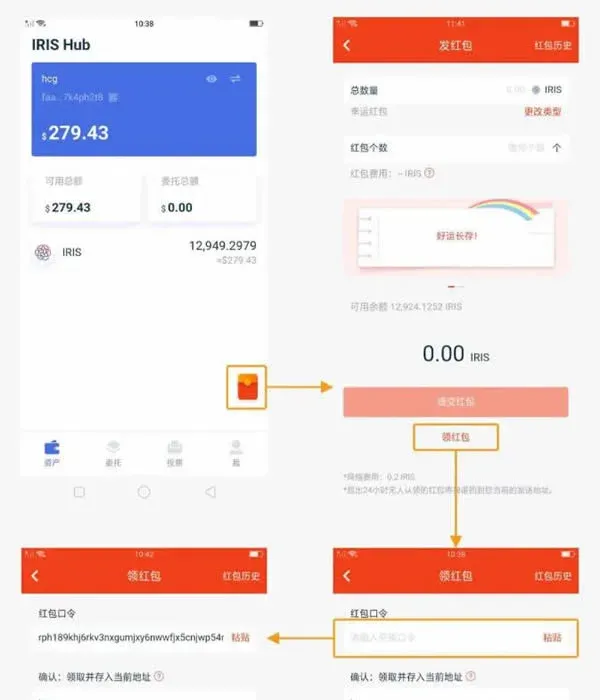
- Launch Rainbow and tap Event Red Packet on the home screen to go to the red‑packet page;
- Scroll to the bottom of the page and tap Red Packet Data Bundle;
- Paste the password you just copied. If you need to change the receiving address, switch wallets on the Assets page before confirming;
- Tap Claim Red Packet; after confirmation the system will display a success message, and you can again tap Claim, Send to go back.
Essential Security Reminder
Whether you create a wallet using the Rainbow app or via on‑chain command‑line tools, immediately back up the 24‑word English mnemonic phrase after the wallet is generated. It is advisable to use the Import Wallet function to verify that the phrase has been recorded correctly. The mnemonic is the sole credential for recovering your assets; any loss or incorrect backup will result in permanent loss of funds.
---
The above constitutes a complete explanation of what the Rainbow wallet is and a step‑by‑step tutorial on how to use it. For additional details and future updates, please follow the relevant sections on the Bitaigen (BitRoot) platform.
Global‑Market Note: When converting any fiat value (e.g., for buying IRIS or covering gas fees) to the local currency, use USD as a reference and consider SEPA or SWIFT transfers where applicable. Users residing in the United States should use Binance.US for any on‑ramp or off‑ramp activities, as the global Binance platform is not available to U.S. residents.
Tax Disclaimer: Crypto‑related gains, including rewards earned from staking or receiving red packets, may be subject to taxation in your jurisdiction. It is your responsibility to consult a tax professional and report any taxable events in accordance with local laws.
💡 Register on Binance with referral code B2345 for the maximum trading fee discount. See Binance complete guide.



