
 Bitaigen Research
 Do you want to try spot or futures trading on the OKX (formerly known as OKEx) platform, but worry that lack of experience could lead to loss of funds?
OKX Demo Trading is built exactly for that purpose. It offers an interface and feature set that is almost identical to the live platform, allowing you to place orders, adjust positions, and monitor profit‑and‑loss on “virtual” assets—completely eliminating the risk to real capital.
This article explains every detail of OKX Demo Trading—from its concept and key features to step‑by‑step usage and practical tips for beginners—so you can get started quickly and build a solid trading foundation in a safe environment.
Our Bitaigen editorial team has carefully prepared this guide to help newcomers become familiar with the OKX interface, order workflow, and leverage operations without any risk. The article systematically outlines the feature highlights, activation steps, and practical practice points, allowing you to build a solid foundation in a zero‑risk environment and rapidly boost trading confidence.
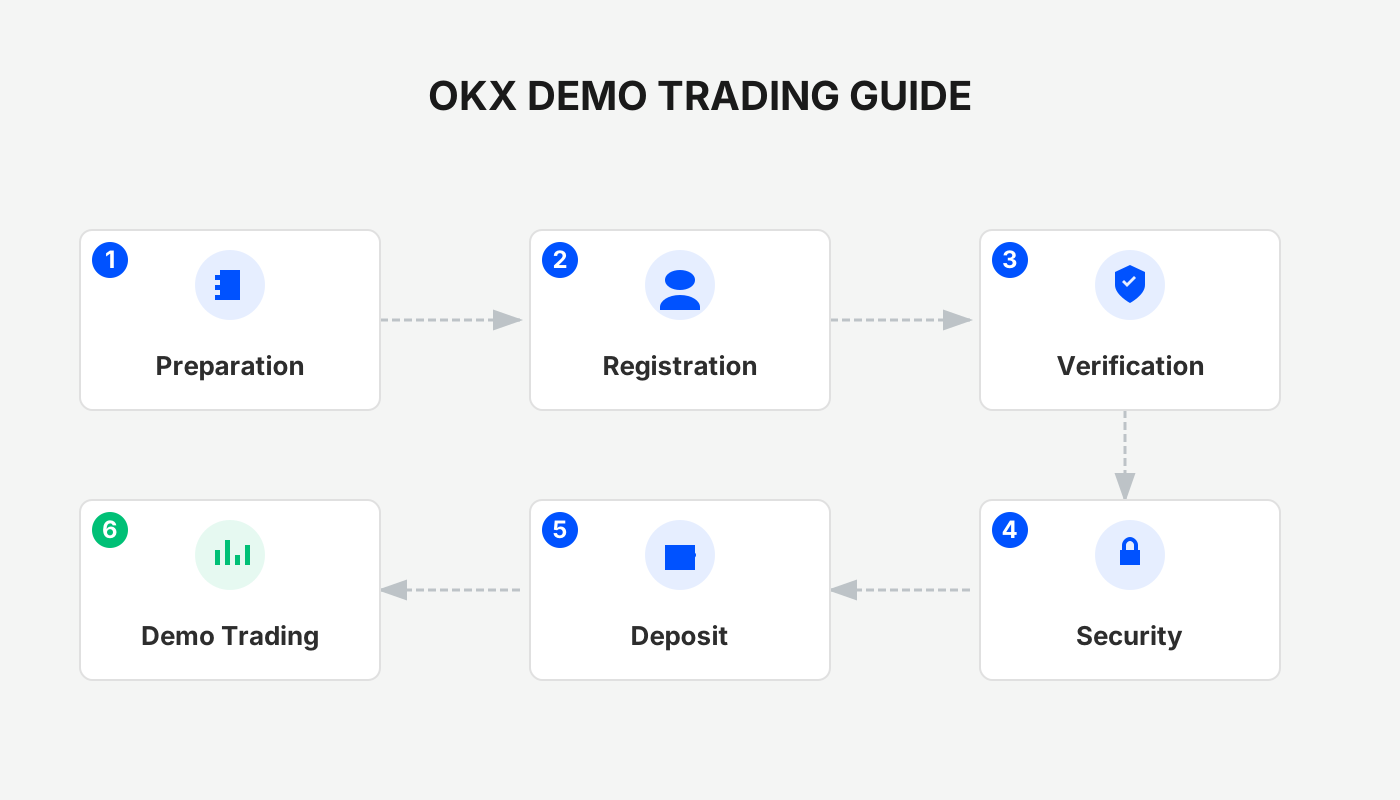
Core Value of Demo Trading and Who It Serves
Why Use a Demo Account?
- Zero‑capital risk: All actions use virtual assets supplied by the platform, so any loss does not affect your real account.
- Realistic feel: The layout of the interface, candlestick charts, order book, etc., mirrors the live environment, helping users become comfortable with every step under “real‑world” conditions.
- Strategy validation: You can test entry/exit rules, stop‑loss settings, leverage usage, and other parameters without spending actual money.
Which Users Are It Suitable For?
| Scenario | Description |
|---|---|
| First time logging into OKX | Get to know the interface and order flow before making a real deposit, ensuring smooth operation. |
| New to futures contracts | Learn concepts such as long/short, margin, liquidation, and see how related data is displayed. |
| Want to validate a trading idea | Use simulated funds to check whether your entry, exit, and stop‑loss conditions are reasonable. |
| Want to develop risk‑control habits | Practice strictly following rules in volatile markets instead of acting on impulse. |
Important: The price movements in the demo environment are not synchronized with the live market; they are intended solely for practice and familiarization, and should not be used as a direct reference for live‑market profit or risk.
Overview of OKX Demo Trading Features
Supported Trading Types
- Spot: Buy, sell, cancel orders, and view asset changes.
- Futures: Long/short direction, margin mode, and leverage adjustment.
- Options: Basic operations such as order placement, strike price, and expiry structure.
- Strategy Trading (Trading Bots): Full workflow for setting parameters and launching a strategy.
- Pre‑market trading: Simulate the trading process of a new token before it officially launches to understand price formation.
The futures demo supports leveraged operations, letting you feel the amplified risk. Copy Trading still requires a live account.
Main Differences Between Demo and Live Trading
| Comparison Dimension | Demo Trading | Live Trading |
|---|---|---|
| Source of Funds | Platform‑provided virtual assets | Real funds deposited by the user |
| Profit & Loss Impact | For learning only; does not affect the account | Directly changes the account balance |
| Psychological Pressure | Almost none | Real gains/losses can cause significant emotional swings |
| Market Data | Simulated quotes, not real‑time matching | Real‑time matching, potential slippage |
| Cost & Fees | Shows “simulated fees” only; no actual deduction | Real fees (trading, funding, etc.) are charged |
Complete Steps to Start Using Demo Trading
1. Prerequisite: Register and Complete KYC
Before you can enter demo mode, you need an OKX account that has passed identity verification. The following guide can help you finish registration and KYC quickly:
2025 Latest Exchange Guide | OKX Account Application + KYC Verification Real‑World Test
Using the referral code in the article also grants a 20 % fee discount and a USD 600,000‑equivalent blind‑box reward.
2. Switch to Demo Mode
Whether you are on the mobile app or the web portal, locate the “Demo Trading” toggle after entering the trading page to switch to the simulated environment. Once switched, the interface, candlestick chart, and order section remain identical to the live platform.
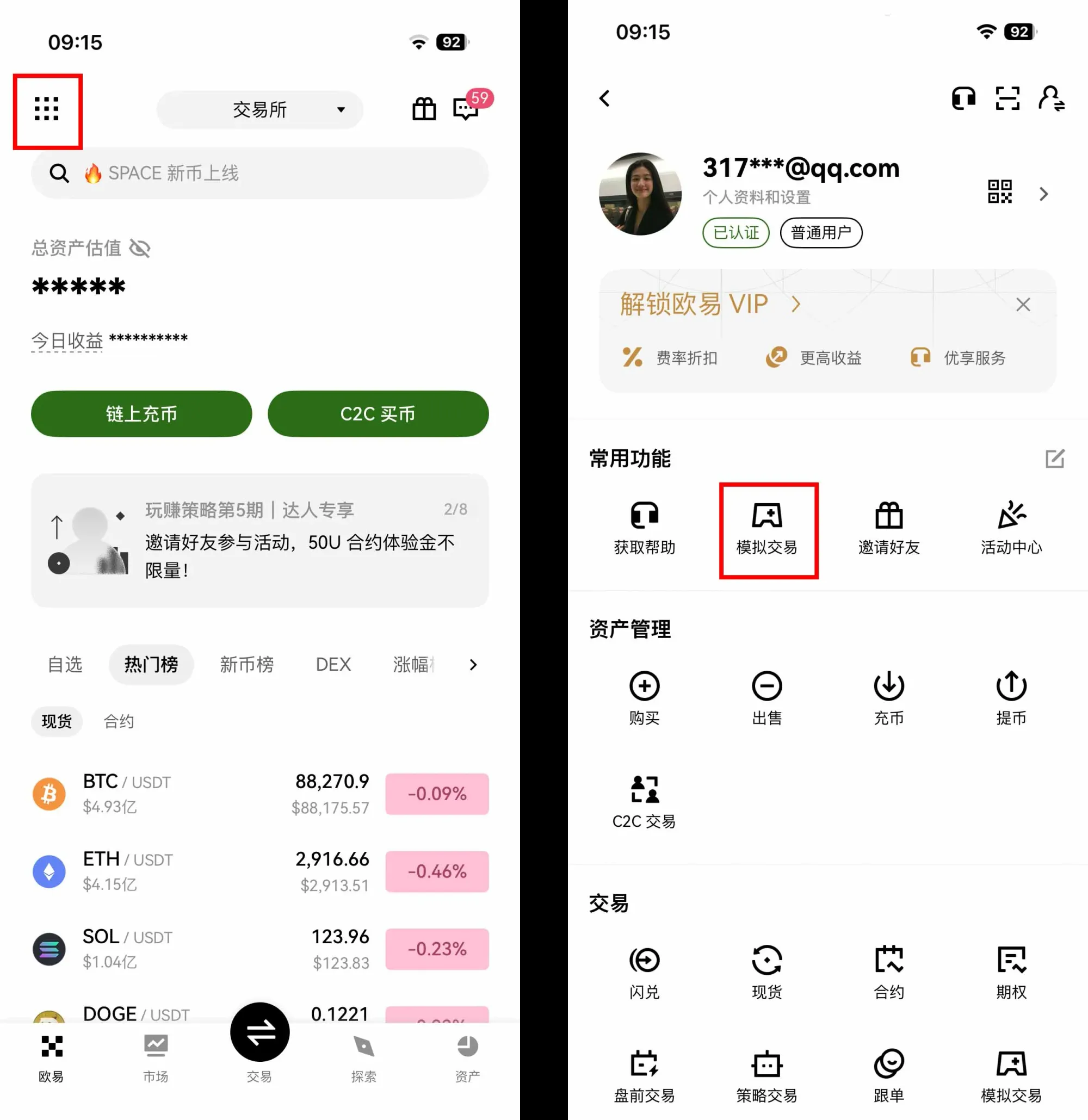
Example Entry on the App
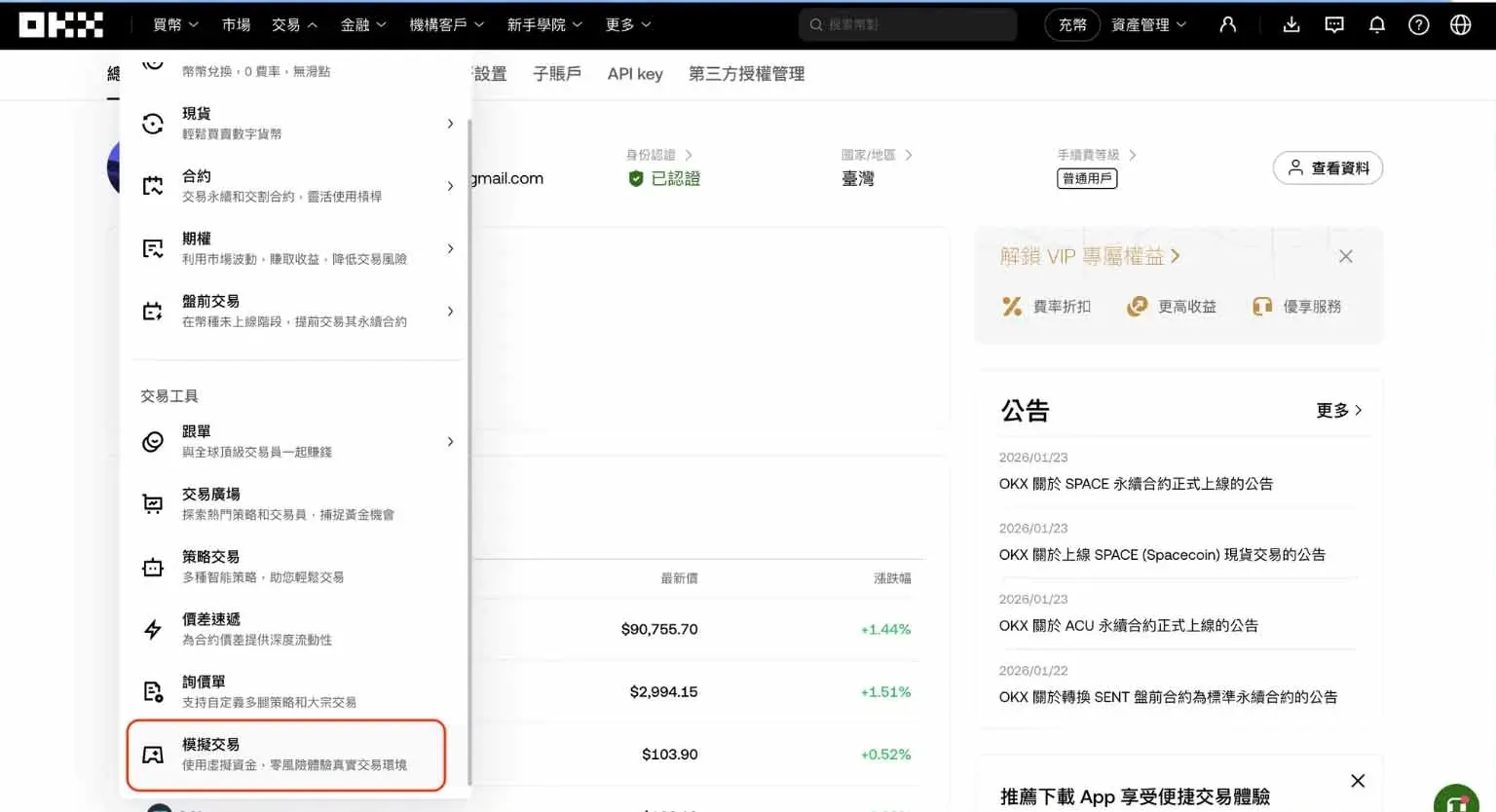
Example Entry on the Web
3. Place Orders in the Demo Environment
After entering the demo market, tap “Trade” to select the product you want to work with (spot, futures, options, etc.). Then follow the same workflow as the live platform to place, cancel, or modify orders. A “Demo Trading” label stays visible in the top‑right corner, and a “Switch back to Live” button is provided to ensure the two modes do not interfere with each other.
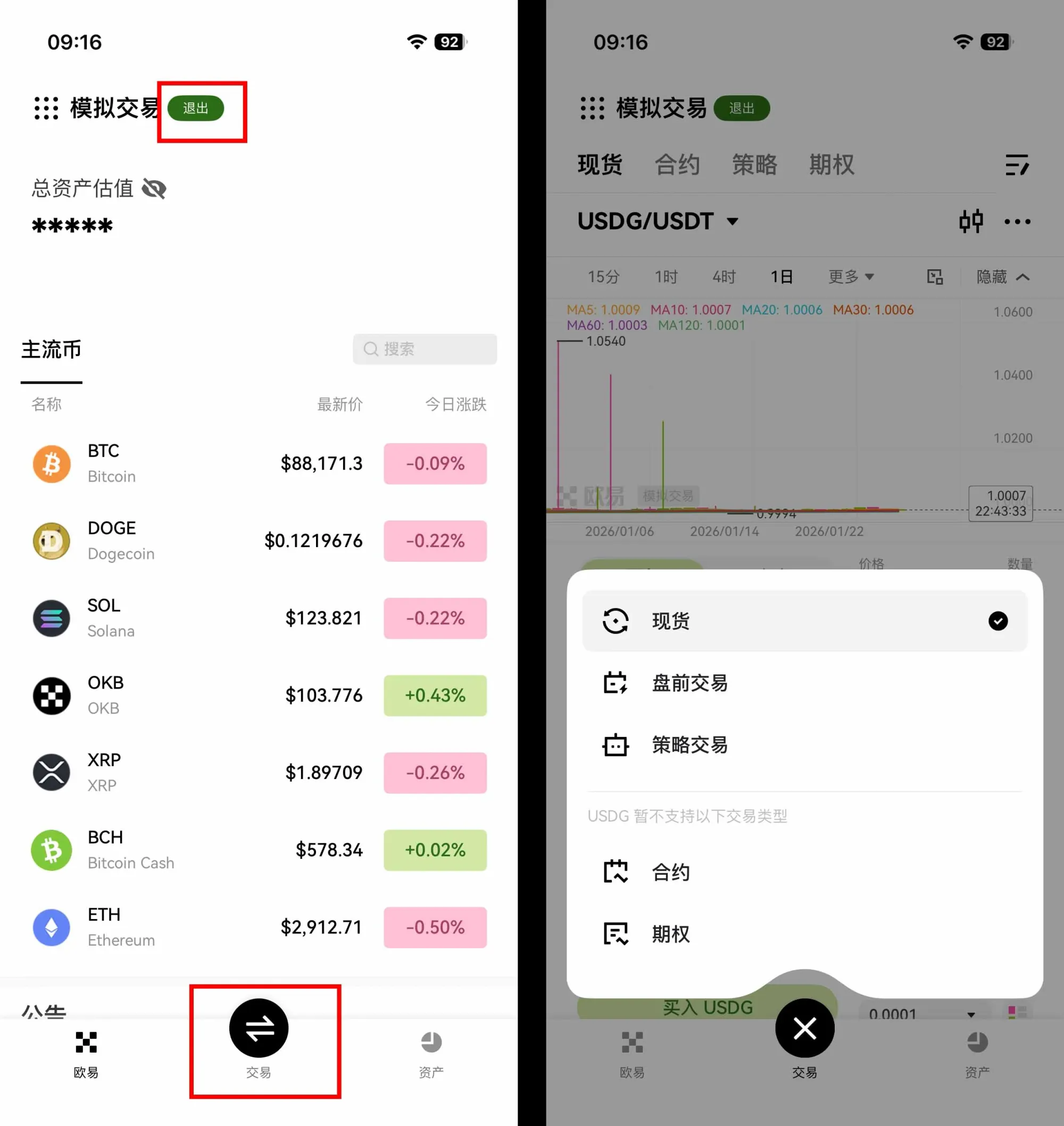
Selecting a Trading Type on the App
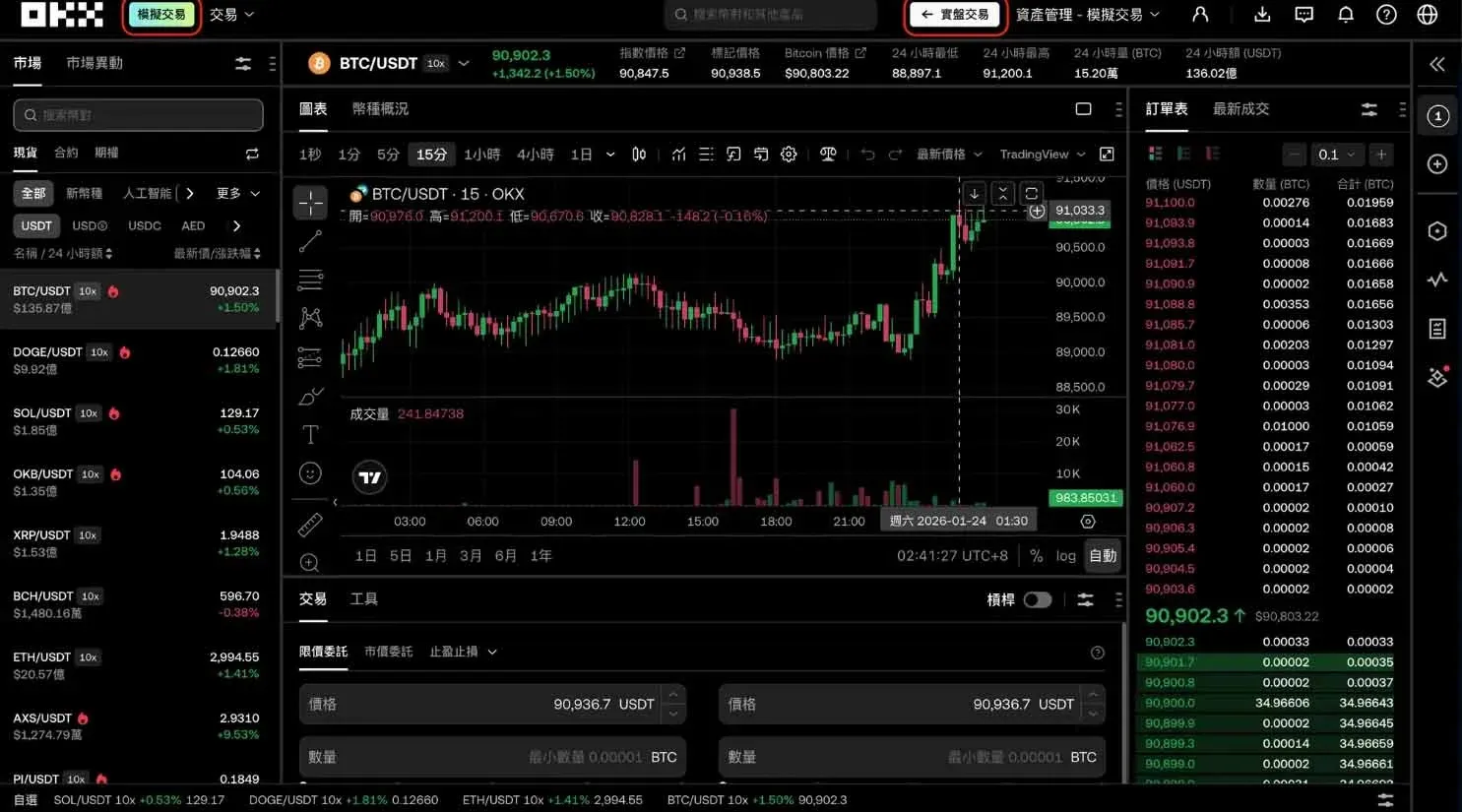
Web Trading Interface
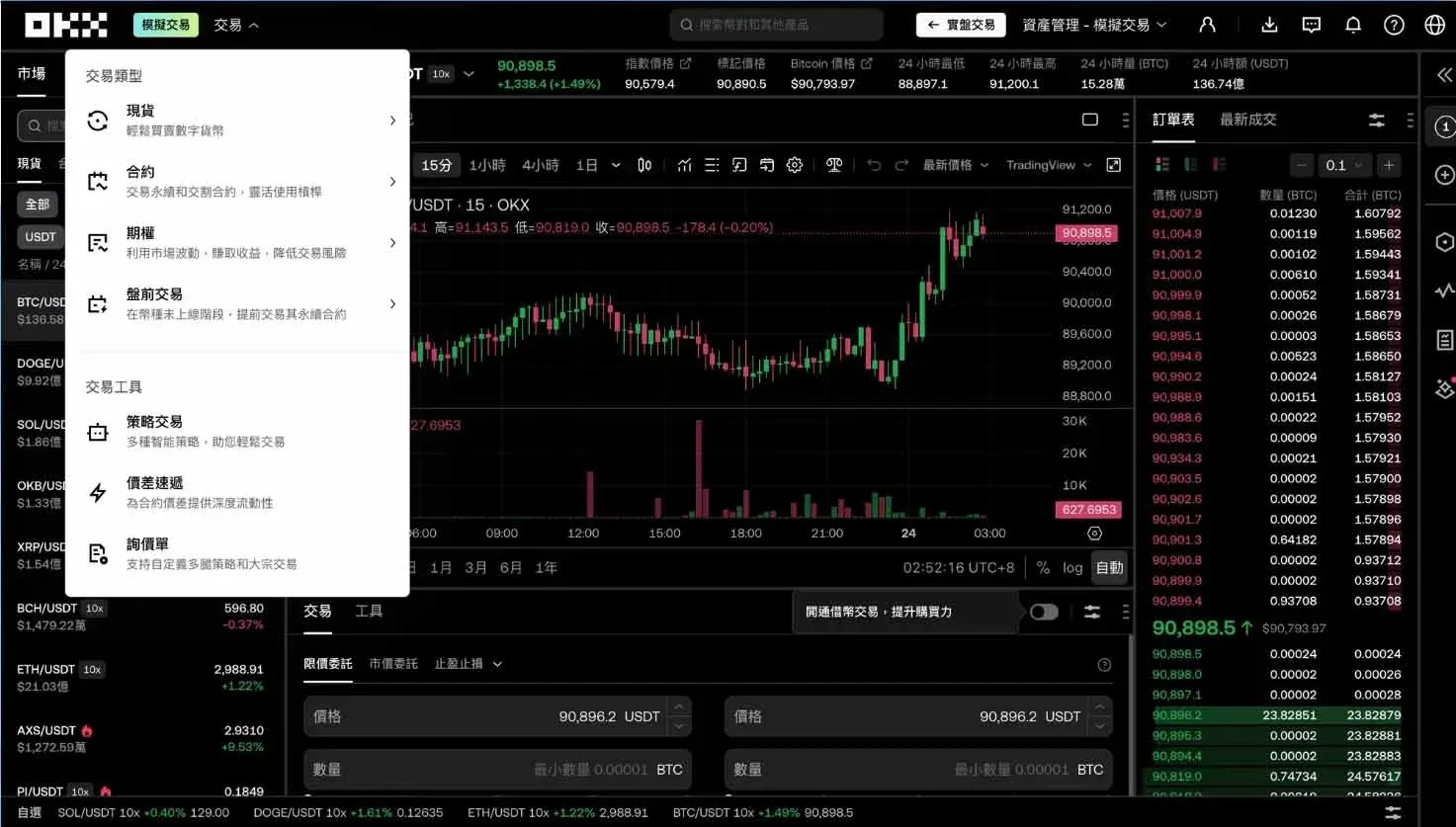
Web Selection of Trading Type
Spot Demo (App Example)
- Choose a trading pair (e.g., BTC/USDT)
- Select order type: Limit (set your own price) or Market (instant execution)
- Enter the quantity and confirm the order
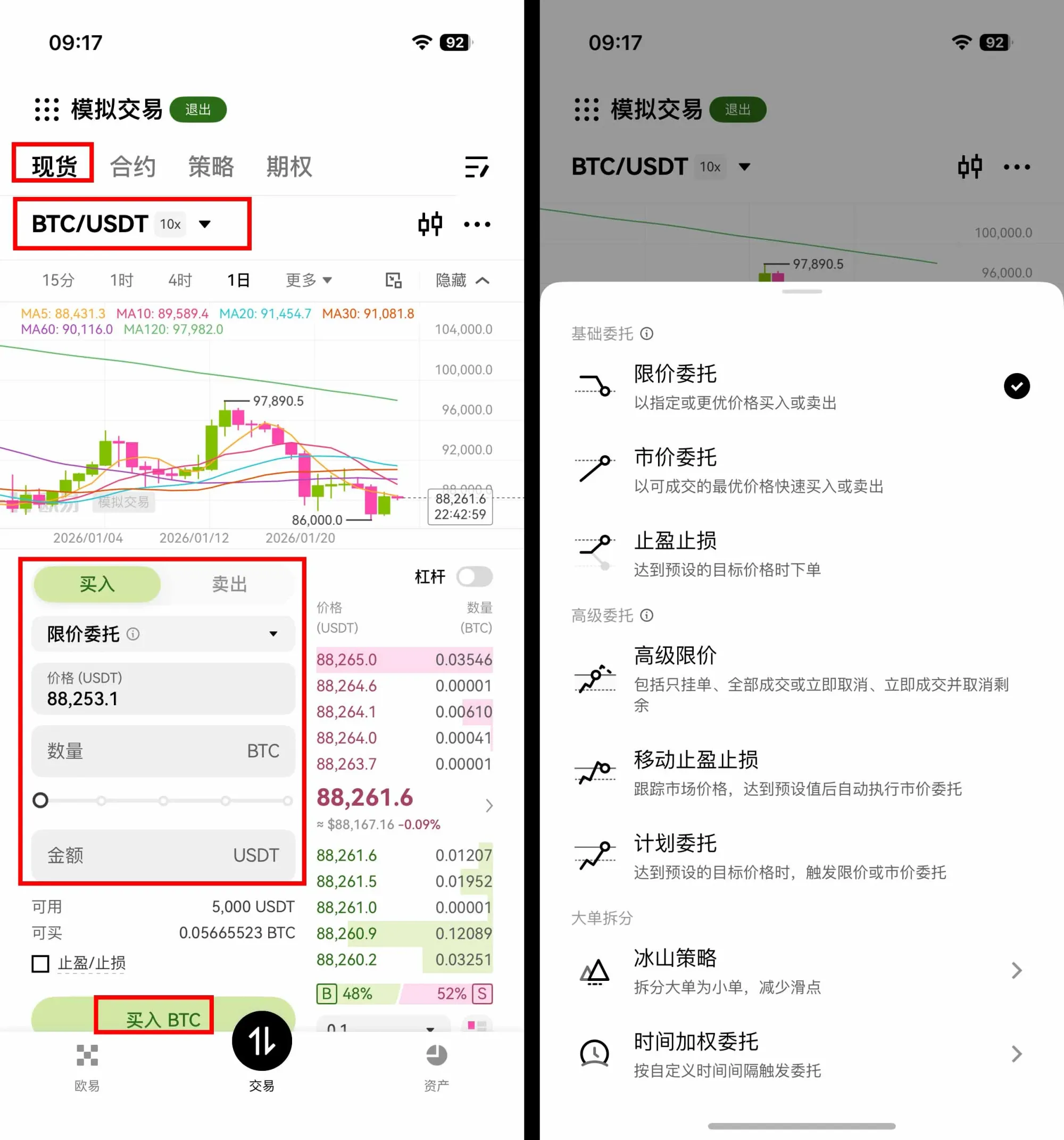
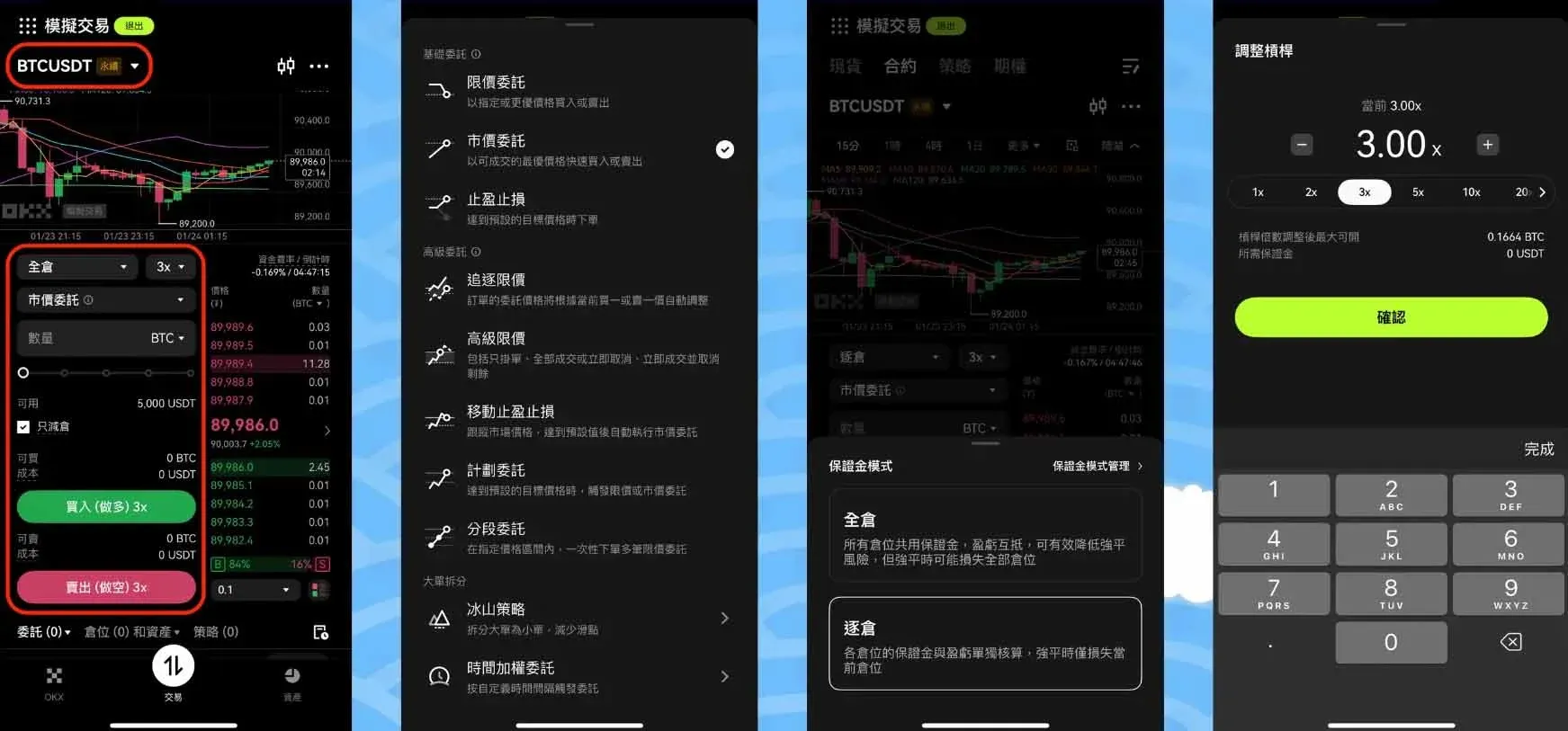
Futures Demo (App Example)
- Choose the contract type (USDT‑margin, coin‑margin, perpetual)
- Select order type: limit or market
- Set the margin mode (cross/isolated) and adjust the leverage multiplier
- Enter the quantity, select direction (long/short), and place the order
4. View and Manage Demo Assets
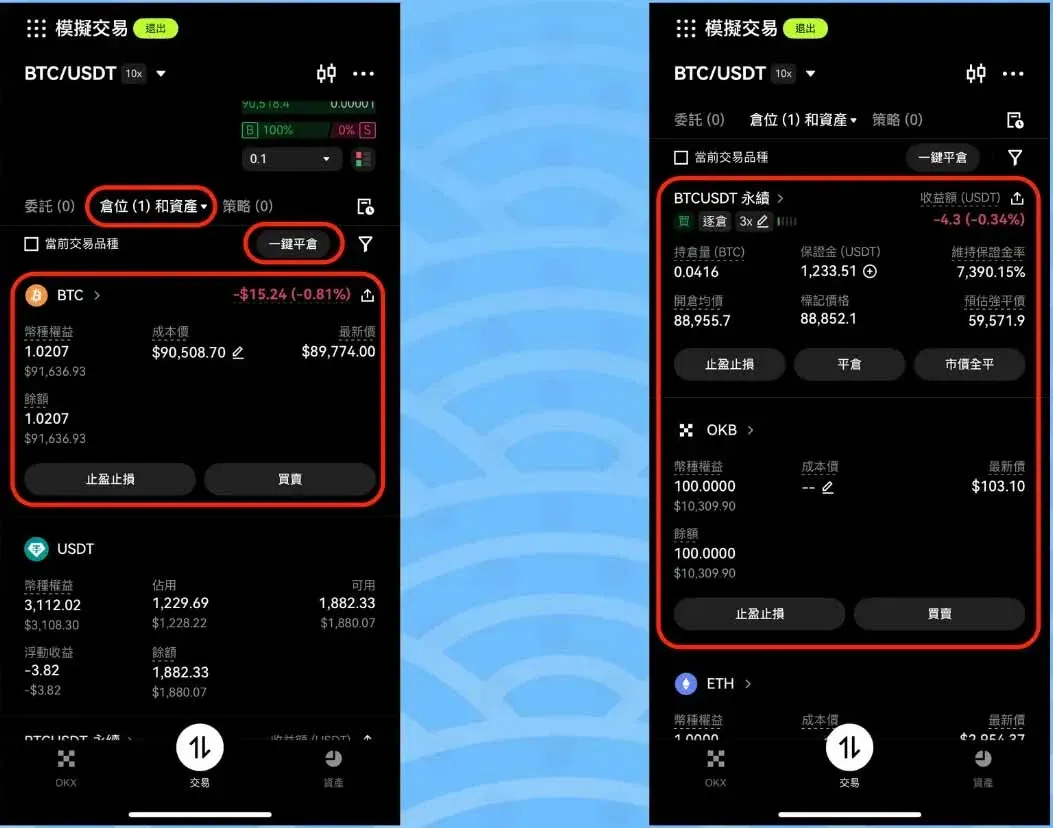
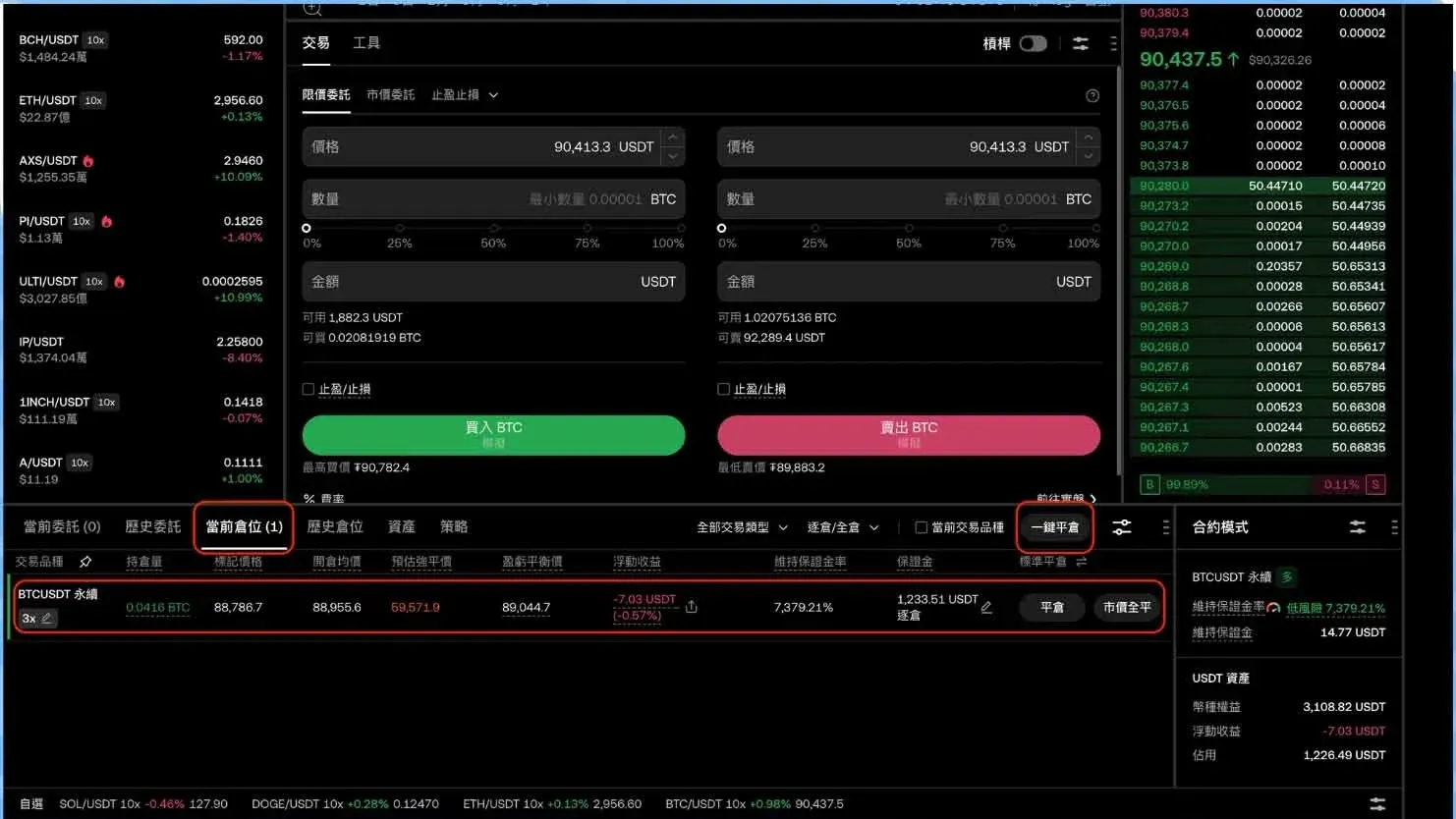
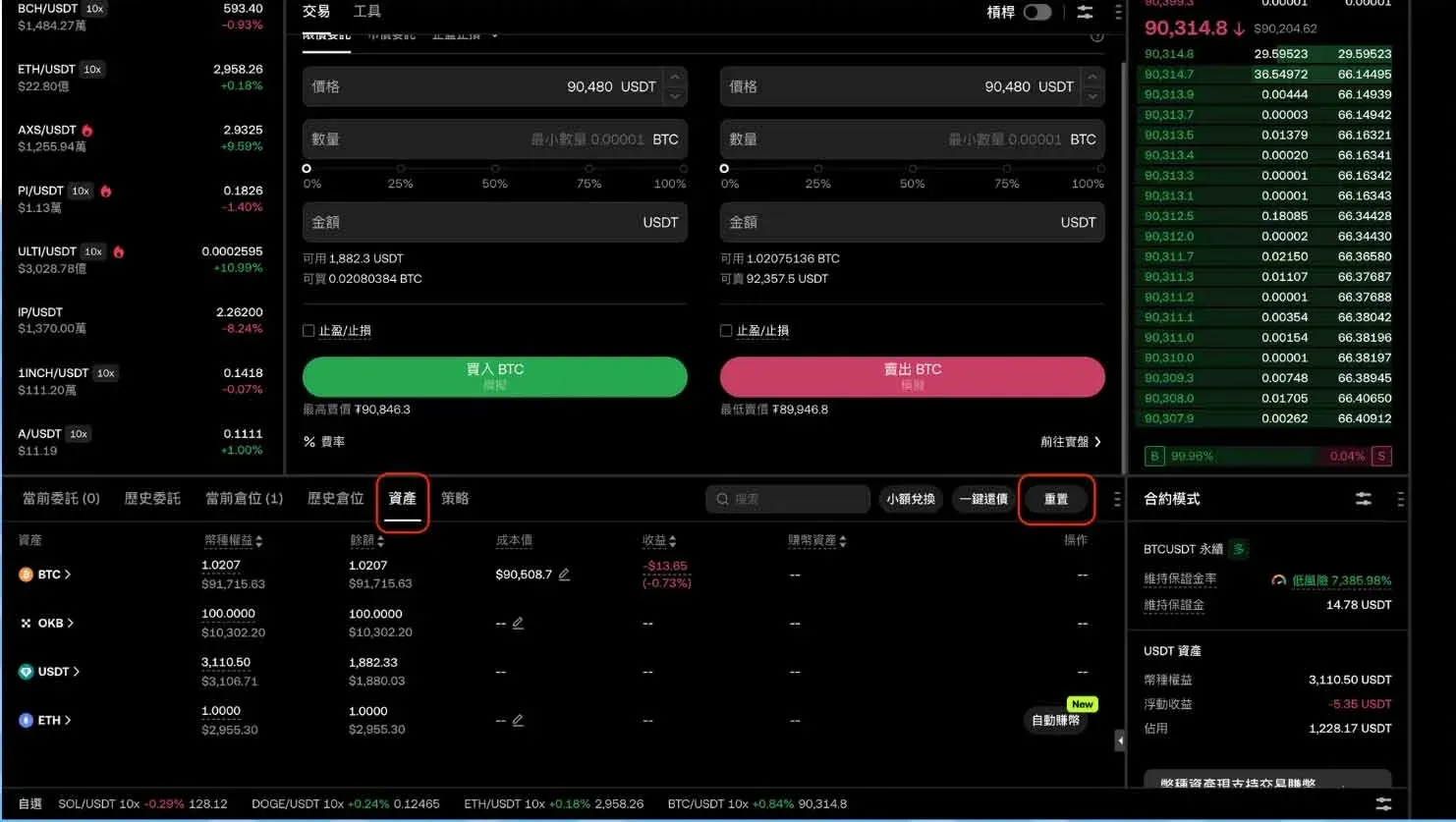
- Check P&L: Swipe up to the “Positions” or “Assets” section on the demo page to see the current simulated profit or loss.
- Quick Actions: One‑click take‑profit, stop‑loss, or close‑position features help you practice risk management.
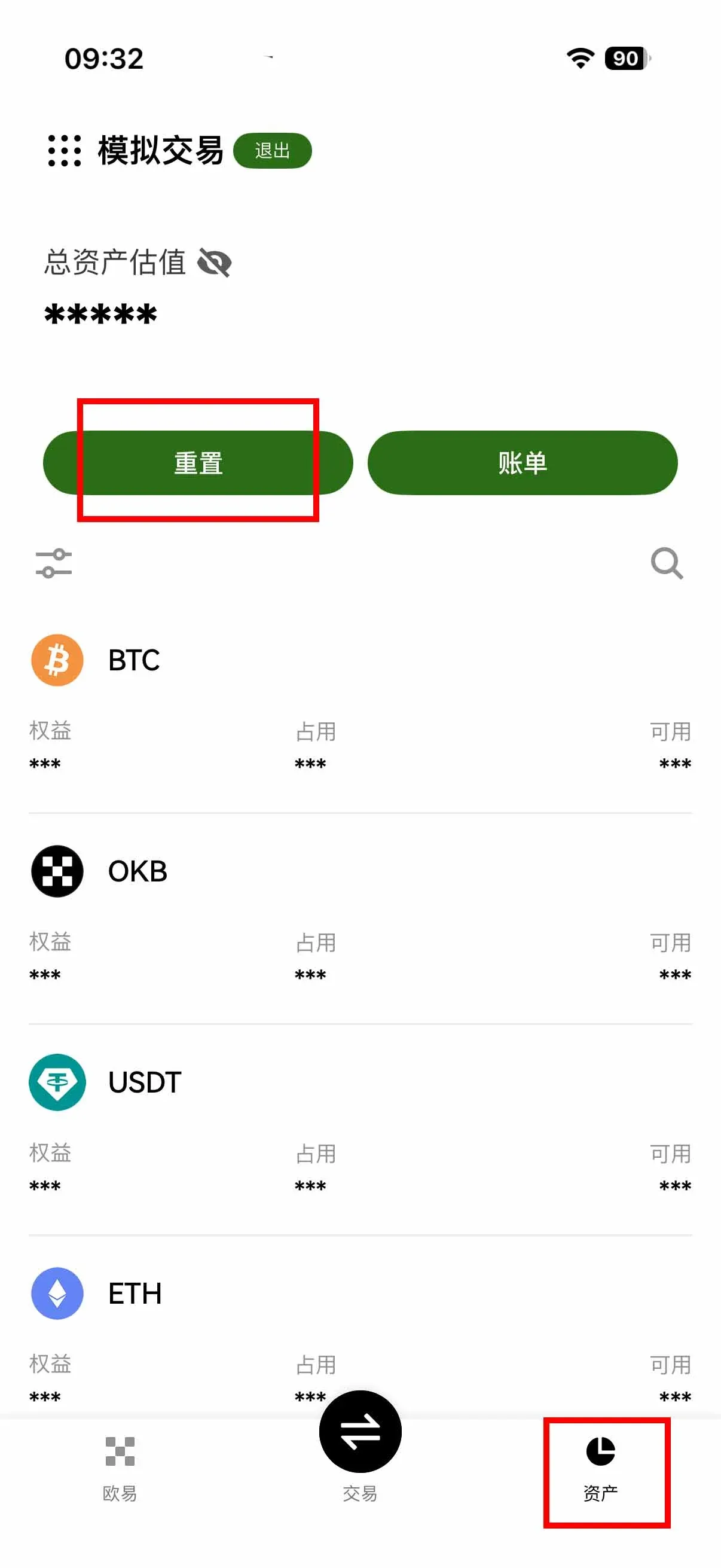
- Reset Assets: If you want to start over, simply tap the “Reset” button on the “Assets” page (provided there are no open positions or pending orders). The system will restore the virtual balance to its default starting amount.
Advantages and Limitations of Demo Trading
| Dimension | Advantages | Limitations |
|---|---|---|
| Risk | Zero capital, zero loss risk – ideal for rapid onboarding | Slippage, execution quality, funding fees, and other costs differ from live trading |
| Cost | No real fees are charged; only simulated fees are shown | Simulated fees are only indicative and cannot replace actual cost calculations |
| Learning Efficiency | Interface and workflow are almost a carbon copy of the live platform, making it easy to practice order placement, cancellation, and position management | The list of tradable pairs may not cover every coin available on the live market |
| Feature Coverage | Supports spot, futures, options, and strategy‑bot products | Some advanced features (e.g., copy trading) still require a live account |
| Asset Management | Assets can be reset at any time for repeated practice | Simulated P&L does not equate to live performance and cannot be used for profit forecasting |
Practical Tips for Beginners Using the Demo
Set Clear Practice Objectives
The demo’s purpose is process validation, not return validation. Consider defining practice tasks in the following categories:
- Pure Execution Practice: Master limit orders, market orders, cancellations, and order modifications to avoid accidental mistakes.
- Risk‑Control Drill: Define entry, stop‑loss, take‑profit, and maximum drawdown rules, then execute them strictly across at least ten consecutive trades.
- Single‑Variable Optimization: Change only one parameter at a time (e.g., stop‑loss distance). After completing 20–30 trades, review the outcomes and gradually improve strategy effectiveness.
Decision Points for Moving from Demo to Live
| Checkpoint | Acceptance Criteria |
|---|---|
| Operational proficiency | Near‑zero errors when placing, cancelling, or adjusting orders. |
| Risk‑control adherence | In the last 30 trades, ≥ 80 % follow your self‑set rules and each trade includes a stop‑loss. |
| Cost awareness | Understand how futures funding rates are calculated and settled, and incorporate them into your strategy. |
| Position sizing | Plan to enter the live market with a small position to test discipline rather than chase profit. |
Four Common Pitfalls
- Treating demo prices as live‑market reference: The two data streams are independent; live trading will involve slippage and different execution quality.
- Only practicing entry, not exit: Ignoring stop‑loss and take‑profit setups leads to emotional decisions in real trading.
- Leveraging aggressively just because the demo feels easy: Real‑world emotions and slippage make high leverage far riskier.
- Skipping record‑keeping and post‑trade analysis: Practicing many trades without systematic review hinders improvement.
Frequently Asked Questions (FAQ)
Q1: Do I need to register an account before I can use demo trading?
A: Yes. Demo trading is a built‑in mode of an OKX account and can only be accessed while logged in.
Q2: Will demo trading affect my real assets?
A: No. Demo assets are completely isolated from real assets; gains or losses appear only in the simulated environment and do not impact live account risk or deposits/withdrawals.
Q3: Can I practice futures contracts in the demo?
A: Yes. The demo supports basic futures functions such as long/short, leverage, and margin modes, which are ideal for learning contract logic. However, execution quality and psychological pressure differ from live trading.
Q4: Are there any fees charged in the demo?
A: No real fees are deducted. The interface may display “simulated fees” to help you understand the fee structure, but no actual charge occurs.
Q5: Is there an expiration date for the demo?
A: No fixed expiration. As long as your account remains active, you can enter demo mode at any time; prolonged inactivity does not deactivate the feature.
Q6: Does the demo provide trade history or analysis reports?
A: The system stores basic order, fill, and P&L records for review, but it does not generate a comprehensive performance report. You may want to keep personal notes or use third‑party analytics tools for deeper analysis.
Q7: What if I run out of demo funds?
A: Simply tap the “Reset” button on the assets page to restore the default starting balance, provided there are no open positions or pending orders.
Closing Thoughts: Demo Trading Is the First Step
For newcomers to cryptocurrency trading or first‑time OKX users, demo trading offers a zero‑risk, low‑cost practice platform. It enables you to master order workflows, trading tools, and risk‑control settings without the fear of real losses, so you can approach live market volatility with confidence.
Remember, the true value of a demo account lies in practicing execution and building discipline, not in predicting or validating actual returns. Once you can consistently follow your own rules in the simulated environment and have a clear understanding of each product’s risk profile, you may consider gradually transitioning to live trading.
If you are ready to take the first live step, refer to the following guide for deposit procedures:
2025 OKX Deposit Process Tutorial | USDT Funding Guide: credit‑card purchases, wallet transfers (using USD via SEPA/SWIFT where applicable).
*Note for U.S. residents: similar fiat‑on‑ramp services are available through Binance.US rather than the global Binance platform.*
Finally, crypto gains may be taxable in your jurisdiction; consult a local tax professional to ensure compliance.
This concludes the article. For deeper analyses of OKX demo trading, search the archives of Bitaigen or continue browsing the related links below. Thank you
Related Reading
💡 Register on Binance with referral code B2345 for the maximum trading fee discount. See Binance complete guide.



