
 Bitaigen Research
 We have compiled the complete end‑to‑end process for depositing and withdrawing Bitcoin in this article, focusing on platform‑specific operational details and security considerations. Using major exchanges as examples, even beginners can quickly get started while avoiding common mistakes. Continue reading to obtain the full step‑by‑step guide for safe and efficient fund movements.
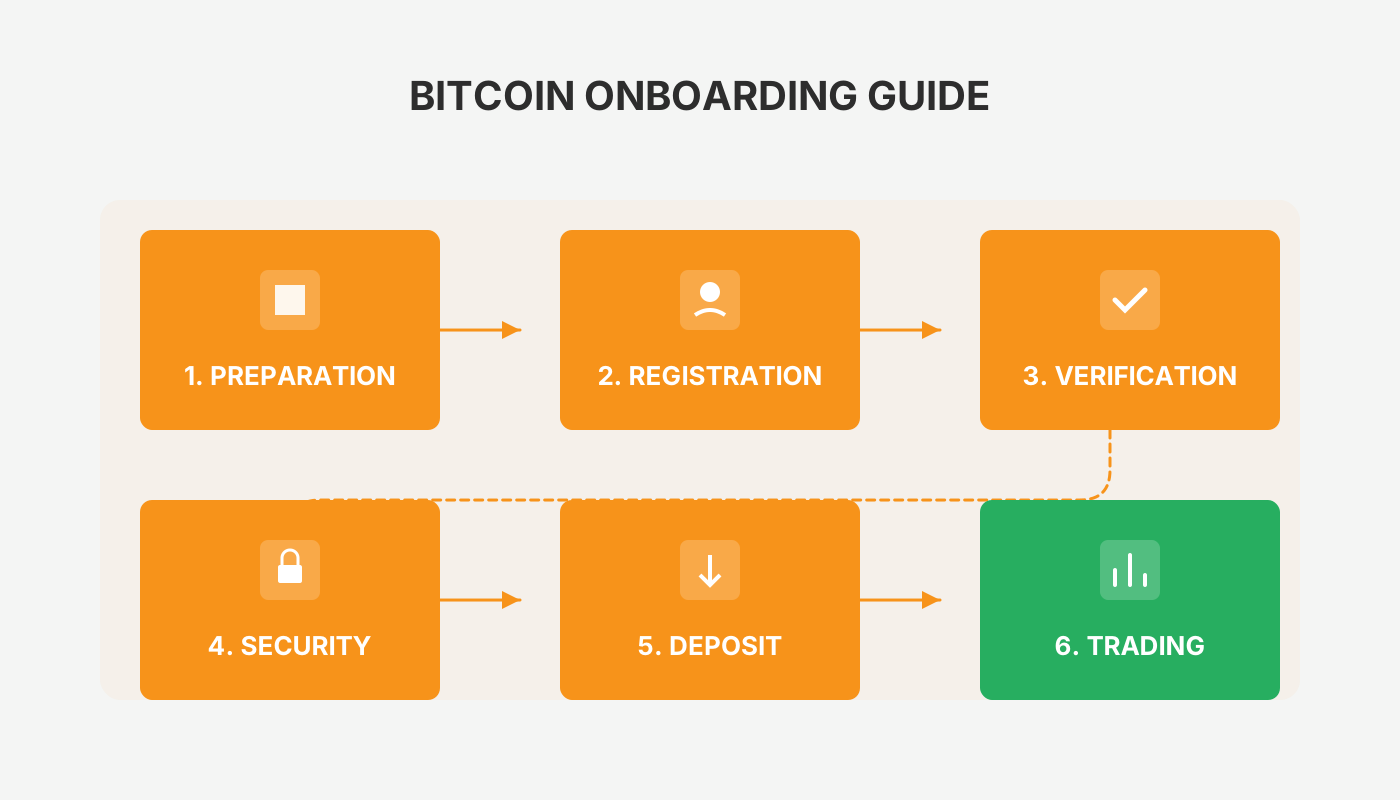
How to Deposit and Withdraw Bitcoin? Bitcoin Deposit & Withdrawal Tutorial
Depositing Bitcoin means transferring Bitcoin from a personal wallet into a exchange account, while withdrawing means sending Bitcoin from the exchange back to a personal wallet. Both actions are performed through the platform’s “Deposit” and “Withdraw” functions.
Bitcoin is one of the most well‑known cryptocurrencies, and many people treat it as an investment asset. After acquiring Bitcoin, users often wonder how to convert it into cash and transfer the proceeds to a bank account. The answer depends on where the Bitcoin is held. As digital assets become more mainstream, an increasing number of users and institutions worldwide accept crypto payments.
Bitcoin Deposit & Withdrawal Procedure
Deposit refers to moving a digital asset from a personal wallet into a trading platform, while withdrawal means moving the asset from the platform back to a personal wallet. Cryptocurrencies are not issued by central banks and are not pegged to fiat currencies, yet because they are accepted by the public they can be used for payments, electronic transfers, storage, or trading.
Bitcoin withdrawal specifically denotes the user sending Bitcoin that resides on the platform to their own wallet to ensure asset safety. Bitcoin is a peer‑to‑peer (P2P) encrypted digital currency that is generated through extensive computation according to a defined algorithm, has a capped supply, and therefore possesses scarcity.
Below we use OKX (formerly OKEx) as a concrete example to demonstrate the full deposit and withdrawal workflow (the tutorial uses USDT as the sample asset; to operate with BTC simply replace USDT with BTC—other tokens follow the same pattern).

OKX trading platform for Android v6.158.1 official Android version
- Category: Banking & Finance
- Size: 376.03 MB
- Language: Simplified Chinese (the app also supports English)
- Last updated: 2026‑02‑11
1. Register
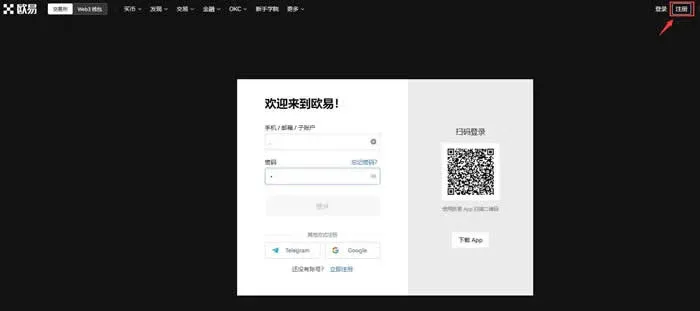
- Open the OKX official website and click the 【Register】 button at the top‑right corner to enter the registration page.
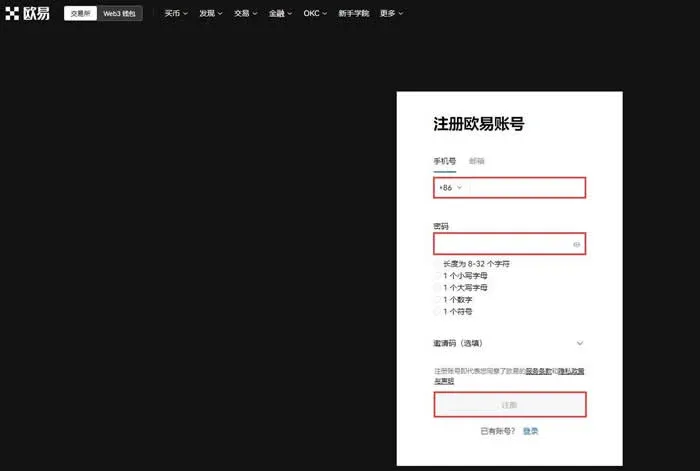
- Choose Mobile‑Number Registration, fill in the phone number and password, then click 【Register】. *(Note: Email registration also requires phone verification; the mobile‑number method is recommended.)*
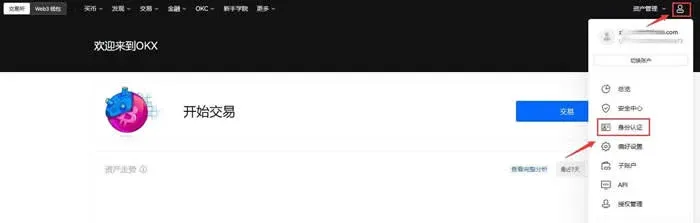
- Complete KYC identity verification before you can trade. Go to Profile → Identity Verification and finish Level 1 Basic, Level 2 Advanced, and Level 3 Video verification in sequence.
Important notes
- Higher verification levels grant access to better counterparties and more favorable fiat‑trading rates.
- The web portal does not support Level 3 video verification; you must use the OKX mobile app for that step.
2. Deposit (Deposit)
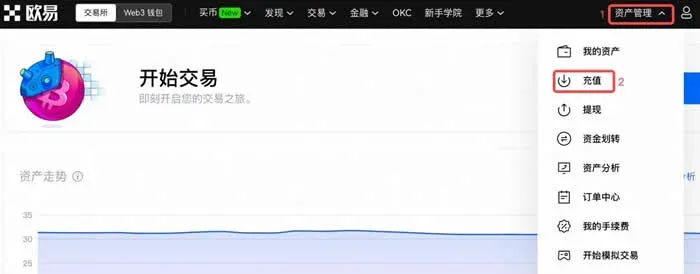
- Using USDT as an example, click 【Asset Management】 → 【Deposit】 at the top‑right corner.
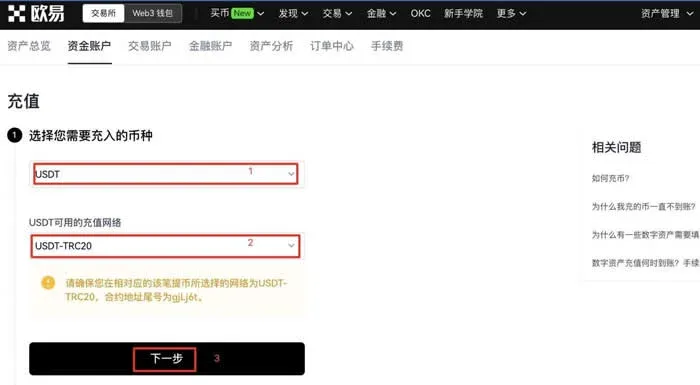
- Select the token USDT, then choose the appropriate deposit network (e.g., USDT‑ERC20, USDT‑TRC20, USDT‑OKC), and click 【Next】. Choose the sub‑account that will receive the funds and then Copy Address.
- In the external wallet or another platform, go to its Withdraw or Send section, paste the address you just copied, enter the amount, and Confirm.
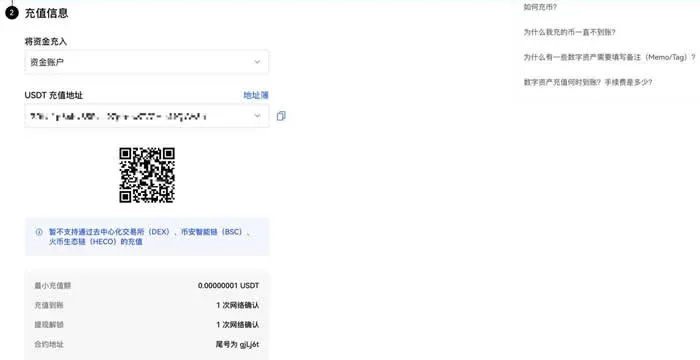
Critical reminder: The deposit network must match exactly. For instance, if OKX is set to USDT‑ERC20, the sending platform must also use the ERC‑20 network; otherwise the assets may be lost.
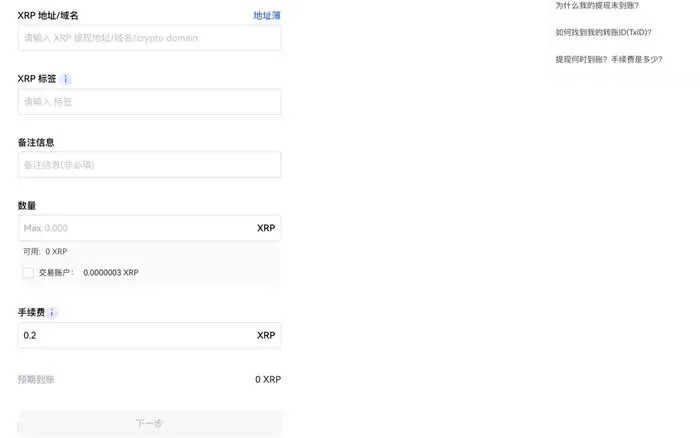
- Certain tokens (e.g., XRP) require an additional Tag (or memo). The tag is typically a numeric string; omitting it will cause the deposit to fail.
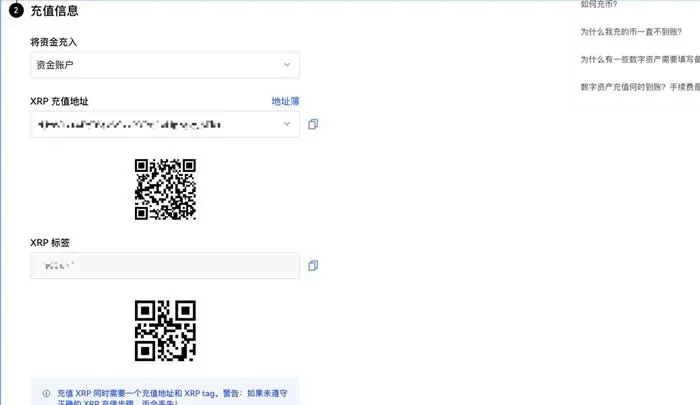
3. Withdrawal (Withdraw)
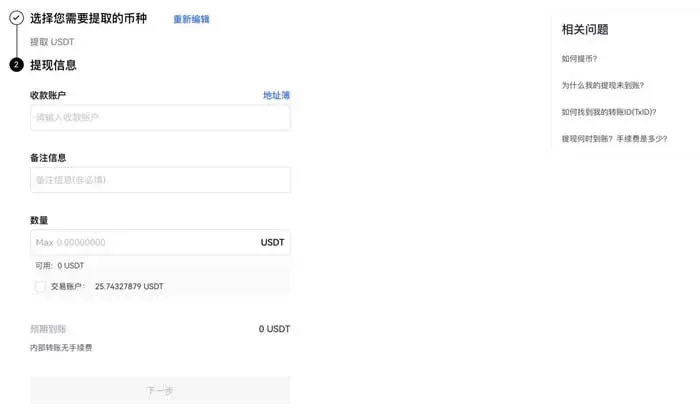
- On‑chain withdrawal: Log in to the website, click 【Asset Management】 → 【Withdraw】, select the token USDT, then choose On‑chain Withdrawal. Using USDT‑TRC20 as an example, click 【Next】.
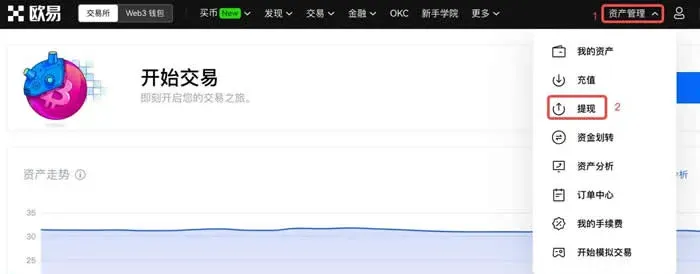
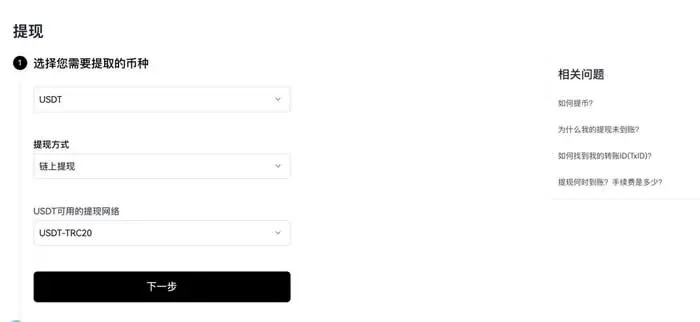
Fill in the USDT address/domain and the withdrawal amount, click Next, follow the prompts to enter your password or verification code, and finally Confirm to complete the transaction.
Note: The withdrawal network must match the receiving platform’s deposit network; otherwise the funds will be irretrievable.
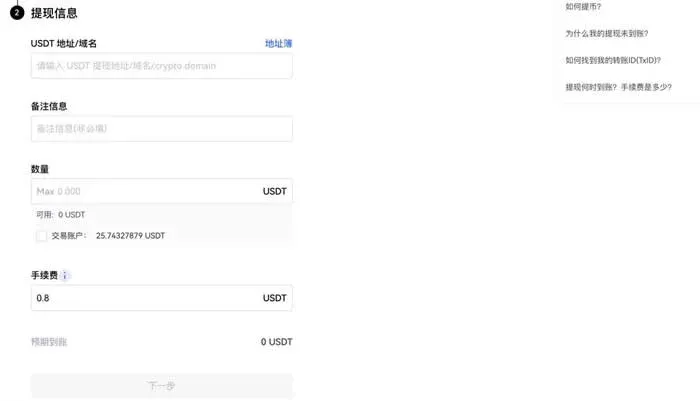
- Internal transfer: On the Asset Management → Withdraw page, choose Internal Transfer, enter the recipient’s account and the amount, complete the identity verification step, and then Confirm.
Friendly tip: Some tokens (e.g., XRP) also require a tag; failing to provide it will result in loss of assets.
What Should You Pay Attention to When Depositing or Withdrawing Bitcoin?
- Deposit: Transfer Bitcoin from another wallet or platform into your exchange account so you can trade or receive payments.
- Withdrawal: Transfer Bitcoin from the exchange back to your personal wallet or to another exchange.
Bitcoin is fundamentally a cryptographic digital asset; each wallet is associated with a pair of public keys (addresses) and private keys (signing credentials). The address functions like an account number, and it must be entered correctly for a successful transfer. Bitcoin operates on a decentralized peer‑to‑peer network, meaning transactions occur without third‑party intermediaries. Although Bitcoin remains the flagship cryptocurrency, blockchain technology now spans supply‑chain management, finance, identity verification, and many other sectors.
The above constitutes the complete guide to depositing and withdrawing Bitcoin. For further reading and updates, follow Bitaigen (比特根) and its subsequent articles.
Tax disclaimer: Cryptocurrency gains may be subject to taxation in your jurisdiction. Consult a local tax professional to understand your reporting obligations.
US‑specific note: Users located in the United States should access Binance via Binance.US rather than the global Binance platform to remain compliant with local regulations.
---
Related Reading
- Fix Bitcoin Withdrawal That Freezes Bank Card
- Mobile Mining: Safe Apps, Risks & Step‑by‑Step Guide
- Buy USDC on Binance: CNY C2C or USDT Swap Guide 2026
💡 Register on Binance with referral code B2345 for the maximum trading fee discount. See Binance complete guide.



