
 Bitaigen Research
 How to Use the Hyperpay Wallet?
When using the Hyperpay wallet, first download and open the app. After creating a new account or importing a recovery phrase, select the desired blockchain or DApp on the main screen to send, receive, and manage your assets.
We have compiled a complete step‑by‑step guide for getting started with the Hyperpay wallet. From downloading and installing the app, to creating or importing an account, switching networks, and interacting with DApps, each operation is illustrated with screenshots to help beginners quickly master the essentials of asset transfers and management. If you want to save time, avoid common pitfalls, and get up to speed fast, continue reading the full tutorial.
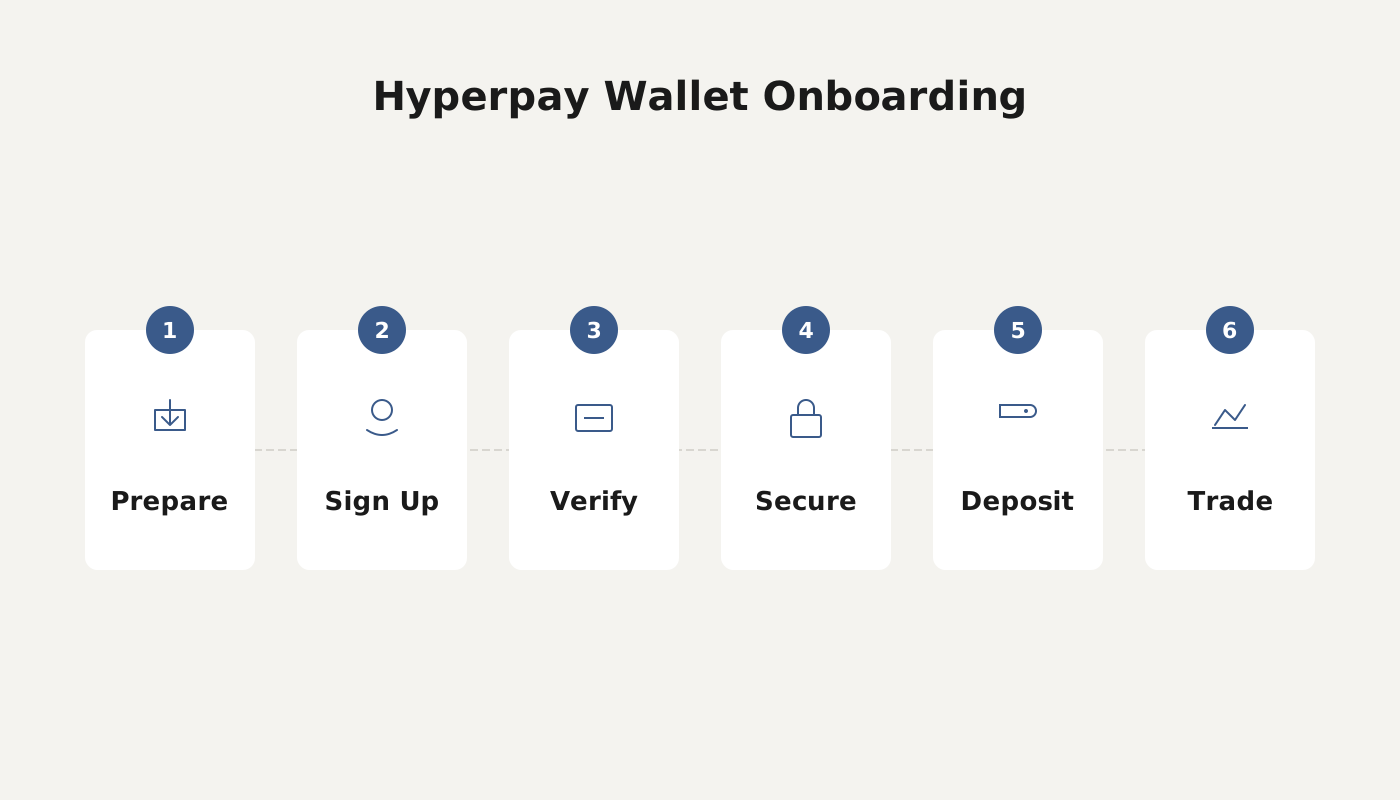
Tutorial
1. Open the Hyperpay Wallet
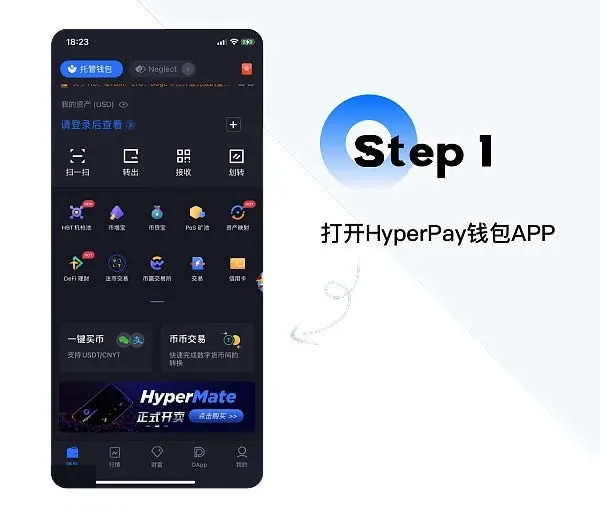
2. Go to the DApp Tab
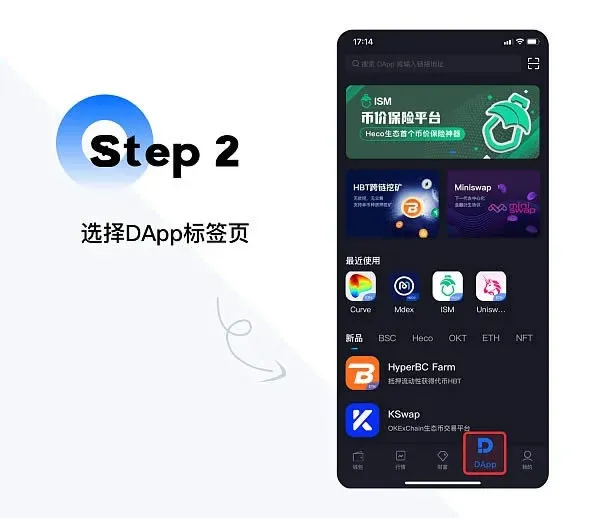
3. Choose the OKT Category
4. Create an OKT Wallet
A prompt will appear asking you to create an OKT wallet.
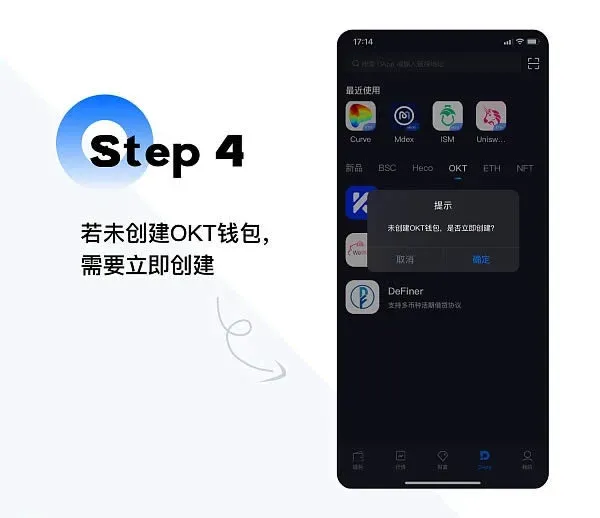
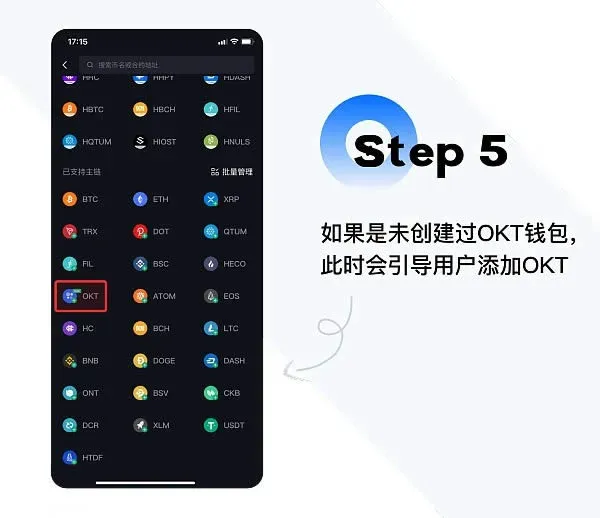
5. Finish Creation and Access the OKExChain Project
Once the wallet is created successfully, you can use all OKExChain‑related functions directly within the app.
Special Note: The Settings center has moved to the top‑left corner of the main interface; tap the gear icon to enter.
- Language Settings: On first login the language matches your device’s system language automatically. After logging in you can manually switch it via the top‑right “Settings → Language” menu.
- Password Management: Login password, PIN, and transaction password can all be changed in the Settings center.
- Biometric Authentication: After enabling fingerprint or Face ID, you may use the corresponding biometric trait instead of a password to log in.
- Device Switch: When changing to a new phone, you will need to enter a SMS verification code to complete the validation. To protect your assets, it is recommended to use a unique, complex password and to keep your passwords, verification codes, and email information secure.
Core Functions
- Basic Wallet Functions – Securely store and send blockchain assets.
- Financial Derivative Functions – Offer flexible digital‑asset wealth‑management products to help grow your holdings.
- Trading & Liquidity Functions – One‑click binding to exchanges (e.g., CoinW, HPX) with fee‑free deposits and withdrawals.
- Payment Application Functions – Off‑chain wallet‑to‑wallet transfers settle instantly and incur no fees.
- Other Utilities – Query token information from hundreds of exchanges, compare market data, and support rapid off‑chain sending/receiving for users.
Product Highlights
| No. | Feature Overview | Key Details |
|---|---|---|
| 1 | **On‑Chain Wallet** | Supports **ERC‑20** and **BTC**; private keys are self‑custodied, ensuring anonymity and security. |
| 2 | **Off‑Chain Wallet** | Supports 110+ mainstream digital assets, built on **Qtum**, **NEO**, **ETH**, and other major chains; peer‑to‑peer transfers settle in seconds with zero fees. |
| 3 | **Financial Derivative Services** | Includes four investment products: PoS mining pool, token‑increase vault, lock‑up, and short‑term wealth‑management, catering to diversified needs. |
| 4 | **One‑Click Exchange Binding** | The new version will open direct in‑wallet trading capabilities. |
| 5 | **Market Features** | Covers market‑cap rankings for 227 coins across 100 exchanges; users can set price alerts, view top‑gainers and losers, sync wallet balances, add favorite trading pairs, and sort them in multiple dimensions. |
The official team has announced that a new Hyperpay version is imminent, adding in‑wallet direct trading, co‑managed digital‑asset accounts for small‑to‑medium organizations, and a Korean language edition.
Security Recommendations
- Private‑Key Management: Never share your private key with anyone. It is advisable to store it offline on a personal USB drive rather than in the cloud.
- Separate Keystore and Password: Keep the Keystore file and the login password in different locations; even if the Keystore is stolen, without the password it remains extremely difficult to crack.
- Anti‑Theft Practices: Regularly audit device security, enable fingerprint or Face ID login, use complex passwords, and change them periodically.
The above constitutes the complete usage guide for the Hyperpay Wallet. For more Hyperpay tutorials and related articles, feel free to follow Bitaigen (比特根).
*Note for global users*: When dealing with fiat on‑ramps or off‑ramps, Hyperpay supports USD transactions via SEPA/SWIFT where applicable. Users located in the United States should use Binance.US for any exchange‑related activities, as the global Binance platform is not available to them. Crypto gains may be subject to taxation under local jurisdiction; consult a tax professional for advice.
Related Reading
- Complete Guide to Using the OKX Web3 Wallet – Setup, Reset & Import
- Send & Receive Crypto Transactions with Modern Wallets
- BRD Wallet: Download, Install, Features & Security Guide
💡 Register on Binance with referral code B2345 for the maximum trading fee discount. See Binance complete guide.



