
 Bitaigen Research
 In this article we provide a step‑by‑step walkthrough of how to complete the LEND‑to‑AAVE migration using the imToken wallet. We cover the navigation path, authorization steps, and fee considerations, helping token holders switch smoothly while avoiding common mistakes. If you want the full process and practical security tips, keep reading.
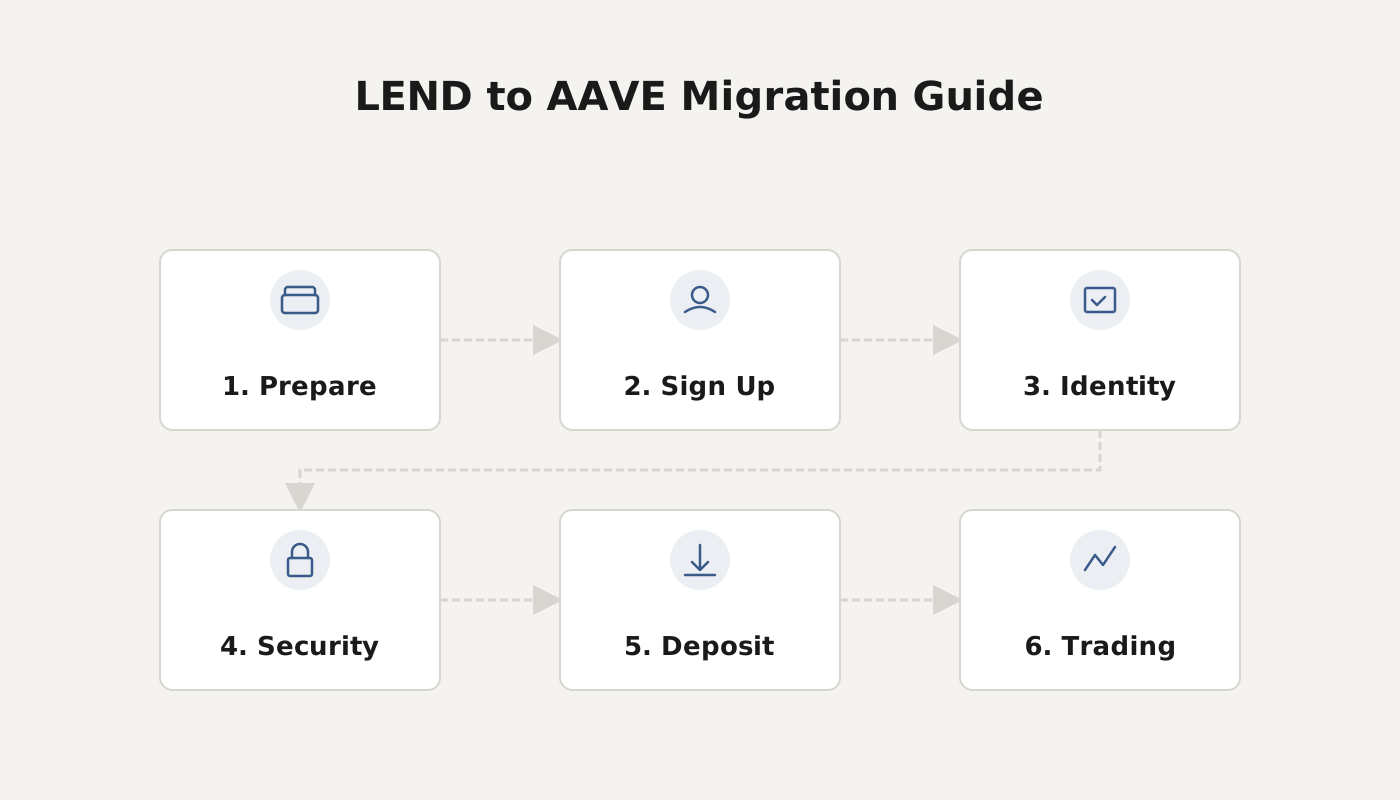
How to Migrate LEND to AAVE in the imToken Wallet
In the imToken wallet, open the Aave page → go to the Migration Portal → authorize the LEND transfer → click Upgrade and pay the miner fee. This will exchange LEND for AAVE at a ratio of 100 : 1.
The DeFi lending protocol Aave has launched a new governance framework on the Ethereum mainnet and opened the LEND‑to‑AAVE migration on October 3. The migration ratio is 100 : 1, meaning each 100 LEND can be exchanged for 1 AAVE. The total supply of AAVE is 16 million tokens, of which 13 million come from the LEND migration and the remaining 3 million are reserved for ecosystem development.
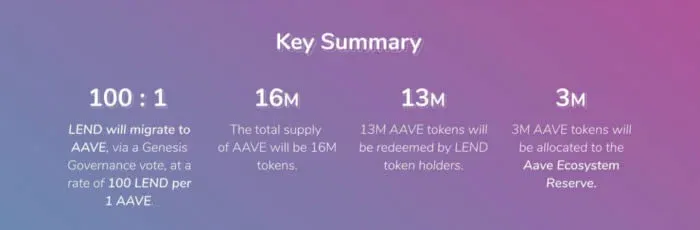
AAVE contract address: `0x7Fc66500c84A76Ad7e9c93437bFc5Ac33E2DDaE9`
Please note: When trading on decentralized exchanges (DEXs), always verify the contract address to avoid buying counterfeit tokens.
Migration Steps
- Open imToken
- In the imToken Browse tab’s search bar, type Aave, tap the result, and select “Aave”.
- If you have not installed the imToken app, you can download it below:
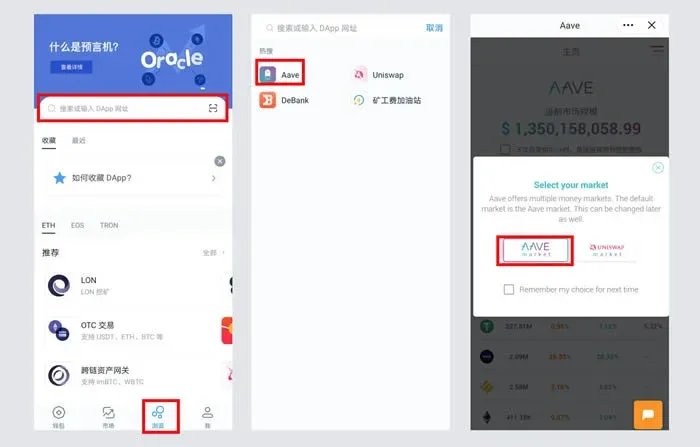
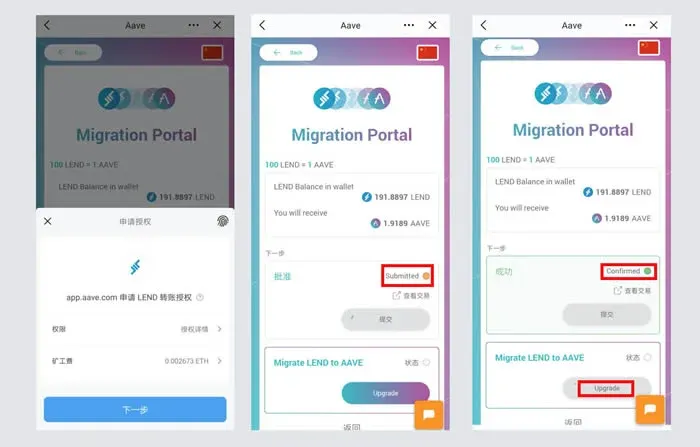
- Enter the Migration Portal
- Tap the menu icon in the top‑right corner and choose Migration Portal. The screen will display the amount of LEND held in your wallet and the amount of AAVE you will receive after migration, with the same 100 : 1 exchange rate.
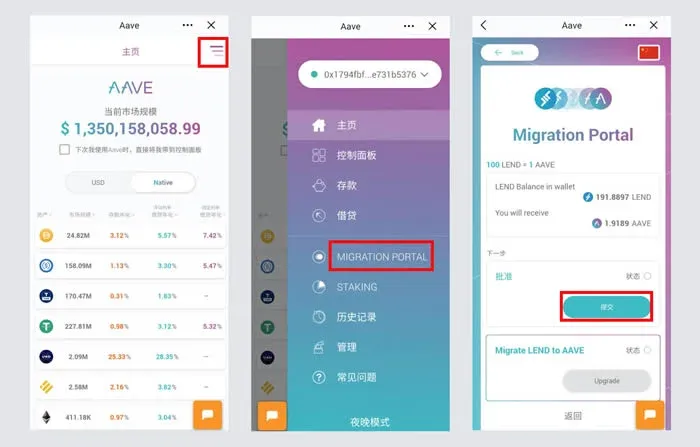
- Authorize and Submit the Migration
- Press Submit to authorize the transfer of LEND. Once the authorization transaction status changes from “Submitted” to “Confirmed”, click Upgrade and pay the required miner fee to complete the migration.
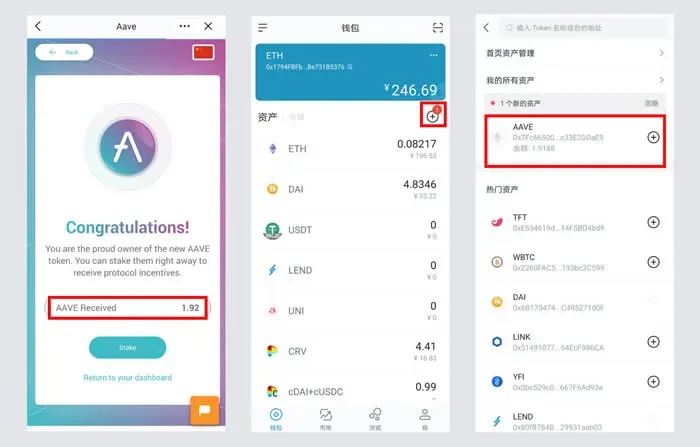
- Confirm and View Your Assets
- After a successful migration you will see a “Congratulations!” message together with the amount of AAVE obtained. Return to the wallet’s asset screen to see the newly added AAVE balance. If the token does not appear automatically, tap the “+” button and manually add the AAVE token by its contract address.
Frequently Asked Questions
| Question | Answer |
|---|---|
| **What is the migration ratio?** | 100 LEND = 1 AAVE |
| **Are additional fees required?** | Only the on‑chain miner fee is needed; there are no extra platform fees |
| **Why isn’t the asset showing up automatically?** | Manually add the token using its contract address if it does not appear |
| **Security tip** | Double‑check the contract address to avoid fake‑token scams |
The above outlines every step required to complete the LEND‑to‑AAVE migration within the imToken wallet. For more migration details and future updates, follow Bitaigen’s (比特根) coverage.
Related Reading
- Crypto Wallets: imToken, Ledger, Trezor, MetaMask
- imToken Wallet Guide: Download, Security & TRC20 USDT Setup
- imToken & Bitpie Wallets: Complete Step‑by‑Step Guide
💡 Register on Binance with referral code B2345 for the maximum trading fee discount. See Binance complete guide.



