
 Bitaigen Research
 We, the Bitaigen editorial team, have meticulously compiled the complete process for downloading and installing Trust Wallet, creating or importing a wallet, as well as funding the wallet and using its built‑in browser for purchases. The guide is intended to help newcomers get up to speed quickly while managing their assets securely. Follow the steps below to practice each detail.
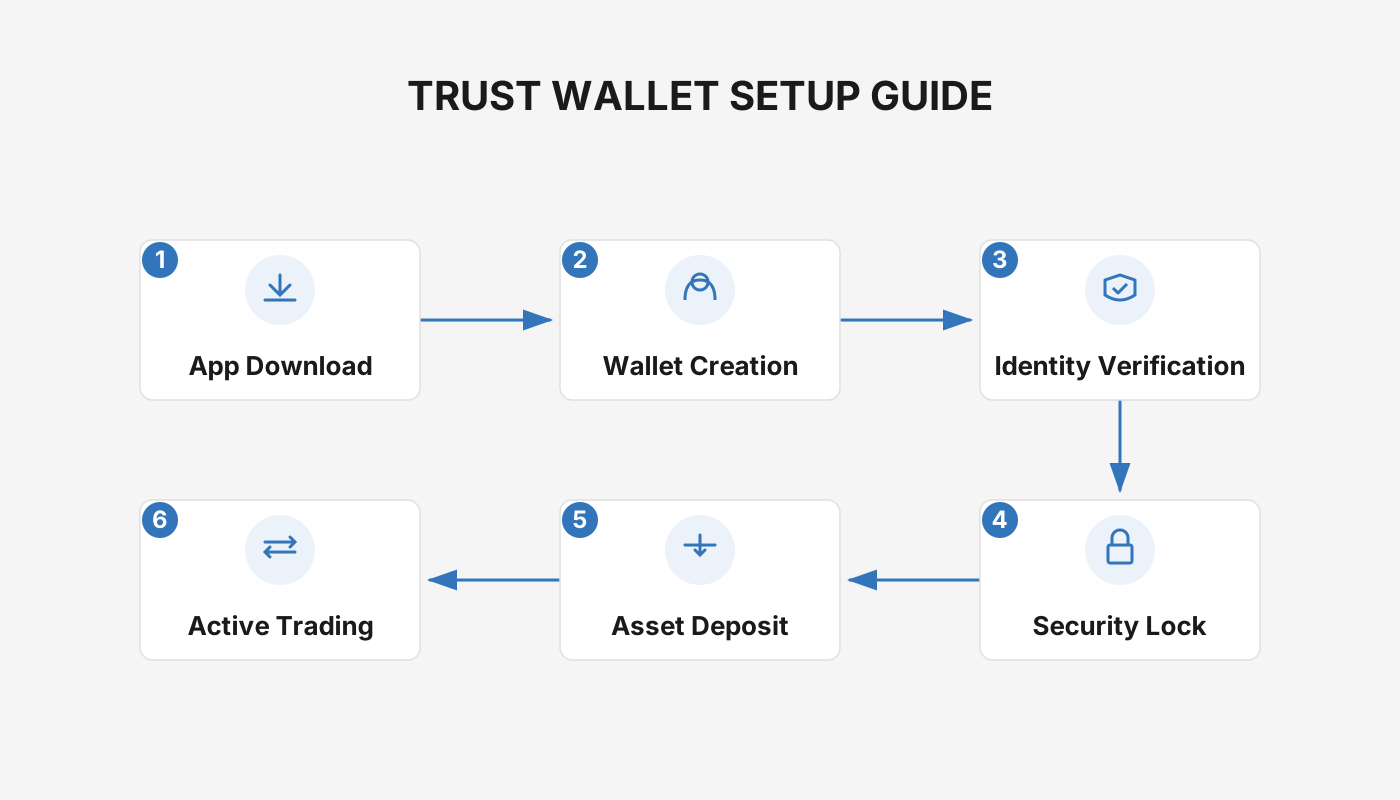
How to Use the Trust Wallet App?
1. Download Trust Wallet
Search for “Trust Wallet” in your mobile device’s app store and select the version that matches your iOS or Android operating system before proceeding with the installation.
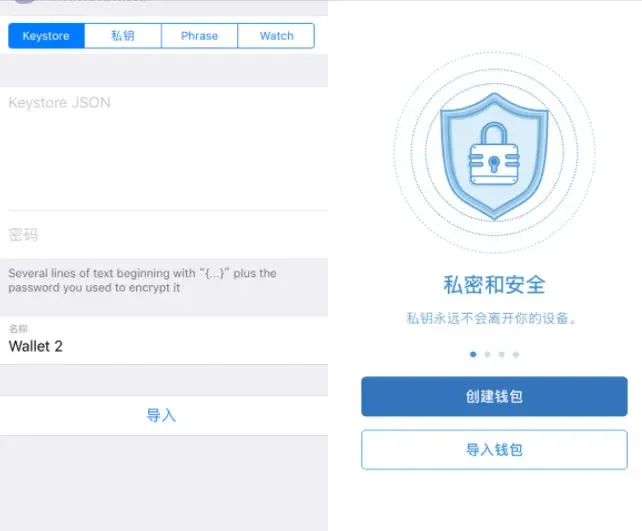
2. Create or Import a Wallet
After launching the app, you can choose either to create a new wallet or to import an existing one using a mnemonic phrase or a private key. If you opt to create a new wallet, be sure to record the mnemonic phrase carefully; it is required to recover the wallet later.
3. Fund the Wallet with ETH
When the wallet is initialized, it generates a unique receiving address. Send ETH from another wallet or an exchange to this address to fund the account.
4. Purchase ethroll via the Built‑in Browser
On the Trust Wallet main screen tap “Browser,” enter `https://ethroll.hygj.io` in the address bar, and once the site loads, click the purchase button to take part in the corresponding activity.
Tip: If you hold a large amount of digital assets, consider using a hardware wallet for cold storage. Users with modest balances or frequent trading activity can choose a hot‑wallet solution or keep the assets on an exchange, depending on their needs.
---
Trust Wallet Tutorial: Creating a Wallet
Step 1: Download the Installation Package
- iOS download link
- Android download link
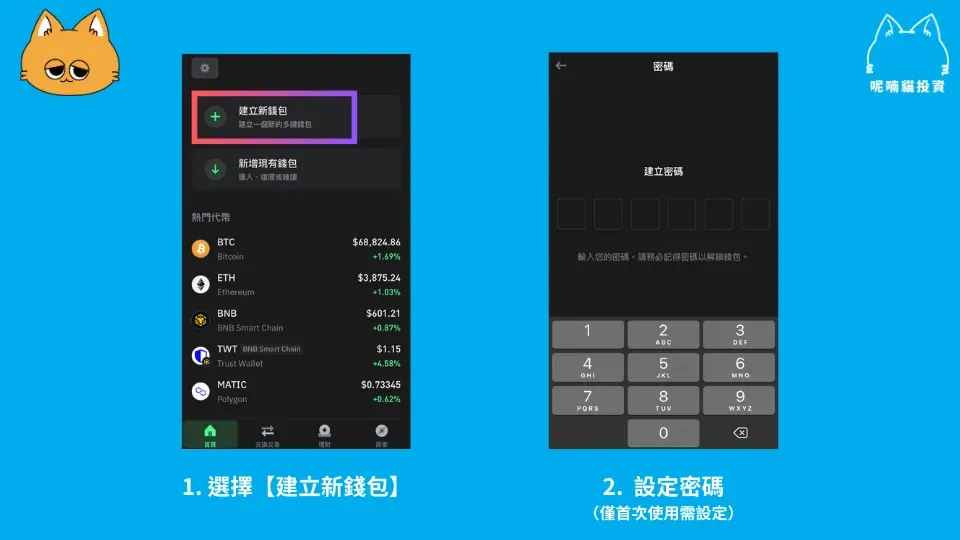
Step 2: Generate a Wallet and Set a Password
In the app, select “Create New Wallet,” then follow the prompts to set a login password.
Step 3: Back Up the Mnemonic Phrase
Trust Wallet offers both manual backup and iCloud automatic backup. For maximum security, it is recommended to first write down the 12‑word mnemonic on paper and store it safely. The mnemonic is effectively the private key of the wallet; if it is lost, the official team cannot help you recover the funds.
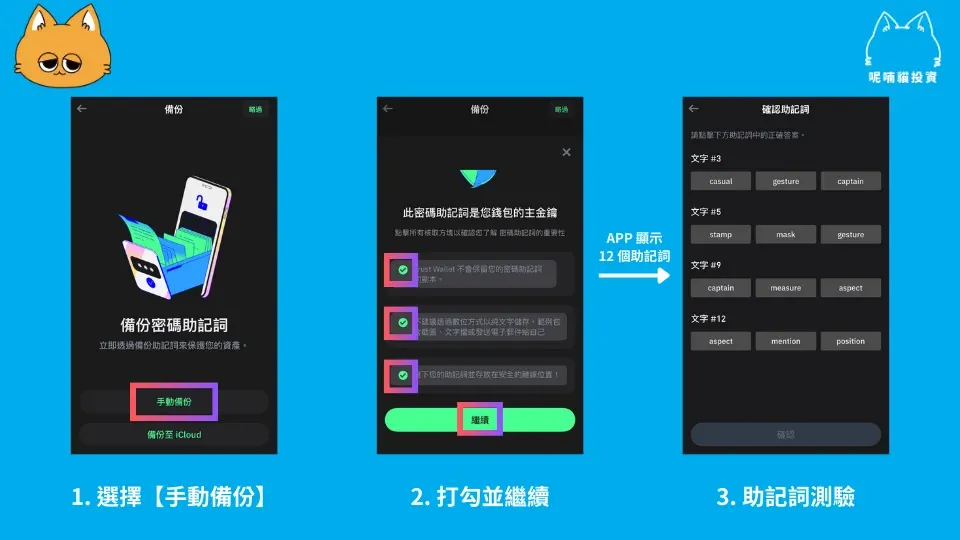
After you confirm the mnemonic, the wallet is ready for sending and receiving assets.
---
Trust Wallet Tutorial: Staking Cryptocurrencies
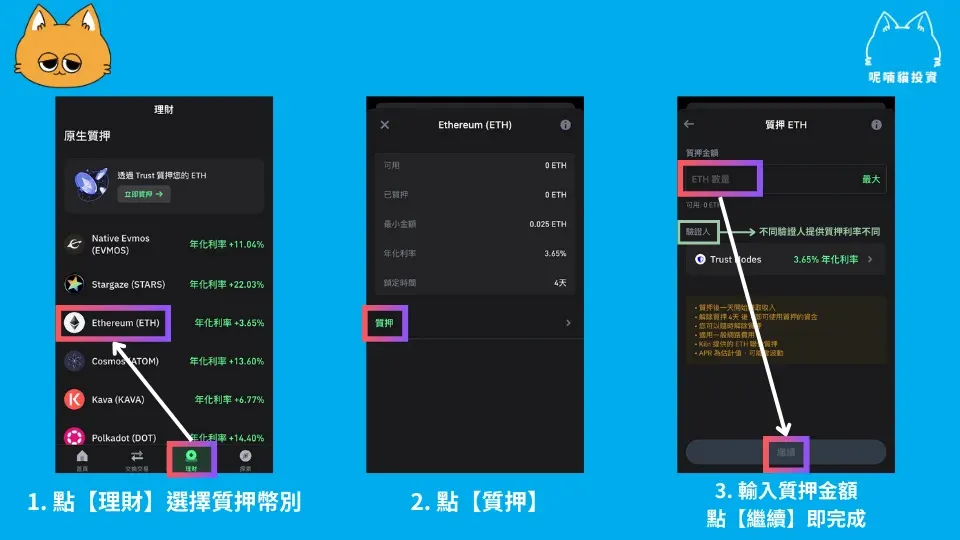
Navigation Path: `【Finance】 → Choose Staking Token → 【Stake】 → Enter Amount, Select Validator → 【Continue】`
Trust Wallet has more than 24 staking options built directly into the app, allowing users to stake without leaving the interface. The example below demonstrates how to stake ETH.
---
Trust Wallet Funding Guide
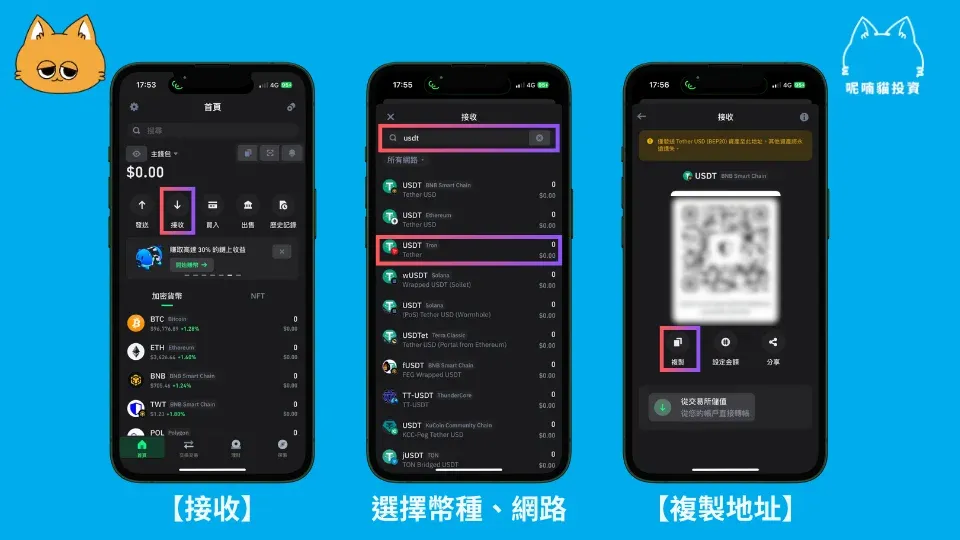
Navigation Path: `【Receive】 → Select Token and Network → Copy Address → Paste Address into Sending Wallet`
If you wish to fund Trust Wallet with fiat‑derived crypto, first purchase the desired cryptocurrency on a local exchange (for example, a platform that supports USD deposits via SEPA, SWIFT, or a U.S. resident should use Binance.US). After acquiring the token, transfer it to the address shown in the Trust Wallet receive screen. Make sure the token type and network you select match exactly the address details; a mismatch can result in permanent loss of funds.
Trust Wallet integrates with Binance, and on the funding page you can tap “Fund from Exchange.” This will move assets directly from your Binance (or Binance.US for U.S. users) account into Trust Wallet.
Tax Note: Cryptocurrency transactions, including staking rewards and asset transfers, may be subject to taxation in your jurisdiction. Consult a qualified tax professional to ensure compliance.
---
Trust Wallet Withdrawal Guide
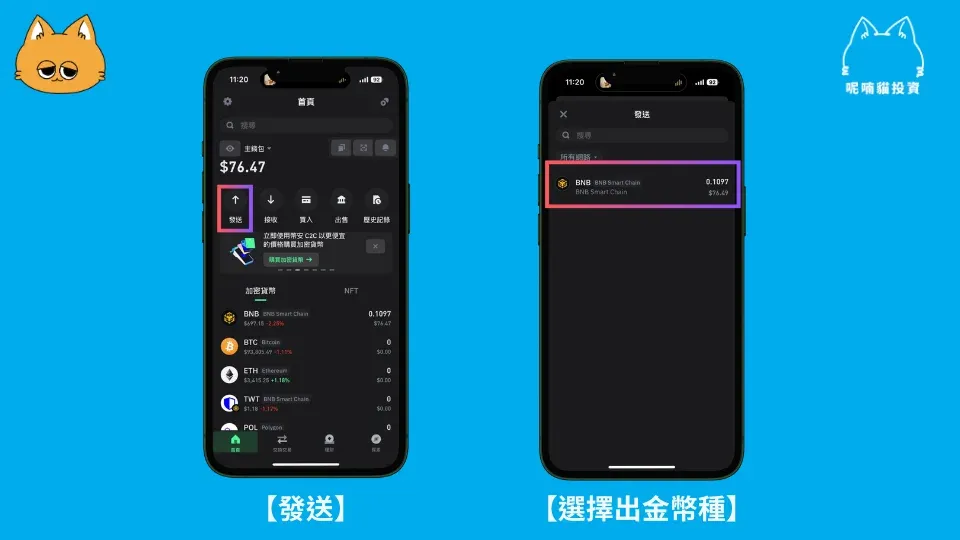
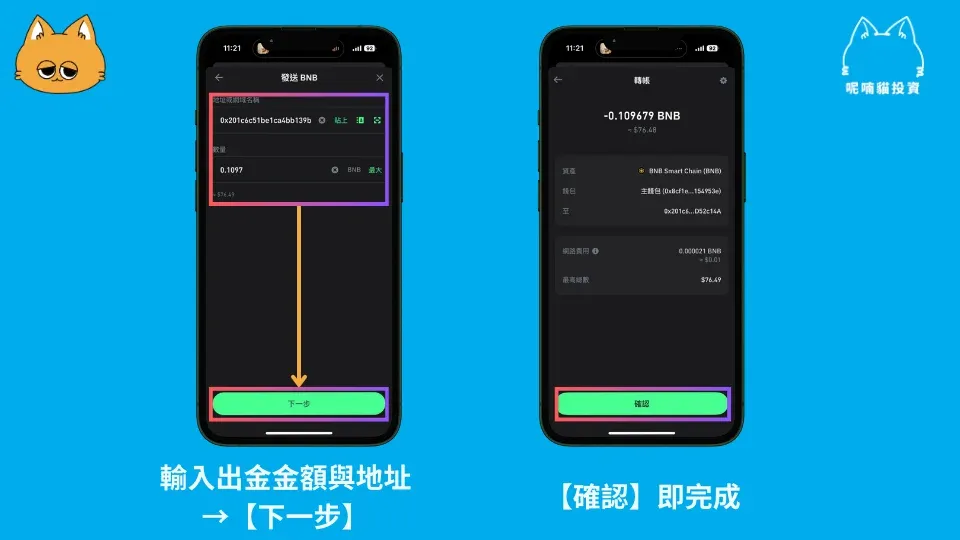
Navigation Path: `【Send】 → Choose Token to Withdraw → Enter Amount and Destination Address → 【Next】 → 【Confirm】`
To move assets from Trust Wallet back to fiat (e.g., USD), first send the crypto to an exchange that supports fiat withdrawals via SEPA, SWIFT, or, for U.S. customers, Binance.US. Follow the exchange’s withdrawal procedure to convert the crypto to fiat and transfer it to your bank account. Detailed conversion steps can be found in the help sections of platforms such as Binance, Kraken, or Coinbase.
---
What Is the Official Binance Wallet?
Trust Wallet is the official decentralized mobile wallet launched by Binance. It features a clean interface, strong emphasis on security, and is designed for users with varying levels of blockchain experience. The wallet supports Ethereum and its derivatives—including ERC‑20, ERC‑223, ERC‑721 tokens—as well as Ethereum mainnet, sidechains, and any assets that follow the Ethereum protocol. Private keys never leave the user’s device, granting full control over digital assets.
The built‑in Web3 browser enables users to access decentralized applications (DApps) directly from their mobile device and interact natively with the Binance Decentralized Exchange (DEX) for on‑chain trades.
---
The content above systematically outlines the core concepts of Trust Wallet, step‑by‑step usage instructions, and its role within the Binance ecosystem. For more detailed walkthroughs and advanced tips, stay tuned to future Bitaigen (比特根) articles.
Related Reading
- OKX Pay Guide: Features, Registration & Fee‑Free Transfers
- Send & Receive Crypto Transactions with Modern Wallets
- What Is a Crypto Payment Gateway? Functions, Benefits & How to Choose
💡 Register on Binance with referral code B2345 for the maximum trading fee discount. See Binance complete guide.



