
 Bitaigen Research
 HashKey Exchange Guide for Beginners
HashKey Exchange is Hong Kong’s first regulatory‑licensed cryptocurrency exchange. Its parent company, HashKey Group, launched the HashKey Global platform in April 2024, which is also accessible to users in Taiwan. This article explains how to use HashKey Exchange, including how to open an account, fund it, and withdraw assets.
New users must first register on the official website and complete KYC verification. After that, you can follow the steps in this guide to deposit fiat (via SEPA/SWIFT in USD) or transfer cryptocurrency from a wallet, and to withdraw funds.
The Bitaigen editorial team has carefully compiled a full‑process beginner’s guide for HashKey Exchange, covering everything from registration and KYC to fiat deposits, wallet transfers, and withdrawals. Illustrated screenshots and step‑by‑step breakdowns help you get started quickly, avoid common pitfalls, and begin trading digital assets with confidence.
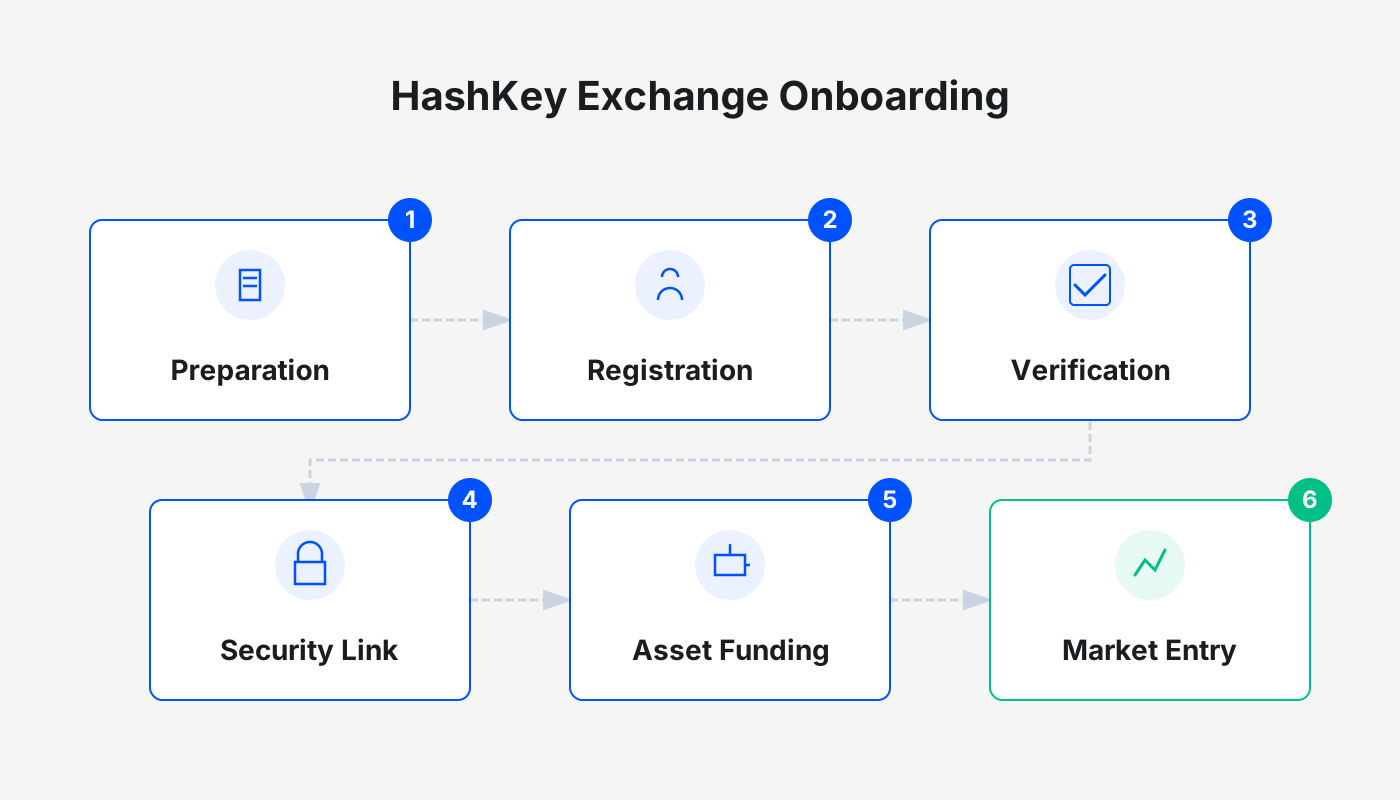
How to Open a HashKey Account
- Hong Kong residents should use the HashKey Exchange official website to register.
- Taiwan residents should sign up through HashKey Global. The following instructions use the HashKey Global portal as an example.
Step 1 – Go to the HashKey homepage and click the “Register” button at the top‑right corner, or follow a direct invitation link.
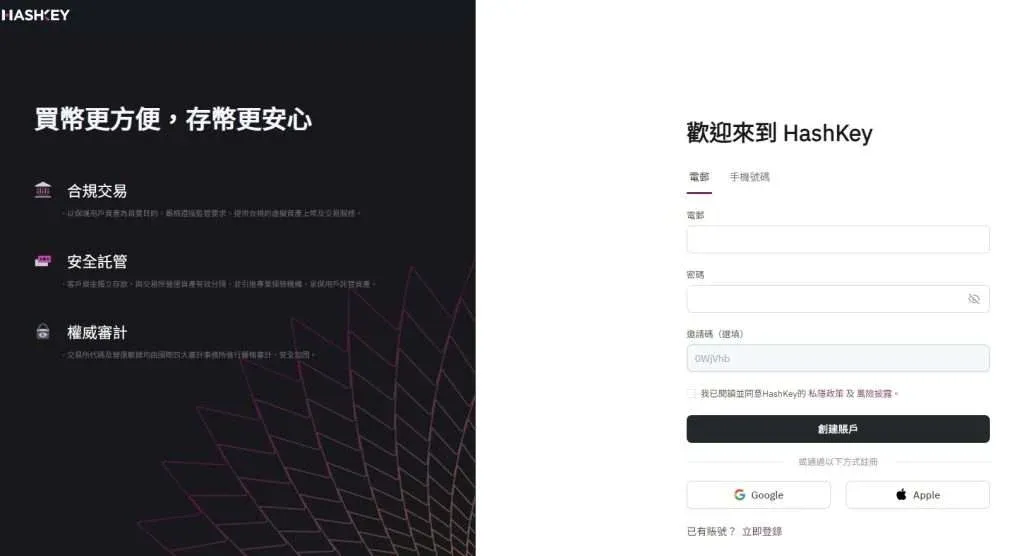
Step 2 – Choose to register with either “Email” or “Phone number.” This guide uses the email option:
- Enter your email address and create a login password.
- Click “Create Account.”
- A 6‑digit verification code will be sent to your inbox; enter it to finish the basic account creation.
- If you have an invitation code, you can enter it on this screen.
Step 3 – After a successful registration, the system will prompt you to download the HashKey App. Click the “App Store” button to be taken directly to the Apple App Store, which helps you avoid downloading a phishing version of the app.
HashKey KYC (Identity Verification)
You must complete identity verification before you can access advanced features such as fiat deposits and higher withdrawal limits.
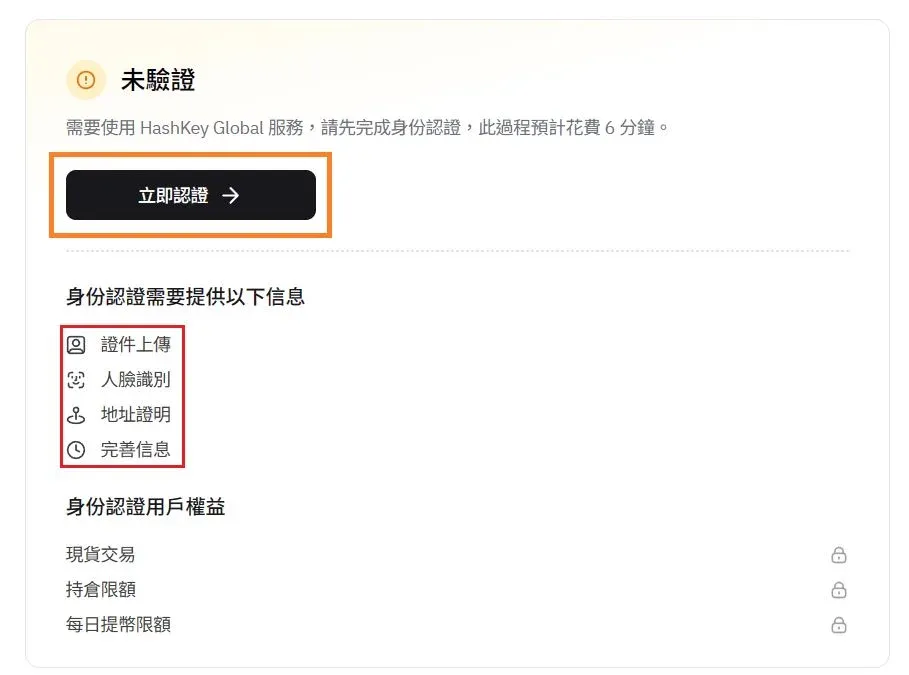
Step 1 – Log in, then click the profile‑icon at the top‑right corner and select “Identity Verification.” This opens the verification page.
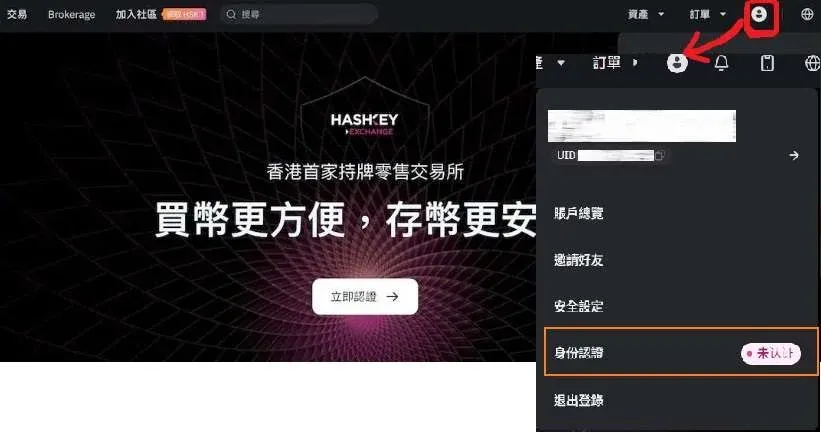
Step 2 – Click “Verify Now” and submit the following items in order:
- Mobile phone number
- Front and back photos of a government‑issued ID (passport, ID card, etc.)
- Facial recognition selfie
- Proof of residential address (e.g., water bill, electricity bill, government tax notice, or bank statement)
Address‑proof requirements
- Issued within the last three months;
- Must clearly display your full name and residential address;
- Upload a digital copy, photo, or scanned image of the original document.
Step 3 – After uploading the address proof, fill out the personal financial questionnaire (employment status, education level, net worth, etc.), click “Next,” sign where required, and then “Submit.” Verification usually completes within three business days; in many cases it can be approved on the same day.
To enhance account security, you can enable Two‑Factor Authentication (2FA) under “Security Settings,” which is located above the “Identity Verification” section.
How to Deposit Funds into HashKey
Once KYC is approved, you need to fund your account before you can trade. HashKey Exchange offers fiat‑deposit channels, while HashKey Global only supports cryptocurrency deposits via wallet transfers.
Below we illustrate a typical crypto‑deposit workflow using Binance as the source exchange (the steps are similar for other platforms). U.S. users should use Binance.US instead of the global Binance site.
- On the HashKey homepage, click “Assets” → “Deposit.” Choose the cryptocurrency you wish to deposit, e.g., USDT.
- Select the deposit network and the source platform. Choose “Exchange Platform” → “Binance” → “Next.”
- A USDT deposit address will be displayed. Go to Binance, navigate to the Withdraw page, select “Transfer via crypto network,” paste the HashKey address, and specify the withdrawal amount. Make sure the blockchain network you select on Binance matches the network you chose on HashKey (e.g., ERC‑20, TRC‑20).
Note: When moving fiat (USD) into HashKey via SEPA or SWIFT, follow the on‑screen instructions on the “Deposit” page; fees are generally zero for fiat deposits, but always verify the latest terms on the platform.
How to Withdraw Funds from HashKey
HashKey Global only allows withdrawals through wallet transfers, which is essentially the reverse of the deposit process.
Using Binance (or Binance.US for U.S. residents) as the destination, follow these steps:
- Log in to Binance, then go to “Wallet” → “Spot” → “Transfer.” Choose the cryptocurrency (e.g., USDT) and the transfer network. HashKey currently supports the ERC‑20 network only; do not select other chains to avoid loss of assets.
- Copy the deposit address shown on Binance.
- Return to HashKey, open the “Assets” page, click “Withdraw,” select USDT, then set “Address Source” → “Exchange Platform” → “Binance.” Enter the withdrawal amount and confirm. The transaction will be processed according to HashKey’s withdrawal schedule.
HashKey Fees
- Trading fees for regular users: Maker 0.12 % / Taker 0.12 %. Fees decrease with higher VIP tiers, reaching as low as 0 % for the top tier.
- Holding the platform’s native token HSK grants additional fee discounts.
- Deposits are free of charge.
- Withdrawals incur a fee that varies by cryptocurrency; consult the latest HashKey Global fee schedule for exact numbers.
Tax reminder: Crypto gains may be taxable in your jurisdiction. Please consult a tax professional or refer to local regulations to ensure compliance.
---
This guide provides a complete walkthrough for new users to register, verify identity, deposit, and withdraw on HashKey Exchange. For more HashKey‑related updates and tutorials, continue following Bitaigen (比特根).
Related Reading
- Bybit Beginner Guide: KYC, Account Setup & First Deposit
- Beginner’s Guide: Register, Top‑Up & Buy Bitcoin on Binance
- Open OKX Account & Complete KYC – Step-by-Step Guide
💡 Register on Binance with referral code B2345 for the maximum trading fee discount. See Binance complete guide.



