
 Bitaigen Research
As the editorial team at Bitaigen, we break down OKX’s Smart Copy‑Trading feature in detail in this article, covering the workflow, fee structure, advantages and risks, so you can get started quickly and assess whether it fits your investment strategy. Keep reading for a hands‑on guide.
What is OKX Copy‑Trading?
OKX’s Smart Copy‑Trading (also referred to as OKX Copy‑Trading) is a feature that allows investors to automatically replicate the trades of top‑performing signal providers—often called “leaders”—on the platform. When a leader generates profit on the assets they manage, they can take an agreed‑upon share of the earnings as a performance fee.
Users can set their own risk tolerance, entry and exit rules, trading instruments, leverage levels, and other parameters. The feature supports both derivatives (contracts) and spot products, giving investors the flexibility to choose the copy‑trading mode that best matches their needs.
OKX Copy‑Trading Fees
When you copy‑trade on OKX, three main types of fees are involved:
- Trading fees
- Contract copy‑trading: 0.02 % ~ 0.05 %
- Spot copy‑trading: 0.08 % ~ 0.10 %
- Performance share
Leaders only charge a performance share when they generate profit for followers, typically ranging from 8 % ~ 13 %. No fee is charged if the leader incurs a loss.
- Funding rate
In contract copy‑trading mode, the copied position incurs (or receives) the applicable funding rate.
Pros and Cons of OKX Copy‑Trading
| Pros | Explanation |
|---|---|
| **Ride the expert’s carriage** | By mirroring top leaders, you can reduce the need for constant market monitoring and directly learn professional traders’ strategies. |
| **Transparent and secure** | Performance data is public and traceable; fund flows are visible, lowering the risk of misappropriation. |
| **Learning boost** | Observing and following seasoned traders helps improve your own trading skills. |
| Cons & Risks | Explanation |
|---|---|
| **Performance manipulation** | Some leaders may use multiple accounts or exploit loopholes to polish historical data, potentially misleading followers. |
| **Agency issues** | The leader’s interests may not fully align with those of followers, leading to cross‑platform hedging or inappropriate actions. |
| **Future uncertainty** | Past performance does not guarantee future returns; the timing of copy‑trading and parameter settings directly affect outcomes. |
How to Choose a Good Leader
Although OKX lacks comprehensive risk‑control metrics, the following dimensions can help you filter for relatively reliable leaders:
1. Long‑term performance
Look at the cumulative number of days a leader has been copy‑traded and the overall return. Longer, more stable track records generally inspire greater confidence.
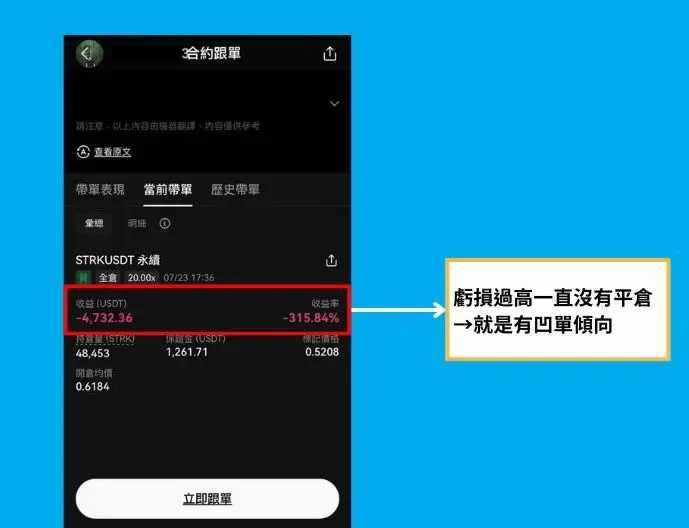
2. Open‑order exposure
If the leader’s page shows many large, un‑stopped orders, it may indicate hidden losses. Consider avoiding such leaders.
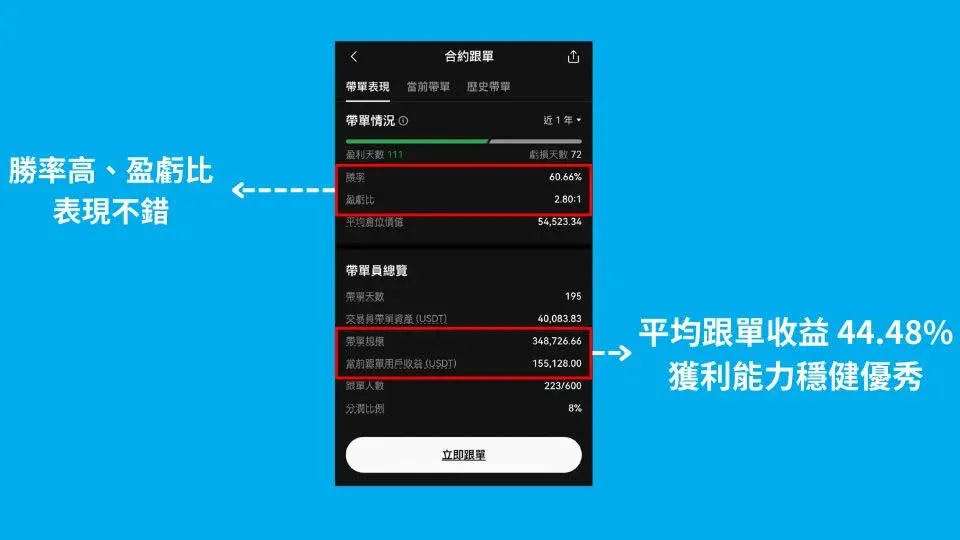
3. Win rate and profit‑to‑loss ratio
Different trading styles produce varying win rates and P/L ratios. Typically you can focus on two types of candidates:
- High win rate, average P/L ratio – Conservative approach, relatively steady returns.
- Average win rate, high P/L ratio – More aggressive, seeks higher upside.
Select according to your personal risk appetite.
4. Realised vs. unrealised returns and ROI
Looking at overall ROI alone can mask the effect of unrealised positions. It is advisable to compute Current follower profit ÷ Leader’s total managed assets to obtain a more objective view of average profitability.
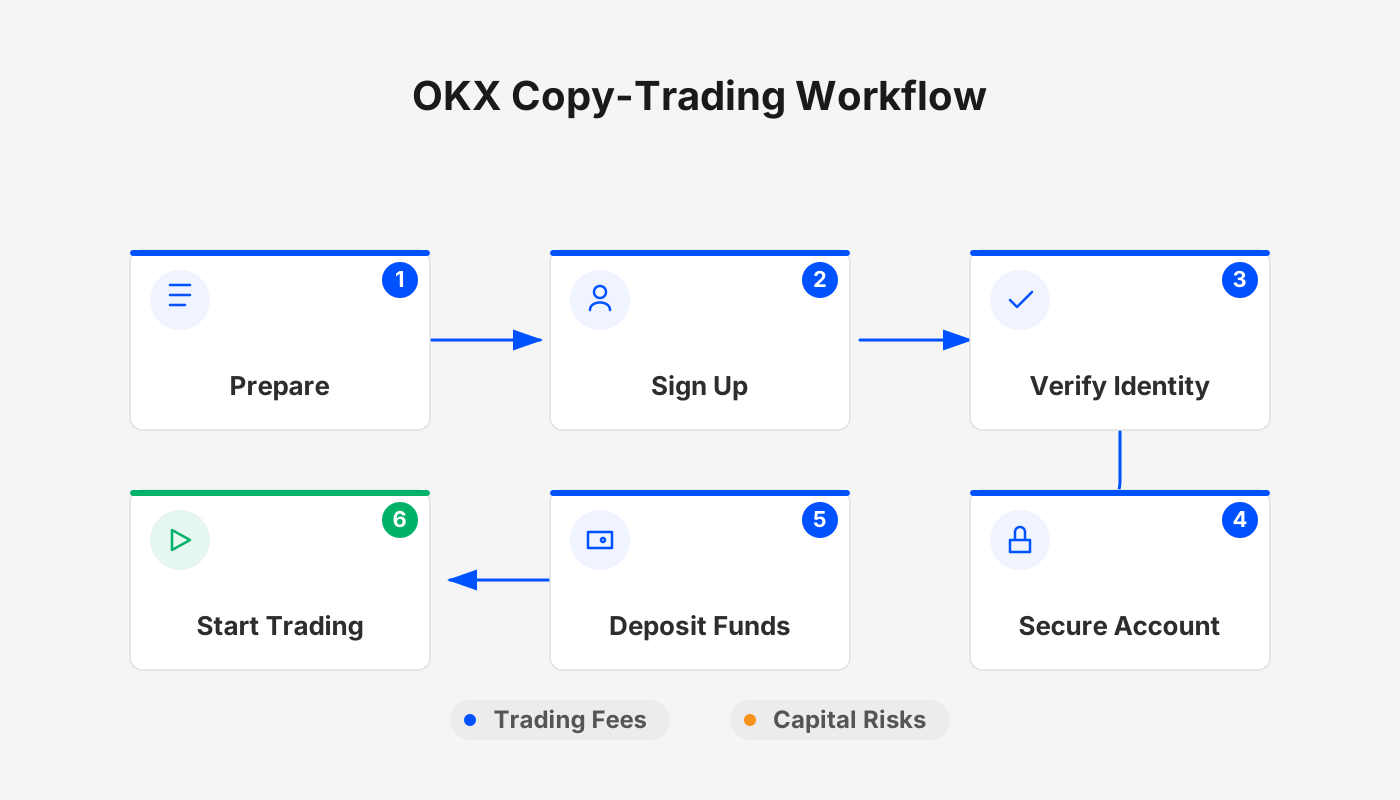
OKX Copy‑Trading Workflow
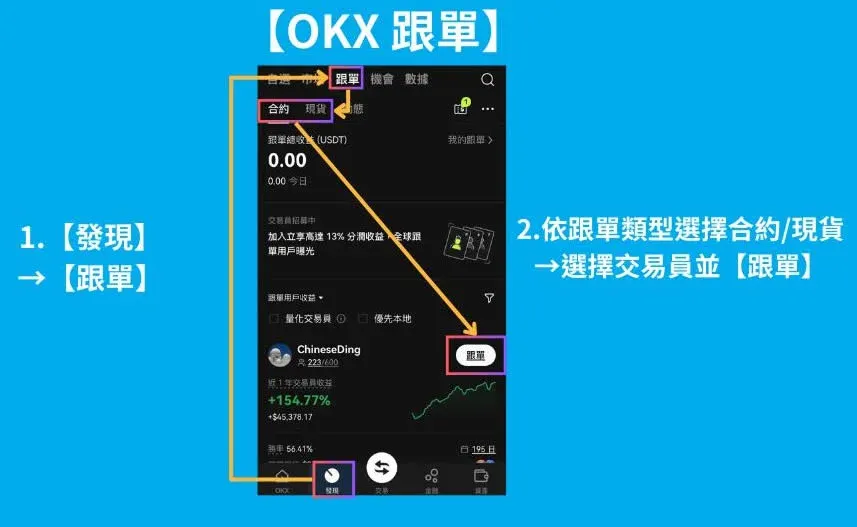
Step 1: Open the copy‑trading entry
Path: [Discover] → [Copy‑Trade]
Step 2: Choose a leader
Select either Contracts or Spot as the copy‑trading type, then pick the desired leader from the list and click [Copy].
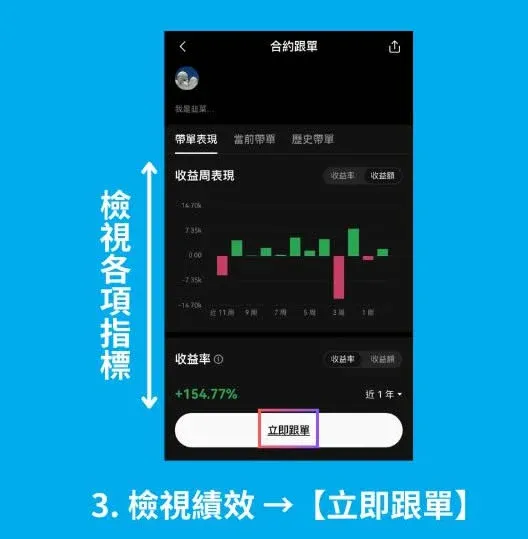
Step 3: Review performance
Using the screening criteria discussed earlier, confirm the leader and click [Start Copying].
Step 4: Configure copy‑trading parameters
OKX offers two modes: Smart Copy‑Trading and Custom Copy‑Trading.
| Mode | Explanation |
|---|---|
| **Smart Copy‑Trading** | Margin, leverage and trading pair are automatically matched to the leader’s settings; positions are copied proportionally. Recommended for beginners. |
| **Custom Copy‑Trading** | Allows you to adjust leverage, trading pair, margin mode, etc., but may cause the follower’s performance to diverge from the leader’s. |
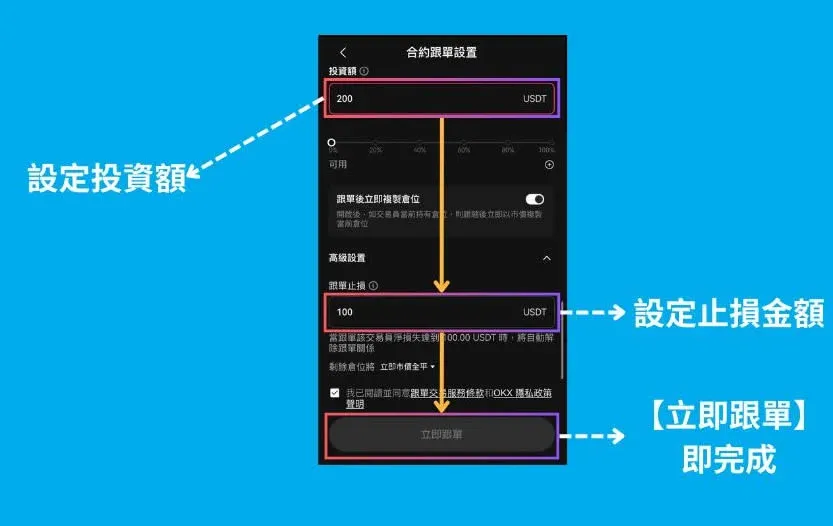
Parameters required for Smart Copy‑Trading
- Copy amount: Total capital you wish to allocate.
- Copy positions immediately?: Enabling this will replicate the leader’s current open positions at the prevailing price (not recommended). Disabling it copies only from the next trade, keeping price alignment with the leader.
Funding approaches for Custom Copy‑Trading
| Approach | Explanation |
|---|---|
| **Maximum copy amount 1:1** | Replicates the leader’s position size proportionally, but caps the total investment. |
| **Fixed amount per trade** | Uses the same dollar amount for each copied trade (e.g., $10 per trade). |
| **Fixed percentage per trade** | Allocates a set percentage of your capital per trade (e.g., 20 % or 10 %). |
The author prefers the fixed‑percentage per trade method, as it helps keep returns in line with the leader’s.
Advanced stop‑loss settings
In the Copy‑trade stop‑loss section, set the maximum allowable loss for the total allocated capital. Enabling this is strongly advised to protect you from a leader’s large drawdown. After configuring all options, click [Start Copying].
How to Cancel an Existing Copy‑Trade
Step 1: Go to “My Copy‑Trades”
Path: [Discover] → [Copy‑Trade] → [My Copy‑Trades] → select the target leader
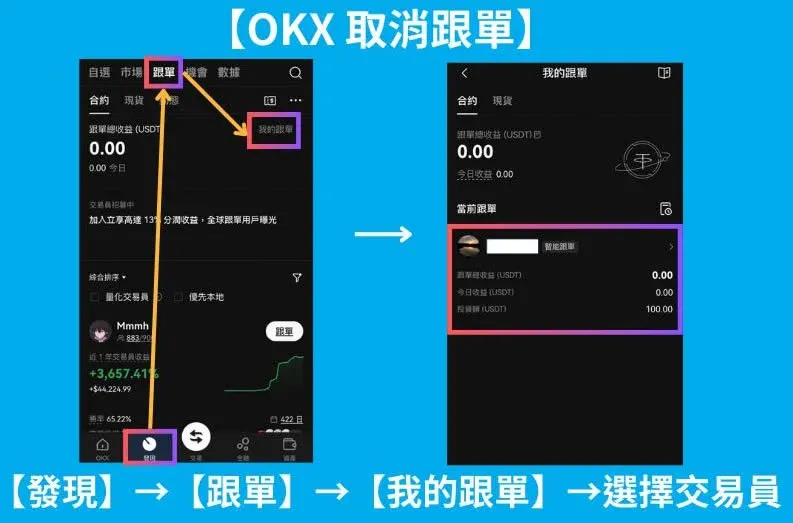
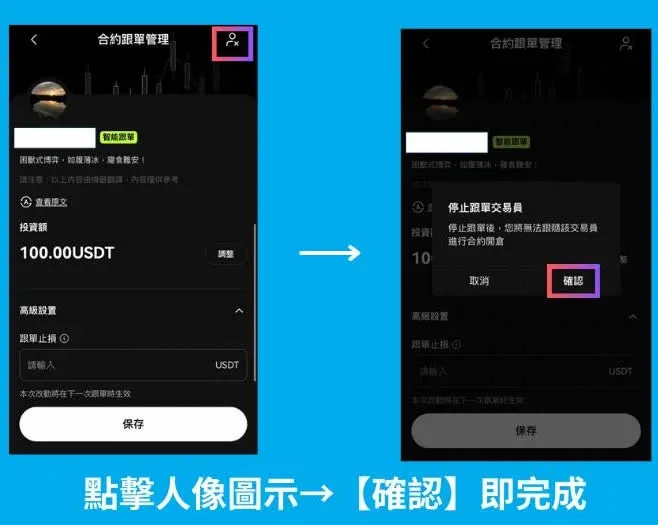
Step 2: Execute the cancellation
Tap the avatar icon in the top‑right corner, then confirm the prompt to complete the cancellation.
Multi‑Leader Copy‑Trading Settings
The position mode you select determines how many leaders you can follow simultaneously:
- Close‑position mode: Contracts can hold both long and short positions, allowing you to follow up to 10 experts at the same time.
- Buy‑sell mode: Only one‑way positions are permitted, limiting you to 1 leader.
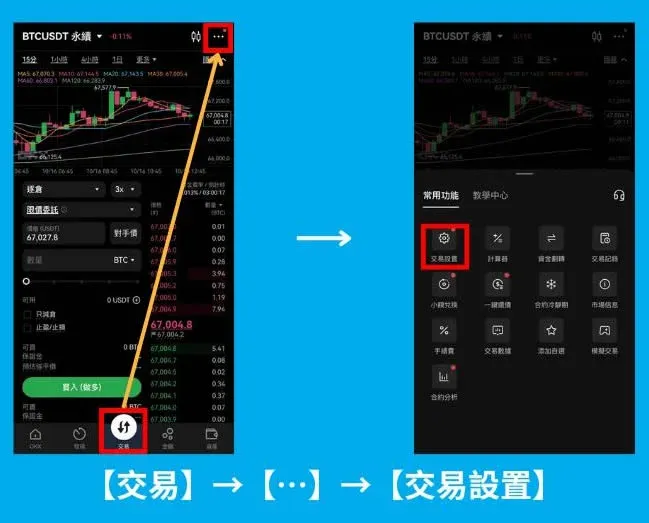
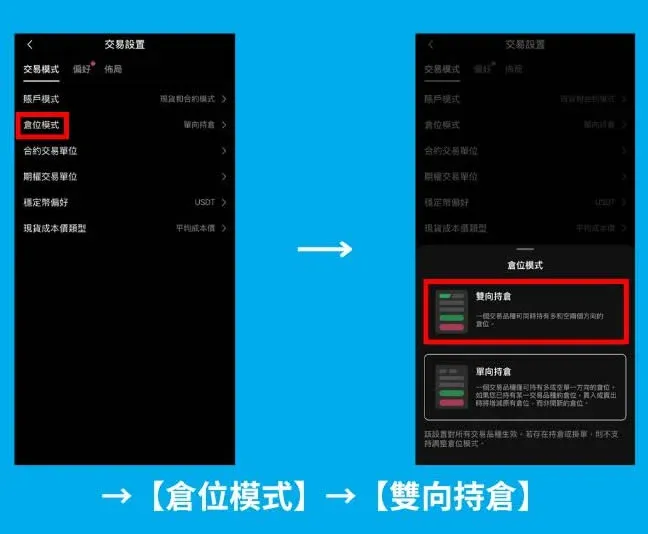
If you wish to follow multiple leaders, enable Bidirectional Position in [Trade] → […] → [Trade Settings] → [Position Mode] → [Bidirectional].
How to Share Your Own Trading Parameters
Even if you don’t want to become a leader, you can share your trading settings with other OKX users. Follow these steps:
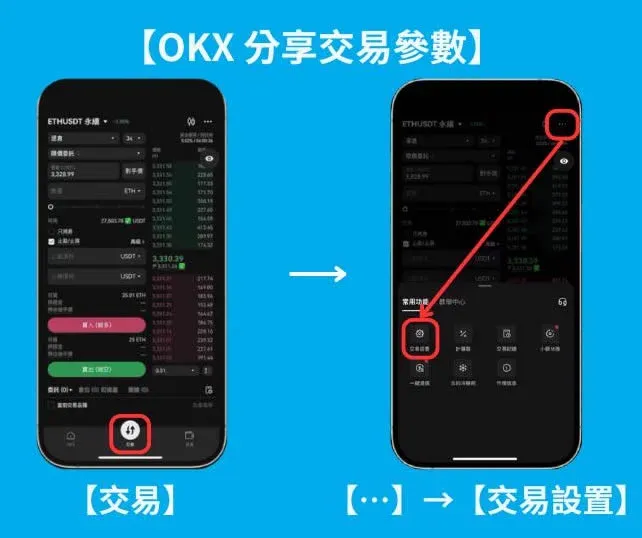
Step 1: Open Trade Settings
Path: [Trade] → […] → [Trade Settings]
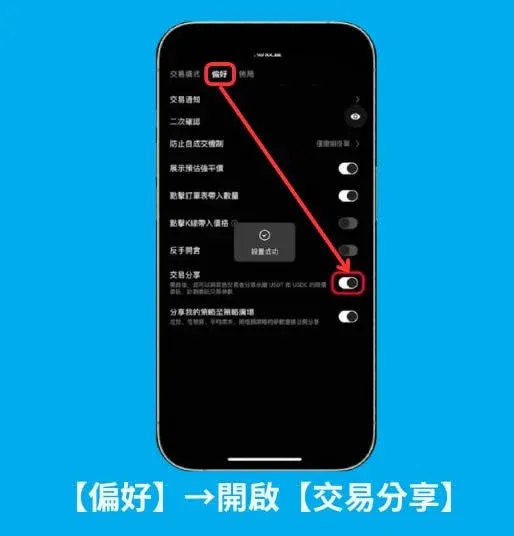
Step 2: Enable Trade Sharing
In [Preferences], turn on the Trade Sharing feature.
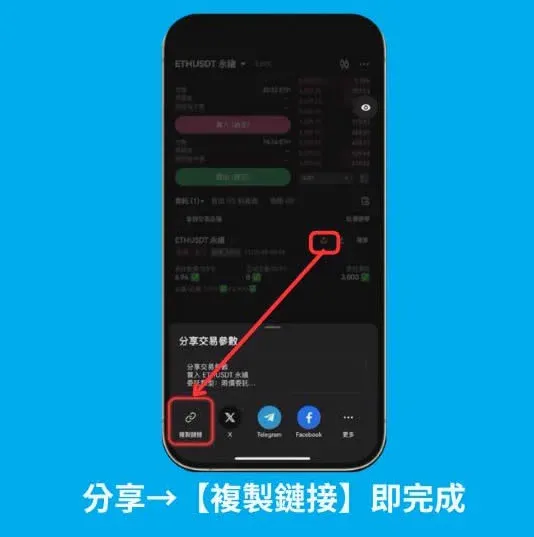
Step 3: Copy the sharing link
Click Share → Copy Link. Then, on the relevant position, tap the share icon; the copied link lets other users apply the exact same parameters instantly.
Frequently Asked Questions (FAQ)
- Can sub‑accounts use the copy‑trading feature?
Not supported at this time.
- Which account should I fund to start copy‑trading?
Simply deposit fiat (USD, EUR via SEPA/SWIFT, etc.) or crypto into your trading account.
- Is there a price‑slippage protection mechanism?
If a leader’s opening price deviates more than 0.5 % from the leader’s original entry price, the system blocks the copy to prevent excessive slippage.
Tax note: Crypto‑related gains may be taxable in your jurisdiction. Consult a local tax professional to understand reporting obligations.
Closing Thoughts
OKX’s Smart Copy‑Trading provides a convenient channel for replicating trades, but independent research (DYOR) remains essential. Even a leader with an impressive historical record does not guarantee future high returns. Investors should exercise caution when selecting leaders, setting stop‑losses, and monitoring performance and market conditions to mitigate risk and pursue steady growth.
This article has outlined the concept, fee structure, pros and cons, selection criteria, and the full operational workflow of OKX copy‑trading. For more tutorials and updates, stay tuned to Bitaigen’s upcoming posts.
Related Reading
- OKX Copy Trading: Auto-Mirror Expert Crypto Trades for Beginners
- OKX C2C Guide: Register, Buy Crypto & Withdraw Funds
- OKX Contract Copy‑Trading Guide 2025: How to Use the New App
💡 Register on Binance with referral code B2345 for the maximum trading fee discount. See Binance complete guide.



