
 Bitaigen Research
 Bitcoin exchanges have repeatedly suffered security breaches—ZB experienced login anomalies in September, and OKEX halted user withdrawals in October. Do you still keep your digital assets on exchanges?
Direct answer: An Ethereum cold wallet is an offline tool for storing private keys. This article provides the complete steps to create and use an ETHTT cold wallet, and explains how to back up the Keystore file, private key, and mnemonic phrase to ensure asset safety.
In this guide we walk through the entire Ethereum cold‑wallet workflow, from offline generation to secure backup, helping you eliminate exchange‑related risk and achieve self‑custody of your assets. Through hands‑on demonstration you will master the key configuration and recovery techniques, keeping your digital assets permanently protected offline. The subsequent sections go deeper, so a careful read is worthwhile.
Review of Exchange Black‑Swan Events
- February 2014 – The world’s largest Bitcoin exchange, Mt. Gox, declared bankruptcy after hackers stole roughly 750,000 BTC, about 7 % of the total market supply, causing Bitcoin’s price to drop 36 %.
- February 2017 – China’s three biggest exchanges (Bitcoin China, Huobi, and OKCoin) suspended withdrawals to comply with regulators, only resuming in June of the same year.
- March 2018 – Binance suffered a hack; the illicit trades were rolled back, but Bitcoin still fell more than 15 % in the following days.
- June 2018 – South Korea’s leading exchange Bithumb was hit again, losing approximately USD 30 million worth of digital assets.
- September 2020 – Multiple coins on the ZB platform dropped 80 %–99 %, forcing the platform to shut down withdrawals and log‑in functions; services were restored only after two weeks.
- October 2020 – Derivatives exchange BitMEX and its founder faced allegations of extortion, money‑laundering, and market manipulation, leading to lawsuits.
These black‑swan incidents remind us that asset security must be under personal control, not entirely reliant on exchanges. *(U.S. users should use Binance.US rather than the global Binance platform.)*
Basic Recommendations for Secure Storage
- Invest rationally – Avoid blind chasing of price spikes, short‑term high‑leverage trades, and maintain independent judgment.
- Diversify risk – Use systematic investment (e.g., dollar‑cost averaging) or a diversified portfolio to mitigate the impact of any single asset’s volatility.
- Adopt a cold wallet – Long‑term holders should store private keys in a secure, reliable cold wallet.
- Self‑manage private keys – Only by holding the private keys yourself can you truly own the digital assets.
The Simplest and Safest Cold Wallet
The ETHTT wallet is currently the only solution that combines a low technical barrier, high security, and ease of use. It ensures full private‑key control by the user, making it suitable for both beginners and more advanced users.
Hot Wallet vs. Cold Wallet
- Hot wallet – A wallet whose private keys can be accessed via the Internet, typically hosted on exchange servers. If the server is compromised, attacked, or the platform shuts down, users may suffer irreversible losses. When using hot wallets, set distinct passwords for each exchange to reduce single‑point‑of‑failure risk.
- Cold wallet – A wallet that stores private keys offline, such as keeping the generated Keystore file, private key, or mnemonic phrase on a USB stick, mobile device, or paper. Offline storage is presently the most secure way to protect digital assets.
We strongly recommend the decentralized cold wallet ETHTT wallet: https://www.ethtt.com/
Core Features of the ETHTT Cold Wallet
- Supports sending and storing all ERC‑20 tokens within the Ethereum ecosystem.
- Available on multiple platforms (mobile and desktop) to keep private keys away from the internet.
- Provides dual‑authentication: Keystore file + password or mnemonic‑phrase login.
- Multilingual interface covering Keystore, private‑key, and mnemonic‑phrase access methods; supports offline transfers, contract deployment, transaction queries, and more.
Step‑by‑Step Guide to Creating and Using an ETH Cold Wallet
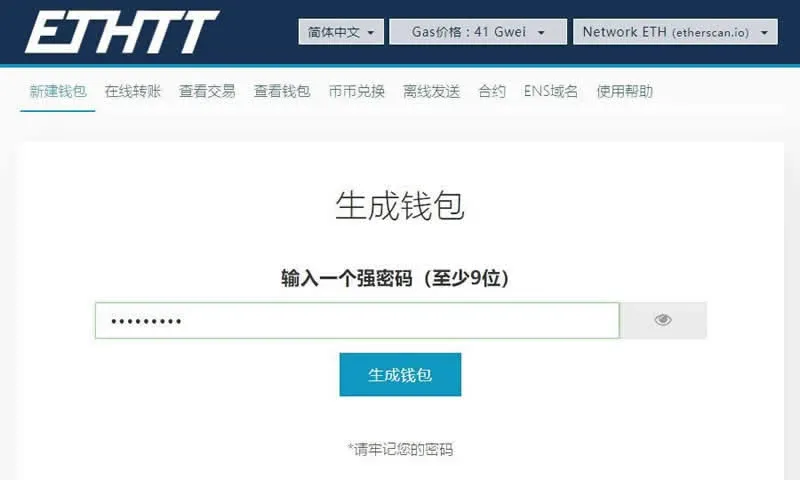
1. Generate a wallet and set a password
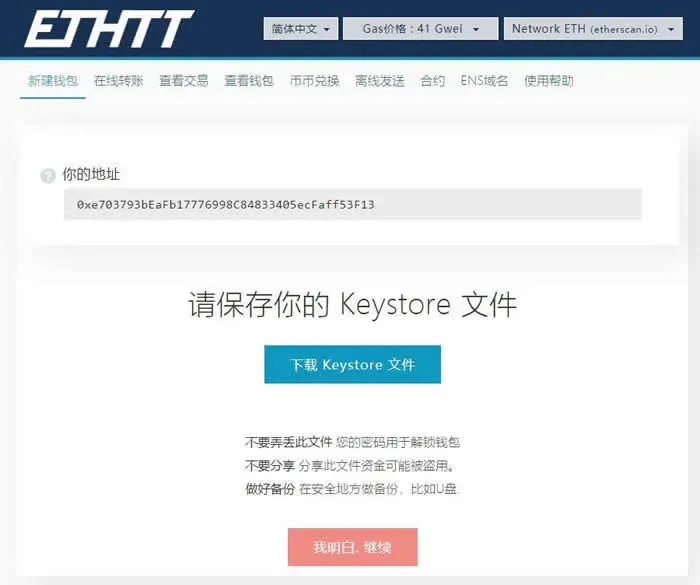
2. Record the address and download the Keystore backup file
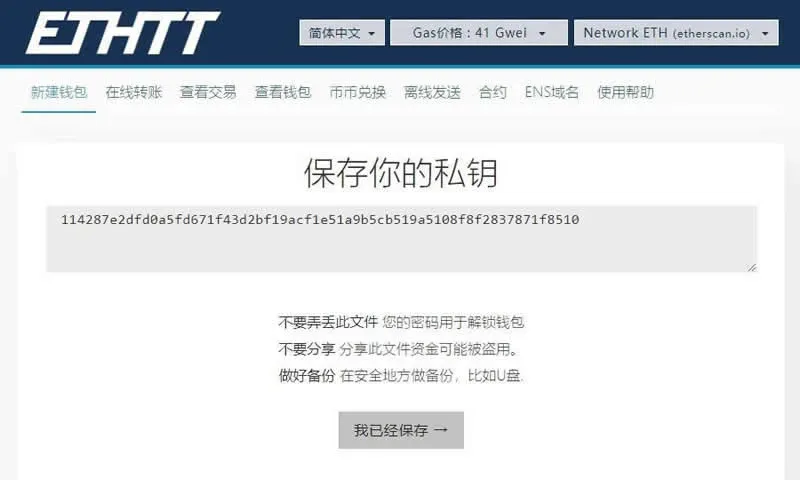
3. Save the mnemonic phrase (login credential)
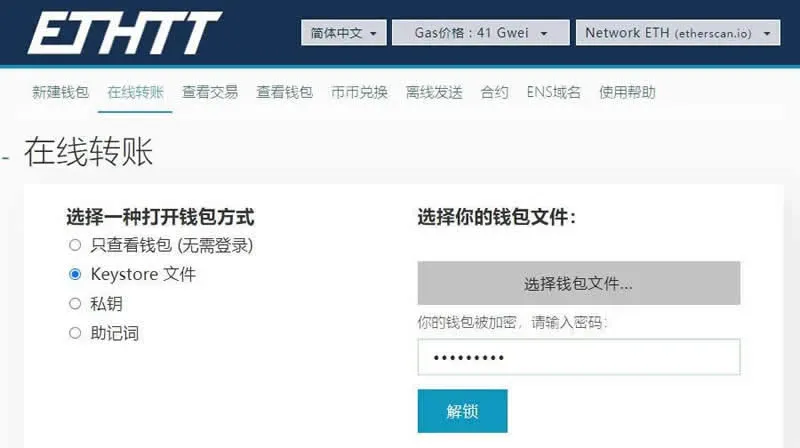
4. Log in using the UTC (Keystore) file
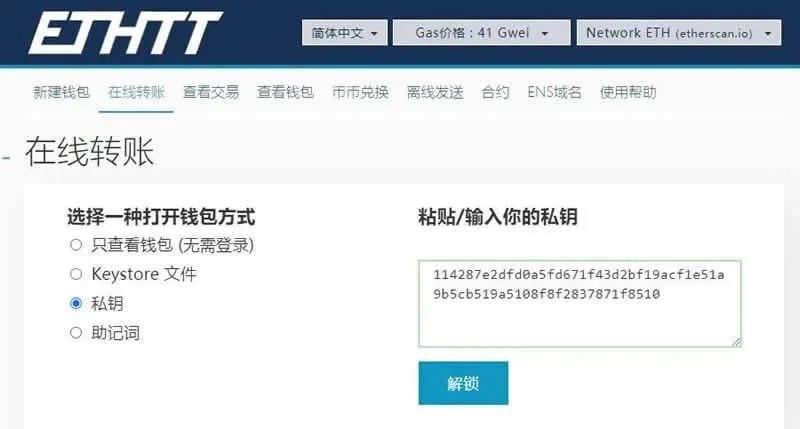
5. Log in using the private key
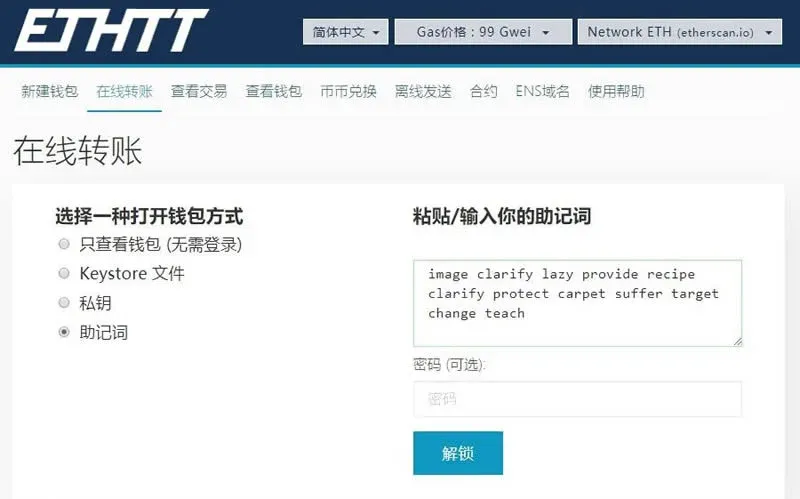
6. Log in using the mnemonic phrase
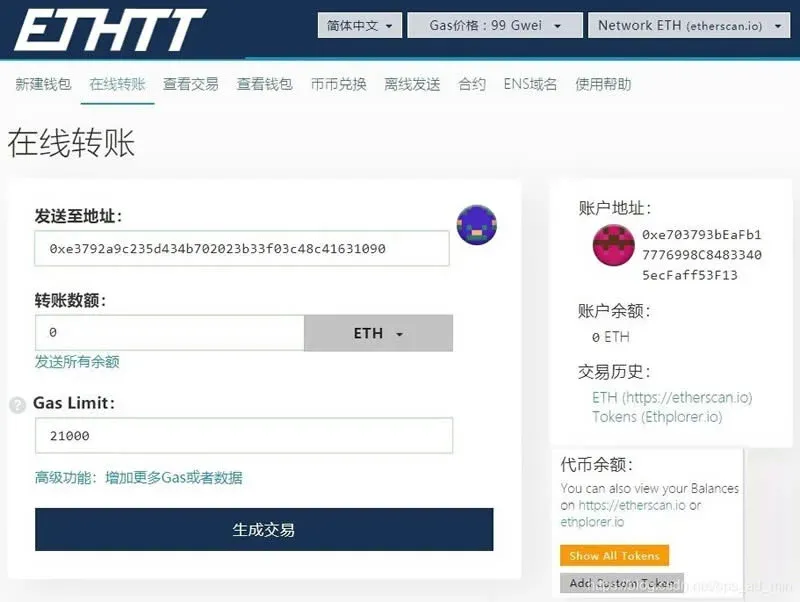
7. Enter the wallet interface and complete asset management
The above outlines the Ethereum (ETH) cold‑wallet creation and usage process with the ETHTT wallet. For more practical tips on Ethereum cold wallets, follow Bitaigen (比特根) and explore its related articles.
Related Reading
- Secure USDT Storage: Step-by-Step imToken Wallet Guide
- Best Wallets to Securely Store USDT: Hardware & Software Guide
- Bitcoin Hardware Wallets: Ledger, Trezor, KeepKey Review
💡 Register on Binance with referral code B2345 for the maximum trading fee discount. See Binance complete guide.



