
 Bitaigen Research
 How is the infinito wallet?
Among the many digital‑asset management tools, the infinito wallet has attracted attention for its lightweight design and comprehensive feature set. Its positioning is similar to Trust Wallet, emphasizing a “small yet refined” experience that balances ease of use with innovative interaction. Below we systematically review the product’s positioning, development history, core functions, and usage details.
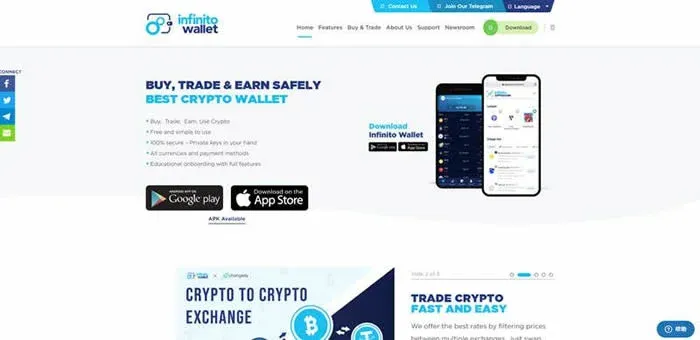
From the perspective of the Bitaigen editorial team, we have systematically outlined the positioning, features, and usage details of the infinito wallet to help you quickly grasp the core advantages and operational highlights of this lightweight multi‑chain wallet. To master onboarding tips and security best practices, continue reading the full article.
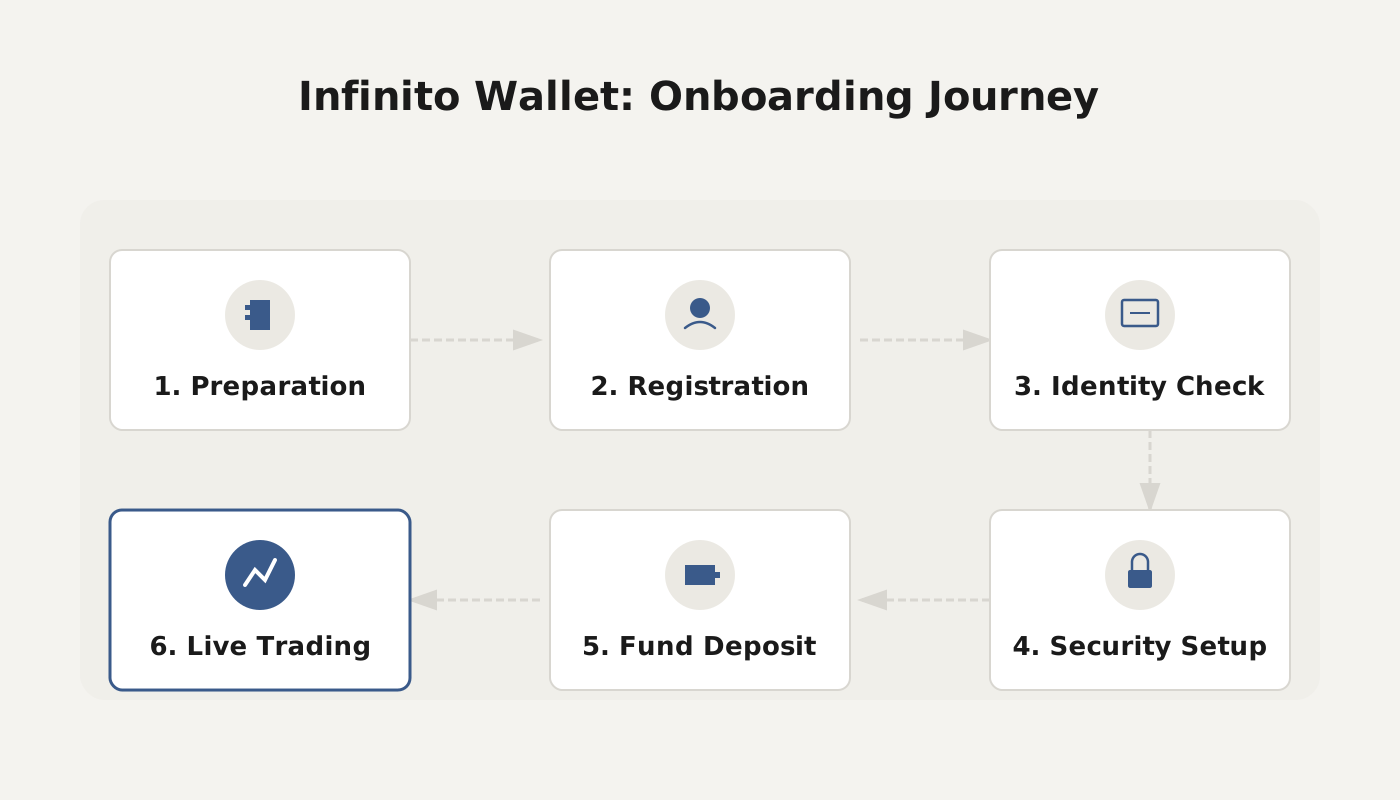
What is infinito wallet?
infinito wallet is a universal digital wallet designed for multi‑chain assets. In addition to supporting mainstream cryptocurrencies such as Bitcoin, Bitcoin Cash, Litecoin, Dash, GAS, and Dogecoin, it can also manage tokens built on Ethereum ERC‑20, NEO NEP‑5, and other smart‑contract standards, with plans to expand further on its roadmap.
The product originally entered the market with the premise of “unified digital‑asset management and secure storage,” aiming to resolve pain points such as cumbersome wallet operations and the need to switch between multiple blockchains. Since its official launch in 2017, the app has accumulated over 400,000 downloads, gradually earning recognition among users.
Starting in the first quarter of 2019, infinito wallet began constructing its own ecosystem, creating a complete closed loop that includes Infinito Wallet, Infinito Pay, Infinito App Square, and the Infinito Blockchain Platform. This ecosystem provides foundational support for blockchain project development and deployment.
Core features of infinito wallet
- Multi‑chain, multi‑wallet: Supports 15 major public and private chains (e.g., EOS, ADA, NEO, ETH, BTC, DASH, LTC, ETC) as well as thousands of tokens, allowing users to switch assets from different chains within a single interface.
- Exchange API integration: Users can bind exchange API keys to place orders directly from the wallet, eliminating the need to transfer assets back and forth between an exchange and the wallet.
- Built‑in airdrop and rewards: The wallet includes an ecosystem‑wide airdrop function that automatically distributes platform rewards to active users, encouraging higher engagement.
- EOS RAM trading: Provides a dedicated entry point for buying and selling EOS RAM, catering to the specific needs of the EOS community.
- Hybrid decentralized‑centralized model: While the current version uses a centralized private‑key management approach (private keys are stored on the project’s servers), the team plans to introduce hardware‑wallet and other decentralized storage options in future releases to raise security levels.
The developers have disclosed that future updates will continue to integrate multiple decentralized exchanges such as Binance DEX, Bitfinex, Bancor DEX, and Kyber Network, delivering a smoother cross‑chain trading experience.
Security and audits
- Unlock methods: Supports Touch ID, Face ID, password, and mnemonic phrase authentication for multiple layers of identity verification.
- Centralized private‑key storage: The wallet presently employs centralized management, meaning user addresses must be online, which introduces a certain risk of private‑key exposure. To mitigate this risk, Infinito validates payment addresses for all DApps, applications, and services on App Square.
- Third‑party audit: Security auditing was performed by KnowSec (known in Chinese as “知道创宇”), covering 11 test items including re‑entrancy attacks, integer overflows, access control, random‑number usage, and transaction‑order dependence, with the goal of identifying and fixing vulnerabilities before they can be exploited.
- Future plans: To meet higher security demands, the team has indicated that offline storage solutions such as hardware wallets will be supported in upcoming versions.
infinito wallet usage guide
1. Install on iOS and Android devices
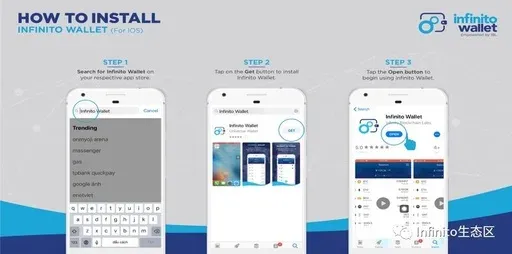
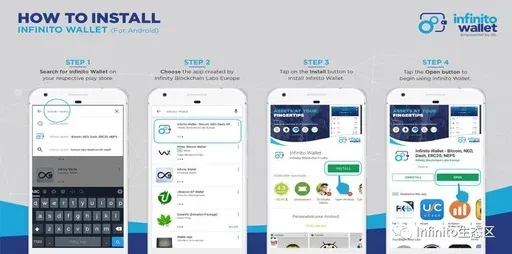
- Open the App Store (iOS) or Google Play (Android) and search for “InfinitoWallet.”
- Locate the official version published by Infinity Blockchain Labs Europe and tap Install.
- After the download finishes, tap Open to enter the wallet’s main interface.
2. Create a new wallet or restore an existing one
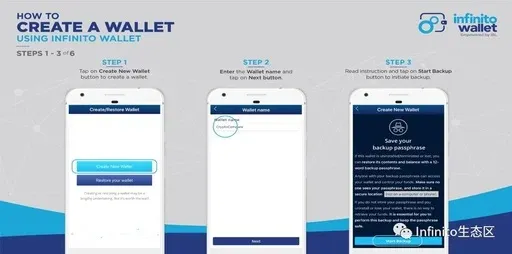
- On first launch, the system will prompt “Create New Wallet” or “Restore Wallet.” Choose the appropriate option and accept the user agreement.
- Give the wallet an easily recognizable name and tap Next; if you are restoring, skip directly to step 5.
- The app will guide you to back up the mnemonic phrase—tap Start Backing Up Mnemonic.
- On the pop‑up page, write down the 12‑word seed phrase, store it securely, and then tap Next.
- Re‑enter the words in the correct order to verify the backup.
- Set a login password, confirm it, and you have completed the creation or restoration process.
Existing users can tap Add Wallet in the top‑right sidebar and follow the same steps to create or import another wallet.
3. Add cryptocurrencies and tokens
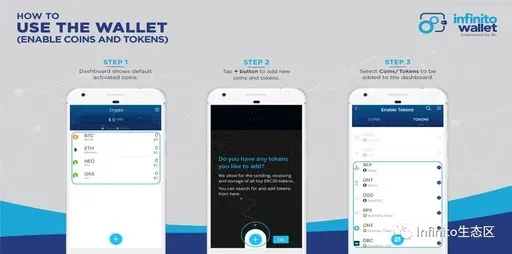
- After creating a wallet, the default view shows BTC, ETH, NEO, GAS.
- Tap the “+” button to open the addition screen.
- In the dialog, choose “Cryptocurrency” or “Token,” then select the desired asset. For mainstream coins, tap Next to finish; tokens are added automatically.
- The app will request your wallet password to verify permission to access the corresponding blockchain; the password itself is never stored in the wallet.
Adding a token via search
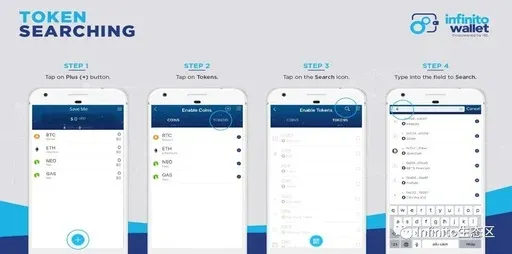
- In the Add Token screen, tap the Search icon at the top‑right.
- Enter the token’s name, symbol, or contract address to quickly locate and add it.
Adding a token via QR‑code scan
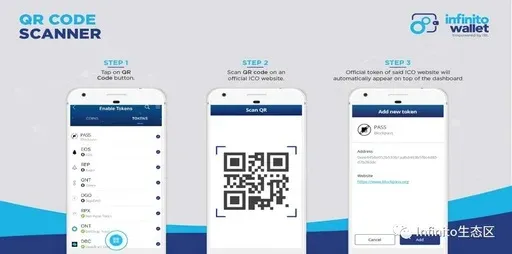
- In the Add Token screen, tap the QR‑code icon.
- Scan the official QR‑code provided by the token project; the app will automatically recognize and display the token information, after which you confirm to complete the addition.
4. Remove an asset you have added
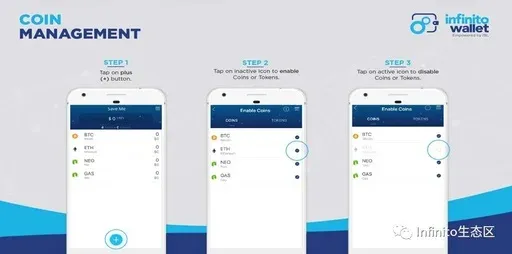
In the asset list, tap the circular button next to the target coin to remove it; tapping again will restore its visibility.
5. Enable password or fingerprint protection
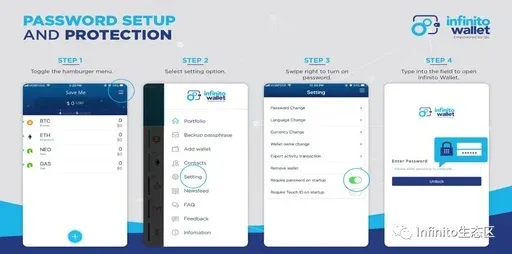
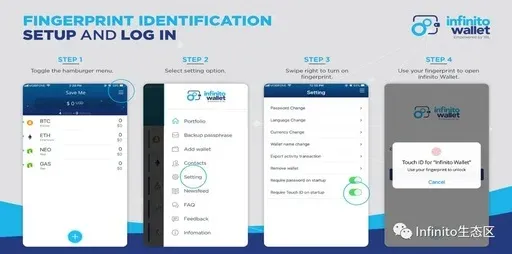
- Open the expandable menu in the top‑right corner and go to Settings.
- Toggle Require password on launch and Require fingerprint on launch. The app will then request verification each time it starts, resumes from background, or is unlocked.
6. Send and receive assets
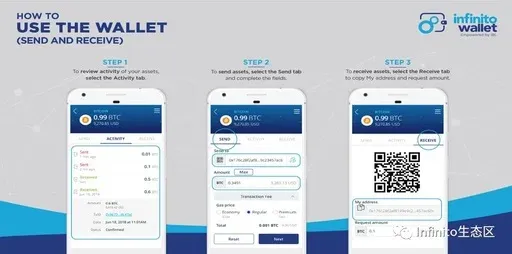
- From the main page, select the coin you wish to operate on; tap Activity to view transaction history.
- Send: Enter the recipient address, amount, and choose a transaction speed (Economy, Standard, Fast), then tap Next.
- Receive: Tap Receive, copy the displayed “My Address,” and provide it to the sender.
7. Export the private key
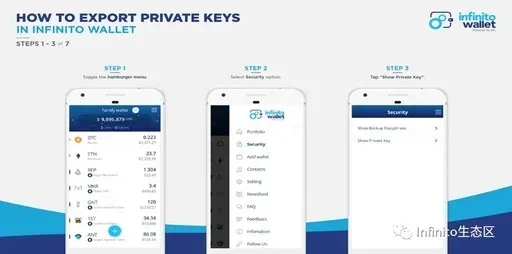
- In the main interface, tap the More button at the bottom‑right and select the relevant wallet.
- Choose Show Private Key.
- Read the disclaimer and confirm “I understand.”
- Enter your wallet password to continue.
- Pick the specific cryptocurrency or token you wish to view; the app will display the corresponding key pair, which you can then export at your discretion.
8. Participate in airdrop campaigns (example: Blockpass PASS)
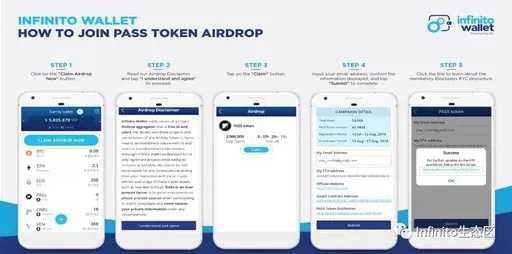
- Tap the “Join Airdrop Now” banner on the page.
- Read the airdrop disclaimer and click “I Understand and Agree.”
- Choose the target airdrop and tap Claim.
- If you meet the eligibility criteria, fill in the required fields and submit.
- After completion, the airdropped tokens will appear in your wallet. Specific rules may vary between airdrops; follow each campaign’s instructions carefully.
Friendly reminder: The regulatory framework governing digital‑wallet security is still evolving globally, and audit standards as well as security parameters have not yet been unified. When using any wallet, remain vigilant, keep your mnemonic phrase and private keys safe, and avoid asset loss due to potential vulnerabilities.
Tax note: Cryptocurrency gains, including airdrop rewards, may be taxable in your jurisdiction. Consult local tax regulations or a professional advisor to ensure compliance.
---
The above provides a comprehensive overview of infinito wallet, its core characteristics, and a complete step‑by‑step usage guide. For deeper analysis and future updates, stay tuned to Bitaigen’s forthcoming专题 articles.
Related Reading
- OKX Web3 Wallet Review: Secure Multi‑Chain Crypto Management
- Binance Funding vs Spot Wallet: Complete Guide
- BitPay Wallet Review: Multi‑Signature Security & Sync
💡 Register on Binance with referral code B2345 for the maximum trading fee discount. See Binance complete guide.



