
 Bitaigen Research
In the TokenPocket wallet, users can obtain energy and bandwidth on the Tron network by freezing TRX, delegating resources, or purchasing from the energy‑rental market, thereby satisfying the needs of transactions and smart‑contract execution.
In this article we lay out the complete pathway for acquiring Tron energy and bandwidth through the TokenPocket wallet, dissect the operational essentials of the two main channels—freezing TRX and energy rental—and share practical usage tips to help you carry out transactions and contract calls smoothly. If you want to master the details of resource management, keep reading for a full‑view overview.
What are Tron Energy and Bandwidth
Tron’s Energy Bandwidth system is a resource model that powers both smart‑contract computation and ordinary transactions. Every account on the network is allocated a certain amount of bandwidth and energy.
- Bandwidth: Used to pay for the network bandwidth consumption of a transaction.
- Energy: Used to pay for the computational resources consumed when a smart contract is executed.
When an account initiates a transaction or calls a contract, it consumes bandwidth and/or energy accordingly. If the account lacks sufficient resources, the transaction is blocked until resources are restored or supplemented by other means (for example, by burning TRX on‑chain).
How to Obtain Energy and Bandwidth
Bandwidth and energy can be obtained through two primary mechanisms:
- Freezing TRX (staking)
- By freezing TRX in an account, you receive bandwidth and energy proportionally.
- The obtained resources can be delegated to other users or consumed by yourself.
- Energy Rental Market
- Directly pay to rent a fixed amount of energy for a set period. Compared with freezing TRX, the overall cost of renting is usually lower.
How to Use “Staking 2.0”
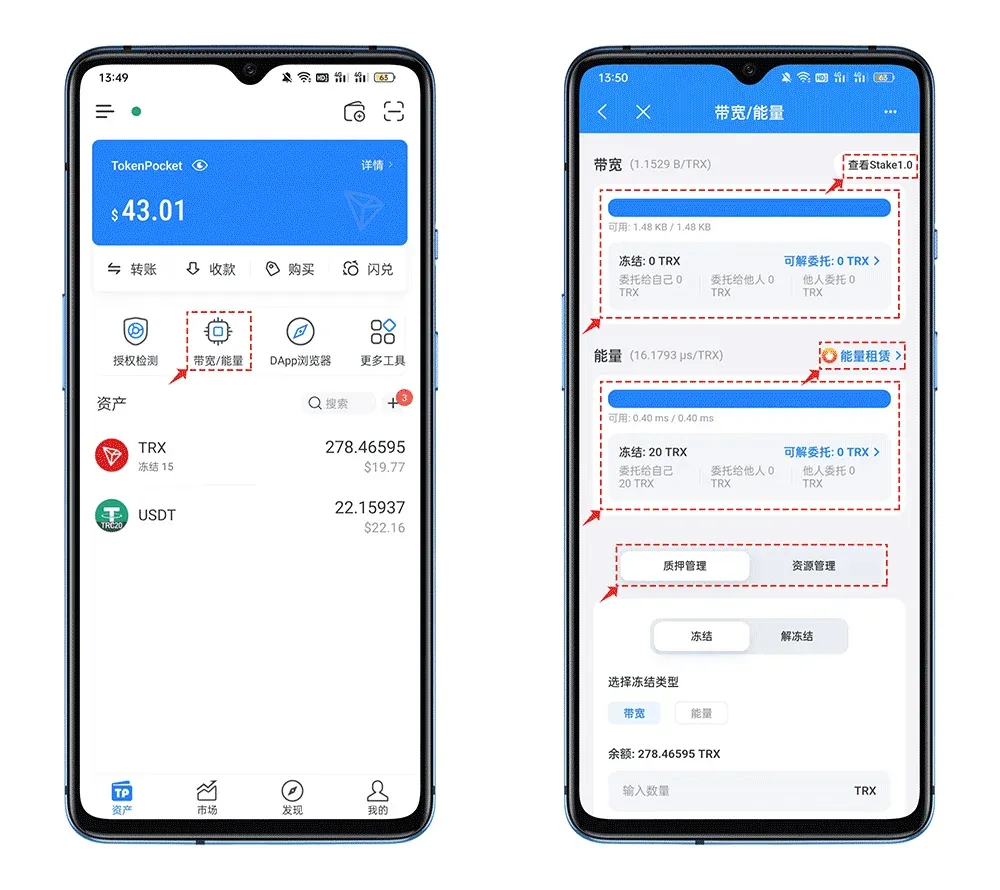
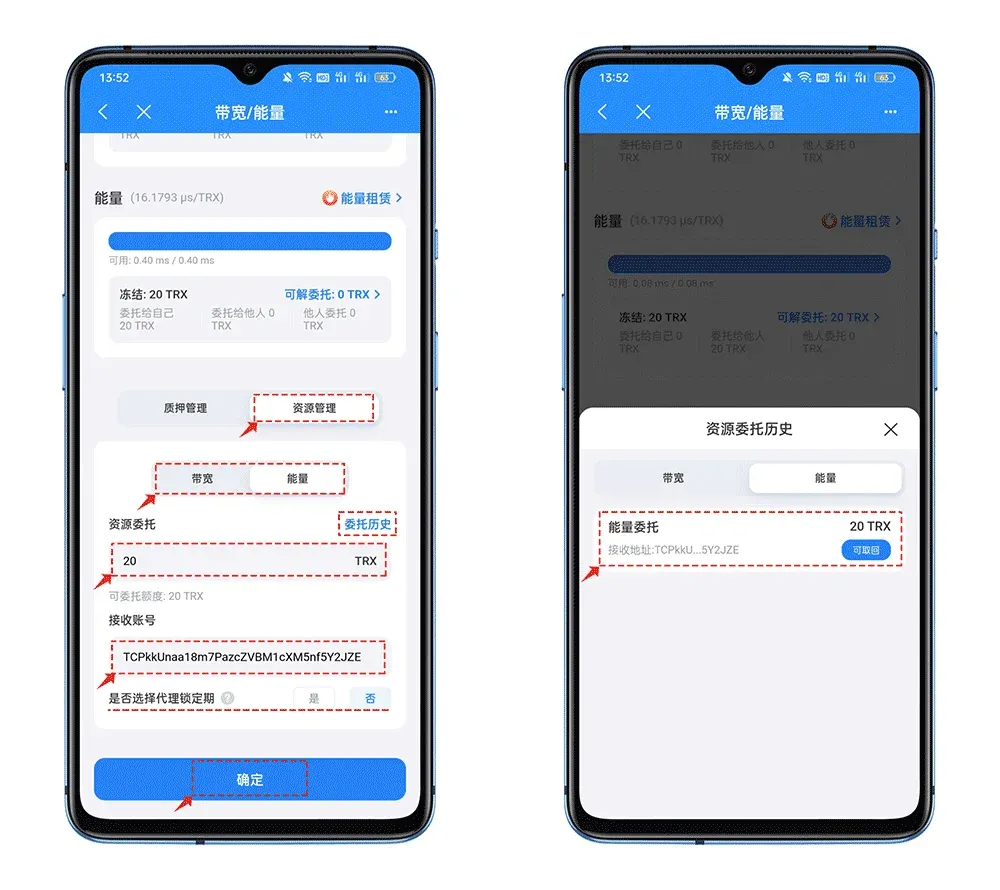
- Open TokenPocket and tap the [Bandwidth/Energy] button in the toolbar. This page includes the following sections:
- Stake 1.0: View legacy staking data, such as retrieving previously frozen TRX.
- Bandwidth Data: Shows the amount of bandwidth held, delegation status, and the amount that can be undelegated.
- Energy Data: Shows the amount of energy held, delegation status, and the amount that can be undelegated.
- Staking/Resource Management: A unified entry point for performing all Staking 2.0 operations.
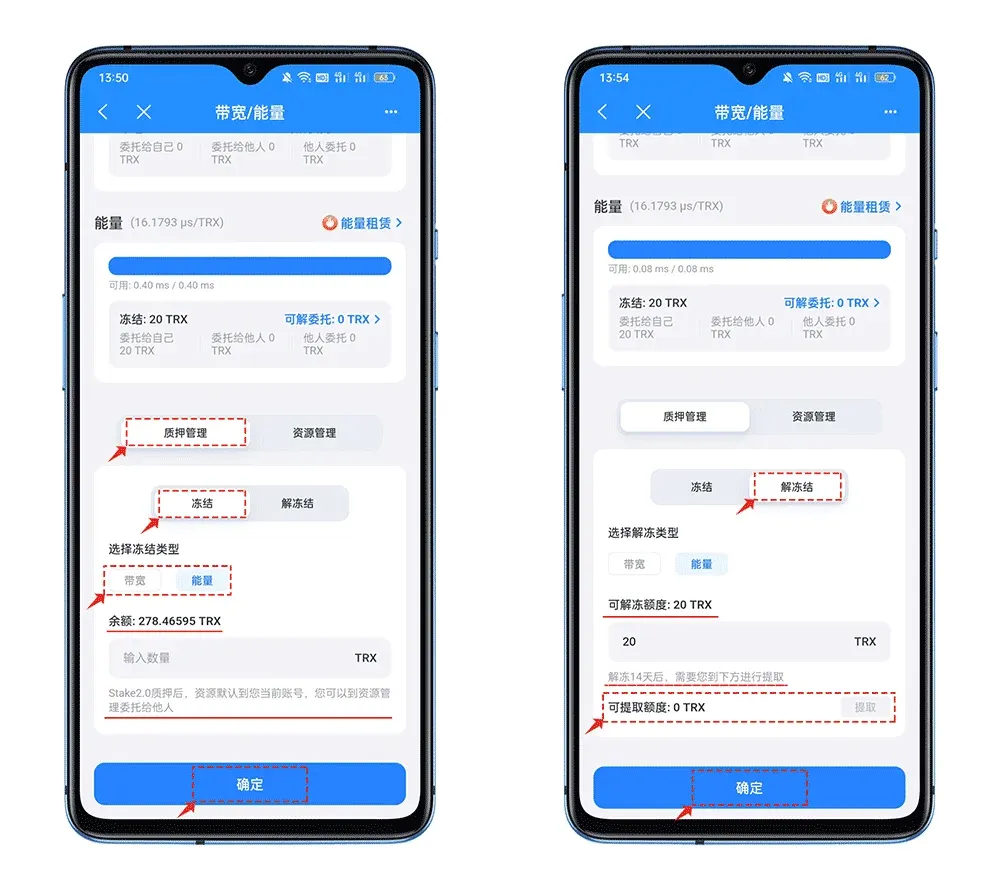
- In the [Staking Management] section, select [Freeze] or [Unfreeze] according to your needs.
- Freeze: Enter the amount of TRX you wish to freeze; after confirmation you will receive the corresponding bandwidth/energy, which can then be delegated to others.
- Unfreeze: When resources are not delegated or after delegation has been reclaimed, you may enter a quantity in the “Unfreeze‑able Amount” field to start the unfreeze process. Unfreezing requires a 14‑day waiting period; once the period ends, the amount appears in the “Withdrawable Amount” field and can be withdrawn, returning the TRX to your wallet.
- Resource Delegation: In the [Resource Delegation] field, input the delegation amount and the recipient address.
- Whether to enable proxy lock‑up period: Selecting Yes locks the delegated resource for 3 days; selecting No allows you to withdraw the delegation at any time.
How to Use Energy Rental
Although TRON Staking 2.0 brings notable improvements in staking, resource management, and unlocking periods, the 14‑day unlock window is still longer than the 3‑day period of the legacy version and can feel unfriendly to casual users. Consequently, the energy‑rental market serves as an effective supplement that reduces TRX consumption.
- Open the Energy Rental screen; the functionality is split into [Buy] and [Sell] sections.
- Buy Energy: Tap [Buy], enter the rental quantity (range 50,000‑1,000,000,000). The system will display the daily unit price (offers above 110 Sun may be matched immediately). The default rental period is 3 days; confirm and then tap [Place Order Now].
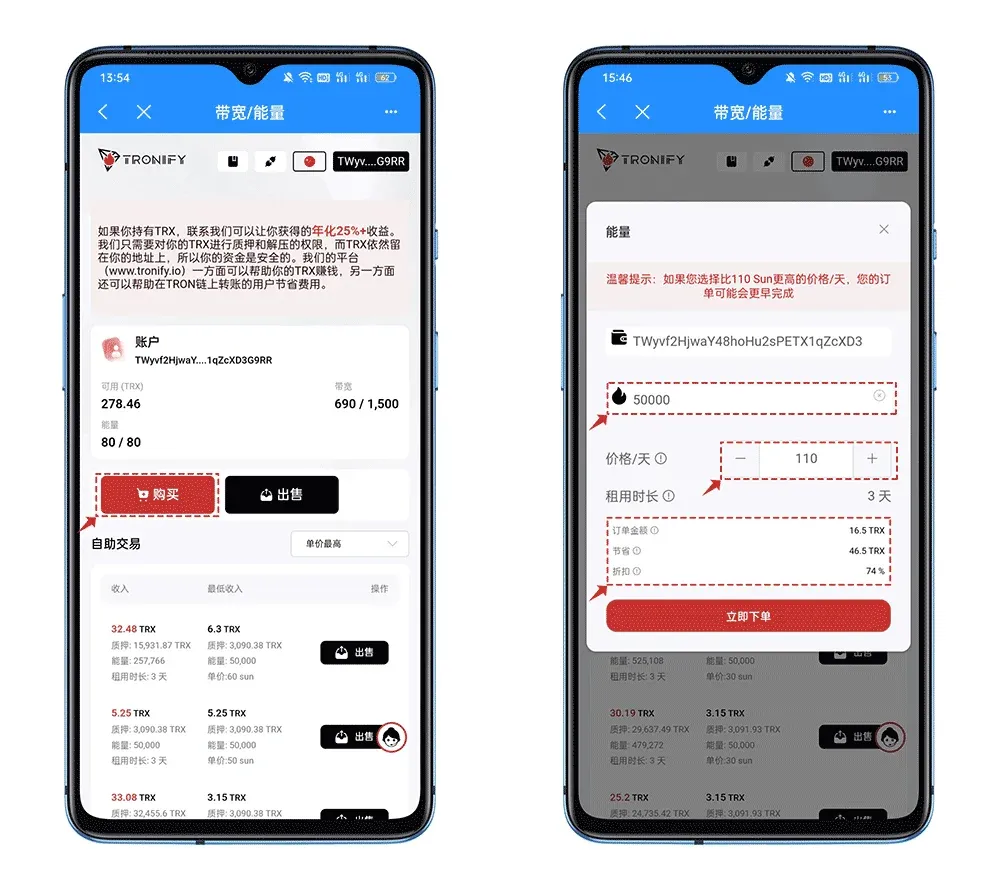
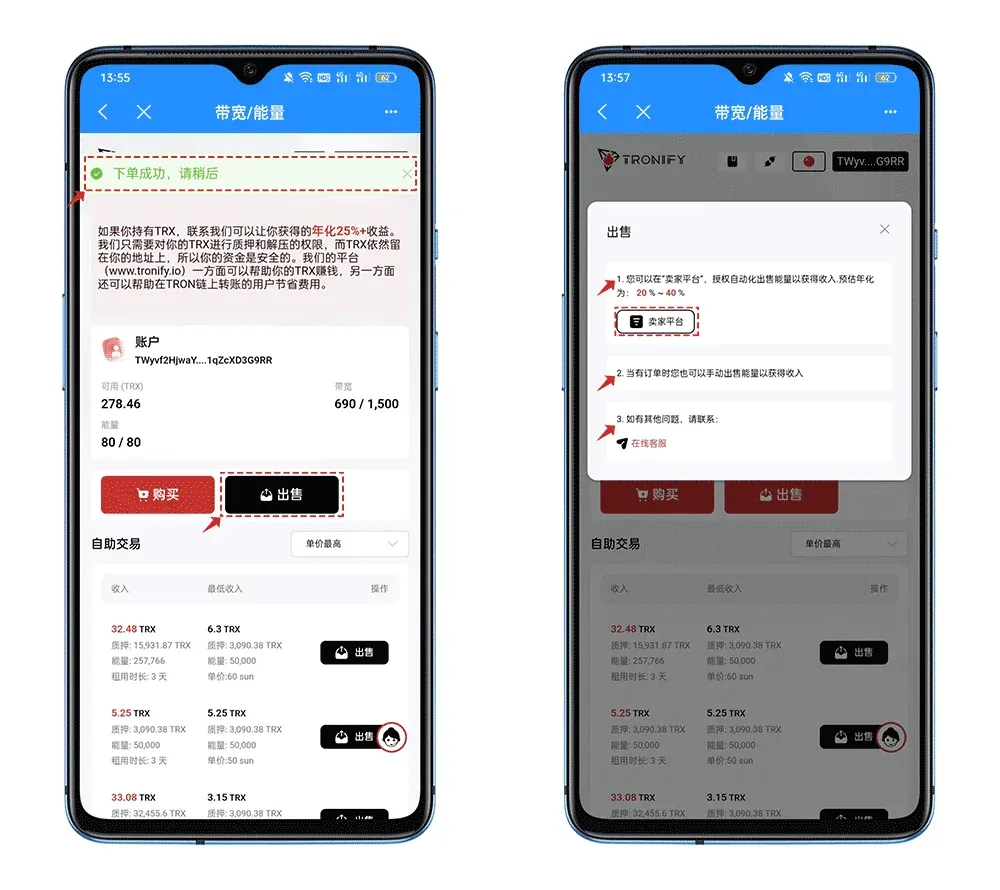
- After a successful purchase, a green banner appears at the top of the page and the newly added energy will be reflected shortly. To sell, tap [Sell]; the interface offers three methods, with the first—using a multi‑signature authorization platform for automated execution—being the recommended approach. Once authorized, the platform receives the following six permissions:
- TRX Stake 2.0: Automatically stake to acquire resources.
- TRX UnStake 1.0: Automatically unlock legacy frozen orders.
- Resources Delegate: Automatically delegate resources for sale.
- Resources Reclaims: Automatically reclaim resources whose delegation period has expired.
- Voting: After a successful sale, automatically vote to obtain TRX‑based reward incentives.
- Reward Withdraw: Automatically withdraw earned rewards to your wallet.
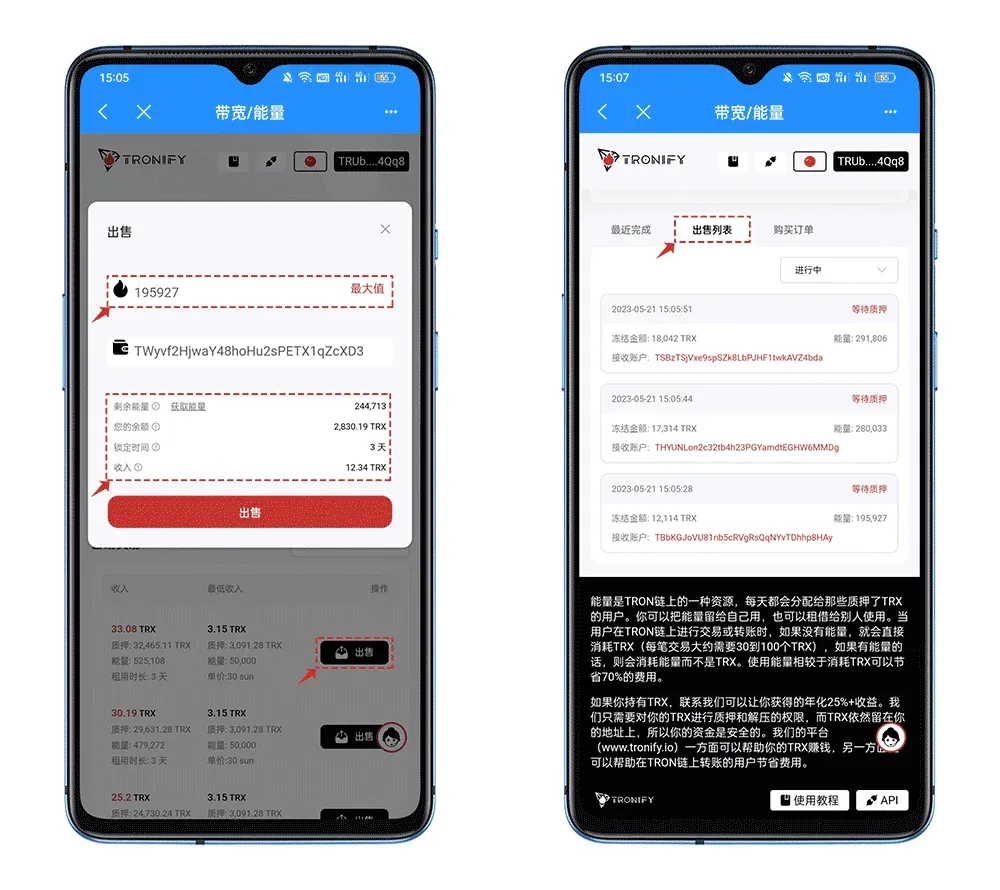
- In the [Sell] interface, input the amount of idle resources you wish to list and confirm. Once the order is filled, you can view order details in the [Sell List] section at the bottom of the page.
---
At this point, the complete workflow for acquiring energy, bandwidth, and using Tron’s energy‑rental service within the TokenPocket wallet has been covered. For additional practical tips on TP wallet operations and Tron energy rental, search for historic articles by Bitaigen or continue browsing the related links below. Thank you for following, and we look forward to your continued support of Bitaigen!
Note: Crypto transactions may generate taxable events in many jurisdictions. Users should consult local tax regulations and consider filing any gains or losses in USD (or the relevant fiat currency) via SEPA/SWIFT channels where applicable. U.S. residents must use Binance.US rather than the global Binance platform.
Related Reading
- TokenPocket Wallet: Multi-Chain Self-Custody for Crypto & DeFi
- TokenPocket TP Wallet: Cold vs Hot & OKX Android Review
- Earn Free SHIB Tokens with TokenPocket Liquidity Mining
💡 Register on Binance with referral code B2345 for the maximum trading fee discount. See Binance complete guide.



