
 Bitaigen Research
 In the cryptocurrency market, USDT (Tether) is a mainstream stablecoin that is pegged 1:1 to the U.S. dollar and is commonly used for converting between fiat currencies and digital assets.
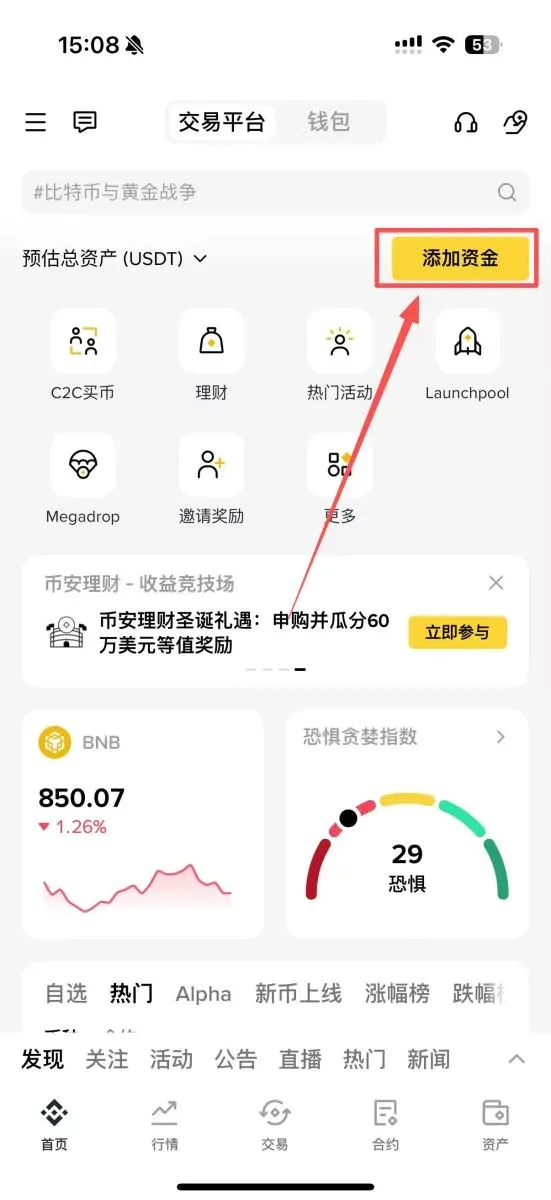
On the Binance app’s home screen, tap Add Funds, go to the C2C (peer‑to‑peer) buying page, select USDT, enter the amount you wish to purchase, and pay with Alipay, WeChat Pay, or a bank card to complete the USDT acquisition.
Below, the Bitaigen editorial team provides a systematic, step‑by‑step guide to the entire Binance C2C deposit and withdrawal workflow—from account registration and buying USDT to safely selling it back for fiat—helping you get started quickly while avoiding common pitfalls.

In this article we walk through the full‑chain process of Binance C2C trading, dissecting each critical step from account registration and USDT purchase to secure fiat withdrawal, and we also share practical risk‑mitigation tips. By following this complete tutorial you can swiftly master the conversion between fiat and stablecoins with confidence.

Binance Official Website Links
All links below are provided directly by Binance, so you can log in and download with peace of mind:
- Binance referral code: `B2345`
- Binance exchange official website
- Binance mobile app download (global version)
*Can Binance still be used in China in 2026?* – The latest registration tutorial (including Mainland China registration steps)
*What is Binance?* – Is it a scam? Official download and registration guide (2026 edition)
*How to download the Binance app for iOS in 2026?* – A step‑by‑step walkthrough
Binance Deposit (Funding) Procedure
If you have not yet created a Binance account, please register via the links above and install the official app first.
1. Open the app’s main screen and tap the “Add Funds” button in the upper‑right corner
2. Enter the buying page and switch to the “Quick Zone” or “Custom Zone”
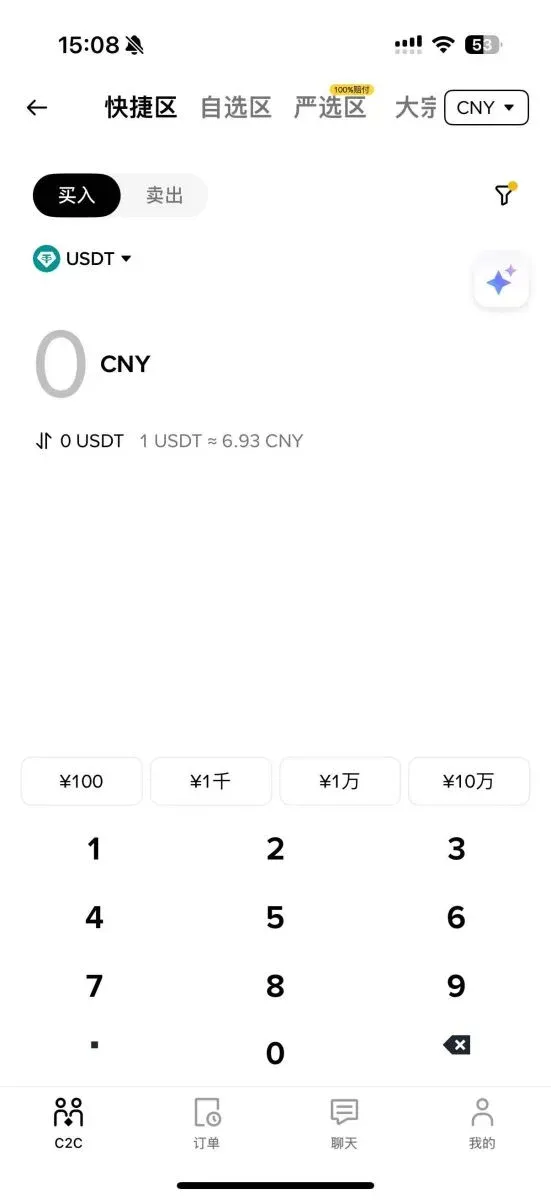
- Quick Zone: The system automatically matches you with a counter‑party; it is ideal for beginners because the workflow is streamlined.
- Custom Zone: Displays advertisements from individual merchants; you can pick a specific seller yourself, which suits users with trading experience or large‑volume requirements.
3. Enter the order amount
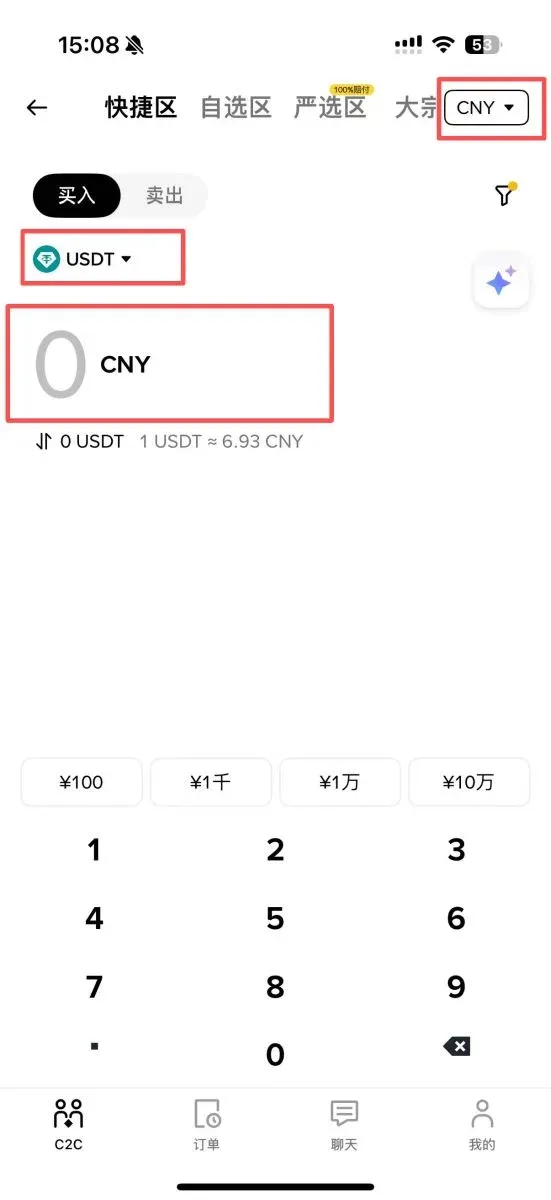
- In the Quick Zone you may choose Buy by Amount or Buy by Quantity.
- Multipliers such as “1X, 2X” indicate multiples of the minimum purchase threshold. For example, the minimum quantity purchase is 10 USDT; 1 × = 10 USDT, 2 × = 20 USDT. The minimum amount‑based purchase is US $72; 1 × = US $72, 2 × = US $144.
4. Confirm the order
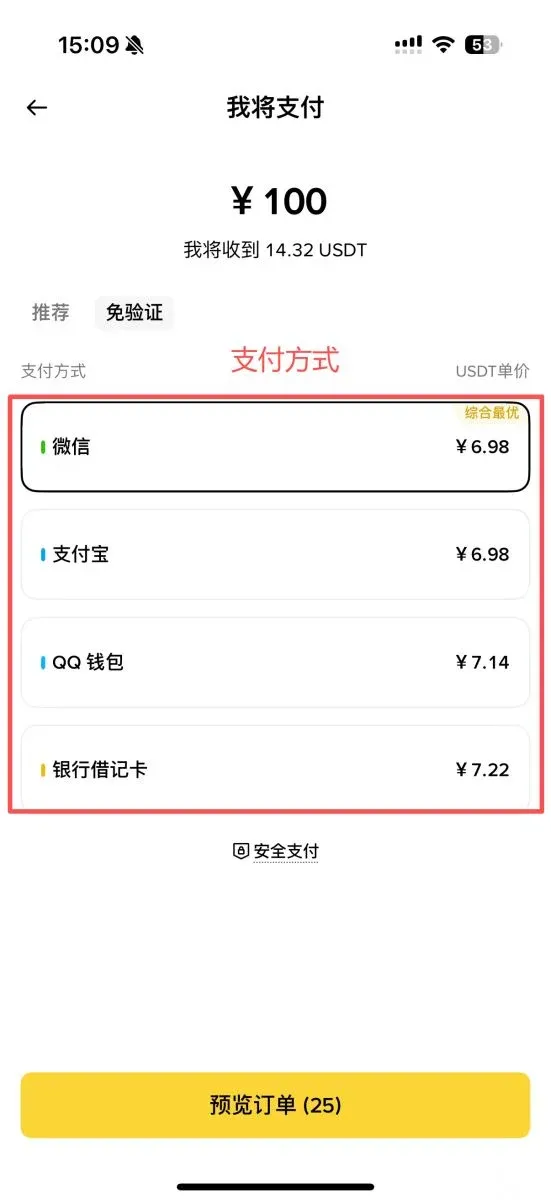
- After reviewing your buying plan, select a payment method (Alipay, WeChat Pay, or a bank card).
5. Complete the payment
- Follow the on‑screen instructions to transfer the funds to the designated receiving account. After you have paid, be sure to tap “I have completed the payment – notify the seller.” If you do not confirm, the order will be automatically cancelled after the timeout period.
6. Verify the asset receipt
- Once the seller confirms receipt of your payment, the USDT will be released. You can check the incoming balance in the Funding Wallet.
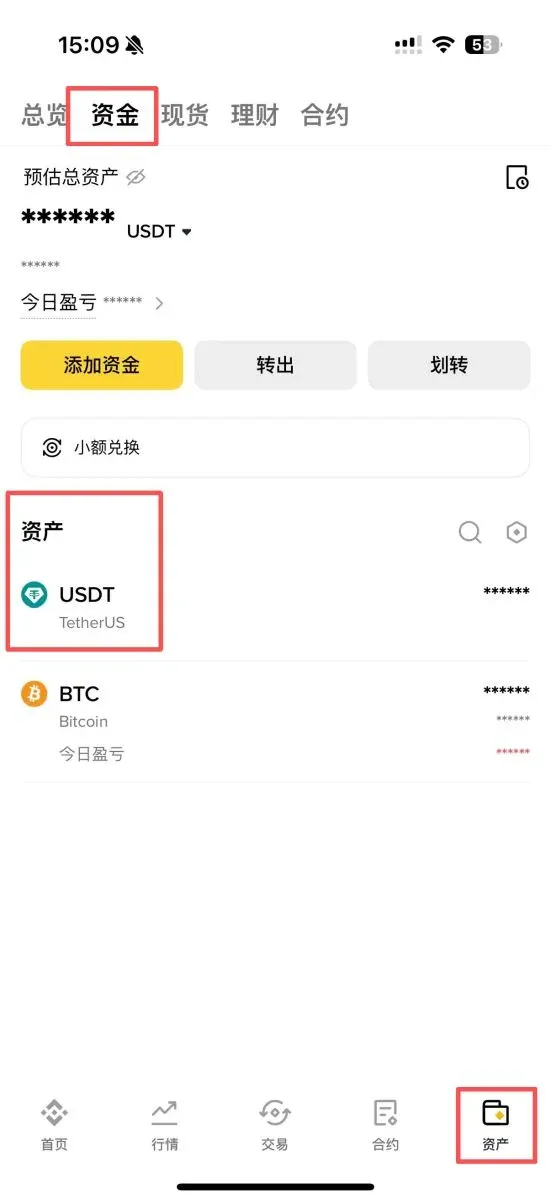
C2C Trading Friendly Reminders
- Every order has a fixed time window; complete the payment before the deadline.
- Click “I have paid” promptly after transferring funds to avoid automatic cancellation.
- Do not cancel the order yourself after payment, as this may result in a loss of funds.
- If you forget to confirm payment, contact Binance support immediately for assistance.
Withdrawal (Cash‑Out) Guide
The steps to convert your crypto assets back into fiat (e.g., USD, EUR via SEPA, or other local currencies) are as follows:
Step 1: Sell your holdings for USDT
Step 2: Sell USDT on the C2C platform
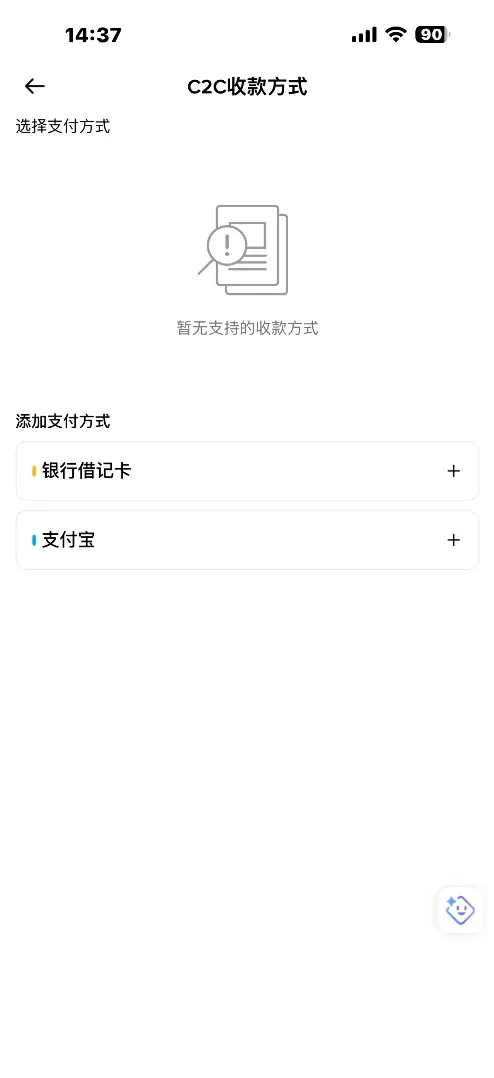
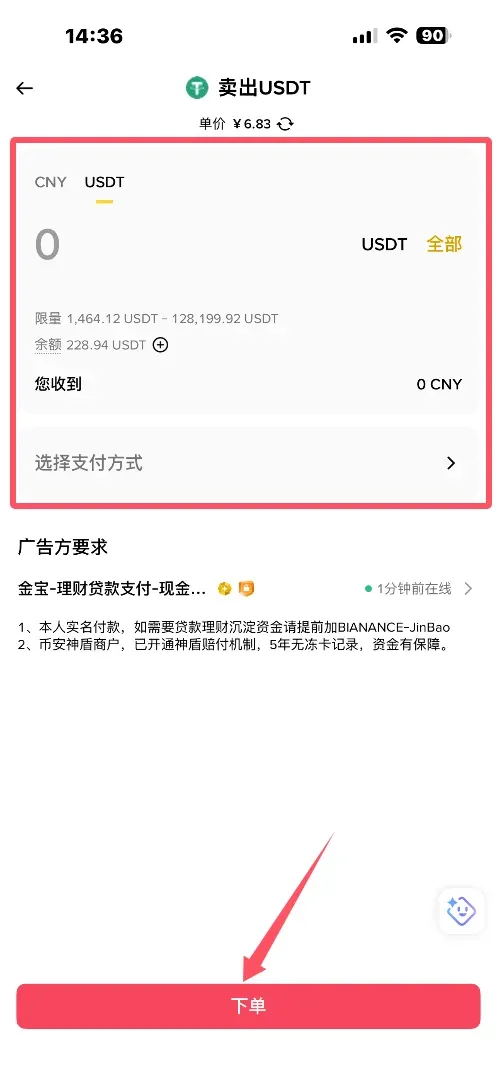
- Open the app, go to Trade, tap Add Funds, and select C2C – Sell.
- Choose your region, click Sell, then select the cryptocurrency, the amount, and the preferred payment method. Be sure to tick the Shield‑Protection and Verified Advertiser options to guarantee a safe withdrawal.
- After entering the sale amount and your receiving details, confirm the sell order.
How to Convert BTC to USDT on Binance
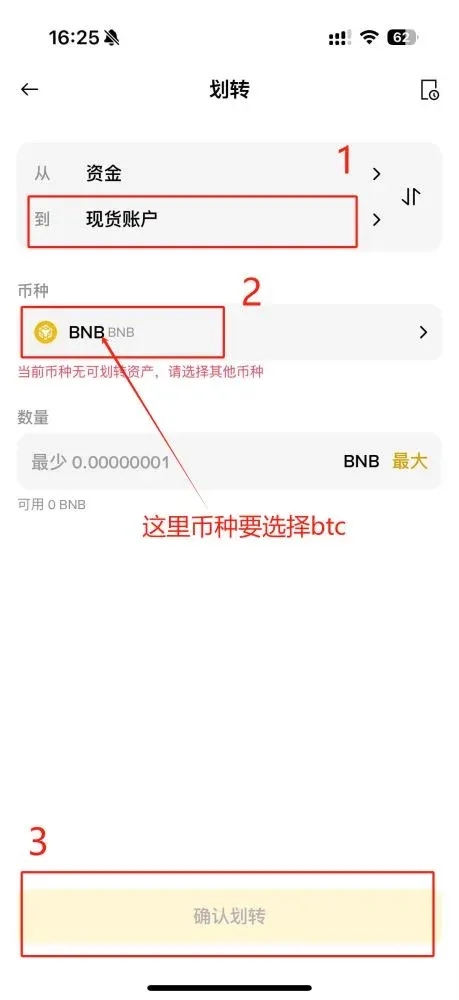
- Open the Binance app, tap Wallet at the bottom, then choose Transfer.
- Select the cryptocurrency BTC and set the transfer direction to Transfer to Spot Wallet.
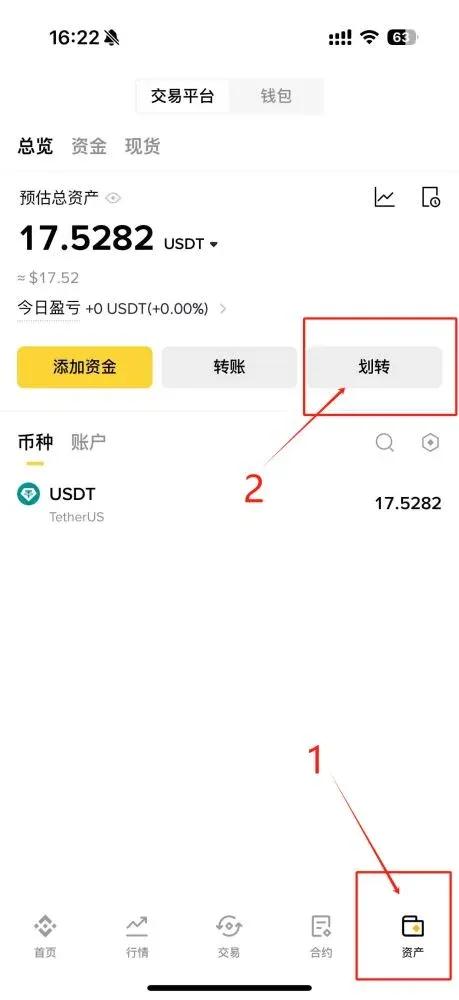
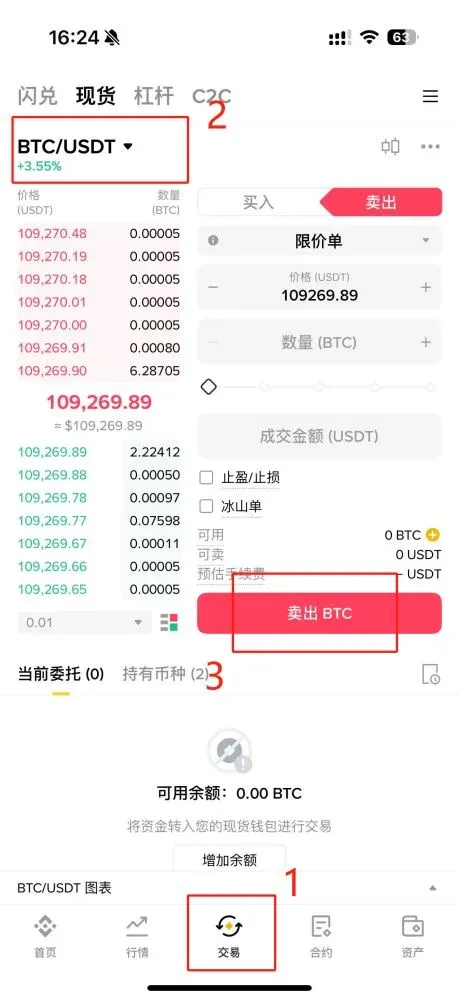
- Return to the Trade tab, select the BTC/USDT pair, and tap Sell to complete the conversion.
Binance Platform Overview
Binance was founded in 2017 by Changpeng Zhao, a Canadian‑born engineer of Chinese descent. Leveraging ultra‑fast order matching (approximately 1.4 million orders per second) and a broad selection of more than 200 trading pairs, the exchange quickly grew into the world’s largest cryptocurrency marketplace. In Q2 2021 Binance also launched a tokenized‑stock service (including assets such as Tesla and Coinbase).
Platform Security
- Two‑Factor Authentication (2FA): Mandatory activation of Google Authenticator or SMS verification during registration.
- Withdrawal Confirmation: Every asset transfer out of the account requires a mobile‑phone verification code.
- Secure Asset Fund for Users (SAFU): An insurance‑style reserve that offers an extra layer of protection for user holdings.
Exchange Evaluation
Pros
- Low trading fees and convenient fiat on‑ramps.
- The deepest liquidity of any global exchange.
- Supports hundreds of cryptocurrencies.
- Multi‑layer security architecture, high reliability.
Cons
- Deposit fees and exchange‑rate spreads can be relatively high compared with some regional services.
- Customer‑service response times are average.
- Minimum order sizes for certain coins may be larger than what small‑scale traders prefer.
Platform Feature Summary
- Spot Trading – Direct buying and selling of crypto assets.
- Futures/Derivatives – High‑leverage contracts with no settlement date.
- Fiat Gateways – Direct purchase of crypto with fiat currencies such as USD, EUR (via SEPA), and others.
- Binance Earn – Staking and lending products that generate annualized yields on deposited assets.
- Launchpad – Platform for new projects to conduct initial token sales (ICOs) and raise capital.
Comparison of the 5 Main Deposit Channels on Binance
| Deposit Method | Description | Advantages | Disadvantages |
|---|---|---|---|
| **Crypto Deposit** (most popular) | Transfer existing crypto directly to your Binance wallet | Low fees, instant credit | Requires you to already hold crypto |
| **Credit Card / Apple Pay** | Purchase crypto instantly with a card inside the app | Funds arrive immediately | Less favorable exchange rates; some banks block the service |
| **Third‑Party Card Services** | Buy crypto through Binance‑partnered aggregators | Instant credit | Higher spreads, additional KYC steps |
| **C2C (P2P) Trading** | Purchase crypto from individual merchants on the platform | Multiple payment options (Alipay, WeChat Pay, bank transfer, etc.) | Merchant quality varies |
| **Bank Wire (SEPA / SWIFT)** | Wire fiat (USD, EUR, etc.) directly to Binance | Low fees for large amounts | Takes 1‑2 business days, may incur cross‑border charges |
After weighing the options, the author prefers using local‑exchange deposit routes (e.g., Taiwan‑based services) because they generally offer tighter spreads, lower fees, and equally convenient fiat withdrawals.
Binance C2C Deposit Risk Analysis: Why Choose It?
C2C (peer‑to‑peer) trading is fundamentally a direct match between buyer and seller; Binance does not hold the fiat itself but employs a Shield‑Protection escrow to ensure fairness. With global regulatory tightening in 2026 (e.g., the EU’s MiCA framework), the main risks are:
- Scam risk – Fake payment screenshots or private chat requests for off‑platform transfers.
- Payment freezes – Large Alipay/WeChat transfers may trigger bank risk‑control systems.
- Exchange‑rate variance – Some sellers quote prices above the market rate, so price comparison is essential.
Choosing a Shield‑Protected merchant (verified seller) lifts the success probability to roughly 99.9 %. In 2026 Binance’s P2P daily volume surpassed $1 billion, and user satisfaction exceeded 95 %.
Pre‑Deposit Account Security Checklist
- Complete KYC – Navigate to Account → Identity Verification, upload a government‑issued ID (passport or national ID). Mainland Chinese users typically wait 1‑3 days for approval.
- Enable 2FA – Set up Google Authenticator or SMS codes and activate the anti‑phishing code feature.
- Link Payment Methods – In P2P → Payment Methods add Alipay, WeChat Pay, or a bank card; it is advisable to whitelist trusted accounts only.
- Use a VPN (if required by local regulations) – Ensure a stable IP address to avoid connectivity restrictions.
These steps take roughly 10 minutes and dramatically cut down the chance of fraud or account compromise.
Anti‑Scam Tips: Avoid 90 % of Common Traps
| Typical Scam | Prevention | Reason |
|---|---|---|
| Fake transfer screenshots | Trust only the in‑app notification from Alipay/WeChat Pay | Screenshots can be edited; the app’s real‑time push is verifiable |
| Private‑chat payment requests | Keep all communication inside the Binance platform | Off‑platform chats have no escrow protection |
| Ultra‑low price offers | Choose listings that are at or above the prevailing market rate | Very low prices are often linked to fraudulent sellers |
| “Pay extra” pressure | Pay exactly the amount shown in the order | Prevents “over‑pay‑then‑request‑refund” scams |
After a trade is finished, monitor the account for 72 hours to guard against chargebacks. Opting for the Quick Zone’s automatic matching typically yields a zero‑risk buying experience.
Binance Deposit Frequently Asked Questions (FAQ)
Q: What is the most cost‑effective way to purchase USDT on Binance?
- Use the Binance official app’s C2C Quick Zone to buy USDT, selecting Alipay or WeChat Pay (or a local bank card) as the payment method.
Q: What is the minimum deposit amount?
| Deposit Method | Minimum Deposit |
|---|---|
| Credit‑card deposit | **$100 USD** |
| Taiwan local‑exchange deposit | No explicit minimum (subject to merchant policy) |
Q: How long does it take for a deposit to be credited?
- All three methods listed above generally credit the account within 10 minutes; a notification is sent once the funds are available.
Q: Which fiat currencies does Binance support? Is Taiwan included?
- Binance integrates more than 60 fiat currencies and a wide array of payment channels. Taiwanese users can trade using New Taiwan Dollar (TWD).
Q: Why does my account balance not update instantly after a deposit?
- After the blockchain or banking network confirms the transfer, Binance processes the credit for a few minutes before the balance is displayed.
Q: How can I ensure the safety of my funds during the deposit process?
- Select reputable merchants with the Shield‑Protection badge, start with a small test transaction, and only increase the amount after confirming the seller’s reliability.
Q: Can I start trading immediately after the deposit appears?
- Yes. Once the funds are visible in your wallet, you may trade spot, futures, or any other supported product instantly.
---
*Please note that cryptocurrency transactions may be subject to taxation in your jurisdiction. It is advisable to consult a tax professional to understand how crypto gains could affect your tax obligations.*
The above constitutes the 2026 Binance Exchange USDT Purchase & Full C2C Deposit/Withdrawal Tutorial compiled by the Bitaigen editorial team. We wish you smooth and secure trading!
Related Reading
- Install Binance App in US – Bypass Binance.US
- Binance C2C & Quick Buy: USDT Purchase Guide for Beginners
- Binance Review 2024: Register, Download & Trade Bitcoin, Ethereum, USDT, USDC
💡 Register on Binance with referral code B2345 for the maximum trading fee discount. See Binance complete guide.



