
 Bitaigen Research
 Binance Alpha token’s reverse order is a One‑Trigger‑One (OTO) order, meaning that after the primary order is fully executed, the system automatically creates and places a child order in the opposite direction, enabling automatic hedging and trade management.

In this article we provide a detailed analysis of the reverse‑order mechanism for Binance Alpha tokens, explain its OTO principle and the risk‑hedging benefits, and give the complete order‑placement process for both the mobile app and the web platform. Through practical examples, traders can get up to speed quickly and improve management efficiency. A thorough read is recommended.
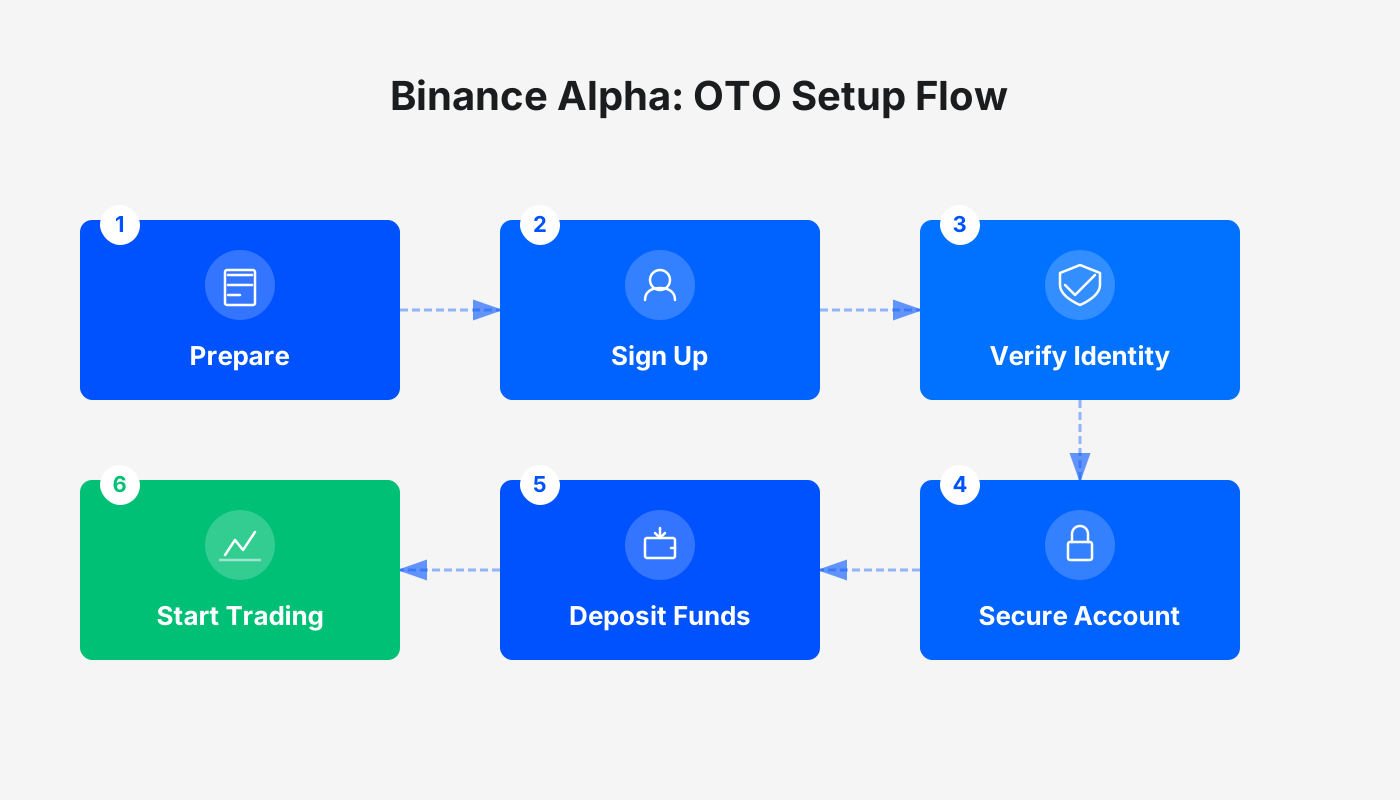
What is a Reverse Order for Alpha tokens
A reverse order belongs to the “one order triggers another order” (OTO) type. After the primary order is submitted, the system automatically issues a child order in the opposite direction once the primary order’s execution conditions are met. This mechanism helps traders match the primary and child orders in a single step, enhancing risk‑management efficiency and saving operation time.
How the quantity of an Alpha reverse order is calculated
- When the primary order is a limit‑buy, the child order is a limit‑sell.
Child order quantity = the actual quantity obtained from the primary order’s execution.
- When the primary order is a limit‑sell, the child order is a limit‑buy.
Child order quantity = total amount received from the fully executed primary order ÷ the price at which the child order is placed.
How to place an Alpha reverse order
Binance mobile app
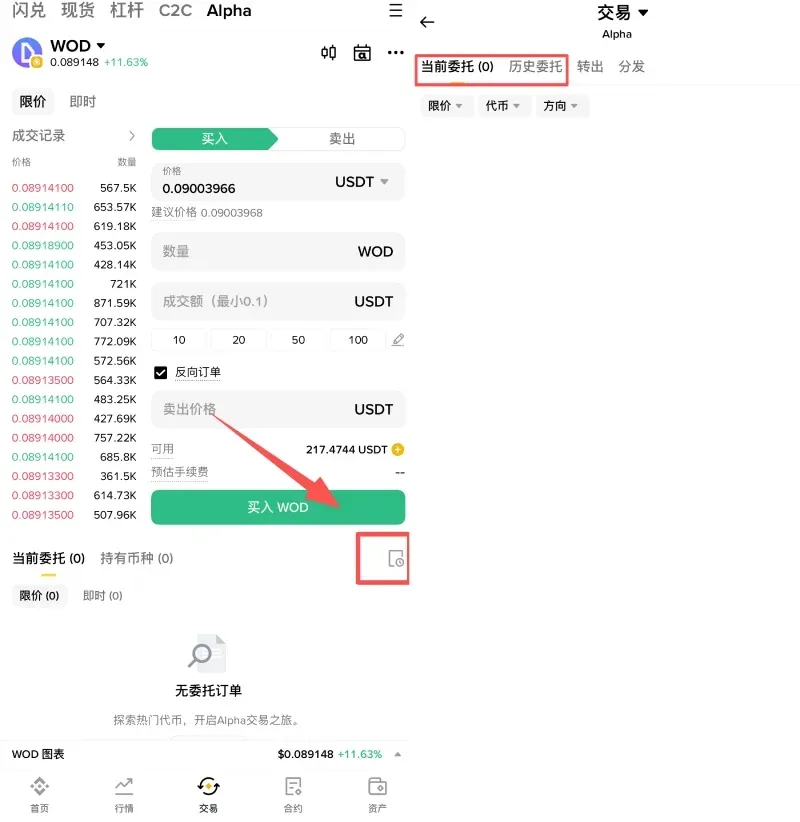
- Log in to Binance (official registration: https://accounts.binance.com/register?ref=B2345 – U.S. residents should use Binance.US; deposits can be made via USD, SEPA, or SWIFT) / download the app from the official source: https://www.bitaigen.com/binance/download. Tap the 【Trade】 tab at the bottom, then select 【Alpha】 at the top to enter the trading page.
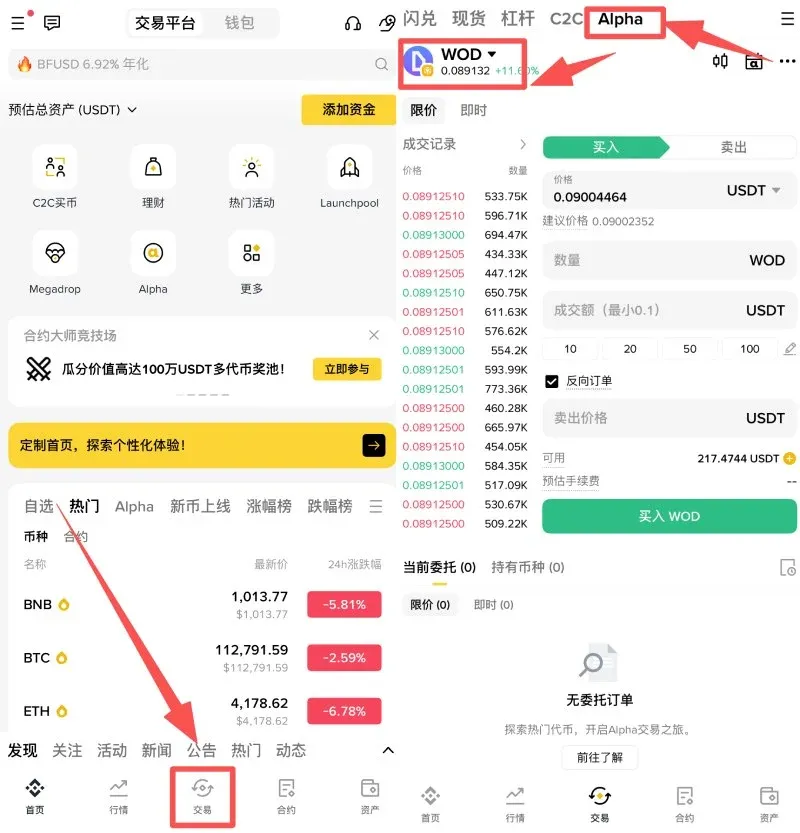
- In the limit‑order section choose 【Buy】 or 【Sell】, fill in the order parameters, check the 【Reverse Order】 box, and submit. A preview of the full order details is shown before confirmation.
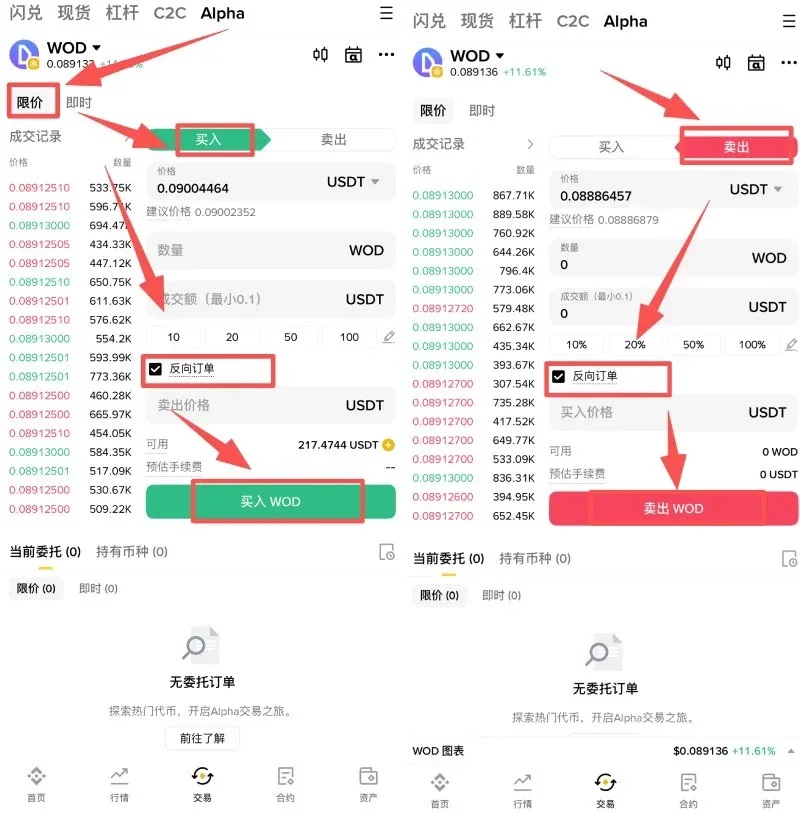
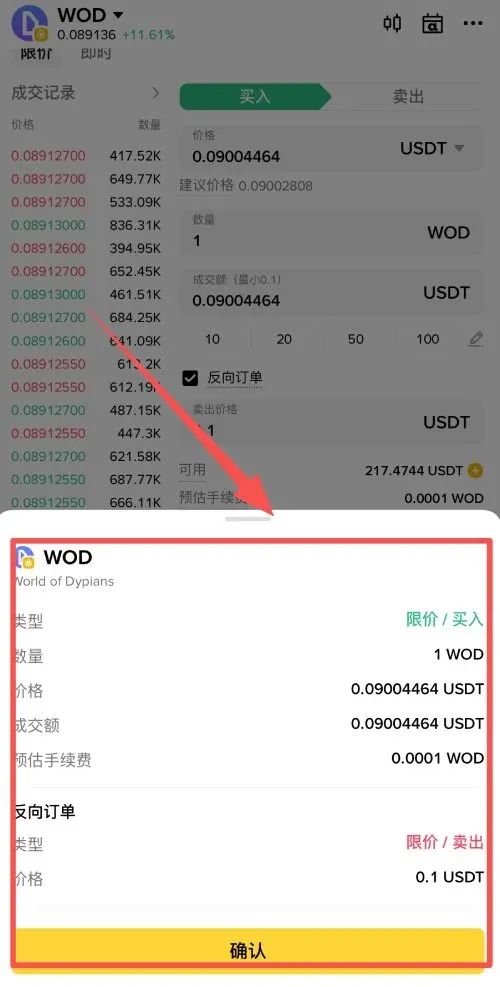
- Open the Alpha Trading page, tap Order History, and view execution status in either 【Open Orders】 or 【Order History】.
Binance website (global)
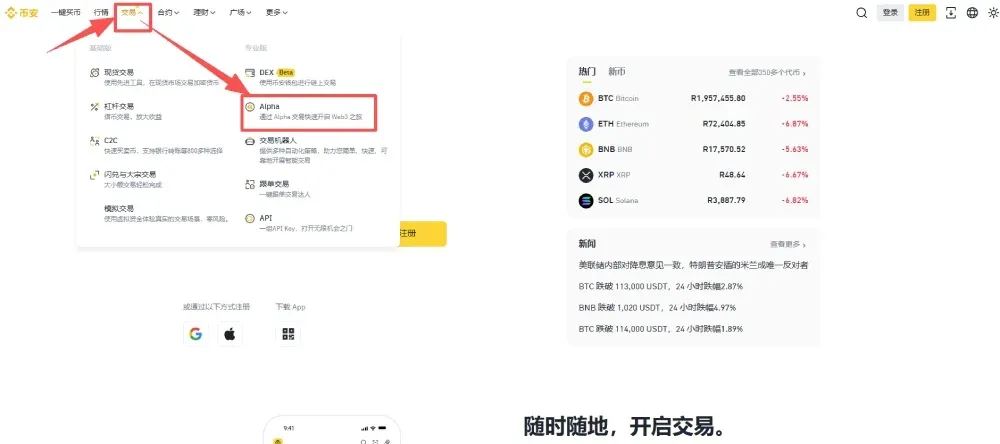
- Log in to the Binance website and navigate to 【Trade】 → 【Alpha】.
- In the limit‑order area select 【Buy】 or 【Sell】, input the required information, tick the 【Reverse Order】 option, and place the order.
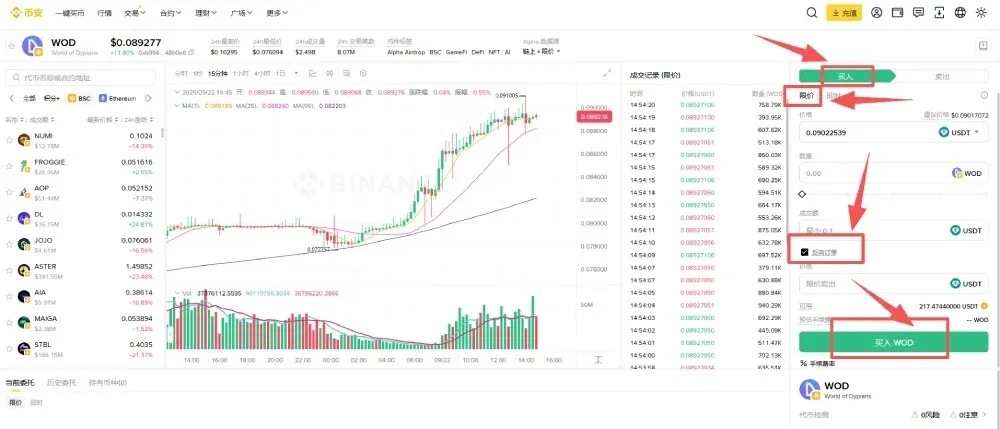
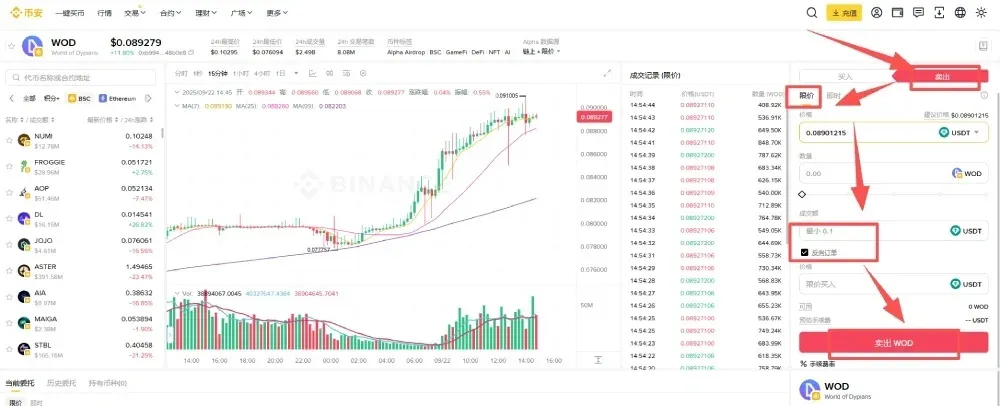
- Review the order details once more before confirming.
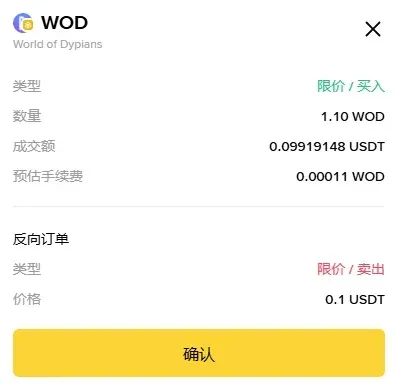
- Check the status of your order under 【Open Orders】 or 【Order History】.

Frequently Asked Questions
1. What is a reverse order?
A reverse order is a conditional order where, after the primary order (Order A) is executed, the system automatically generates a child order (Order B) in the opposite direction, achieving automatic buy‑sell hedging.
2. How do Order A (primary) and Order B (child) differ?
- Order A (primary): The first limit‑buy or limit‑sell submitted by the user.
- Order B (child): A limit order automatically placed by the system after Order A is fully filled, using the price preset by the user.
3. Which order types are supported?
Currently only limit orders are supported; market orders are not available for reverse orders.
4. How is the child order’s direction determined?
The child order’s direction is always opposite to the primary order:
- Primary limit‑buy → Child limit‑sell.
- Primary limit‑sell → Child limit‑buy.
5. How is the child order’s quantity calculated?
- Limit‑buy primary: Child quantity = the actual quantity filled by the primary order.
- Limit‑sell primary: Child quantity = total proceeds from the primary order ÷ the price set for the child order.
6. Does a partially filled primary order trigger the child order?
Only a fully filled primary order triggers the child order. Partial fills or unfilled orders do not generate a child order.
7. How is the child order’s price set?
When submitting a reverse order, the user must manually input the price at which the child order will be placed. The system will use this price when the child order is triggered.
8. Can a reverse order be cancelled?
- The primary order can be cancelled at any time before it is filled, which also cancels the entire reverse order setup.
- Once the primary order is filled and the child order is created, the child order behaves like a normal limit order and can be cancelled independently.
9. In which situations might a reverse order fail?
- If the primary order does not fill or only partially fills, the child order will not be generated.
- After the child order is generated, extreme market volatility may cause the child order’s price to fall outside a reasonable range, potentially preventing execution.
10. What advantages does a reverse order have over a regular order?
With a regular limit order, traders must manually place a separate hedging order. A reverse order automatically creates the hedging order once the primary order is filled, which is useful for users who need fast, automated trading.
---
This article introduced the concept of reverse orders for Binance Alpha tokens and provided step‑by‑step instructions for both the mobile app and web platform, helping you conduct automated trading more efficiently. For additional Binance Alpha content, you can search the Bitaigen (比特根) archive or continue reading the related articles recommended below.
*Please note that cryptocurrency gains may be subject to tax in your jurisdiction; consult a tax professional for guidance.*
Related Reading
- How to Place a Binance Alpha Reverse Order (One‑Trigger‑One)
- Binance Alpha to List SUPERFORTUNE (GUA) – Airdrop Nov 27
- Binance Alpha Lists SatLayer (SLAY) – Aug 11 Airdrop Claim
💡 Register on Binance with referral code B2345 for the maximum trading fee discount. See Binance complete guide.



