
 Bitaigen Research
 If you are active in the crypto space and often operate through Binance (official registration link | official download link) for selecting coins, transferring funds, trading, or receiving remittances from friends, the act of “transferring crypto” is actually simpler than you might think.
Binance Pay is Binance’s internal account‑to‑account transfer feature; as long as both parties have completed KYC and hold Binance accounts, transfers are fee‑free and settle within seconds.
If you and the counter‑party each have a Binance account and you are using the “in‑account transfer” function, you can enjoy zero fees and instant settlement. Yes, you read that correctly—no hidden steps.
This article will walk you through the entire process with screenshots:
- How to set up and enable Binance Pay (the built‑in “account inter‑transfer” feature)
- The complete workflow: selecting the cryptocurrency, entering the recipient’s account, confirming, and seeing the funds arrive in seconds
- Common mistakes and safety reminders: avoiding wrong addresses, incorrect data entry, failed account verification, and other risks
Whether you are sending USDT, BNB, or any other token to a friend, or simply managing multiple of your own accounts, mastering this technique can save you the “on‑chain transfer fee.”

If you have not yet created a Binance account, you can register using the links below and download the app. A video tutorial is also provided for self‑guided registration.
Binance global registration: https://accounts.binance.com/register?ref=B2345 (copy the URL into a browser)
Binance Android app download: https://www.bitaigen.com/binance/download
In this article we detail the usage of Binance Pay, helping you achieve fee‑free, instant, intra‑platform transfers. Through illustrated steps you can set up, execute, and mitigate risks with a single click, making your trades more efficient and secure.
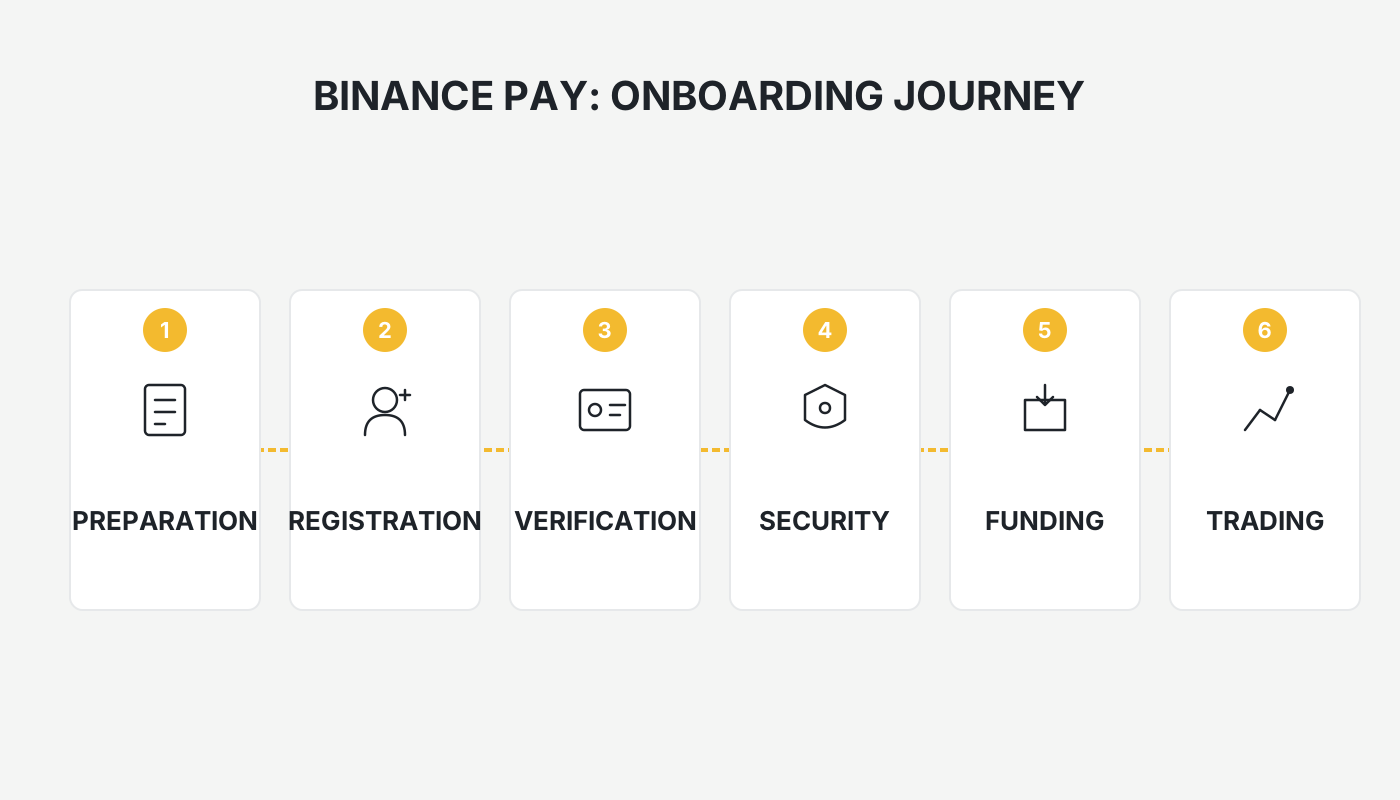
What Is Binance Pay?
In the world of digital assets, “transferring crypto” is a function almost everyone uses.
Fees are the biggest pain point of transfers, especially when moving assets on‑chain where networks such as TRC‑20, ERC‑20, etc., charge gas fees.
Binance Pay is a platform‑internal transfer service launched by Binance. Once both parties have passed KYC and own a Binance account, they can move assets between accounts without fees and with immediate credit.
Think of it as the “Line Pay” or “JKoPay” of the crypto world—except you are sending USDT, BTC, BNB, ETH, and other digital assets instead of fiat currency.
Fees and Limits
| Item | Description |
|---|---|
| **Monthly free allowance** | Up to the equivalent of 140,000 USD (≈ 140 k USDT) per month is fee‑free |
| **Over‑limit fee** | 1 USD charged per transaction once the free quota is exceeded |
| **Credit time** | Real‑time (typically 1–3 seconds) |
| **Supported assets** | USDT, BTC, BNB, ETH, SOL and other major coins |
| **Transfer condition** | Recipient must be a Binance user who has completed KYC |
As long as your monthly transferred amount does not exceed the USD 140 k equivalent, Binance Pay can effectively be considered permanently fee‑free.
Typical Use Cases
- Friend‑to‑friend transfers / bill‑splitting: instantly settle meals, joint token purchases, etc.
- Multi‑account management: quickly move funds between personal and corporate Binance accounts
- Team payroll: pay global employees via Binance Pay
- Online purchases: some Binance partner merchants accept direct crypto payments
Compared with on‑chain transfers that require 3–10 minutes for block confirmations, Binance Pay operates entirely within Binance’s internal ledger, bypassing the blockchain verification step.
Measured Speed
Repeated tests show that from entering the recipient’s UID → confirming the transfer → the recipient receiving a notification, the whole sequence takes less than 3 seconds.
If the recipient does not hold a Binance account (e.g., they are on OKX, Bybit, etc.), you must revert to an on‑chain withdrawal, which will incur the usual network fees.
Step‑by‑Step Guide to Using Binance Pay
Complete the four steps below to perform a fee‑free intra‑account transfer with Binance Pay:
- Create a Binance account and finish KYC verification
- Navigate to the Binance Pay feature and select the appropriate function
- Enter the recipient’s UID, choose the coin, and specify the amount
- Confirm the transfer
Step 1: Binance Account Creation and KYC
To use Binance Pay you must first have a Binance account that has passed KYC.
- Register using the link provided above.
- Follow the on‑screen prompts to upload a valid government ID and personal details; verification typically completes within 24 hours.
For a full walkthrough, refer to a beginner‑friendly Binance tutorial covering account registration, KYC, and fiat‑on‑ramp/off‑ramp procedures (including SEPA/SWIFT for fiat deposits/withdrawals).
Note for U.S. users: Only Binance.US is available to residents of the United States. The global Binance platform described here is not accessible from the U.S., and you should use Binance.US for any comparable functionality.
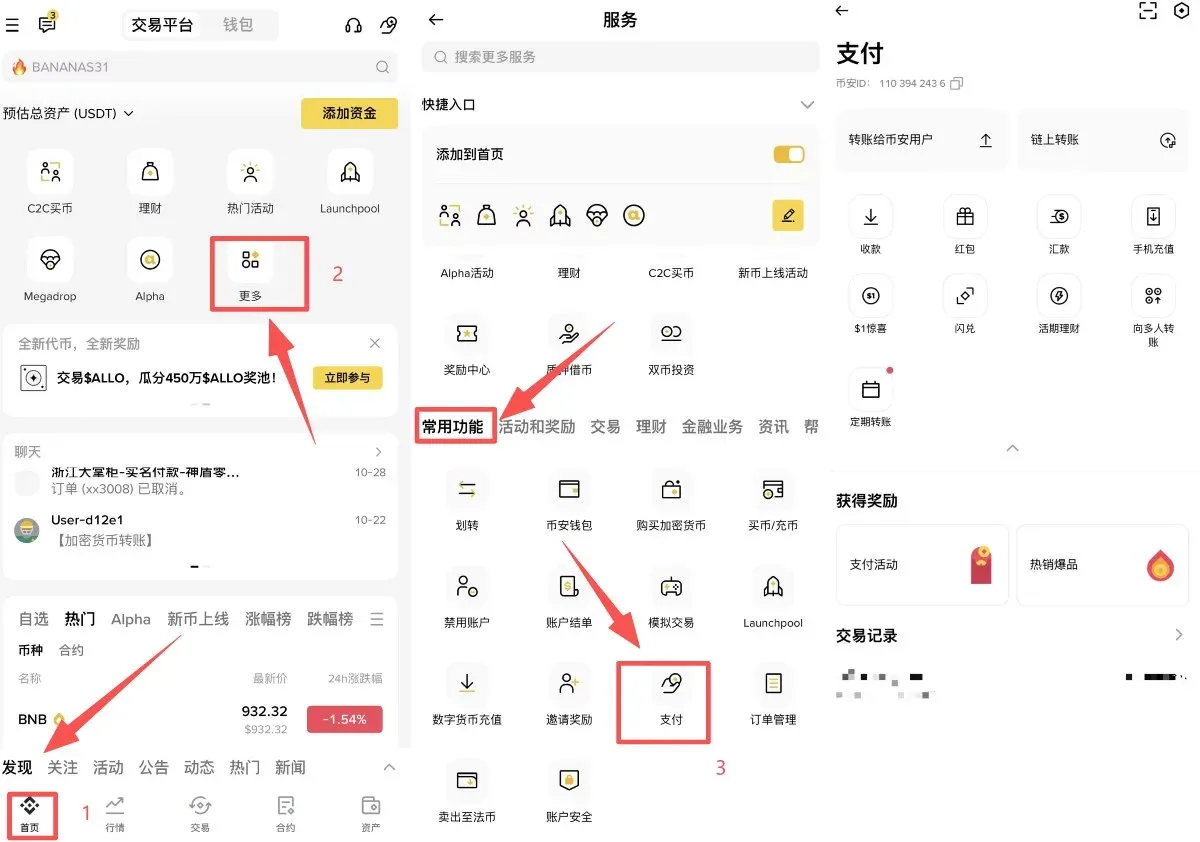
Step 2: Open the Binance Pay Page and Choose the Feature
Once your account is set up, launch the Binance mobile app:
- Tap “More” in the upper‑right corner of the home screen
- Go to “All Services”, locate the “Payments” tile under “Common Functions,” and tap it
Step 3: Input Recipient Information and Amount
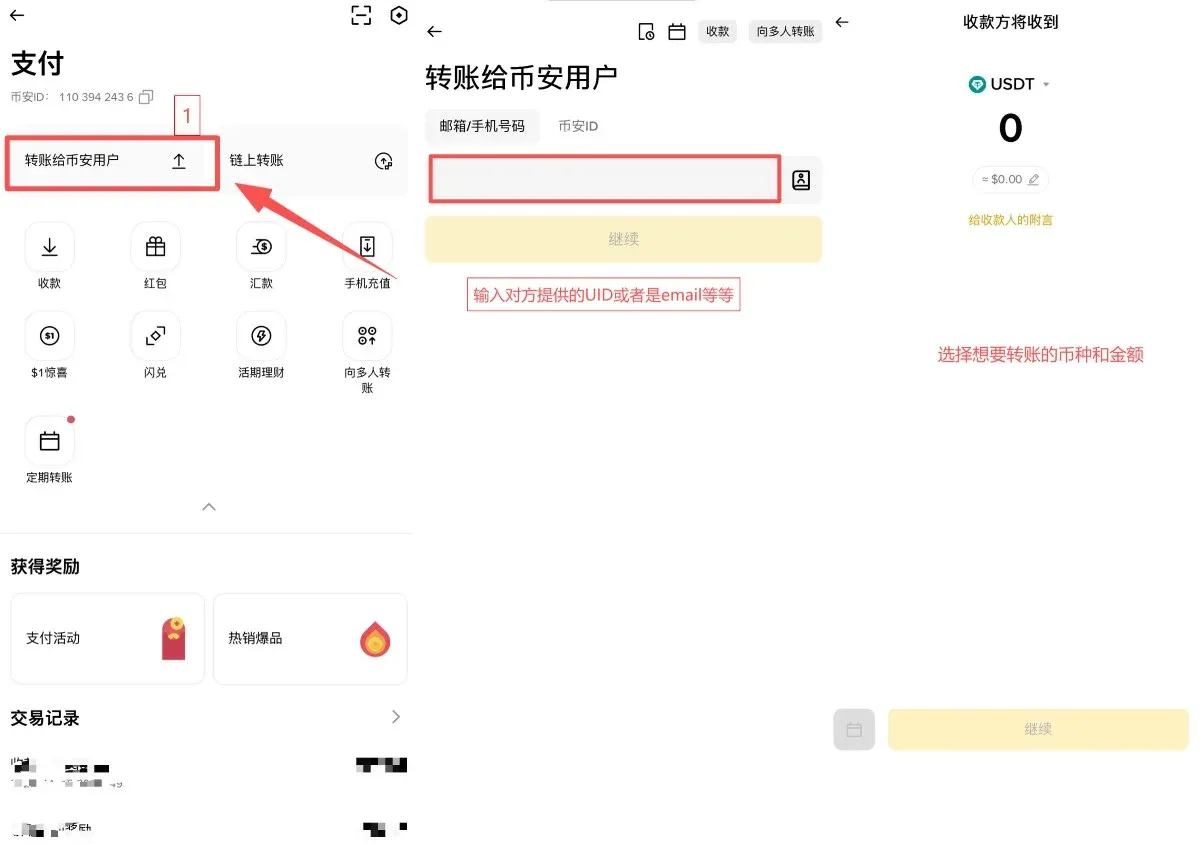
On the Payments page select “Transfer”, then fill in the following fields in order:
- Recipient details: It is recommended to use the UID (a unique identifier that reduces the chance of errors). You may also use the recipient’s email, phone number, or QR code.
- Coin and amount: Choose from USDT, BTC, BNB, etc., and optionally add a memo.
The system will automatically display the recipient’s account name; double‑check that it matches the intended party before tapping “Continue.”
Step 4: Confirm the Transfer
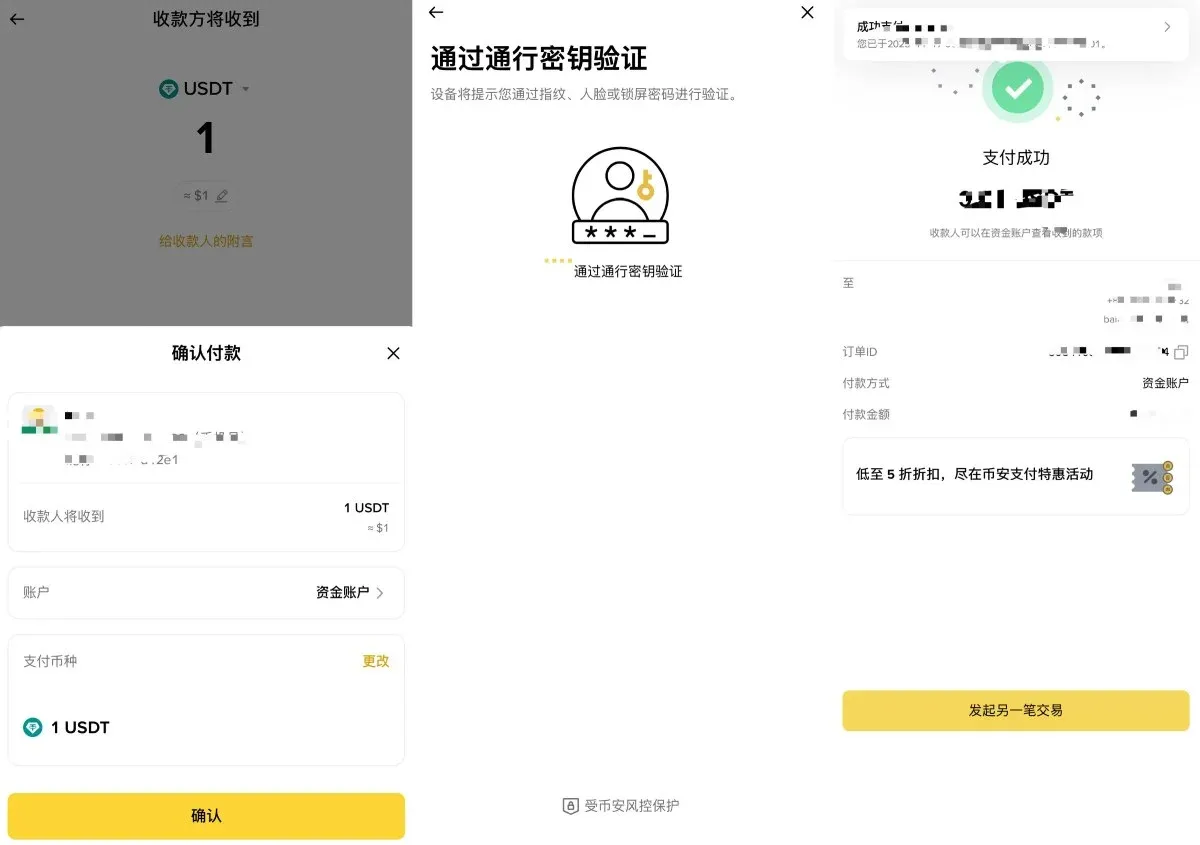
The confirmation screen lists the transfer amount, recipient, and any applicable fee (which will be 0 if you are within the free quota).
- Complete the 2FA or Pay PIN verification.
- Once approved, Binance instantly shows a “Transfer Successful” screen containing the recipient’s ID, amount, source, and timestamp.
No blockchain confirmation is required; the transfer is final instantly.
Daily Transfer Limits for Binance Pay
Similar to a traditional bank account, Binance Pay imposes daily caps that increase with your account tier.
For most individual users the daily ceiling is about 8 million USD (≈ 240 million TWD), which comfortably covers typical personal needs.
| Account Tier | Daily Payment Limit (USD) |
|---|---|
| Regular user | 8,000,000 |
| VIP 1 | 18,000,000 |
| VIP 2 | 28,000,000 |
| VIP 3 | 38,000,000 |
| VIP 4 | 416,000,000 |
| VIP 5 | 524,000,000 |
| VIP 6 | 640,000,000 |
| VIP 7 | 764,000,000 |
| VIP 8 | 880,000,000 |
| VIP 9 | 996,000,000 |
Frequently Asked Questions & Troubleshooting
- Transfer fails: Usually due to incomplete security steps (e.g., missing KYC, 2FA not enabled). Follow the on‑screen prompts to resolve.
- Recipient not shown: Verify that the other party has activated Binance Pay and completed their KYC.
- Insufficient daily quota: Upgrade your account tier or wait until the next day when the limit resets.
Security Recommendations
- Verify the recipient: Only send to trusted Binance users to avoid scams.
- Rotate passwords regularly: Changing your login password every three months is advisable.
- Enable two‑factor authentication: Use Google Authenticator or SMS codes for added protection.
Tracking Transfer Status
In the Payments interface, tap “Transaction History” to view the status, timestamp, and counterpart details of each transfer.
If you encounter unusual situations, Binance offers 24‑hour live chat support for immediate assistance.
Practical Tips
- Prefer UID transfers: They provide the highest accuracy.
- Activate 2FA and Pay PIN: Dual‑layer protection safeguards your funds.
- Regularly review transaction logs: Spot anomalies early.
- Only transfer to verified Binance users: Reduces exposure to unknown parties.
Summary
By following this tutorial you now know the full Binance Pay workflow, enabling fee‑free, instant intra‑platform transfers.
- Move assets between accounts in a matter of seconds
- Eliminate on‑chain withdrawal gas fees
- Keep a complete, searchable transaction record with built‑in security checks
For traders who frequently shift funds across multiple accounts, split receipts, or manage portfolio allocations, Binance Pay is an extremely valuable tool.
This concludes the guide. For more Binance Pay‑related articles, search the Bitaigen (比特根) archive or continue browsing the recommended links below. Thank you for supporting Bitaigen!
Tax reminder: Cryptocurrency gains may be subject to tax in your jurisdiction. Consult a local tax professional to ensure compliance with applicable laws.
Related Reading
- Binance Pay: Send to Contacts & On‑Chain Send Guide (2024)
- How to Buy ETH on Binance: Step‑by‑Step Guide for Beginners
- Binance Beginner Tutorial 2026: Step‑by‑Step Guide
💡 Register on Binance with referral code B2345 for the maximum trading fee discount. See Binance complete guide.



