
 Bitaigen Research
 We systematically outline the core concepts of margin trading in this article and walk you through the complete process on the Gate platform step by step. With illustrated, picture‑rich instructions, beginners can get up to speed quickly while avoiding common pitfalls. Subsequent sections will delve deeper into the differences between margin and futures trading, so a thorough read is recommended.
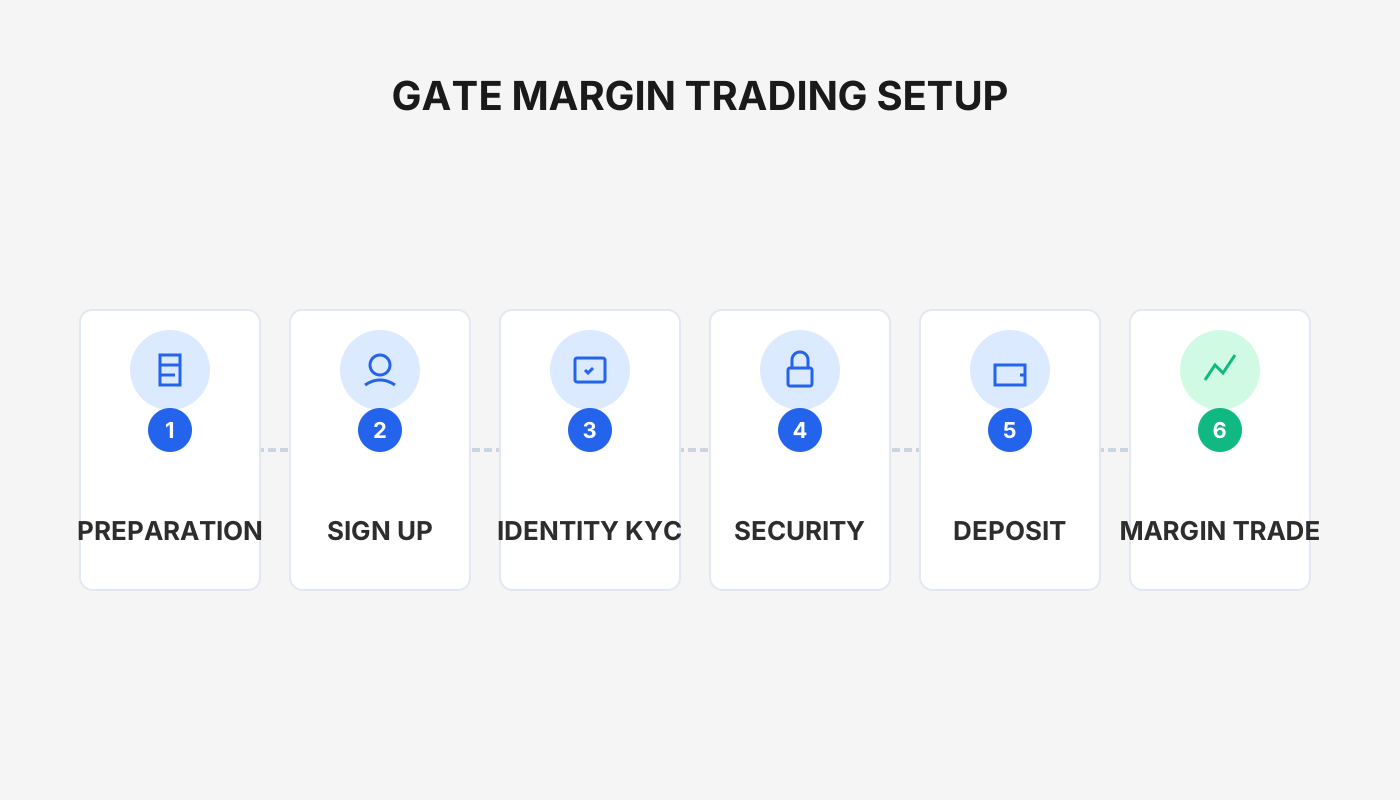
What Is Margin Trading?
Margin trading means using digital assets as collateral to borrow multiple times the amount of capital from the platform for buying or selling, thereby magnifying both profit and risk. On the Gate exchange, the entire workflow—including collateral transfer, borrowing, order placement, and position closing—can be completed via the mobile app or the web interface.
Gate’s margin trading lets you pledge the digital assets you already hold as collateral, borrow several times that amount from the platform, and trade with the borrowed funds. The borrowed assets must be returned within a stipulated period. This model is analogous to margin lending in traditional equities, allowing gains to be amplified—but so are potential losses.
Margin Trading vs. Futures Trading
| Item | **Margin Trading** | Futures / Derivatives Trading |
|---|---|---|
| Leverage | Usually 3‑20× | Usually 10‑125× |
| Risk level | Medium‑high | High |
| Underlying | Digital currencies | Crypto contracts, options, etc. |
How to Conduct Margin Trading?
Example
Li is bullish on Bitcoin (BTC) for the next month and wants to amplify his returns with leverage. He has 10,000 USDT in his spot account and plans to borrow an additional 10,000 USDT, creating a 2× leverage position.
- Transfer the 10,000 USDT from the spot account to a isolated‑margin account (the transfer must be completed before borrowing).
- Checking the “Auto‑borrow” option will automatically pull in the loan when placing an order; alternatively, Li can manually click the “Borrow” button to obtain the 10,000 USDT.
- Li purchases 4 BTC at a price of 5,000 USDT each. The BTC price later rises to 10,000 USDT. Assuming a daily interest rate of 0.02 % over a 25‑day borrowing period, Li sells all BTC, repays principal and interest, and ends up with 9,950 USDT more profit than if he had not used leverage.
Profit Comparison
Margin‑trading profit
\[
\frac{(10{,}000\text{ USDT} + 10{,}000\text{ USDT})}{5{,}000\text{ USDT}} \times 10{,}000\text{ USDT}
- 10{,}000\text{ USDT} - 10{,}000\text{ USDT}\,(1 + 0.02\% \times 25) = 19{,}950\text{ USDT}
\]
Non‑margin profit
\[
\frac{10{,}000\text{ USDT}}{5{,}000\text{ USDT}} \times 10{,}000\text{ USDT}
- 10{,}000\text{ USDT} = 10{,}000\text{ USDT}
\]
The formulas show that using margin yields an extra 9,950 USDT compared with a non‑leveraged trade.
If Li anticipates a price decline, he could transfer 10,000 USDT (equivalent to 2 BTC) into his margin account as collateral, borrow 2 BTC, and immediately sell them for 10,000 USDT. Should the market fall to the expected 2,500 USDT, Li would buy back 2 BTC at 5,000 USDT each, repay the loan, and end up with a net asset of 15,000 USDT (ignoring interest and fees)—a 50 % return. This scenario illustrates:
- Leverage can magnify gains when the market moves in the direction you predicted, and it also enables short‑selling for profit on declines.
- If the market moves opposite to your expectation, losses are amplified as well, so risk management is essential.
Gate Margin‑Trading Visual Guide (Mobile App)
If you do not yet have a Gate account, please use the registration link and app download address below to sign up.
- Official Gate registration link: <https://www.gate.com/share/vqnhawhe> (copy into a browser)
- Gate Android app download: <https://www.gate.com/share/vqnhawhe>
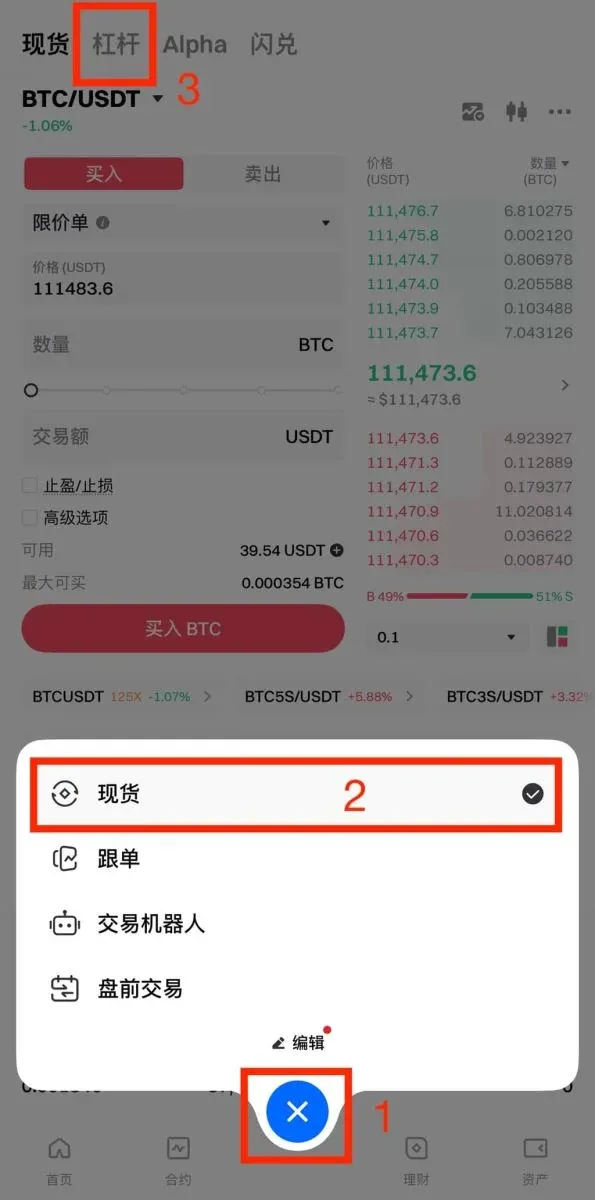
Step 1: Open the Margin‑Trading Page
Log into the Gate mobile app (tap Download → Register), then tap the bottom navigation bar in order: Trade → Spot → Margin to reach the margin‑trading interface.
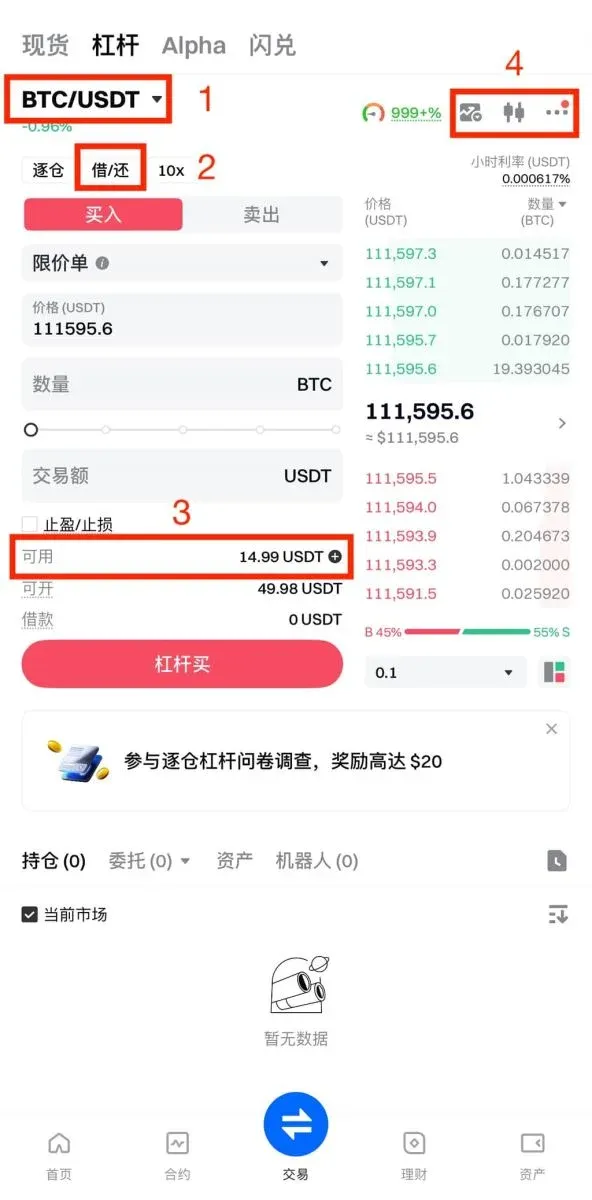
Step 2: Choose the Trading Pair
- Select the desired trading pair; the page will instantly display the available leverage multiplier for that pair.
- Tap Borrow/Repay to perform a manual borrow or repayment.
- Use the transfer entry point to move collateral.
- From left to right you will see: K‑line chart, market data analysis, and function settings.
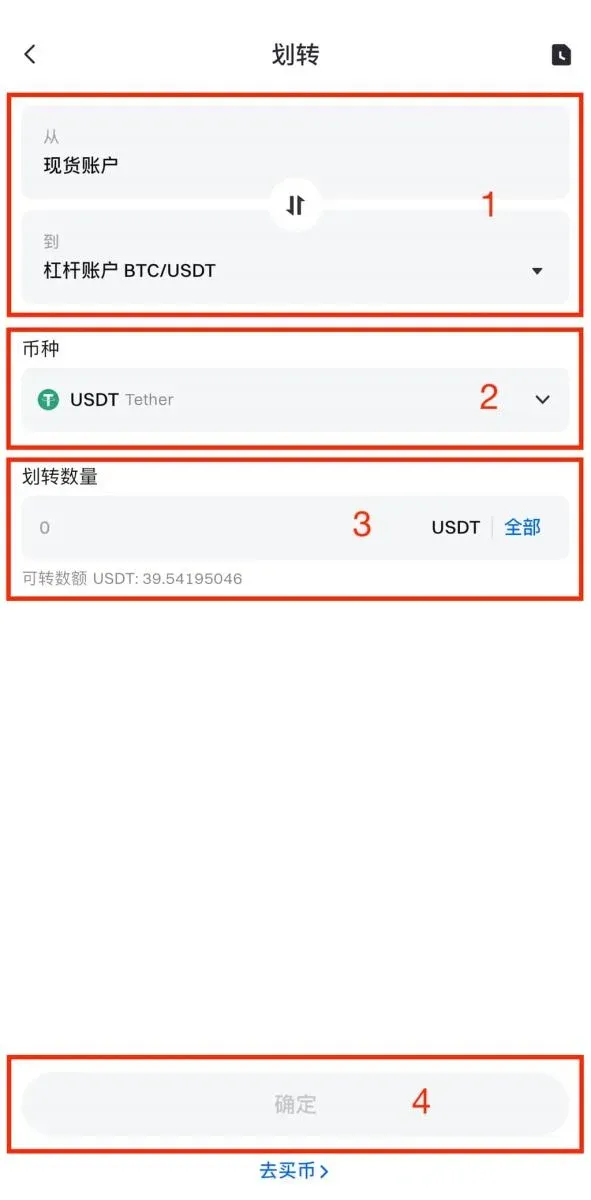
Step 3: Transfer Funds
Before you can trade on margin, you must transfer collateral:
- Choose the transfer direction (Spot ↔ Margin).
- Choose the cryptocurrency to transfer.
- Enter the amount.
- Tap Confirm to complete the transfer.
Step 4: Borrow
After the transfer, you can borrow assets according to your intended trade direction:
- Auto‑borrow: If the margin account lacks sufficient available balance when you place an order, the system automatically borrows the needed amount and starts accruing interest; after the order is filled, the system will prioritize repayment.
- Manual borrow: Click Borrow/Repay to manually borrow the required cryptocurrency.
Manual borrowing example (using the BTC/USDT pair):
- Confirm the trading pair.
- Choose the asset to borrow (borrow USDT for a long position, borrow BTC for a short).
- Input the borrowing amount and confirm.
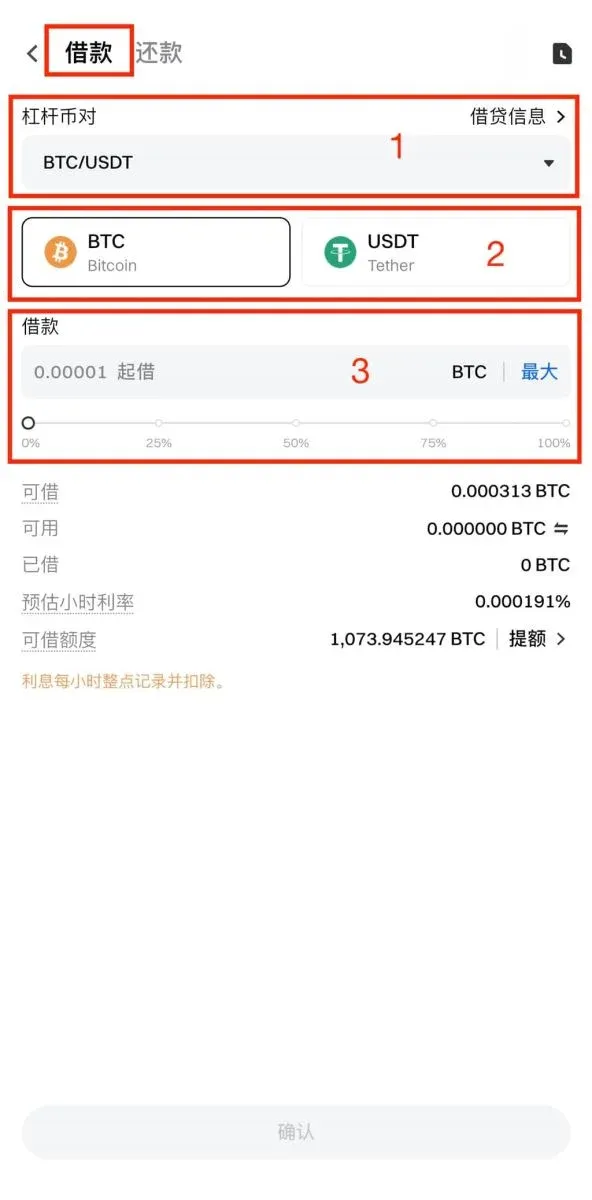
Step 5: Place an Order
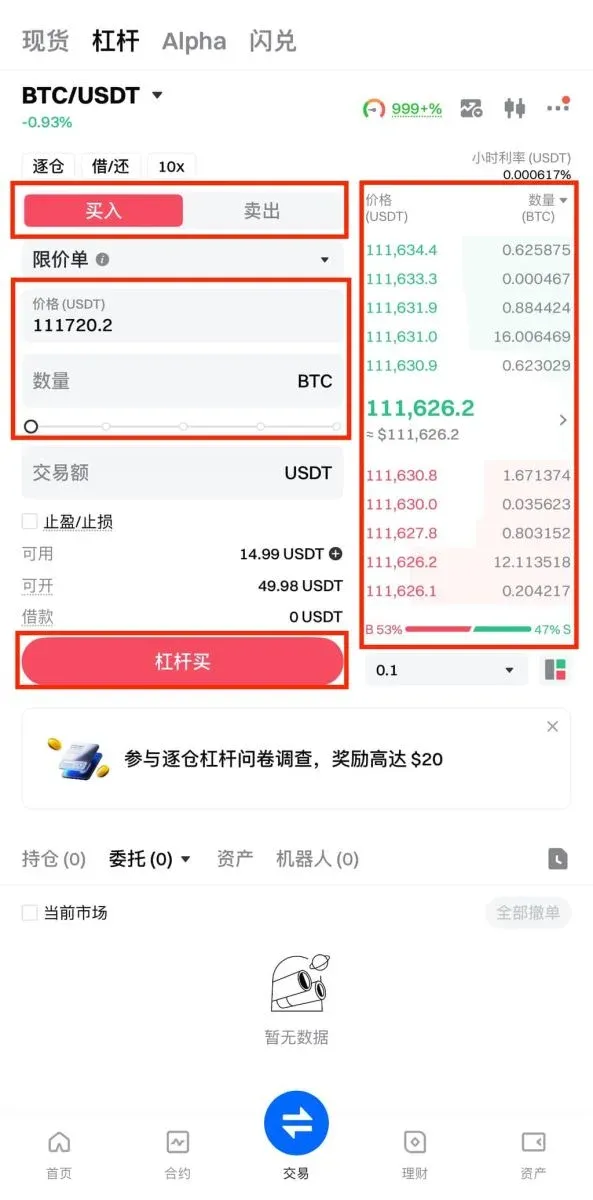
Select Buy or Sell based on the asset you borrowed, set your price and quantity manually, or quickly pick a price from the order book on the right side, then tap Margin Buy / Margin Sell.
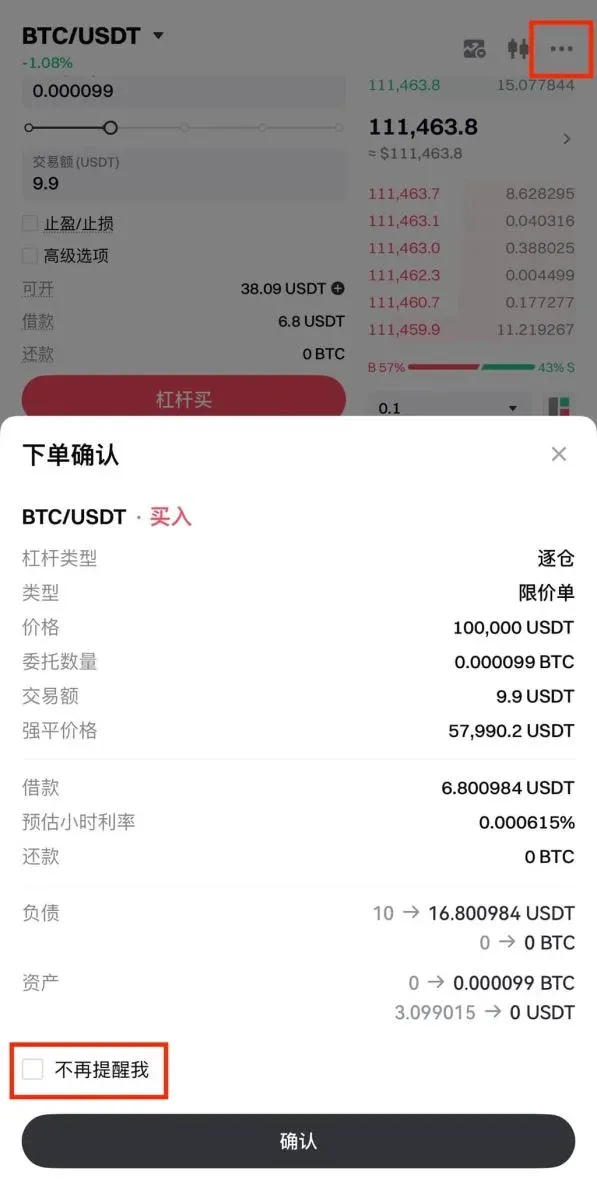
A secondary confirmation window will pop up; checking Do not remind again will suppress future confirmation dialogs for isolated‑margin orders. You can reactivate the confirmation prompt via the top‑right … → Trade Settings → Order Confirmation.
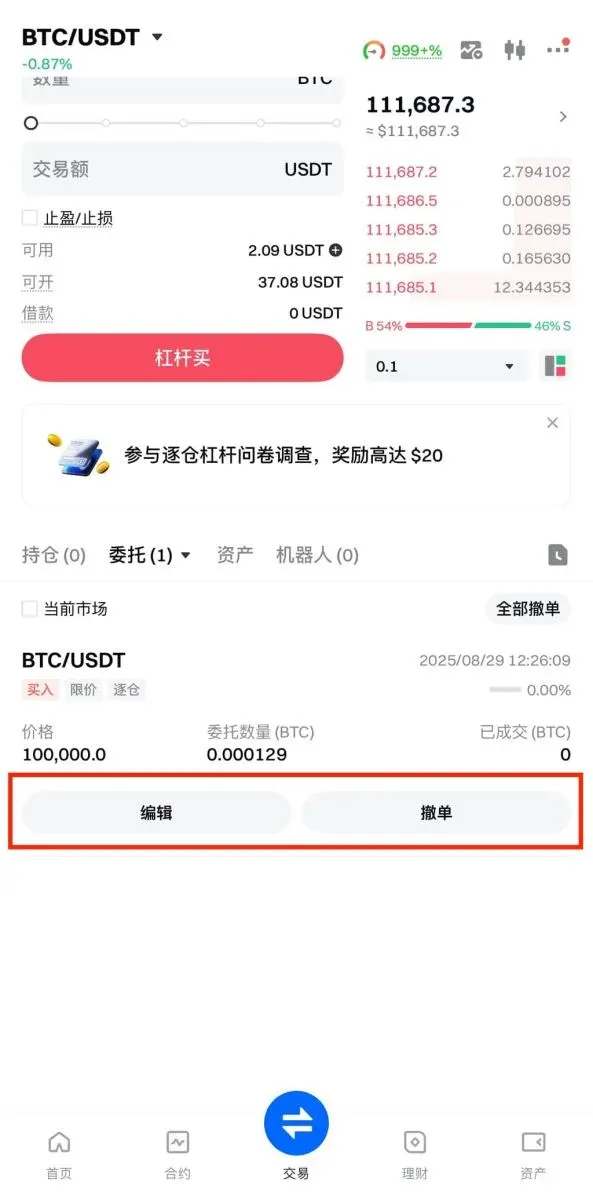
After the order is successfully placed, you can view the status of pending orders in the Current Orders section at the bottom of the page. To cancel an order, click the corresponding Cancel button.
Step 6: Close Position / Repay
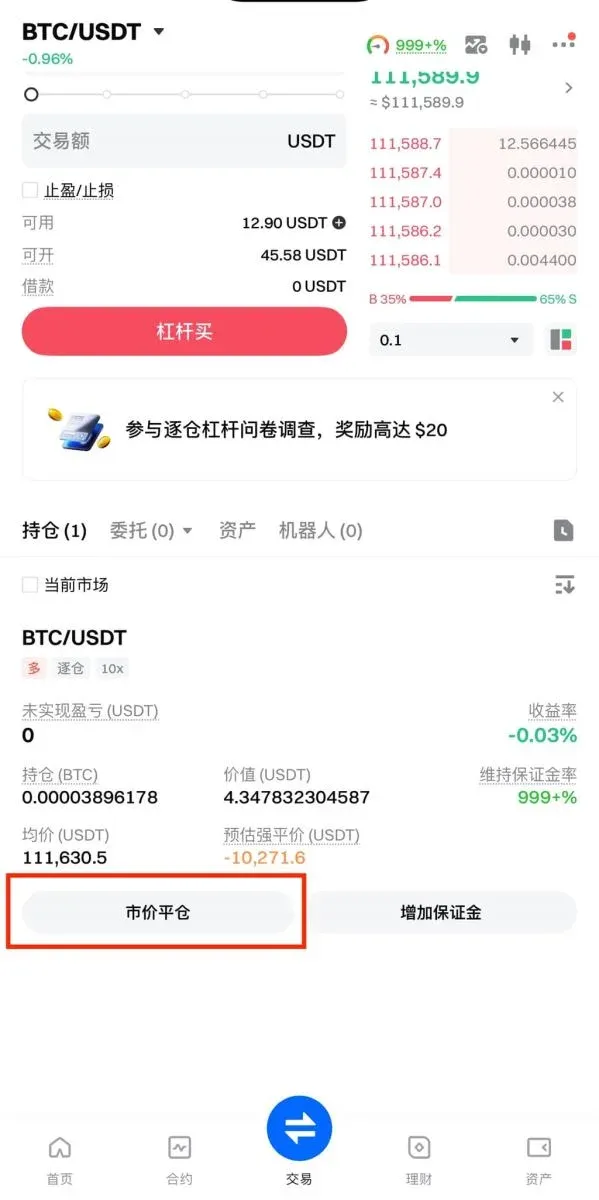
When the trade is finished, you can click Market Close to close the position instantly; the system will automatically settle the borrowed amount. You may also repay manually:
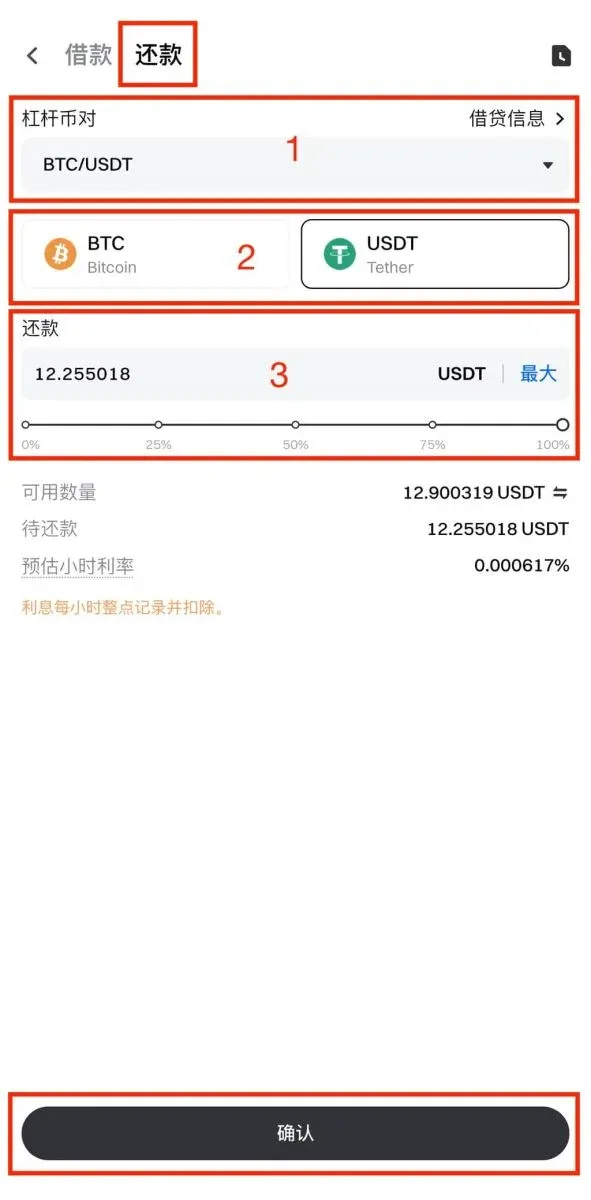
- Select the margin pair you wish to repay.
- Choose the repayment asset (BTC or USDT).
- Enter the repayment amount (partial or full repayment is supported) and tap Confirm to complete the process.
Gate Margin‑Trading Visual Guide (Web Version)
Step 1
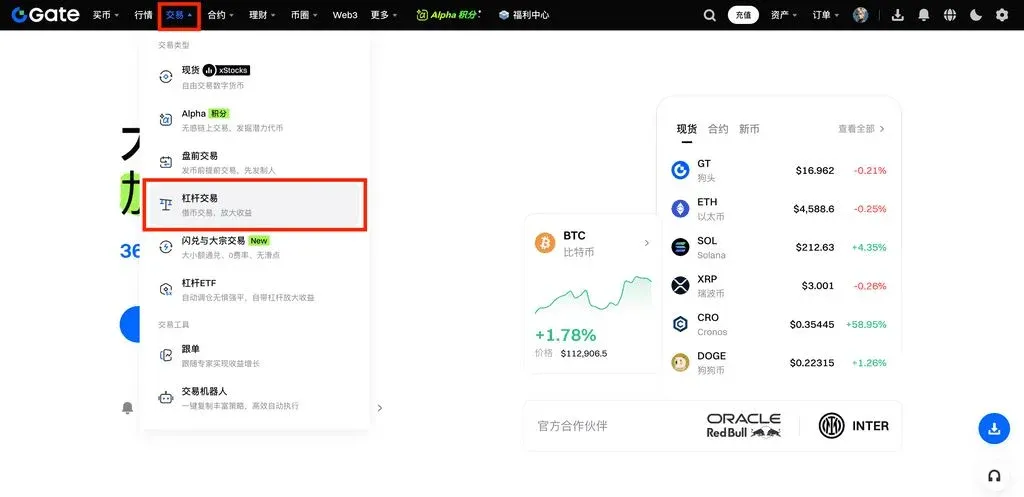
Log into your Gate account, then click the top navigation bar Trade → Margin Trading.
Step 2
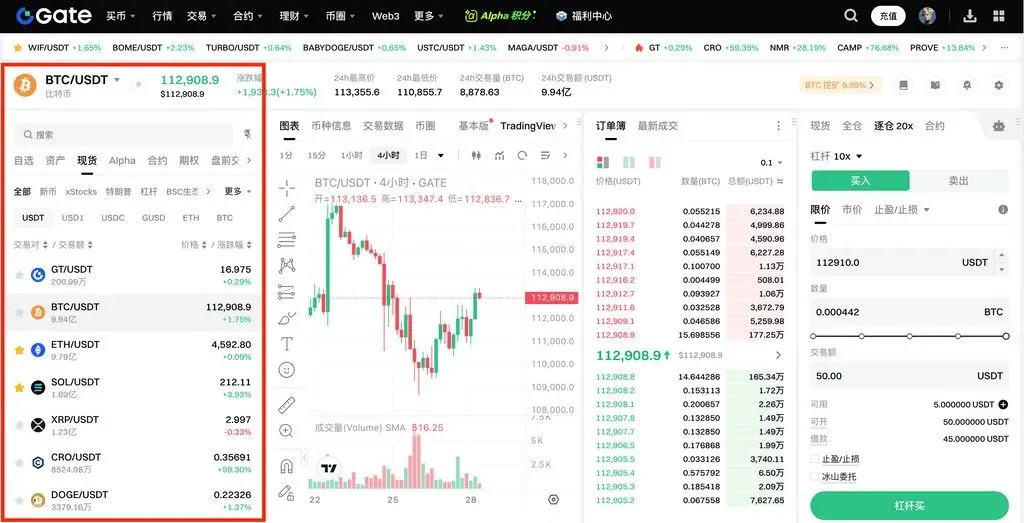
Select the trading pair from the left‑hand list (e.g., BTC/USDT).
Step 3: Transfer Funds
Click the Transfer button and complete the following steps:
- Choose the transfer direction (Spot ↔ Isolated Margin).
- Choose the cryptocurrency.
- Enter the amount.
- Click Confirm to finalize the transfer.
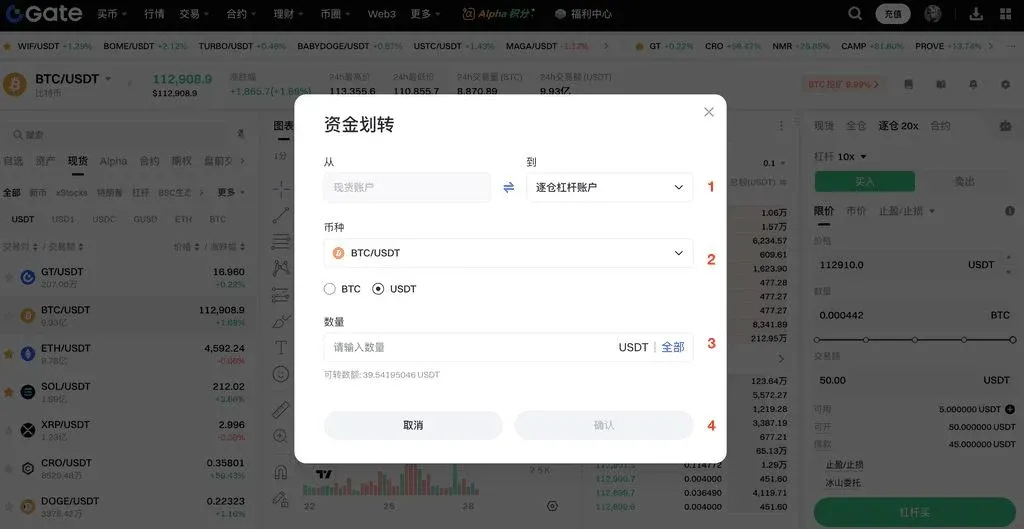
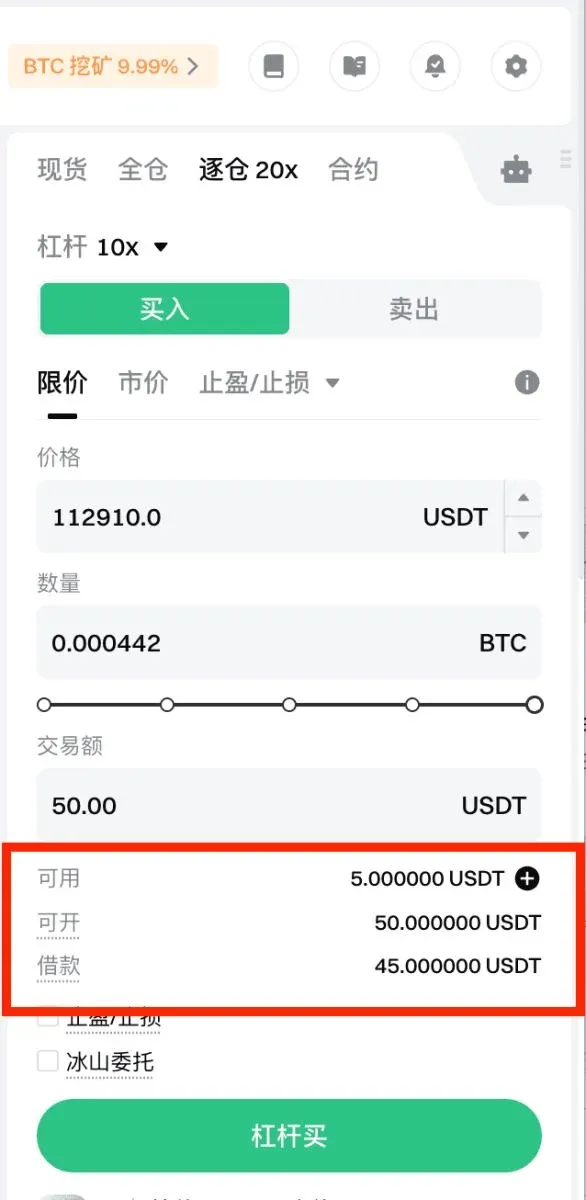
Step 4: Place an Order with Auto‑Borrow
When you place an order, the system will automatically borrow the required funds. Borrowed amounts accrue interest, which you can view in the asset panel at the lower right. Buying automatically borrows USDT, while selling automatically borrows BTC. After configuring the order, you can preview the borrowing details.
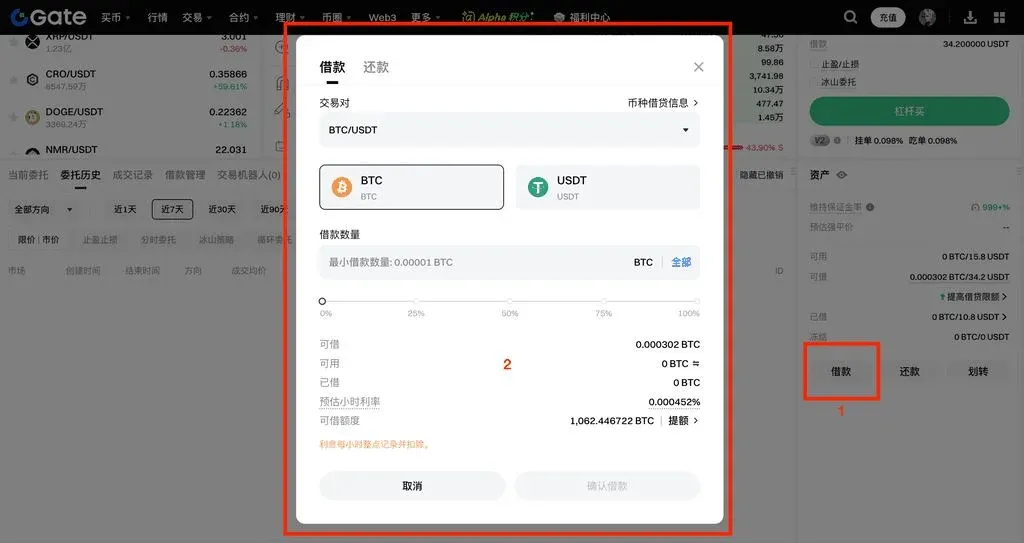
Step 5: Manual Borrow (Optional)
If you prefer to manually borrow BTC or USDT, you can do so from the asset panel.
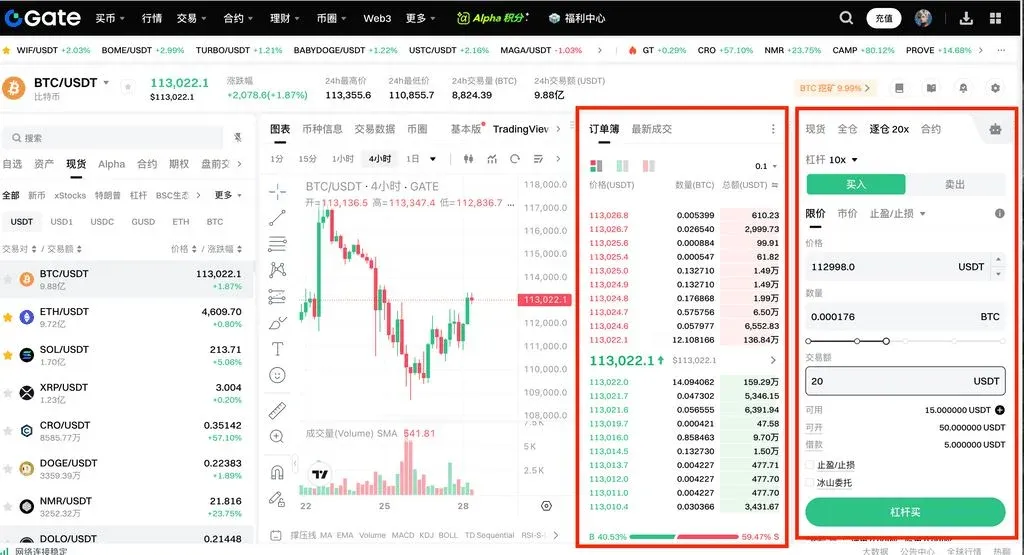
Step 6: Buy or Sell
Choose Buy for a long position or Sell for a short position based on the borrowed asset. You can manually input price and quantity, or click a price level directly from the left‑hand order book. Percentages shown beneath the quantity field (e.g., 25 %) indicate the proportion of your account balance that will be used.
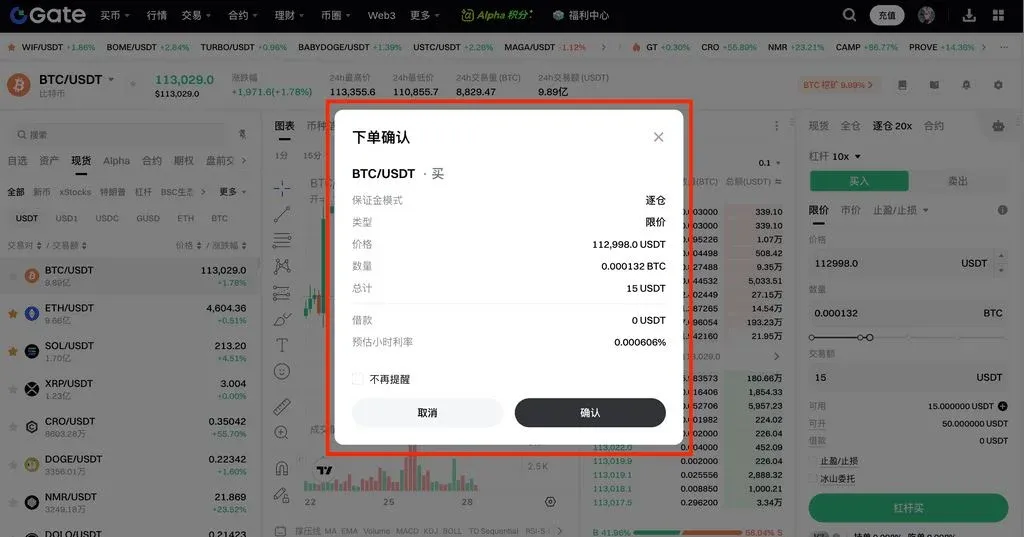
Step 7: Confirm Order
After double‑checking the buy/sell amount, price, borrowing amount, and daily interest rate, click Confirm to submit the order. Selecting Do not remind again will suppress future confirmation pop‑ups; you can re‑enable them later via the gear‑icon settings in the upper‑right corner.
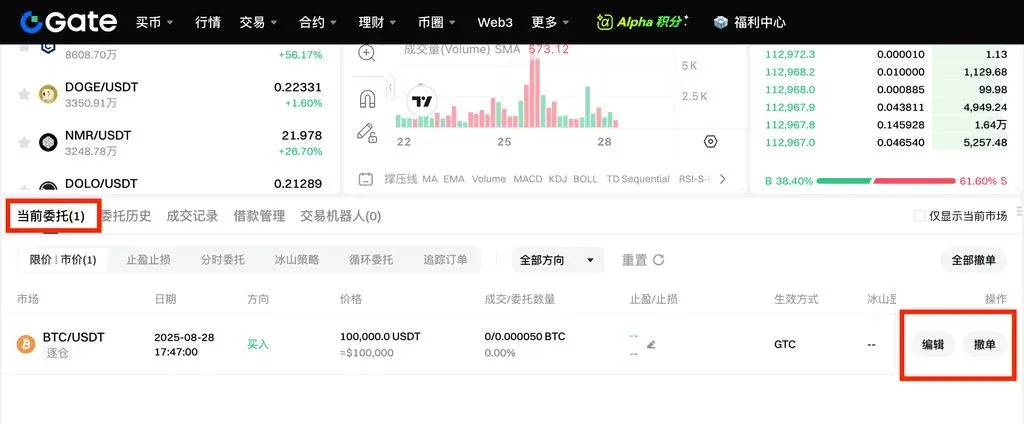
Step 8: View and Cancel Orders
Once the order is placed, use the Current Orders section at the bottom of the page to filter by order type, monitor status, and cancel any unfilled orders by clicking the Cancel button.
Remarks
- When the market rises, a long (buy) position generates profit; when the market falls, a short (sell) position generates profit.
- Introducing leverage magnifies returns if the market moves as you anticipated, but it also magnifies losses when the market moves against you. Proper risk management is therefore essential.
The above constitutes the complete visual tutorial for “What Is Margin Trading? How to Trade on Gate?” For more Gate‑related content, follow the other articles published by Bitaigen (比特根).
Related Reading
- Best 7 Crypto Exchanges for Margin & Leverage Trading 2026
- XRP $2.00 Support Level: Analysis & Potential Moves
- Gate Gets Malta Licence for EU Fiat & Stablecoin Services
💡 Register on Binance with referral code B2345 for the maximum trading fee discount. See Binance complete guide.



