
 Bitaigen Research
 RedotPay cannot be used directly on the Chinese mainland; users must first complete identity verification, download the app, upload identification documents and top‑up in Hong Kong or another jurisdiction before they can apply for a virtual or physical card.
RedotPay is a Hong Kong‑registered, regulated Money Service Operator (MSO) that provides cryptocurrency payment functionality by issuing a RedotPay credit card. Users can load USDT, USDC, BTC, ETH and other supported cryptocurrencies into the card account, then spend at merchants that accept VISA or use the card through Apple Pay, Google Pay, LINE Pay without first converting the crypto into fiat currency.
Card Types and Use Cases
- Physical card: Can withdraw cash at any global VISA‑supported ATM (provided there is a balance in the account) and can be linked to mobile‑payment wallets.
- Virtual card: Provides only the card number details; it can be added directly to Apple Pay, Google Pay, LINE Pay for everyday online purchases.
Core advantage: Pay directly with cryptocurrency, eliminating the fiat‑conversion step; the app offers convenient management, including transaction verification, spending limits, and instant freeze functions.
In this article we walk through the complete mainland‑China verification and card‑issuance process for RedotPay, covering identity verification, app download, document upload and top‑up steps, and we compare the use cases for physical and virtual cards to help you get started with crypto payments quickly.
Availability of RedotPay on the Mainland
RedotPay is currently unavailable for direct use in mainland China; users must complete overseas identity verification before they can obtain a card.
Overview of the Workflow: Top‑up First, Spend Later
- Obtain a card: Complete identity verification in the app and select either a virtual or physical card.
- Top‑up with cryptocurrency: Transfer assets on‑chain (e.g., TRC‑20 USDT) or via Binance Pay to fund the card account. *(U.S. users should use Binance.US for this step.)*
- Link to mobile‑payment wallets: Add the card to Apple Pay, Google Pay, LINE Pay within the app.
- Make a purchase: Pay at any VISA‑accepting merchant using the card or the linked mobile wallet; the system automatically deducts the equivalent amount from the cryptocurrency balance.
Featured Functions
- Direct cryptocurrency spending – no fiat conversion required.
- User‑friendly app – registration, top‑up and transactions can all be performed on a smartphone.
- Multiple mobile‑payment channels – Apple Pay, Google Pay, LINE Pay are supported.
- Supports four major cryptocurrencies – USDT, USDC, BTC, ETH.
- Physical card enables ATM cash withdrawals (physical cards only).
- No account‑management fees (including card monthly/annual fees).
Fee Overview
| Item | Maximum Fee | Remarks |
|---|---|---|
| **Purchase (card‑present) transaction** | 2.2 % | 1 % for USD‑denominated cards transacting in USD |
| **ATM cash withdrawal (physical card)** | 4.2 % | 3 % for USD withdrawals |
| **Annual / monthly / account‑management fee** | None | Small charges may apply only when replacing or re‑issuing a card |
Card issuance cost: Virtual card – 10 USDT; Physical card – 100 USDT (the amount must be funded by the user at the time of first purchase).
Card Variants
- Virtual card: Costs 10 USDT; card number, expiration date and CVC are displayed directly in the app, with a default validity of three years.
- Physical card: Costs 100 USDT; after delivery the card can be used at VISA‑compatible ATMs to withdraw cash. Shipping takes roughly three weeks.
Practical tip: Most users only need a virtual card to cover everyday spending.
Transaction‑Fee Details
- USD‑denominated card: If the transaction or withdrawal is in USD, the fee is 1 %; for non‑USD currencies the fee is 2.2 %.
- ATM withdrawal: 3 % for USD, 4.2 % for other currencies.
- Replacement / re‑issue fee: 5–10 USD; deleting a card incurs a 2 USD charge.
Merchant Scenarios Where the Card Can Be Used
- Online: After linking to Apple Pay or LINE Pay, the card works at most convenience stores, supermarkets, restaurants and other e‑commerce merchants.
- In‑store: The physical card can be swiped or inserted at any VISA‑enabled POS terminal; very old terminals may not be compatible.
- Abroad: The experience is smooth in Singapore, Europe and many other regions; some Japanese merchants may require a physical card or a local payment method such as Suica.
Usage hint: Activate the desired cryptocurrency in the app before making a purchase; if a foreign card reader asks for a currency, select the local currency to minimise fees.
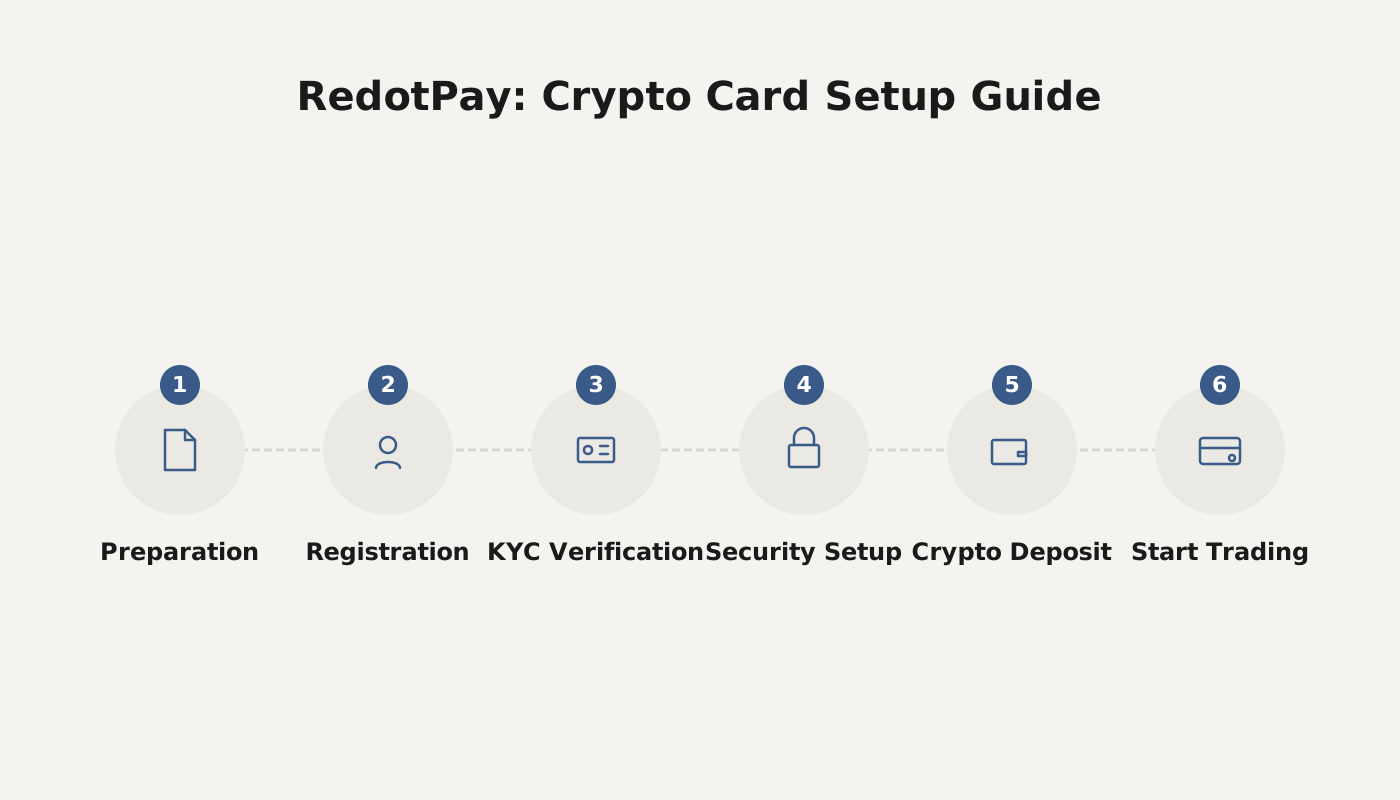
Registration & Application Process (about 5 minutes)
Required items: mobile phone, email address, and one of the following IDs – passport, national ID card or driver’s licence.
Step 1: Download and open the app, tap “Sign Up”
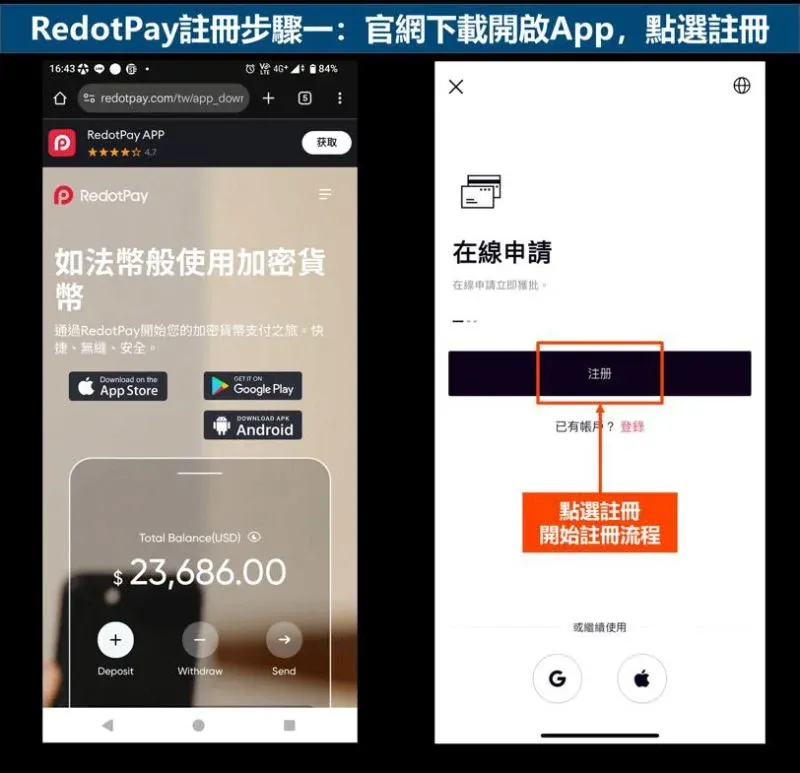
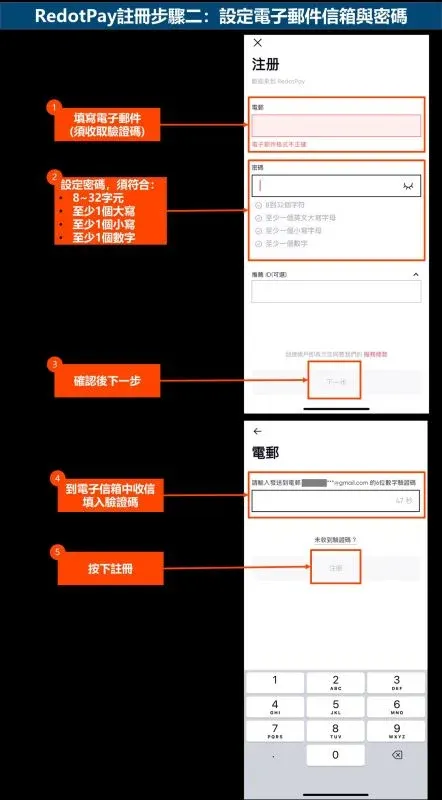
Step 2: Set email and password
- Password requirements: 8‑32 characters, containing uppercase, lowercase letters and numbers.
- The system sends a verification code to the email; enter it to complete registration.
Step 3: Choose card type
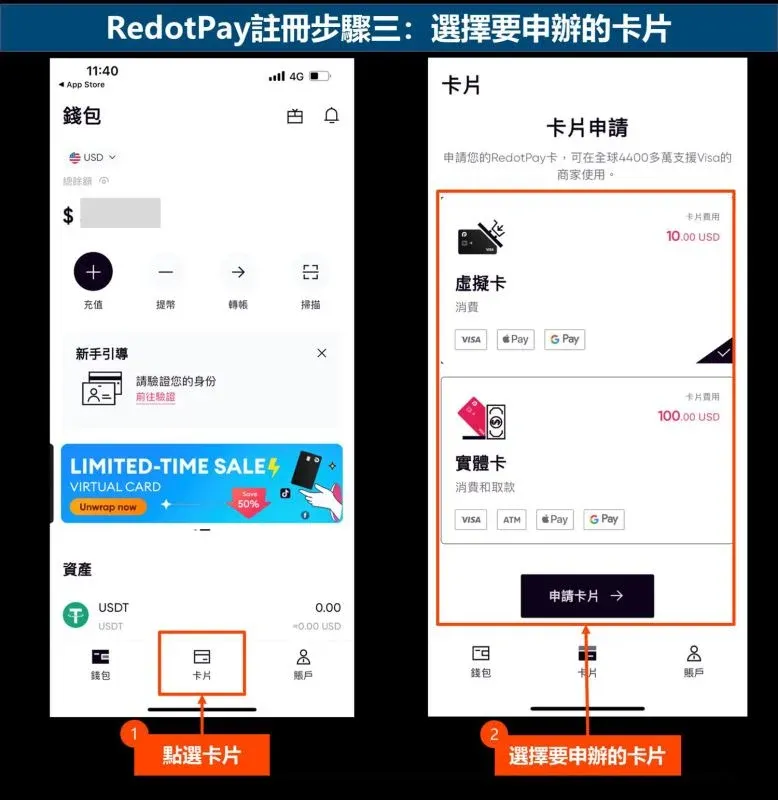
- Scroll to the bottom of the home screen, tap the Card icon and select either Virtual Card or Physical Card.
- First‑time users are advised to start with a virtual card.
Step 4: Bind a mobile phone number
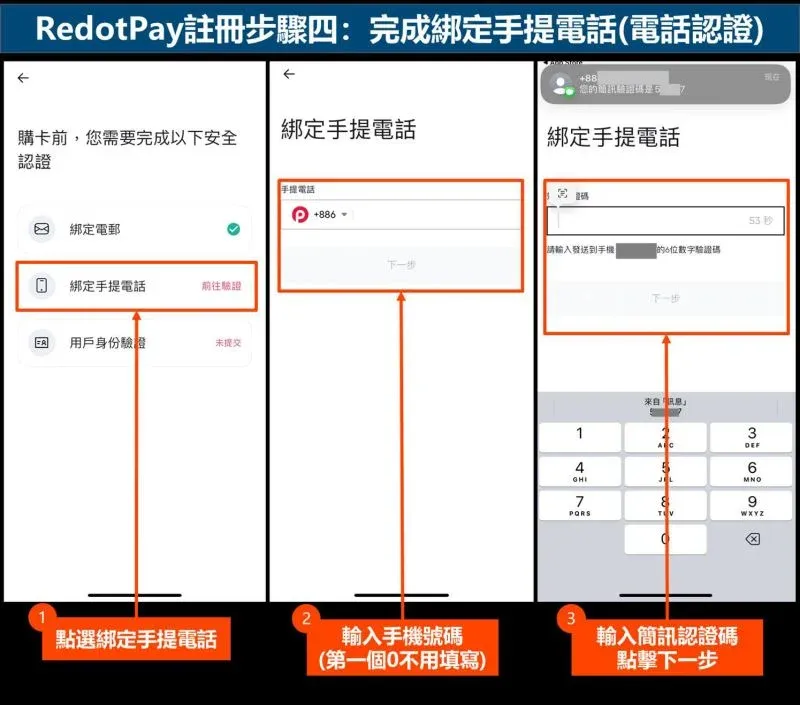
- Enter the phone number with the country code (the leading “0” can be omitted). After receiving an SMS verification code, the number is bound to the account.
Step 5: Identity verification
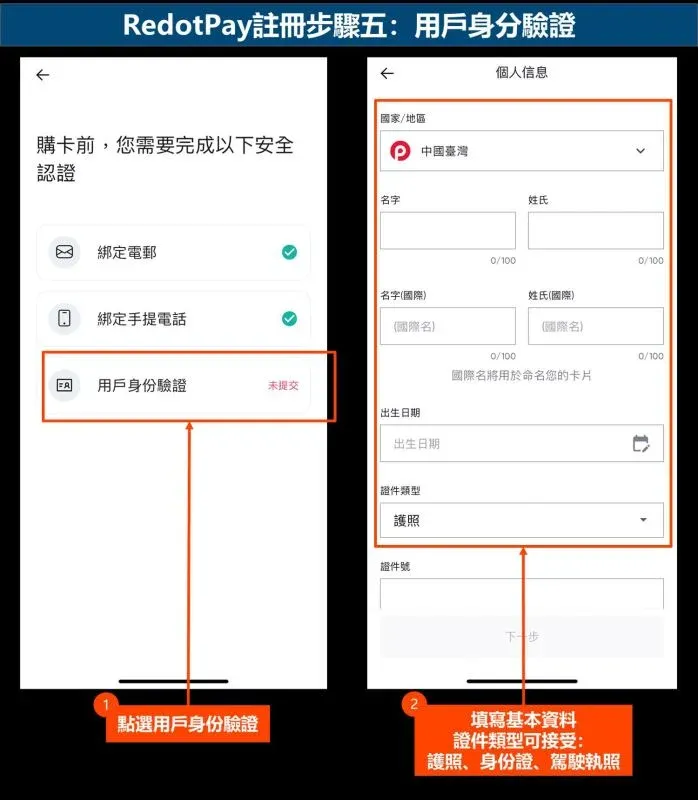
- On the User Identity Verification page, fill in personal details; supported document types are passport, national ID card and driver’s licence.
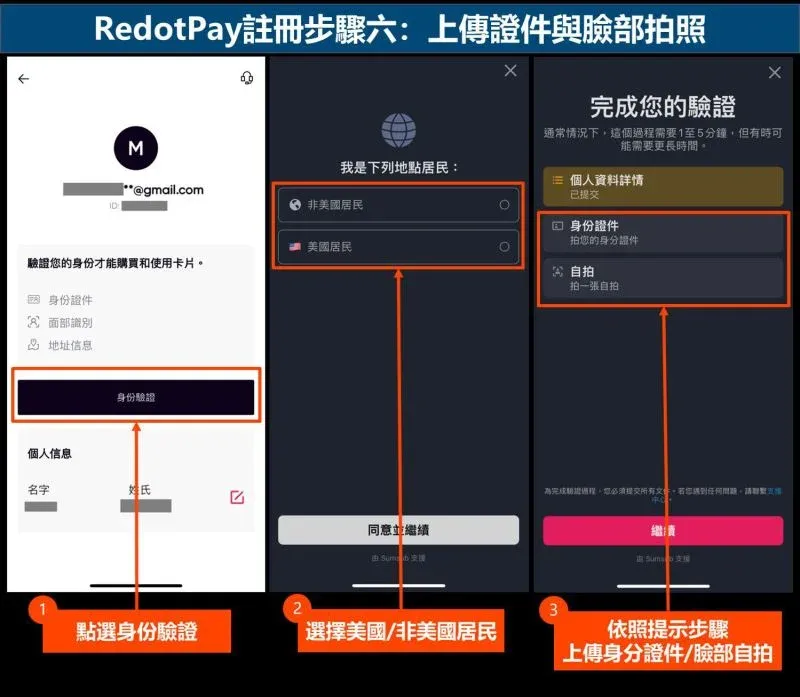
Step 6: Upload documents and facial photo
- Follow the prompts to open the camera, upload the identification document and perform facial‑recognition capture.
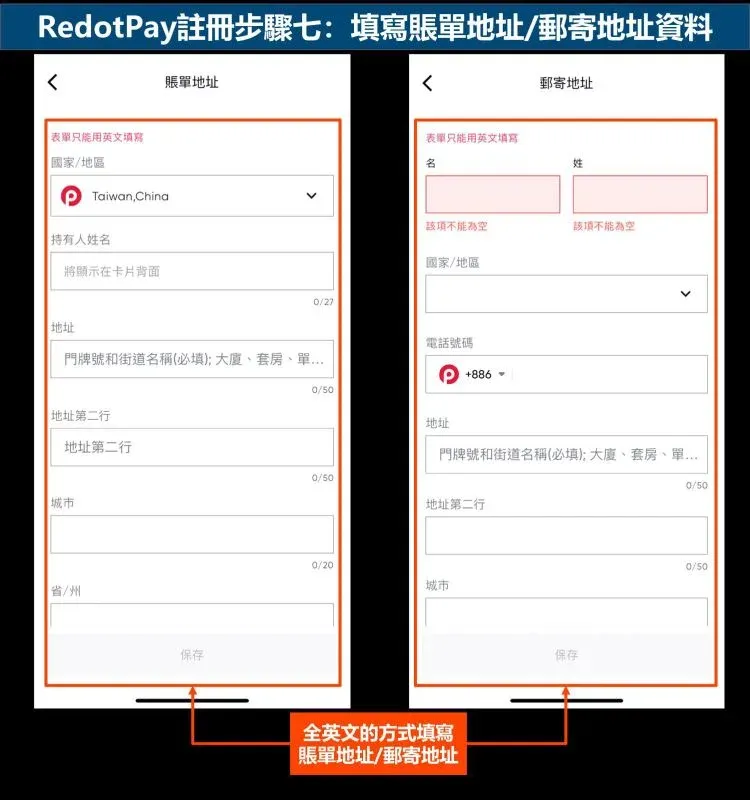
Step 7: Enter billing and shipping address
- The address must be entered entirely in English, split into two lines (each ≤ 50 characters), and cannot be left blank.
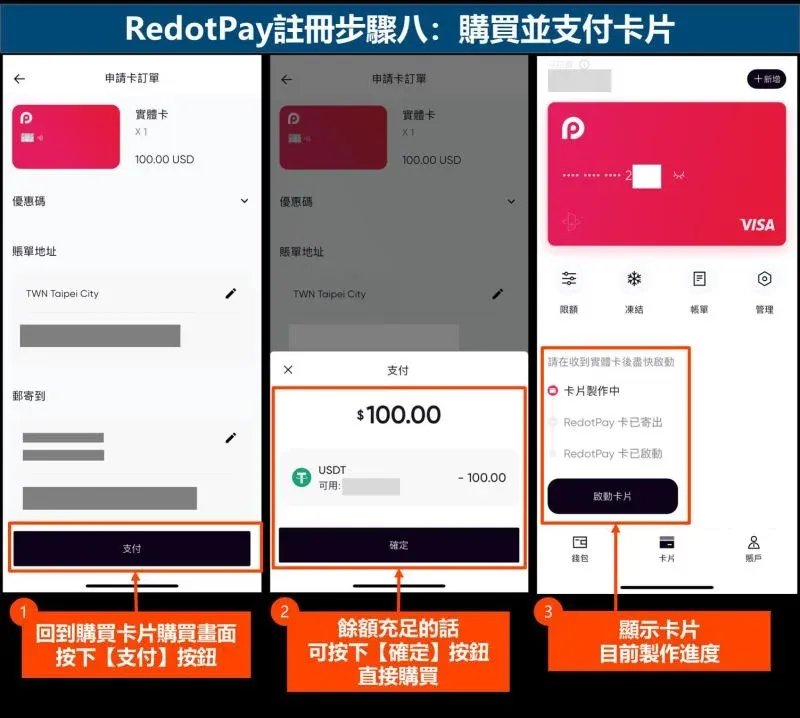
Step 8: Purchase the card and pay
- After identity verification, fund the account with enough balance and then purchase the selected card. If the balance is insufficient, top‑up first.
Top‑up (Funding) Guide (using Binance as an example)
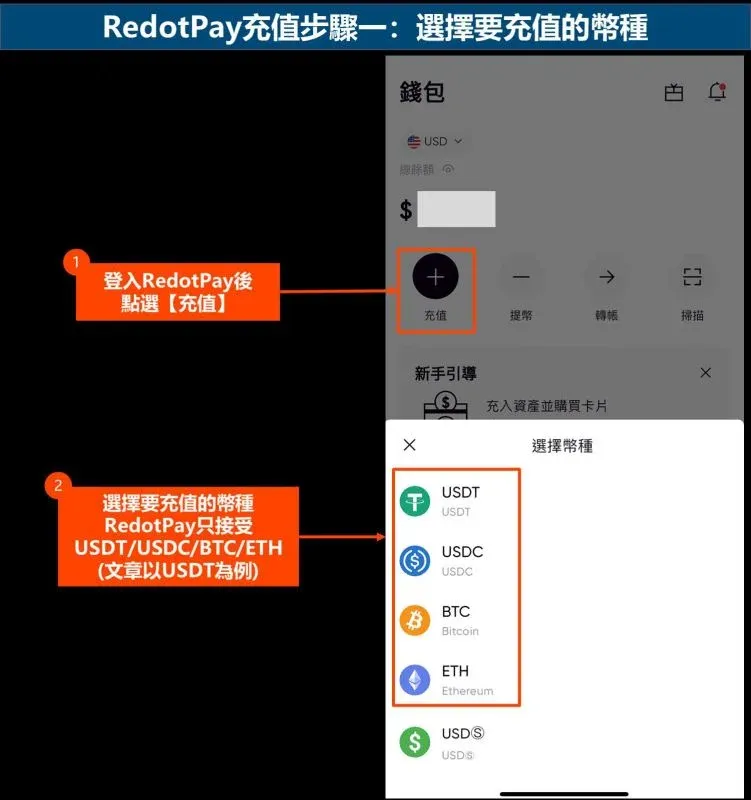
Step 1: Choose the top‑up cryptocurrency
- In the app go to Wallet → Deposit, then select one of USDT, USDC, BTC or ETH. This guide uses USDT as an example.
- Both on‑chain transfers (TRC‑20, Solana, BNB Chain, etc.) and Binance Pay (1 % fee) are supported. *(U.S. residents should use Binance.US for the Binance Pay option.)*
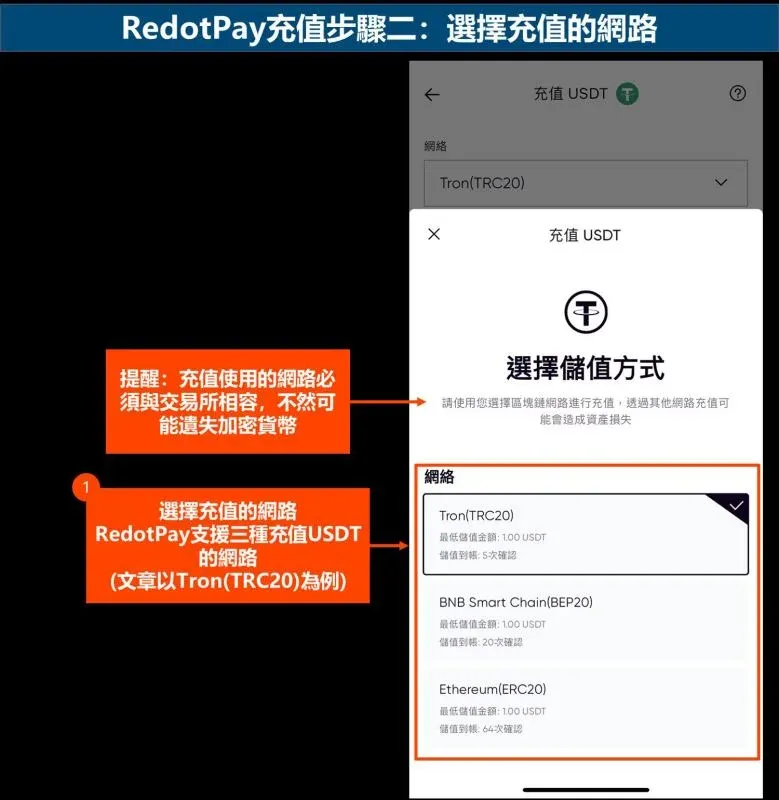
Step 2: Confirm the deposit network
- For Tron (TRC‑20), make sure the same network is selected on the Binance side; mismatched networks will result in lost funds.
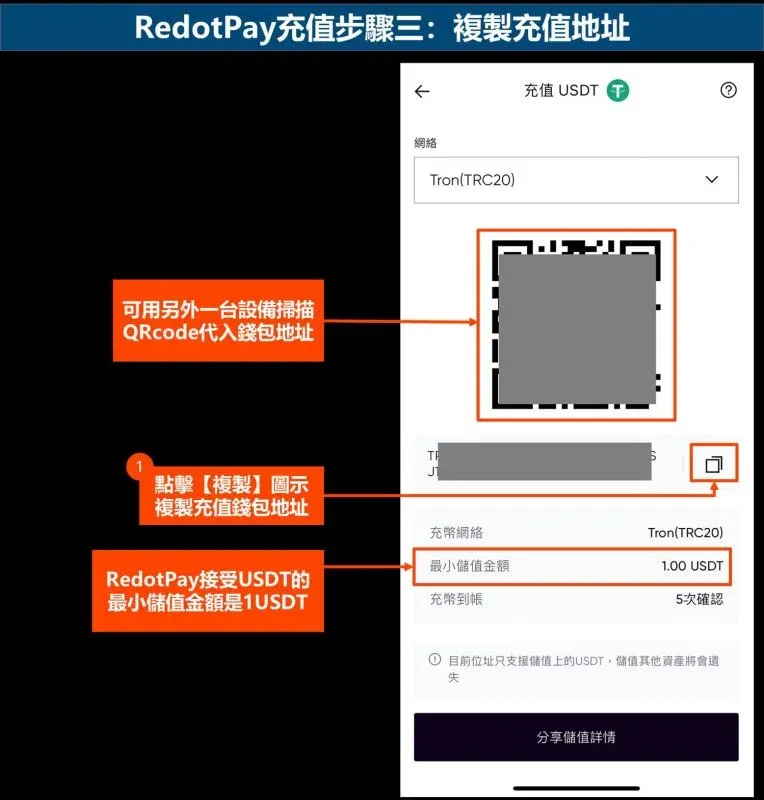
Step 3: Copy the deposit address
- Copy the address shown in the app or scan the QR code; you will need it when sending funds from Binance.
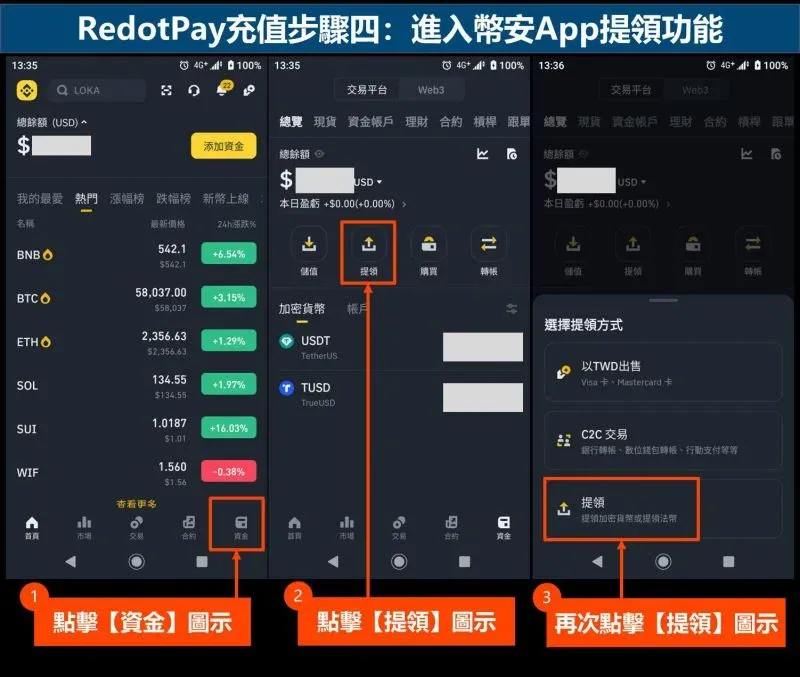
Step 4: Open the Binance withdrawal page
- In the Binance app tap Funds → Withdraw → Withdraw.
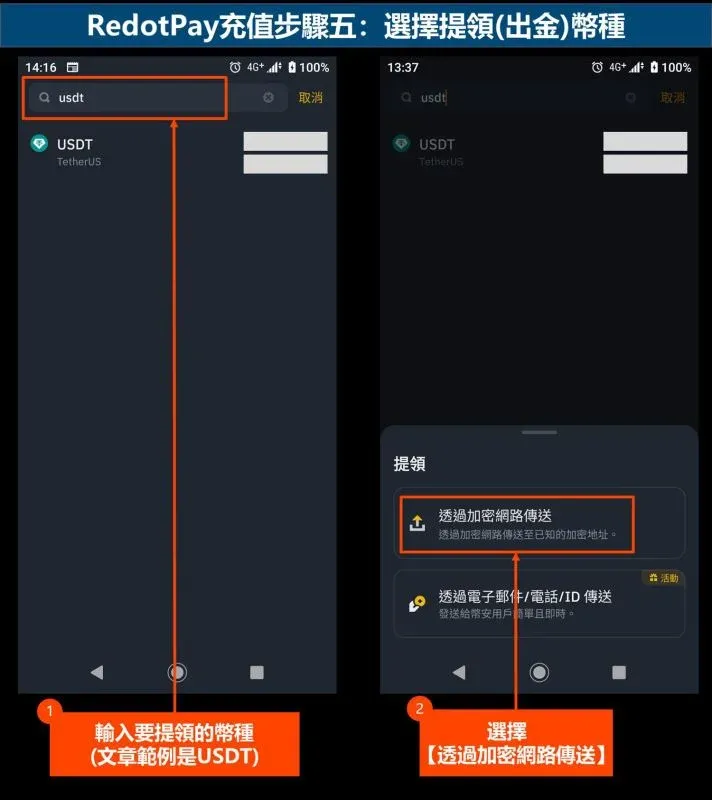
Step 5: Choose the withdrawal cryptocurrency
- Select USDT, then a pop‑up will ask you to “Transfer via Crypto Network”.
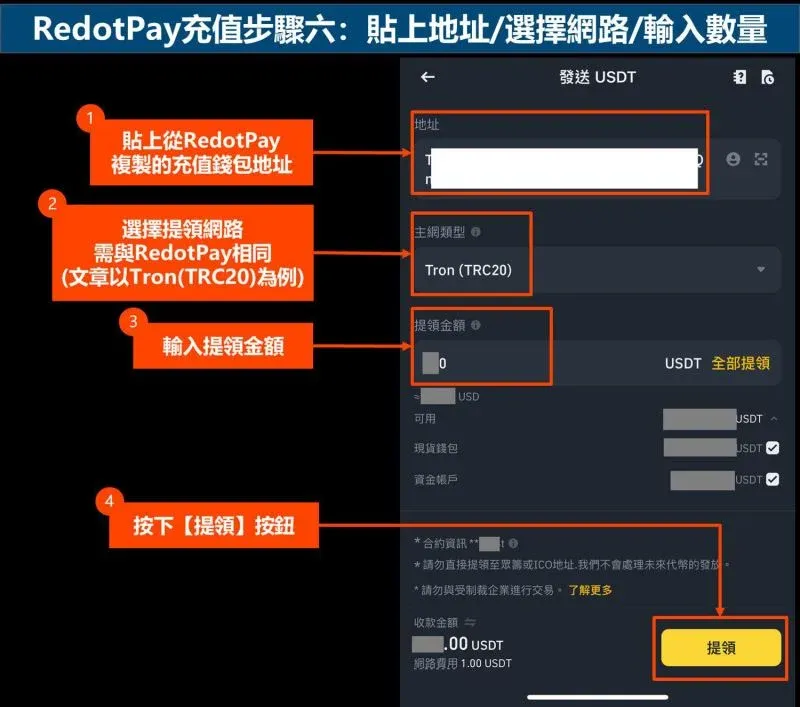
Step 6: Paste address, select network, enter amount
- Paste the RedotPay address, choose Tron (TRC‑20), input the amount and confirm.
- Using the wrong network will cause the withdrawal to fail and may permanently lose the assets; double‑check every field.
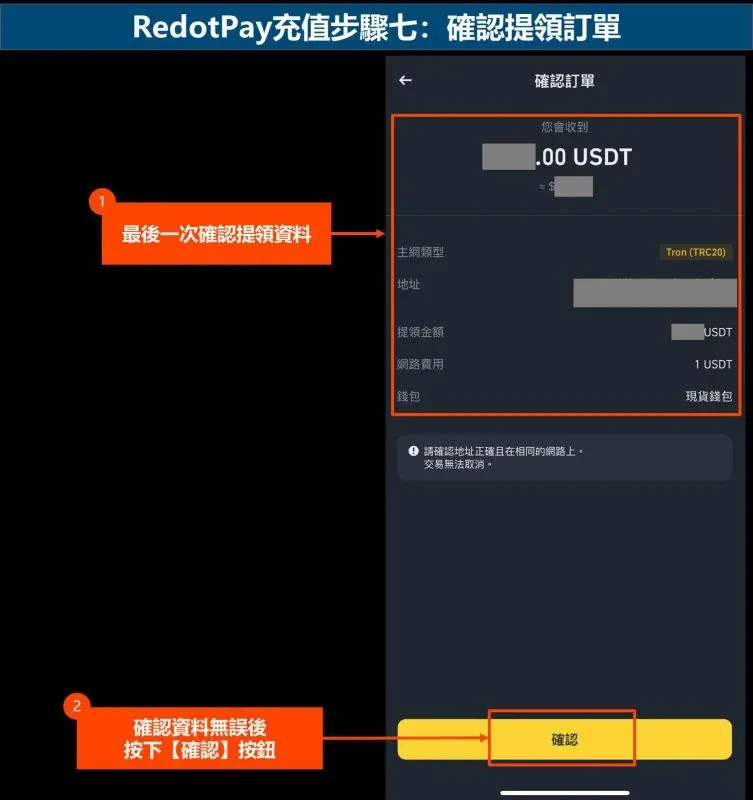
Step 7: Confirm the withdrawal order
- Review the details once more and tap Confirm.
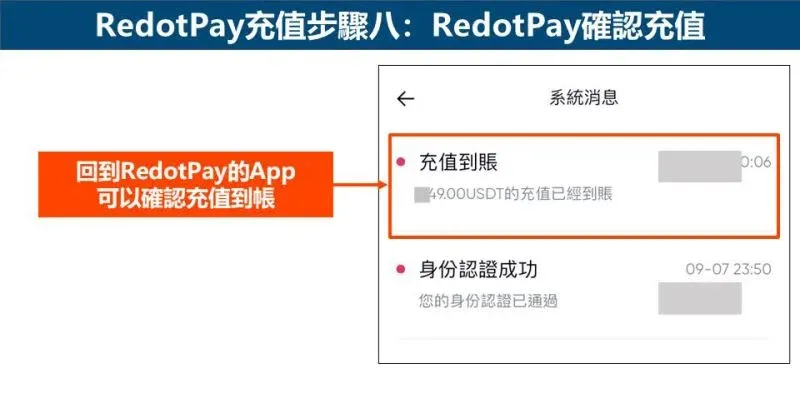
Step 8: Verify receipt in the RedotPay app
- After roughly 3‑5 minutes the deposit will appear in the system messages inside the RedotPay app.
Safety of Funds
RedotPay implements three layers of protection:
- Customer funds are held by a Hong Kong‑registered trust company, separate from the operating company's assets.
- OneDegree provides USD 42 million of insurance coverage.
- Private keys are stored in a hardware security module (HSM) that meets FIPS 140‑2 Level 3 standards.
To mitigate risk, it is advisable to top‑up only the amount you expect to spend in the short term and to set per‑transaction limits and an instant card‑freeze option within the app.
---
Note on taxation – Crypto‑related gains may be subject to tax in your local jurisdiction. Users should consult a qualified tax professional to understand their obligations.
---
The above is a complete, illustrated guide on how to verify, register, apply for, and fund a RedotPay card on the mainland. If you have additional experiences or tips, feel free to share them in the comments.
Related Reading
- Buy & Sell USDT with CNY on BiyaPay: Complete KYC Guide
- USDT to CNY Exchange Rate June 2026 – Quick Conversion Guide
- Best Wallets to Securely Store USDT: Hardware & Software Guide
💡 Register on Binance with referral code B2345 for the maximum trading fee discount. See Binance complete guide.



