
 Bitaigen Research
 OKX (formerly OKEx) is a globally recognized digital asset exchange founded in 2017. It offers spot trading, derivatives, and Web3 ecosystem services, and completed a brand refresh in January 2022.
After registering an OKX account, you can quickly purchase USDT via the C2C “Buy Crypto” feature and view and copy the corresponding USDT deposit address from the “Deposit” entry on the Assets page.
If you have not yet created an OKX account, you can use the registration link and app‑download URL below, together with the video tutorial, to complete the sign‑up on your own.
- Official OKX registration link: <https://www.okx.com/zh-hans/join/B2345>
- OKX APP download link: <https://www.bitaigen.com/binance/download>
We have compiled the full workflow for registering an OKX account, quickly buying USDT, and obtaining the deposit address. The article includes step‑by‑step screenshots and video links, so even first‑time users can get started with ease. Subsequent sections will cover asset management, deposit/withdrawal considerations, and common risk‑mitigation practices, helping you begin your digital‑asset journey safely and compliantly. Practical tips and FAQs are also provided so beginners can become familiar with the platform’s functionality rapidly.
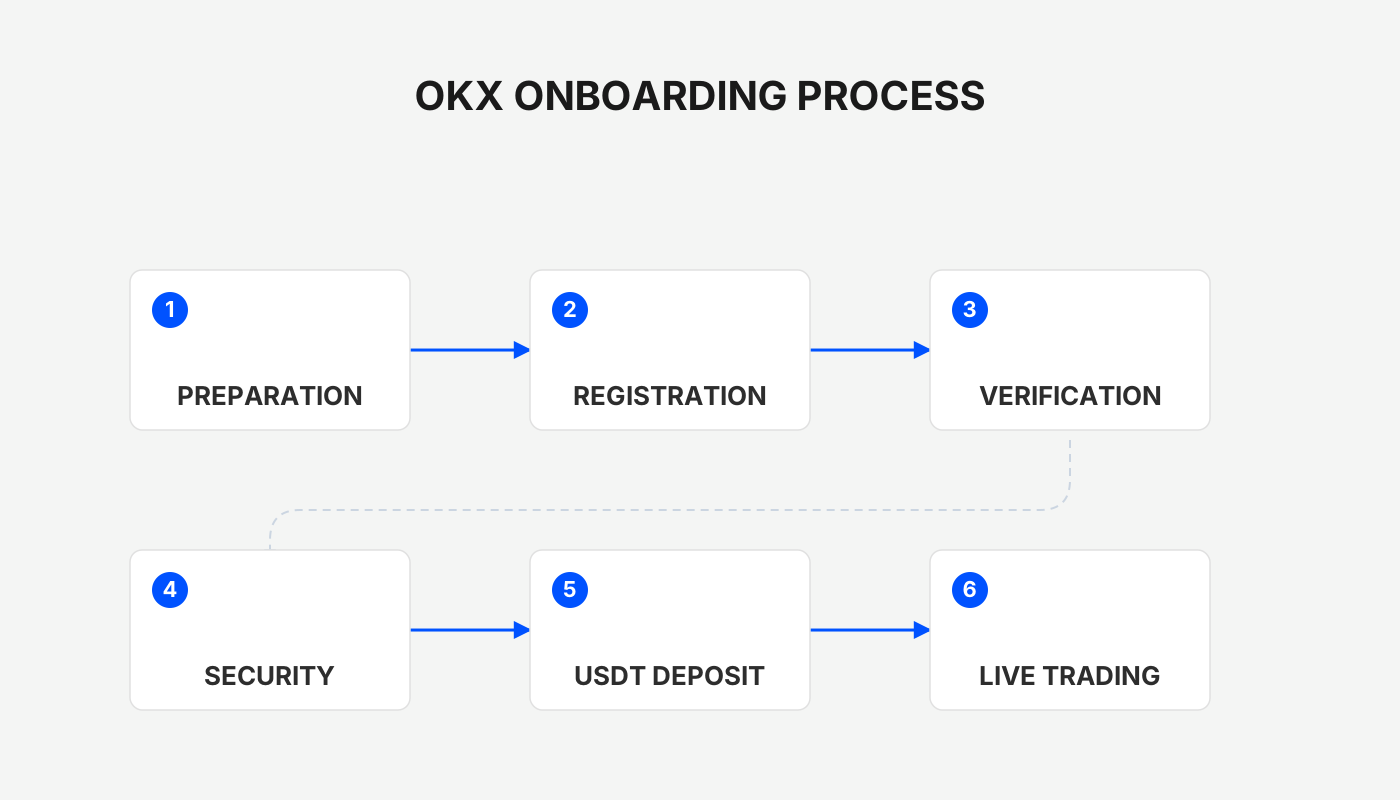
1. OKX Beginner Registration Guide
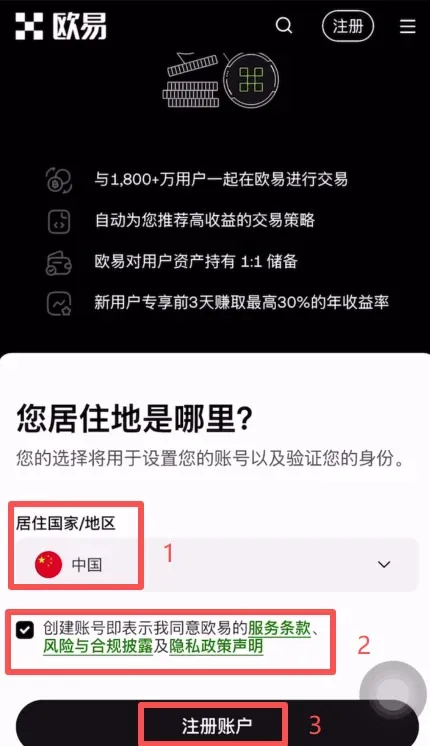
Open the official registration link to reach the sign‑up page. First select your country/region “United States”, “European Union”, or any other applicable jurisdiction, then tick the terms of service box and click [Register Account].
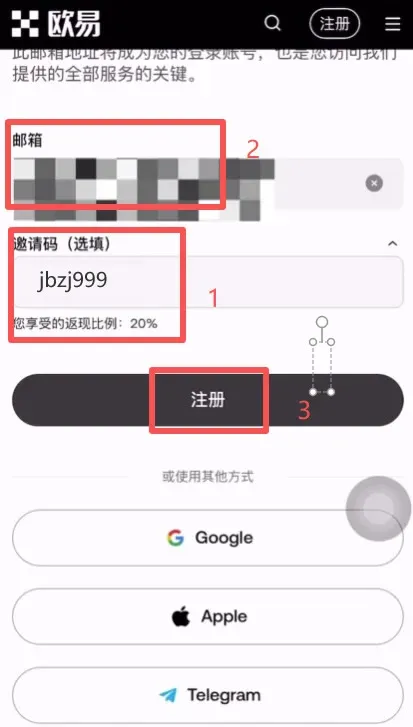
Next, enter a frequently used email address (e.g., from Outlook, Gmail, or your preferred provider). If you arrived via my QR code, the system will automatically insert the invitation code `B2345`, granting you a 20 % cash‑back rebate; if the code does not appear, you can manually type it to receive the same benefit. After filling in the details, click [Register].
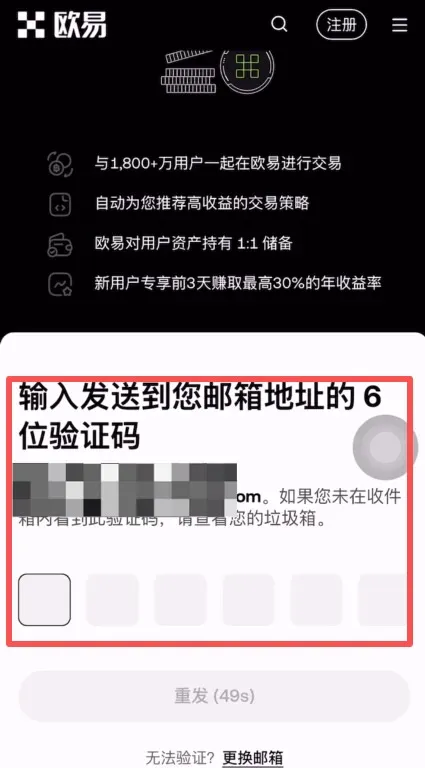
A 6‑digit verification code will be sent to the email address you provided; retrieve it and enter it in the corresponding field.
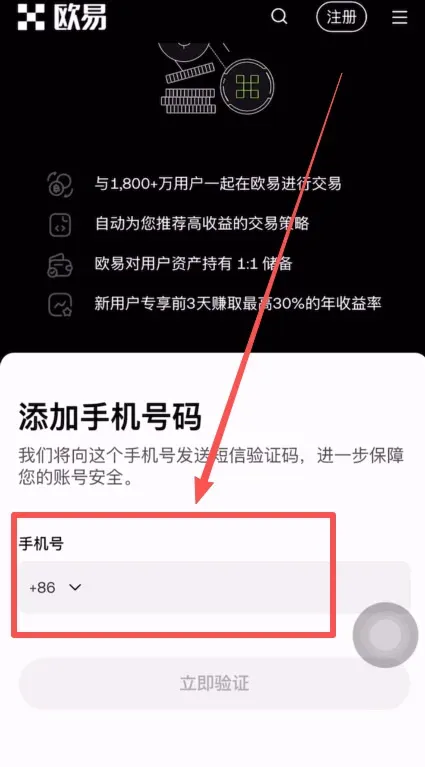
Now bind a mobile phone number. Choose your country’s calling code (e.g., +1 for the United States, +44 for the United Kingdom, etc.) and input your mobile number, request the SMS verification code, and complete the verification. This finishes the account registration.
After a successful registration, download the OKX APP onto your phone. Android users should use the link above; iOS users can follow the corresponding Apple Store download process.
2. How to Purchase USDT on OKX
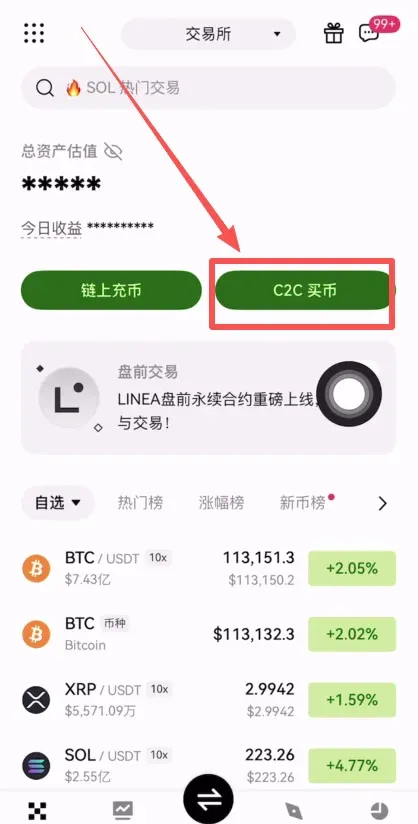
- Launch the OKX APP, log in, and tap [C2C Buy Crypto].
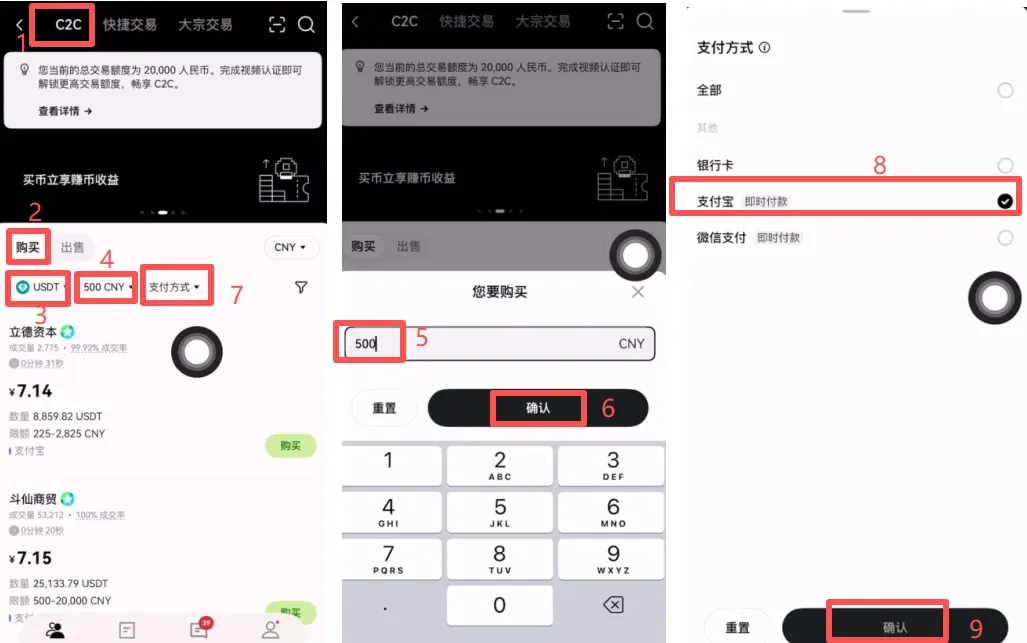
- At the top of the page select “C2C” (peer‑to‑peer trading), then tap [Buy] and choose USDT (the stablecoin pegged 1:1 to the US Dollar).
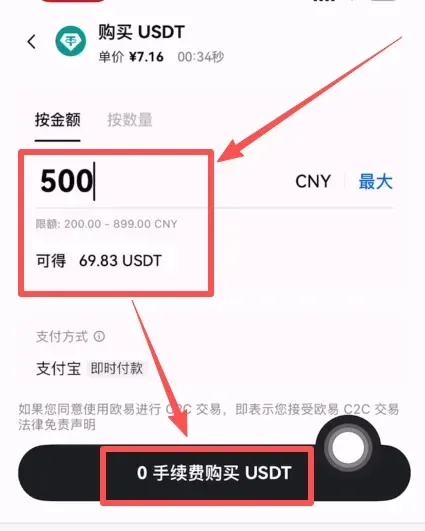
- Enter the amount you wish to spend, for example 500 USD, and the system will automatically calculate the equivalent USDT quantity.
- Choose a payment method (bank transfer via SEPA or SWIFT, credit/debit card, PayPal, etc.), tick the option, and tap [Confirm].
The platform will filter merchants based on your criteria. It is advisable to prioritize merchants who:
- Have a large trading volume and a 100 % completion rate.
- Have been registered for over a year (reducing risk).
For illustration, the merchant “Tianlong Studio” has been active since 30 April 2023 (over two years) and maintains a 100 % completion rate over the past 30 days. Click its [Order] button to proceed with the purchase.
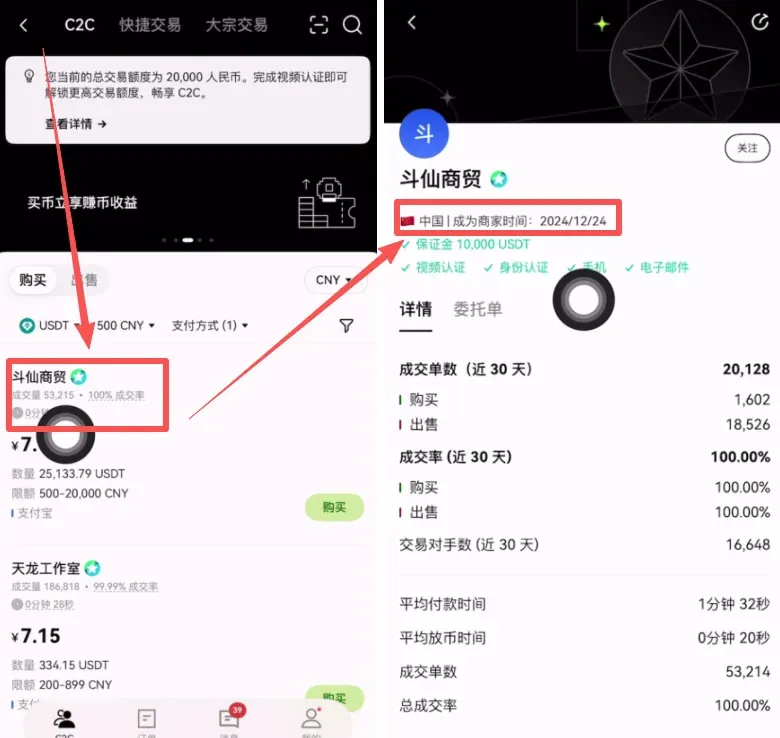
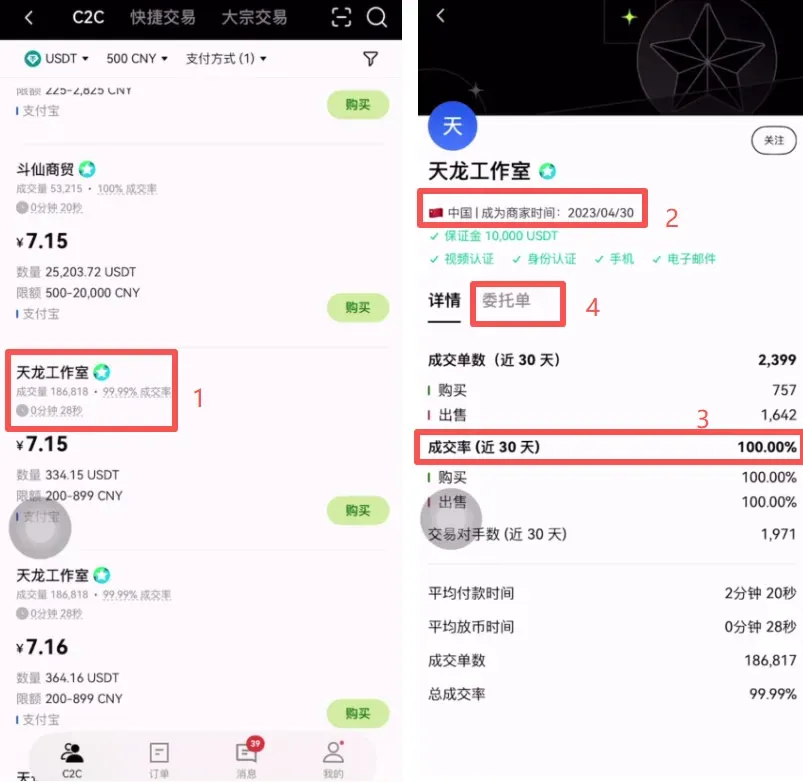
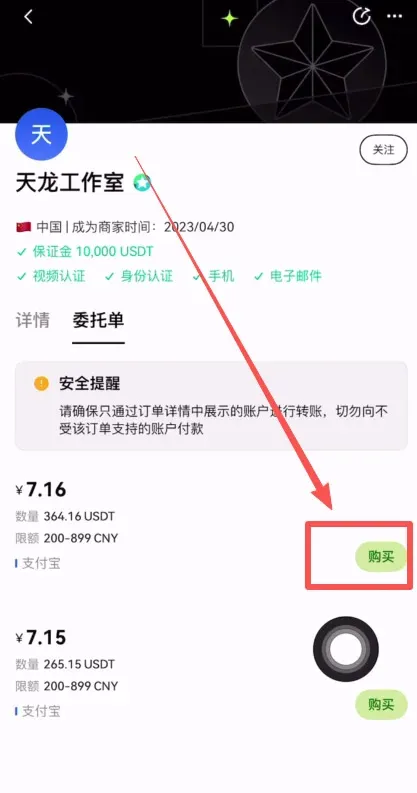
Confirm the purchase amount once more. The system will display the final USDT you will receive (e.g., 500 USD ≈ 69.83 USDT) and you can tap [Buy USDT with 0% Fee].
Within the merchant’s chat window, you will be prompted that the payment must be made under your own verified name; otherwise the funds cannot be released. Click [Get Payment Details], follow the instructions to complete the transfer, then tap [I Have Paid]. After the merchant confirms receipt, the USDT will be credited to your account.
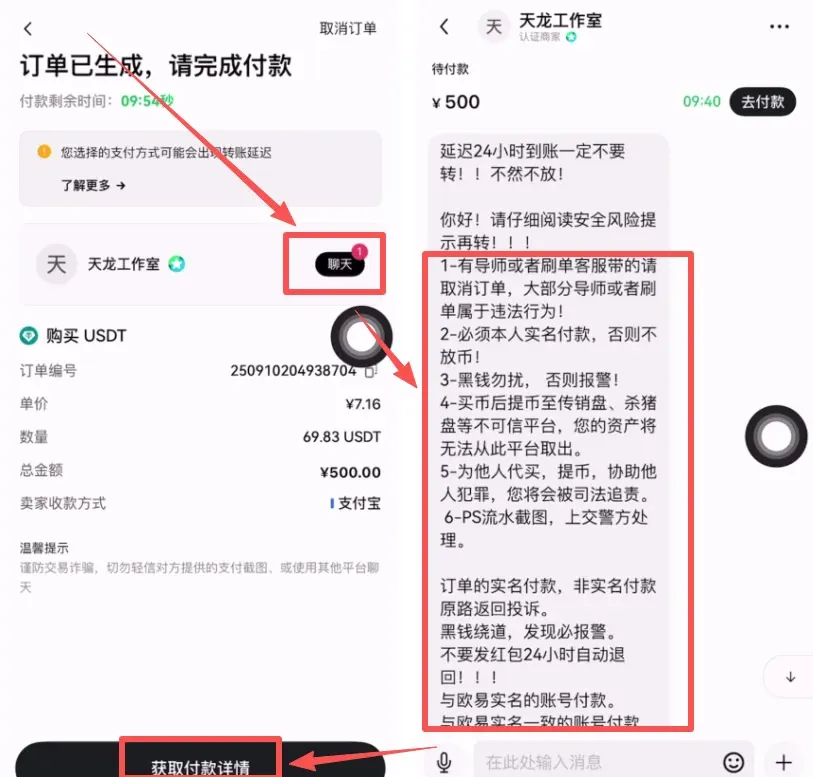
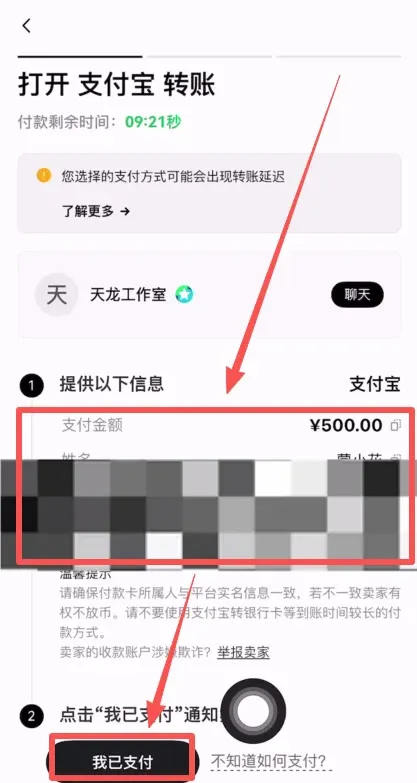
The purchased USDT will appear on the [Assets] page.
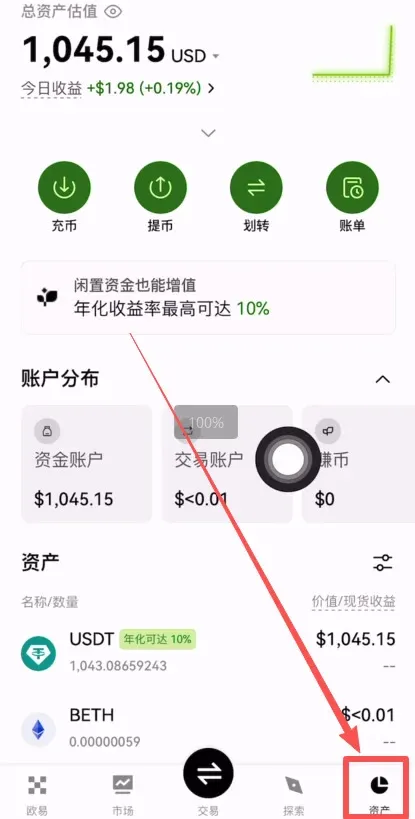
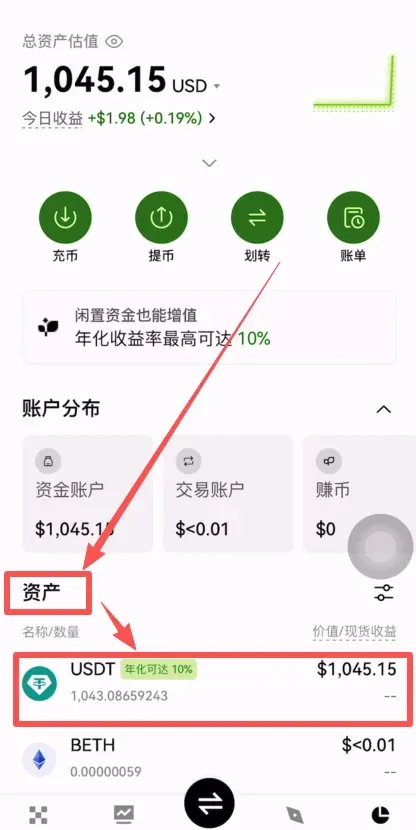
At this point you own a transferable digital asset that can be moved to any compatible wallet or exchange.
3. How to View Your USDT Deposit Address in the OKX APP
- In the bottom navigation bar of the APP, tap [Assets], then select [Deposit].
- Locate USDT in the asset list and tap it.
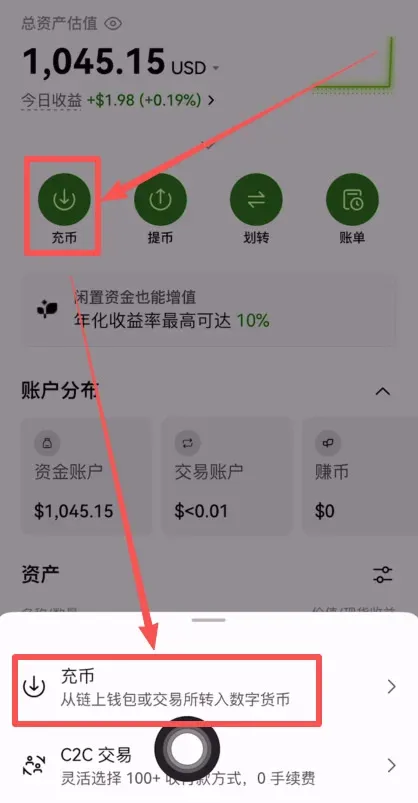
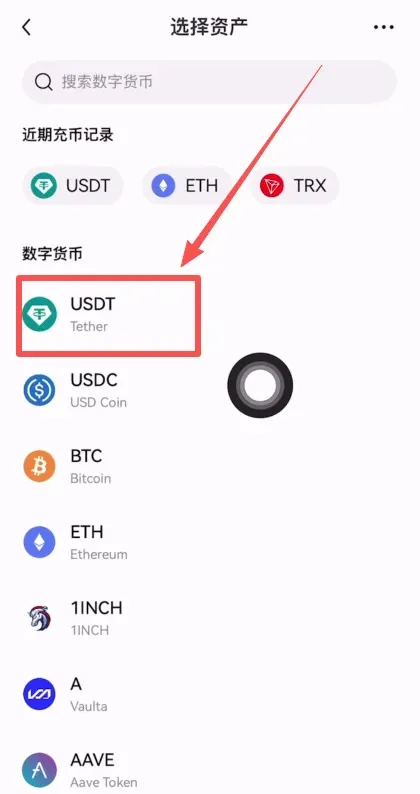
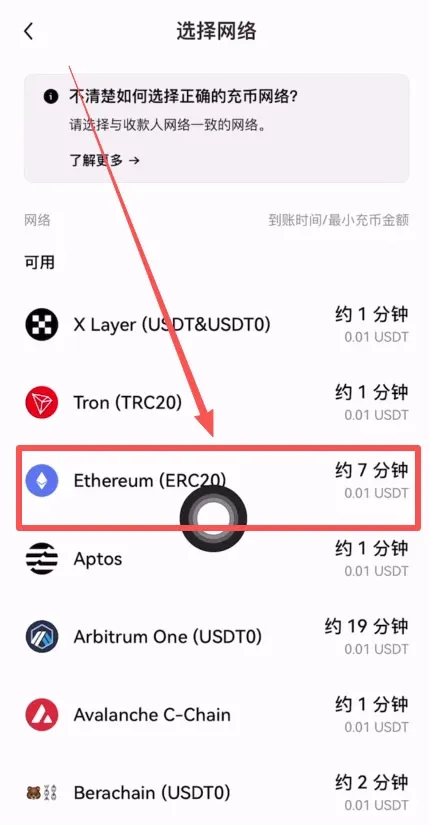
- The page will display a list of supported networks; the most common are USDT‑TRC20 and USDT‑ERC20.
- ERC20 generally offers higher security.
- The network you select for the deposit must match the network you later use for withdrawals.
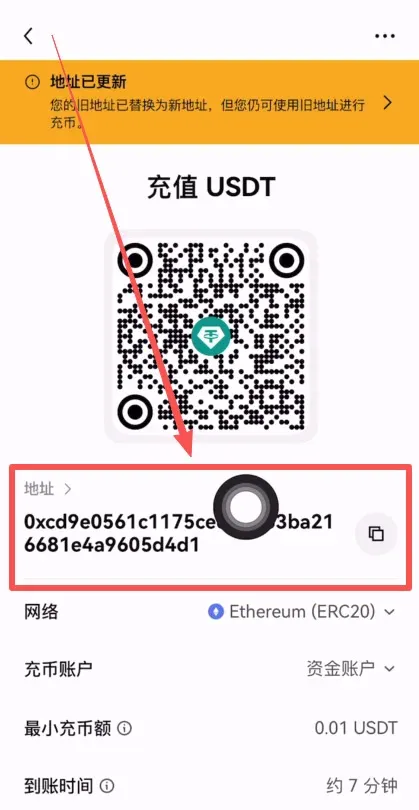
Choose ERC20 (or the network you require), and the system will generate the corresponding deposit address.
Copy this address and share it with the party sending you funds to complete the receipt.
4. Six Common Pitfalls for Beginners Buying USDT
| # | Typical Question | Key Explanation |
|---|---|---|
| 1 | **What is USDT?** | USDT is a **stablecoin** pegged 1:1 to the US Dollar, providing relatively stable value. |
| 2 | **Is my money safe?** | C2C trades are escrowed by the platform; funds remain in a protected vault until the transaction is confirmed. |
| 3 | **Why can’t I withdraw immediately after purchase?** | To protect newcomers from accidental mistakes, the platform imposes a **T+1** cooling‑off period and limits large withdrawals. |
| 4 | **Will I receive “dirty money” from unknown sources?** | After deposit, the platform performs compliance checks; under normal circumstances such risks do not arise. |
| 5 | **Why do merchants ask for “fund settlement” time?** | Allowing funds to sit briefly reduces the likelihood of triggering anti‑fraud controls, increasing the chance of a successful trade. |
| 6 | **Will my bank card or e‑payment account be flagged?** | For large transactions, consider using a dedicated bank account, a secondary PayPal/WeChat/Alipay account, or a corporate card to avoid platform risk controls. |
The table above summarizes the complete workflow for OKX beginner registration, USDT purchase, and viewing the USDT deposit address. For more detailed information, stay tuned to Bitaigen’s follow‑up articles.
Additional Note: Cryptocurrency transactions may be subject to tax in your jurisdiction. Be sure to consult a tax professional regarding the reporting of crypto gains or losses.
For U.S. residents: Access to OKX services may be limited; you should use Binance.US (or another regulated U.S. exchange) for fiat on‑ramps and off‑ramps instead of the global Binance platform.
Related Reading
- OKX China 2026: Register, Download App, Buy USDT, Trade
- OKX Registration Guide: Verify Identity & Buy USDT Fast
- OKX Crypto Guide: User‑Friendly Entry for Beginners
💡 Register on Binance with referral code B2345 for the maximum trading fee discount. See Binance complete guide.



