
 Bitaigen Research
 When you encounter a insufficient fee warning while transferring assets with the OKPay wallet, you can replenish the required main‑net coin for the relevant network either by receiving the coin or by withdrawing it from an exchange. This ensures that the transaction can be processed smoothly.
In this article we systematically outline the most common scenarios that lead to an insufficient‑fee notice in the OKPay wallet, and we walk you through two fast ways to top up the main‑net coin. With step‑by‑step screenshots, you’ll learn how to reserve enough fee balance before initiating a transfer, thereby avoiding failed transactions. To master the full workflow, keep reading.
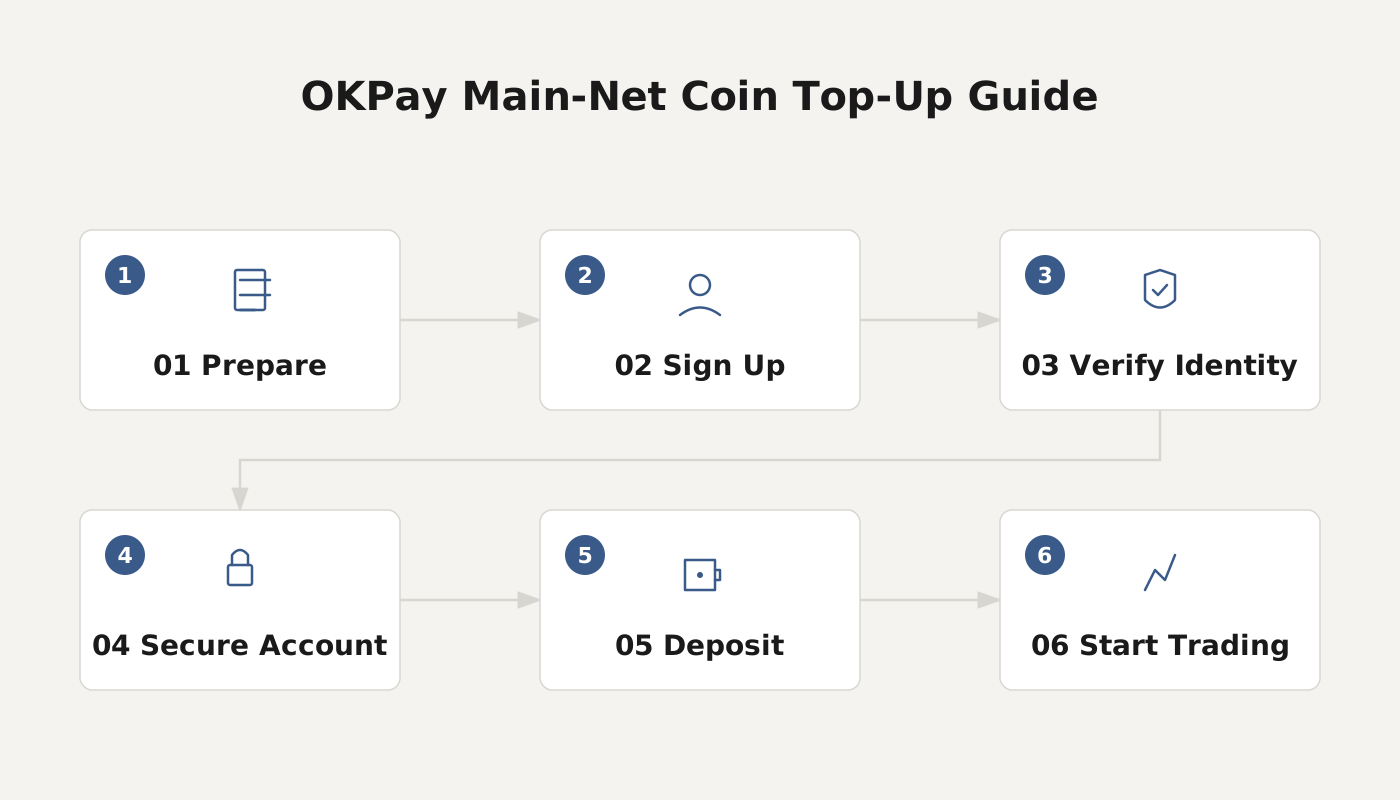
What Is a Transfer Fee
A transfer fee (also called a network fee, gas fee, or miner fee) is the reward paid to miners or validators for packaging your transaction into a block on the blockchain. This fee goes directly to the network participants and is not collected by the wallet provider.
How Much Does a Withdrawal Cost
On the withdrawal (send) page of the wallet, you will see the estimated coin and the fee amount that will be required. Withdrawal fees are charged per transaction, regardless of the amount you are sending; the network fee itself fluctuates in real time according to blockchain congestion, and the exact figure shown on the page is the one that will be deducted. Before you initiate a transfer, make sure the wallet address holds enough of the native coin to cover the fee, otherwise the transaction will fail due to insufficient funds. If a transaction does fail, any fee that has already been deducted is non‑refundable.
Method 1: Replenish the Fee by Receiving Coins
If your wallet balance cannot be directly converted into the needed fee, you can top it up by receiving the appropriate coin. Using TRX as an example, follow these steps:
- On the confirmation screen for sending assets, tap [Add TRX]; copy the receiving address, scan the QR code, or share the address with the payer. If you need to specify an exact amount, click [Set Amount] and enter it.
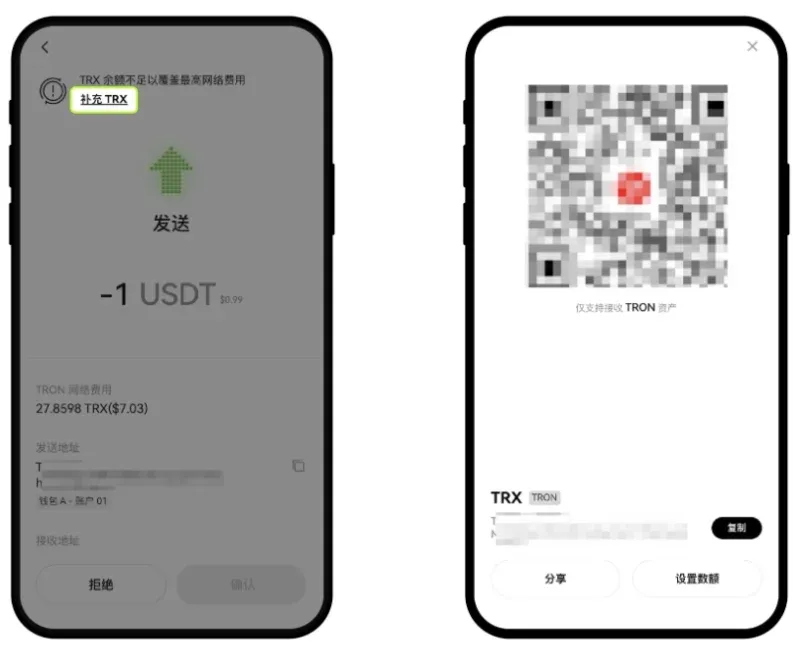
- Open your preferred exchange or another wallet, search for TRX, select the TRON network, and go to the Transfer / Withdrawal section. Paste the address you copied in step 1 and specify the amount you wish to send, then complete the withdrawal.
- After the withdrawal is confirmed, return to the OKPay wallet’s home screen and tap [Transaction History] to view the fee‑replenishment record.
Note: The network fee for a Web3 wallet transaction is always paid in the native coin of the corresponding network. For instance, a transfer on the TRON (TRC‑20) network consumes TRX. The exact fee token and amount displayed on the UI should be considered authoritative.
Method 2: Quickly Replenish the Fee via an Exchange Withdrawal
Again using TRX as an example, if receiving coins is inconvenient you can directly withdraw the fee from an exchange:
- Open the exchange’s mobile app, switch to [Web3 Wallet] → [Send], select the coin and network, then paste or type the receiving address.
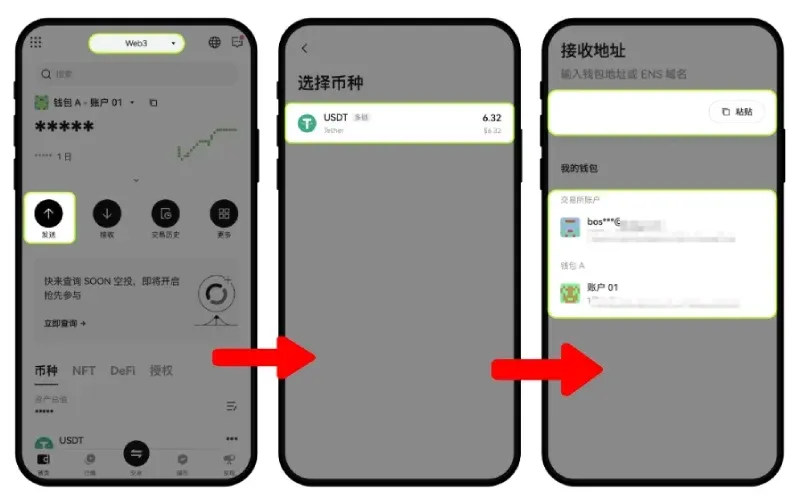
- Enter the amount you wish to transfer, then tap [Next] → [Add TRX].
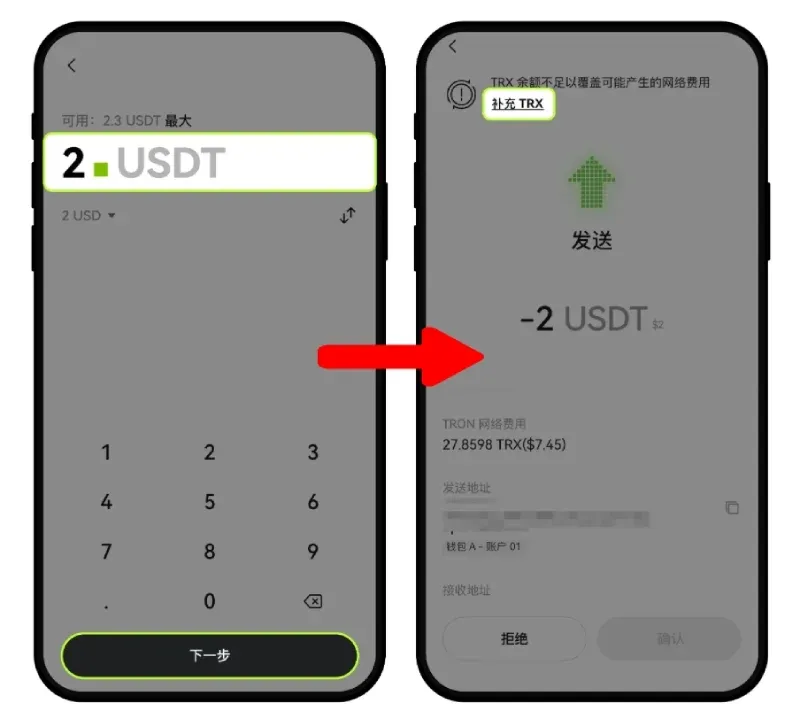
- Choose [Exchange Withdrawal], specify the quantity of TRX to withdraw, and submit the request.
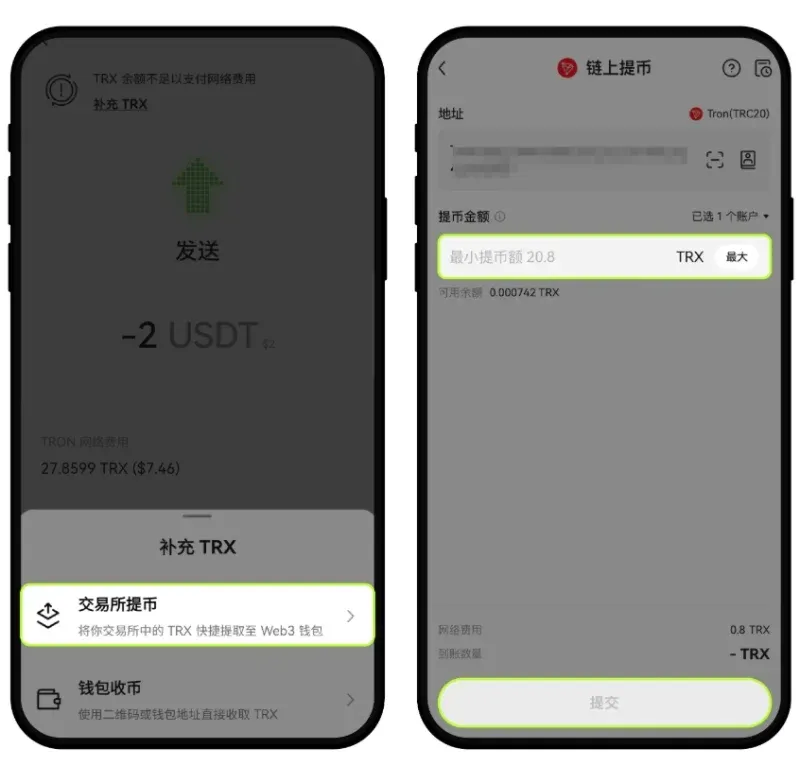
Each cryptocurrency has a minimum withdrawal amount; please refer to the on‑screen prompt for the exact figure.
Once the fee has been successfully added, you can proceed with sending your assets.
Remarks
- If tapping [Add TRX] does not reveal the [Exchange Withdrawal] option, it means your wallet has not yet been linked to an exchange account. Complete the linking process first.
- The OKX Wallet app does not offer the [Exchange Withdrawal] feature; you will need to use the receiving‑coin method to top up the fee.
That concludes a complete guide on how to replenish fees in the OKPay wallet using the two most common approaches. For additional tips on using the OKX Wallet, search for past articles on Bitaigen (BitRoot) or continue browsing the related links below. We appreciate your ongoing interest and support!
*For users in the United States, please ensure you are using Binance.US or another locally compliant exchange when performing the exchange‑withdrawal steps described above. Fiat transactions should be conducted via USD, SEPA, or SWIFT channels where applicable.*
💡 Register on Binance with referral code B2345 for the maximum trading fee discount. See Binance complete guide.



