
 Bitaigen Research
 OKX Web3 Wallet Overview
OKX Web3 Wallet is a multi‑chain management tool built on blockchain technology that provides users with secure asset storage, transfers, and cross‑chain transactions across iOS, Android, and browser extensions. With a single set of mnemonic words, users can generate the corresponding on‑chain identity, enabling free operation of assets on more than 40 public blockchains such as Bitcoin, Ethereum, OKC, Solana, BSC, Polygon, Avalanche, Tron, Arbitrum, and many others. When connecting, the wallet automatically detects the chain type, eliminating the need for manual switching.
---
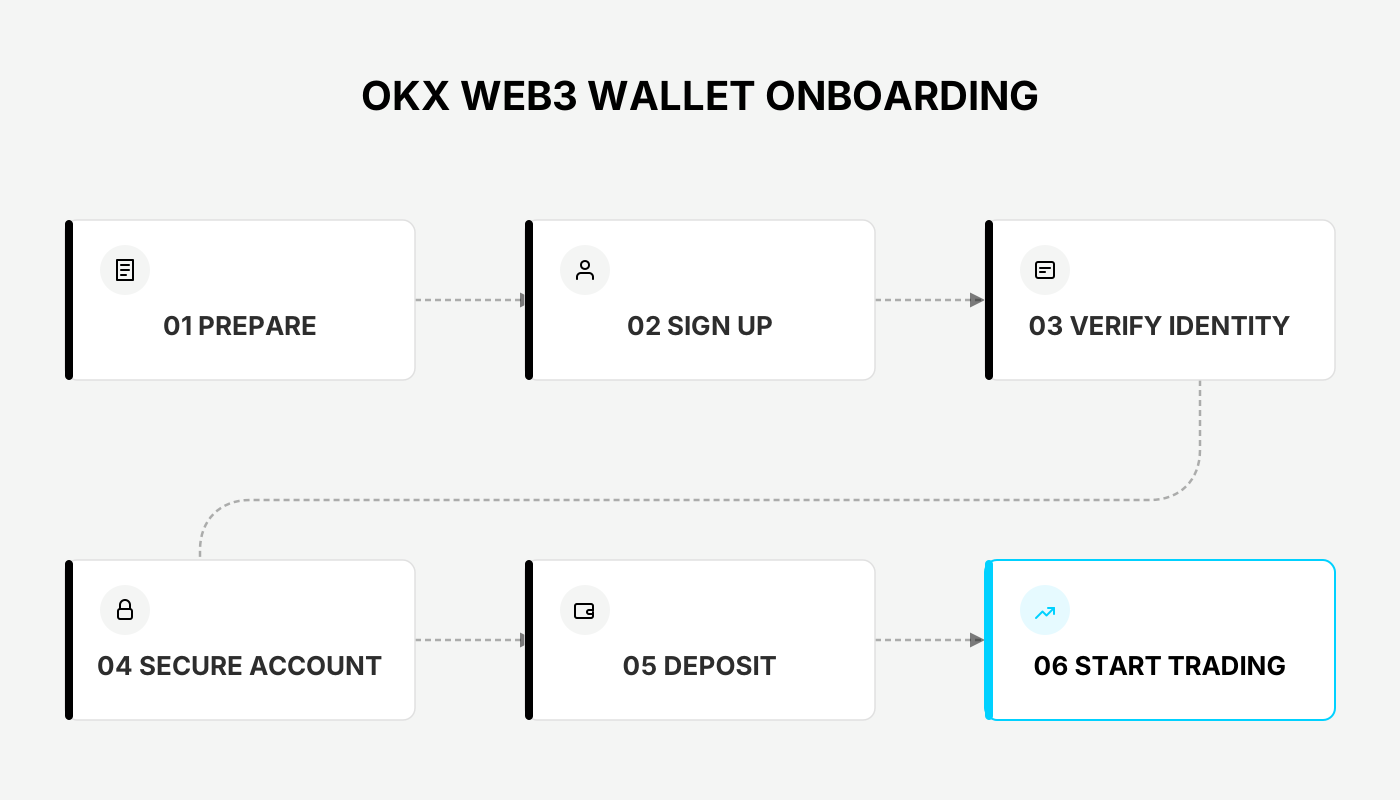
In this article we systematically walk through the entire registration and usage process of the OKX Web3 Wallet app, helping beginners quickly get started with multi‑chain asset management. We also compare the core differences between centralized exchanges and decentralized wallets, so readers can choose the tool that best fits their needs.
1. What Is a Web3 Wallet?
A Web3 wallet (also known as a decentralized wallet) is a crypto‑asset management tool specifically designed for blockchain assets. Compared with traditional financial institutions or centralized exchanges, a Web3 wallet lets users hold their private keys themselves, granting full control over their assets. In addition to basic send/receive functions, a Web3 wallet can directly interact with decentralized applications (DApps), smart contracts, digital identities, and distributed network resources, serving as the entry point to the Web3 ecosystem.
---
2. Centralized Exchange vs. Decentralized Wallet
| **Feature** | **Centralized Exchange (e.g., OKX, Binance)** | **Web3 Wallet (e.g., OKX Web3 Wallet)** |
|---|---|---|
| **Asset Control** | Assets are custodial; users rely on account passwords | Private keys belong to the user; assets are fully self‑custodied |
| **Security Measures** | Multi‑factor authentication, MPC, etc.; still subject to hacks | Private keys stored offline; a single mnemonic can derive wallets on many chains, reducing leakage risk |
| **User Barrier** | Simple UI, ideal for quick trades | Richer feature set, more friendly to advanced users |
| **Fee Structure** | Trading fees vary by product and volume | Network fees charged on‑chain; differ by blockchain |
| **On‑Chain Support** | Supports spot, futures, margin, and other financial products | Focuses on DeFi, GameFi, NFT and other on‑chain activities |
| **Target Audience** | Users who need fast buying/selling, fiat on‑ramps, leveraged trading | Users who need secure storage, cross‑chain operations, deep participation in blockchain ecosystems |
---
3. Core Functions of the OKX Web3 Wallet
- One‑Click Creation: Generate a Web3 wallet instantly within the native OKX app—no extra download required.
- Multi‑Chain Interoperability: Integrated support for major chains such as Ethereum, BNB Chain, Polygon, and many others, enabling cross‑chain asset management.
- Non‑Custodial: Private keys remain only on the user’s device, granting full autonomy.
- Security Protections: Offers encrypted backup, MPC multi‑party computation, fingerprint/face recognition, and other layered verifications.
- On‑Chain Aggregation: Built‑in modules for DeFi trading, token staking, lending, and more, all accessible directly within the app.
- Mobile‑First Design: Interface optimized for smartphones, delivering a smooth user experience.
---
4. Wallet Security Mechanisms
- Offline Private Keys: Private keys are never uploaded to any central server, eliminating the risk of remote theft.
- Single Mnemonic, Multi‑Chain: The same set of mnemonic words can derive wallets on 40+ public chains, reducing the chance of losing access.
- Multi‑Factor Authentication: Biometric features such as fingerprint or facial recognition can serve as additional login methods.
- “Sky Eye” KYC System: The platform maintains a database of roughly 200 million on‑chain address tags, automatically blocking suspicious addresses and abnormal transactions.
---
5. Download and Initialization
- Visit the OKX official website and download the OKX client.
- Open the OKX app, switch to the Web3 Wallet tab, and tap Create Wallet.
- Set a login password; the system will then generate a mnemonic phrase. Be sure to follow the prompts and back it up carefully.
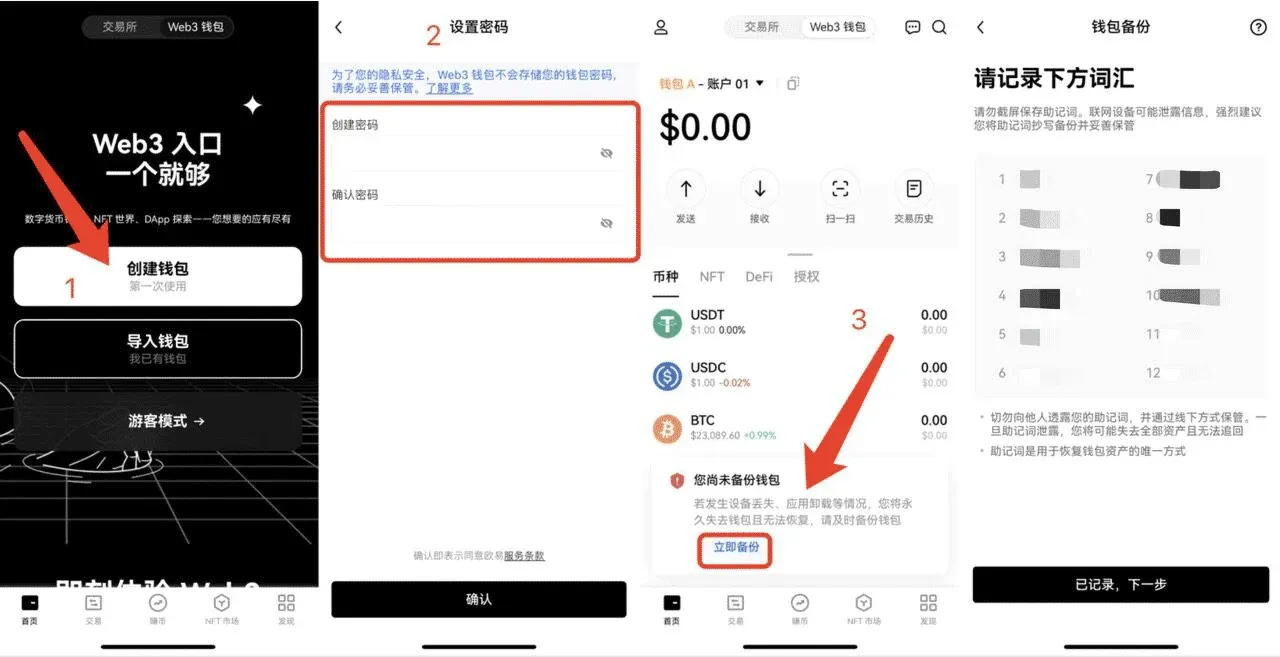
- We recommend enabling fingerprint or facial verification to improve future login convenience and security.
---
6. Importing an Existing Wallet
If you already own a mnemonic phrase or private key from another wallet, you can import it directly into the OKX Web3 Wallet:
- Tap Import Wallet.
- Choose Import Mnemonic or Import Private Key.
- Enter your login password to complete the import flow.
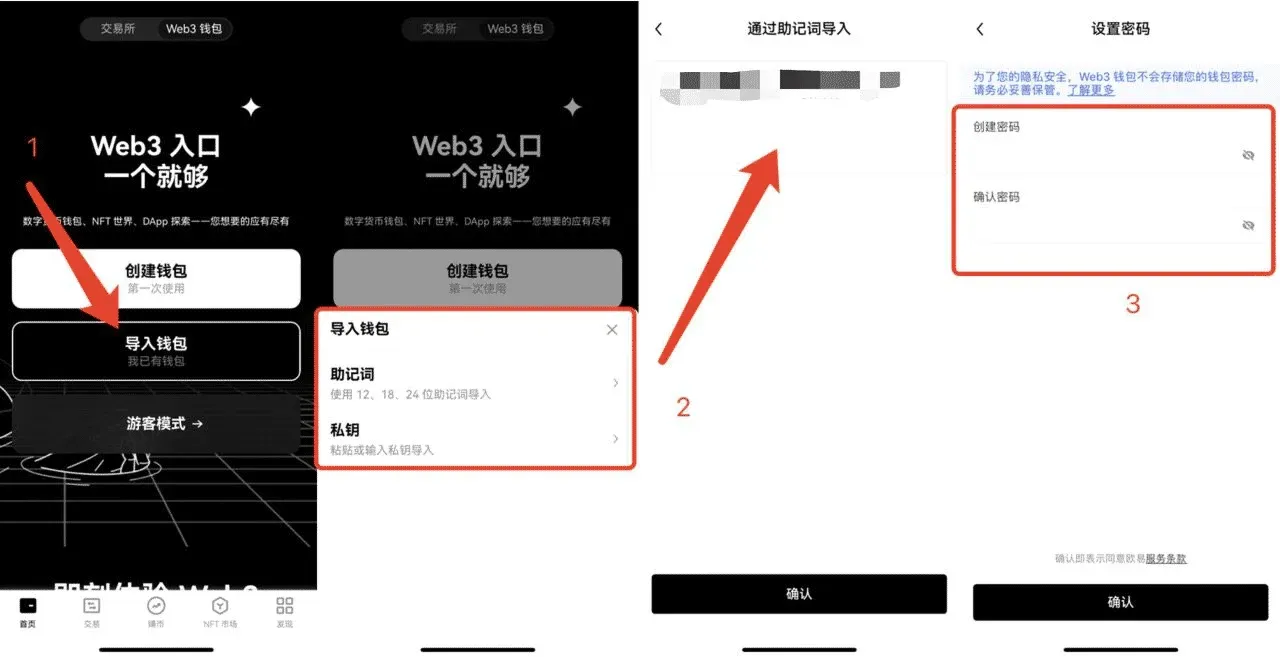
Friendly reminder: Passwords and mnemonic phrases are stored only locally; the platform does not provide a recovery service. Keep them in a secure place.
---
7. Backing Up Mnemonics and Private Keys
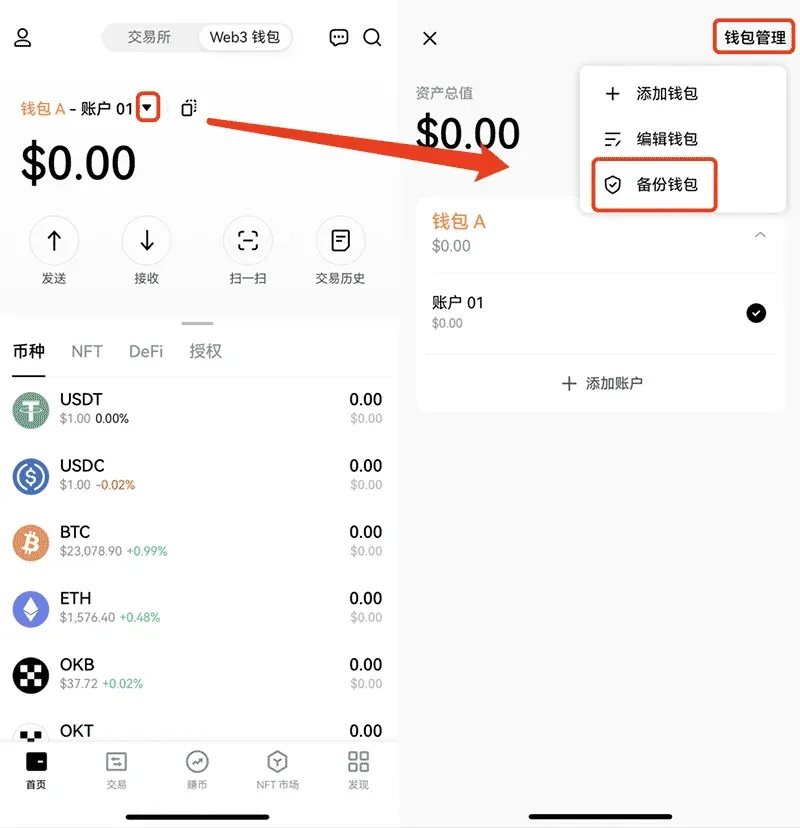
From the main screen of the OKX Web3 Wallet, tap ▼ > Wallet Management > Backup Wallet to view and export:
- Mnemonic Phrase: One mnemonic corresponds to a master wallet and all its derived accounts, covering assets on 40+ public chains.
- Private Key: Different chains may have distinct private keys; be sure to differentiate them when backing up.
---
8. Creating and Managing Sub‑Accounts
- In the wallet view, tap ▼ > + Add Account to generate a new account. This account shares the same mnemonic as the master wallet and is a derived wallet.
- To rename a wallet or account, go to ▼ > Wallet Management > Edit Wallet.
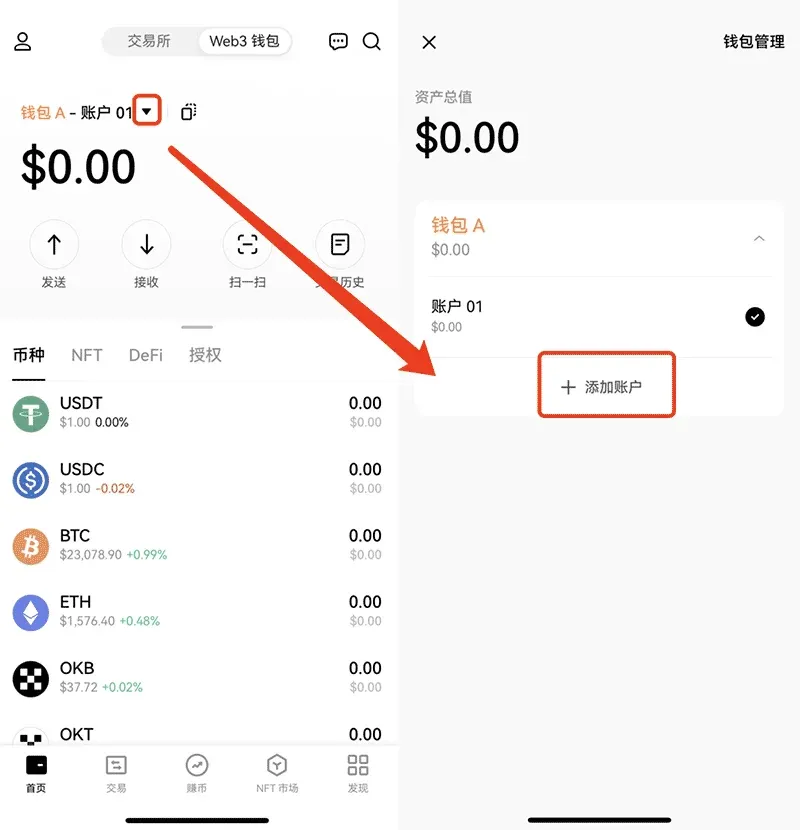
Currently, created accounts cannot be deleted individually; to remove one you must delete the entire wallet and re‑import using the mnemonic. Wallets imported via private key do not support adding sub‑accounts.
---
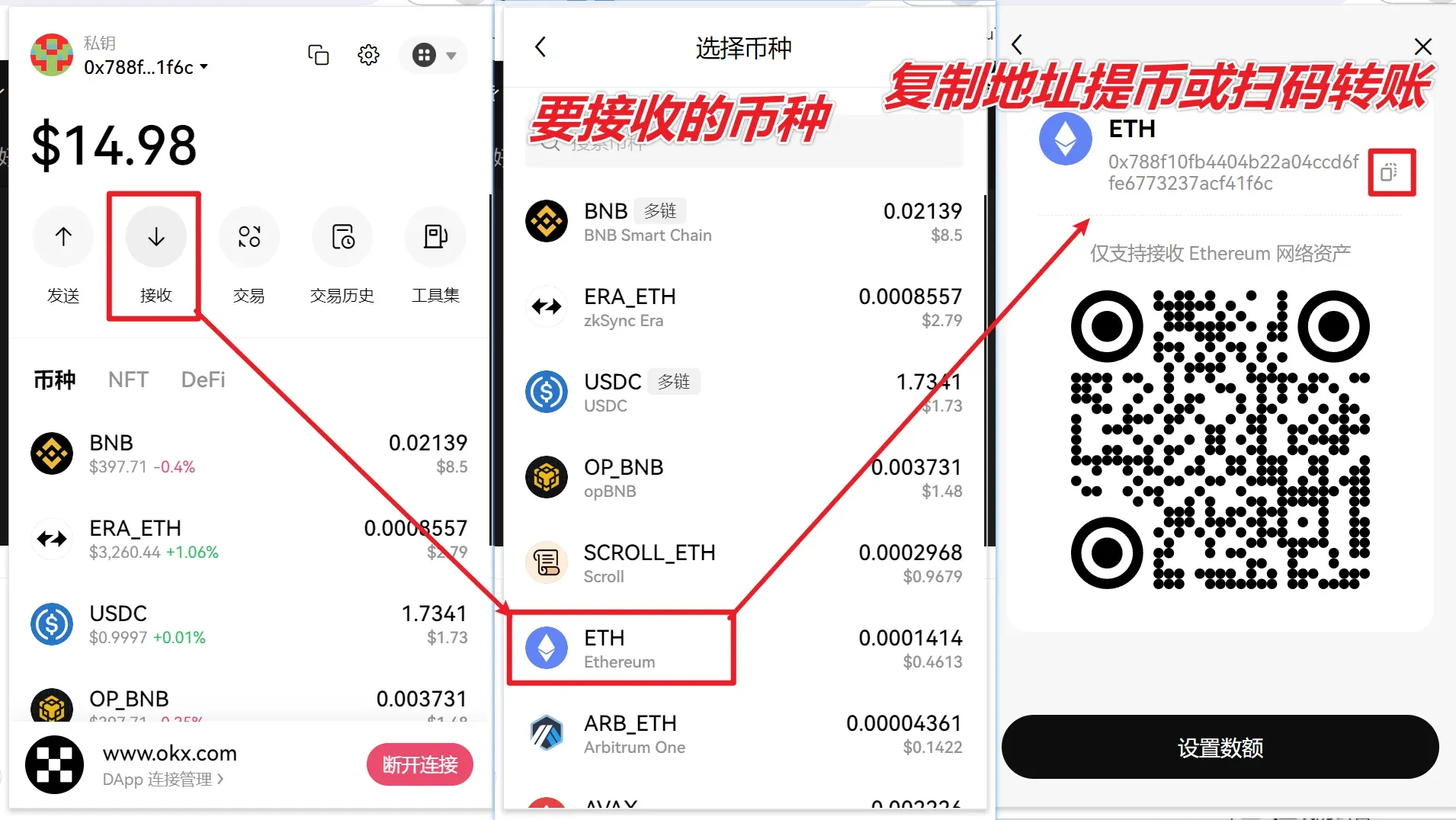
9. Obtaining a Deposit Address
To fund the wallet, you first need the receiving address for the relevant blockchain. Open the wallet, then either copy the address directly or use the phone‑scan method to quickly add it on a desktop client.
---
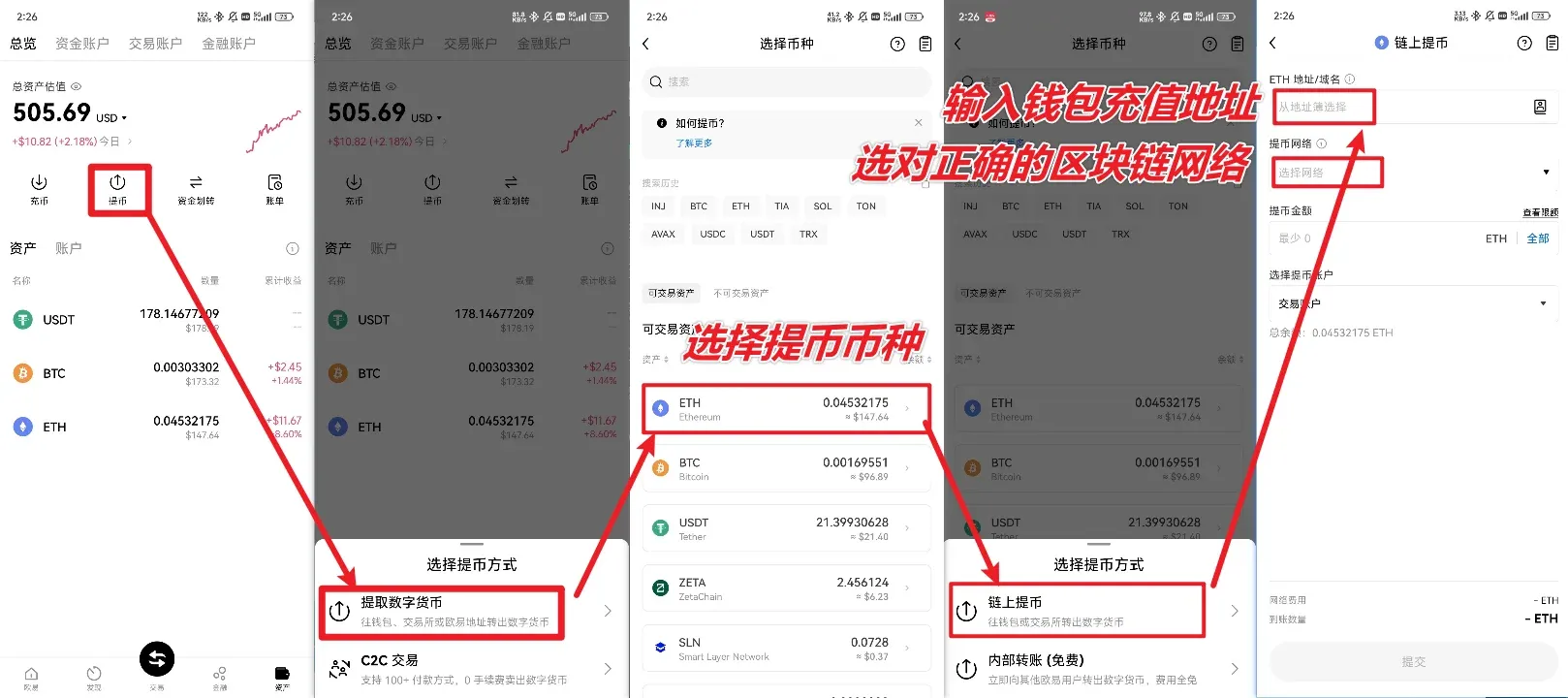
10. Withdrawing from an Exchange to the Wallet
After completing a withdrawal on exchanges such as OKX or Binance, the funds will arrive at the address you obtained from the OKX Web3 Wallet. At this point the assets are fully under your control, and you are solely responsible for their security.
Note for U.S. users: If you are based in the United States, you must use Binance.US (or another U.S.-compliant exchange) for fiat on‑ramps and withdrawals. The global Binance platform is not available to U.S. residents.
---
11. Discovering and Using DApps
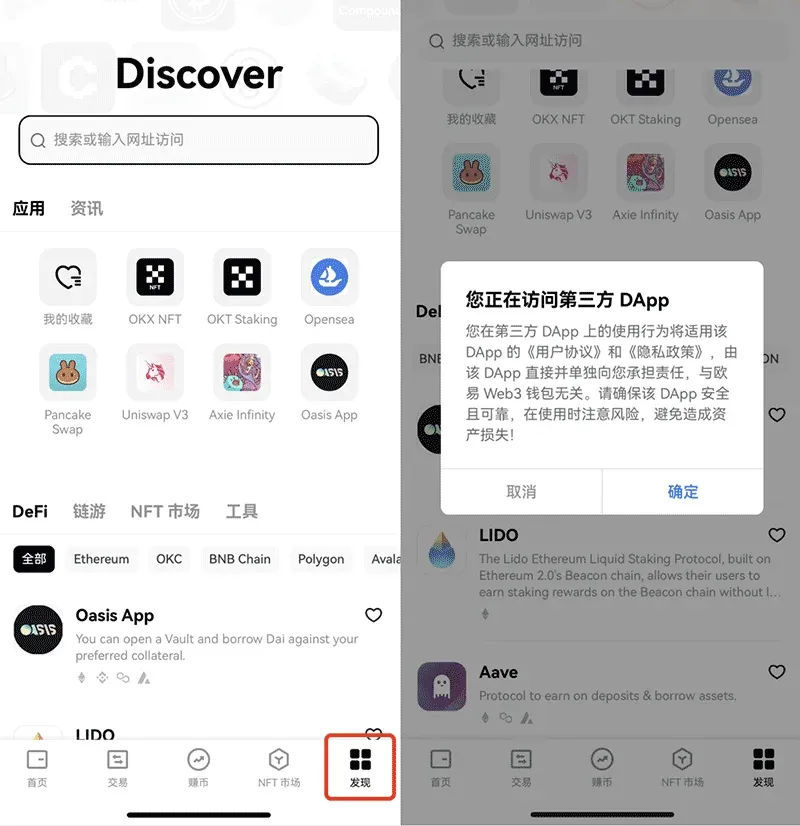
The OKX Web3 Wallet includes a built‑in Discover hub that aggregates thousands of DApps. Users can:
- Enter keywords in the search bar to locate specific projects.
- Filter by the four main categories: DeFi, GameFi, NFT Marketplace, Tools.
- Tap a desired DApp; a Connect Wallet prompt will appear—once approved, you can start interacting.
- Favorite frequently used DApps by clicking the ♡ icon, adding them to My Favorites for quick access.
---
12. Tax Considerations (Brief)
Cryptocurrency gains may be subject to tax in many jurisdictions. When you trade, sell, or otherwise dispose of digital assets, you should consult local tax regulations—whether you are in the United States, European Union (where SEPA/SWIFT transfers are common), or elsewhere. Keep detailed records of transactions (including timestamps, amounts, and fiat equivalents in USD) to simplify reporting.
---
13. Summary
The registration, creation, backup, and everyday usage flow of the OKX Web3 Wallet app has now been fully presented. For more practical tips, feel free to search Bitaigen (比特根) for previous articles or continue browsing the subsequent content on this site. We wish you an enjoyable and secure journey in the Web3 world!
Related Reading
- Complete Guide to Using the OKX Web3 Wallet – Setup, Reset & Import
- Is the OKX Web3 Wallet Secure? In‑Depth Security Review
- Proof-of-Work Explained: Security, Energy Challenges & Future Trends
💡 Register on Binance with referral code B2345 for the maximum trading fee discount. See Binance complete guide.



