
 Bitaigen Research
 In a blockchain explorer, simply entering a transaction hash, a wallet address, or a block height lets you quickly view the corresponding transaction details, fund flows, and account balances.
In the world of cryptocurrencies, every on‑chain transaction leaves a publicly traceable footprint. These transaction data are not just piles of numbers; they embed rich market information and potential risk signals.

In this article we will guide you through the basic usage of blockchain explorers and hand‑pick four free crypto‑flow‑tracking tools. With these platforms you can easily query transaction specifics, monitor wallet activity, capture market signals, and avoid potential pitfalls. If you want to learn how to efficiently obtain on‑chain information, keep reading.
The Starting Point of Crypto‑Flow Tracking: Getting to Know the Tools
In the cryptocurrency ecosystem, each transaction leaves a publicly traceable record. This data is more than a collection of digits; it contains valuable market insights and possible risk indicators.
For professional traders, these tools are essential for observing market dynamics, allowing direct tracking of “whales” — large holders of crypto assets — and their fund movements, thereby identifying pivotal investment opportunities. By analyzing wallet activity, users can also spot suspicious or illicit behavior and pre‑empt risks.
However, tracking where crypto funds go is akin to detective work; you must first master the instruments at your disposal.
Blockchain explorers and data‑analysis platforms serve as magnifying glasses and analytical instruments for observing and interpreting on‑chain data. They not only let users view the details of each transaction clearly, but also enable tracing of fund footprints and analysis of market trends.
Therefore, before diving deep into crypto‑flow‑tracking techniques, you need to become familiar with these indispensable tools. This article compiles four commonly used free crypto‑flow‑tracking utilities to help you understand how to leverage them.
Tool 1: Mainstream Blockchain Explorers
A “blockchain explorer” (or Block Explorer) works like a search engine for a blockchain. With a web browser you can query any transaction or any wallet on the chain, much as you would search for information on the internet.
Because each blockchain (e.g., Bitcoin, Ethereum, Solana, etc.) has its own technical architecture and data structure, you must use a explorer that is specifically built for that chain in order to parse and display the information correctly.
Different networks have dedicated explorers; for example, Bitcoin users often rely on blockchain.com, while Ethereum users turn to Etherscan.
The core functions of most blockchain explorers include:
- Transaction lookup: Retrieve and view any on‑chain transaction, including sender, receiver, amount, gas fee, and timestamp.
- Wallet lookup: Query any wallet address for its balance and transaction history, helping you follow fund movements.
- Contract verification: View contract source code, associated transactions, and event logs.
- Token tracking: Follow ERC‑20 (and similar) tokens to see supply, holder distribution, and transfer history.
- Block information: Display block height, miner details, and the list of transactions contained in a block.
- Gas tracker: Monitor real‑time gas prices and historical data, assisting you in selecting optimal transaction timing.
How to Query a Transaction or Wallet via a Blockchain Explorer?
Most blockchain explorers feature intuitive user interfaces, but users should have a basic understanding of blockchain concepts and be able to input accurate query parameters. The following example uses Etherscan, the Ethereum explorer, to demonstrate how to look up a wallet address.
Step 1: Visit the Etherscan website
Enter `etherscan.io` into your browser’s address bar and load the site.
Step 2: Use the search bar
The search bar at the top of the homepage accepts any of the following inputs:
- Wallet address (Wallet Address)
- Transaction hash (TXID)
- Block height (Block Height)
- Token contract address (Token Contract Address)
Beginners can start by pasting the 0x‑prefixed wallet address shown in MetaMask or by entering the hash of a known transaction. After typing, click the “Search” button.
Step 3: Review the results
Etherscan will present detailed information, including:
- Sender, receiver, amount, gas fee, and timestamp
- Overall wallet status (balance, token holdings)
- NFT transaction history, if applicable
Rui Ke Financial Technology Co., Ltd. CEO Cai Meng‑ling notes that investigators typically begin fund‑flow tracing with mainstream explorers such as Etherscan and TRONSCAN, and that judicial investigation reports rely on these data sources to avoid software errors or misinformation.
Note: Crypto gains may be subject to taxation in many jurisdictions; users should consult local tax regulations to determine reporting obligations.
Tool 2: OKLink
OKLink is a blockchain data‑analysis platform developed by **** (the original source omitted the developer’s name).
The platform supports querying more than 60 public chains, including major networks like Bitcoin and Ethereum as well as emerging ones. Users can view blocks, transactions, addresses, and other on‑chain data, and track wallet and NFT transaction histories.
OKLink is more than a ledger‑lookup tool; it also displays the quantity of cryptocurrency held by a wallet, the total fees paid, and the timestamp of the first transaction.
Its “On‑Chain Eye” feature converts complex transaction histories into intuitive graphics, helping users easily follow fund flows. The platform also lists celebrity wallets (e.g., those belonging to Jay Chou or Vitalik Buterin) and high‑risk scam wallets, providing practice material for identification.
On the “Centralized Institution Asset Dashboard” page, users can see the total assets of major exchanges, the distribution of leading coins, and historical changes, allowing monitoring for large‑scale transfers.
For instance, on 21 February 2024 the exchange Bybit suffered the largest recorded hack, with more than $1.47 billion worth of Ether moved out illicitly. OKLink enables users to view the exchange’s asset changes and trace the stolen funds’ path.
When dealing with fiat on global platforms, USD is commonly used, and transfers can be conducted via SEPA (for Euro‑zone users) or SWIFT for international wires.
Tool 3: Arkham
Arkham is a blockchain intelligence platform focused on enhancing the transparency of on‑chain data, helping users gain deeper insight into on‑chain behavior and patterns.
Its standout feature is the ability to reveal real‑world identifiers behind anonymous addresses, such as associated X (formerly Twitter) accounts, OpenSea usernames, or Ethereum ENS domains.
Through AI algorithms and data analytics, Arkham transforms seemingly unrelated on‑chain activity into understandable intelligence, which can be used to trace fund flows, link addresses, and access rich on‑chain datasets.
How to Use Arkham
- Enter a name keyword or wallet address into the search box.
- The page will display four information blocks:
- Top‑left: Portfolio composition, cross‑chain asset distribution, and historical changes.
- Top‑right: Time‑series chart showing total portfolio value, individual token values, and daily profit/loss.
- Bottom‑left: Counterparty information, including exchanges and major capital‑flow partners.
- Bottom‑right: Transaction details, with filters to show only inbound or outbound flows.
- Click the “Visualization Tool” at the top left; after entering a wallet or a person’s name, a fund‑flow diagram is generated.
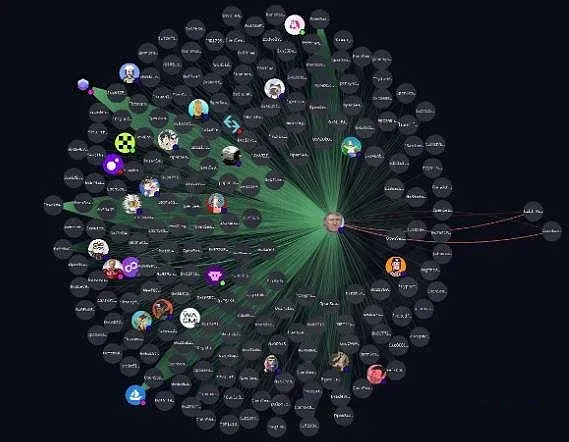
The visual fund‑flow map shows a central wallet surrounded by multiple circular nodes; green lines indicate incoming funds, while red lines represent outgoing funds. Users can drag, zoom, or click on nodes to view detailed transaction information.
Tool 4: MistTrack
MistTrack is developed by the blockchain security firm SlowMist and is purpose‑built for tracing cryptocurrency transactions on the chain.
As crypto adoption expands, illicit on‑chain activity is on the rise. MistTrack provides strong support for anti‑money‑laundering (AML) efforts and corporate compliance. The tool offers a free tier; although the feature set and the number of supported chains are limited, it satisfies basic tracing requirements.
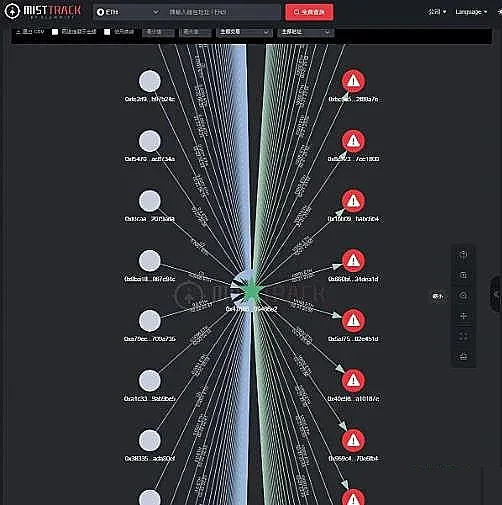
The interface displays incoming funds on the left side and outgoing funds on the right. Users can also click, drag, or zoom the circular nodes (wallet addresses) and follow the connecting lines to examine transaction specifics.
---
That concludes the full walkthrough of “How to Query a Transaction or Wallet via a Blockchain Explorer? A Review of Four Free Crypto‑Flow Tools.” For additional free crypto‑flow utilities, search for previous Bitaigen (BitRoot) articles or continue exploring the related links below. We appreciate your continued support of Bitaigen (BitRoot)!
Important for U.S. users: When accessing global cryptocurrency services, you must use Binance.US rather than the worldwide Binance platform to remain compliant with U.S. regulations.
Tax reminder: Gains from cryptocurrency trading may be taxable in many jurisdictions; always verify your local tax obligations.
Related Reading
💡 Register on Binance with referral code B2345 for the maximum trading fee discount. See Binance complete guide.



