
 Bitaigen Research
 Blockchain Explorers: A Comprehensive Guide
Web browsers are essential tools for everyday internet access—whether on a smartphone or a computer, browsers like Chrome and Safari are ubiquitous. In a similar way, blockchain explorers enable users to quickly retrieve transaction, address, block and other data on a blockchain network.
A blockchain explorer is a web‑based tool that lets you look up transactions, addresses, blocks and more on a blockchain. Simply type a transaction hash, address or block number into the search box to view the details.
In this article we break down the core concepts and practical tips for using blockchain explorers, and we highlight three mainstream tools to help newcomers start querying transactions, addresses and block information right away. Read on to master the workflow and boost your on‑chain data insight.
What Is a Blockchain Explorer?
A blockchain explorer (sometimes called a block explorer) is a class of Web application that extracts, visualises and displays key metrics from a blockchain network, including:
- Transaction history, wallet balances, transaction fees (gas) and related data.
- Block height, block time, hash‑rate and other network‑status indicators.
Most blockchains have dedicated explorers, for example:
| Blockchain | Common Explorers |
|---|---|
| Bitcoin | Blockchain.com, Blockchair |
| Ethereum | Etherscan, Ethplorer, Etherchain |
| BNB Chain | BscScan |
| Polygon | Polygonscan |
These explorers record transaction details in a way that resembles a bank statement: they show the sender, receiver, transferred amount, fee and more, allowing users to double‑check information before confirming a transfer and avoid losses caused by mistyped addresses or insufficient fees.
Explorers can be public (open to anyone) or private (restricted to a specific organisation), depending on the underlying blockchain network.
In short, a blockchain explorer functions as the “browser” and “search engine” for blockchains and cryptocurrencies, providing detailed analysis of blocks, addresses and transactions while showing real‑time charts for hard forks, hash‑rate and other metrics.
How Blockchain Explorers Work
- Node Connection – The explorer connects directly to one or more blockchain nodes to fetch raw on‑chain data.
- Data Processing – It transforms raw identifiers such as transaction IDs or block heights into human‑readable, structured formats.
- Visual Presentation – The user interface offers a search box that supports queries by transaction hash, wallet address, block number, etc.
- Live Synchronisation – The explorer stays in sync with the network in real time, ensuring that displayed balances, transaction statuses and other information are always up‑to‑date.
This workflow allows even non‑technical users to view and understand on‑chain activity within seconds.
Main Use Cases for Blockchain Explorers
- Verify Transactions – Track a transaction’s progress and confirm whether it has been included in a block.
- Explore Addresses – View an address’s asset balance and full transaction history.
- Monitor Blocks – Receive live updates on newly mined blocks and the list of transactions they contain.
- Analyse Data – Study metrics such as transaction volume, active addresses and other indicators to gain insight into network behaviour.
Three Recommended Blockchain Explorers
The following three explorers enjoy wide community adoption, mature feature sets and suit a variety of user needs.
1. Etherscan
- Positioning – The earliest and most comprehensive Ethereum block explorer.
- Core Features – Search blocks, transactions and addresses; provides gas‑price estimation, node status, decentralized‑exchange (DEX) checks and more.
- Token Support – Full coverage of ERC‑20 and ERC‑721 tokens, displaying top holders, price history (in USD), total supply, ICO details, etc.
- Usage Example – Paste a transaction hash into the search bar to see block height, gas consumption, confirmation count and other specifics.
2. Ethplorer
- Positioning – Developed by the Everex team, with a focus on token‑centric displays.
- Highlights – Balance charts denominated in USD, transfer‑volume statistics; token pages show price fluctuations and on‑chain operation counts.
- Advantage – Quickly view the tokens held by an address together with their current USD value.
3. Etherchain
- Positioning – A visually appealing explorer with functionality comparable to Etherscan.
- Unique Tool – Built‑in Unit Converter that switches between WEI, Szabo, Finney and other denominations.
- Address Overview – Concise presentation of inbound and outbound records for rapid historical inspection.
- Limitation – No token search; entering a token contract address may return no results.
How to Use a Blockchain Explorer to Look Up Information
Using btc.com as an example, follow these steps:
- On the homepage, enter a wallet address, transaction hash, block height or block hash into the search bar.
- The explorer returns the full details of the matching transaction, block or address.
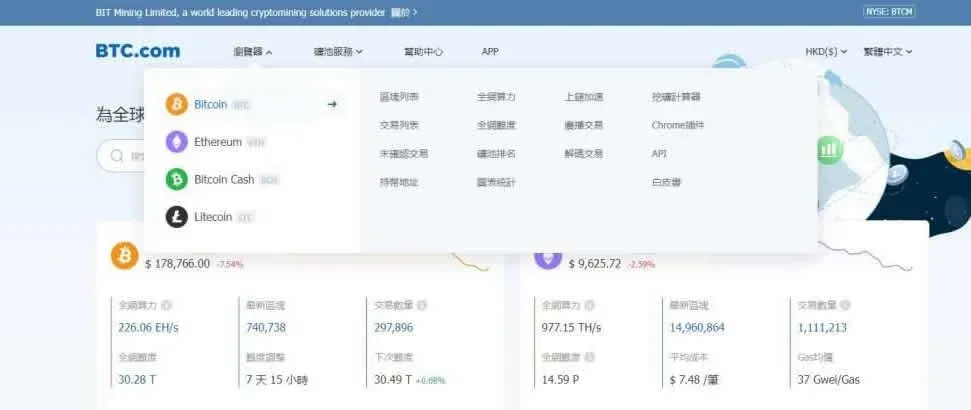
Common Bitcoin Query Fields
- Block Height – The sequential position of a block, analogous to a layer in a stack of bricks.
- Confirmations – Each new block added on top of the block containing the transaction adds one confirmation; six confirmations are generally regarded as final.
- Timestamp – The time the miner packaged the transaction into a block.
- Inputs & Outputs – Correspond to debit and credit entries in accounting terminology.
- Fees – The service charge paid to miners, calculated as the difference between total inputs and total outputs.
Step‑by‑Step Query
- Locate the transaction’s hash (available in most wallet interfaces).
- Paste the hash into the explorer’s search box.
- The explorer will display the transaction status: confirmed, pending or failed.
Using Blockchain Explorers for On‑Chain Analysis
While an explorer itself does not generate profit, the data it supplies is a fundamental source for on‑chain analytics. Typical analytical angles include:
- Transaction‑Volume Trends – Observe overall volume fluctuations to gauge network activity.
- Whale Behaviour – Track large‑balance addresses to see buying or selling patterns.
- Holding Patterns – Identify “diamond hands” or long‑term holders by analysing address distribution.
For a broader perspective, combine explorer data with dashboards such as Dune Analytics, Nansen or similar platforms to obtain whole‑network metrics.
Note for U.S. users: When converting crypto proceeds to fiat, use services that support USD transfers via SEPA/SWIFT where applicable, and consider using Binance.US rather than the global Binance platform.
Tax reminder: Crypto gains may be taxable in your jurisdiction; consult a local tax professional to understand reporting obligations.
Frequently Asked Questions (Q&A)
Q: What is a blockchain explorer?
A: A blockchain explorer is a tool that lets you query transaction records, block heights, wallet addresses, smart‑contract states and other on‑chain data—essentially the “Google” for blockchains.
Q: What kind of information can I look up?
A:
- Transaction hash, fee, confirmation status
- Asset balances and transaction history of a wallet address
- Block height, block time
- Smart‑contract source code and current state
- Transfer records, total supply and circulation of certain NFTs and tokens
Q: Which explorers are mainstream?
A:
- Ethereum: Etherscan, BscScan (BNB Chain)
- Bitcoin: Blockchain.com Explorer, Blockchair
- Polygon: Polygonscan
- Solana: Solscan, Solana Explorer
- Arbitrum: Arbiscan
Q: Do I need to log in?
A: Most explorers are fully functional without an account; you can start searching by entering the relevant parameters.
Q: Will my wallet information be exposed?
A: Personal identity is not revealed, but any address you query is public on the blockchain, so transaction history is visible to everyone. Consider privacy‑preserving measures when making transfers.
Q: How can I track transaction progress?
A: Paste the transaction hash into the search box; the explorer will show the number of confirmations, the block it resides in and the timestamp.
Q: Can I trace a scam wallet?
A: You can follow the flow of funds, but because blockchain addresses are pseudonymous, further investigation typically requires cooperation with exchanges or law‑enforcement agencies.
Q: How do I look up NFTs?
A: In NFT‑compatible explorers (e.g., Etherscan, Polygonscan) enter the NFT contract address or a wallet address to view owned NFTs and transfer history.
Q: Can I see a token’s total supply?
A: Yes—enter the token’s contract address to view total supply, circulating supply and holder distribution.
Q: Is it usable on mobile?
A: The majority of explorers are mobile‑friendly; some (like Etherscan) also offer dedicated apps or optimized mobile pages.
Summary
A blockchain explorer is a Web‑based application that helps users retrieve, visualise and analyse on‑chain data such as transactions, addresses and blocks. By providing an intuitive interface, explorers lower the barrier to accessing blockchain information, enabling users to verify transactions, ensure security and conduct deeper research. Mastering the use of these tools is valuable for managing crypto assets and performing on‑chain analysis. We hope this guide equips you to make the most of blockchain explorers.
Related Reading
- Blockchain Explorer: Transaction Lookup & Risk Insights
- TVL in DeFi: How It’s Calculated, Why It Matters
- 2026 Privacy Coins: Concealing Transactions Amid Regulation
💡 Register on Binance with referral code B2345 for the maximum trading fee discount. See Binance complete guide.



