
 Bitaigen Research
 In this article we systematically outline the most common query techniques for Solana blockchain explorers, covering quick lookup methods for wallets, tokens, program contracts, transaction signatures, and block information. This guide helps newcomers and developers efficiently retrieve on‑chain data, improving asset management and debugging productivity. Interested readers are encouraged to continue reading.
Methods for Querying Addresses on Solana Blockchain Explorers
On the Solana blockchain, explorers such as SolScan and Solana Explorer allow you to enter a wallet address, token address, program account, transaction signature, or block height to retrieve detailed information about assets, transactions, contracts, and blocks.
1. Wallet Address Lookup
A wallet address is the unique identifier for a user on the Solana blockchain. Simply paste the wallet address into the SolScan search bar to view the full transaction history, balance, and NFT holdings of that address—ideal for users who want to monitor their own account activity.
2. Token Address Lookup
A token address corresponds to a specific token on the chain. After entering the token address you can obtain the token’s name, issuer, total supply, circulating supply, and transaction history, which assists investors and researchers in performing asset analysis.
3. Program Account Address Lookup
On Solana, smart contracts and programs are represented by program account addresses. Querying such an address reveals all related transactions, state changes, and call histories, making it an essential tool for developers when debugging and monitoring contracts.
4. Transaction Signature (Hash) Lookup
A transaction signature (or hash) uniquely identifies each transaction. By entering the signature you can view the counterparties, amounts, timestamps, fees, and other details—useful for verifying transaction status or resolving disputes.
5. Block Information Lookup
Block information includes metadata such as block height, timestamp, and the number of transactions. Inputting a block height or block hash returns the complete block data, providing reliable metrics for blockchain research.
Step‑by‑Step Guide to Querying Addresses on Solana Explorers
1. Visit the SolScan website
Open your web browser, search for, and navigate to the official SolScan site. The platform offers comprehensive on‑chain data query capabilities.
2. Confirm the network type
SolScan defaults to the Mainnet Beta network. Regular users typically focus on mainnet data; if you need to switch to Testnet or Devnet, select the desired network from the dropdown in the upper‑right corner of the page.
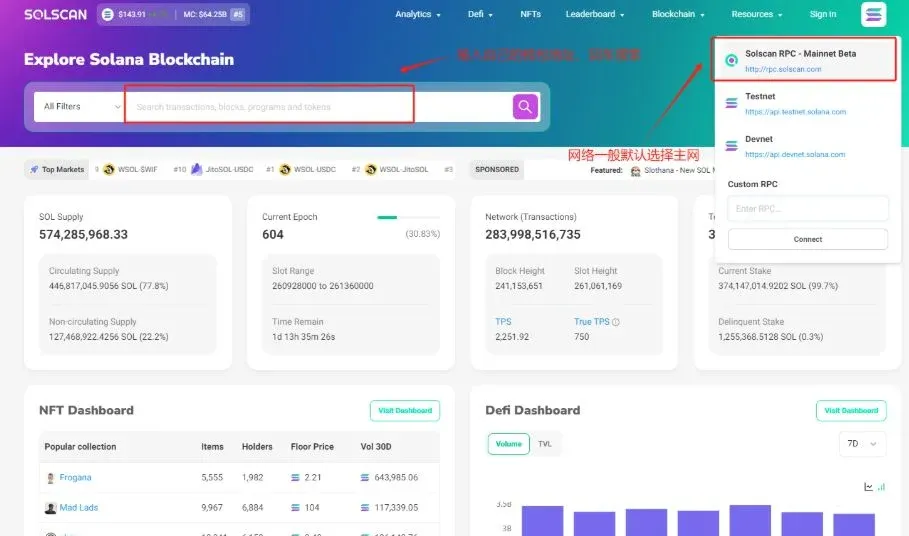
3. Enter the query information
Type the item you wish to look up into the search bar—choose from wallet address, token address, program account address, transaction signature, or block information, and make sure the input is accurate.
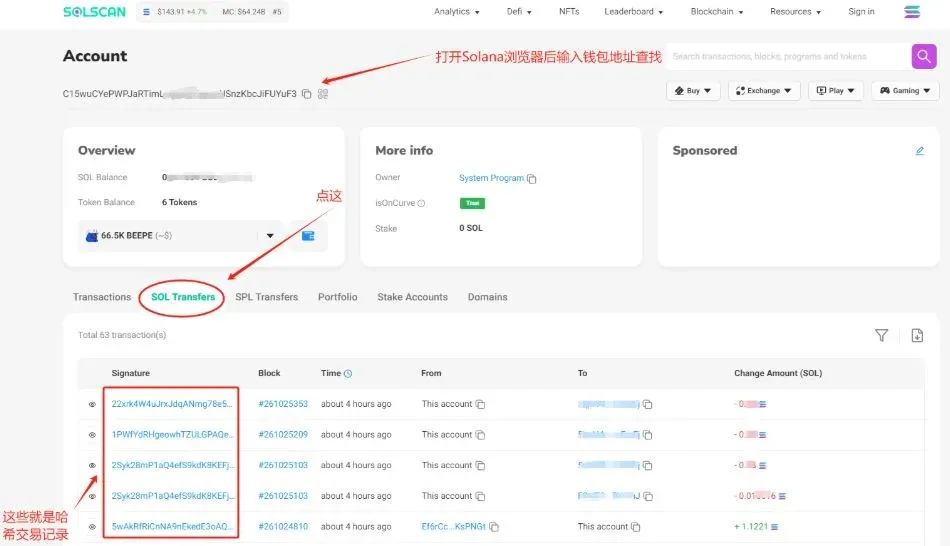
4. Review the query results
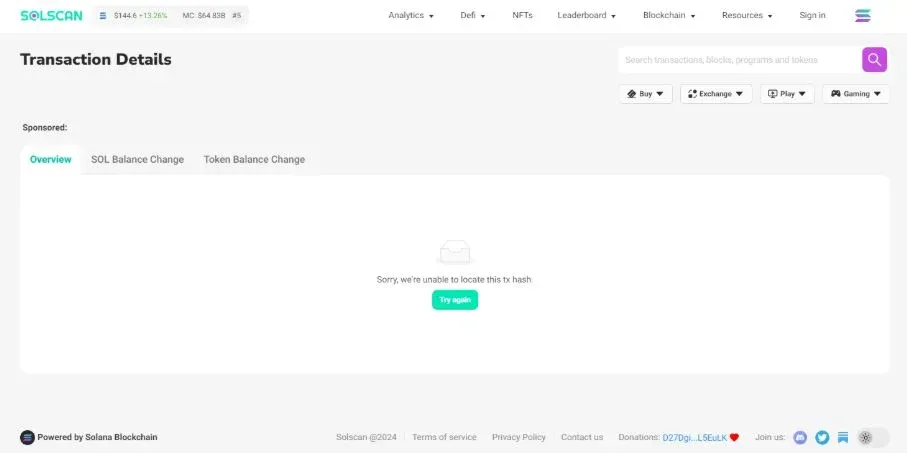
After clicking search, the system will direct you to the corresponding page.
- For a wallet address, switch to the “Sol Transfers” tab to see the latest transactions; failed entries are marked with a red exclamation point.
- For a token address, program account address, or block information, the platform displays a detailed page containing token attributes, contract status, block metadata, and more.
5. Verify transaction status
When looking up a transaction signature, the page shows the transaction’s current state:
- “Success” indicates the transaction has been included on‑chain and confirmed.
- “Pending” or “Failed” signals that the transaction is incomplete or encountered an error.
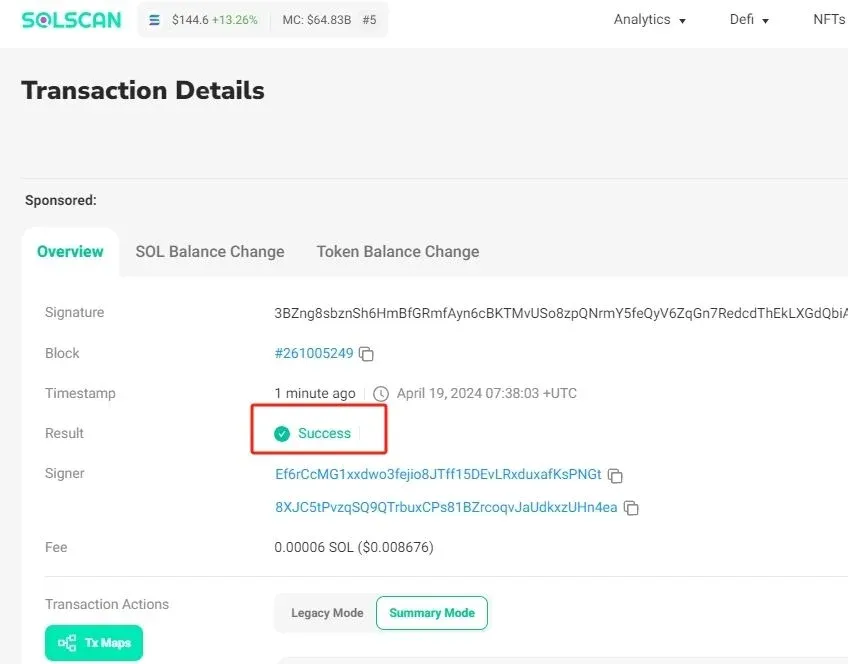
If a failure is reported, you can investigate common causes such as insufficient gas fees, network congestion, or contract bugs, and address the issue according to the provided hints.
6. Leverage advanced features
SolScan also offers transaction history charts, NFT market overviews, token leaderboards, and other advanced tools that help users gain deeper insight into Solana’s activity and market trends.
Extended Knowledge: Which Solana Blockchain Explorers Are Available
1. SolScan
SolScan is the explorer officially recommended by Solana, known for its completeness and user‑friendliness. It supports multiple query types—including wallets, tokens, and transaction signatures—updates on‑chain data in real time, and provides detailed failure reasons for transactions. The clean interface makes it easy for beginners to get started; however, large‑scale data queries can occasionally experience latency, and some advanced features may have a modest learning curve for newcomers.
2. Solana Explorer
Solana Explorer focuses more on in‑depth analysis and visualisation. The platform transforms on‑chain data into charts, curves, and other graphical representations, catering to users who require granular data mining. It also supplies extensive developer documentation and APIs for secondary development. During peak periods the site may become sluggish, and certain analytical outputs can be complex for non‑technical users.
SolScan, Solana Explorer, and other Solana blockchain explorers provide users with rich on‑chain information retrieval and analysis tools, enhancing operational efficiency and decision‑making accuracy on the network. When using these services, remain mindful of data security and privacy, evaluate on‑chain information rationally, and avoid unnecessary risk stemming from market volatility.
Global Context Note: When converting cryptocurrency proceeds to fiat, USD is the most widely used currency, and transfers can typically be executed via SEPA (for Euro‑zone users) or SWIFT for international payments. U.S. residents should use Binance.US rather than the global Binance platform. Additionally, keep in mind that crypto‑related gains may be taxable under the regulations of your local jurisdiction.
Related Reading
- Solana vs Ethereum: Trading Volume & Liquidity Analysis 2024
- Cross-Chain Restaking: Ethereum, Bitcoin & Solana Trends
- Cross‑Chain Bridges: Solving Blockchain Fragmentation
💡 Register on Binance with referral code B2345 for the maximum trading fee discount. See Binance complete guide.



