
 Bitaigen Research
 We have noticed a recent surge in exchange security incidents, prompting many users to urgently move their assets into personal wallets. This article will start with the main‑net assets supported by imToken, break down the withdrawal steps in detail, and explain the differences between main‑net coins and tokens, helping you complete transfers safely and quickly.
A Step‑by‑Step Guide to Transfer Coins from an Exchange to an imToken Wallet
Frequent security breaches at exchanges have led many users to consider moving their holdings to a personal wallet for safekeeping. If you are unfamiliar with the withdrawal process or unsure whether your specific coin can be deposited directly into imToken, the following guide will help you get started quickly.
Main‑Net Assets Supported by imToken
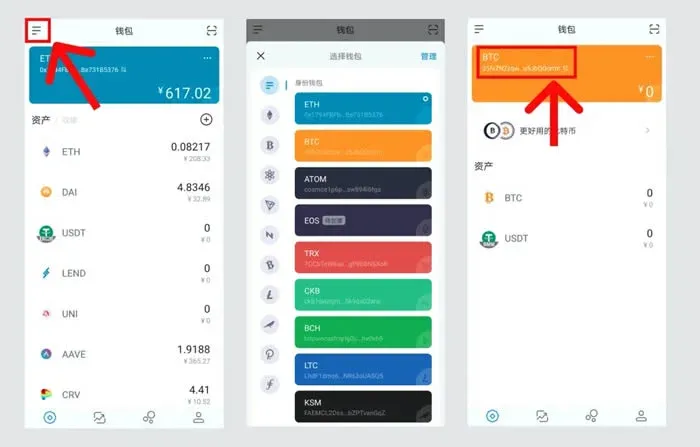
Currently, imToken is compatible with the native coins of the following 11 blockchains: ETH, BTC, ATOM, EOS, TRX, CKB, BCH, LTC, KSM, DOT, FIL. On the wallet’s “Asset Management” page you can view the address associated with each chain; simply copy that address into the withdrawal field of the exchange to complete the transfer.
Difference Between Main‑Net Coins and Tokens
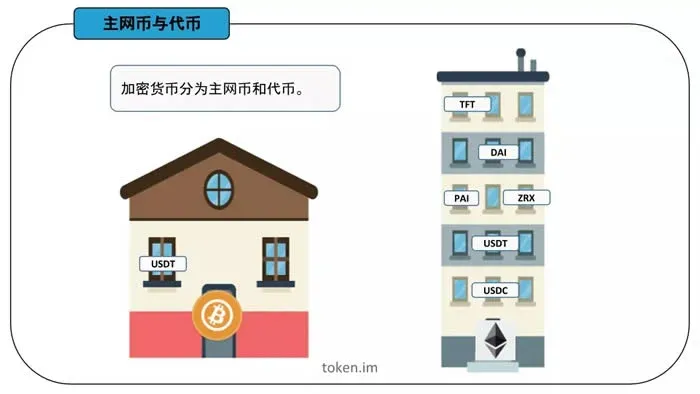
In the blockchain world, assets are broadly divided into two categories: main‑net coins and tokens. A main‑net coin has its own independent blockchain and therefore its own dedicated wallet address. A token, on the other hand, is issued on top of an existing main chain and can only be stored within the wallet that holds the corresponding main‑net coin.
You can think of the two as types of housing:
- Main‑net coins are like a house you own outright—you decide the decoration and move in at will.
- Tokens are more like renting a room in someone else’s house; you must follow the landlord’s rules.
Using USDT as an Example to Explain Withdrawal Details
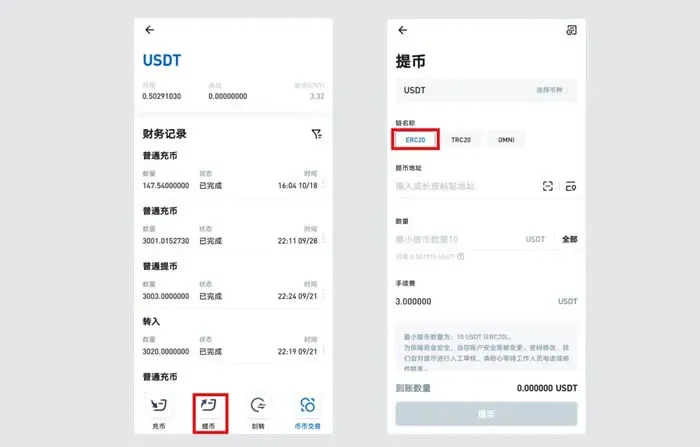
USDT is a token that exists on three different chains: Bitcoin (OMNI), Ethereum (ERC‑20), and Tron (TRC‑20). When withdrawing, you must first select the appropriate chain; otherwise the system will return an “invalid address” error. For illustration:
- To send USDT to a BTC wallet → select OMNI, then enter the BTC address.
- To send USDT to an ETH wallet → select ERC‑20, then enter the ETH address.
- To send USDT to a TRX wallet → select TRC‑20, then enter the TRX address.
If you mistakenly paste a Bitcoin or Tron address while the withdrawal is set to ERC‑20 format, an error will be triggered.
Below we demonstrate the full withdrawal process using USDT (ERC‑20) as the example.
Procedure Steps
- Select “Withdraw” on the Exchange
Go to the assets page, choose USDT, click “Withdraw,” and in the pop‑up select the ERC‑20 chain (or another chain if your use case requires it).
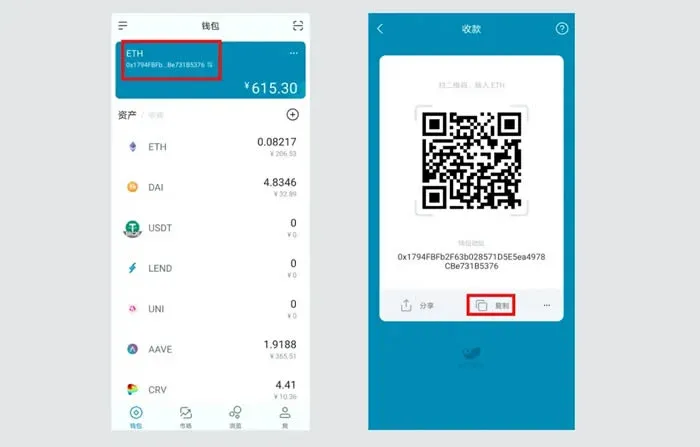
- Obtain Your ETH Address from imToken
Open imToken, switch to the ETH wallet, tap the address field and choose “Copy.”
- Paste the Address Back on the Exchange
Paste the copied ETH address into the “Recipient address” field on the exchange’s withdrawal page.
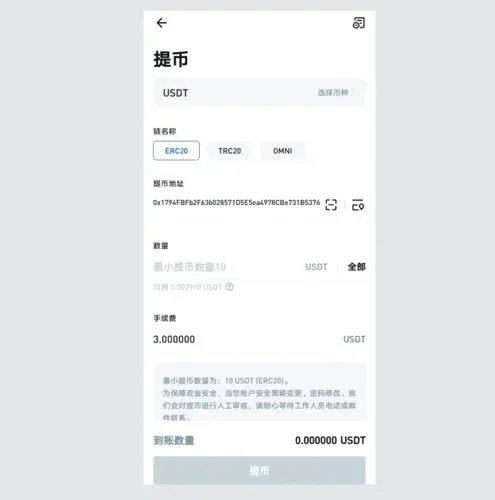
- Enter the Withdrawal Amount
Input the amount of USDT you wish to transfer, or click “All.” After double‑checking all details, click “Withdraw.”
- Wait for the Funds to Arrive
Once the withdrawal request is submitted, wait a short while. The USDT will soon appear on the imToken asset page.
Summary
By following the steps above, you can securely move assets from an exchange into your imToken wallet, thereby mitigating potential exchange‑related risks while keeping your holdings easy to manage. For more practical tips on asset transfers, stay tuned to upcoming topics from Bitaigen.
*Note for U.S. users: When using Binance, please access Binance.US rather than the global Binance platform.*
💡 Register on Binance with referral code B2345 for the maximum trading fee discount. See Binance complete guide.



