
 Bitaigen Research
Want to understand the concepts and mechanics behind Smart Money and Smart Money Signals on Binance? Below is a concise answer.
On Binance, “Smart Money” refers to top‑performing traders or whales in the futures market; “Smart Money Signals” display these users’ long‑short bias, net trading volume and other key metrics in real time, helping you gauge overall market sentiment.
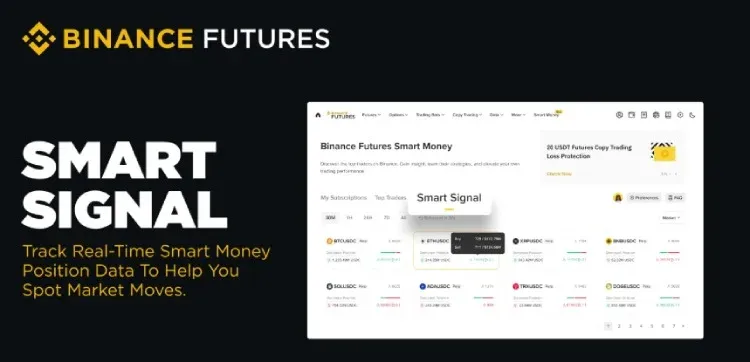
In this article we systematically outline Binance Futures’ “Smart Money” concept and its signal mechanism, dissect the logic behind the core indicators, and provide practical thinking steps to help traders quickly capture shifts in market sentiment. If you want to learn how to use these data to improve decision‑making efficiency, keep reading.
Key Takeaways
- Smart Money Signals reveal the long‑short bias of the best‑performing traders and whales on Binance Futures, allowing traders to capture real‑time market sentiment.
- Aggregated data include net trading volume, position size, average entry price, unrealized P&L, and the long‑short ratio across various time frames.
- Accessible directly through Binance Futures, the tool is suitable for all types of traders and offers powerful market insight.
What Is “Smart Money”?
Smart Money is one of the earliest real‑time tracking tools launched by Binance, designed to show the movements of profitable futures traders.
- Top Trader Leaderboard: A ranking system added to the “Smart Money” suite where futures users can publicly display performance metrics and real‑time positions; other users may follow them and receive trade notifications.
- Latest Feature – Smart Money Signals: Evolved from tracking a single trader to a market‑wide sentiment gauge.
What Are Smart Money Signals on Binance Futures?
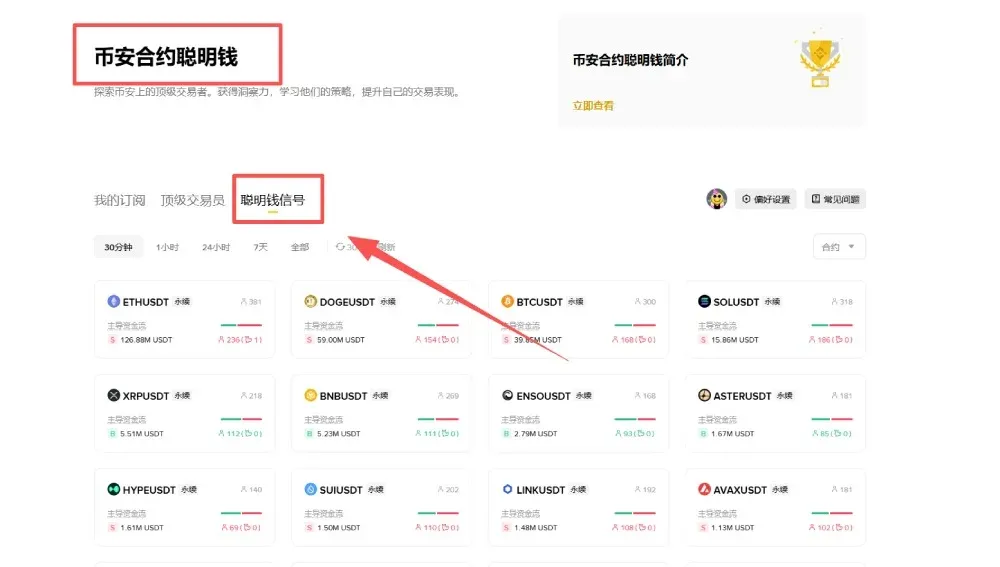
Smart Money Signals are embedded in the Smart Money page. Open any USDⓈ‑M contract and you will see the following information:
- Validate an Idea: Check whether the contract’s “Smart Money” is net‑long [B] or net‑short [S], giving you a quick sense of the crowd’s bias.
- Quantify Sentiment: Use metrics such as net trading volume, average entry price and real‑time long‑short ratio to measure market mood before making a decision.
- Avoid Crowding: Compare the number of traders, position size, unrealized P&L and the proportion of profitable traders to spot where positions and profits are concentrated.
How Smart Money Signals Operate
Who Is Considered “Smart Money”
Smart Money Signals (Smart Signal) aggregate activity from two categories of users, collectively called Smart Money:
| Category | Criteria |
|---|---|
| Skilled USDⓈ‑M Traders | Total P&L positive, 30‑day ROI > 50 %, 30‑day P&L between **$1,000 – $100,000** |
| Large‑Scale Whale Users | Total P&L positive **and** 30‑day P&L > **$100,000** |
Long vs. Short at a Glance
- Net Long (larger volume or position size) is shown as [B];
- Net Short is shown as [S].
Beyond the overall tag, you can expand the view to see the following breakdown:
- Number of traders
- Nominal value of positions
- Average entry price
- Unrealized profit/loss
- Percentage of profitable traders
These dimensions let you quickly locate where capital and gains are clustered, helping you infer the overall conviction of Smart Money.
The Role of Time Frames
Different windows serve distinct analytical needs:
- Short‑Term Flow (30 min, 1 h, 24 h, 7 d): Shows the long‑short bias for the selected interval (based on net trading volume).
- Current Positions (All): Displays the total nominal value, making it easy to see which side holds a larger overall position.
Interpreting the Nominal Long‑Short Ratio
Formula: `net long / net short` (or the equivalent nominal‑value ratio).
- Ratio > 1.0 → Market leans bullish.
- Ratio < 1.0 → Market leans bearish.
The ratio is a widely used quick‑look indicator for sentiment.
Digging Deeper Into Top Performers
Click any Smart Money trader’s avatar to view their position details, historical performance and live holdings. If several top traders’ actions align with your own thinking, it suggests that your view is supported by Smart Money.
How to Access Smart Money Signals on Binance Futures
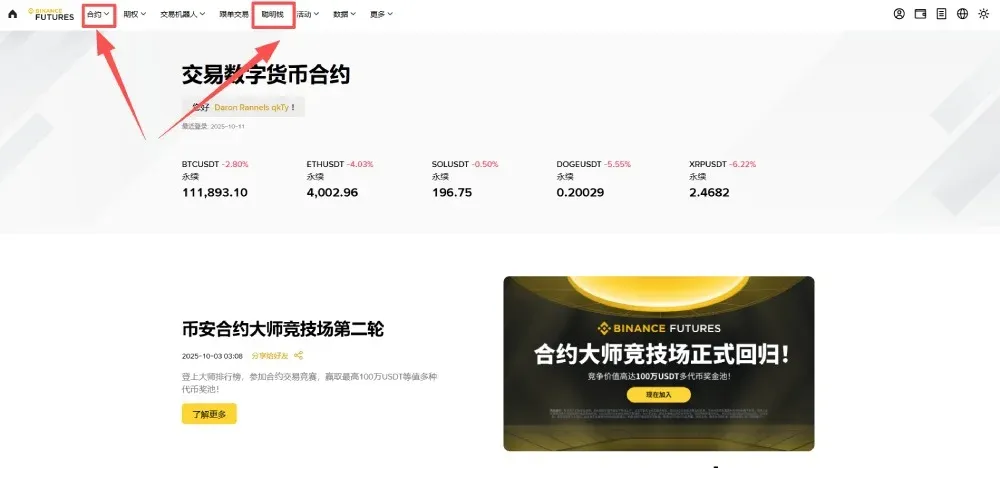
Web Interface
- Log in to the Binance website (U.S. residents should use Binance.US instead of the global platform).
- Navigate to the [Derivatives] → [Futures] page.
- In the left‑hand menu select [Smart Money].
- Click [Smart Money Signals] to view the data.
Mobile App
- Open the Binance app (U.S. users must download the Binance.US app).
- Go to [Futures].
- Tap the [Smart Money] tab at the bottom.
- Choose [Smart Money Signals] to enter the corresponding page.
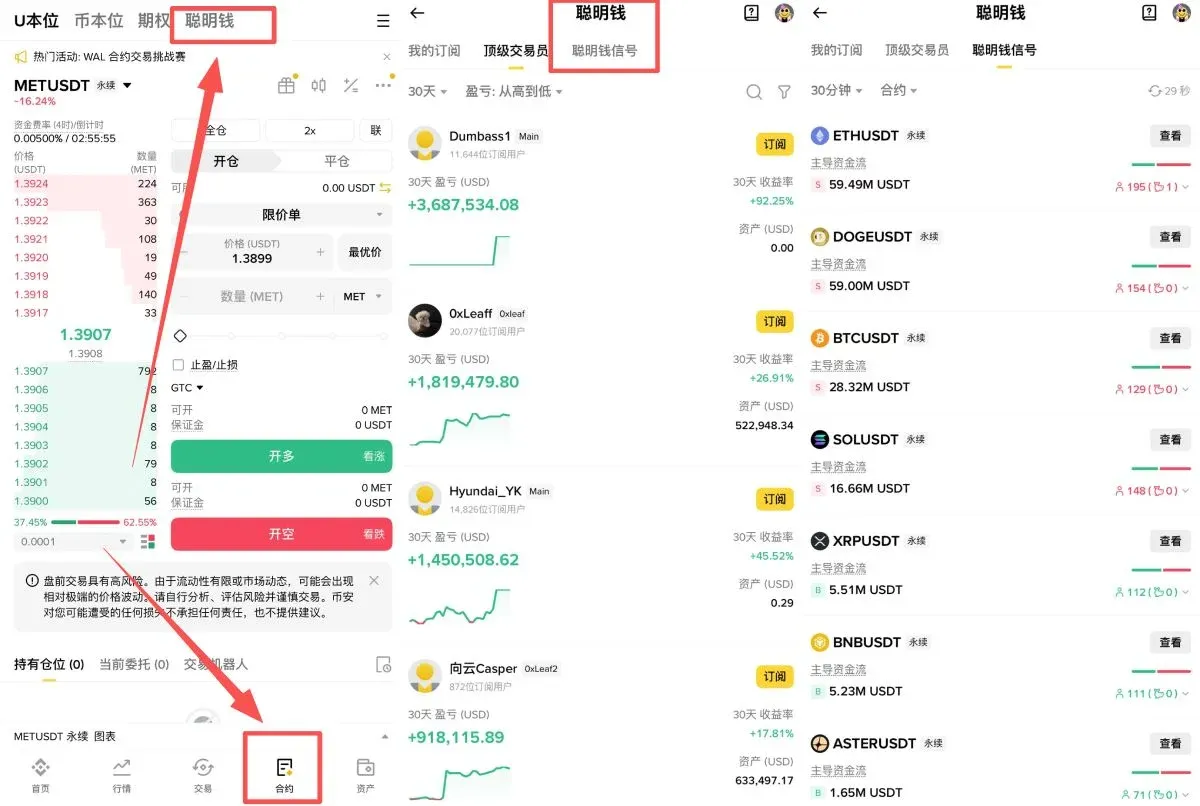
Whether you are an active trader looking to fine‑tune entry timing, a newcomer studying top accounts, or an observer focused on whale movements, Smart Signal can provide the most comprehensive insight into cryptocurrency market sentiment and scale.
This article ends here. For more practical tips on using Binance Smart Money Signals, search for historical posts by Bitaigen or continue reading the related links below. Thank you for following, and we look forward to your continued support of Bitaigen!
*Note: Cryptocurrency gains may be taxable in your jurisdiction; please consult a tax professional for guidance.*
Related Reading
- Smart Money in Crypto: Institutional Traders Shaping Trends
- Buy USDC on Binance: CNY C2C or USDT Swap Guide 2026
- Binance ALL Composite Index: Alt‑Coin Perpetual Tracker
💡 Register on Binance with referral code B2345 for the maximum trading fee discount. See Binance complete guide.



