
 Bitaigen Research
 We have systematically compiled the entire account‑opening workflow for BitoPro, covering registration, identity verification, deposit, and withdrawal operations. In addition, we provide an in‑depth analysis of the platform’s fee structure and important usage considerations, helping newcomers get started quickly while avoiding common pitfalls. The following sections will guide you through each critical step one by one.
Overview of BitoPro and Fee Explanation
BitoPro is a Taiwan‑based cryptocurrency exchange founded in 2018. It was the first exchange in the country to implement a mandatory real‑name registration system, and it is popular among many beginner investors because of its strong security measures and the availability of New Taiwan Dollar (TWD) deposit and withdrawal channels.
Before using the platform, it is essential to understand its fee structure. The fees are divided into two main categories: trading fees and deposit/withdrawal fees.
- Maker fee: 0.1 % of the transaction amount. This fee is charged when a limit order is placed on the order book and later matched.
- Taker fee: 0.2 % of the transaction amount. This fee applies to market orders or limit orders that are filled immediately.
- Deposit fee: 0 USD (the platform does not charge any fee for deposits in fiat or cryptocurrency). For global users, fiat deposits are typically made via USD through SEPA or SWIFT channels.
- Withdrawal fee: a fixed fee of 15 TWD.
Tip: The minimum withdrawal amount is 100 TWD, the maximum per transaction is 1 million TWD, the 24‑hour limit is 2 million TWD, and the monthly limit is 5 million TWD (the limits reset on the first day of each month).
---
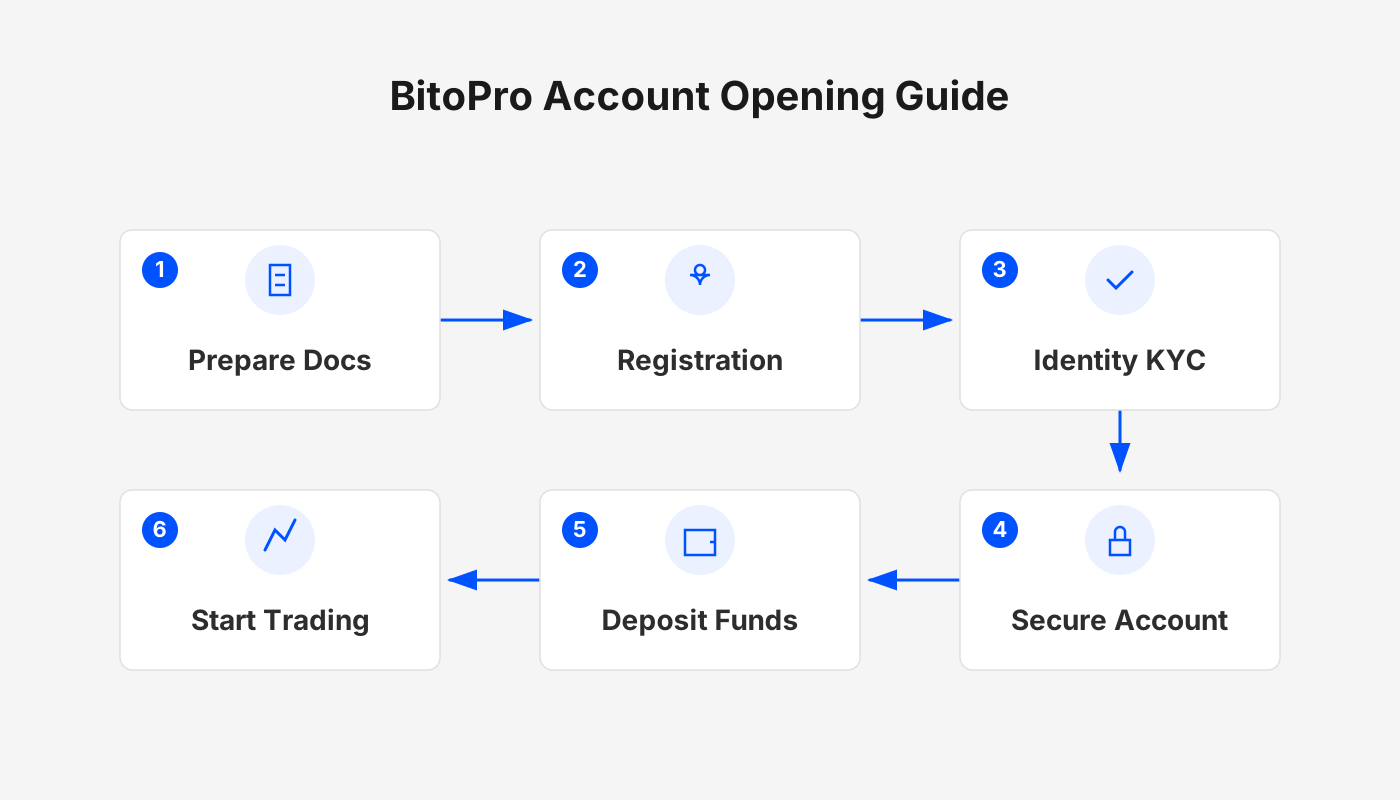
1. Account‑Opening Process
Before you can start trading, you must complete the account registration on BitoPro. Below is the full step‑by‑step procedure. It is recommended that you prepare the following information in advance:
- Email address
- Mobile phone number
- National ID or residence permit
- Bank card or passbook (if you do not have a passbook, you may provide an account opening certificate or a screenshot of online banking)
Step 1: Open the Official Registration Page

Click the “Register” button located at the top‑right corner or the upper part of the homepage to enter the account‑creation screen.
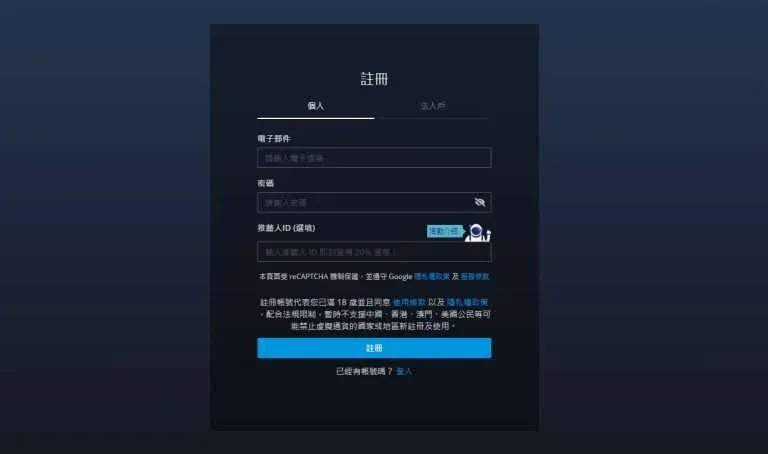
Step 2: Fill in Personal Information
Select the “Individual” account type, enter your email address as the login ID, and set a password. The password must be at least eight characters long and contain at least one uppercase English letter. It is advisable to click the eye icon on the right to verify that you have entered the password correctly.

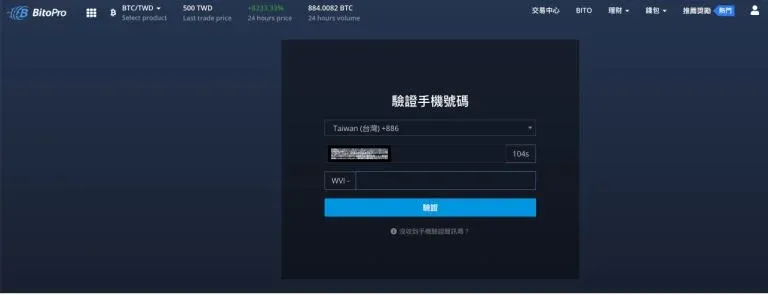
Step 3: Verify Email and Mobile Phone
After clicking “Register,” the system will send an email verification code and an SMS verification code. Complete both verifications according to the on‑screen prompts, and the account will be created.

---
2. Identity Verification (KYC)
After completing the account registration, the platform will require further real‑name verification (Level 1) and KYC identity authentication. This step directly determines your future deposit, withdrawal, and trading privileges.
Start the Verification
In the top‑right corner of the website, click your avatar → “Verification.” Then, in the identity‑verification section, click “Verify.”
Fill in Information and Upload Documents
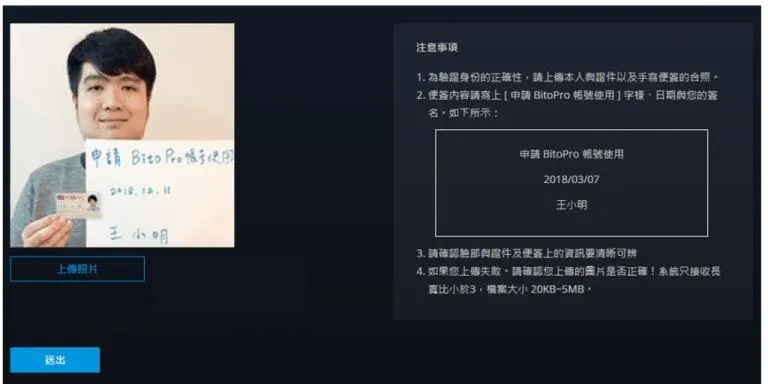
Follow the prompts to enter your ID number, full name, date of birth, and other basic data, then upload a front‑side photo of your ID card and a selfie holding the ID card (the selfie must also display a handwritten note).
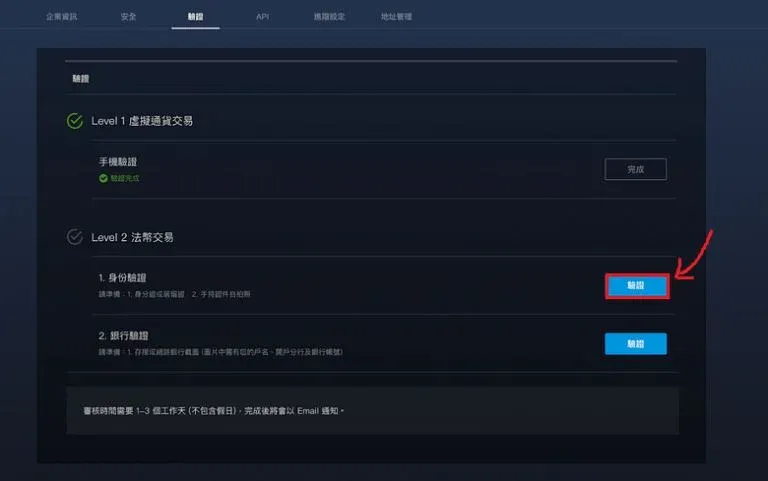
- Taiwanese citizens select “National ID” and click “Click here to verify.”
- Foreign residents select “Residence Permit” to complete verification.
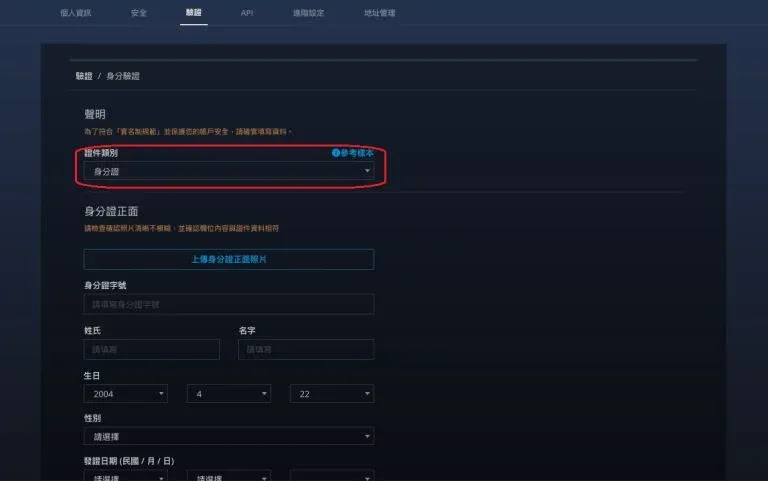
The review period is typically 3–5 business days. Once approved, the platform will send a “Verification Passed” notification email.
Tax Note: Crypto‑related gains may be subject to tax in your jurisdiction. Please consult a tax professional to ensure compliance with local regulations.
---
3. Bank Account Linking
If you wish to purchase cryptocurrencies with New Taiwan Dollar, you must first link a personal bank account to BitoPro.
Linking Steps
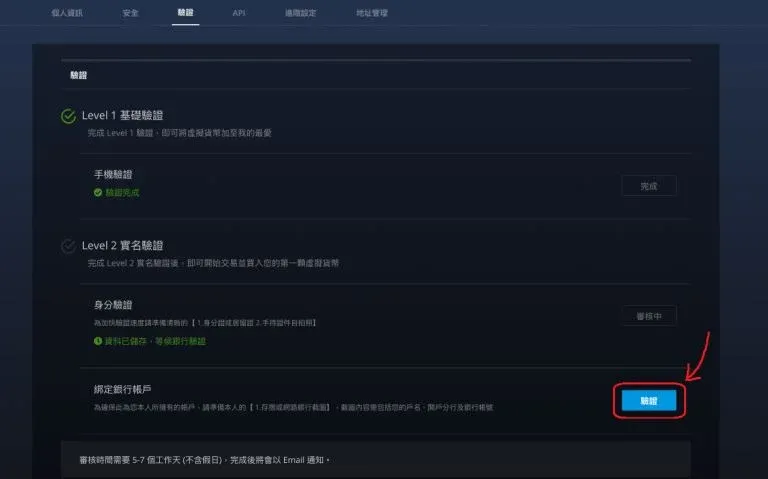
- After completing KYC, return to the “Verification” page and click the “Verify” button next to “Link Bank Account.”
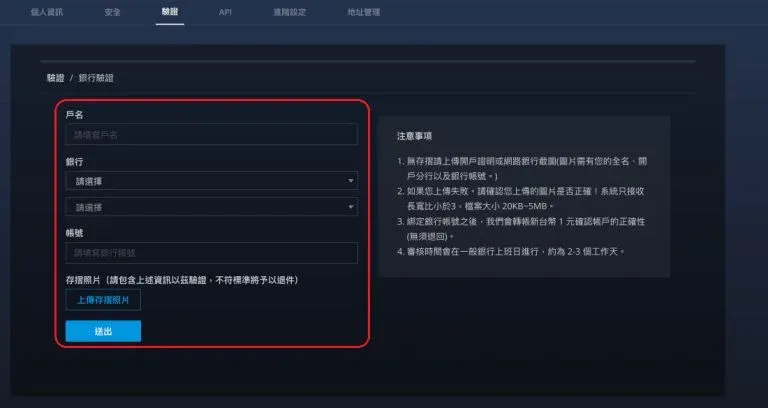
- Enter the account holder name, bank name, branch, and account number, then upload a photo of your passbook (if you do not have a passbook, you may provide an account‑opening certificate or an online‑banking screenshot).
Bank verification also takes 3–5 business days. After approval, you will receive an email notification.
---
4. Strengthening Account Security: 2FA and Anti‑Phishing Code
Google Authenticator Two‑Factor Authentication
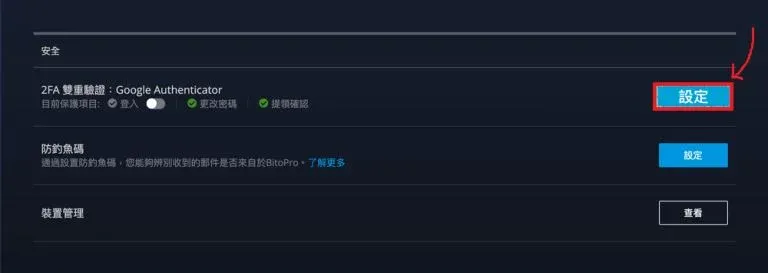
- Click your avatar at the top‑right corner → “Security.”
- In the “2FA – Google Authenticator” row, click “Set Up.”
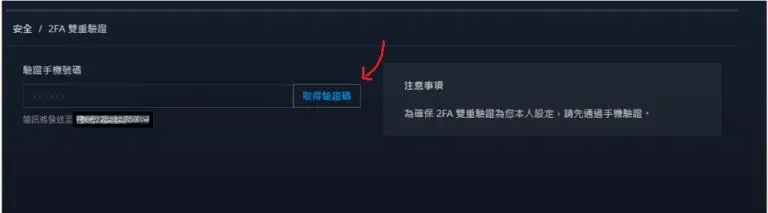
- Enter the verification code received via SMS to complete the first layer of verification.
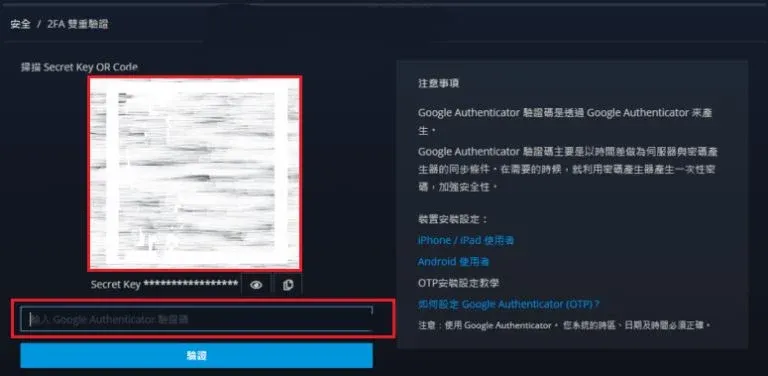
- Open the Google Authenticator app, scan the QR code displayed on the screen, and enter the generated six‑digit code into the platform, then click “Verify.”
After setup, make sure the “Login” toggle is turned on to enhance protection against unauthorized access. If you reset 2FA, the platform will suspend withdrawal functions for 24 hours.
Anti‑Phishing Code Setup
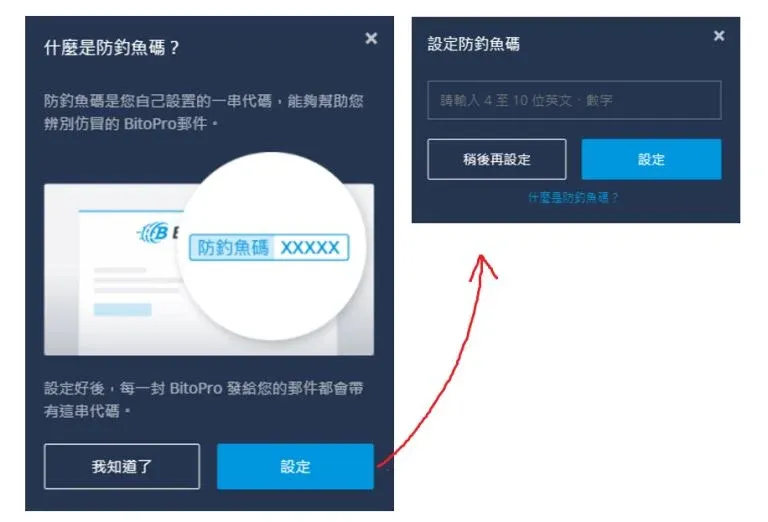
- On the same “Security” page, select “Anti‑Phishing Code” → “Set Up.”
- Choose an alphanumeric combination of 4–10 characters, then enter the Google Authenticator code you generated earlier to confirm.
Once enabled, every email sent by BitoPro will display the anti‑phishing code in the upper‑right corner, helping you verify the authenticity of the communication.
---
5. Deposit Methods
BitoPro supports two major deposit categories: New Taiwan Dollar top‑up and cryptocurrency wallet transfers. The platform also offers barcode payment services through the 7‑Eleven convenience‑store network (note that barcode scanning may occasionally fail).
5.1 New Taiwan Dollar Top‑Up
- Click “Wallet” at the top‑right corner of the website, then select “Deposit.”
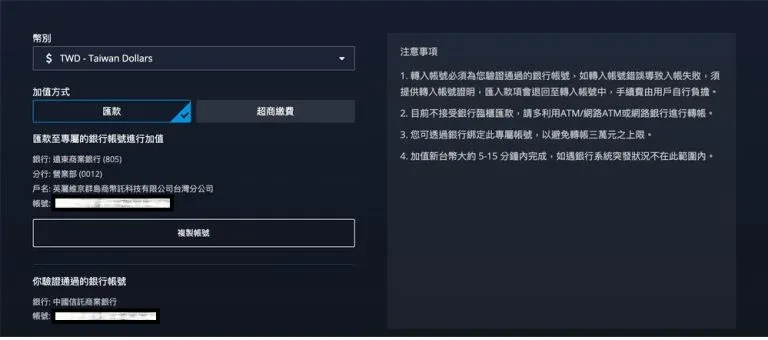
- Choose “New Taiwan Dollar” and use a previously verified bank account to transfer funds via “Online Banking” or “ATM” to the exchange’s dedicated TWD account.
- When using online banking, be sure to select the bank account that you have already linked; otherwise the deposit will not be recognized.
5.2 Transfer Cryptocurrency from Other Exchanges
- Again go to “Wallet” → “Deposit,” select the cryptocurrency you wish to add, and the system will display the corresponding wallet address (available as a QR code or a copy‑able string).
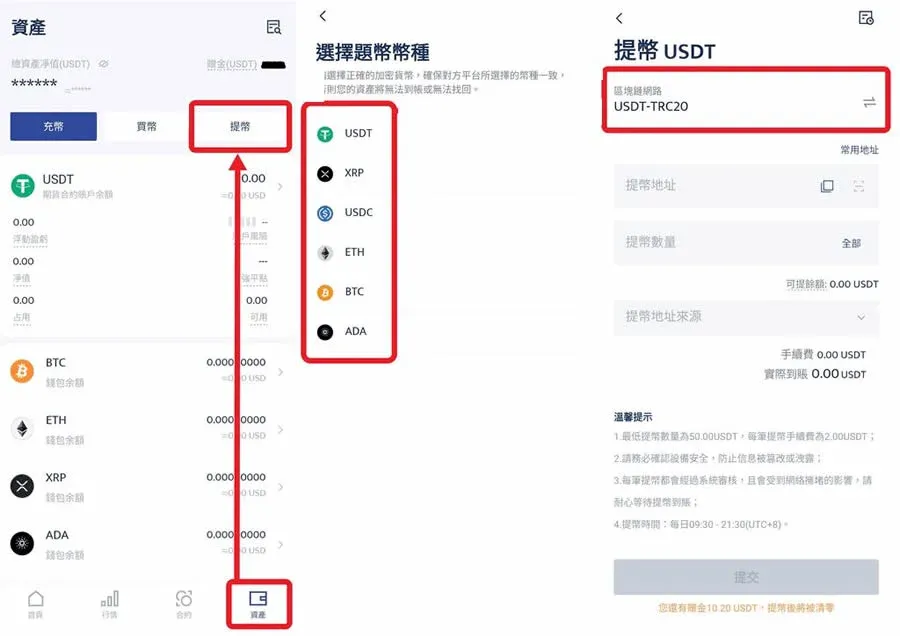
- Log in to another exchange (e.g., BTCC), navigate to “Assets” → “Withdraw,” select the same coin and blockchain network, paste the BitoPro deposit address, and complete the withdrawal.
Note: When withdrawing, be sure to choose the same blockchain network that BitoPro uses for that coin. After the external withdrawal is processed, you will need to wait for blockchain confirmations—typically about three minutes—before the funds appear in your BitoPro wallet.
---
6. Trading Operation Guide
Once your deposit is confirmed, you can access the trading interface:
- In the top navigation bar, click “Trade Center” → “Professional Trading.” This will open the spot‑trading screen.
- Click the currency pair label in the upper‑left corner and select the market you want to trade (e.g., BTC/TWD, ETH/TWD, USDT/TWD, etc.).
- In the lower‑right corner, toggle between “Buy” and “Sell.” Choose either a limit order (maker) or a market order (taker), enter the amount, verify the details, and submit the order. Filled orders will appear under “Completed,” while pending orders will be listed under “Open.”
---
7. Withdrawal Process
After converting your crypto assets to New Taiwan Dollar, you can withdraw cash by following these steps:
- Click “Wallet” at the top‑right corner, then select “Withdraw.”
- Enter the withdrawal amount and the recipient bank account details, then click “Withdraw.”
- The system will request a second verification step. Retrieve the six‑digit code sent to your email, enter it, and the withdrawal will be processed.
Before withdrawing, double‑check the bank account details. It is advisable to perform a small test withdrawal the first time; once confirmed, add the address to your whitelist before initiating larger transfers.
Withdrawal Limits and Fees
- Your account level must be upgraded to LV.2 before the withdrawal function becomes available.
- The fee is a fixed 15 TWD per withdrawal.
- Minimum withdrawal amount is 100 TWD, maximum per transaction is 1 million TWD, 24‑hour limit is 2 million TWD, and the monthly cap is 5 million TWD (limits reset on the first day of each month).
---
8. Dual‑Bank Switching for Deposits and Withdrawals (Announcement dated 31 December 2024)
Effective 2 January 2025, BitoPro will launch a Dual‑Bank Switching service. This feature is available only to users who have linked a dedicated Bankee X BitoPro investment settlement account and wish to bind a second bank as well.
- Feature Description: The system automatically selects a “Default Bank” as the channel for deposits and withdrawals. After changing the default bank, you must wait 24 hours before you can switch again, with a maximum of five changes per month.
- Quota Calculation: The higher of the two banks’ withdrawal limits will apply. For example, if Bankee X has a monthly withdrawal limit of 3 million TWD and the second bank allows 1 million TWD, you could first use the second bank up to its 1 million TWD cap, then switch back to Bankee X and still have 2 million TWD remaining for that month.
---
This guide constitutes a complete beginner’s tutorial for BitoPro, covering account registration, KYC identity verification, 2FA security setup, bank linking, deposits, trading, and withdrawals. For additional practical information, continue following articles from Bitaigen.
*Note for U.S. readers*: If you are located in the United States, you must use Binance.US for any Binance‑related services, as the global Binance platform is not available to U.S. residents.
*General Tax Disclaimer*: Cryptocurrency transactions may be taxable in your country or region. Please consult with a qualified tax advisor to understand your obligations.
Related Reading
- BitoPro Security Review: Certified, Insured, and Not a Scam
- BitoPro Review: Security, Fees & How to Use the Exchange
- How to Deposit USDT On‑Chain Using OKX Mobile App
💡 Register on Binance with referral code B2345 for the maximum trading fee discount. See Binance complete guide.



