
 Bitaigen Research
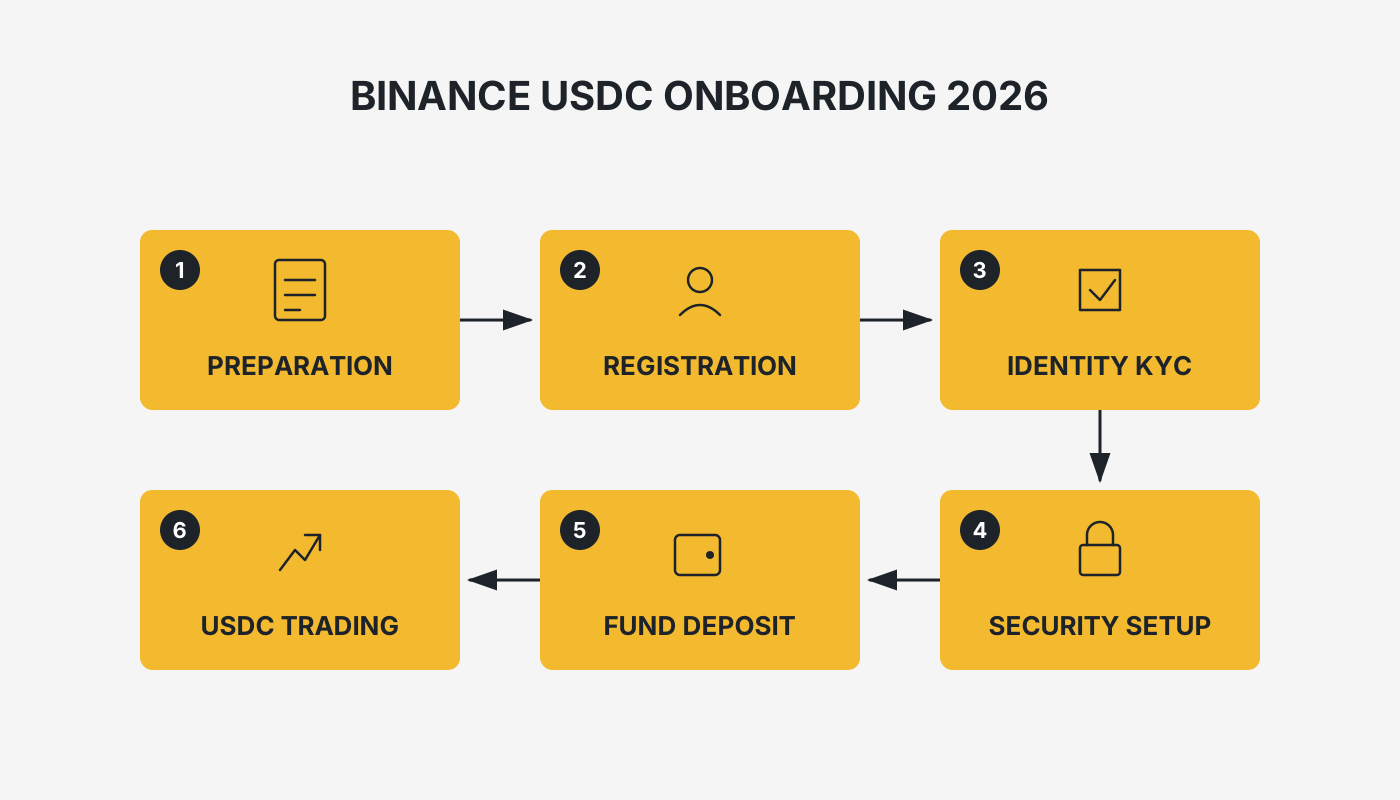
 In Binance, there are two mainstream ways to acquire USDC: the first is to buy it directly with Chinese yuan (CNY) through a C2C (peer‑to‑peer) transaction, and the second is to swap an existing USDT balance for USDC on the spot market. By following the step‑by‑step procedures outlined below, you can complete either method without difficulty.
This article walks you through the entire process of obtaining USDC on the Binance platform, covering both the C2C yuan‑direct purchase route and the spot‑market swap route. It also explains the basic principles behind USDC and its multi‑chain deployment. With illustrated, step‑by‑step guidance, even first‑time users can complete the operation smoothly, helping you mitigate risk and improve asset management.
Note for U.S. residents: Binance’s global platform is not available in the United States; you must use Binance.US for any fiat‑on‑ramp or spot‑market activity.
Tax reminder: Crypto‑related gains may be subject to tax in your local jurisdiction; consult a tax professional for advice.
What Is USDC?
USDC (USD Coin) is a stablecoin issued and managed by Circle that is pegged 1:1 to the U.S. dollar. In simple terms, USDC is a digital representation of the dollar on a blockchain.
For every USDC token minted, an equivalent $1 or an asset of equal value is held in a regulated financial institution. This “1:1 dollar reserve” mechanism typically keeps the market price of USDC very close to $1.
In June 2025, Circle went public on the New York Stock Exchange under the ticker CRCL, branding itself as the “first stable‑coin stock.” The debut share price surged 168 % and the market capitalization topped $30 billion, marking the entry of USDC into mainstream financial coverage.
On Which Blockchains Is USDC Issued?
USDC was first launched as an Ethereum (ERC‑20) token, and later expanded to multiple public blockchains to meet the demand of different network ecosystems. As of 2025, USDC is deployed on the following major chains:
- Ethereum – the original chain with the deepest liquidity.
- Solana – offers high throughput and low fees, making it suitable for micro‑payments.
- Polygon – an Ethereum scaling solution that combines low transaction costs with full compatibility.
- Avalanche, Arbitrum, Optimism and other emerging chains – provide faster finality and further broaden USDC’s use cases.
Preparations (Essential for Beginners)
| Requirement | Description |
|---|---|
| **KYC Identity Verification** | Users located on the Chinese mainland must complete Level 2 real‑name verification (see the related tutorial). |
| **Payment Instruments** | Link a personally‑named bank card, Alipay or WeChat Pay (required for C2C trades). |
| **Client Application** | Install the latest Binance App (recommended) or access the official website via a desktop browser. |
| **Network Environment** | A stable internet connection that can reach Binance without restrictions. |
| **Security Settings** | Enable Google Authenticator or SMS verification, and set a fund password (refer to the security tutorial). |
Method 1: Direct C2C Purchase of USDC (Recommended for Newcomers)
This path is ideal for users who want a “one‑click” deposit using Chinese yuan.
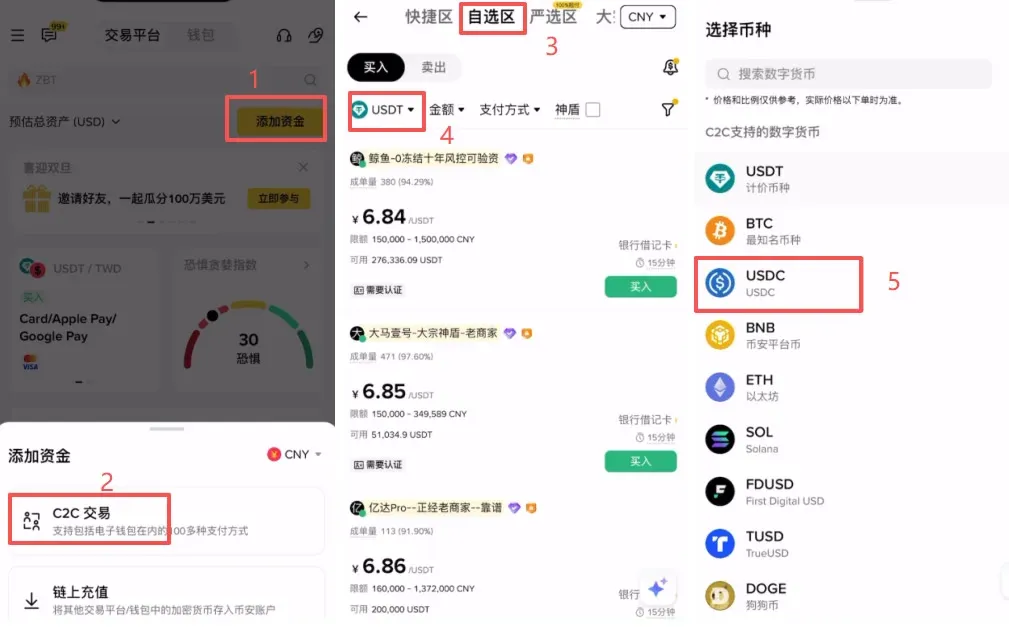
Step 1 – Enter the C2C Trading Section and Filter the Asset
- Log in to your Binance account.
- On the Binance App home screen, tap [Add Funds] → [C2C Trading].
- In the “Select Coin” bar at the top of the custom‑buy area, type “USDC” and select the token from the dropdown list.
Step 2 – Choose WeChat Pay and Filter Sellers
Tap the Filter button in the upper‑right corner and set the following parameters:
- Amount – enter the amount of CNY you wish to spend (e.g., 1,000 CNY).
- Payment Method – tick the [WeChat] checkbox, then apply the filter.
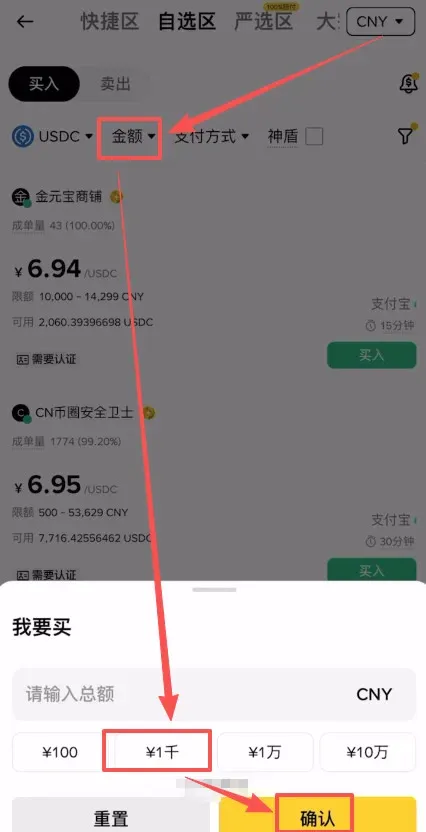
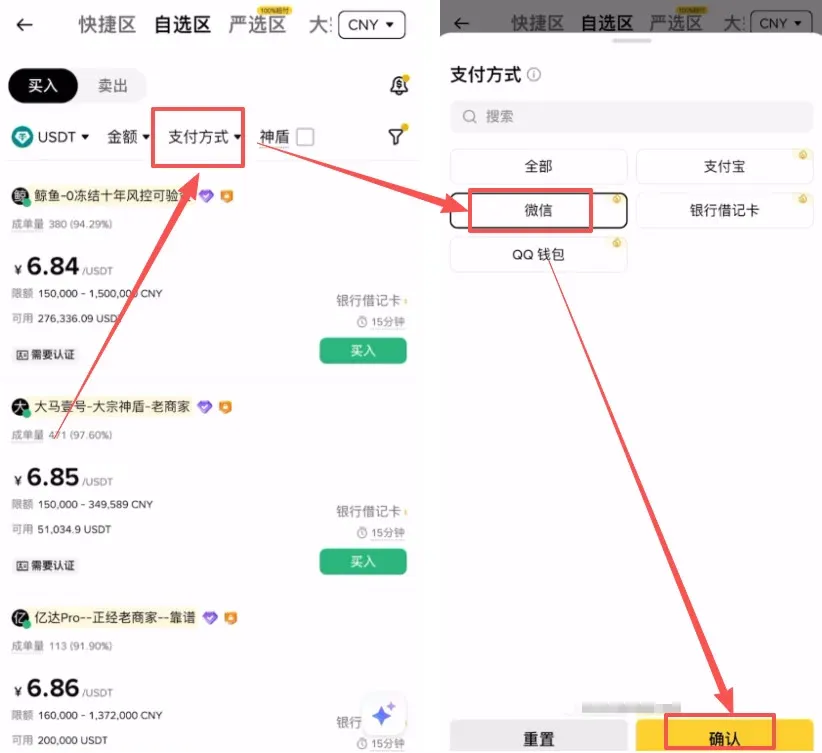
When the filtered list appears, select a seller based on the following risk‑mitigation standards:
- Sellers with high transaction volume and a completion rate of ≥ 98 %.
- Check the seller’s “Account Creation Date” on their profile; it is advisable to pick merchants whose accounts have been active for more than one year, as longer‑standing accounts generally indicate more reliable funding sources.
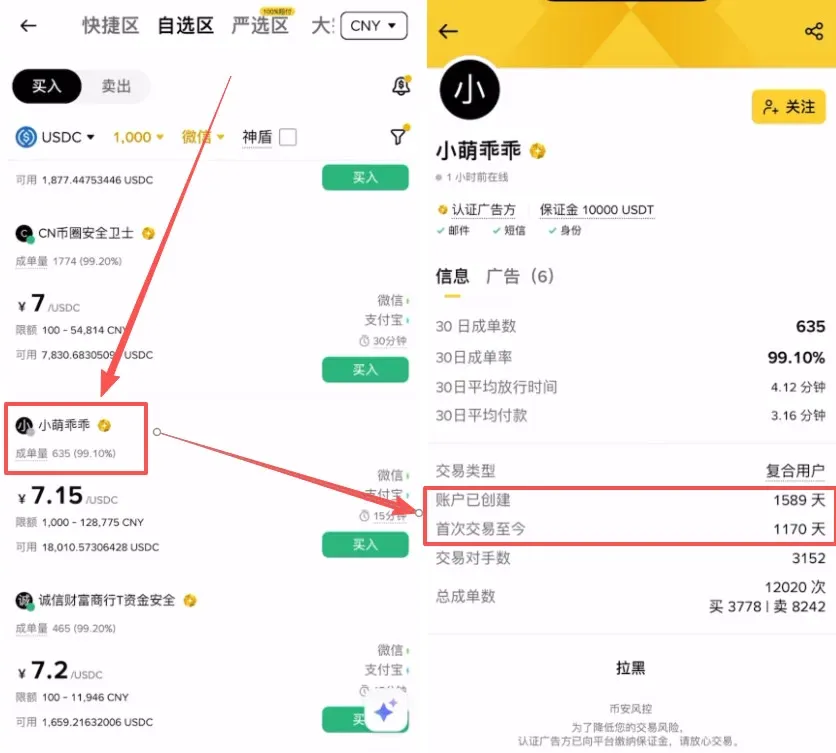
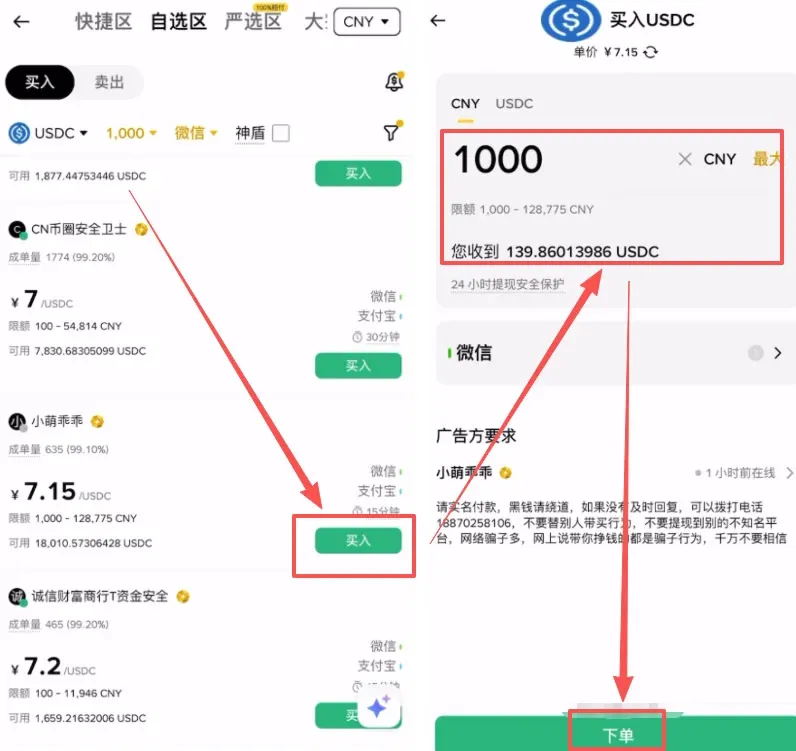
Step 3 – Place the Order and Complete the WeChat Payment
- After confirming the seller’s details, tap the [Buy] button on the right side, input the purchase amount, and submit the order.
- Once the order is generated, the seller’s WeChat ID or a QR‑code for payment will be displayed. If a “Request Window” prompt appears, click [Chat] to save the QR‑code.
Payment‑security reminder: When scanning the QR‑code with WeChat, do not add any notes—especially avoid keywords such as “buy coin,” “USDC,” “BTC,” or “Binance,” as these may trigger anti‑fraud filters.
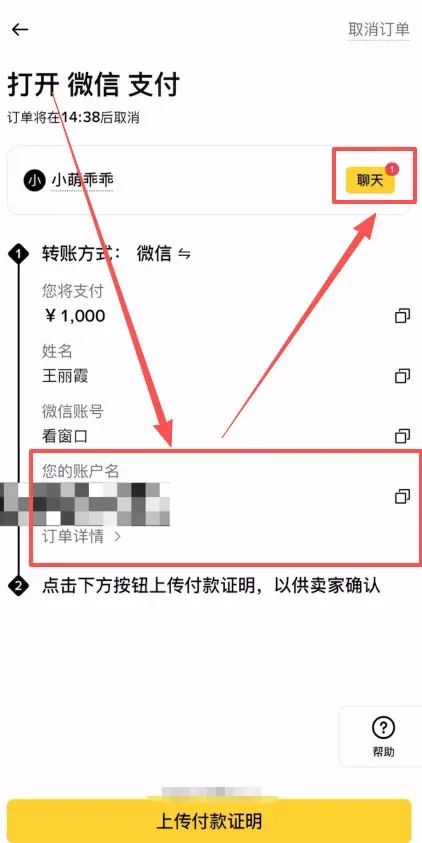
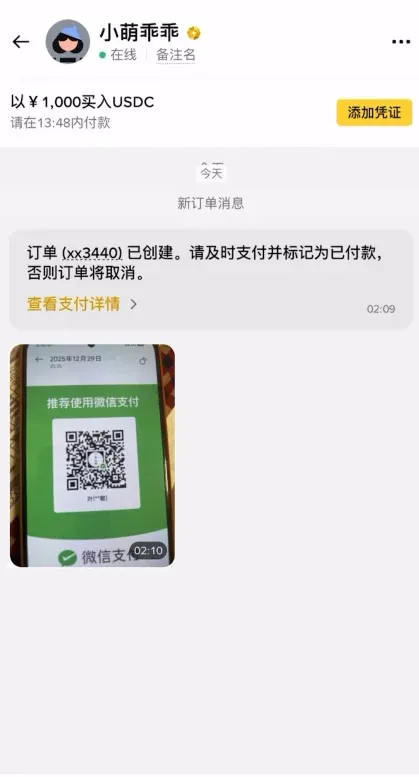
Step 4 – Upload the Payment Proof and Await Release of USDC
- After a successful transfer, take a screenshot of the transaction receipt.
- In the Binance App, tap [Upload Payment Proof] (if the button appears) and attach the screenshot.
- Press [I Have Completed Payment – Notify Seller]. The system will automatically credit the USDC to your funding wallet once the seller confirms receipt.
Method 2: Spot‑Market Swap Using USDT (Suitable for Users Who Already Hold Crypto Assets)
If you already have USDT in your Binance account, you can quickly exchange it for USDC on the spot market with minimal spread loss.
- Open the Binance App and tap the middle [Trade] icon on the bottom navigation bar to enter the spot‑trading interface.
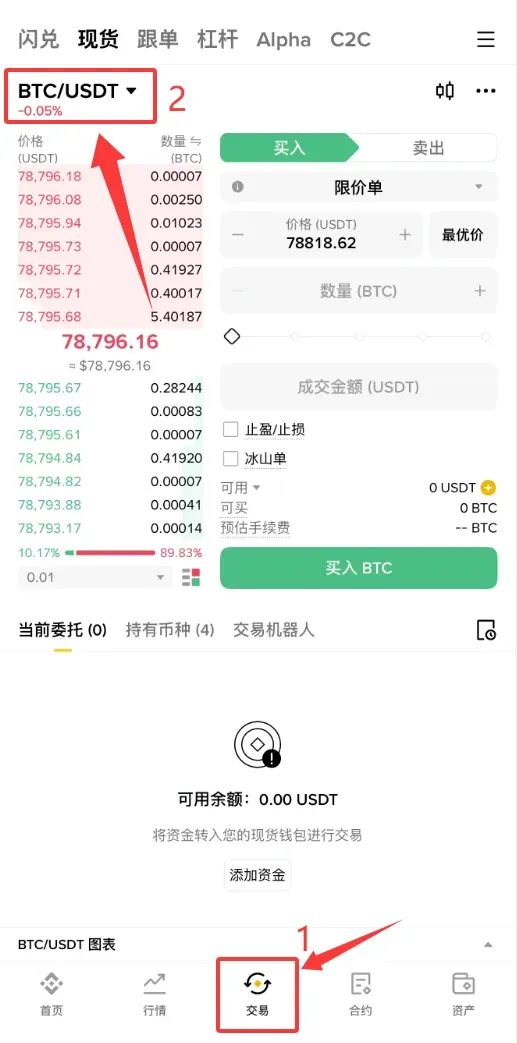
- In the trading‑pair selector at the top‑left, type “USDC” and choose the USDC/USDT pair.
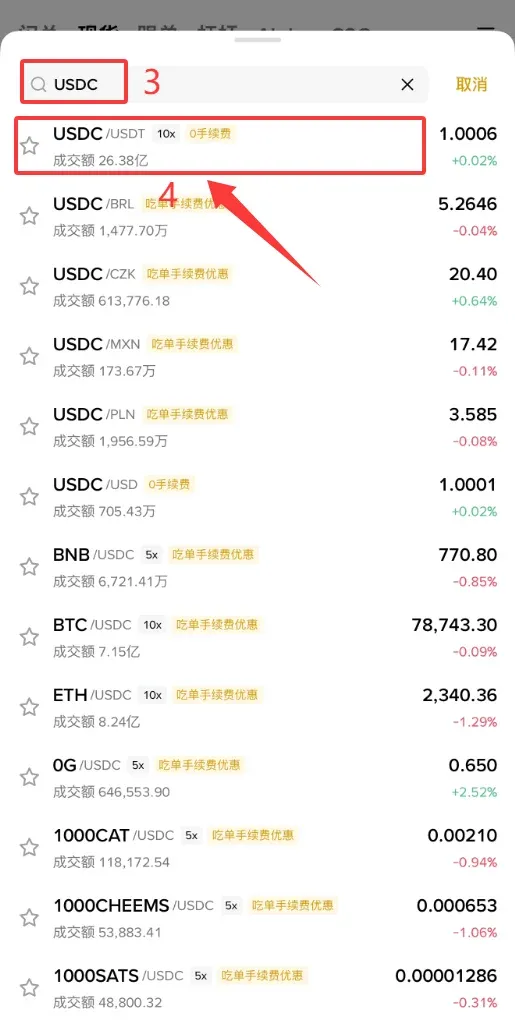
- Switch to a [Market] order; the system will fill the trade instantly at the best available price.
- In the amount field, either type the exact USDT amount you wish to convert or drag the slider to set the proportion.
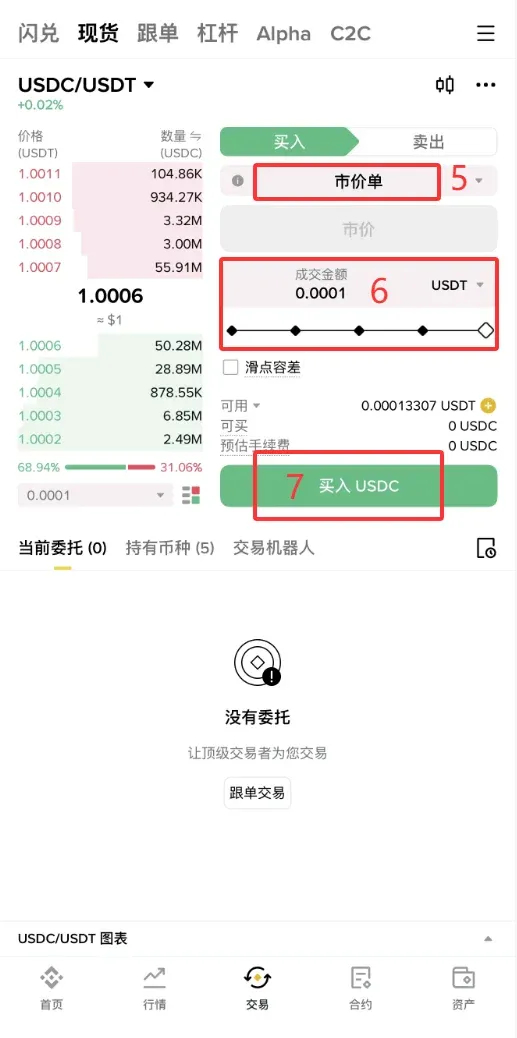
- Press [Buy USDC] and the swap will be executed instantly.
Differences Among USDC, USDT, and USD
| Type | Belongs To | Value Peg | Issuer | Key Characteristics |
|---|---|---|---|---|
| **USD** | Fiat currency | 1 USD = 1 USD | United States government | Global reserve currency, regulated by the Federal Reserve. |
| **USDC** | Stablecoin | 1 USDC = 1 USD (backed 1:1 by reserves) | Circle (regulated) | High transparency, regular third‑party audits. |
| **USDT** | Stablecoin | 1 USDT ≈ 1 USD | Tether Ltd. | Widely accepted, but audit transparency is comparatively lower. |
Frequently Asked Questions & Safety Tips
1. What should I do if a trade fails or gets cancelled?
- Verify that the payment was completed within the seller‑specified time window.
- Ensure the transfer details (including the recipient’s name) exactly match the information provided by the seller.
- Keep the payment receipt; if needed, contact Binance customer support for mediation.
2. Three Principles for Secure C2C Trading
- Only trade within the platform’s C2C marketplace – never send funds off‑platform.
- Validate the seller’s profile – avoid merchants without verification or with low ratings.
- Confirm the order status before paying – this prevents premature payments that could expose you to loss.
3. Storing and Withdrawing USDC
- After purchase, you may keep USDC in the Spot Wallet or move it to the Funding Wallet for other activities.
- When withdrawing, select the appropriate network (e.g., ERC‑20, TRC‑20). Different networks incur different transaction fees, so compare costs before confirming the withdrawal.
---
This concludes the Binance (global) USDC purchase tutorial (2026 edition). For deeper insights, additional guides, and community discussions, please refer to the related articles published by Bitaigen (比特根).
Related Reading
- Binance ALL Composite Index: Alt‑Coin Perpetual Tracker
- China's Regulated Crypto Exchanges: Binance, OKX, HTX
- Hyperliquid vs Binance: Contracts, Fees & Security
💡 Register on Binance with referral code B2345 for the maximum trading fee discount. See Binance complete guide.



