
 Bitaigen Research
 In this article we systematically outline the core differences between OKX’s coin‑denominated contracts and its USDT‑denominated contracts, and provide a complete step‑by‑step guide from registration and login to beginner‑level trading. By analyzing pricing method, contract face value, margin requirements, and profit‑and‑loss calculations, newcomers can quickly determine which contract type best fits their needs. A practical demonstration follows, so we recommend a careful read to reduce the learning curve.
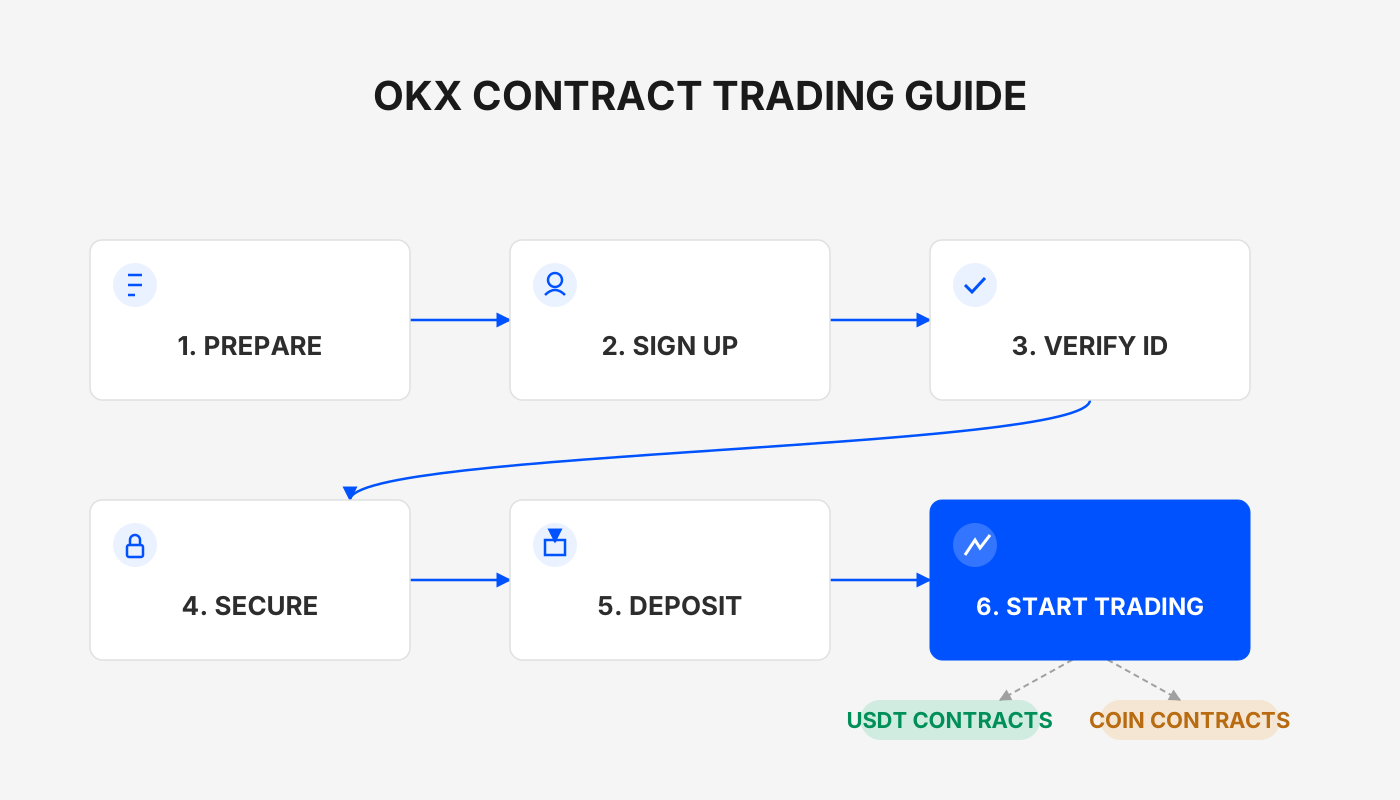
Core Differences Between OKX Coin‑Denominated Contracts and USDT Contracts
- Pricing method: USDT contracts are priced in USDT; coin‑denominated contracts are priced in United States dollars (USD). Consequently, the index price of the same underlying can differ. For example, the BTC/USDT perpetual contract uses the spot price of BTC against USDT, whereas the BTC/USD coin‑denominated perpetual contract uses the spot price of BTC against USD.
- Contract face value: A USDT contract represents a fixed amount of the underlying coin (e.g., each BTC/USDT contract equals 0.001 BTC). A coin‑denominated contract has a fixed face value expressed in USD (e.g., each BTC/USD contract equals 100 USD).
- Margin currency: USDT contracts uniformly require USDT as margin, so holding USDT lets you trade any pair. Coin‑denominated contracts require the corresponding underlying coin as margin; for instance, to trade BTC/USD you must hold BTC.
- Profit‑and‑loss calculation: Gains and losses on USDT contracts are settled in USDT; coin‑denominated contracts settle P&L in the underlying cryptocurrency, so the P&L of a BTC/USD trade is expressed in BTC.
Within the broader categories of delivery contracts and perpetual contracts, there are further sub‑categories of USDT‑margin and coin‑margin modes. Users can choose the mode that best matches their asset composition.
---
Register and Log In to OKX
If you do not yet have an account, click this link to create a new one. After completing identity verification, you can access the platform and begin contract trading.
---
Opening a Position: Step‑by‑Step Guide
1. Bullish – Buy to Open a Long (using the BTC/USDT perpetual contract as an example)
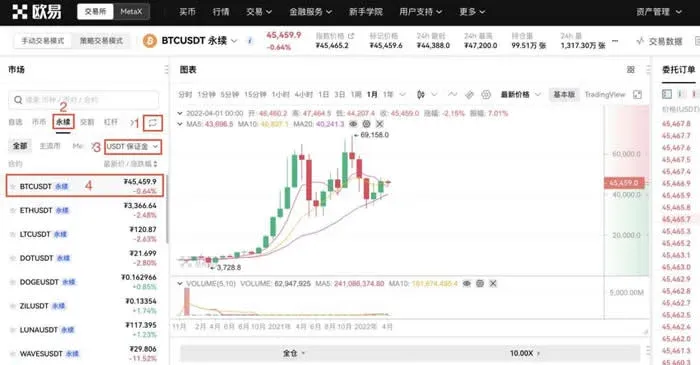
- From the homepage, go to Trade → Margin & Futures Trading in the top‑left corner.
- In the pop‑up page, switch to Perpetual → USDT Contracts, then select BTC/USDT Perpetual.
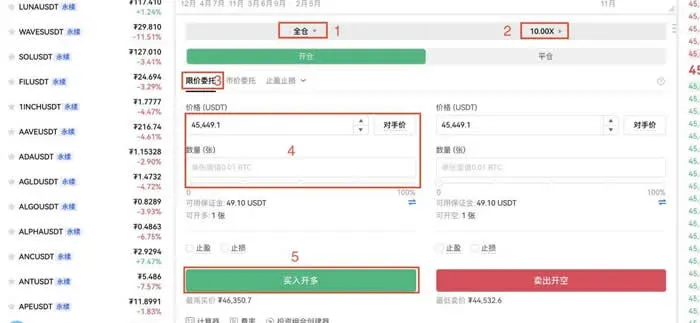
- Choose Cross‑margin or Isolated‑margin, and set the desired leverage multiplier.
- In the Limit Order section, enter the target price and quantity, then click Buy/Long → Confirm.
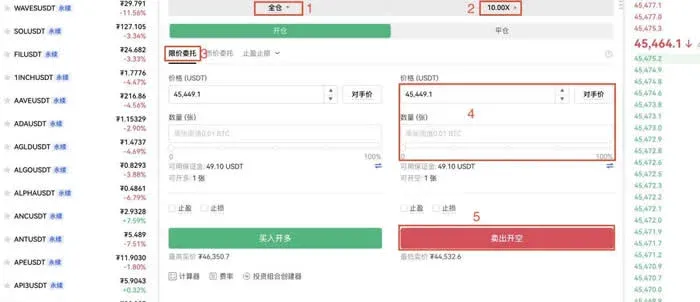
2. Bearish – Sell to Open a Short (also using the BTC/USDT perpetual contract)
- Navigate to the Trade → Margin & Futures Trading page.
- Switch to Perpetual → USDT Contracts, then select BTC/USDT Perpetual.
- Choose Cross‑margin/Isolated‑margin, set the leverage multiplier, and fill in the expected price and quantity in the Limit Order box.
- Click Sell/Short and confirm.
---
Details on Closing a Position
Closing a Long Position (Sell to Close)
- Open the Positions page and locate the long position you wish to close.
- Enter the desired closing price and quantity, then click Close.
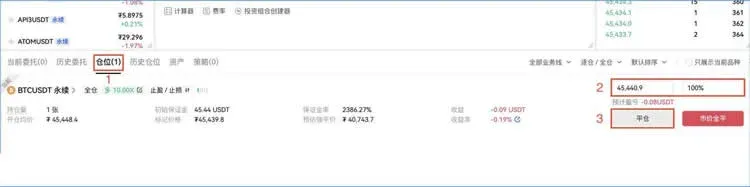
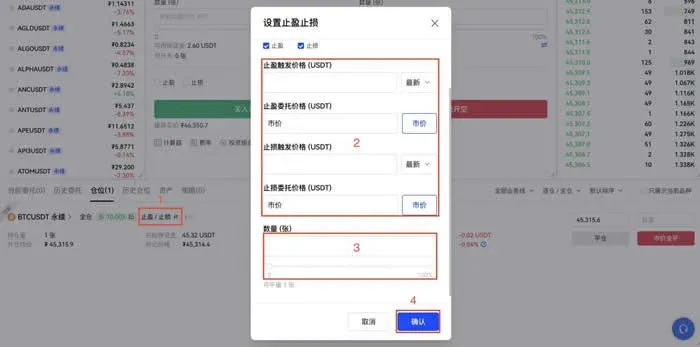
Tip: You can use the Take‑Profit / Stop‑Loss feature to set trigger prices in advance, enabling automatic closure to lock in profit or limit loss.
Procedure: On the Positions page, click Take‑Profit / Stop‑Loss, fill in the Take‑Profit trigger price, Stop‑Loss trigger price, and quantity, then confirm.
If you want to liquidate the entire position at once, select Market Close All under the corresponding position. Note that during periods of extreme volatility, limit orders may fail to fill.
Closing a Short Position (Buy to Close)
- Go to Positions, locate the short position you intend to close.
- Input the closing price and quantity, then click Close.

The Take‑Profit / Stop‑Loss tool works for short positions as well. The navigation is identical to that for longs; only the direction of the trigger price differs.
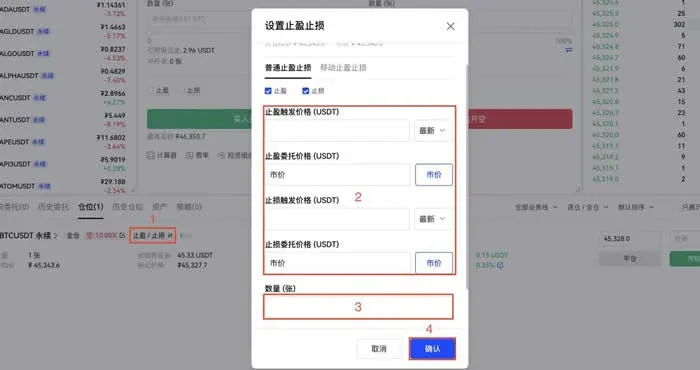
For a rapid full liquidation, you can also use the Market Close All function.
---
Overview of the OKX Platform
OKX is a globally‑focused digital‑asset exchange known for its low‑fee structure. Most spot and futures trades can be executed with fees as low as 0.10 %, and the platform offers a variety of high‑yield staking products. Deposits can be made via debit/credit cards, SEPA/SWIFT bank transfers, or cryptocurrency wallets, providing a relatively seamless user experience.
A few points to keep in mind:
- Liquidity for certain low‑volume altcoins may be limited.
- When trading volume surges or the proportion of OKB holdings rises, fees may be adjusted accordingly.
- US residents should be aware that some fiat on‑ramps and derivative products might be unavailable on the global OKX platform; they may need to use a US‑registered exchange such as Binance.US for fiat deposits via ACH, wire, or other US‑compliant methods.
- Tax disclaimer: Gains from cryptocurrency trading are potentially taxable in many jurisdictions. Users should consult local tax regulations or a professional advisor to ensure proper reporting of any realized profits or losses.

---
Mobile App Download Information
- App name: OKX Trading Platform (Android)
- Version: v6.158.1 (official release)
- Size: 376.03 MB
- Language: Simplified Chinese (the app also supports English and other languages)
- Last update: 2026‑02‑11
---
The above outlines the basic workflow for OKX coin‑denominated contracts and highlights key platform features. For deeper trading strategies, advanced tips, or the latest news, feel free to follow the upcoming series from Bitaigen.
Related Reading
- OKX Guide: Verify ID, Buy USDT via C2C & Instant Buy
- 2022 Top Domestic Bitcoin Platforms: Binance, OKX, Huobi
- Huobi vs OKX vs Binance: Spot, Derivatives & Service Suite Comparison
💡 Register on Binance with referral code B2345 for the maximum trading fee discount. See Binance complete guide.



