
 Bitaigen Research
 Many newcomers entering the cryptocurrency market are often haunted by a very practical question: Will buying USDT with Alipay cause my bank card to be frozen? This concern is understandable. In this article we will not only reveal the truth behind the issue, but also provide a complete “freeze‑prevention guide” that ensures the safety of your fund deposits and withdrawals.
When purchasing USDT with Alipay, as long as you follow the correct operational procedures and meet the risk‑control requirements of Alipay and the trading platform, a bank‑card freeze is generally unlikely. However, using funds that have not been properly verified or conducting frequent large‑value transactions can still trigger the platform’s risk‑control mechanisms.
In this article we dissect the risk points associated with buying USDT via Alipay and present a practical freeze‑prevention workflow. By adhering to the platform’s risk‑control policies and the source‑of‑funds guidelines, beginners can safely complete deposits and withdrawals while avoiding unnecessary account freezes. Continue reading for the full step‑by‑step process and key considerations.
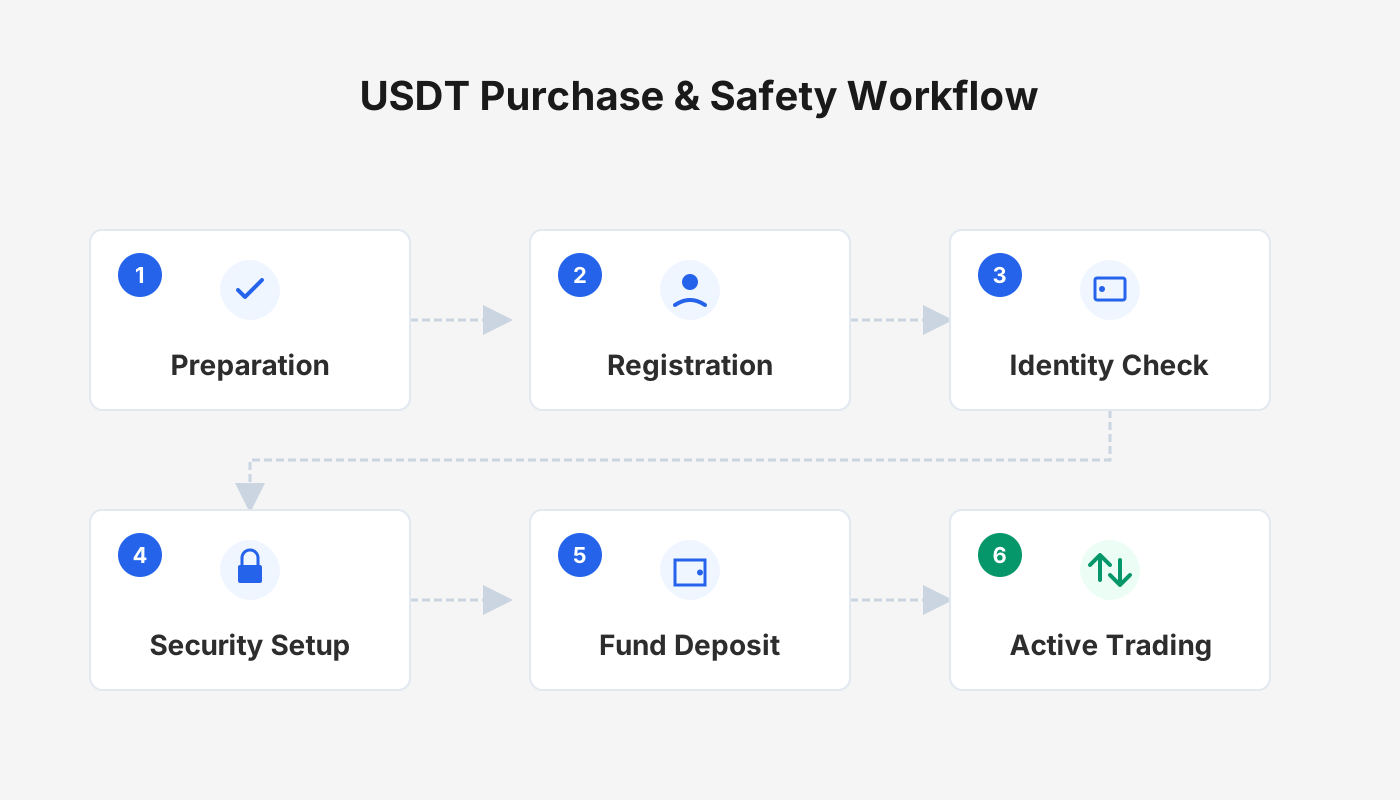
How to Avoid a Card Freeze After Buying USDT?
Prioritize Alipay as the payment method and keep each transfer amount under USD 15,000 (≈ 10,000 CNY). It is advisable to conduct transactions during normal business hours on weekdays, and to install the digital security payment certificate within the Alipay app. If Alipay displays an anti‑fraud warning, you must explicitly acknowledge the known risk and verify the counterparty’s identity before proceeding.
Why Is Alipay Considered Safer Than a Direct Bank Card Transfer?
Before you start the actual transaction, you should observe three core principles that form the foundation of freeze‑prevention:
- The source of funds must be clean – Only use your own legally‑obtained money. Never use third‑party funds that have been collected on your behalf, as this could expose you to illicit‑activity risk.
- Leverage Alipay’s built‑in risk‑control – Alipay automatically scans every transfer for suspicious activity. If the recipient’s account is flagged, the system will block the payment before any funds leave your account, thereby preventing a freeze from occurring.
- Key technique – the “isolation method” – When paying, always use Alipay balance or Yu‑E‑Bao (Money Market Fund) rather than drawing directly from a linked bank card.
Why this matters: If you link a bank card and the transaction is later disputed, the bank card itself may become entangled in the investigation. By paying with Alipay balance, any dispute remains confined to the Alipay ecosystem, keeping your physical bank assets better protected. The goal is to minimize risk exposure by retaining only a single Alipay‑only payment path.
Binance App Safe USDT Purchase Freeze‑Prevention Tutorial
Note for U.S. readers: Users located in the United States must use Binance.US (or another regulated U.S. exchange) rather than the global Binance platform.
Step 1 – Filter Reliable “Shield” Merchants
- Open the Binance app (official registration: <https://accounts.binance.com/register?ref=B2345> | official download: <https://www.bitaigen.com/binance/download>). On the home screen tap Add Funds → C2C Trading.
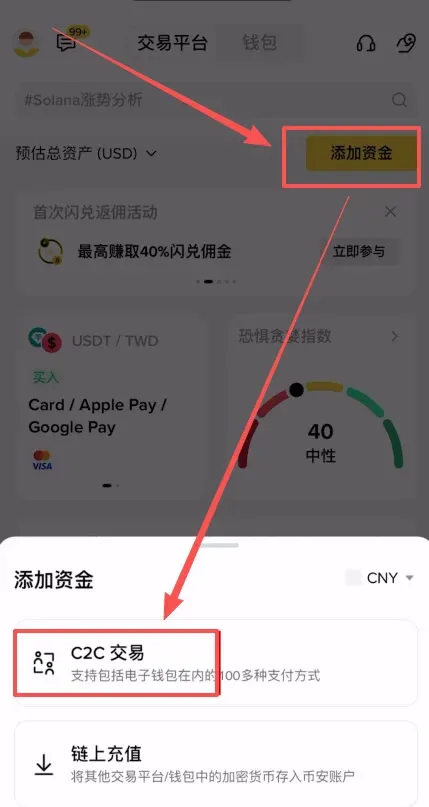
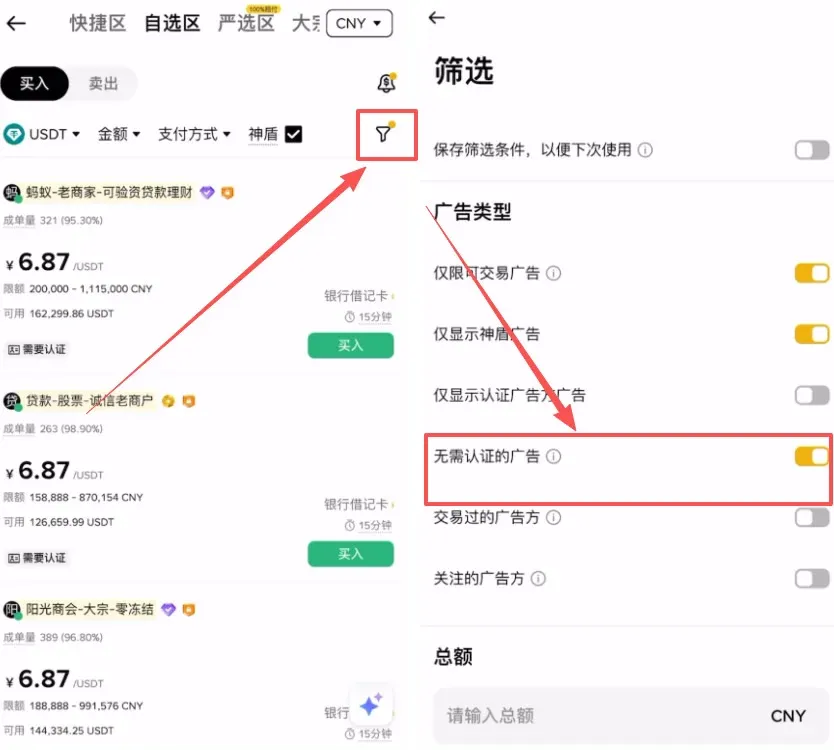
- Select “Shield” merchants: Shield merchants post a large security deposit and pass a stringent background‑check by the platform, forming the first line of defense for your capital.
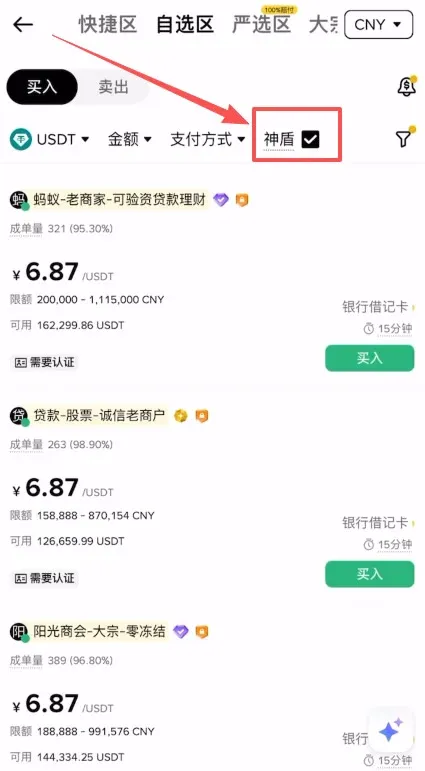
- Choose “No verification required”: Tap the funnel icon in the top‑right corner and enable the “No verification” filter, which skips the tedious self‑certification steps and makes the trade smoother.
Step 2 – Pick High‑Quality Merchants (Check Registration Age)
Enter the desired purchase amount (e.g., USD 150 or its CNY equivalent) and select Alipay as the payment method.
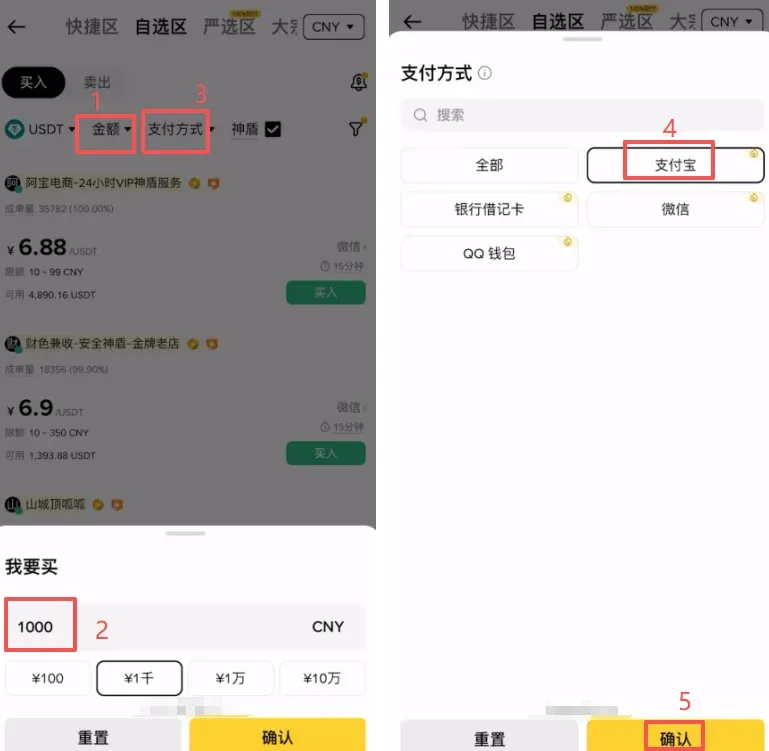
In the resulting merchant list, besides price, pay close attention to the following metrics:
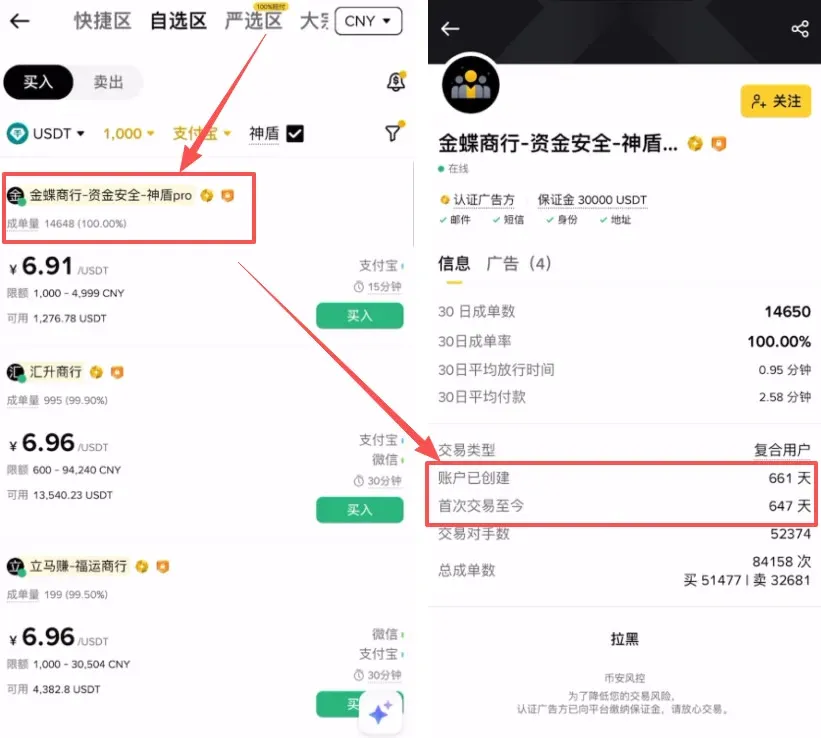
- Order volume and completion rate – Prefer merchants with higher numbers, indicating reliability.
- Account age (hard metric) – Click the merchant’s profile and view the “Account creation date.” We recommend selecting merchants that have been registered for at least one year; a longer lifespan usually signals a more stable asset reserve and a clean trading history.
Step 3 – Order Placement and Payment Details
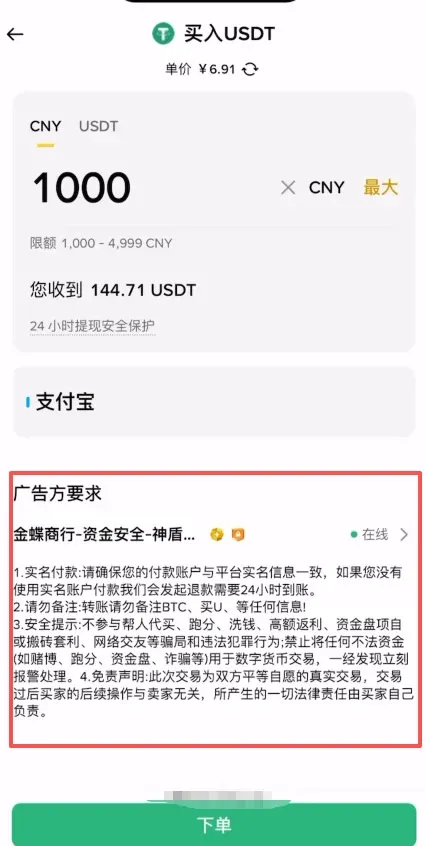
After confirming the merchant’s information, tap Buy to place the order.
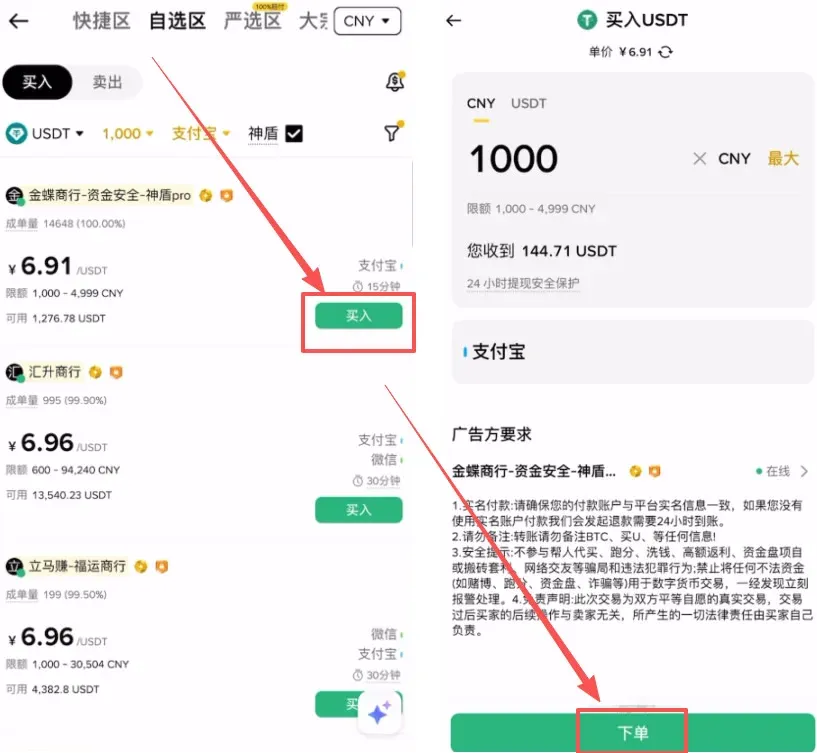
- Advertiser requirements: Most sellers require you to make a real‑name payment and do not include any sensitive keywords (such as “BTC”, “USDT”, “Binance”) in the transfer note; you can leave the note blank.
- Payment flow: Copy the seller’s Alipay account, open the Alipay app, search for the account, and complete the transfer.
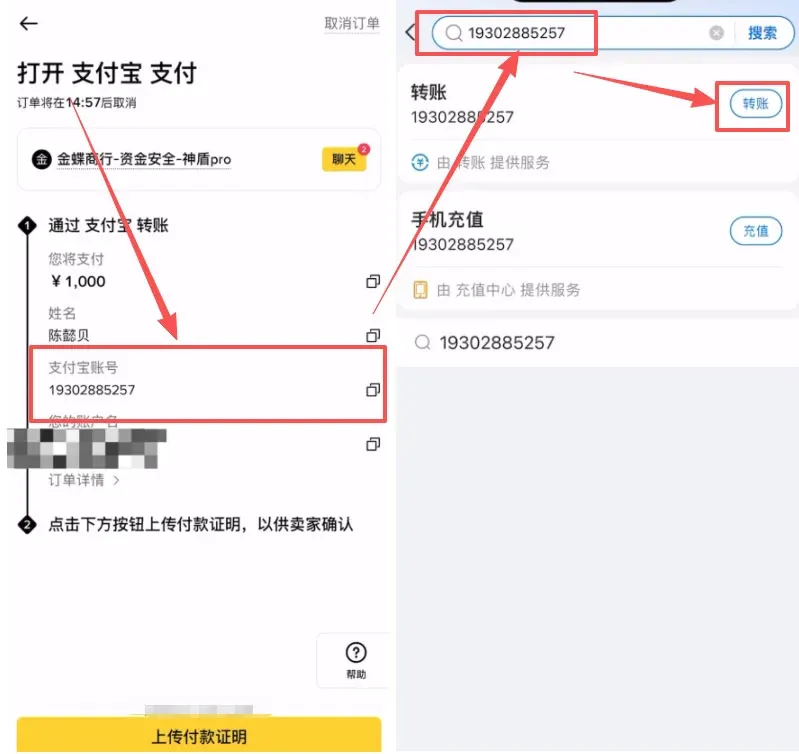
- Risk‑control alert: If Alipay pops up a “risk control reminder” or blocks the transaction, stop immediately, cancel the order, and select a different merchant. Do not force the payment.
Step 4 – Upload Proof and Release of Coins
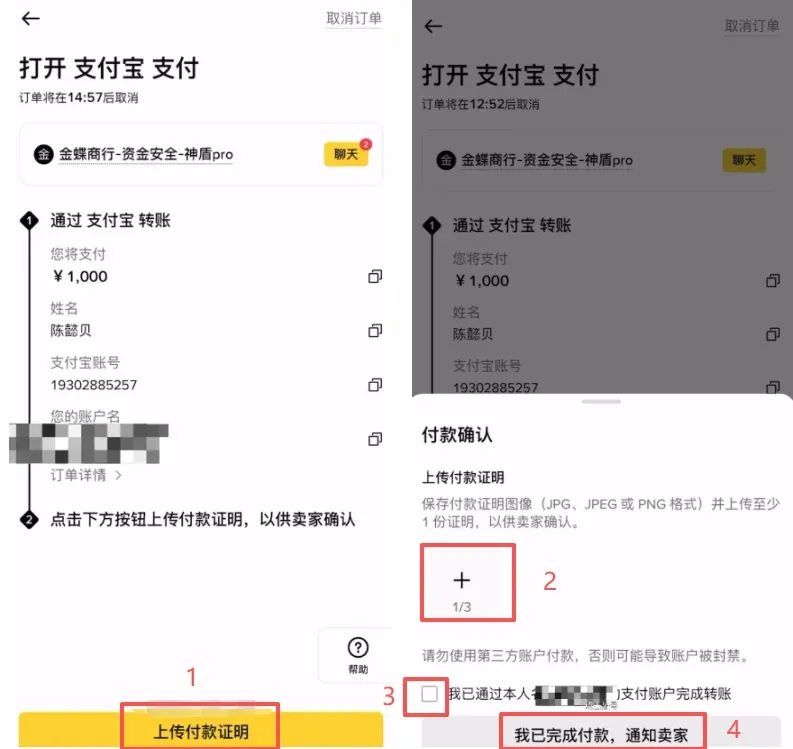
- Screenshot the Alipay “transfer successful” screen.
- Return to the Binance app, tap I have completed the payment, but first click Upload payment proof (the plus sign) and attach the screenshot.
- Check the “Transferred” box and confirm to notify the seller. Once the seller verifies receipt, they will promptly release the USDT to your Binance wallet.
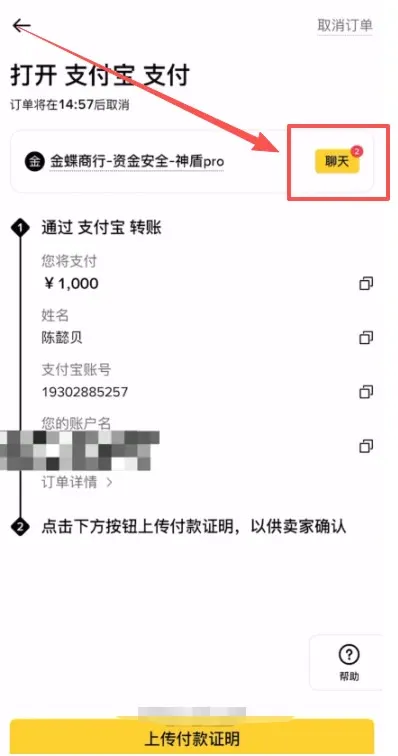
If you have any questions, you can tap the Chat icon in the upper‑right corner to communicate directly with the merchant.
Additional tutorials
- 2026 latest guide for domestic users to register on Binance
- How to download the Binance app? Mainland China Binance App download and installation guide (Android/iOS essential)
- How to sell USDT on Binance?
- How to play with Bitcoin? How to buy BTC with RMB? Beginner‑friendly purchase and practical guide
What Is a Binance “Shield” Merchant?
A Binance Shield Merchant (Shield Merchant) is a premium C2C trader that enjoys stronger security guarantees. Admission criteria include posting a security deposit of at least 100,000 USDT, a long‑standing clean trading record, rigorous risk‑control vetting, and no history of violations or freezes. The purpose is to protect users’ transaction funds and reduce the risk of illicit money flowing through the platform.
Security guarantees offered by Shield Merchants (Premium Zone):
- High‑value deposit – Merchants must lock a large USDT deposit, allowing Binance to compensate users first if anything goes wrong.
- Strict entry requirements – High transaction volume, more than 1,000 distinct counterparties, and at least 90 days of verified merchant status without payment anomalies, legal investigations, or serious violations.
- Multiple layers of risk‑control and service assessment – Binance’s risk‑control team conducts deep analysis of the merchant’s account and any linked accounts to ensure that no personnel have criminal investigations or freeze records.
- Good reputation – Merchants and their managers must not have caused reputational damage to the Binance brand.
How to identify and use Shield Merchants:
- On the Binance C2C page, look for the merchant badge that usually contains the words “Shield” or “Premium”. This indicates a highly vetted trader.
- Trading with a Shield Merchant provides a more reliable environment and reduces the likelihood of encountering “dirty money” or scams.
Extra recommendations for ordinary users:
- Use Binance’s Escrow service to lock the cryptocurrency until the trade is fully completed.
- Complete Know‑Your‑Customer (KYC) verification and enable two‑factor authentication (2FA) to boost account security.
- Keep a clear record of where your funds come from and where they go, avoiding any involvement with illegal proceeds.
How to Prevent a Card Freeze When Buying USDT with Alipay?
The essence of freeze‑prevention is to mimic normal‑commerce behavior, avoiding “rapid in‑and‑out” patterns and limiting interactions with high‑risk merchants. Specific actions include using a seldom‑used low‑limit separate bank card (especially a regional or community bank card), spreading transactions across multiple cards, avoiding late‑night activity, and letting funds sit idle after each trade. These steps lower the chance that the risk‑control system flags the flow as abnormal.
Concrete freeze‑prevention strategies
- Isolate your bank cards
- Use a rarely‑used card: Dedicate a card solely for over‑the‑counter (OTC) crypto trades. Do not mix it with your salary or primary‑use card; if the card gets frozen, your everyday finances remain untouched.
- Prefer regional banks: Choose city‑commercial or rural‑commercial banks over the “big four” (Industrial and Commercial, Agricultural, China Construction, Bank of China). Enforcement agencies find it easier to freeze accounts at the major banks.
- Simulate normal commerce
- Avoid instant turnover: After receiving payment, do not immediately transfer the funds out. Let the money rest for a while or make a small withdrawal/consumption to avoid being flagged for “money laundering”.
- Distribute transactions: Do not receive a large sum or many small sums in a short window and then move them all at once.
- Pick appropriate time slots: Conduct trades on weekdays between 09:00 – 21:00 local time; steer clear of late‑night large transactions.
- Select trustworthy counterparties
- Big platforms first: Use the OTC markets of well‑known exchanges such as Binance, OKX, or others that display “Blue Shield” or similar verification badges, and pick large, reputable merchants.
- Avoid fixed merchants: Do not repeatedly buy and sell with the same merchant within a short period; this reduces the perception of “layering” in anti‑money‑laundering terms.
- Take the large‑merchant order: Prefer orders posted by high‑volume merchants rather than tiny, fragmented listings.
- Control amount and frequency
- Start small: Begin with modest amounts to familiarize yourself with the process and stay below most platforms’ risk thresholds.
- Limit withdrawal frequency: After selling USDT for fiat, avoid making frequent withdrawals to different bank accounts.
- Additional supporting measures
- Full real‑name verification: Ensure your Alipay account’s identity information is complete; incomplete data raises the probability of a risk‑control block.
- Neutral transaction description: When making the payment, use vague descriptors such as “goods payment” or “living expenses” rather than explicitly writing “USDT”, “buy crypto”, etc.
Tax reminder: Cryptocurrency gains may be taxable in your jurisdiction. Please consult a local tax professional to understand reporting obligations for any profit you realize from buying or selling USDT.
That concludes the full coverage of “Will buying USDT with Alipay freeze my card?” and the Binance app safe USDT purchase freeze‑prevention tutorial. For more practical resources on securely buying USDT on Binance, follow Bitaigen (比特根) and explore their other related articles!
Related Reading
- Buy USDT on OKX with Alipay CNY – Fast C2C & KYC Guide
- Buy Bitcoin on OKX with Alipay – 2026 Step‑by‑Step Guide
- Hong Kong Stablecoin Draft – Buying USDT/USDC on OKX
💡 Register on Binance with referral code B2345 for the maximum trading fee discount. See Binance complete guide.



