
 Bitaigen Research
 Common DeFi users often encounter the situation that the service they want to use is deployed on a different blockchain, requiring them to move assets across chains themselves.
The Binance Wallet cross‑chain bridge lets you complete the transfer directly inside the wallet. Simply log in, select the source chain and the destination chain, set the amount and pay a modest Gas Fee, and the transfer is executed. You can also check the status at any time in the transaction history.
Cross‑chain means moving an asset from one blockchain to another, for example moving USDC that resides on the BNB Smart Chain (BSC) to Ethereum or any other network.
Example Scenario for Cross‑Chain Use
Suppose you want to send USDC to a crypto‑backed credit‑card wallet via the Base network, but the only USDC you hold is on BSC. How would you proceed?
- Use the cross‑chain bridge inside the wallet to swap the BSC‑based USDC for USDC on the Base chain (you’ll need a small amount of BSC‑native BNB to cover the Gas Fee).
- Then, using the Base network, transfer the funds to the credit‑card wallet (again a tiny amount of Base‑native ETH is required for the Gas Fee).
This article walks through the same scenario, demonstrating how to operate the Binance Web3 Wallet cross‑chain bridge. Binance Wallet download invitation code: `NWLULCZQ`
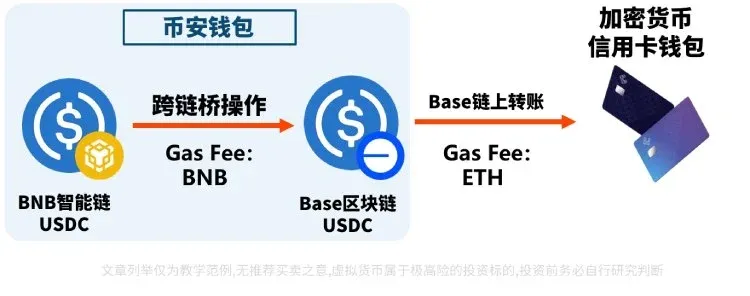
Note: The bridge supports a large number of blockchains and tokens. If you wish to bridge other assets or networks, the workflow is essentially the same.
---
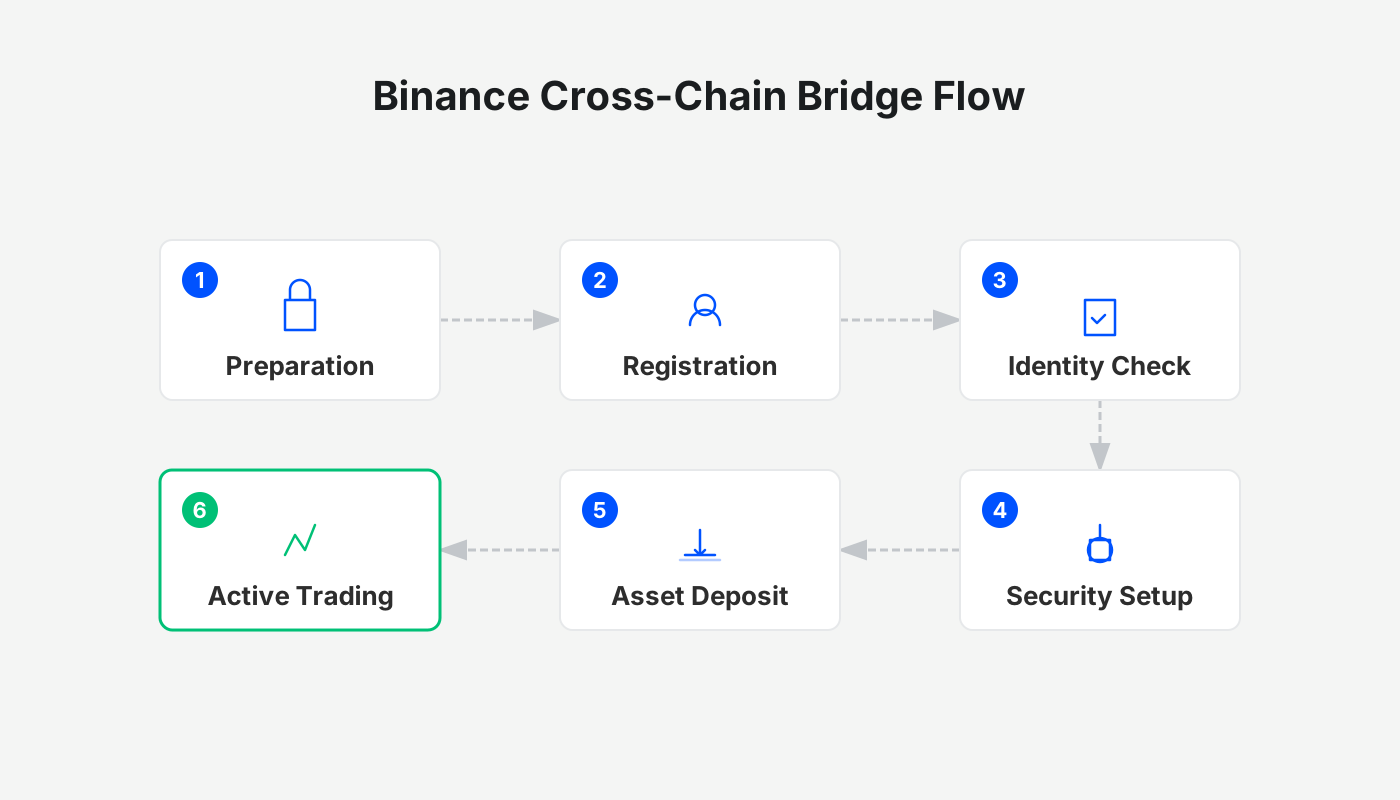
The Bitaigen editorial team has compiled a complete step‑by‑step guide for the Binance Wallet bridge, helping DeFi users move assets quickly between chains while highlighting gas‑cost considerations and security best practices. The illustrated walkthrough enables even first‑time cross‑chain users to get started with confidence. Subsequent sections will dissect common risks and optimal practices so you can complete inter‑chain “arbitrage” safely and efficiently.
What Is the Binance Wallet?
Binance is the world’s largest cryptocurrency exchange, and the Binance Wallet is its stand‑alone Web3 wallet offering several advantages:
- Built‑in cross‑chain bridge: Complete a bridge in a few taps without leaving the app or visiting an external DApp.
- Easy fiat on‑ramps: Transfer funds directly from your Binance exchange account into the wallet.
- Familiar user experience: The interface mirrors the exchange, making it intuitive for existing Binance customers.
Brief Overview of Binance
Binance (official registration link | official download link) had roughly 300 million registered users by the end of 2025 and supports more than 100 cryptocurrencies.
If you are not yet registered, you can sign up using the links below and follow the video tutorial for a smooth onboarding.
- Binance official registration: <https://accounts.binance.com/register?ref=B2345> (copy into your browser)
- Binance Android app download: <https://www.bitaigen.com/binance/download>
*Extended reading:* 2025 Binance Guide – Comprehensive walkthrough of deposits, withdrawals, fees, and security.
For users residing in the United States: you must use Binance.US (the U.S.‑compliant platform) instead of the global Binance service. The steps described below remain the same, but you will access the bridge through the Binance.US mobile app.
---
Binance Wallet Cross‑Chain Bridge – Step 1: Log In and Open the Bridge
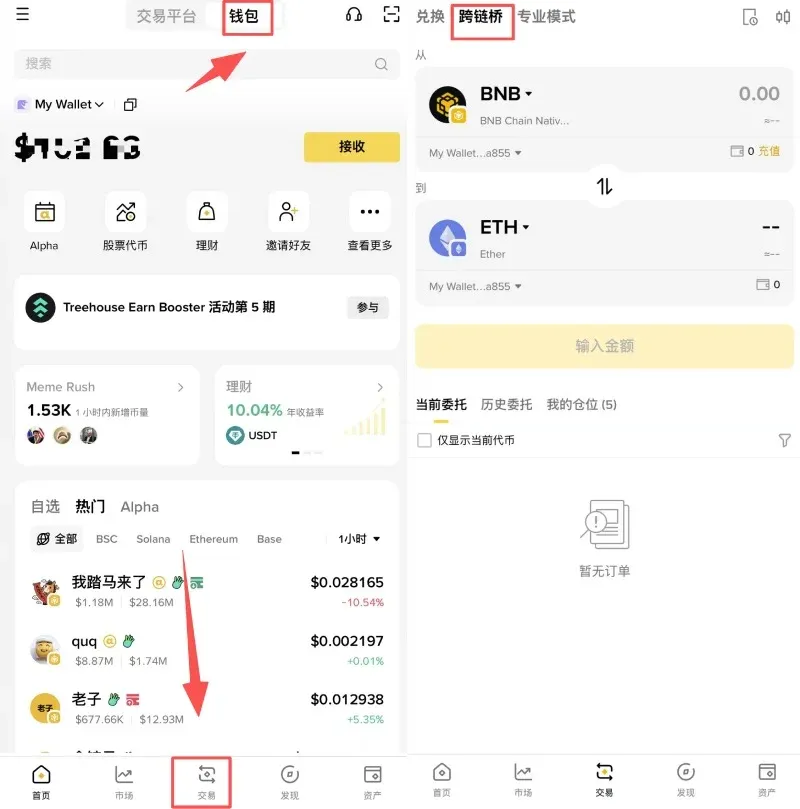
- Launch the Binance app and tap the 【Wallet】 tab at the top.
- Select the 【Trade】 tab at the bottom.
- After the switch, tap 【Cross‑Chain Bridge】 to open the feature page.
---
Step 2: Choose the Source Chain and Token
On the configuration screen:
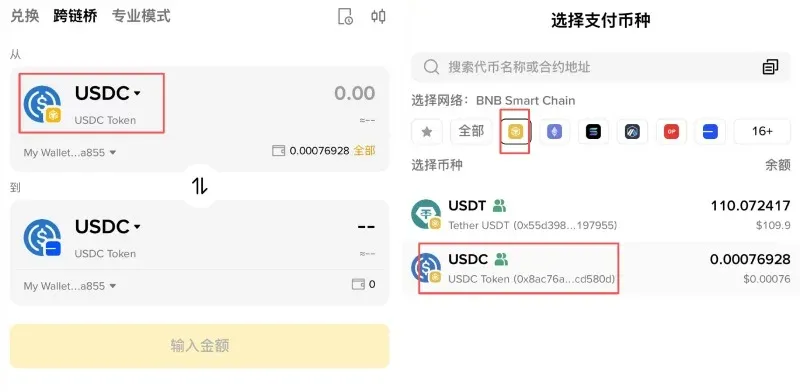
- First pick the blockchain (the example uses BNB Smart Chain (BSC) – tap the yellow icon).
- Then select the token (the example uses USDC).
After confirming, the source is USDC on BSC.
---
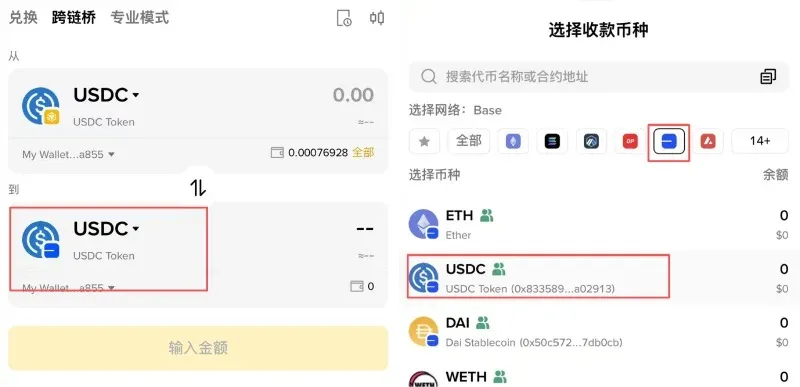
Step 3: Choose the Destination Chain and Token
Still on the same screen:
- First select the destination chain (the example uses Base, tap its icon).
- Then choose the token (again USDC).
Now the destination is USDC on the Base network.
---
Step 4: Enter the Amount and Review the Gas Fee
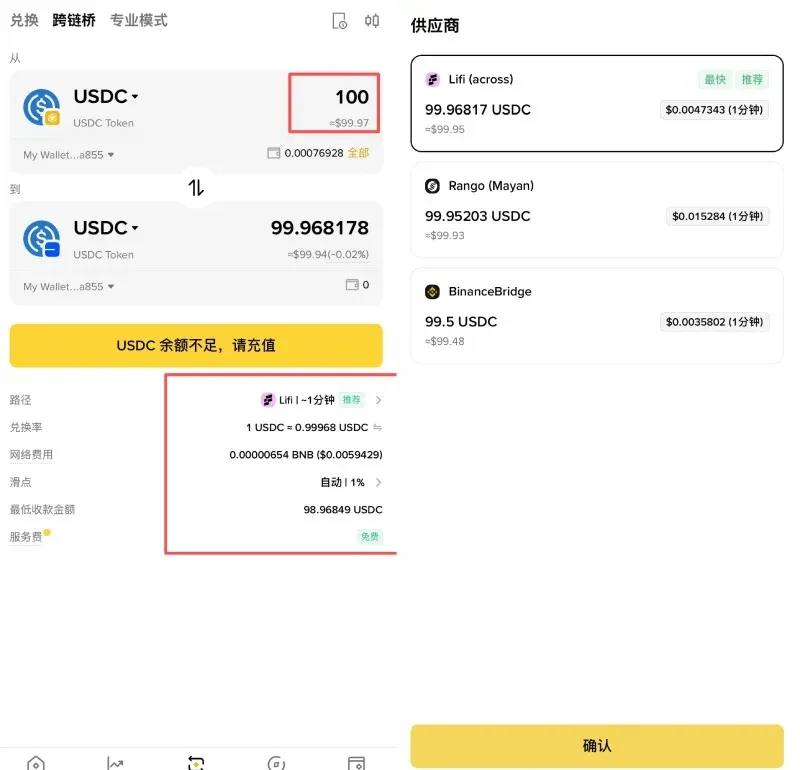
- Input the amount you wish to bridge; the system automatically selects the fastest and cheapest route.
- At the bottom of the page you will see the required Gas Fee (shown in BNB for this example), roughly $0.0042 USD (the exact figure fluctuates with network congestion).
- If you prefer a specific bridge, tap 【Path】 to view all bridge options supported by the Binance Wallet.
---
Step 5: Final Confirmation Before Bridging
Press Cross‑Chain Swap and a confirmation screen appears:
- If the wallet balance is insufficient to cover the Gas Fee, the app will display “Unable to pay network fee” and the confirm button will be greyed out.
- Once you verify sufficient balance, tap the yellow 【Confirm】 button to launch the bridge transaction.
---
Step 6: Verify the Transaction in the History
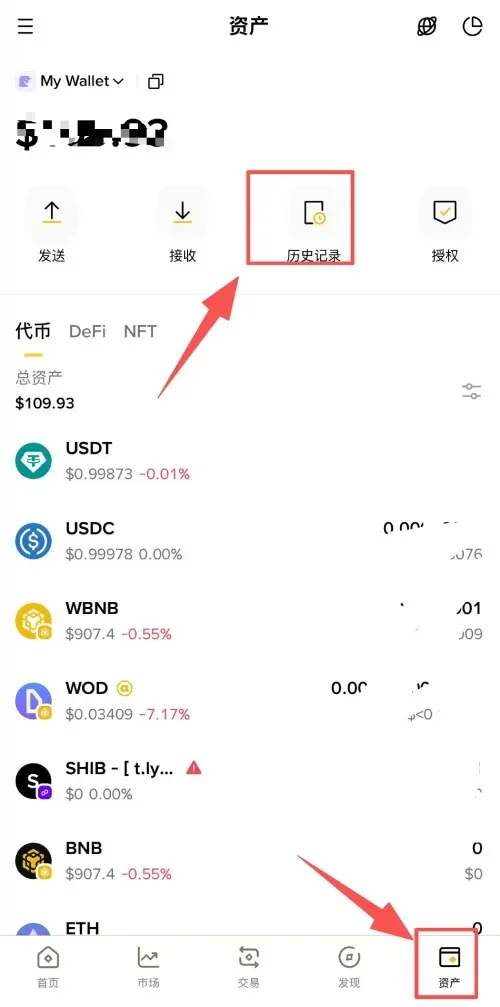
- Tap the 【Assets】 icon at the bottom right.
- Select 【History】.
- Locate the most recent cross‑chain entry and confirm that its status reads Completed.
---
Fee Structure of the Cross‑Chain Bridge
When using the Binance Wallet bridge, two primary fee categories apply:
| Fee Type | Description |
|---|---|
| **Gas Fee** | Network fee paid to miners/validators. Each blockchain uses its native token (e.g., BNB, ETH, SOL, etc.). |
| **Service Fee** | Platform fee charged by Binance. Most mainstream tokens are exempt. |
1. Gas Fee – Dependent on Chain Congestion
Typical native tokens used for gas:
- BNB Smart Chain (BSC) → BNB
- Ethereum → ETH
- Ethereum L2s (Base, Arbitrum, Optimism) → ETH
- Solana → SOL
- TRON → TRX
During peak periods, gas costs can rise sharply; during off‑peak times they may be close to zero.
2. Service Fee – Mostly Waived for Major Tokens
Bottom line: When swapping stablecoins or major native assets such as USDC, ETH, SOL, Binance Wallet does not charge a service fee.
Binance classifies assets into three groups:
| Group | Definition |
|---|---|
| **Group 1** | Stablecoins and major native tokens (e.g., ETH, USDT, SOL, etc.) |
| **Group 2** | Binance Alpha tokens |
| **Others** | All remaining tokens not covered by the first two groups |
Service‑fee rates (as shown in the mobile app; the web interface may differ slightly):
| Source‑Target Group | **Group 1** | **Group 2** | **Others** |
|---|---|---|---|
| **Group 1 → Group 1** | 0 % | — | — |
| **Group 2 → Group 1** | 0 % | — | — |
| **Group 2 → Group 2** | — | 0 % | — |
| **Others → Group 1** | 0 % | — | — |
| **Others → Group 2** | — | 0.5 % | — |
| **Others → Others** | — | — | 0 % |
Source: Binance official documentation. Always check the latest fee schedule on the official website.
Because both USDC on Base and USDC on BSC belong to Group 1, the bridge will not levy a service fee for this particular transfer.
---
Operational Tips and Precautions
1. Pre‑fund the Destination Chain for Gas
After the bridge completes, any subsequent action on the destination chain (e.g., sending Base‑network USDC to a credit‑card wallet or performing another bridge) requires the native token of that chain to pay gas. Base uses ETH for gas. If your wallet lacks ETH on Base, the transferred assets will be locked until you top up the chain with a small amount of ETH (via an exchange or another wallet).
2. Verify Contract Addresses to Avoid Same‑Name Tokens
Some networks host multiple tokens with identical symbols but different contract addresses. For example, on Arbitrum there are two distinct USDC contracts:
- USDC Token – the version bridged from Ethereum.
- USDC Coin – the version minted directly by Circle on Arbitrum.
Always confirm the contract address or the “Notes” field. The Circle‑issued version generally enjoys broader acceptance.
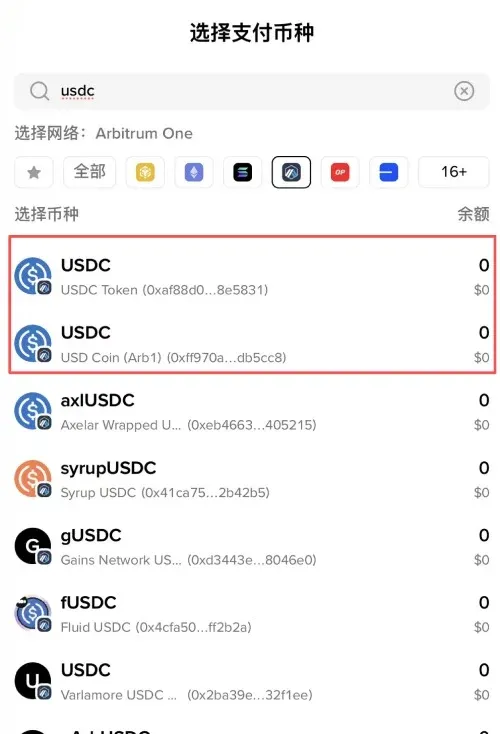
Remark: The Ethereum‑bridged USDC appears on Arbitrum as USDC.e, with a contract address ending in DB5CC8. Some DApps still rely on the symbol alone, so the safest approach is to copy‑paste the exact contract address.
3. Conduct a Small Test Transfer First
When you are using a bridge for the first time or moving assets to a new network, start with a modest amount (e.g., 10 USDC). Verify that the transaction completes successfully before scaling up. This practice limits potential loss if you accidentally select the wrong chain, token, or encounter an unexpected contract issue.
---
This article concludes here. For more practical content on the Binance Wallet bridge, search the Bitaigen (比特根) archive or continue reading the related links below. Thank you for following, and we hope you keep supporting Bitaigen!
Tax reminder: Crypto‑related gains may be subject to taxation in your jurisdiction. Please consult a local tax professional to understand your reporting obligations, especially when converting or moving assets across chains.
---
Related Reading
- Intent‑Based Trading: Simplifying DeFi for Users
- Ethereum Staking Guide: How PoS Works, Earnings & Risks
- Solana Token Launchpad Comparison 2024: Features, Fees & Launch Dates
💡 Register on Binance with referral code B2345 for the maximum trading fee discount. See Binance complete guide.



