
 Bitaigen Research
 If you entered the crypto space because of the recent buzz around Dogecoin, the next crucial step is to find a safe and reliable way to store your coins. As early as 2015, the project released an official wallet—Dogecoin Core, often referred to as the official Dogecoin wallet. Below we will dissect this wallet’s features, platform compatibility, and the step‑by‑step onboarding process, giving you a complete picture of its capabilities and how to get started.
In this article we outline the core functions of the official wallet for newcomers, its cross‑platform compatibility, and a secure onboarding workflow, helping you quickly decide whether the wallet meets your storage needs and providing practical instructions. Keep reading to obtain the full usage guide.
Positioning and Features of Dogecoin Core
Dogecoin Core is developed by the Dogecoin Wallet company and is compatible with the three major desktop operating systems—Windows, macOS, and Linux—as well as offering an Android mobile client. Although the wallet’s publisher is a separate legal entity from the Dogecoin Foundation, the two maintain close technical cooperation.
- Single‑currency dedicated: The wallet only supports DOGE, eliminating the security risks that can arise from handling assets on multiple blockchains.
- Usability: The interface is minimalistic; after downloading, users back up the wallet with a mnemonic seed phrase. This seed is the sole credential that can recover the wallet if the password is forgotten, so safeguarding it is essential.
- Payment convenience: The Android version includes a built‑in peer‑to‑peer (P2P) transfer feature, making small‑value DOGE payments fast and straightforward.
Because of these advantages, Dogecoin Core is often regarded as the “default” tool for storing DOGE, especially for users who plan to keep their assets locally for the long term.
How to Quickly Get Started with the Official Dogecoin Wallet
The following steps use the Windows version of Dogecoin Core (also known as MultiDoge) as an example, illustrating the complete process from download to full synchronization.
1️⃣ Obtain the Installation Package
Click the link below to download the official installer (MultiDoge):
If your browser prompts a download confirmation, choose “Allow.” Once the download finishes, double‑click the `.exe` file to launch the installer.
2️⃣ Complete the Installation
Follow the wizard prompts, read and accept the license agreement, then proceed. After installation, a MultiDoge shortcut will appear on your desktop or in the Start menu; double‑click it to open the application.
3️⃣ Initialization and Synchronization
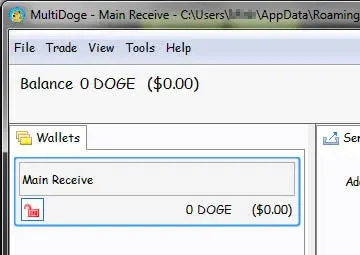
When you launch the wallet for the first time, a progress bar appears at the lower left corner. The wallet must synchronize with the full network of nodes to download the blockchain. This typically takes 1–5 minutes, depending on your internet connection. Once synchronization finishes, the wallet becomes operational and you can start receiving or sending DOGE.
4️⃣ Version Information (as of 2021‑08‑09)
- Version: Dogecoin Core (MultiDoge) v0.1.7
- Type: Financial management software
- File size: 9.66 MB
- Language: Simplified Chinese

Summary
Dogecoin Core, as an official single‑chain wallet, works across the major desktop platforms and offers an Android client. It satisfies everyday payment requirements while also providing a secure environment for long‑term holding. By following the steps above—downloading, installing, and syncing—you can comfortably use this wallet that was built specifically for DOGE. For deeper insights or the latest updates, feel free to explore other articles on Bitaigen (比特根).

Additional notes for a global audience
- If you wish to convert DOGE to fiat currencies such as USD, reputable exchanges that support SEPA or SWIFT transfers (e.g., Binance.US for U.S. residents) can be used.
- Please be aware that cryptocurrency gains may be taxable in your local jurisdiction; consult a tax professional to understand your obligations.
Related Reading
- Proof-of-Work Mining: How Blockchain Miners Earn Rewards
- DeFi Lending Basics: Core Concepts & Top Projects
- MetaMask Transaction Fees: Gas, Base & Priority
💡 Register on Binance with referral code B2345 for the maximum trading fee discount. See Binance complete guide.



