
 Bitaigen Research
 In this article we systematically outline the usage details of the OKX Web3 Wallet, providing clear step‑by‑step instructions and key considerations for common concerns such as forgotten passwords, wallet resets, and importing existing accounts. The goal is to help users manage their assets securely in a decentralized environment. Subsequent sections will continue to present additional practical tips, making the guide worth a thorough read.
Frequently Asked Questions About the OKX Web3 Wallet
1. What should I do if I forget my wallet password?
When you create or import an OKX Web3 Wallet, you are required to set a password that protects the app itself and authorizes wallet operations. Because this wallet is non‑custodial and fully decentralized, the platform does not store any passwords and therefore cannot offer a password‑recovery service. If the password is forgotten, the only remedy is to re‑import the wallet using a previously backed‑up seed phrase (mnemonic) or private key, and then set a new password. It is essential to keep your seed phrase or private key in a safe place, otherwise the assets associated with the wallet cannot be recovered.
Please note that the password referred to here is the login password for the OKX Web3 Wallet only; it is unrelated to the password used for an OKX exchange account. The exchange account password can be reset directly through the exchange’s login‑settings page.
2. How do I reset the wallet?
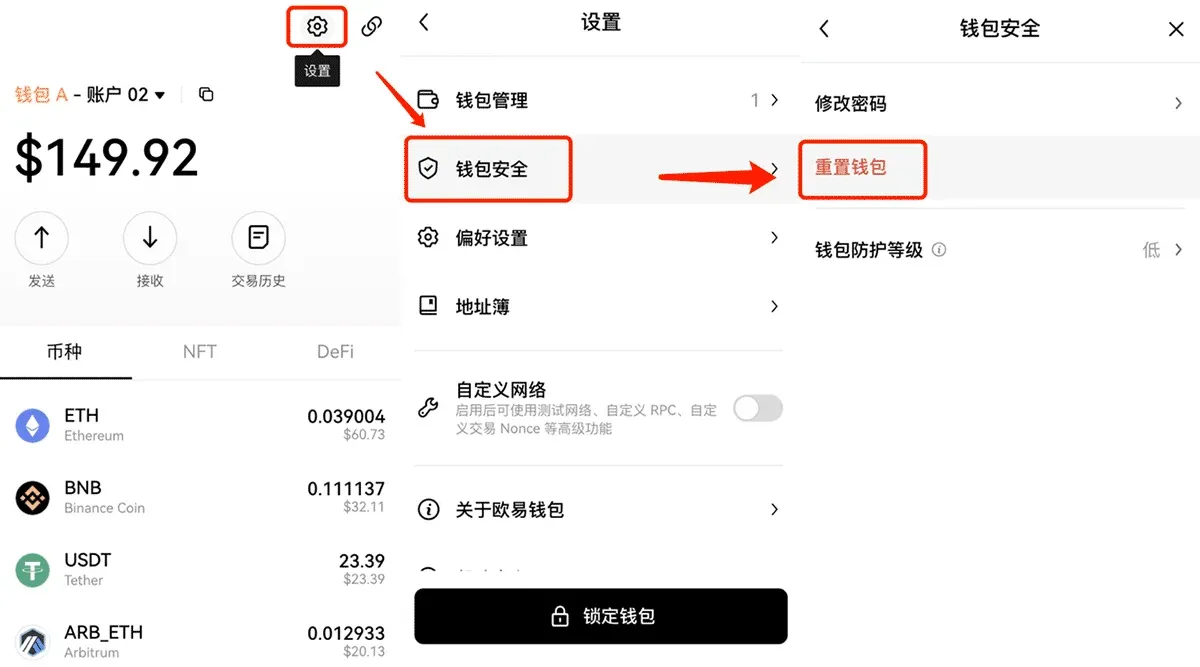
A reset operation clears all data belonging to the current wallet—including seed phrase, private key, and account information—returning the app to its factory state. After resetting, you must re‑import the wallet using the seed phrase or private key before you can continue using it. The steps are:
- Open the OKX Web3 Wallet → Settings → Wallet Security → Reset Wallet.
3. Steps to import an existing wallet
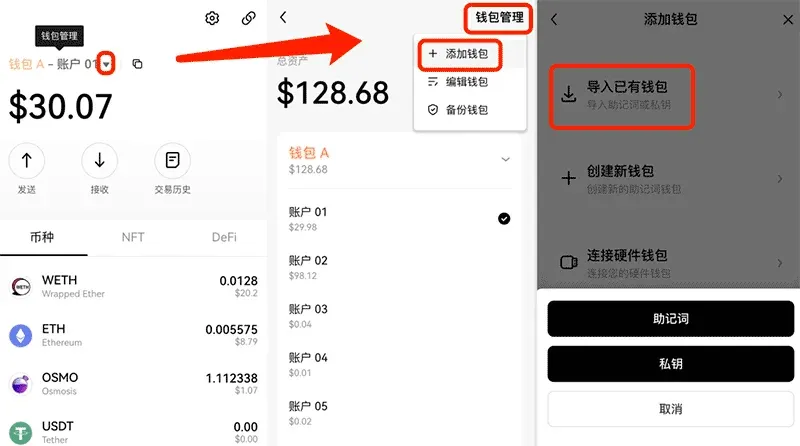
- Launch the OKX Web3 Wallet and tap the ▼ icon in the upper‑right corner;
- Navigate to Wallet Management → Add Wallet → Import Existing Wallet;
- Choose either Seed Phrase or Private Key and follow the on‑screen prompts to complete the import.
4. Why does the account shown after importing a seed phrase differ from what I expected?
A mismatch between the displayed account and the expected one usually stems from one of the following situations:
- You own multiple seed phrases and accidentally used the wrong one during import;
- The target account is a derived account under the current seed phrase. In this case, add more derived accounts within the wallet and look for the correct one;
- The seed phrase was not originally generated by the OKX Web3 Wallet. You will need to return to the original application that created the phrase and import it from there.
5. Why must seed phrases and private keys be backed up, and how should I back them up?
The seed phrase or private key constitutes the fundamental proof of ownership for your crypto assets. Losing them is equivalent to permanently losing the associated funds. To back them up:
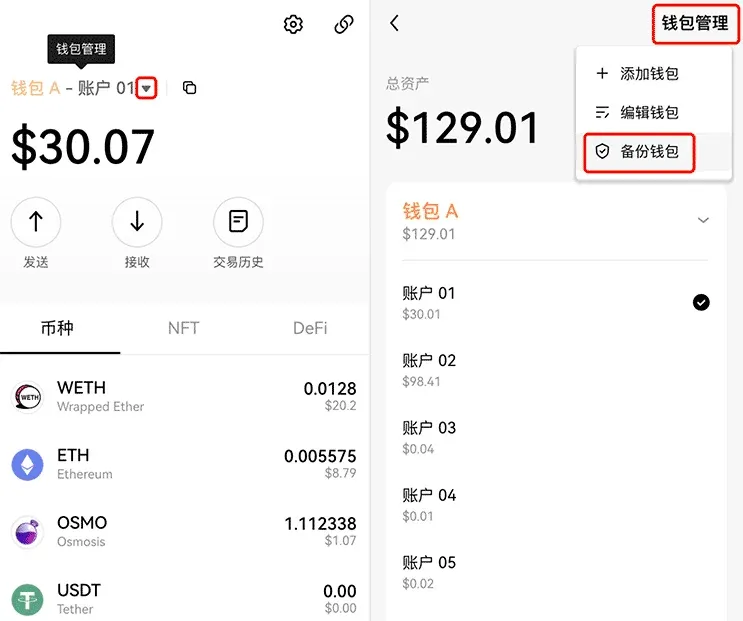
- Open the OKX Web3 Wallet → tap the ▼ icon in the upper‑right corner → Wallet Management → Back Up Wallet;
- Choose either Seed Phrase or Private Key and export the information for safe storage (offline, preferably on paper or a hardware device).
6. Can a previously created account be deleted?
Blockchain architecture guarantees that once an address is generated on‑chain it cannot be destroyed. If you merely want to “hide” an account from the wallet UI, you can do so by:
- For derived accounts created from a seed phrase (e.g., accounts 01‑10 under wallet A), to remove account 05 you must delete the entire wallet A from the device and then re‑import the same seed phrase; the unwanted derived account will no longer appear.
- Wallets imported via a raw private key do not support additional derived accounts, so you can simply delete that wallet entry.
7. Why can’t I find a particular token in the wallet?
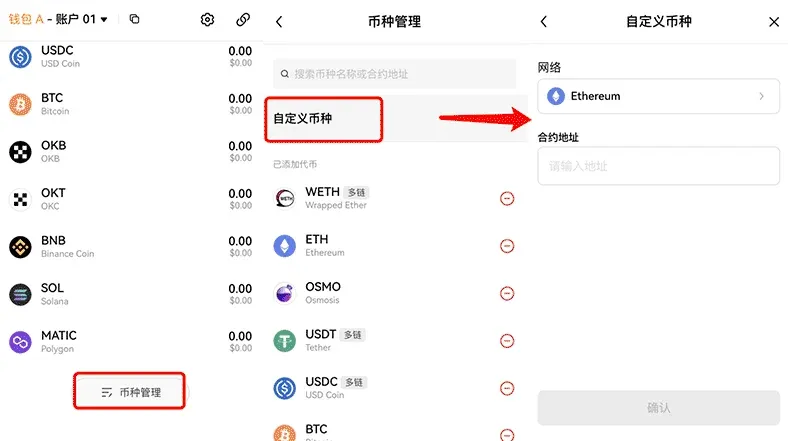
If the token you wish to receive is not listed under Added Tokens, scroll down on the wallet’s main screen to Token Management → Custom Token. Select the appropriate network, input the contract address, and confirm. The token will then appear in your asset list.
8. How to cancel or speed up a pending Ethereum transaction?
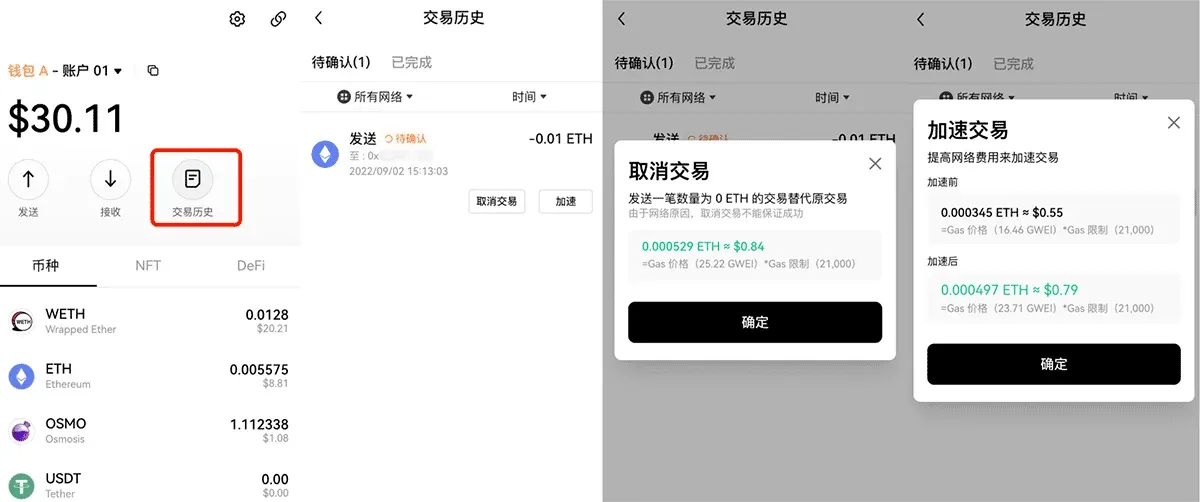
Go to the wallet’s home page, open Transaction History, locate the pending transaction in the Pending section, and tap either Cancel Transaction or Speed Up to modify the transaction’s nonce or gas price accordingly.
9. Do I still have to pay network fees if a transaction fails?
Yes. Whether the operation is a simple transfer, a smart‑contract interaction, or any other on‑chain activity, the network consumes computational resources. Consequently, a miner or validator must be compensated with a gas fee. The fee is collected by the blockchain itself; the wallet does not issue refunds.
10. Can funds be recovered if I entered the wrong address when sending?
The immutable nature of blockchain means that once a transaction is confirmed on‑chain, the assets cannot be automatically reversed. If you entered an incorrect address, you may try the following avenues:
- If the destination address belongs to another exchange or custodial service, contact that platform’s support team and request a return of the funds;
- If you sent the assets to a contract address by mistake, reach out to the project’s team to see whether a manual refund is possible.
11. How to change the wallet’s language settings?
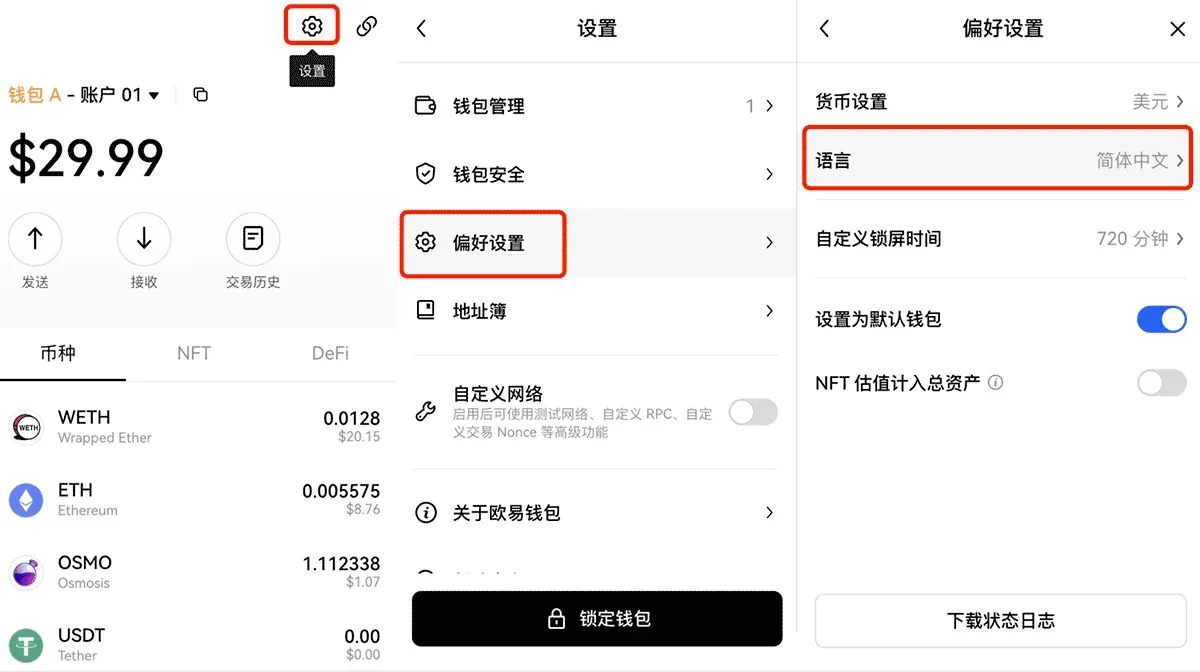
Open the OKX Web3 Wallet → Settings → Preferences → Language, then select the desired language from the list.
12. How can I submit feature suggestions or improvement feedback to the official team?
We welcome user feedback and ideas for enhancement. There are two primary channels:
- Tap the person icon in the top‑left corner of the wallet → Help Center → FAQ. If your question is not answered, scroll down and click Start a Conversation to chat with online support;
- Join the OKX Discord community and leave your feedback in the appropriate channel.
---
What Is the OKX Web3 Wallet?
The OKX Web3 Wallet is a decentralized, non‑custodial multi‑chain asset‑management solution. It integrates a cross‑chain DEX, DeFi entry points, and a heterogeneous multi‑chain aggregation trading platform. With a single seed phrase, users can simultaneously manage assets across more than 60 major networks—including Ethereum, OKTC, BSC, Polygon, and others—on iOS, Android, and web interfaces.
Key advantages of using this wallet include:
- Full ownership of assets – withdrawals do not require platform approval, resulting in faster access to funds;
- One‑click access to over 1,000 DApps, providing a “single‑stop” Web3 gateway;
- Support for multiple seed phrases and derived addresses, ensuring compatibility with a broad multi‑chain ecosystem.
The OKX Web3 Wallet has undergone a private‑key security audit by Slowmist. The platform never stores users’ passwords, seed phrases, or private keys, nor does it transmit these sensitive details to any external servers.
In the current trend of moving from single‑chain to multi‑chain interoperability, possessing an OKX Web3 Wallet allows seamless switching among Ethereum, Arbitrum, OKC, BSC, Aptos, and many other networks, eliminating the need to create separate wallets for each chain and truly delivering a “one‑wallet‑to‑play‑the‑entire‑Web3” experience.
Note: Crypto gains may be subject to taxation in your jurisdiction. Users should consult local tax regulations or a qualified tax professional. For U.S. residents, trading on Binance must be conducted via Binance.US, which complies with U.S. regulations, while the global Binance platform is not available to them. Transactions involving fiat on‑ramps typically use USD, SEPA, or SWIFT transfers, depending on the provider.
Related Reading
- Is the OKX Web3 Wallet Secure? In‑Depth Security Review
- OKX Web3 Decentralized Wallet Beginner’s Guide 2026
- Send & Receive Crypto Transactions with Modern Wallets
💡 Register on Binance with referral code B2345 for the maximum trading fee discount. See Binance complete guide.



