
 Bitaigen Research
 In this article we outline methods for tracking Solana wallets, compare the functional differences between blockchain explorers and portfolio trackers, and highlight several practical tools. With step‑by‑step guides and scenario analyses, readers can quickly start monitoring asset flows and spotting potential trading opportunities. If you want to know which tool best fits your needs, keep reading for a complete roundup.
Can I track a Solana wallet?
Yes. With a blockchain explorer or a dedicated asset‑management tool, any public Solana address can be monitored. These platforms display token balances and transaction histories in real time, helping users catch the early movements of emerging meme tokens.
Because the blockchain itself is a public ledger, every fund movement is permanently recorded and can be traced. You can instantly follow the actions of a specific trader or watch assets move between different protocols. This open‑access model makes monitoring relatively easy and provides a clear view of how crypto assets circulate among accounts.
Solana Explorer vs. Portfolio Tracker
Blockchain explorers (such as Solscan, SolanaFM) act as the network’s technical ledger, allowing users to verify transaction hashes and view a complete account history. They are suited for confirming whether a transfer has been successfully written on‑chain.
Portfolio trackers and specialized platforms like Jupiter, GMGN aggregate cross‑protocol data and display total asset value in real time. By presenting multi‑chain holdings in a unified interface, they simplify portfolio management and help users accurately gauge market capital flows.
| Feature | Solana Explorer | Portfolio Tracker |
|---------|-----------------|-------------------|
| Primary purpose | Verification & ledger audit | Asset management & active trading |
| Data depth | Detailed raw transaction logs & hashes | Summarized balances & P&L metrics |
| Focus | Basic staking & simple transfers | Complex lending, LP pools, limited‑partner funds |
| Target audience | Developers, technical auditors | Investors, retail market participants |
Top Solana Wallet Trackers
When choosing a monitoring tool, you should decide based on your use case. Below are three platforms that enjoy strong reputations in the industry, each catering to different needs.
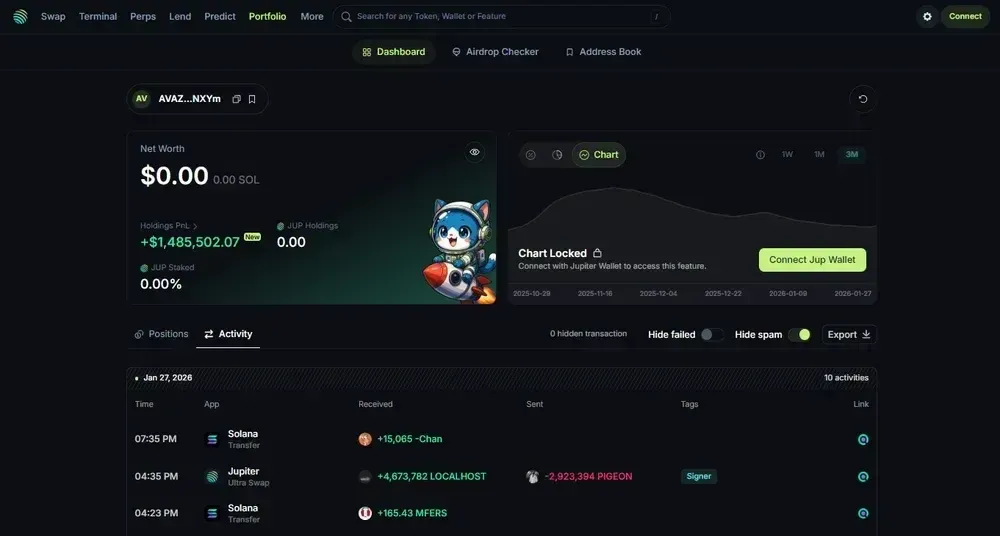
1. Jupiter Wallet (Overall best Solana wallet tracker)
Jupiter recently embedded Sonar Watch’s tracking functionality directly into its trade interface, providing a more intuitive experience. Users can view assets and execute trades on the same screen, dramatically simplifying asset management within Solana’s DeFi ecosystem.
The dashboard automatically lists balances across various lending protocols and liquidity pools, so you don’t need to jump to other sites to keep tabs on positions in Kamino, Marginfi, and similar platforms. Because it leverages the largest on‑chain aggregator, price data stays up‑to‑date, and new or verified tokens are added faster than on most independent trackers, helping you monitor portfolio value in real time and avoid price lag.
Pros
- Deep integration with the most popular Solana token‑swap aggregator.
- Automatic detection of assets from multiple lending and liquidity protocols.
- High‑precision price data for virtually all verified tokens.
Cons
- Lacks the advanced “sniping” features found in specialist trading wallets.
- Historical P&L tracking is less granular than some competitors.
- Mobile UI is still evolving, so the experience may feel rough at times.
2. GMGN (Excellent for tracking whales)
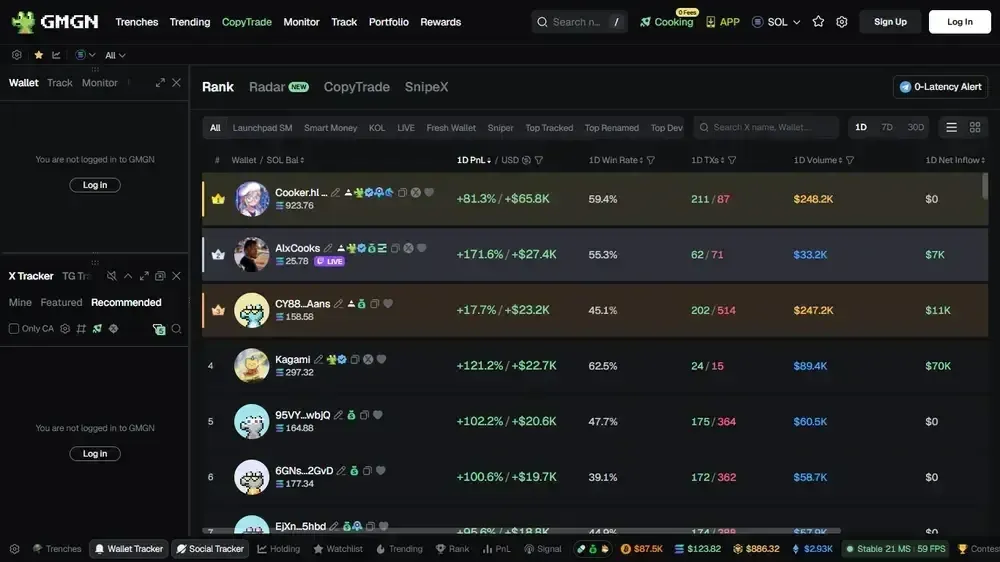
GMGN lets users lock onto specific Solana addresses and monitor the flow of large‑volume tokens. The platform focuses on capturing the movements of “smart money,” helping you spot whale buying activity and discover early trades of hot meme tokens before they gain broad attention.
The interface overlays buy‑sell pressure directly on charts, allowing you to filter by transaction size and discard low‑value bot activity, so you can concentrate on trades that truly move market prices. Advanced users can also receive alerts from signal bots when new wallets are created, copy high‑performing addresses, and automatically execute strategies based on verified performance, turning raw on‑chain data into actionable trade signals.
Pros
- Clear visualization of emerging tokens and smart‑money flows.
- Built‑in execution tools for rapid buying and selling.
- Filters out fake trades, showing only genuine volume and market activity.
Cons
- High information density can be overwhelming for beginners.
- Whale‑focused, with limited long‑term portfolio‑management features.
- Configuring advanced filters requires a modest technical background.
3. Phantom (Ideal for personal wallet tracking)
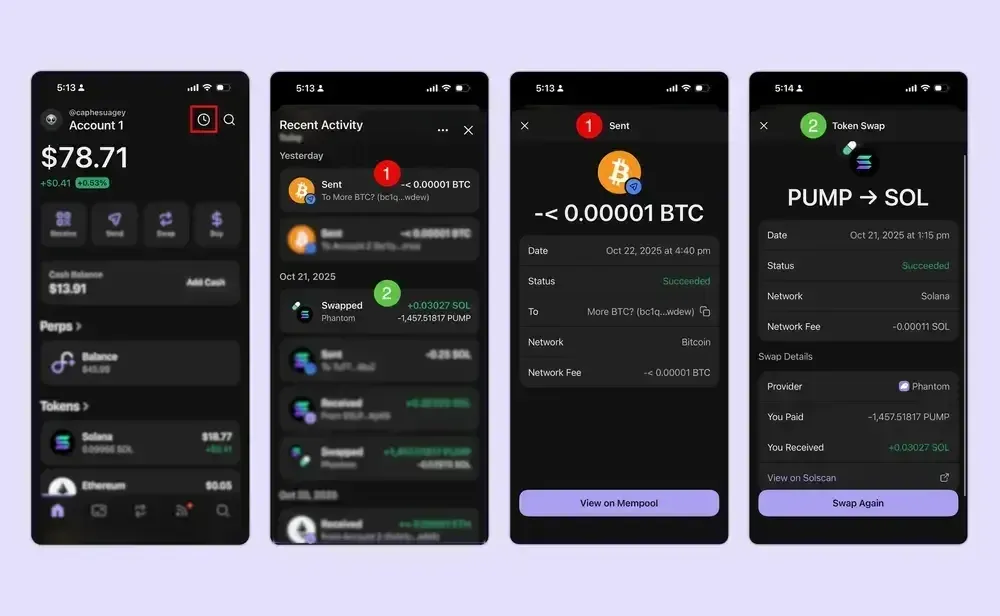
Phantom includes a native Solana asset manager that displays the tokens and collectibles you hold. This tracker eliminates the need to click external links, allowing you to view balances safely on any device.
The wallet automatically hides spam NFTs and scam tokens, keeping your asset list tidy; it also provides floor‑price lookups for digital art and a 24‑hour total‑value summary, making it a reliable tool for everyday use. Users with multiple accounts can switch between them instantly, obtaining a merged view of all holdings. While it lacks deep DeFi analytics, its built‑in tracking convenience remains the safest way to view assets.
Pros
- Fully local; no external site connections required, offering high security.
- Automatic filtering of fraudulent tokens and junk NFTs.
- Easy multi‑account switching for a quick overall snapshot.
Cons
- Does not support complex yield farming or LP reward tracking.
- Historical data is limited compared with dedicated portfolio‑management tools.
- Lacks export of transaction data for tax‑reporting purposes; remember that crypto gains may be taxable in your jurisdiction, so you may need to keep separate records for SEPA/SWIFT or other fiat‑conversion reporting.
How to Use a Solana Wallet Tracker
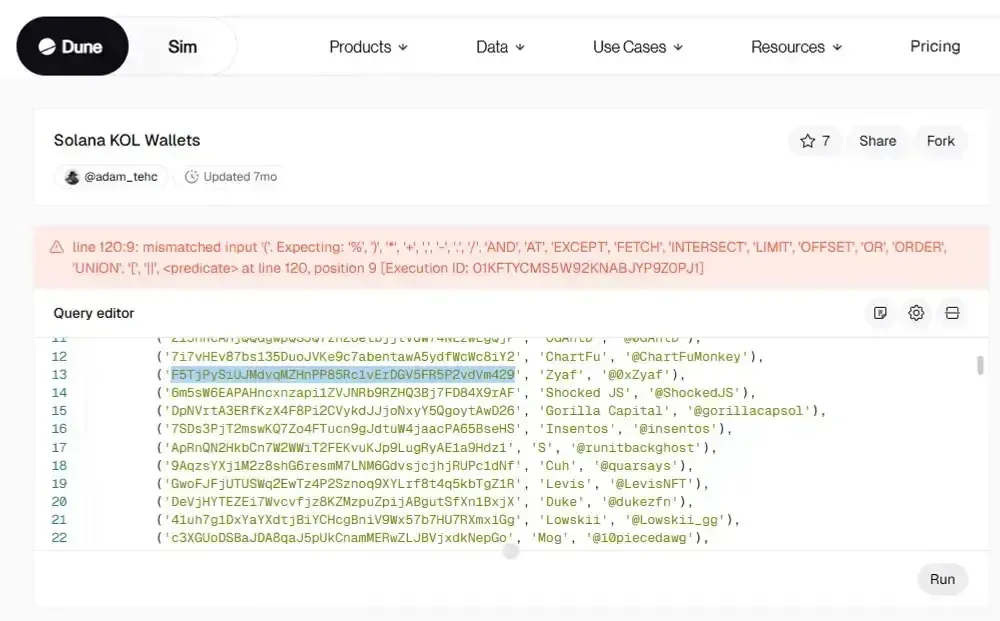
A few simple steps can turn raw on‑chain information into readable data. The example below uses Ansem to illustrate how to analyze any address:
- Obtain the public address: Search for the target Solana leader’s public key on a Dune Analytics dashboard and copy the address for further queries.
- Query via a blockchain explorer: Open SolanaFM or Solscan, paste the copied address, and ensure the network is set to Mainnet so you can view live on‑chain activity.
- Check the holdings overview: In the asset summary section, review the total balance and individual token quantities to quickly confirm the current portfolio composition.
- Review recent transactions: Switch to the Transactions tab and scroll through each transfer record; this helps you understand the account’s trading strategy and activity level.
How to Track Solana Whales and Smart Money
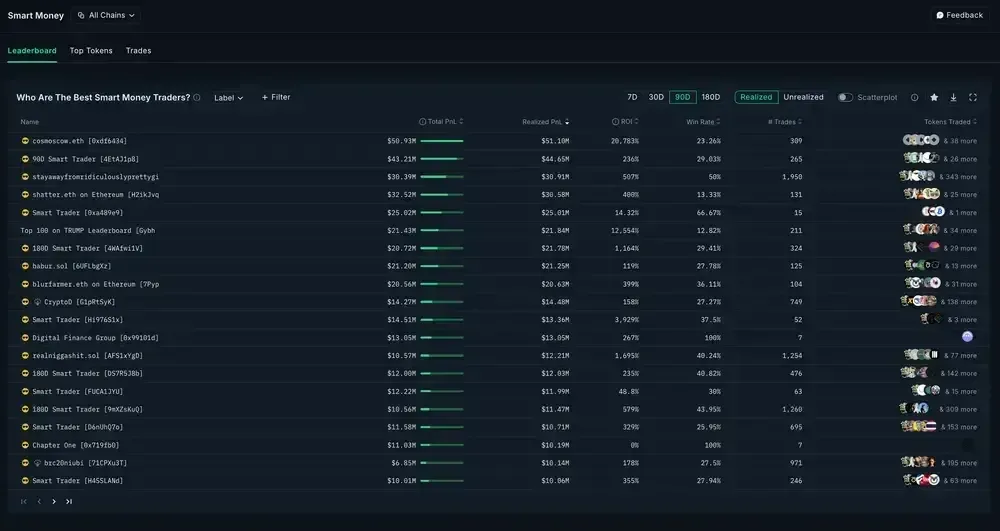
Identifying wallets with a consistent profit record is key to spotting smart money. Nansen currently offers the most comprehensive Solana monitoring suite, specifically labeling high‑performing addresses as “Smart Money.”
The platform rates wallets based on on‑chain profitability, helping users differentiate ordinary retail participants from institutional whales executing single trades worth up to $5 million. Nansen provides a dedicated Solana dashboard that shows real‑time inflows into new assets. By watching which tokens these high‑quality wallets accumulate, you can capture potential meme token rallies before they hit mainstream markets.
As of 2026, Nansen’s professional tier costs $69 per month (payable via USD, SEPA, or SWIFT). Subscribing grants you full access to the data needed to follow these large holders, whose combined assets across decentralized protocols and exchanges exceed $100 million.
Solana Wallet Alert Services
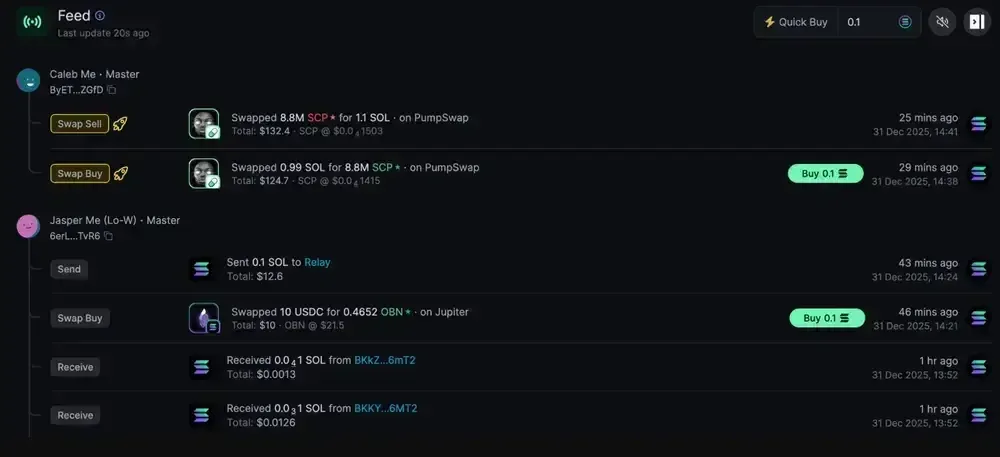
Automatic notifications let you stay informed without constantly checking the blockchain, ensuring important events reach you instantly.
Common Solana alert services include
- Cielo: Monitors designated wallet addresses and sends instant alerts to Telegram or Discord when large transactions are detected.
- Birdeye: Allows you to set custom price and volume alerts for any token, helping you catch sudden market moves.
- Helius: Built on webhook technology, provides high‑speed notifications for complex on‑chain events and account changes, aimed at developers and power users.
Are Solana Wallet Trackers Safe?
Read‑only Solana explorers are safe because they only require a public key to query information; no private key or seed phrase is needed, preserving fund security while still providing real‑time visibility of every on‑chain transaction.
When a tracking platform asks you to connect a wallet for advanced features or portfolio management, the risk level rises. Always verify that you are using an official site and avoid clicking malicious contracts that could trigger asset transfers. Never approve unknown transaction requests.
Privacy is another consideration: a public address exposes its entire transaction history and holdings. If you care about anonymity, avoid linking a real‑world identity to wallets holding significant amounts (e.g., over $3,000 USD). Maintaining a reasonable digital distance is a basic security practice.
Final Thoughts
Effective asset monitoring in the Solana ecosystem requires combining the transparency of blockchain explorers with the analytical power of dedicated portfolio dashboards. This hybrid approach lets you keep tabs on personal holdings while also understanding broader market capital flows.
By following standout wallets and enabling relevant alerts, you can capture emerging trends promptly and add a layer of protection to your assets during volatility. At the same time, steer clear of unknown websites to safeguard your data, and remember to comply with any local tax obligations when reporting crypto gains.
The above constitutes a complete rewrite of “Can I track a Solana wallet? How to track? Best Solana wallet tracker roundup.” For more details on Solana wallet tracking tools and methods, stay tuned to Bitaigen’s other articles!
💡 Register on Binance with referral code B2345 for the maximum trading fee discount. See Binance complete guide.



