
 Bitaigen Research
 From TokenPocket (TP) Wallet to OKX (formerly OKEx), transferring USDT only requires obtaining the appropriate deposit address on OKX for the chosen chain (TRC‑20 or ERC‑20), then selecting the same chain in the TP Wallet, entering the address, and paying the required network fee. The transfer will be completed once these steps are followed.
In this article we walk you through the entire process of sending USDT from a TP Wallet to OKX. We break down the key stages—chain selection, address retrieval, network‑fee configuration—and provide screenshots and safety tips so that beginners can get started quickly, avoid common pitfalls, and complete the transfer smoothly by following the steps.
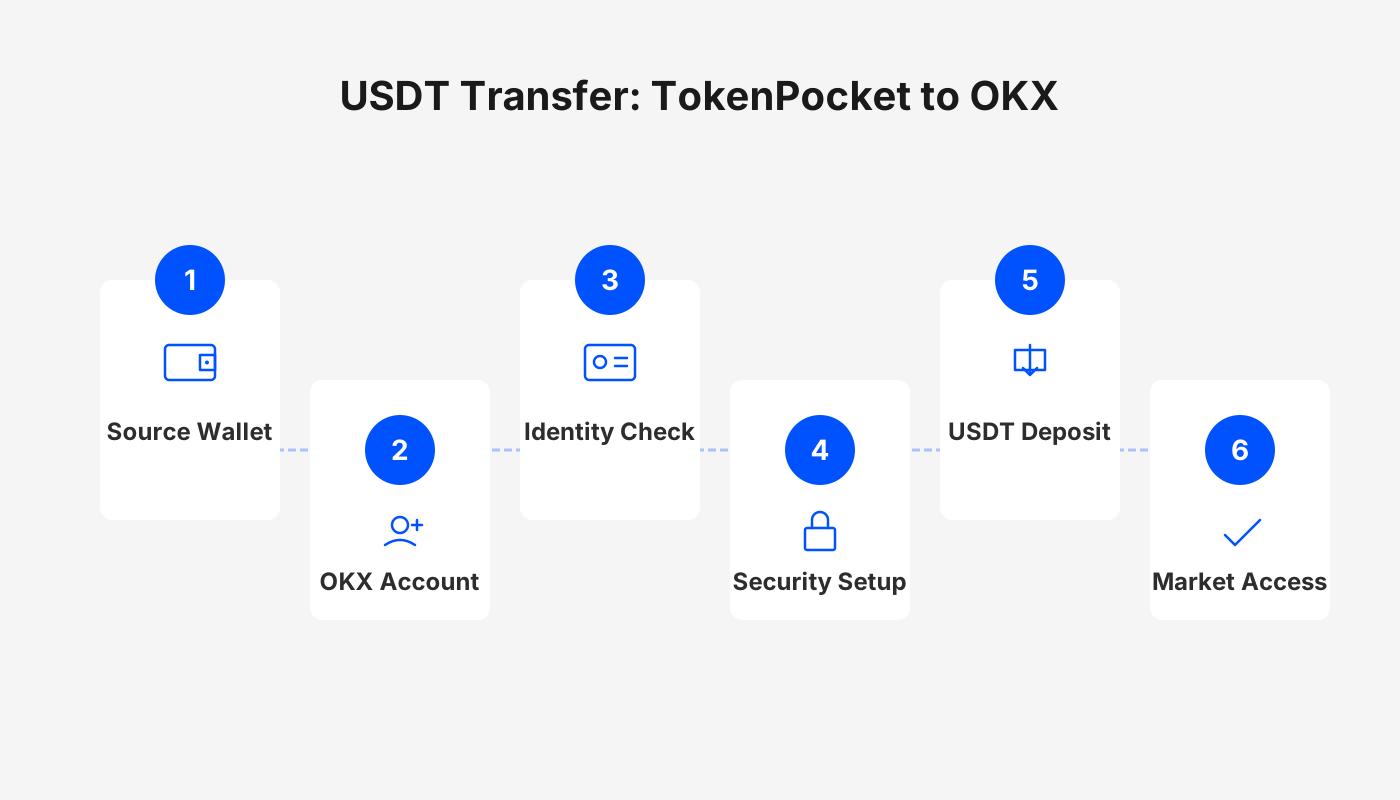
TP Wallet USDT Transfer to OKX – A Step‑by‑Step Guide
OKX side – Obtaining a TRC‑20 Deposit Address
- Open the OKX mobile app (official sign‑up | download page) and tap 【On‑Chain Deposit】 on the home screen.
- From the list of assets, select 【USDT】.
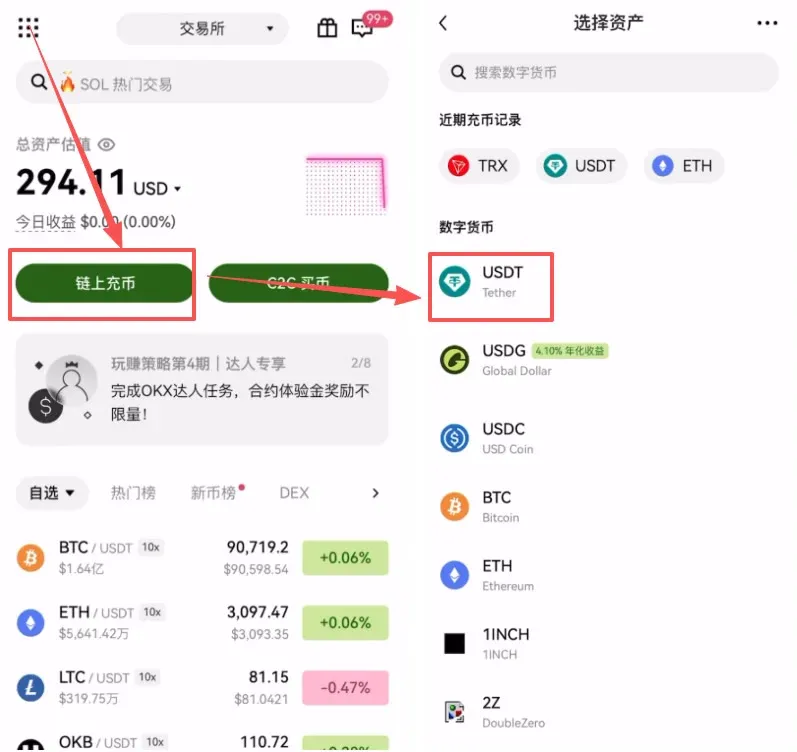
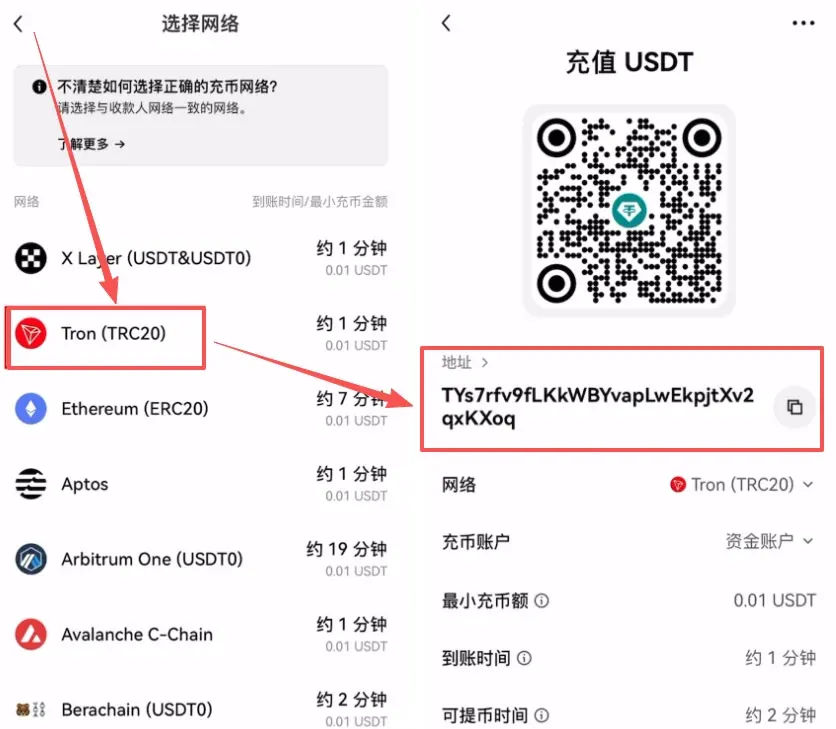
Key point: The chain you choose must match the chain you intend to use for the transfer. Below we demonstrate the lowest‑fee, most widely used Tron chain (TRC‑20).
- On the network‑selection screen tap 【USDT‑TRC20】. Your deposit address will appear; tap Copy to save it for later use.
TP Wallet side – Setting Up a TRC‑20 Transfer
- Return to TokenPocket and make sure you are in the Tron (TRX) wallet (different from the Ethereum wallet).
- In the asset list tap 【USDT】 → 【Transfer】.
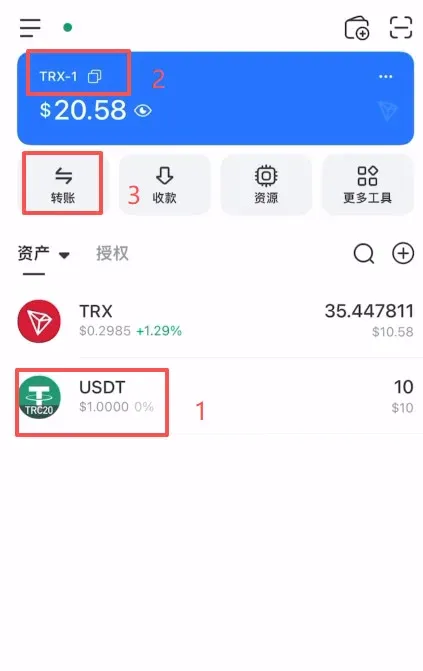
Core of a TRC‑20 Transfer – Network Fee and Confirmation
- Check your TRX balance: A TRC‑20 transfer requires a small amount of TRX to cover the network fee. If you have no TRX in the wallet, the transfer cannot be completed.
- Paste the OKX address you copied into the 【Recipient Address】 field, enter the amount you wish to send (you may choose “All”), verify the displayed network fee, and tap 【Confirm】.
- Enter your wallet password; the transaction will be processed and the funds will appear in OKX shortly.
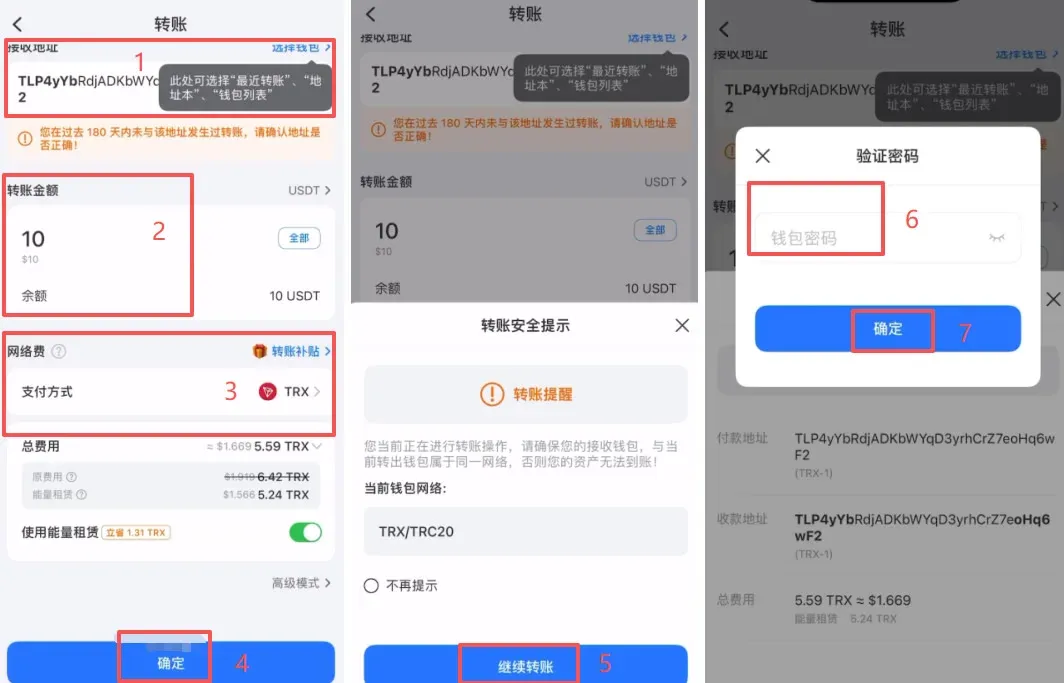
ERC‑20 Transfer Demo – Switching Networks and Getting the Address
- In the TP Wallet list, switch to the ETH (Ethereum) wallet, select USDT → Transfer.
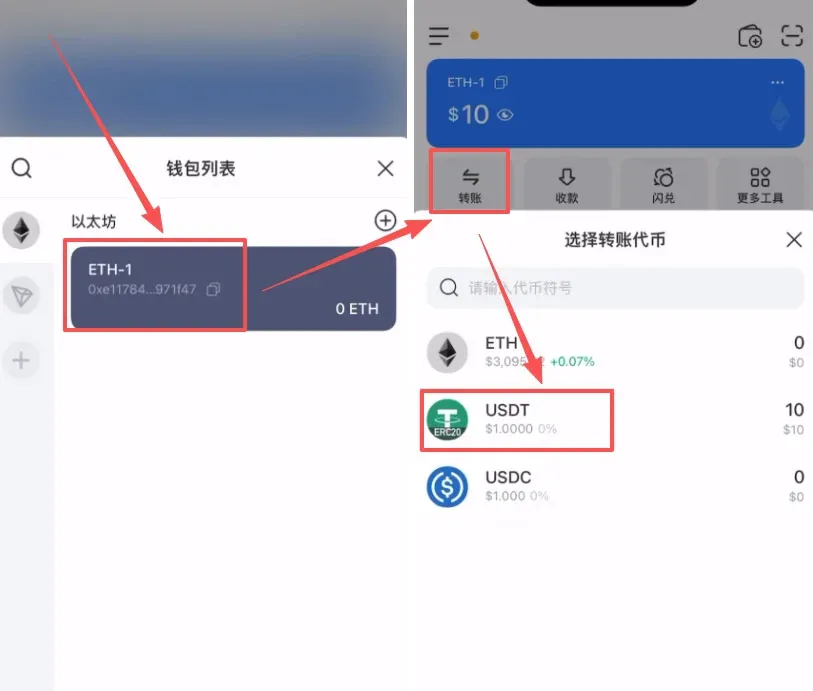
- Return to the OKX app, reopen the deposit page, and this time choose 【USDT‑ERC20】 from the network list.
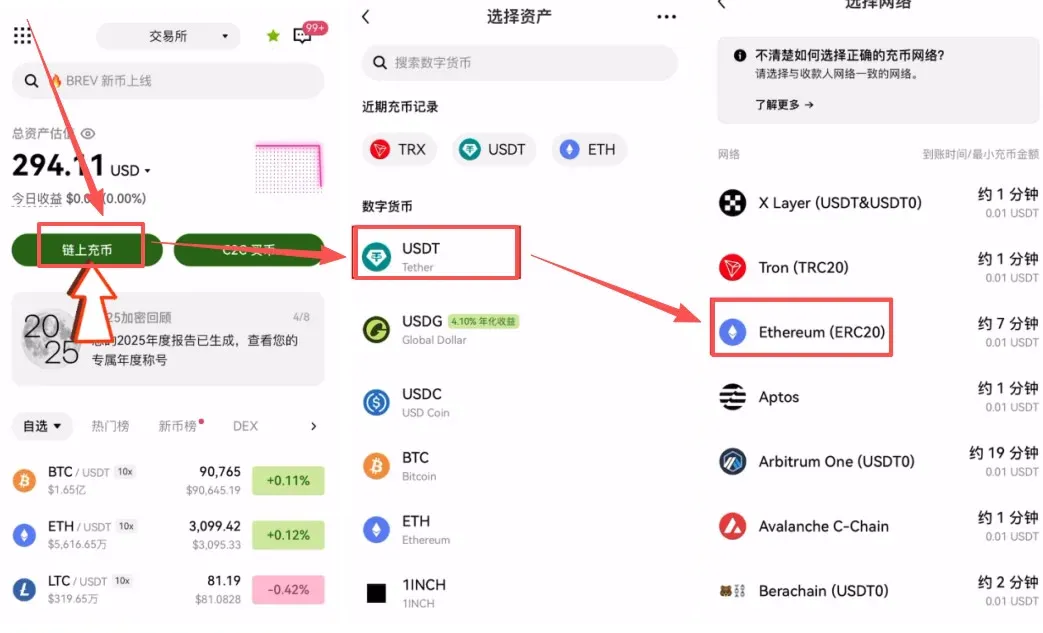
- The system will generate an Ethereum‑network deposit address; tap Copy.
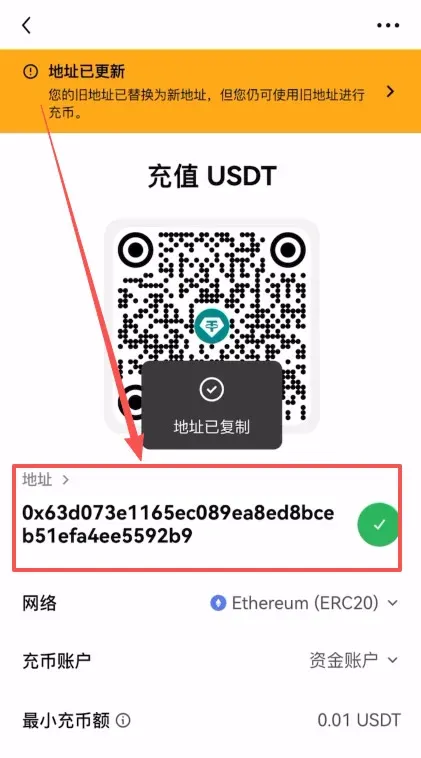
Core of an ERC‑20 Transfer – ETH Network‑Fee Notice
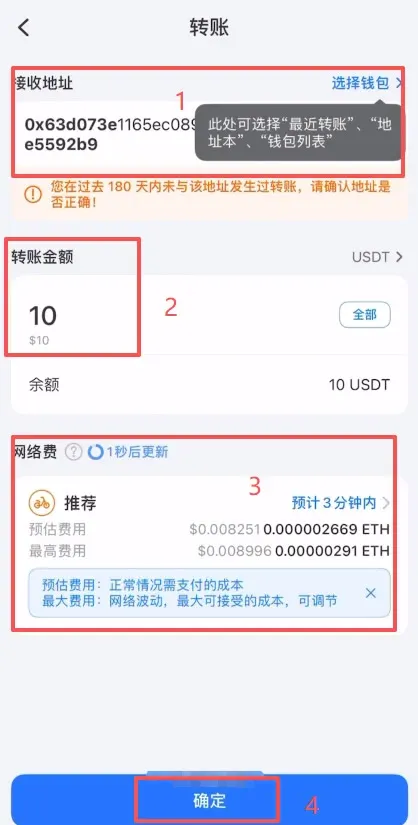
- Paste the ERC‑20 address you just copied, then enter the amount you wish to send.
- ERC‑20 transfers consume ETH as the network fee. Make sure your Ethereum wallet holds enough ETH, otherwise the withdrawal will fail.
- After confirming that all details are correct, tap Confirm, enter your password, and the transfer will be completed.
---
Additional Tutorials
- Complete 2025 OKX account registration + KYC verification illustrated guide
- OKX iOS app download instructions
- How to top‑up OKX via WeChat
- Full Bitcoin purchase workflow (using OKX as an example)
- Withdrawing USDT from OKX to a bank card (SEPA/SWIFT)
- TP Wallet mnemonic length, compatibility, and how to view it
- TP Wallet BTC transfer tutorial
OKX Web3 Wallet USDT Deposit Process
- Open the OKX Web3 wallet official sign‑up and tap 【Receive】.
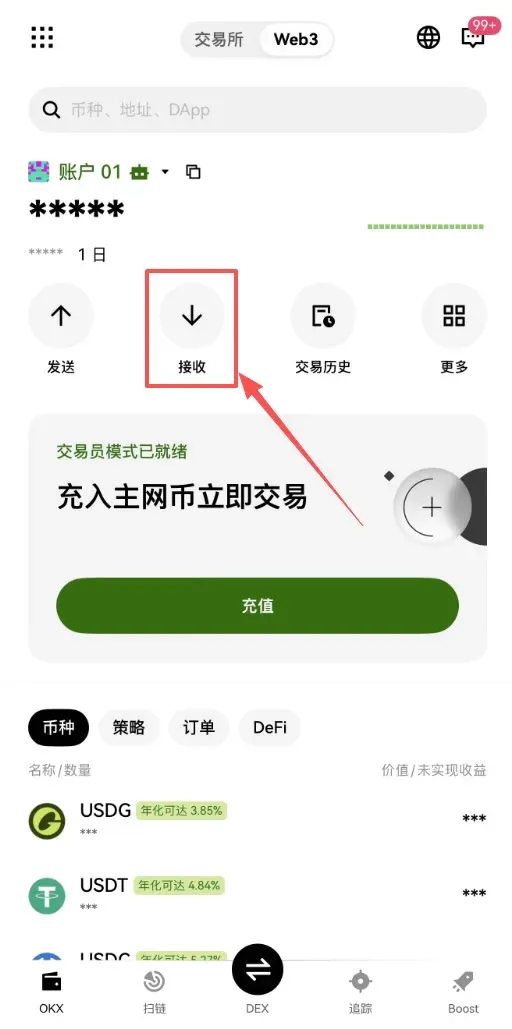
- On the asset‑selection page, tap 【Quick Withdraw from Exchange Account】, then choose 【USDT】.
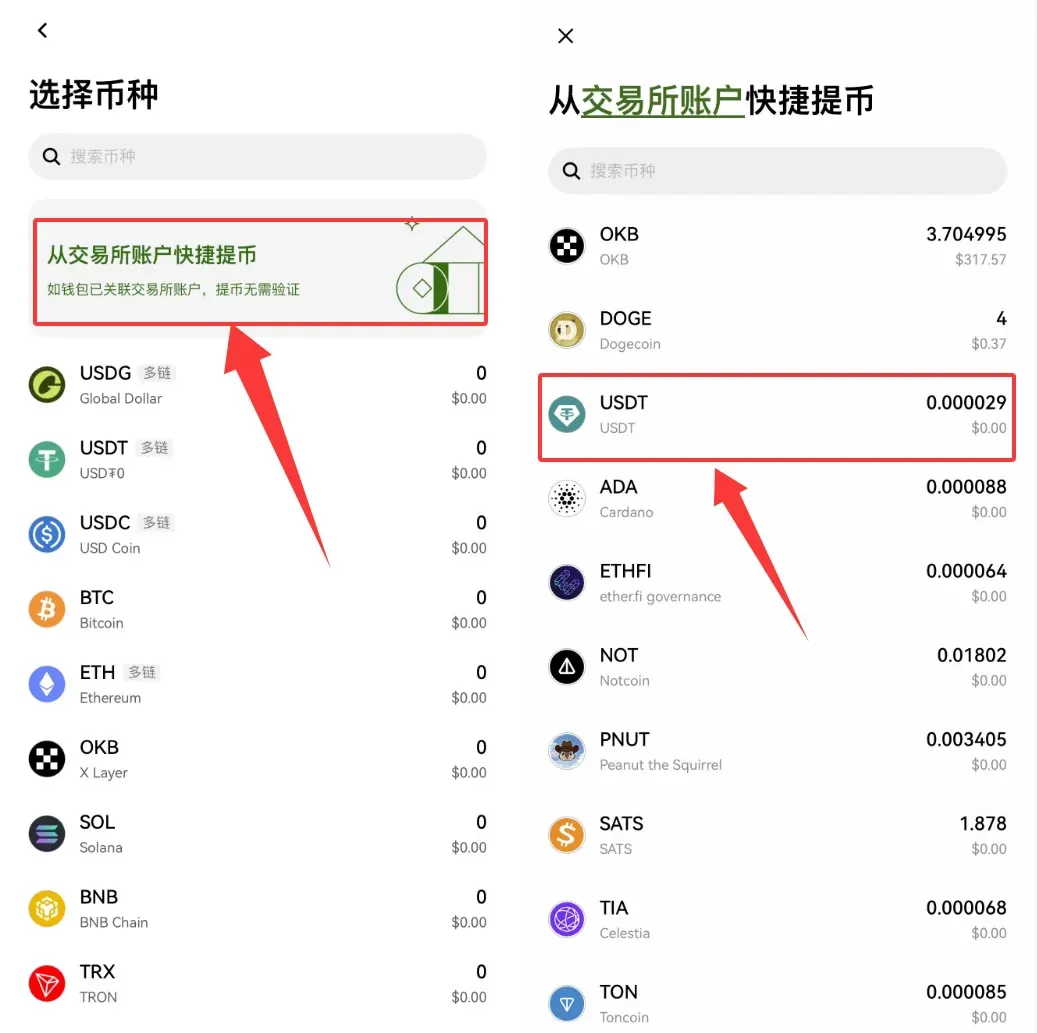
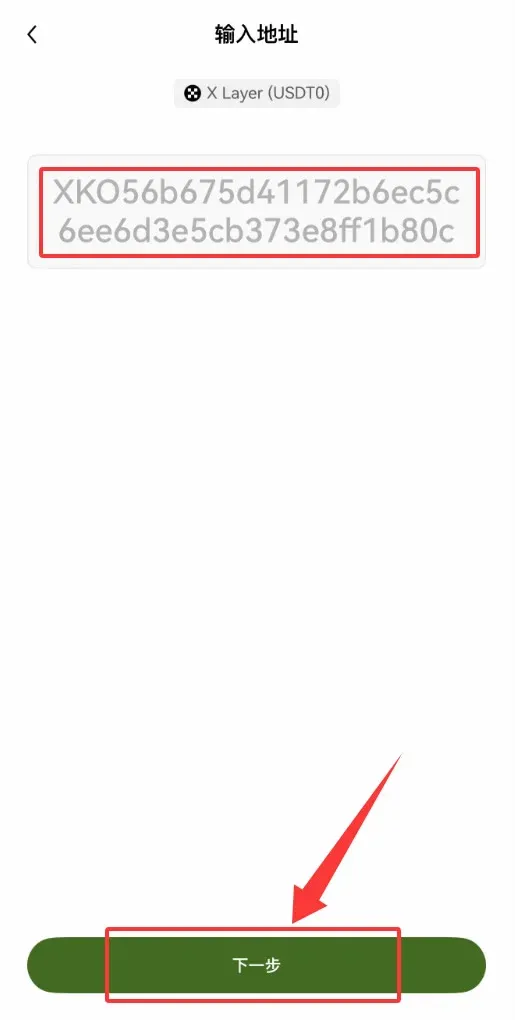
- Enter the network address; the system defaults to the X Layer network. Confirm and tap 【Next】.
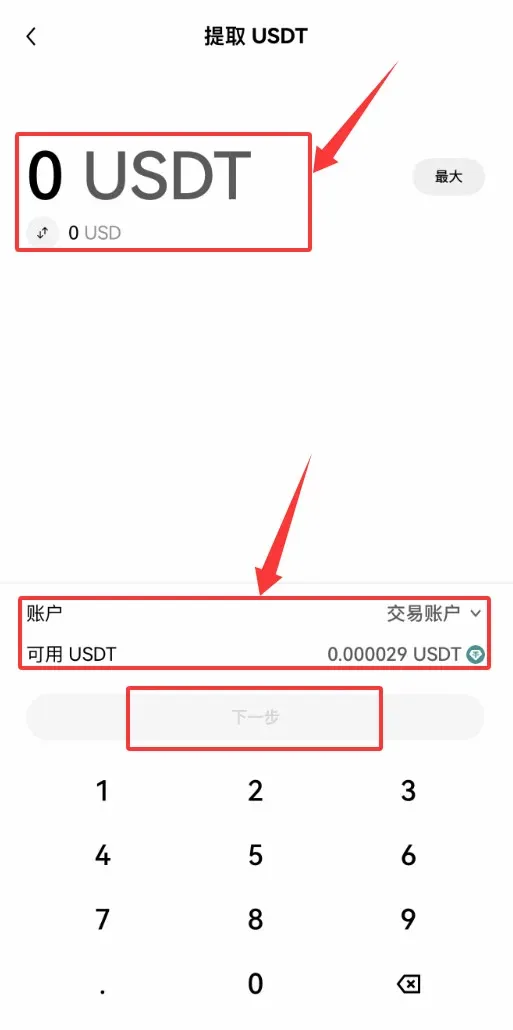
- On the USDT withdrawal page, specify the amount to deposit, verify the available USDT balance, and tap 【Next】 again to complete the deposit.
Advantages of Sending USDT from TP Wallet to OKX
Moving assets from TokenPocket to the OKX Web3 Wallet creates a seamless bridge between a centralized exchange and the decentralized ecosystem. Key benefits include:
- Consolidated asset management: One interface to oversee holdings across multiple chains (Ethereum, BSC, Polygon, etc.).
- Integration of exchange and Web3: After withdrawing from TP, you can directly connect to OKX DApp services, taking part in DeFi, liquidity mining, and other on‑chain activities.
- Leverage OKX Web3 wallet features: Multi‑chain support, cross‑platform experience (mobile app, browser extension, web portal), and deep integration with the OKX exchange.
- Security and self‑custody: Private keys remain under your control, ensuring you retain full ownership of your funds.
- Access to broader on‑chain use‑cases: Interact with NFTs, lending protocols, and more without constantly switching wallets.
In short, a TP → OKX Web3 transfer moves your assets from a lightweight wallet to a more powerful Web3 entry point, enabling efficient allocation and multi‑scenario usage.
Important Considerations When Sending USDT from TP Wallet to OKX
The core principle is “select the correct token, select the correct network, double‑check the address, confirm the amount and fee.” Any mistake at any stage can result in permanent loss of funds, so meticulous verification is essential.
Critical Steps and Checklist
- Obtain the receiving address (OKX)
- Open the OKX app, go to 【Assets】 → select USDT → 【Deposit】.
- Key: choose the correct network (e.g., USDT‑TRC20, USDT‑ERC20, USDT‑BEP20). This network must match the one you will use in TP Wallet.
- Copy or scan the provided receiving address.
- Send funds from TP Wallet
- Launch TokenPocket, pick the USDT belonging to the appropriate chain.
- Tap 【Transfer】, paste the address you copied from OKX.
- Ensure the network matches, then input the transfer amount.
- Set or confirm the network fee (TRX for TRC‑20, ETH for ERC‑20) and verify you have enough balance to cover it.
- After double‑checking the address, network, and amount, enter your password to confirm.
Important Reminders
- Network matching is paramount: Addresses on different chains may look similar but are not interoperable; sending to the wrong chain can make recovery extremely difficult.
- Address accuracy: Even a single character typo can result in loss of funds.
- Test with a small amount: Before moving large sums, send 1 USDT as a test; once confirmed, proceed with the larger transfer.
- Contract version awareness: USDT exists under different contract standards on each chain (ERC‑20, TRC‑20, BEP‑20). Make sure you are using the correct one.
- Mnemonic backup: Prior to any transfer, ensure you have securely backed up the TP Wallet mnemonic phrase and private keys in case of accidental loss.
The above constitutes a complete, step‑by‑step “nanny‑level” tutorial for sending USDT from TokenPocket to OKX. For more TP Wallet withdrawal guides, please explore additional articles on Bitaigen (比特根).
*Note: Crypto gains may be subject to taxation in your jurisdiction. Consult a tax professional for advice relevant to your situation.*
Related Reading
- On‑Chain Earning on OKX: Step‑by‑Step Staking & DeFi Guide
- Buy USDT on OKX with Alipay Safely – Avoid Card Freezes
- Binance vs OKX: Which Crypto Exchange Is Better in 2024?
💡 Register on Binance with referral code B2345 for the maximum trading fee discount. See Binance complete guide.



