
 Bitaigen Research
 Halo Wallet is a digital‑asset management tool aimed at Chinese‑speaking users, emphasizing security, speed, and an intelligent experience. It focuses on the EOS mainnet, supports cross‑chain swaps and DApp payments, and is often referred to by its community as the “Alipay for EOS” or a “playground for applications and gaming DApps”.
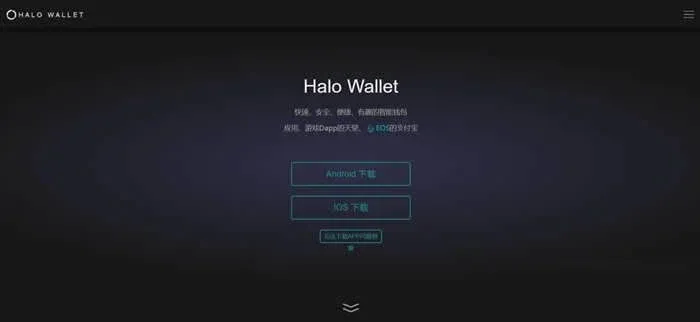
From the perspectives of security, cross‑chain capability, and the DApp ecosystem, we dissect Halo Wallet’s core functions and usage flow in depth, helping Chinese users get up to speed quickly and master asset‑management techniques. The following sections provide practical steps and key points to watch, so a careful read is recommended.
What is Halo Wallet?
Halo Wallet (also known as the halowallet wallet) is a decentralized wallet built for the EOS ecosystem, featuring the following core attributes:
- Fast and secure – Utilizes mature cryptographic techniques widely adopted in the industry to ensure transactions are both efficient and reliable.
- Convenient and smart – Comes with an integrated DApp marketplace, game portal, and one‑click address mapping, offering a user experience comparable to mobile payment solutions.
- Cross‑chain swapping – Allows free exchange of assets across multiple blockchains, catering to diversified user needs.
The wallet is designed specifically for EOS; its mobile app can push real‑time “candy” (reward) campaign notifications, helping users stay instantly informed about on‑chain events while providing a unified account‑management interface.
After downloading and completing registration, users can claim 500 points in the “Candy Center”. Voting for EOS Gravity‑Pool nodes earns an additional 1,000 points (100 points per vote, up to ten votes).
The conversion rate between points and EOS is 1,000 points = 1 EOS. In the future, points will also be exchangeable for Halo Wallet’s native token. Currently, points can only be used for payments inside DApps that the wallet opens, with the pricing unit expressed in EOS.
*Note: Converting points or EOS into fiat currency (e.g., USD) may constitute a taxable event in many jurisdictions. Users should consult local tax regulations and consider professional advice.*
Basic Workflow for Using Halo Wallet
1. Create or Import an EOS Wallet
- Visit the official website halowallet.io (downloadable via a web browser) and follow the on‑screen instructions to either create a brand‑new EOS wallet or import an existing wallet file.
2. Access the Asset Page to Manage RAM
- On the Assets page, tap [Vote] to open the account details, then select RAM and click [Buy] or [Sell].
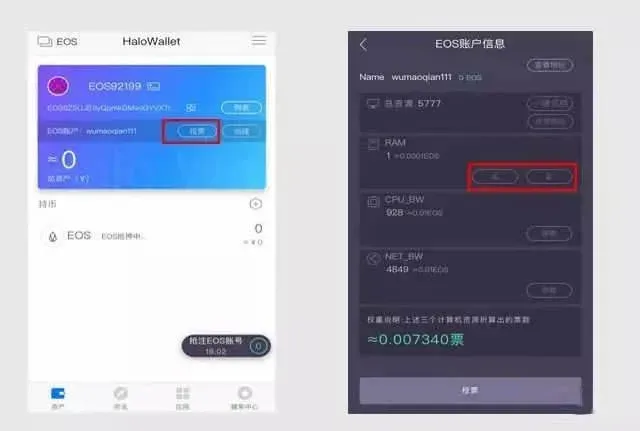
3. Enter the Amount and Confirm
- Input the amount of EOS you wish to buy or sell, then confirm. The system will automatically execute the transaction.
Within Halo Wallet, RAM can be used to help other accounts complete purchases; if you sell RAM, the EOS you receive belongs to the buyer.
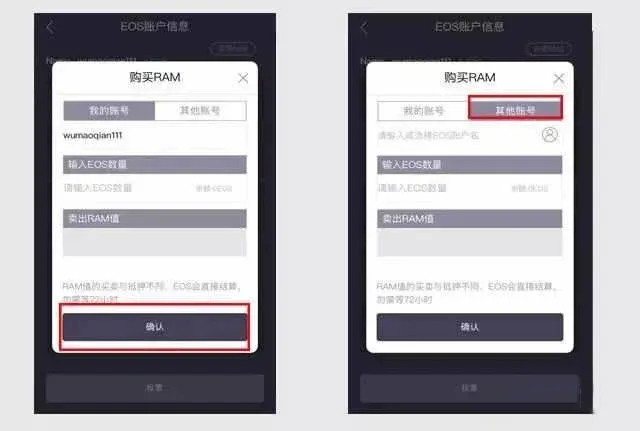
RAM Explained
RAM (Random‑Access Memory) is a resource required by the EOS network to execute smart contracts. It is obtained by staking EOS to the system account EOSIO, rather than through a traditional buyer‑seller marketplace. Each RAM transaction incurs roughly 0.5 % in fees, so buying and selling together amount to about 1 % total. Upcoming versions will feature real‑time RAM market data; stay tuned for that enhancement.
Summary and Further Follow‑Up
A digital wallet serves as the first key for ordinary investors to step into the blockchain world, making the choice of tool especially critical. Halo Wallet’s deep integration with the EOS ecosystem, extensive DApp support, and points‑incentive system provide users with a relatively complete usage scenario.
If you wish to explore the features of other digital wallets or stay updated with the latest industry news, follow Bitaigen. We will continue delivering professional blockchain content for you.
*When converting EOS to USD or other fiat currencies, users can employ major exchanges such as Binance (U.S. residents should use Binance.US). Fiat withdrawals typically use SEPA (for Euro‑zone transfers) or SWIFT (for international transfers).*
---
💡 Register on Binance with referral code B2345 for the maximum trading fee discount. See Binance complete guide.



