
 Bitaigen Research
 Binance (Binance) – Updated Account Registration and Identity Verification (KYC) Guide (January 2026)
Since its founding in 2017 by Changpeng Zhao (CZ) in Shanghai, Binance has followed a “global nomadic” path—setting up operations in Japan, Malta, Singapore and eventually establishing a core operating hub in the United Arab Emirates, where it has obtained multiple regulatory licences. As the platform with the highest worldwide trading volume, Binance’s native token BNB can be used to offset transaction fees and also serves as the primary gas for contracts on the Binance Smart Chain (BSC).
This article focuses on the latest account registration and identity verification (KYC) procedures as of January 2026, covering both mobile‑app and web‑based workflows, required documentation before registration, common issues, and security‑hardening recommendations to help newcomers complete account opening efficiently.

We have compiled Binance’s 2026‑latest registration and KYC workflow, outlining the critical steps for mobile and desktop, required documents, frequently asked questions, and security highlights, so beginners can quickly finish account creation. Read on to master the end‑to‑end process.
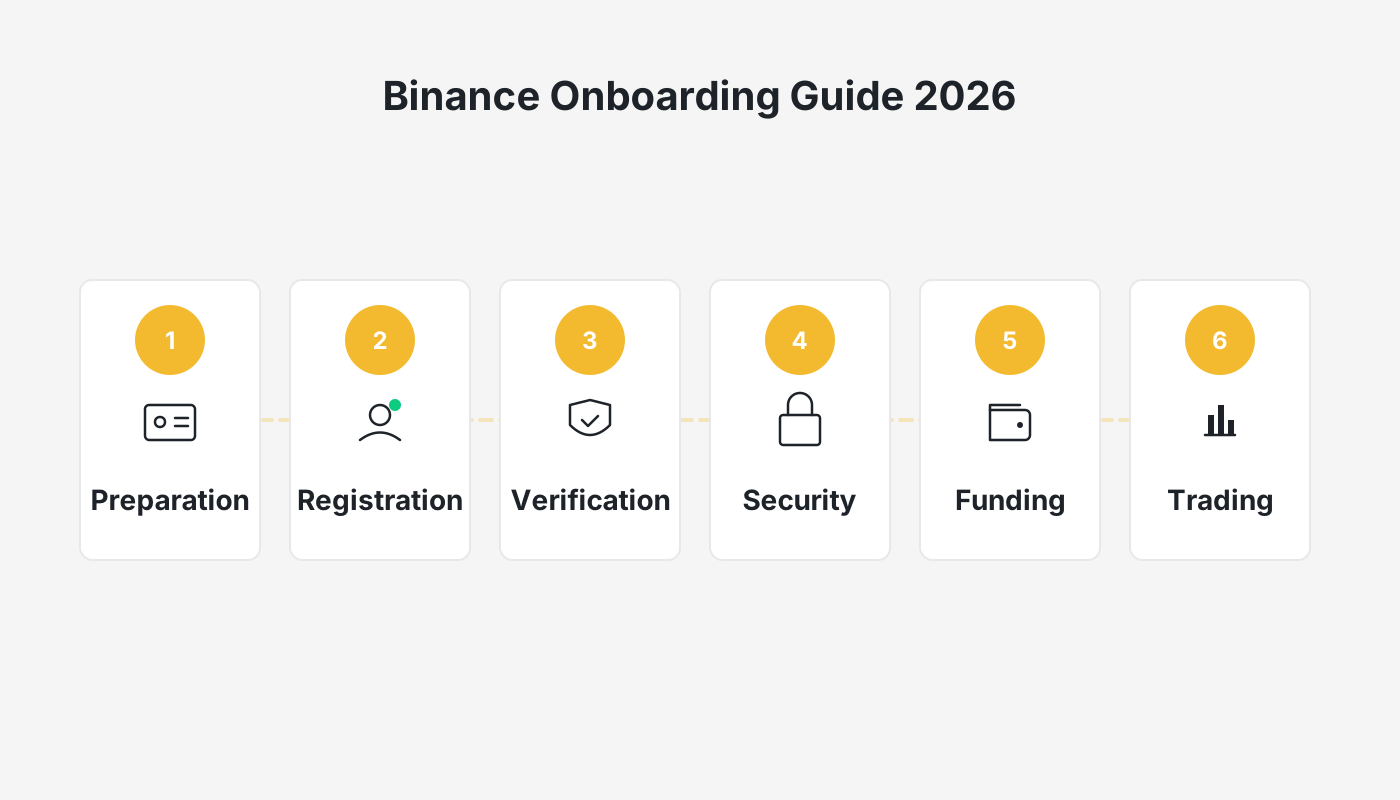
Preparatory Checklist
Before you start the registration, make sure the following items are in order:
- Device and Network
- It is recommended to use an Android or iOS smartphone (the official app) for the smoothest experience, although you may also complete the process on a computer via the official website.
- Ensure a stable internet connection; preferably stay on a reliable Wi‑Fi network or mobile data and avoid frequent IP changes during the process.
- Identification Documents
- Mainland China residents must provide high‑resolution front‑and‑back photos of their second‑generation ID card. International users may use a passport, driver’s licence, or other government‑issued ID.
- Personal details (full name, date of birth, nationality, residential address) must match exactly what appears on the selected ID document.
- Contact Information
- A mobile phone number is required to receive verification codes; an email address is needed for account recovery and important notifications.
- Security Baseline
- Choose a strong password that is at least 12 characters long and includes uppercase letters, lowercase letters, numbers, and special symbols.
⚠️ Friendly reminder: Binance’s service policy for users residing in mainland China may change without prior notice. Please verify the latest compliance announcement on the platform before you register.
1. Download and Install the Binance APP (Recommended)
Official Sources
- Android: Visit the official Binance site (www.binance.com), scroll to the bottom of the page and click “APP Download.” Choose the Android version. Do not download from third‑party app stores to avoid malicious software.
- iOS: You will need an overseas Apple ID to log into the App Store, then search for “Binance” and install the official app.
Installation Details
- Android devices must enable “Allow installation from unknown sources” in the system settings before the APK can be installed.
- After installation, launch the app and read and accept the User Agreement.
Reference tutorials:
- Help article “Full Process for Downloading the Binance APP”
- “How to Register an Overseas Apple ID and Download the iOS Binance App”
2. Account Creation and Basic Verification
2.1 Start Registration
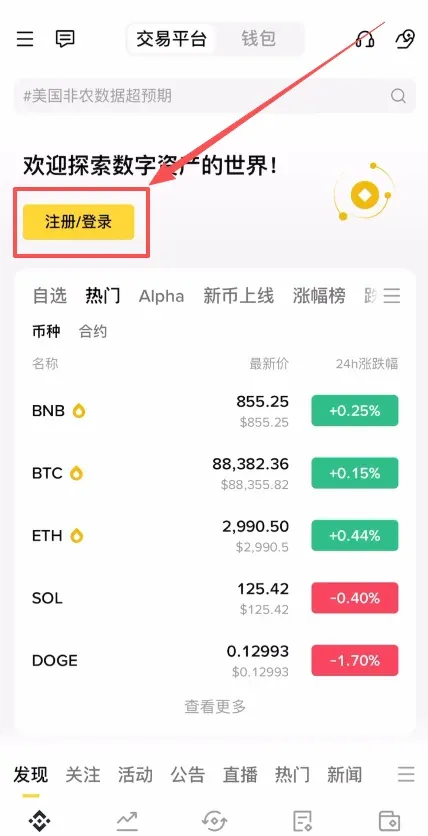
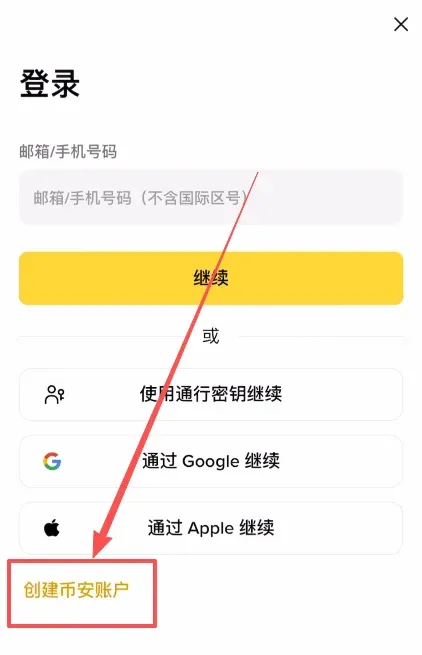
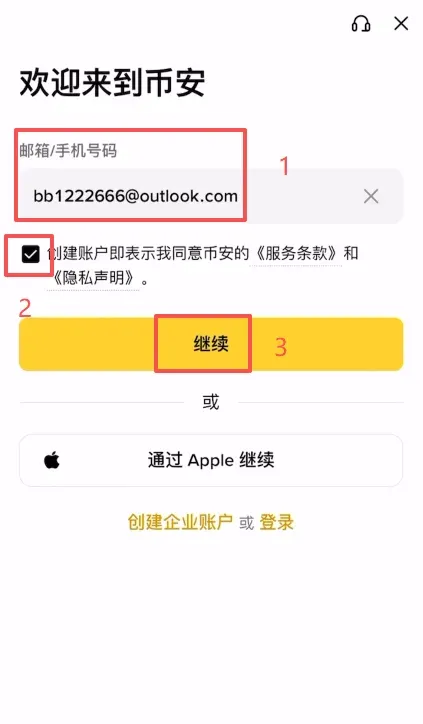
Open the installed Binance APP, tap the 【Register / Login】 button at the top‑right corner of the home screen, and then select 【Create a Binance Account】.
2.2 Choose Registration Method
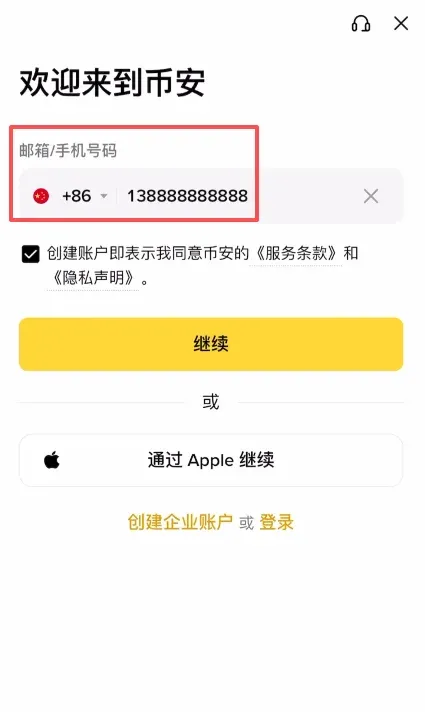
You may register using a mobile phone number (including the Chinese country code +86) or an email address. To improve email deliverability, it is advisable to use an overseas email service such as Outlook or Gmail; domestic services like 163.com or QQ Mail are also accepted.
2.3 Email Verification Code
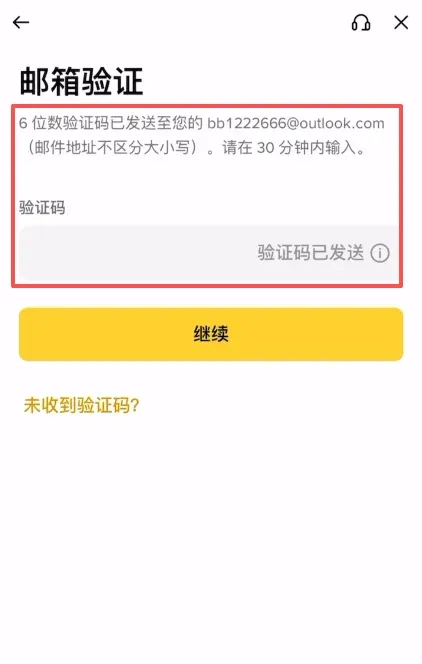
The system will send a verification code to the entered email address. Open your mailbox, copy the code, and paste it into the app to complete the verification step.
2.4 Set Login Password
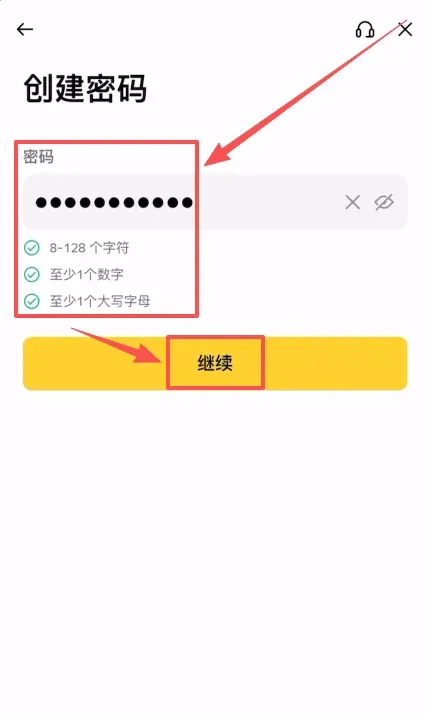
Your password must meet the following criteria: minimum 8 characters, containing at least one digit and one uppercase letter. After entering a compliant password, tap 【Continue】.
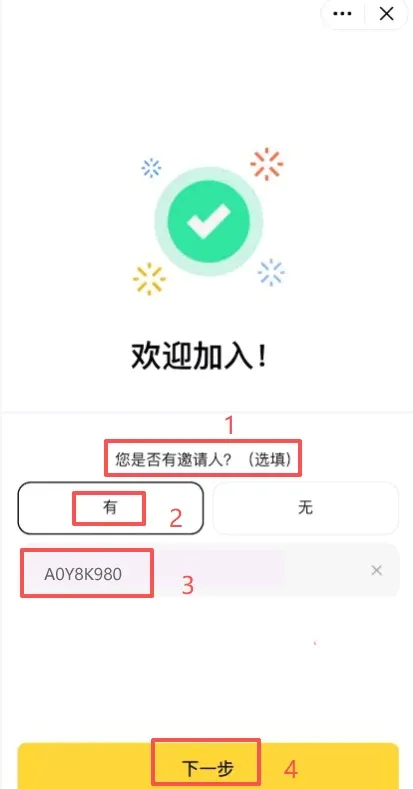
2.5 Referral Code (Optional)
After the basic registration is complete, the system will ask whether you have an inviter. If you have one, you can enter B2345 – this referral code grants a 20 % fee discount on subsequent trades. Then proceed to the next step.
3. Identity Verification (KYC) – Basic Tier
3.1 Choose Document Type and Upload
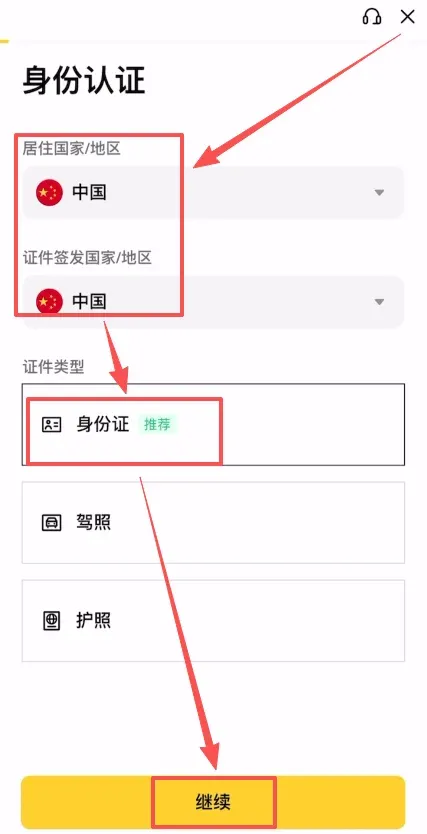
On the identity verification page, first select your country/region of residence (e.g., China). Then pick the document type: ID card, passport, or driver’s licence. In this example we use a Chinese ID card; tap 【Continue】.
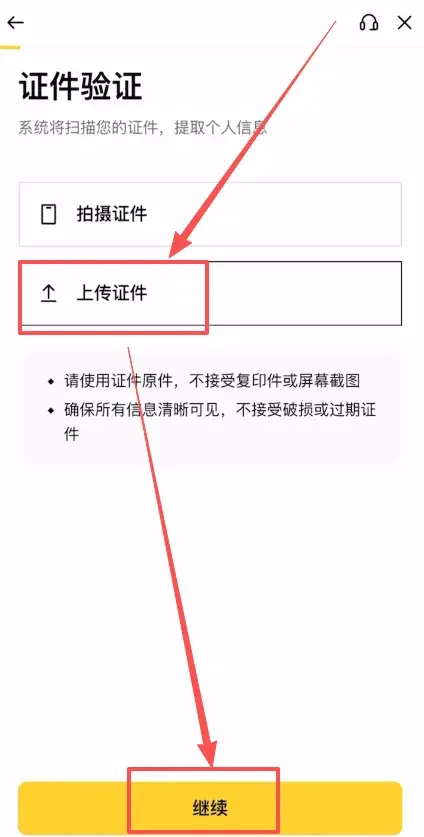
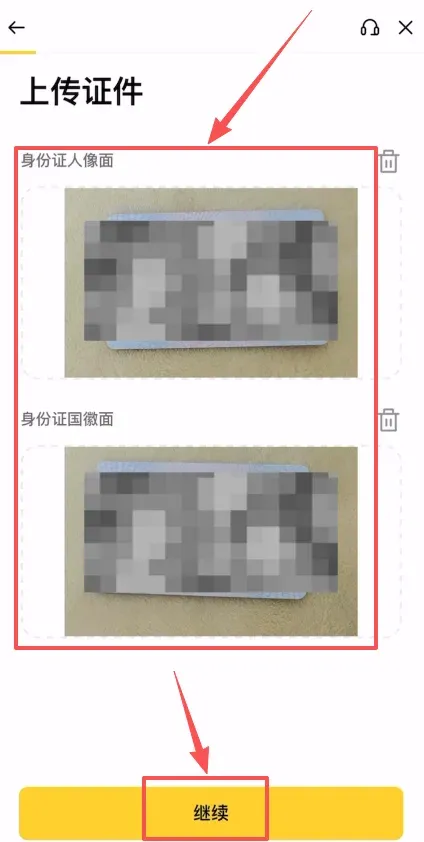
Next, upload clear, complete photos of the front and back of the ID card. Make sure the images are sharp and fully visible.
3.2 Facial Recognition
After the document upload, the system will prompt you to perform a real‑time facial scan. Follow the on‑screen instructions to capture a live selfie.
3.3 Information Confirmation
Verify that the personal information displayed (nationality, full name, date of birth, etc.) matches the document you uploaded. Submit the data. You will also be asked about your current employment status; choose the option that reflects your situation.
After submission, the system enters a review stage. Please be patient while your documents are being processed.
4. Security Hardening (Strongly Recommended)
To reduce the risk of account compromise, we recommend enabling the following protective measures:
4.1 Two‑Factor Authentication (2FA)
- Google Authenticator – generates a time‑based one‑time password (TOTP) that changes every 30 seconds, making it extremely difficult for attackers to log in even if they have your password.
- Binance Authenticator – Binance’s own 2FA solution, integrated directly into the platform for a smoother user experience.
Enabling Binance Authenticator
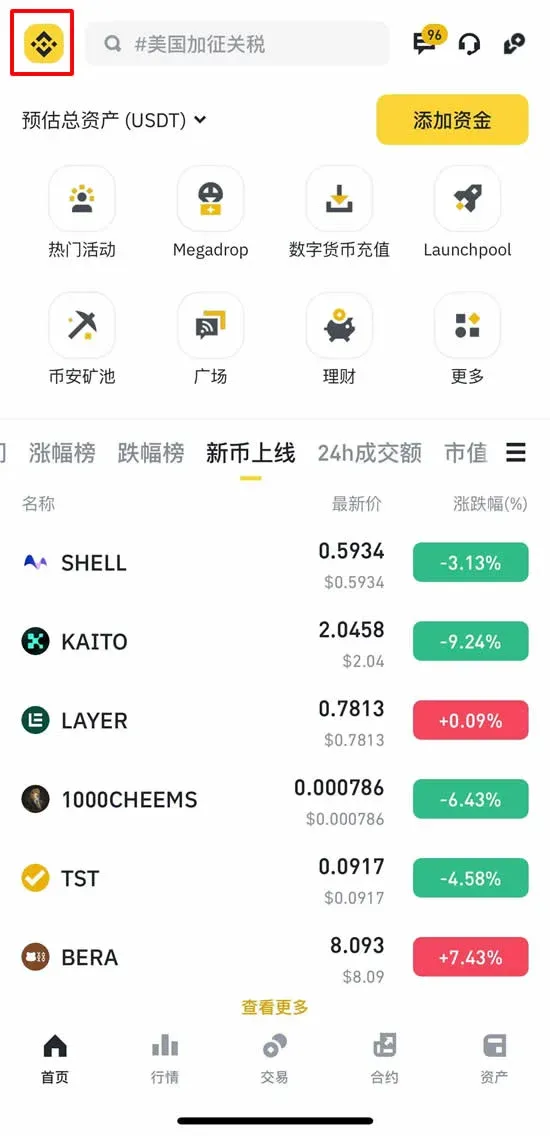
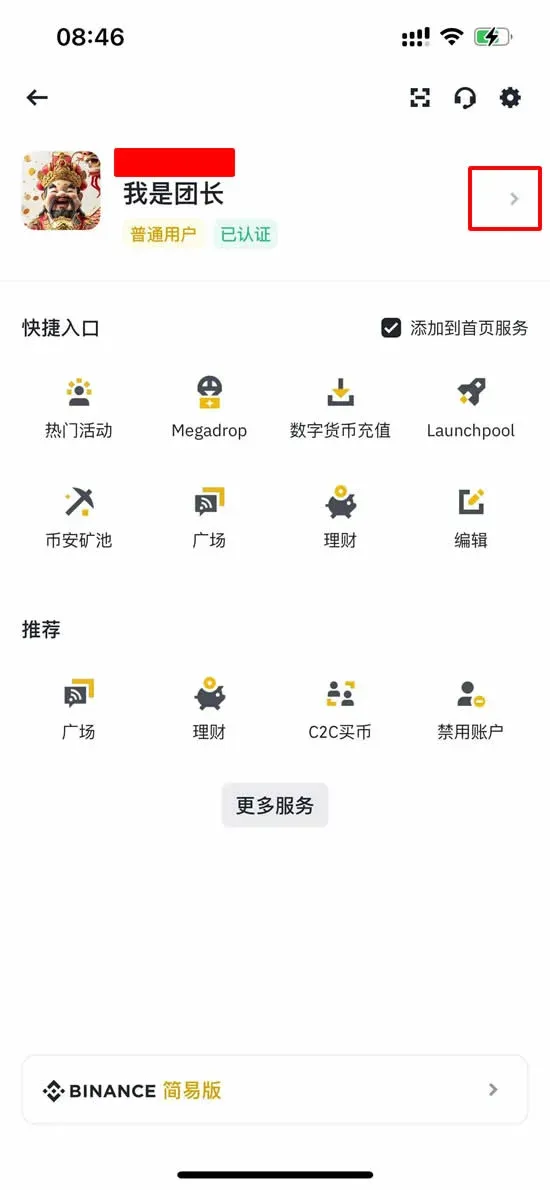
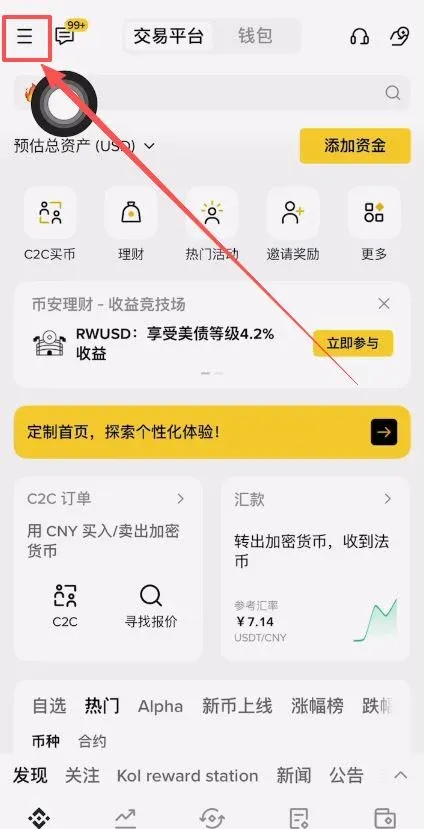
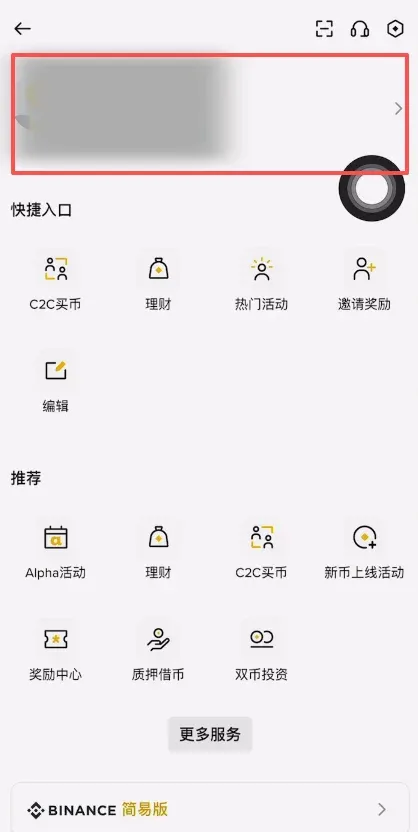
- On the Binance APP home screen, tap the Binance logo at the top‑left corner → go to Personal Center.
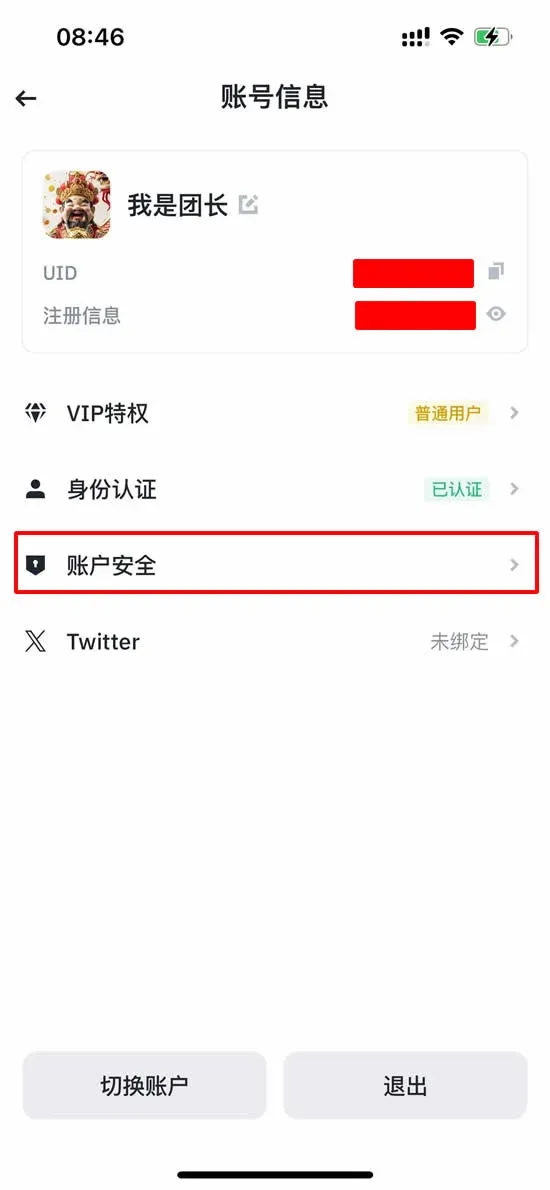
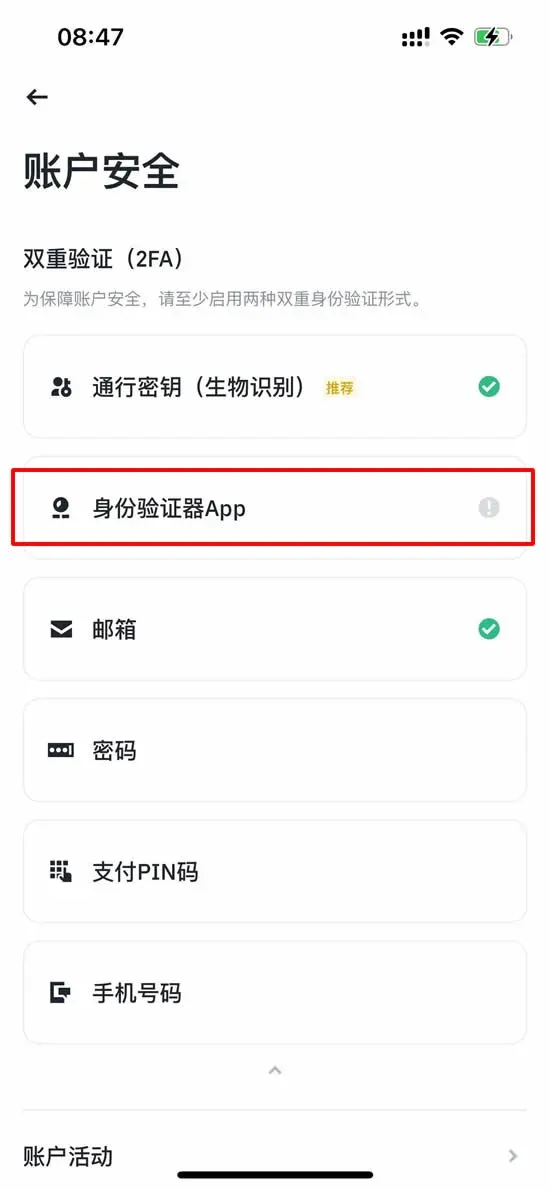
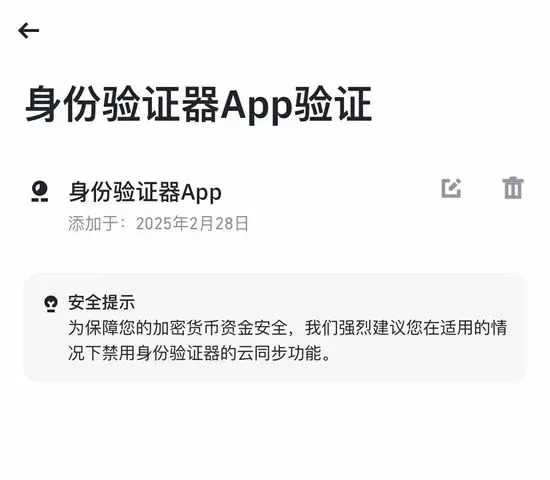
- Select Account Security → Authenticator App.
→
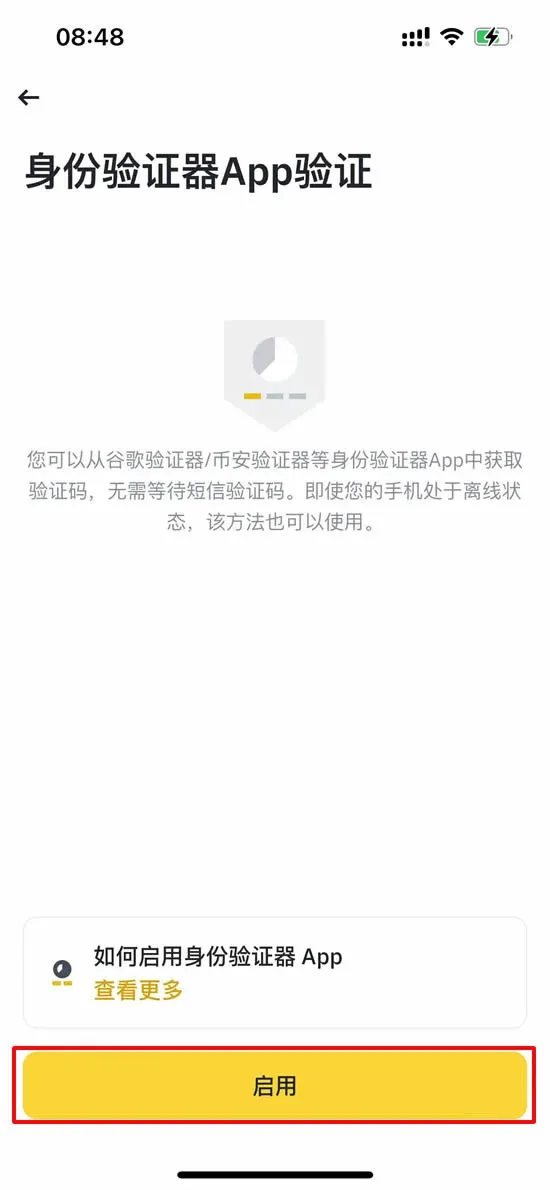
- Confirm that the Binance Authenticator app is installed on your phone, then tap 【Enable】.
→
- The system will present a 16‑digit secret key. Save it securely (you may copy and paste it into the Authenticator app).
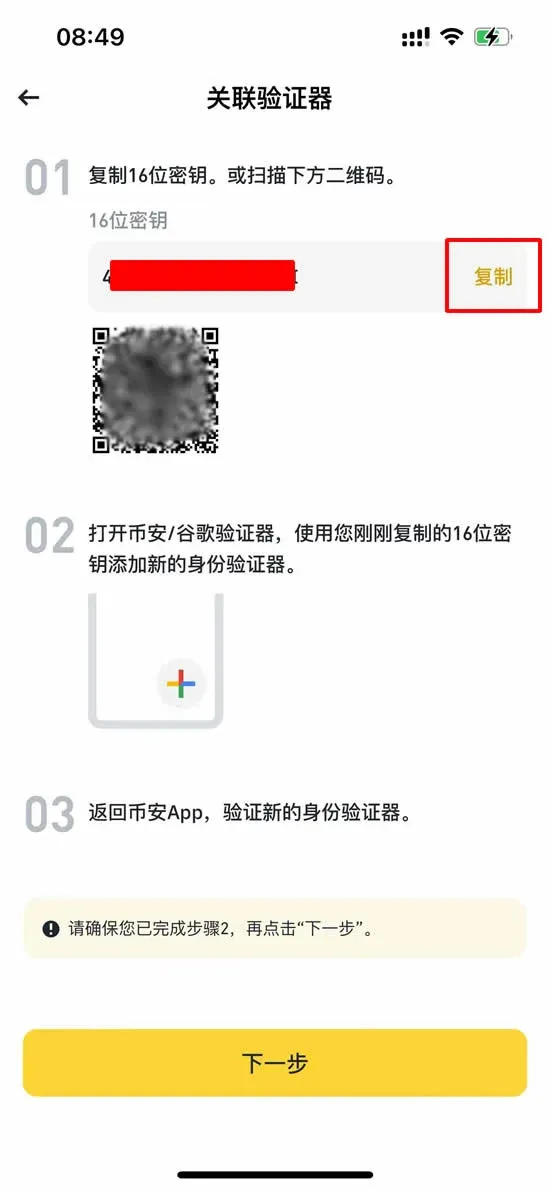
→
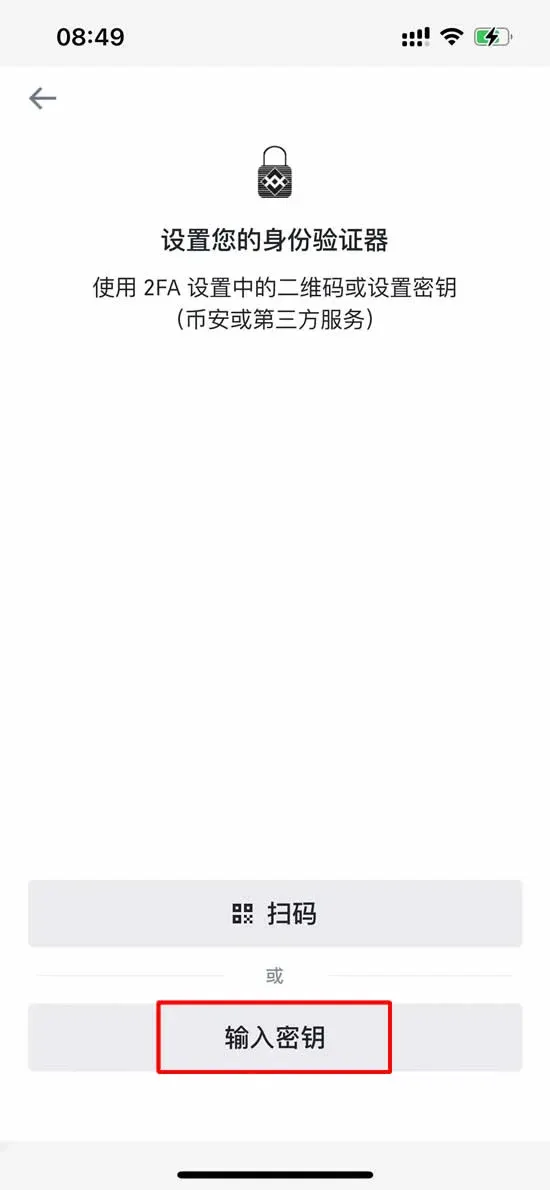
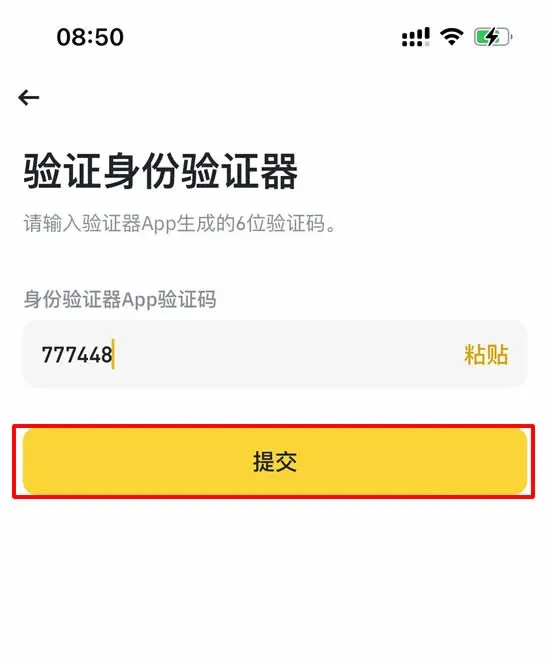
- Enter the 6‑digit code generated by the Authenticator app to complete the binding.
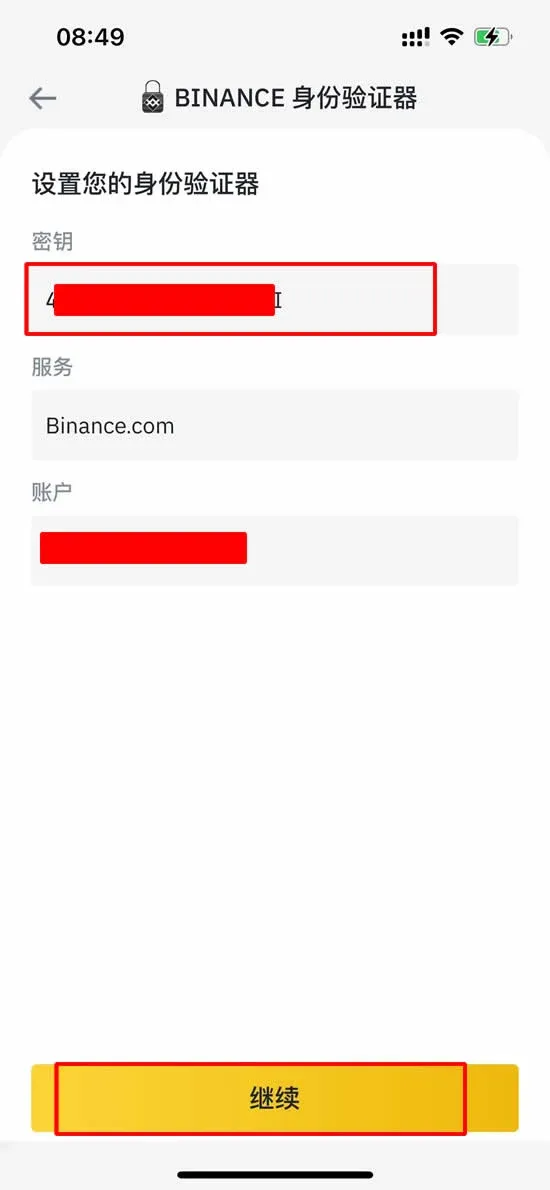
→
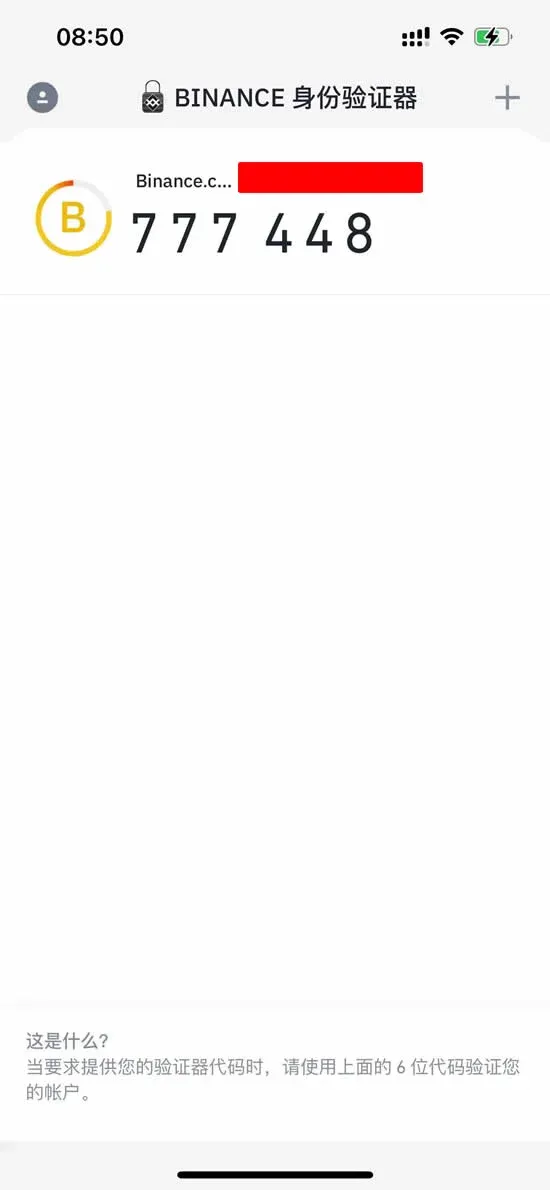
- After successful binding, every critical operation—such as login, fund withdrawal, or security setting changes—will require this 6‑digit code.
→
4.2 Passkey
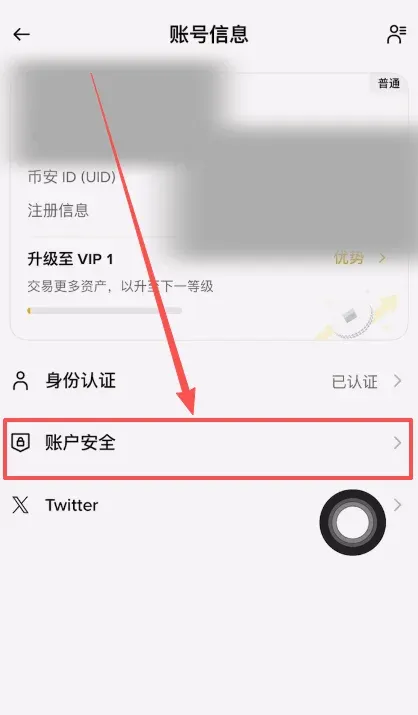
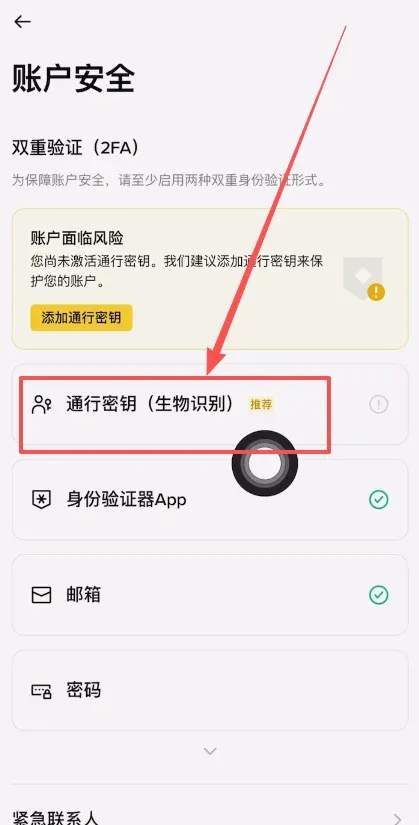
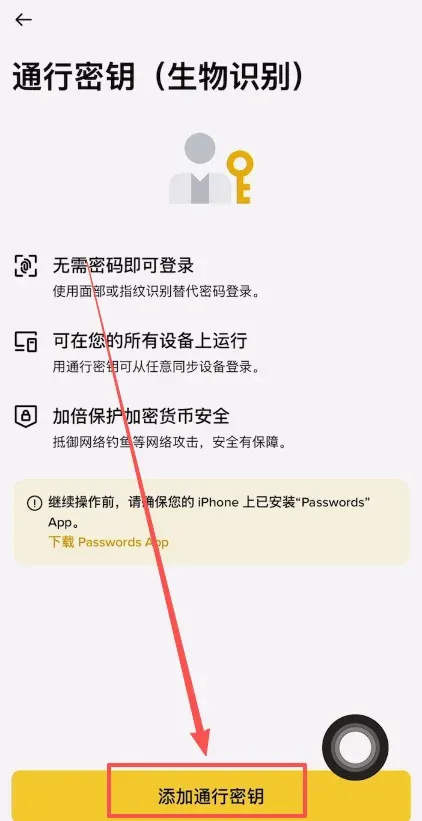
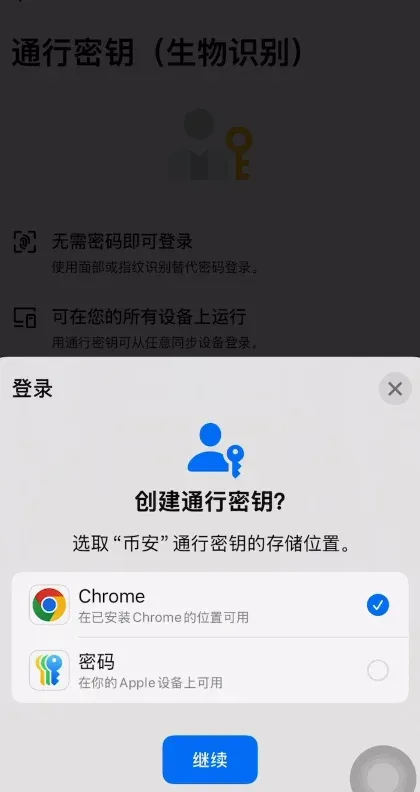
Passkeys use public‑key cryptography to bind your account to a trusted device, enabling password‑less login. In the Binance APP, navigate to 【Account Security】 → 【Passkey】 → 【Add Passkey】, select where to store the credential, and complete the facial‑recognition step.
→
→
→
→
→
4.3 Security Key (Hardware)
A Security Key is a physical device (e.g., YubiKey) that must be present to complete login or withdrawal verification, adding an extra layer of protection against
Related Reading
- Binance vs Gate.io vs Bybit vs Bitget: Best Crypto Exchange
- Gate.io Registration & Real‑Name Verification for Mainland China
- Binance Reaches 300M Active Users in 2026, Trading Leader
💡 Register on Binance with referral code B2345 for the maximum trading fee discount. See Binance complete guide.



