
 Bitaigen Research
 We break down the details of Binance’s BNB fee discount in this article, helping frequent traders evaluate whether to enable the fee reduction and providing complete step‑by‑step instructions for turning the feature on or off, so you can maximize cost efficiency across various trading scenarios. If you want to see the actual workflow and applicable rules, keep reading.
Key Takeaways
- On the Binance platform, holding BNB and enabling the discount feature reduces spot‑ and futures‑trading fees by a preset proportion (the typical discount is about 25 %).
- The actual savings depend on your VIP tier, the trading product, and BNB’s market price; the higher your VIP level, the smaller the marginal benefit of toggling the discount on or off.
- Whether to use the discount hinges on your personal trading frequency, the cost of holding BNB, and your expectations for BNB’s price movement; high‑frequency traders, futures users, or those employing high leverage generally benefit the most.
---
Concept of BNB Discount and Applicable Scenarios
What is the BNB discount?
When you bind BNB as a “discount token,” the system automatically reduces the fee by the preset percentage at settlement. The most common discount rates are:
- Spot trading: roughly 25 %
- Futures trading: according to the latest platform rules
Scope of applicability
- Spot trading – buying and selling of major coins as well as newly listed tokens.
- Futures trading – perpetual contracts and delivery contracts, especially sensitive when using high leverage.
- Other Binance products – some promotional services may stack with or be mutually exclusive to the BNB discount; the exact treatment is shown on the relevant product page.
Note: The BNB discount only reduces fees; it does not affect order‑matching logic or order‑type selection.
---
Practical Steps: How to Enable/Disable BNB Discount on Binance
On the Web Platform (Binance.com)
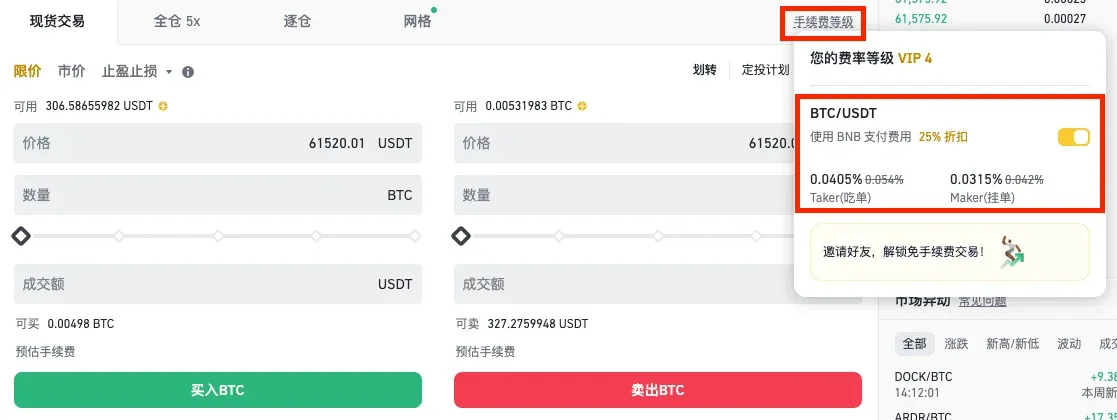
- Go to the [Fee Tier] page and click the [Use BNB to Pay Fees – 25 % Discount] button to toggle the feature on or off.
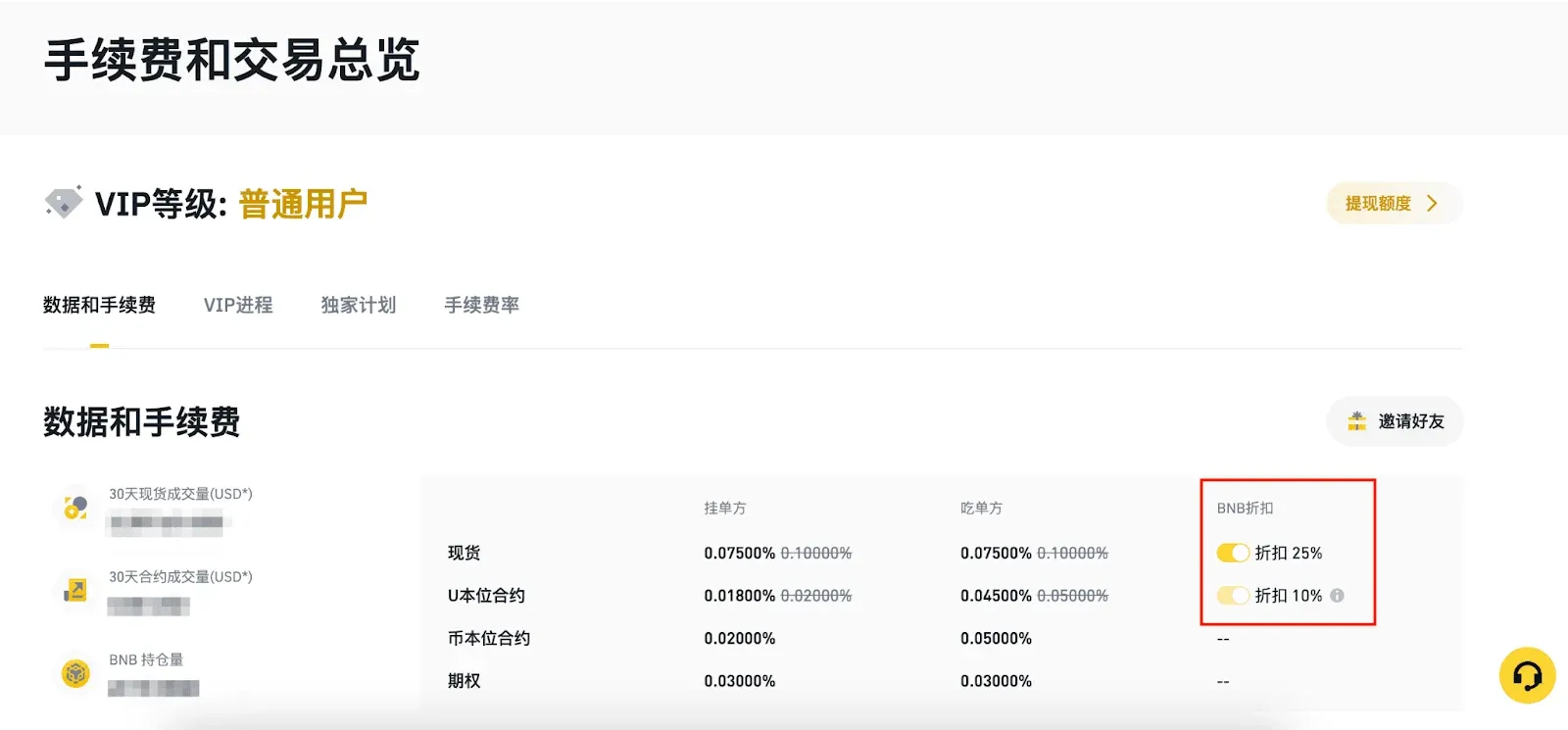
- The same toggle can also be found under [Fee and Trade Overview].
On Mobile (Binance App)
- Open the app, navigate to [Account Center] → top‑right [Settings]**.
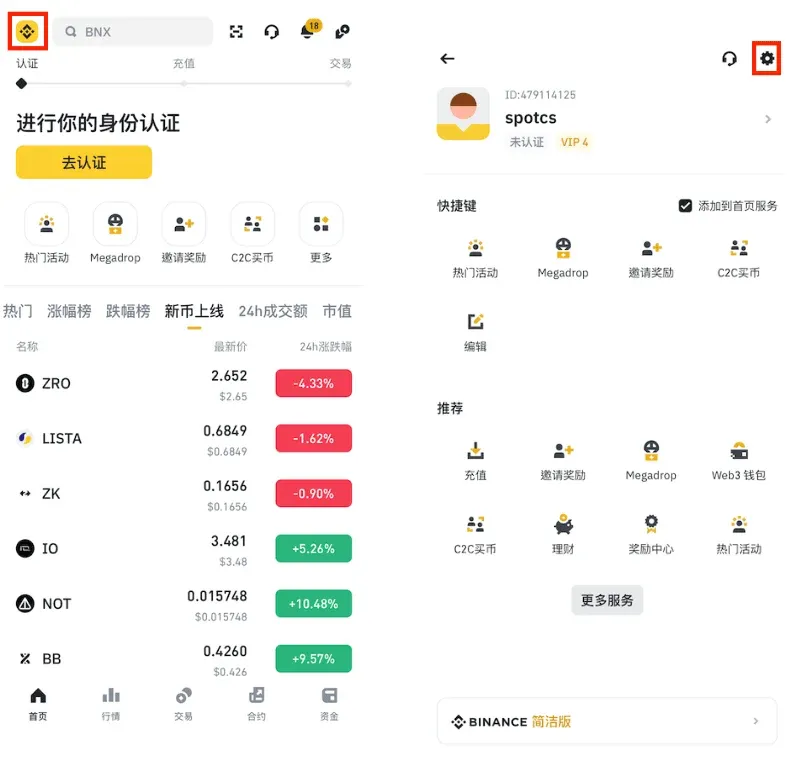
- Select [BNB Discount], then toggle [Use BNB to Pay Trading Fees] to enjoy a 25 % spot‑trading discount.
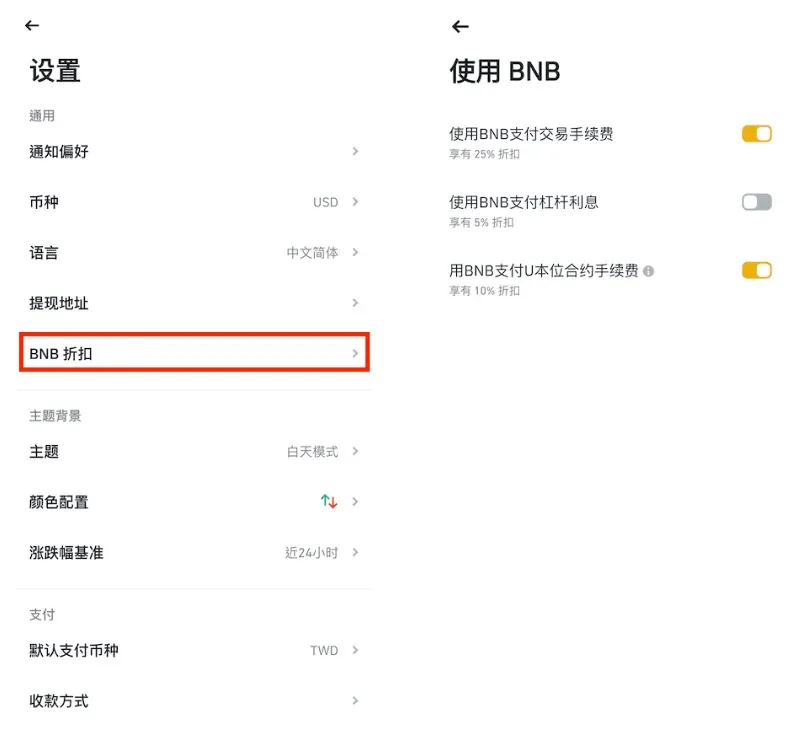
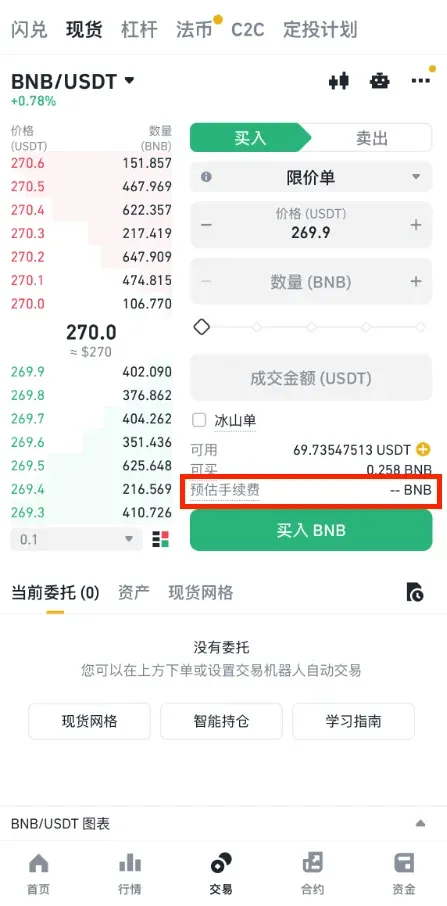
- You can also reach the same setting via [Trade] → [Spot], tap the top‑right […] → [Fee Rate].
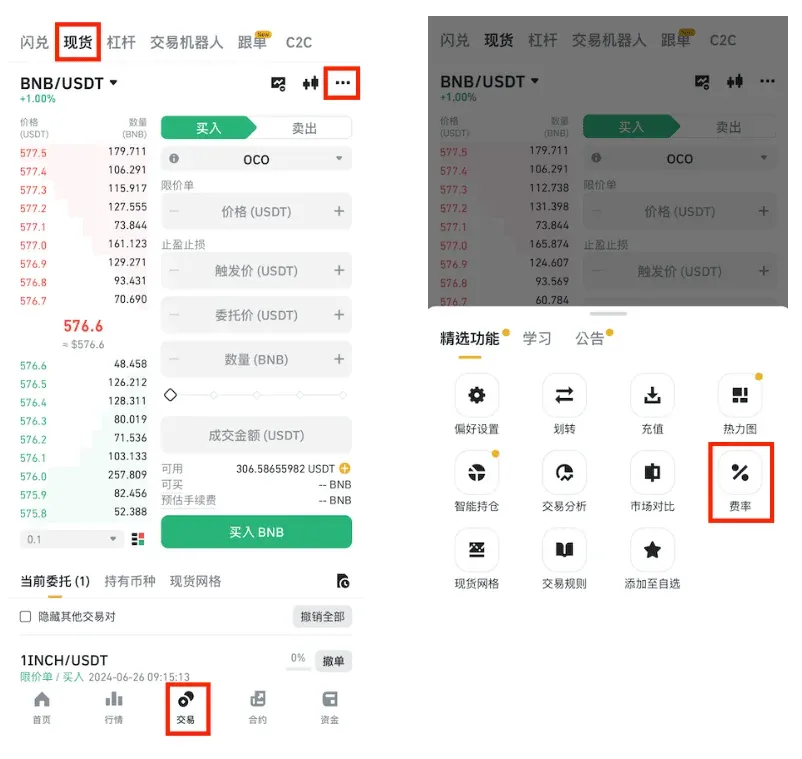
Currently the discount remains at 25 % when using BNB. Binance will announce any future adjustments separately.
---
How New Users Can Obtain a Fee Rebate at Registration
Binance offers a permanent 20 % fee rebate to newly registered users who enter a valid referral code during sign‑up.
Registration Steps
- Enter your details – use a regular email address or phone number (the platform accepts the +86 country code for mainland China) so you can receive a verification code.
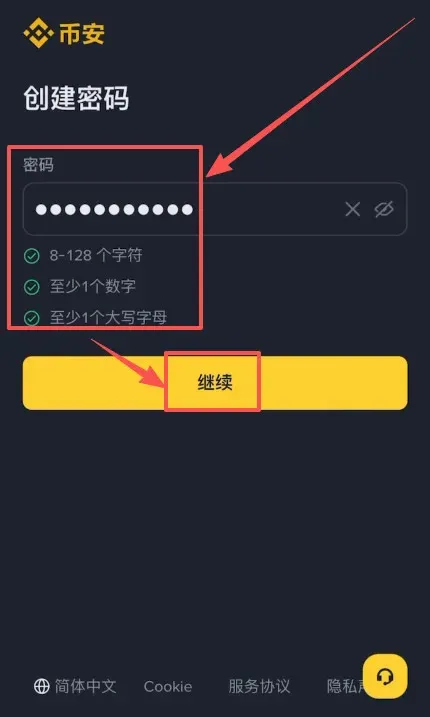
- Set a password – at least 8 characters, containing uppercase and lowercase letters, numbers, and special symbols.
- Enter the referral code – type B2345 to claim the 20 % fee rebate on future trades.
Security Recommendations
- Change your password regularly and enable two‑factor authentication (2FA) to protect the account.
Registration Link
- Visit the official sign‑up page directly: Binance.com registration and click “Register.”
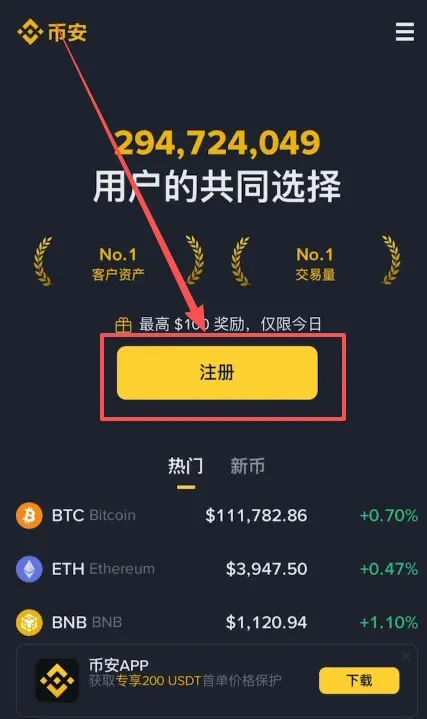
- Both email and phone registration are supported; Chinese mobile numbers work as well.
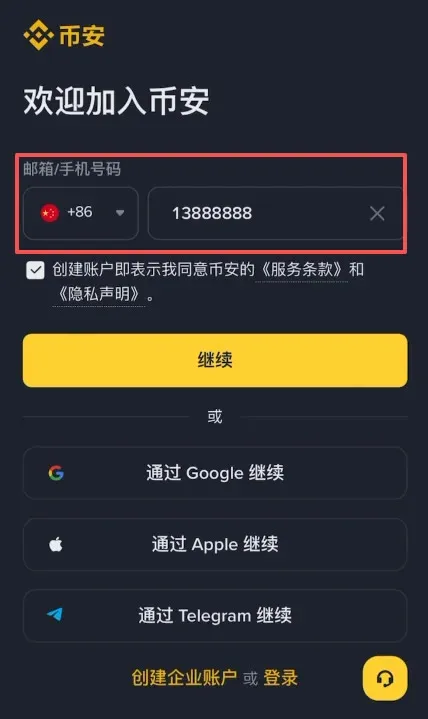
The following example walks through a complete email‑based registration:
- On the registration page, enter an overseas email (Outlook, Gmail) or a domestic provider (QQ, 163) and click “Continue.”
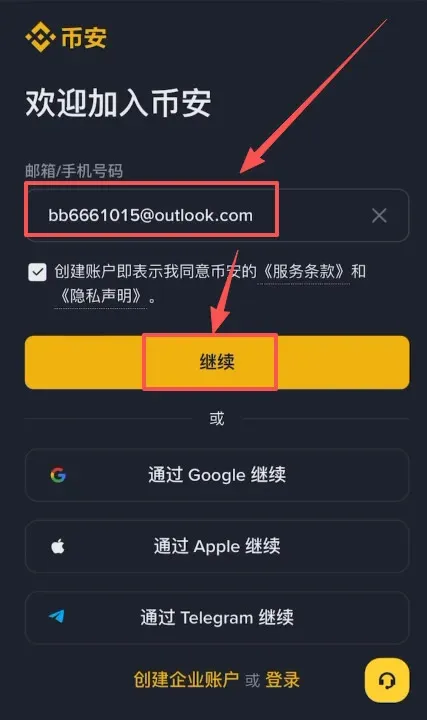
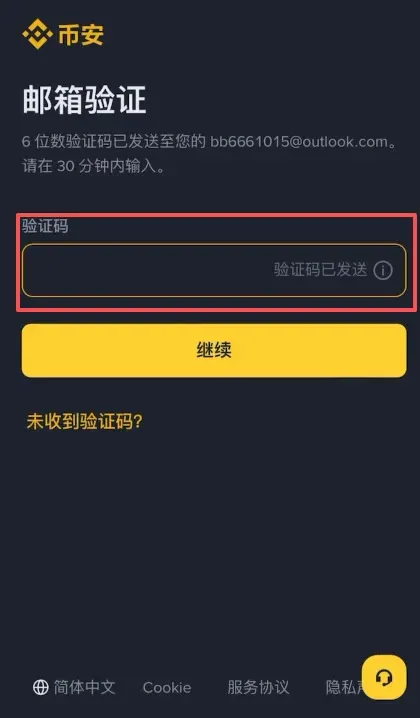
- After receiving the verification code, paste it into the field to complete verification.
- Set a compliant password and proceed.
- After successful registration, the system asks whether you have an inviter; select “Yes,” input B2345, and you will receive the permanent 20 % fee rebate.
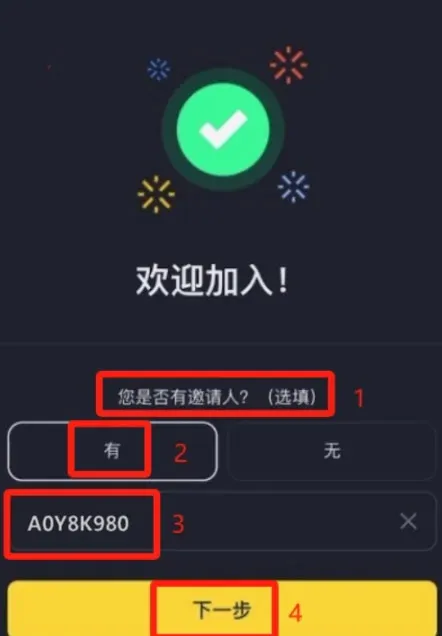
Important: Enter the referral code during the initial registration. It cannot be added later, and missing it will forfeit the associated discount.
---
Fee Comparison Data (Reference Only)
| Platform / Rule | Base Maker / Taker | BNB Discount Rate | Discounted Maker | Discounted Taker | Notes |
|---|---|---|---|---|---|
| Binance (Spot) | 0.10 % / 0.10 % | ≈ 25 % | 0.075 % | 0.075 % | Higher VIP tiers receive further reductions |
| OKX (Spot) | 0.08 % / 0.10 % | None | 0.08 % | 0.10 % | Fees drop with VIP level |
| Bybit (Spot) | 0.00 % / 0.10 % | None | 0.00 % | 0.10 % | Most Maker orders are free |
| Gate.io (Spot) | 0.20 % / 0.20 % | None | 0.20 % | 0.20 % | Depends on VIP and promotions |
For high‑frequency taker traders, the effective one‑sided cost after enabling BNB discount is about 0.075 %, still higher than Bybit’s 0.10 % taker fee (but Bybit offers free maker).
For maker‑oriented traders, OKX’s 0.08 % and Binance’s 0.075 % are comparable; the choice may hinge on liquidity depth and ecosystem preferences.
| Platform / Rule | Base Maker / Taker | VIP / BNB Discount | Discounted Maker | Discounted Taker | Notes |
|---|---|---|---|---|---|
| Binance (USDT‑M) | 0.020 % / 0.040 % | ≈ 25 % BNB | 0.015 % | 0.030 % | Higher VIP tiers get larger discounts; funding fees are charged separately |
| OKX (USDT‑M) | 0.020 % / 0.040 % | VIP‑dependent | — | — | No BNB discount |
| Bybit (USDT‑M) | 0.020 % / 0.040 % | VIP‑dependent | — | — | No BNB discount |
Futures users who enable the BNB discount see taker fees drop from 0.04 % to 0.03 %, a noticeable cost reduction for high‑frequency contract traders, although the marginal benefit diminishes for top‑tier VIPs.
Scenario‑Based Fee Savings (Example)
Assume an annual trading volume of $10 million USD in spot and $100 million USD in futures.
- Binance without BNB discount: spot fees = $100,000 USD, futures fees = $400,000 USD.
- Binance with BNB discount: spot fees = $75,000 USD, futures fees = $300,000 USD.
- Competing platforms (OKX, Bybit): both roughly $100,000 (spot) + $400,000 (futures) = $500,000 USD.
The larger the volume and the higher the trading frequency, the more pronounced the cost advantage of the BNB discount. High‑leverage futures traders derive most of their savings from the contract‑side discount.
---
Pros and Cons at a Glance
Advantages
- Direct fee reduction – costs shrink proportionally, and the calculation is straightforward.
- Broad coverage – applicable to spot and futures, suitable for accounts running multiple strategies simultaneously.
- Stackable with VIP – high‑level VIPs can combine their tier discount with the BNB discount for an even lower overall rate.
Potential Risks
- Opportunity cost – holding BNB exposes you to price volatility; if BNB’s price appreciation outpaces the fee savings, you may experience a net loss.
- Liquidity requirement – you must maintain a sufficient BNB balance for discounting; a sharp BNB price drop could force you to sell at a loss to keep the discount active.
- Rule changes – fee structures and discount percentages are subject to periodic revisions; stay updated with the latest policy announcements.
- Yield conflict – BNB used for fee discount cannot simultaneously earn returns in other Binance products (e.g., savings, staking).
---
When to Enable and When to Disable the BNB Discount
Situations Favoring Activation
- High‑frequency taker or high‑leverage futures traders.
- Your account already holds a reasonable amount of BNB and you do not plan large reallocations in the short term.
- Your primary goal is cost reduction, not speculative BNB price gains.
Situations Favoring Deactivation or Reduced Weight
- You intend to hold BNB long‑term and anticipate a substantial price increase.
- Your trading style is mainly maker‑oriented and you already enjoy low base fees (e.g., OKX’s 0.08 % maker rate).
- BNB represents a large share of your portfolio, and you are concerned about drawdowns affecting overall capital safety.
Practical Recommendations
- Set a threshold monitor: if the cost basis of your BNB holdings is more than, say, ‑15 % below the current market price, you might temporarily enable the discount; otherwise, consider turning it off.
- Separate accounts: keep a “strategy” account with the discount active, while a “store‑of‑value” account retains BNB for staking or other yield‑generating activities, avoiding cross‑impact from price swings.
- Monthly review: compare actual fee rates, BNB price movement, and overall cost savings; adjust the discount status as needed.
---
Difference from On‑Chain Gas Fees
- The BNB discount applies only to Binance’s internal trading fees and has no effect on blockchain gas fees.
- If you interact with the BNB Smart Chain (BSC) directly, gas is still paid in BNB, and Binance’s discount does not reduce those on‑chain costs.
---
Frequently Asked Questions
1. How is the actual fee calculated after the BNB discount?
When the discount is enabled, the system automatically converts the original fee into BNB at the preset discount rate; when disabled, fees are charged in the traded asset at the full rate. Detailed conversion rules are visible on the “Fee and Trade Overview” page.
2. How does the platform convert fees from other assets into BNB?
Binance uses the market exchange rate at the time of the trade to first convert the fee‑denominated asset into a base currency (e.g., USDT) and then into BNB via the BNB/base‑currency pair. Because an average rate is applied, the final BNB amount may differ slightly from the instantaneous spot rate.
3. I enabled the BNB discount but was still charged the full fee—why?
- Insufficient BNB balance; the system falls back to charging in the default asset.
- Very small trades (where the fee in BNB would be less than 0.00000001 BNB) are excluded from the discount.
- When using a trading bot, fees may initially be deducted in full from the bot’s account, after which the system refunds the BNB‑discount portion.
4. Does the BNB discount affect interest on margin (borrowed) positions?
Binance now supports applying the BNB discount to margin‑interest charges; the activation process mirrors that for trading‑fee discounts.
---
Action Checklist
- In the Binance app, navigate Account → Settings → Trading Settings → Fee Discount and toggle BNB discount on or off according to your spot or futures needs.
- Record monthly trading volume and the effective fee rate to evaluate actual savings from the BNB discount.
- Monitor BNB’s market price against your holding cost; adjust the discount switch or re‑allocate assets when necessary.
---
Closing Thoughts
- If your trading style leans toward high‑frequency taker orders, “chasing the dog” (rapid scalping), or high‑leverage futures, enabling the BNB discount is usually the more cost‑effective choice.
- If you are more interested in BNB’s price appreciation or primarily place low‑frequency maker orders, keeping BNB out of the discount mechanism may be preferable.
- Conduct a monthly review of fee rates and portfolio composition, and make dynamic decisions based on the “saved fees vs. opportunity cost” analysis.
We hope this guide clarifies how to use Binance’s BNB fee discount and helps you assess the real‑world benefit. May your trading be cost‑efficient and your journey steady!
Tax reminder: Cryptocurrency gains, including any savings
Related Reading
- Binance: Leading Crypto Exchange with Deep Liquidity
- Binance Account Registration & KYC Guide 2026 – Steps
- Binance vs Gate.io vs Bybit vs Bitget: Best Crypto Exchange
💡 Register on Binance with referral code B2345 for the maximum trading fee discount. See Binance complete guide.



