
 Bitaigen Research
 In this article we break down the entire C2C (peer‑to‑peer) buying process on Binance for newcomers, covering account registration, obtaining fee discounts, entering the C2C portal, selecting a payment method, and completing the order. Each step includes screenshots and key operational tips to help you get started quickly, saving time and effort. If you want to see the full procedural details, keep reading.
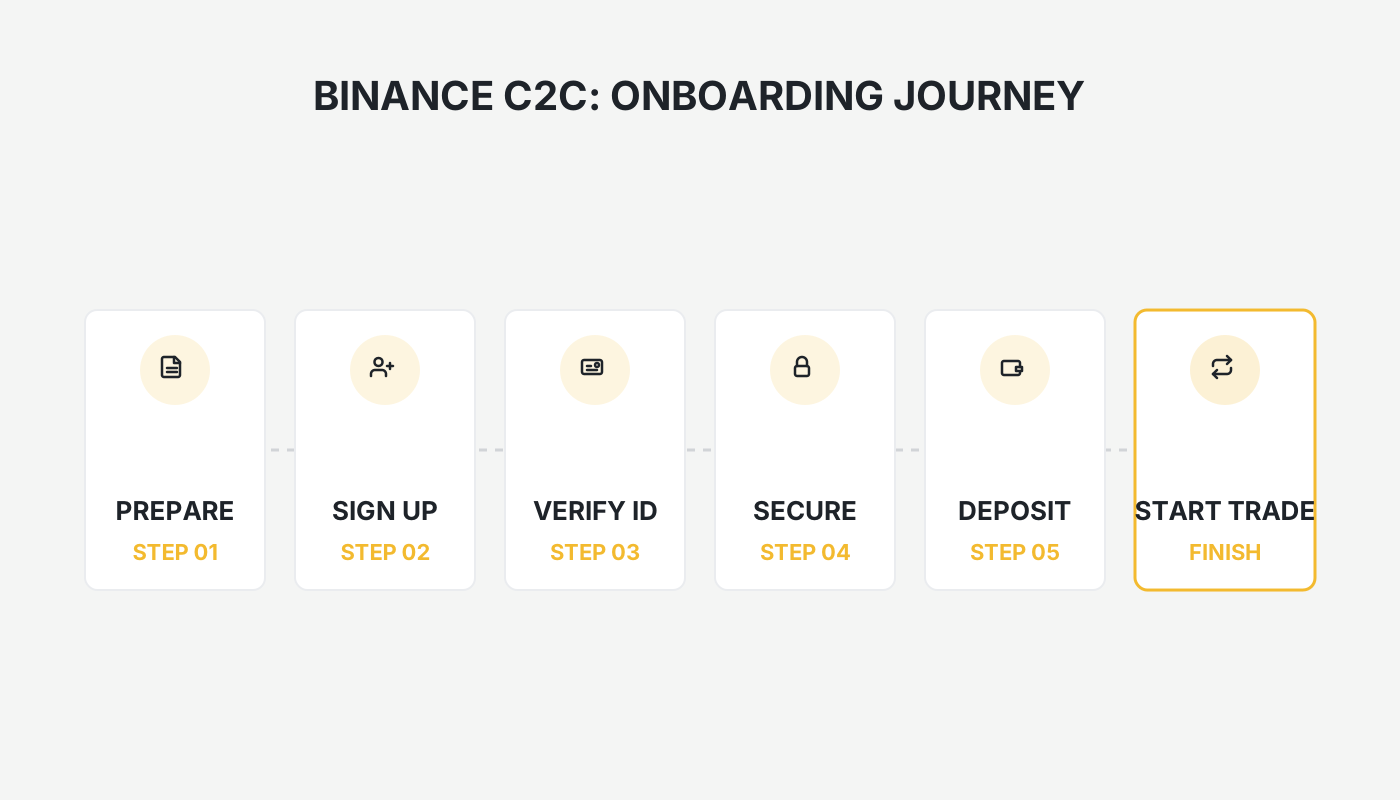

If this is your first time using Binance’s C2C service and you don’t know where to start, the following step‑by‑step guide will show you how to purchase USDT, supporting payment methods such as WeChat Pay, Alipay, and others, with a simple workflow.
On the Binance C2C platform, register an account using an invitation code, log in, click “Add Funds” → “C2C Trade”, enter the purchase amount, select Alipay, WeChat, etc., confirm the order and place it, and the USDT purchase will be completed.
1. Register and Obtain a Fee Discount
- Go to the official Binance website and click the registration link at the bottom of the page.
- Use the invitation code `B2345` to complete registration; you will enjoy a 20 % permanent trading‑fee discount on subsequent transactions.
New Binance user registration: Click to Register
Note for U.S. residents: Use Binance.US (https://www.binance.us) instead of the global Binance site, as the latter is not available in the United States.
2. Enter the C2C Trading Portal
On the homepage click 【Add Funds】 → select 【C2C Trade】.
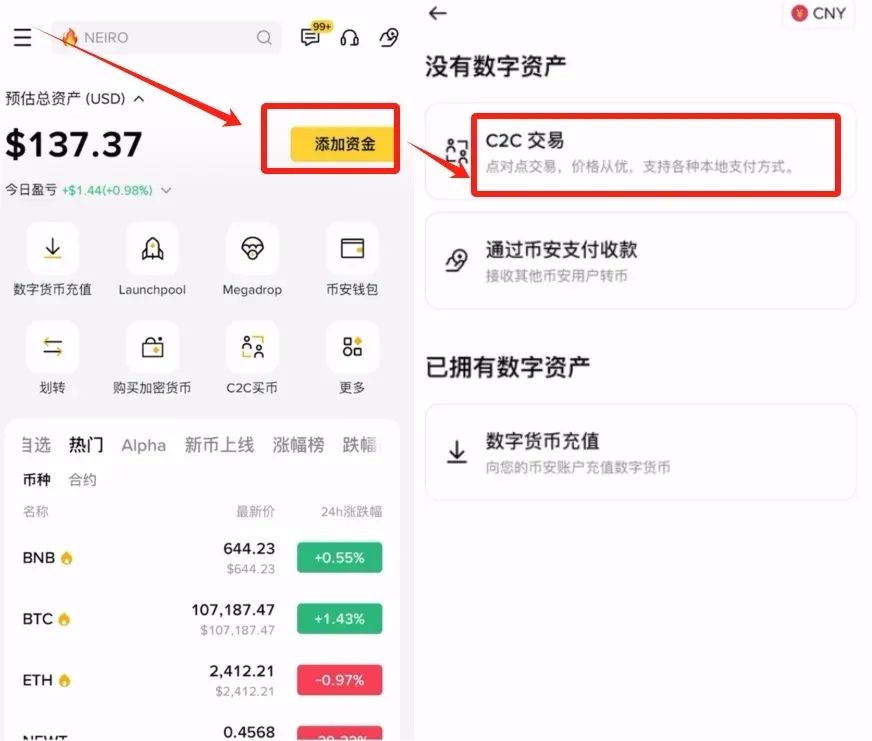
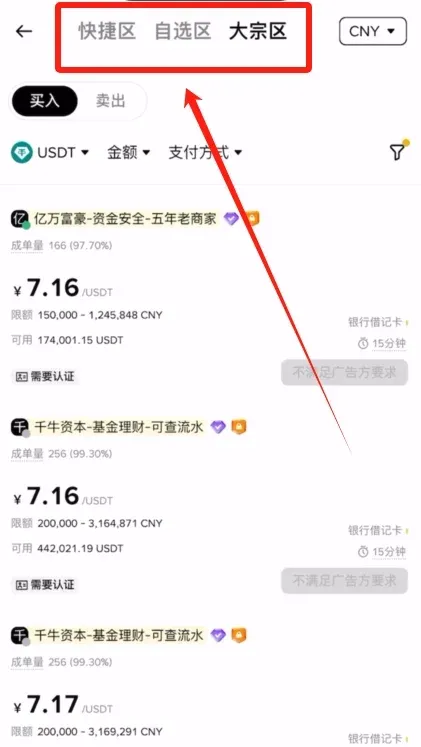
The interface is divided into three panels: Quick‑Trade, Custom‑Trade, and Bulk‑Trade.
- Quick‑Trade: Optimized for fast, small‑amount transactions.
- Custom‑Trade: Allows you to filter merchants manually; suited for ordinary trades.
- Bulk‑Trade: Designed for large‑volume trades; its rules are similar to Custom‑Trade.
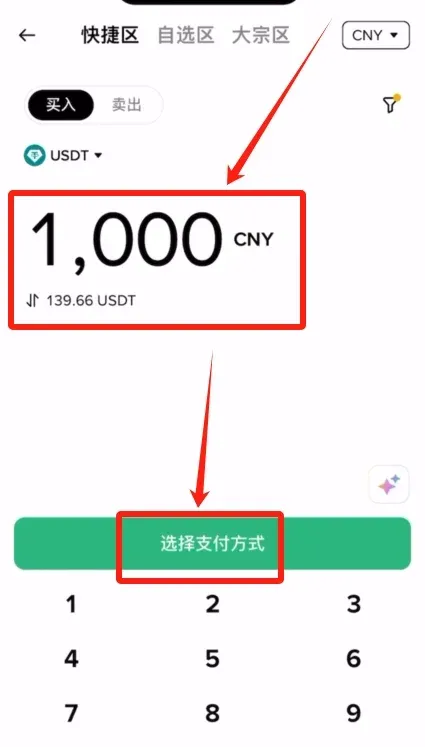
3. Small‑Amount Purchase Procedure (Example: ¥1,000 CNY)
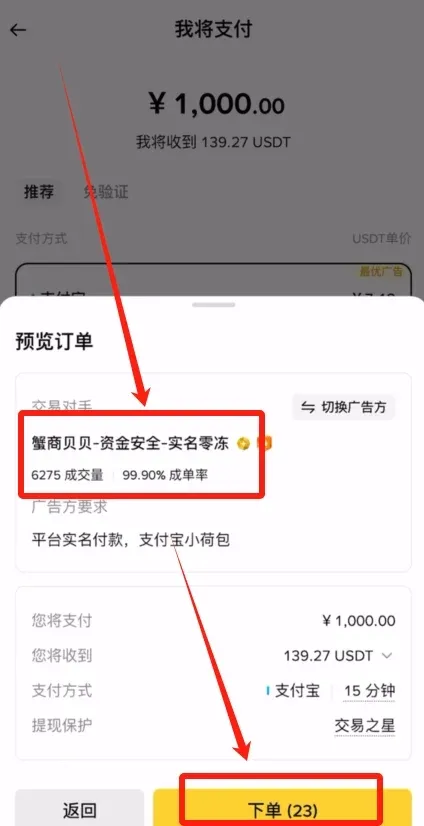
- In the Custom‑Trade panel, input a purchase amount of 1,000 CNY. The system automatically converts it to approximately 139.66 USDT (≈ $190 USD at current rates).
- Click 【Select Payment Method】 and choose from Alipay, QQ Wallet, Debit Card, WeChat Pay, etc. This example uses Alipay.
- Click 【Preview Order】, verify the displayed information, and proceed to the next step.
4. Confirm the Merchant and Place the Order
- The system provides a 30‑second window for you to confirm the merchant’s trade volume and completion rate.
- After confirming the details, click 【Place Order】.
5. Make the Payment and Upload the Receipt
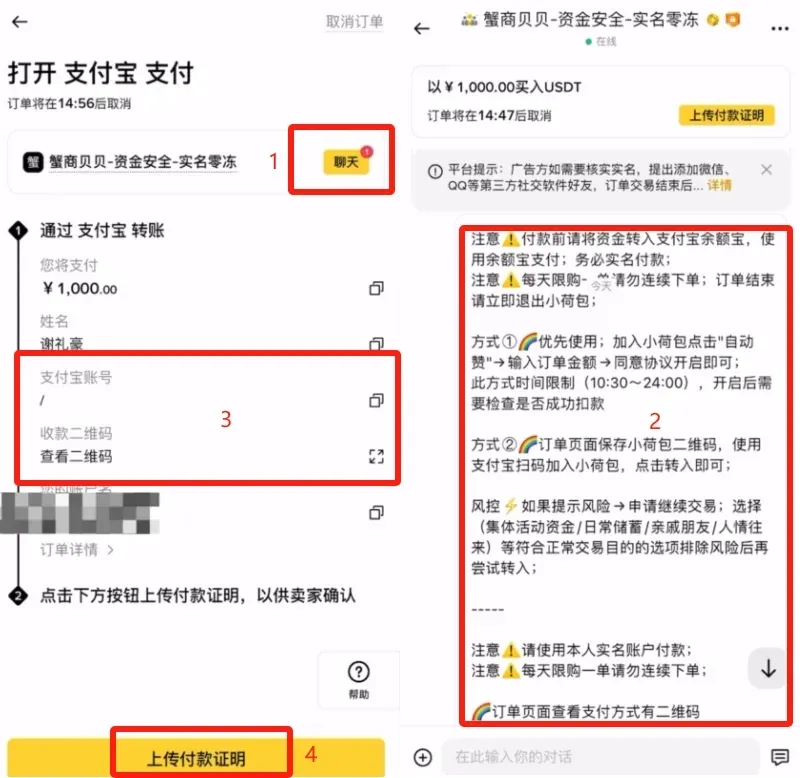
- Once the order is generated, open the chat window to view the merchant’s payment instructions (e.g., Yu‑e‑bao payment, real‑name verification, prioritize using “Xiao He Bao”, etc.).
- Complete the transfer via Alipay or the specified channel according to those instructions.
- After a successful transfer, take a screenshot of the payment receipt and upload it. Once the merchant confirms receipt, the USDT will be credited to your Binance account.
6. Withdrawal (Selling) Procedure
- Return to the homepage and again click 【Add Funds】 → C2C Trade.
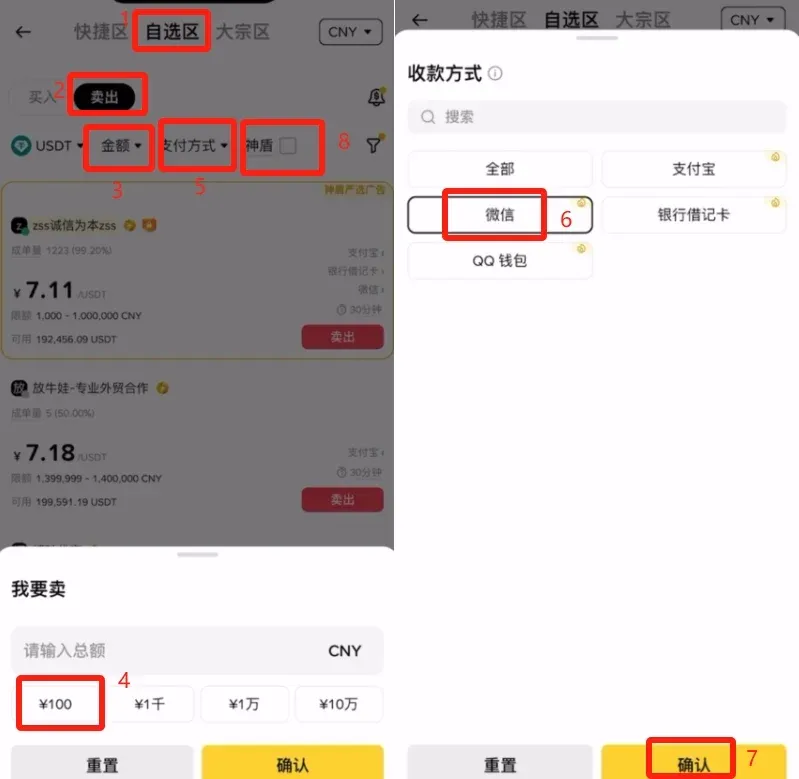
- It is recommended to manually select a reputable merchant in the Custom‑Trade panel; avoid the Quick‑Trade section for selling.
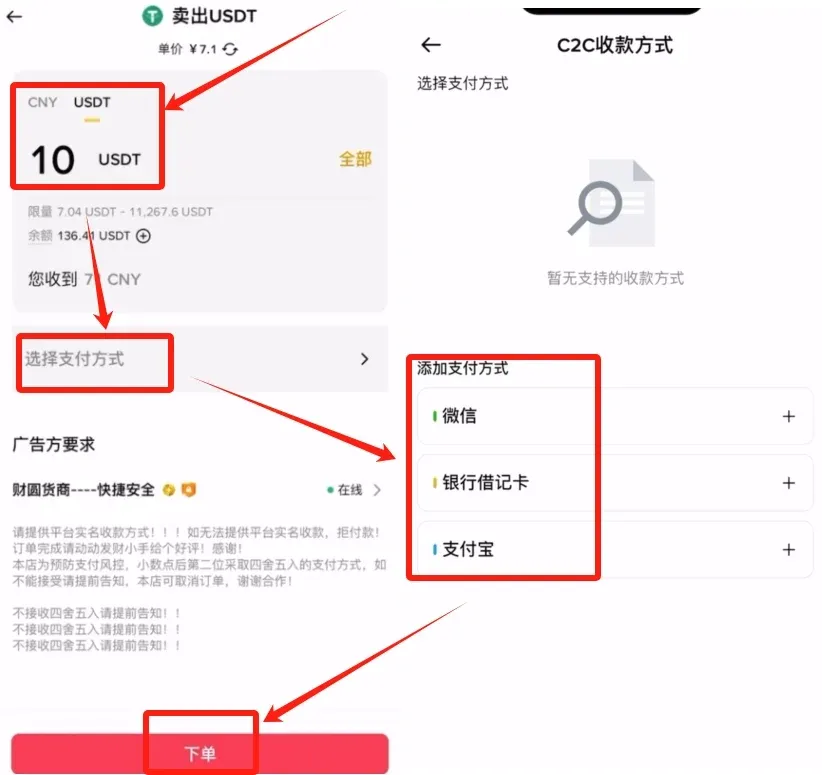
- Choose the 【Sell】 mode, enter the amount you wish to sell (e.g., 100 CNY) or the corresponding USDT quantity.
- Select a receiving method (e.g., WeChat Pay) and tick the 【Shield】 option. This service provides a margin‑insurance guarantee; in case of a dispute you can claim compensation.
7. Merchant Selection Tips
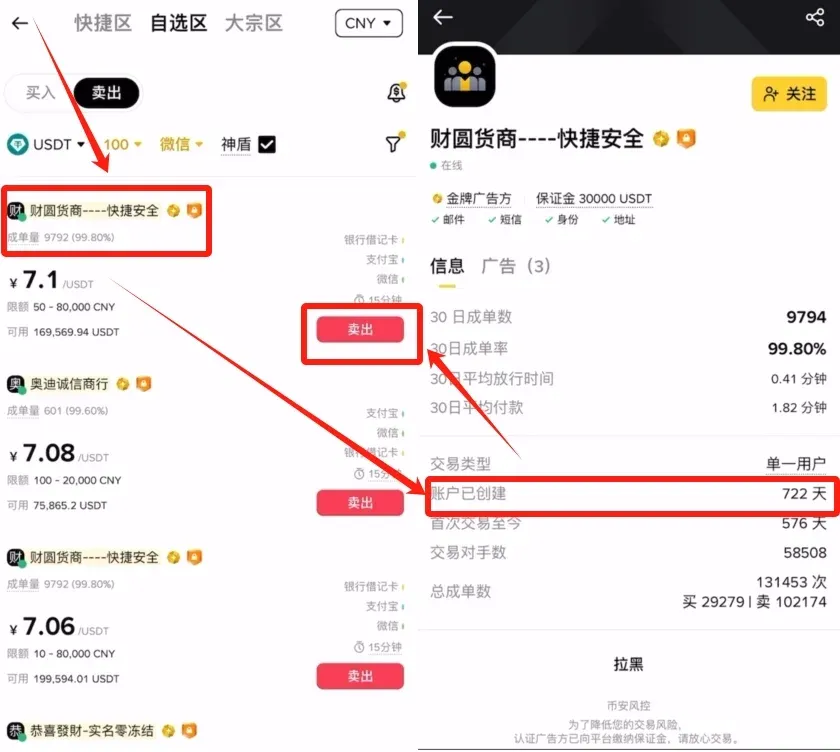
- Higher trade volume and completion rate are preferable.
- Check the merchant’s account age; a longer registration period (e.g., 722 days) generally indicates a more stable asset background.
- After confirming the merchant’s credibility, click the 【Sell】 button on the right side.
8. Complete the Sale
- Input the sell amount or USDT quantity, click 【Select Payment Method】 to add your WeChat, bank card, or Alipay receiving details.
- After confirming the information, click 【Place Order】.
- Make sure you have received the buyer’s payment before releasing the USDT on the platform, to ensure the safety of your assets.
---
The above constitutes the complete Binance C2C buying guide. For more Binance C2C tutorials, search for historical articles from Bitaigen or continue browsing the related links below. Feel free to follow and support Bitaigen!
Important Tax Note: Crypto transactions may be subject to capital‑gain taxation in your jurisdiction. Consult a local tax professional to understand your reporting obligations.
Fiat Transfer Guidance: When moving fiat currency to or from Binance, you can use USD transfers via SEPA (for Euro‑zone banks) or SWIFT for international wires, depending on your location.
---
Related Reading
- Is Binance C2C Safe? Top Ways to Securely Cash Out Crypto
- How to Buy Bitcoin: Step‑by‑Step Guide for Beginners (2024)
- How to Buy USDT with Chinese Yuan on Binance via C2C
💡 Register on Binance with referral code B2345 for the maximum trading fee discount. See Binance complete guide.



