 Bitaigen Research
 Since the publication of the Bitcoin Whitepaper, the cryptocurrency industry has evolved for over 13 years, with trading platforms playing a pivotal role in this journey.
Binance is the world's largest cryptocurrency exchange known for its high security standards. Its registration process involves providing an email or mobile number, setting a password, and completing KYC (Know Your Customer) verification. The platform supports a wide range of fiat and cryptocurrency deposit and withdrawal methods.
From an industry development perspective, we have systematically organized Binance's security mechanisms, registration procedures, and fund management operations. This article caters to both beginners and advanced users, helping readers assess the platform's credibility and master operational essentials. Subsequent sections will also provide in-depth analysis of regulatory adaptation and common risks, making it a comprehensive read.
Binance Background
The name Binance is a portmanteau of "binary" and "finance." Founded in 2017 by Changpeng Zhao (CZ), a Chinese-Canadian developer, the platform achieved the number one global ranking on CoinGecko in just 165 days—a position it has maintained ever since.
The platform was launched during a bull market, but as the subsequent bear market arrived, Binance maintained its competitiveness through proactive innovation and structural changes during various market downturns.
To date, Binance offers trading for over 600 types of crypto assets, employs more than 3,000 people globally, and has surpassed 100 million users. To comply with diverse international regulations, Binance has launched several localized platforms, such as Binance.US (specifically for US residents), Binance UK, Binance SG, and Binance TR.
*Note: US-based users are required to use Binance.US due to local regulatory requirements. Additionally, please be aware that cryptocurrency gains may be subject to capital gains tax depending on your local jurisdiction.*
Is Binance Safe?
1. Historical Security Events
- July 2018: The platform encountered a phishing attack where hackers attempted to manipulate the price of SYS. Fortunately, no user assets were stolen.
- May 8, 2019: Hackers utilized phishing and malware to steal user API keys and two-factor authentication (2FA) codes. This resulted in the theft of approximately 7,000 Bitcoins (about 2% of the platform's total holdings), valued at roughly $40 million at the time. Binance immediately activated the SAFU (Secure Asset Fund for Users) to provide full compensation to affected users.
2. Asset Protection
The SAFU fund proved its worth during the 2019 incident. As of late January 2022, the fund's valuation reached $1 billion. Binance has committed to maintaining the fund at no less than this level to ensure the protection of user assets against unforeseen security breaches.
3. Account Security
Binance employs a triple-layer protection system: account passwords, Google Authenticator, and SMS/mobile verification codes. It is highly recommended that users enable Two-Factor Authentication (2FA) to significantly increase the difficulty of unauthorized account access.
4. Data Encryption
Personal user information is protected via end-to-end encryption, ensuring that only the authorized user can access their sensitive data.
5. Anti-Phishing Codes
By enabling an anti-phishing code, Binance embeds a unique, user-defined code in every official email. This helps users distinguish legitimate communications from phishing attempts, preventing malicious actors from stealing credentials.
In summary, Binance’s security measures are among the most robust in the industry, making it a highly trusted platform for global traders.
Introduction to BNB: The Binance Ecosystem Token
BNB (Binance Coin) was originally issued on the Ethereum blockchain in 2017 with an initial price of $0.10. The total supply is capped at 200 million tokens. Every quarter, the platform uses a portion of its profits to buy back and "burn" (destroy) tokens, with the ultimate goal of reducing the supply to 100 million.
As of the latest quarter, the 20th burn has been completed, with a total of 1,959,595.29 BNB destroyed (valued at approximately $444,632,106).
The utility of BNB includes:
- Trading fee discounts (VIP program)
- Referral commissions of up to 40%
- Staking rewards in various yield pools
- Launchpool (new token farming) and Liquidity Farming
- Exclusive token subscriptions via Binance Launchpad
- Global spending via the Binance Visa Card
- Payment processing via Binance Pay
- Crypto-backed loans through Binance Loan
- Security staking within the ecosystem
- Flexible yields on selected blockchain projects
Pros and Cons of Binance
| Pros | Cons |
|---|---|
| 1. Massive trading volume and high liquidity | 1. Slower listing process for very small-cap coins |
| 2. Extensive range of coins and derivative products | 2. Direct fiat support for certain local currencies may vary |
| 3. Stable platform with a user-friendly multi-language interface |
Experienced traders often use Binance in conjunction with local regulated exchanges—using the local platform for fiat on-ramps and off-ramps, while utilizing Binance for its superior trading depth. Beginners can benefit directly from Binance’s streamlined and intuitive trading interface.
Binance APP Download
- Official Registration Link: https://accounts.binance.com/register?ref=B2345
- APP Download Link: https://www.bitaigen.com/binance/download
- Referral Code: `B2345` (Provides a 20% trading fee rebate)
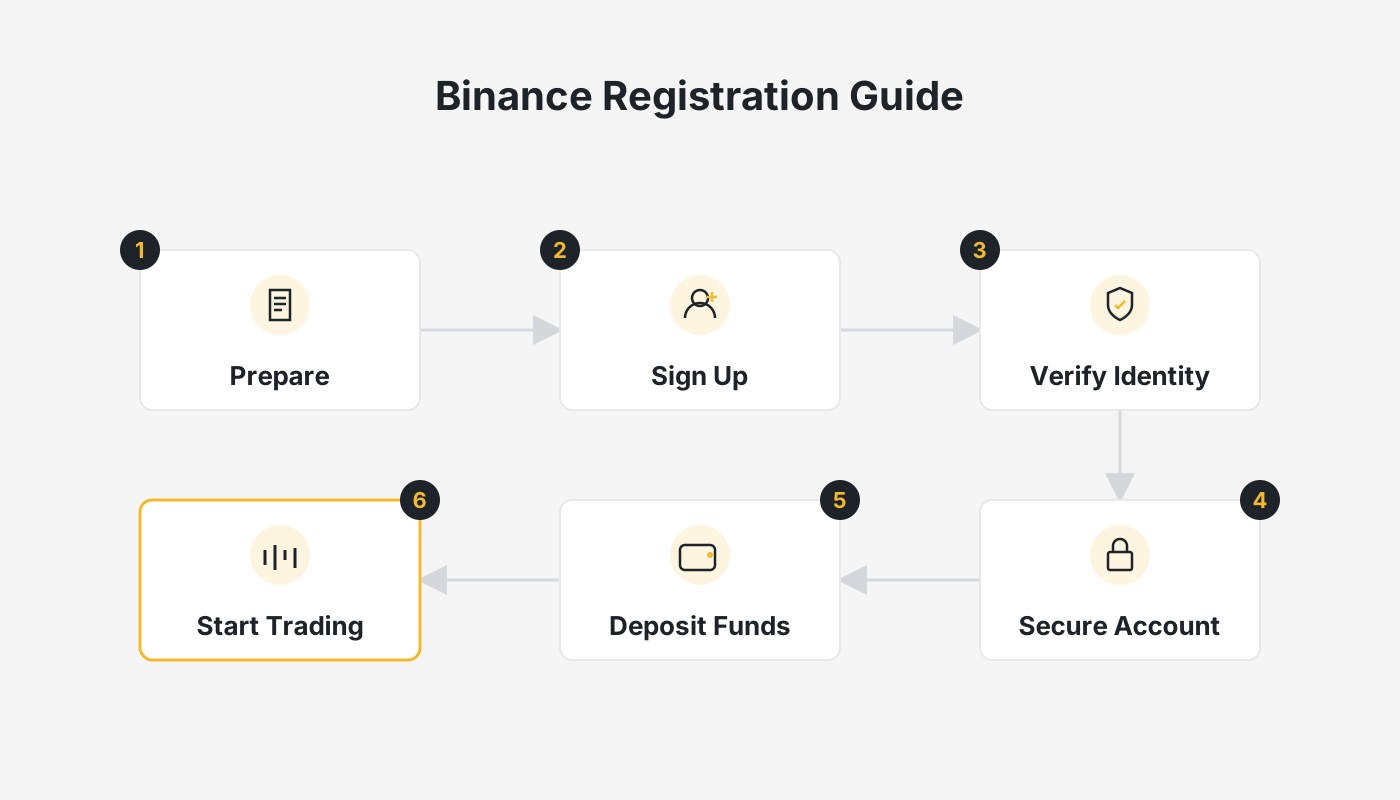
How to Register for Binance
- Ensure your network environment is stable. If using a VPN, set it to a neutral region (avoiding restricted regions like the US, Canada, Singapore, or Japan for the global site).
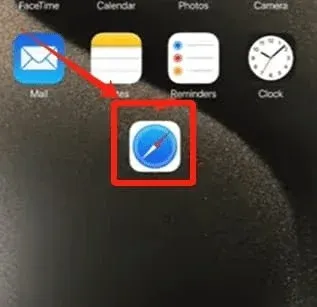
- Click the registration link: Binance Registration. It is recommended to use Safari (iOS) or a standard system browser (Android).
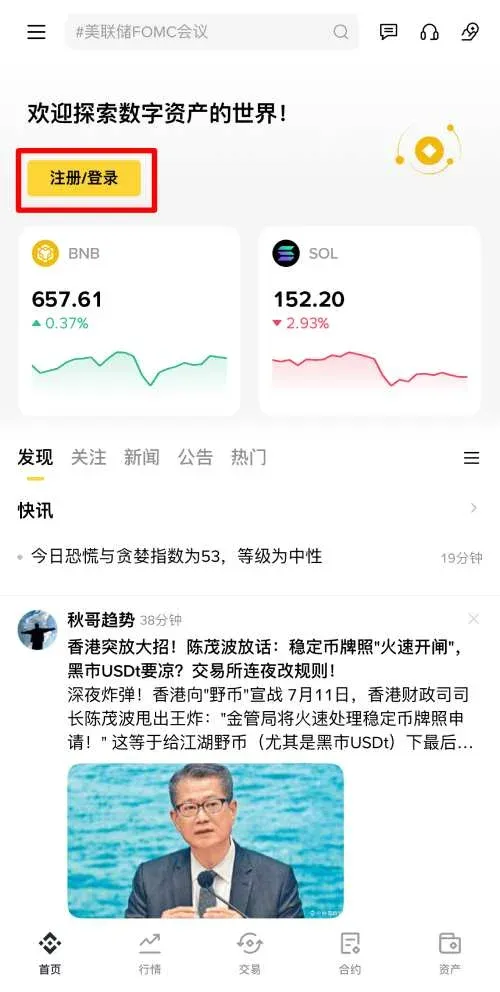
- On the APP homepage, click [Register/Login] → [Create Binance Account].
- Choose to register via email or mobile (email is recommended). After entering your details, click [Next] and enter the 6-digit verification code sent to your inbox.
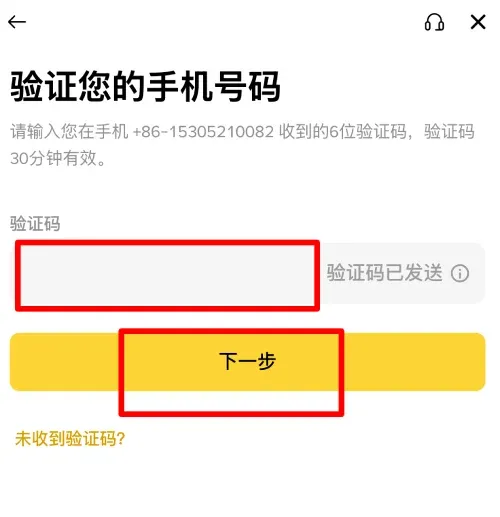
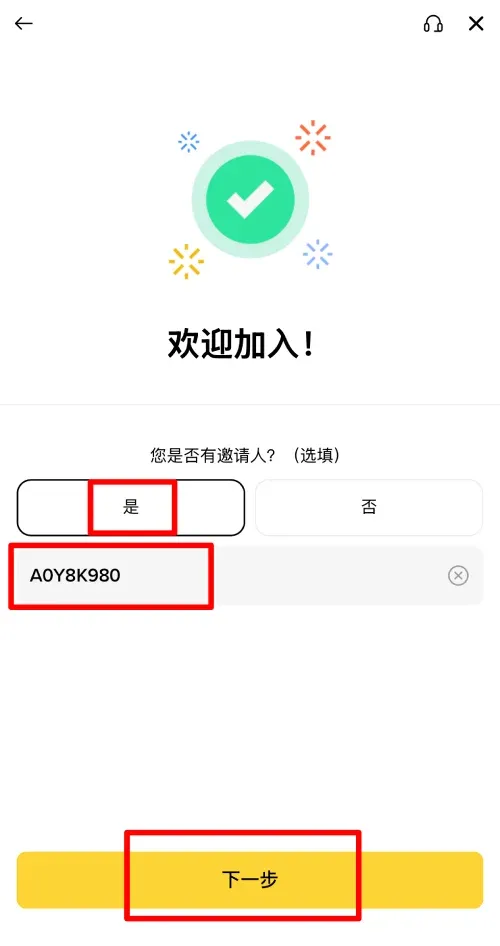
- Set a password (must be at least 8 characters, including numbers and uppercase letters). Upon completion, you will see the Referral Code page. If you registered through our link, the code `B2345` will be automatically filled, and the 20% cashback offer will be displayed.
Binance KYC (Identity Verification)
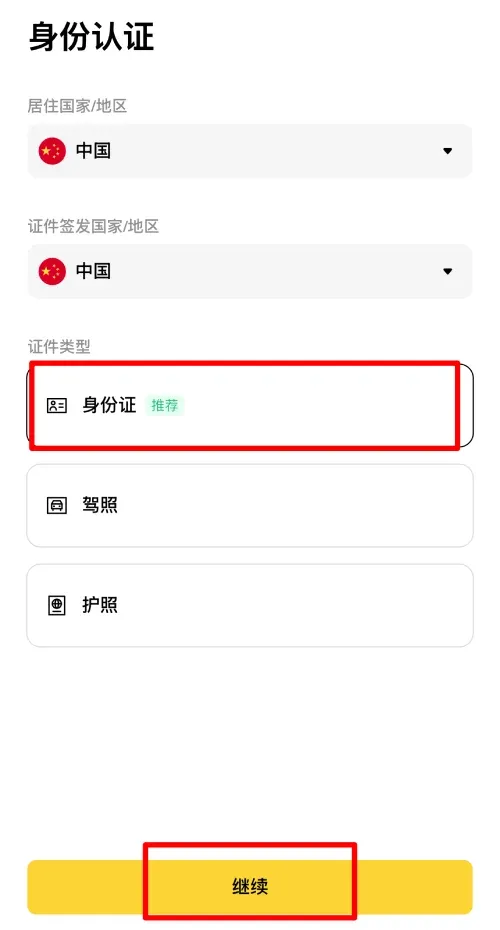
- Select your country or region of residence. Ensure this information is accurate.
- Select your ID type, such as [ID Card] or [Passport], then click [Continue].
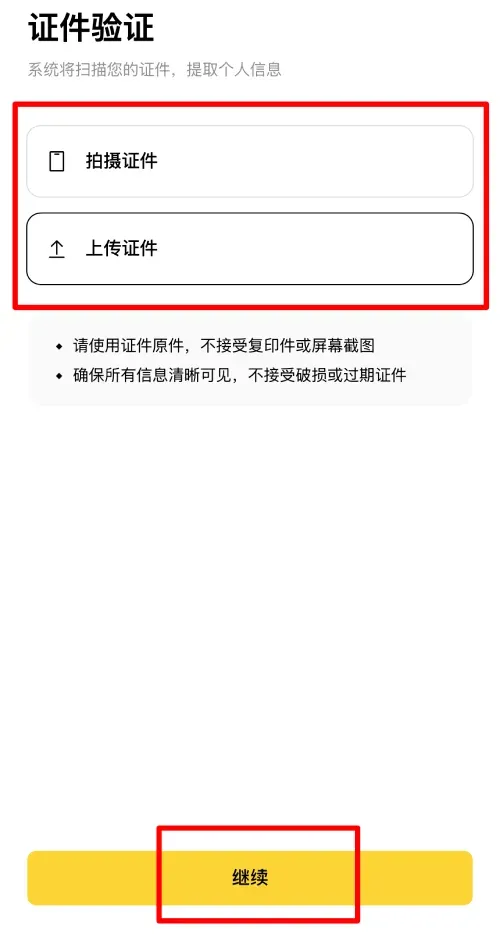
- Upload clear photos of the front and back of your identification document.
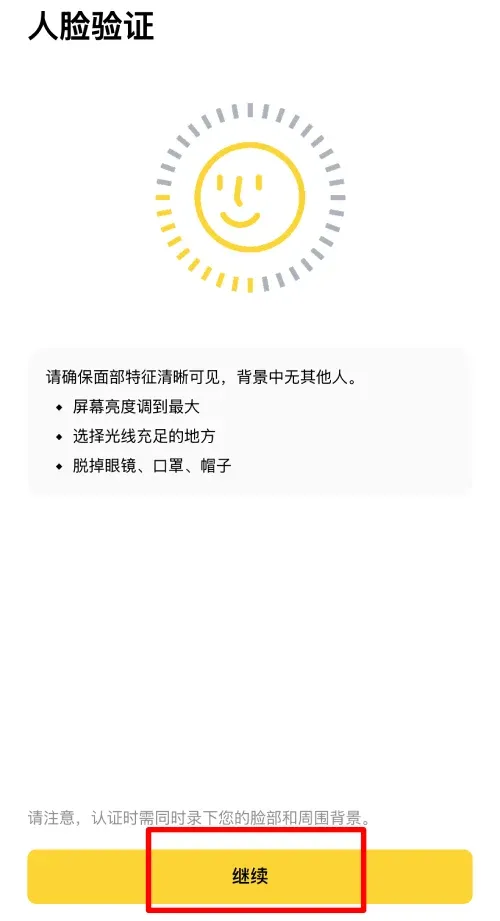
- Complete the liveness check (facial recognition), which may require you to blink or turn your head as prompted.
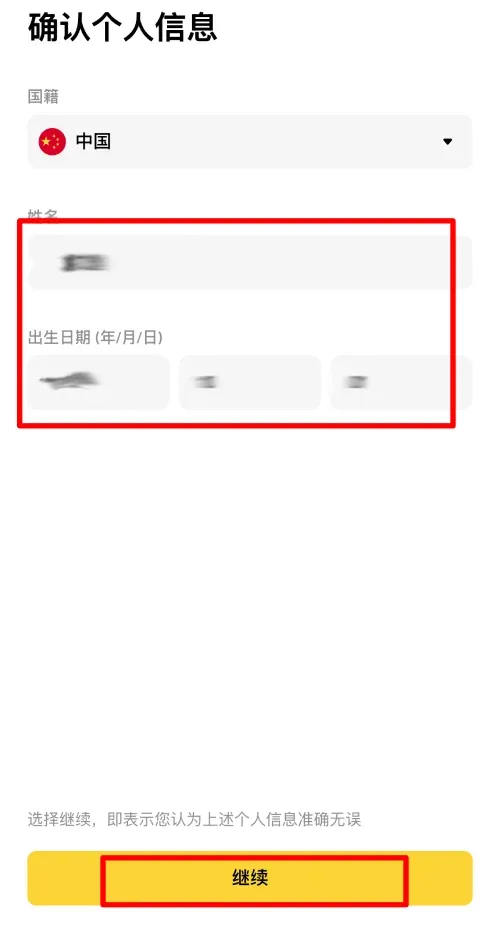
- Confirm your name, nationality, and date of birth. Once verified as correct, submit for review.
Methods for Depositing and Withdrawing Funds
| Method | Category | Key Features | Best Use Case |
|---|---|---|---|
| Fiat Deposit | P2P, Buy Crypto, SWIFT/Bank Wire | Supports local bank transfers, cards, etc. | Small, fast deposits or large wire transfers |
| Crypto Deposit | On-chain Transfer | Low cost, requires network matching | Transferring from other wallets or exchanges |
| Fiat Withdrawal | P2P (C2C) | Convert crypto back to local currency | Liquidation or spending needs |
| Crypto Withdrawal | Withdraw to External Wallet | Supports multiple chains; network fees apply | Long-term storage or DeFi participation |
Internal Transfers (Transferring to Binance Users)
- Definition: Moving assets between accounts within the Binance ecosystem. These are recorded in the internal database and do not require blockchain confirmation.
- Features: Nearly instantaneous and zero network fees. You only need the recipient's email, phone number, or Binance UID.
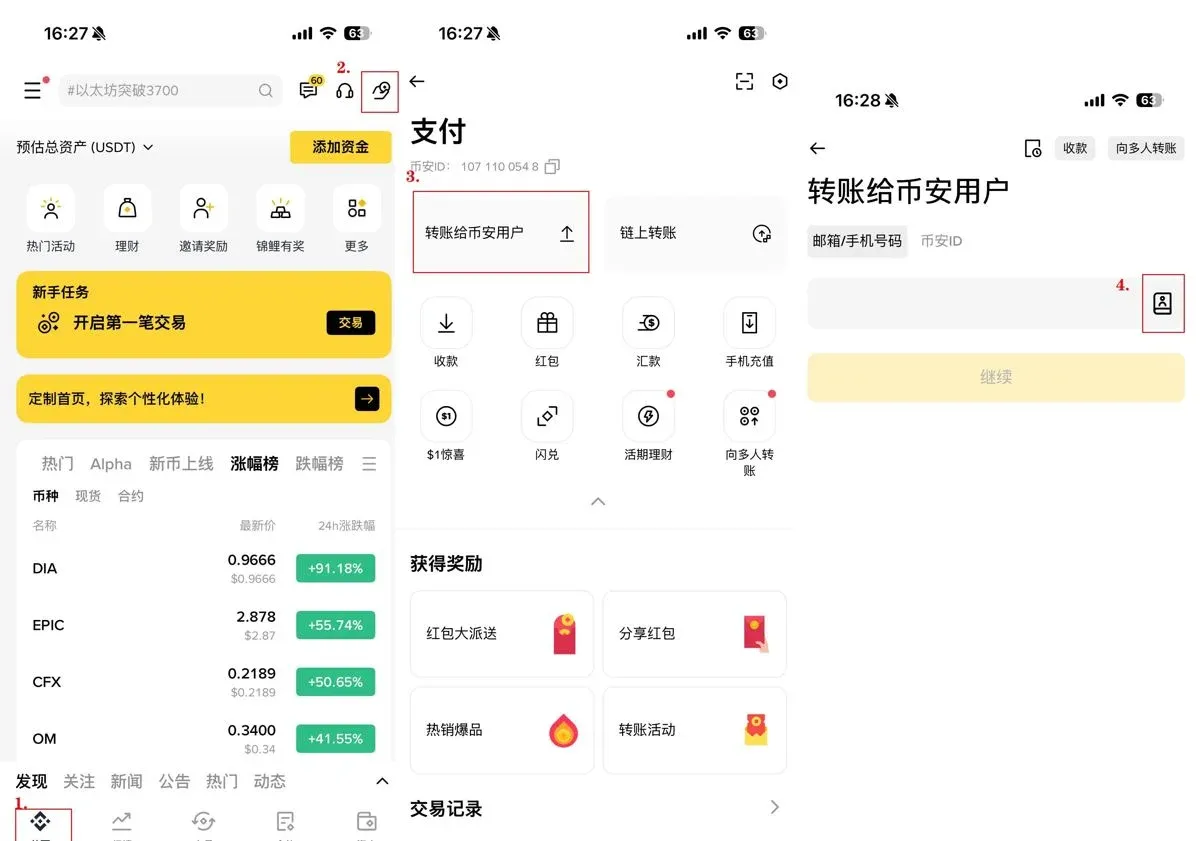
Steps: Open the APP → [Pay] icon (top right) → [Send] → Select [Internal] → Choose contact/enter details → Select coin → Enter amount → Confirm.
On-chain Withdrawal
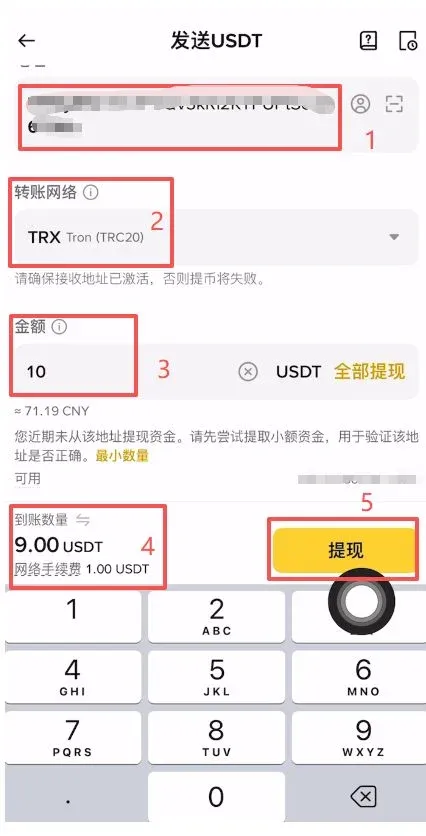
Using USDT as an example: first, obtain the deposit address from your target platform (e.g., OKX) and confirm the network (TRON-TRC20 is highly recommended for speed and low cost). In the Binance APP, go to [Wallets] → [Withdraw] → [Send via Crypto Network]. Paste the address, select the matching network, enter the amount, and submit.
P2P (C2C) Trading
Binance P2P features four specialized zones: Express, P2P, Block Trade, and Shield. Users can choose based on their transaction size and security preferences.
- Express: The system automatically matches you with a verified merchant, ideal for small, quick transactions.
- P2P (Custom): Manually browse and select merchants based on their completion rate and rating.
- Shield (Verified): Displays only high-reputation merchants with added security layers.
- Block Trade: Designed for institutional or high-net-worth individuals making large transactions.
Please refer to the corresponding image placeholders for detailed visual guidance.
Binance Deposit Tutorial
Depositing via P2P Trading
- On the homepage, click [Add Funds] → [P2P Trading].
- Select the Express or P2P tab, enter the amount of USDT you wish to purchase, select your preferred payment method, and the system will find the best match.
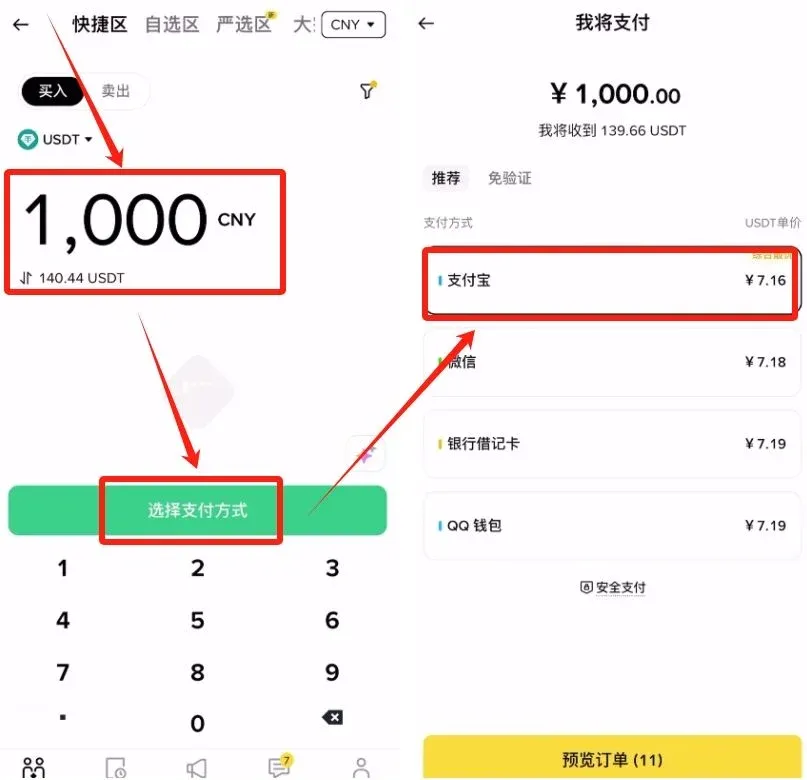
- Complete the offline payment to the merchant via your banking app or e-wallet. Upload the proof of payment. Once the merchant confirms receipt, the crypto will be released to your account.
On-chain Deposit
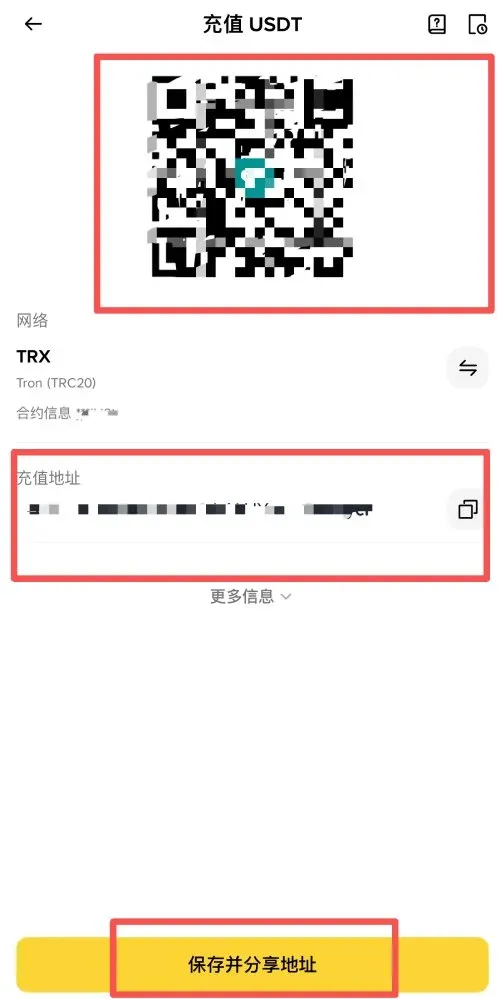
- In the Binance APP, select [Wallets] → [Deposit] → [Deposit Crypto], and choose the coin (e.g., USDT).
- Crucially, select the correct network (e.g., TRC20 or BEP20). Copy the deposit address.
- In your external wallet or other exchange, paste this address and submit the transfer.
Receiving via Binance Pay
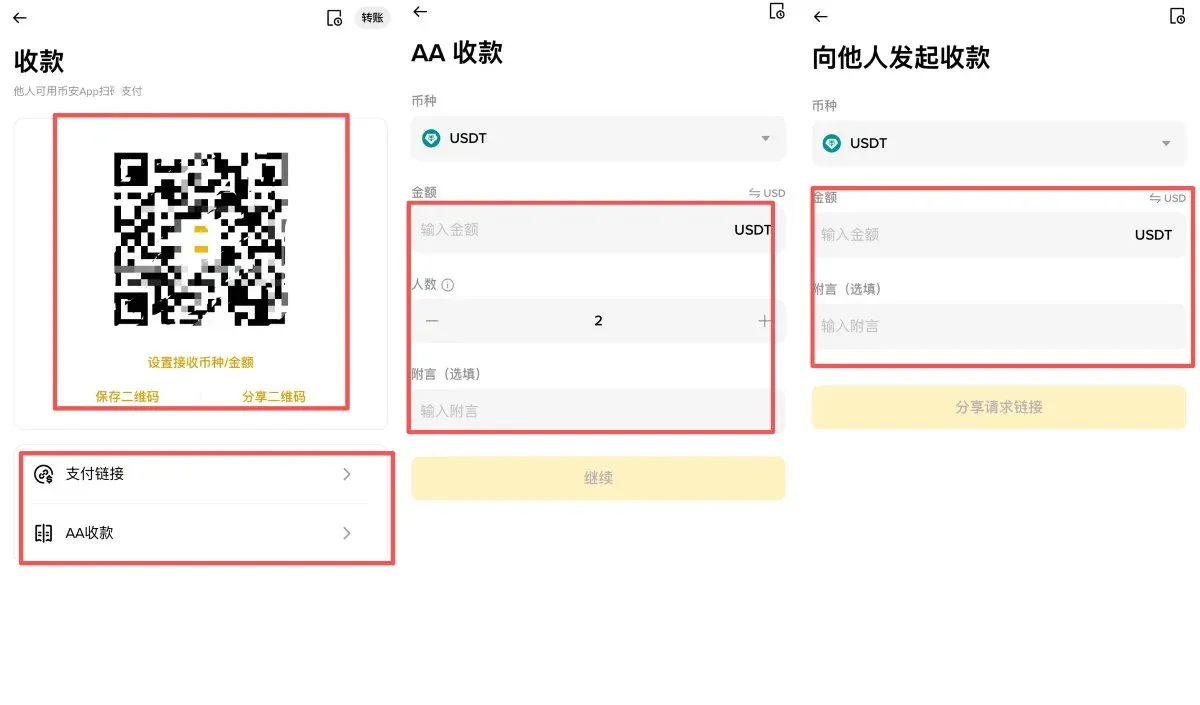
Binance Pay offers three ways to receive funds: a QR code, a payment link, or a "Split Bill" (AA) request. Users can choose the method that best suits their situation.
Comparison of Binance Fees
1. Withdrawal Fees
| Method | Fee | Pros | Cons |
|---|---|---|---|
| P2P to Local Fiat | Merchant-defined (often 0 platform fee) | Negotiable rates | Potential for delays; requires multiple steps for very large sums |
| USD SWIFT/Wire | Approx. 15 USD | Funds arrive directly in USD bank account | Requires a USD-capable bank; higher fixed cost |
| Transfer to Local Exchange | ~1 USD + Local Spread | Low network fees | More complex process; requires a second exchange account |
2. Deposit Fees
| Deposit Method | Description | Fee |
Related Reading
- Bitcoin Portfolio Allocation: How OKX & Binance Shape Crypto Investing
- How to Earn 11.83% on Binance USDC Earn – Step‑by‑Step Guide
- Buy USDT & USDC on Binance: Simple Stablecoin Guide
💡 Register on Binance with referral code B2345 for the maximum trading fee discount. See Binance complete guide.



