
 Bitaigen Research
 Stablecoins Are Gaining More Attention in the Crypto Space – A Step‑by‑Step Guide to Buying USDT and USDC on Binance
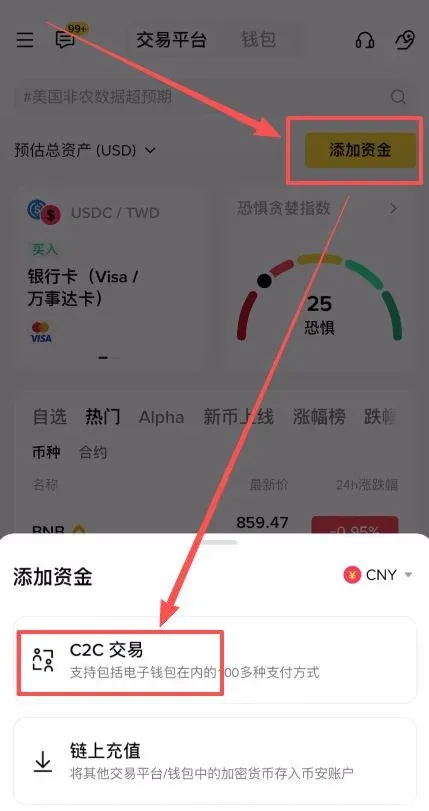
On the Binance app’s home screen, tap Add Funds → select C2C Trading → choose the coin USDT or USDC → enter the amount you wish to purchase and pick a payment method → confirm the order and upload your payment proof. Your tokens will be credited within a few minutes.
In this article we walk you through the entire process of purchasing USDT and USDC on the Binance mobile app, complete with screenshots. Afterwards, our team compares the main characteristics, advantages, and potential risks of the two most widely used stablecoins, helping you make a more rational decision before you trade. If you want to master the detailed steps and understand which token better matches your needs, keep reading.
USDT vs. USDC: What You Need to Know
Many community members recommend buying USDC instead of USDT, but this article compares both coins from the perspective of strengths and weaknesses so that you can reach a more balanced conclusion.
USDT – The Dominant Stablecoin
USDT currently holds the largest market capitalization among stablecoins, roughly three times the size of USDC.
Advantages of USDT
- Market dominance – Highest market cap, widest adoption, and deep liquidity across exchanges and DeFi platforms.
- Low fees – Trading fees are generally zero or near‑zero, making it cost‑effective for most users.
Potential Risks
- The issuer is a company headquartered in China. Certain jurisdictions such as the United States and the European Union maintain a cautious regulatory stance, which could lead to compliance challenges in the future.
USDC – The U.S.‑Backed Alternative
USDC is issued by the American company Circle and runs on the Ethereum network.
Disadvantages of USDC
- Higher transaction fees – Because it relies on the Ethereum blockchain, gas fees can make transfers relatively expensive, especially during periods of network congestion.
- Smaller market cap – Its circulating supply is lower than that of USDT, which may limit liquidity in extreme market conditions.
Why Tension Exists Between USDT and USDC
- Issuing background – The Chinese origin of USDT prompts tighter scrutiny from some regulators.
- Compliance perception – USDC benefits from the backing of a U.S.‑registered entity, leading many to view it as the safer, more compliant option.
Nevertheless, USDC is not an unequivocal “best choice.” Its higher transaction costs can erode the benefits of small‑value or high‑frequency transfers.
My Current Preference: Stick With USDT—for Now
When you weigh fees, liquidity, and market share together, USDT remains the more practical option for most everyday transactions. Keep an eye on emerging stablecoins and be ready to adjust your holdings if the market dynamics shift.
---
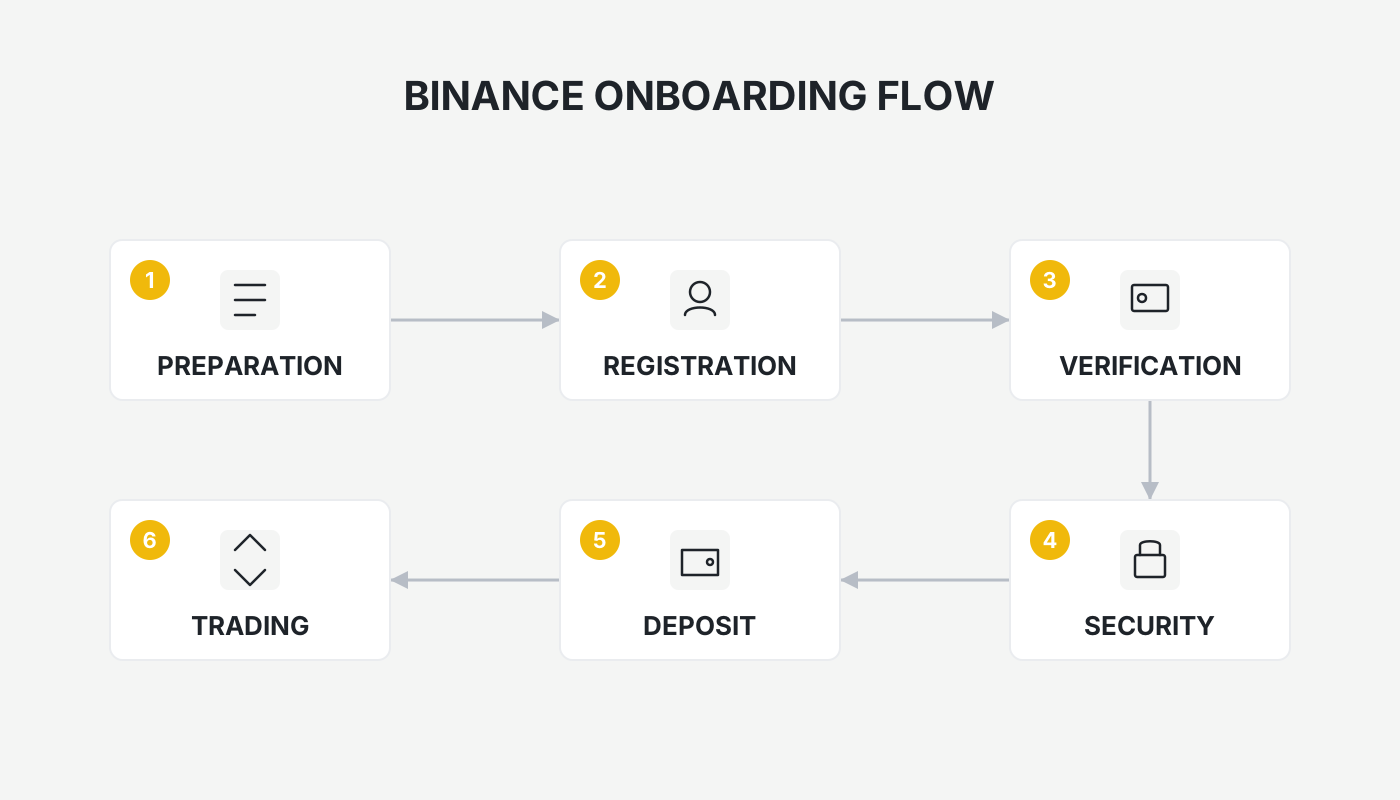
If you are ready to purchase USDT or USDC on Binance, the following steps—illustrated with screenshots from the Binance exchange—provide a full, end‑to‑end guide.
Preparation – Make sure you have downloaded and logged into the Binance app (or the OKX app) and have completed the required identity verification (KYC). For users in the United States, you must use Binance.US rather than the global Binance platform.
Steps to Purchase USDT
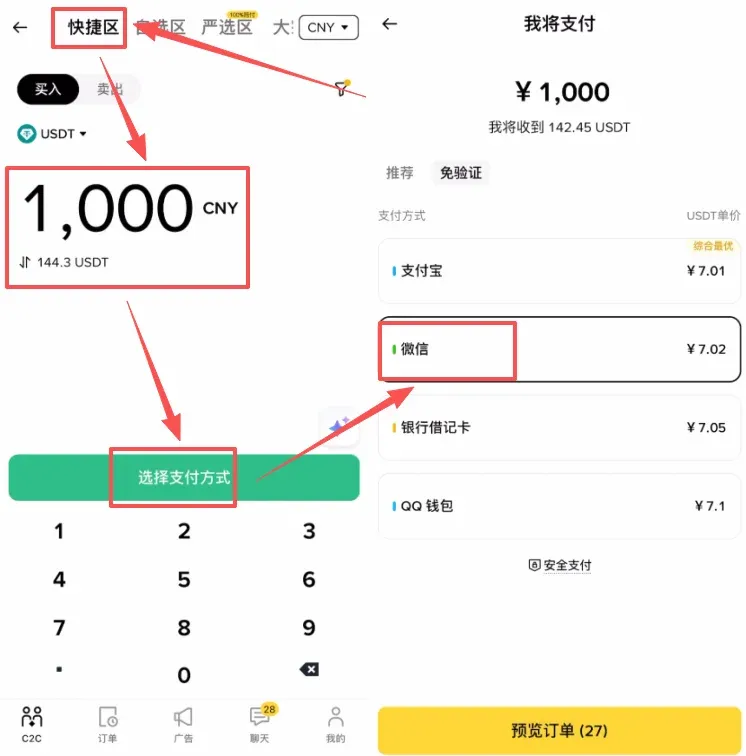
- Open the Binance app home page, tap the top‑right Add Funds button → choose C2C Trading.
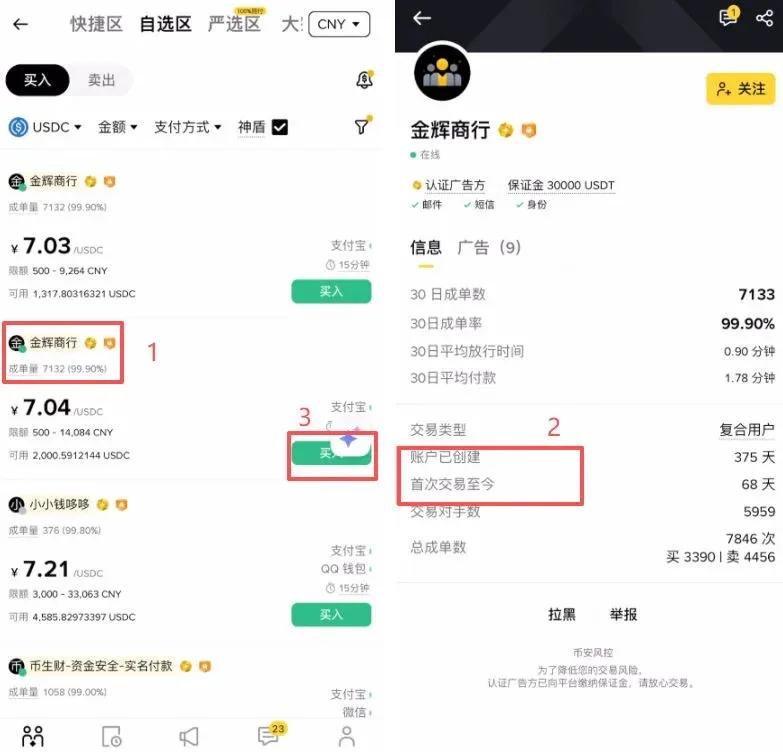
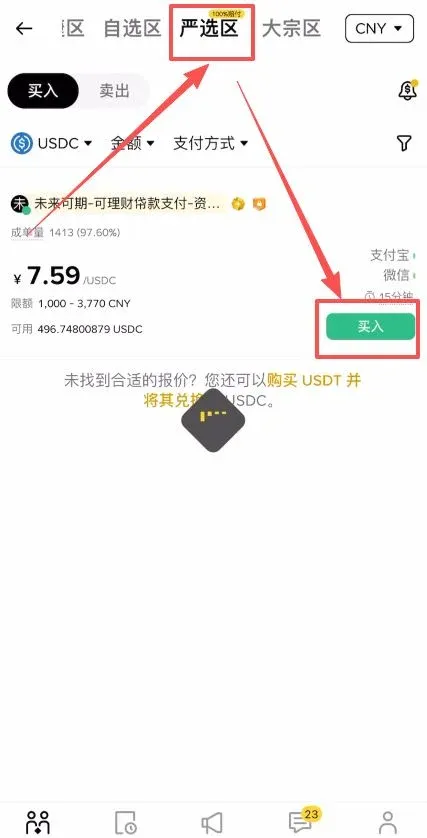
- The screen is divided into four sections: Quick, Custom, Premium, and Wholesale.
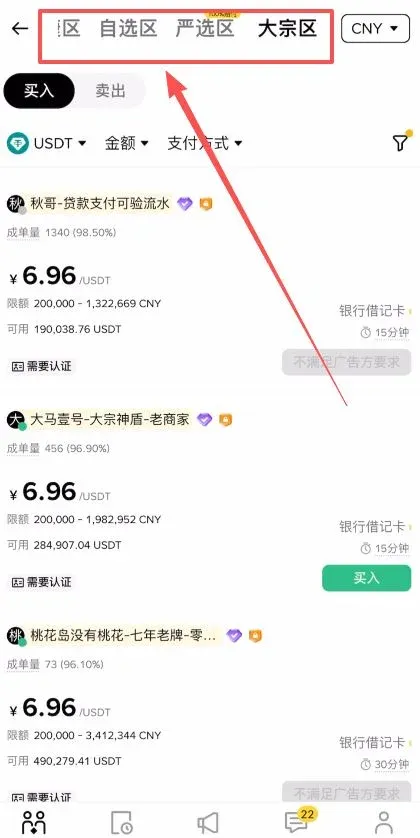
- Quick Section (recommended for beginners)
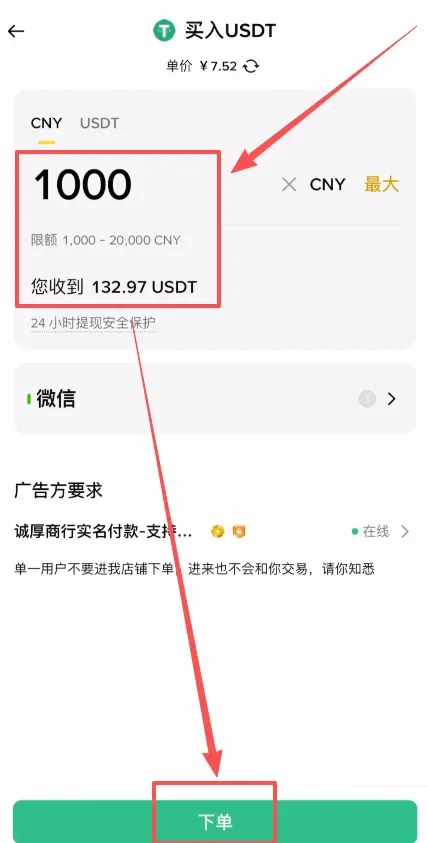
- Select the coin USDT.
- Enter the amount you wish to buy.
- Choose a payment method (Alipay, WeChat Pay, bank debit card, QQ Wallet). Using WeChat Pay as an example, tap Preview Order.
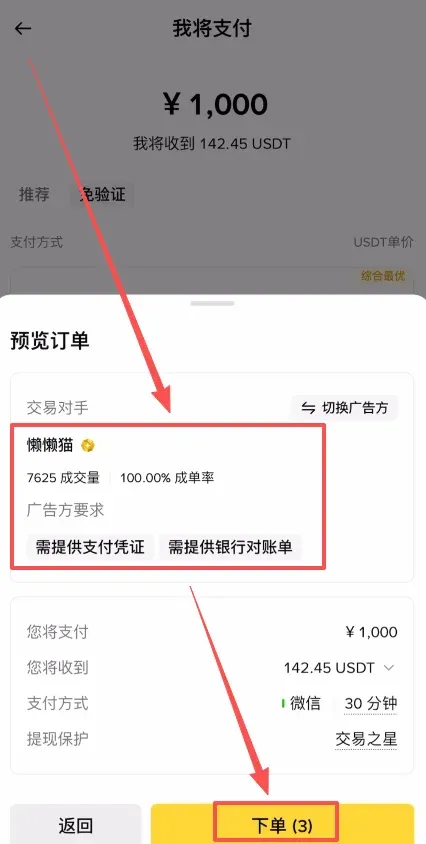
- After reviewing the order details (volume, fill rate, seller requirements), tap Place Order. The system gives you a 30‑second confirmation window.
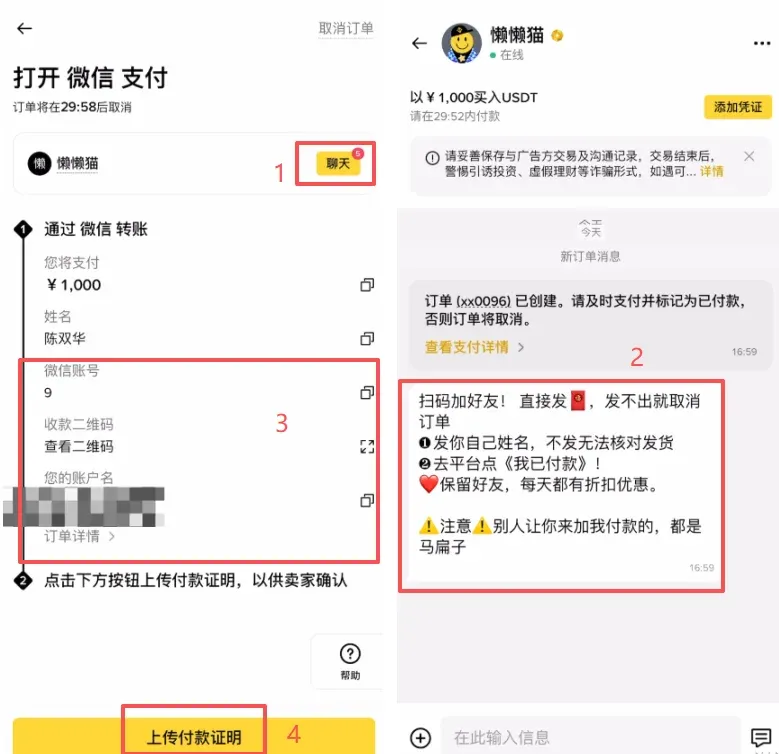
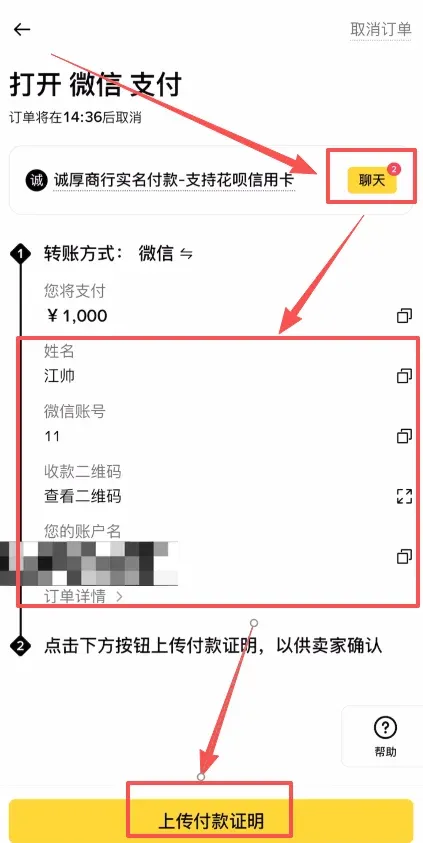
- Once the order is generated, tap Chat to see the seller’s specific instructions (e.g., real‑name payment, proof of payment).
- Using the seller‑provided WeChat ID or QR code, exit the Binance app and complete the transfer in WeChat.
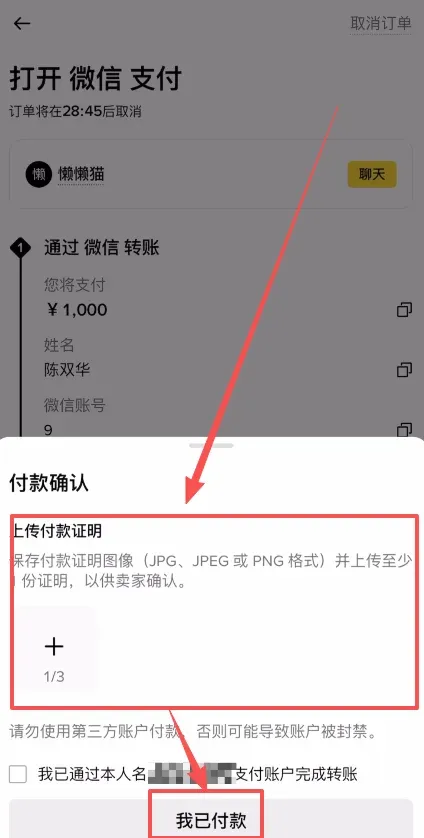
- After the transfer, take a screenshot of the payment receipt, return to Binance, tap Upload Payment Proof, and confirm I Have Paid.
- The seller releases the tokens, and your USDT will arrive within minutes.
Notes on the Other Sections
- Custom / Premium / Wholesale – Designed for users with specific needs.
- Premium – The platform offers a 100 % compensation guarantee, which can be reassuring for users worried about counter‑party risk.
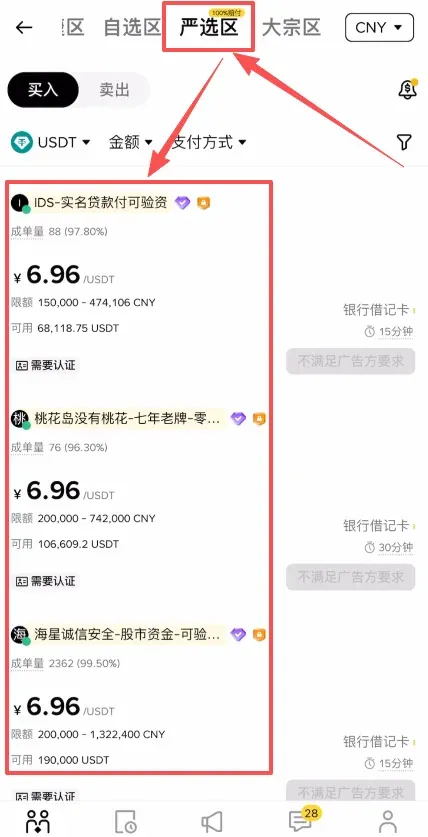
- Wholesale – Higher transaction limits, primarily intended for large‑volume traders.
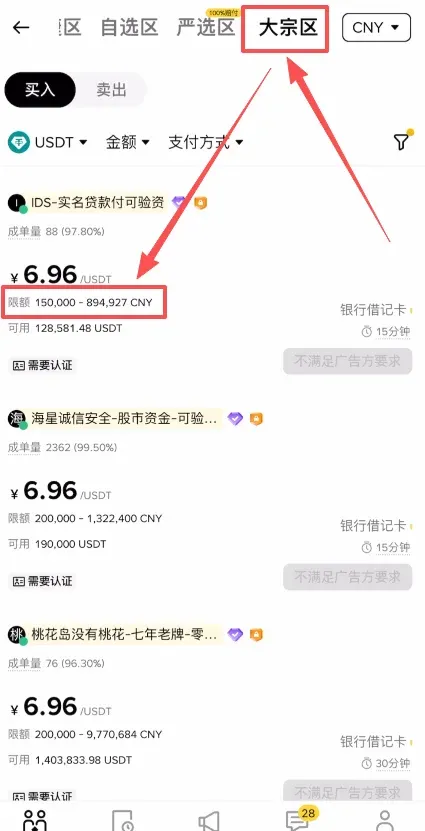
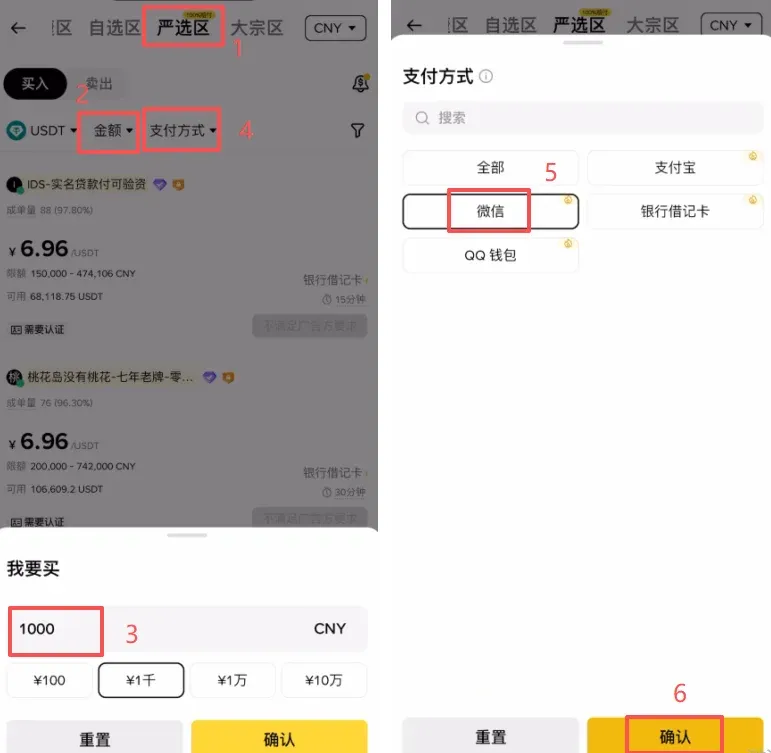
In the Premium or Custom sections you can follow a similar workflow:
- Set the purchase amount and payment method (e.g., WeChat), then tap Confirm.
- The system lists sellers that meet your criteria. Review each seller’s completed volume, fill rate, account age, etc., and pick a reputable one.
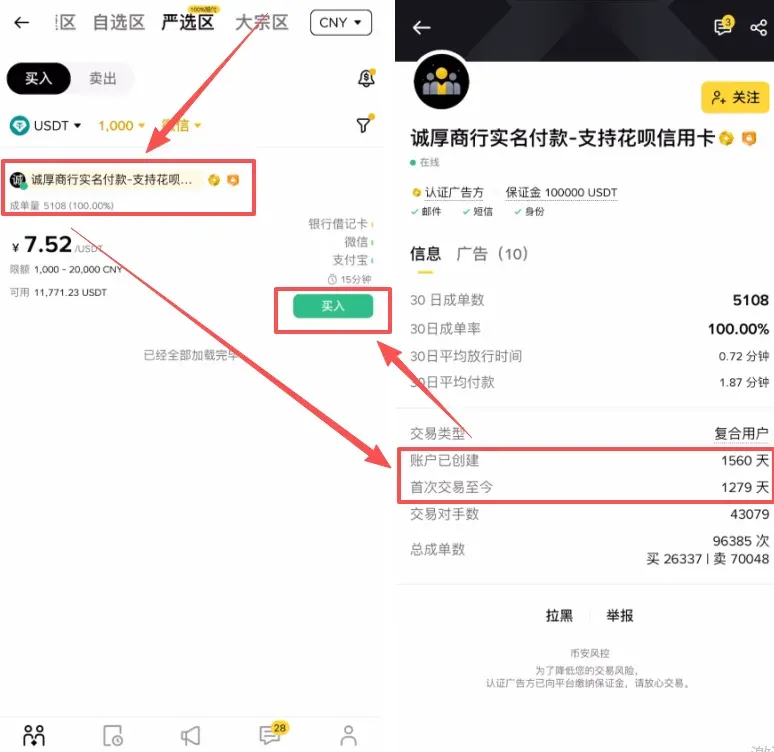
- Enter the amount, tap Place Order → follow the chat instructions to complete the offline transfer → upload the payment receipt → wait for the tokens to be released.
Steps to Purchase USDC
- On the Binance app home page, tap Add Funds → select C2C Trading.
- The interface is identical to the USDT flow, showing the Quick, Custom, Premium, and Wholesale sections.
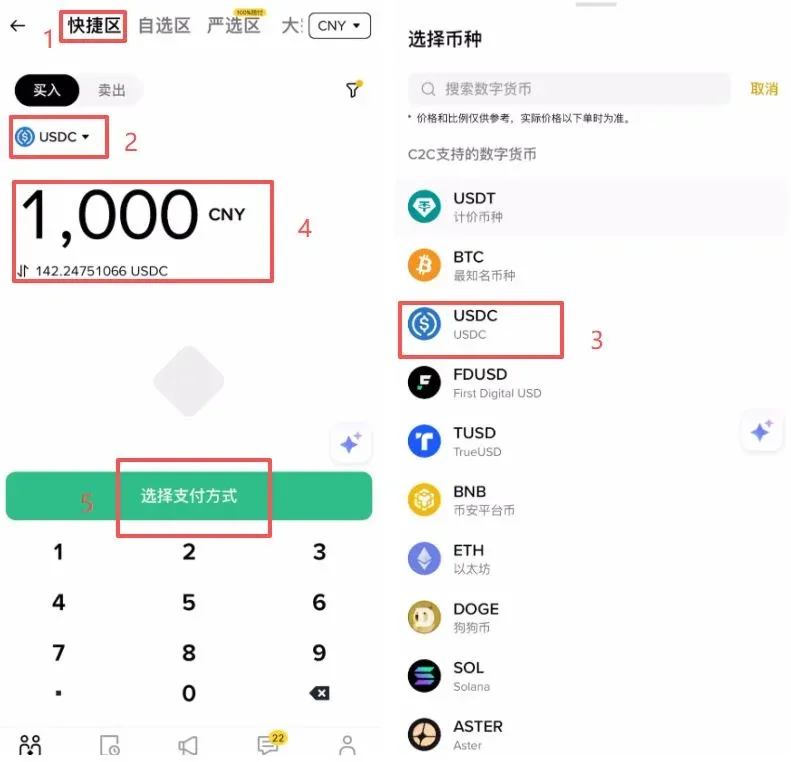
- Quick Section
- Choose the coin USDC.
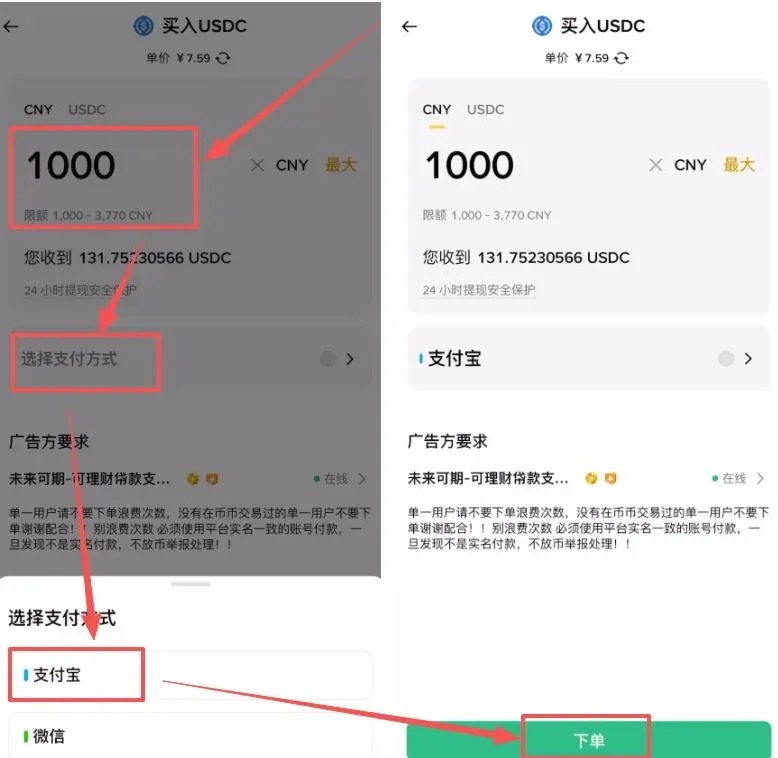
- Input the amount you want to buy.
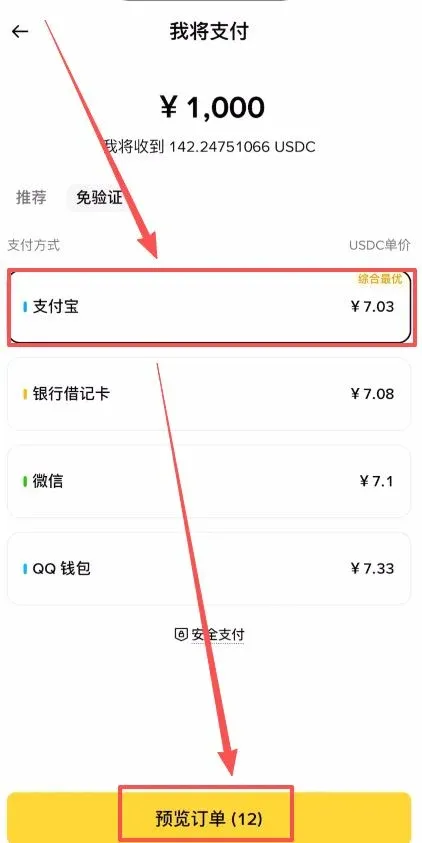
- Pick a payment method (Alipay, bank debit card, WeChat Pay, QQ Wallet). Using Alipay as an example, tap Preview Order.
- Within 30 seconds, confirm the seller’s details and tap Place Order.
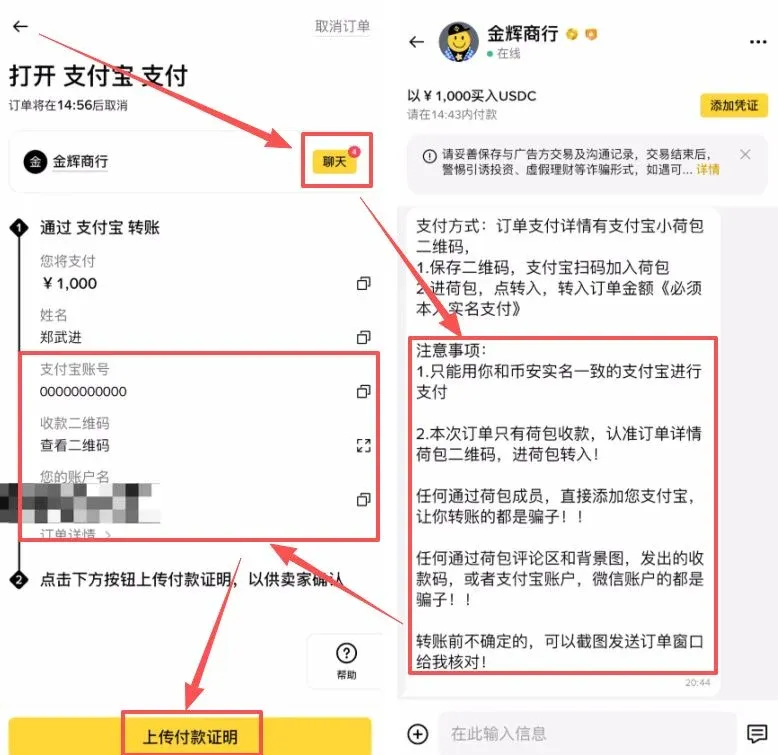
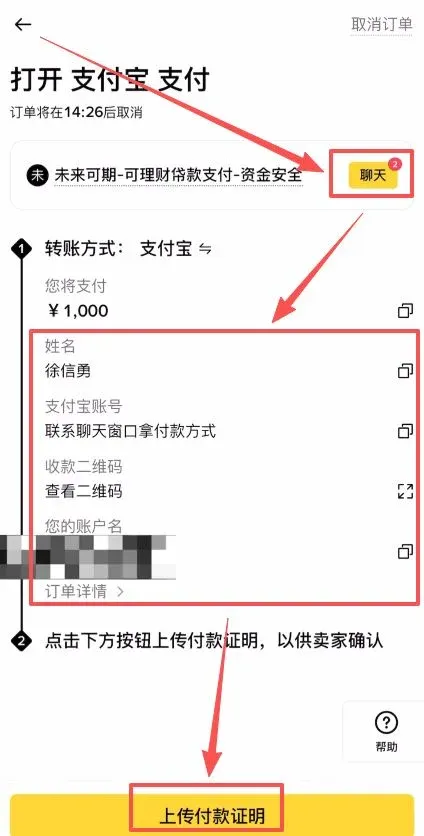
- Open the Chat window to view the seller’s requirements (e.g., they may only accept small‑value payments). After confirming, submit the order.
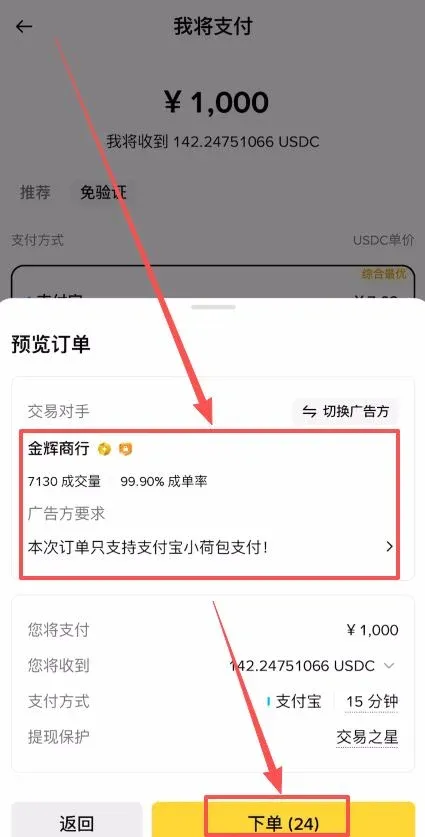
- The seller will provide an Alipay account or QR code. Exit the Binance app and complete the transfer in Alipay.
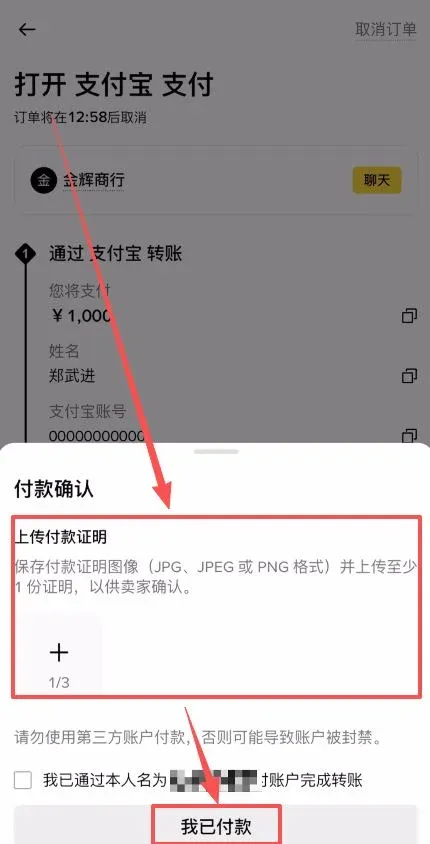
- Once the transfer is done, capture a screenshot of the receipt, return to the platform, upload the proof, and tap I Have Paid.
Premium and Wholesale Sections for USDC
- Premium – Also offers a 100 % compensation guarantee, but the number of USDC sellers is smaller than for USDT.
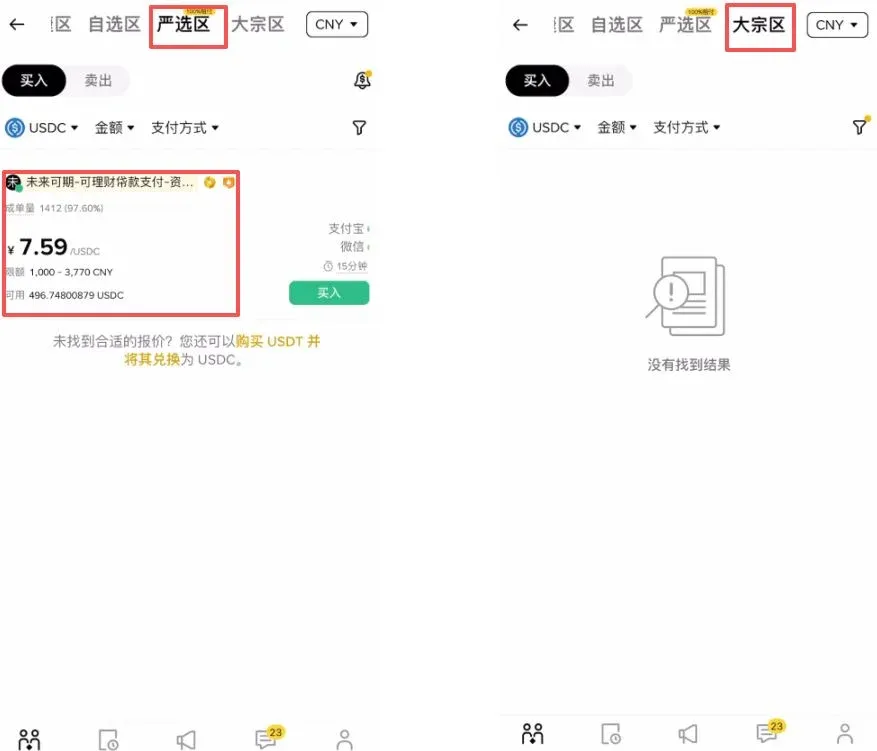
- Wholesale – High limits, rarely used by ordinary retail users.
Tips for Using the Custom Section
- Check the “Shield” box to filter sellers who have posted large security deposits on the platform.
- Evaluate sellers based on completed volume, fill rate, and account longevity to select trustworthy counterparties.
- Click Buy, set the amount and payment method (e.g., Alipay), place the order, and follow the chat instructions to finish the offline payment.
If you trade on other exchanges and have not yet benefited from fee rebates, you can obtain the relevant commission rebates through the links below.
Important Reminder – You must complete registration before you can receive a 20 % rebate.
- OKX `B2345` – 20 % – Official Registration | Official Download
- Binance `B2345` – 20 % – Official Registration | Official Download
- HTX `b6yq8223` – 20 % – Official Registration | Official Download
- Gate.io `VLIWUGTFAA` – 20 % – Official registration & download links
- Bybit `B2345` – 20 % – Official Registration | Official Download
- Bitget `good9999` – 20 % – Official Registration | Official Download
What Is USDT (Tether)?
USDT is a stablecoin pegged 1:1 to the U.S. dollar. Its issuer, Tether, claims that each token is backed by an equivalent amount of dollar reserves, which is intended to keep its price stable relative to fiat currency.
Historically, USDT has faced criticism over the transparency of its reserve holdings, especially after the 2022 collapse of Terra’s UST, which heightened demands for more rigorous audit procedures. Tether denies any shortage of reserves and says it will regularly publish audit reports to improve transparency.
What Is USDC (
Related Reading
- USDT Explained: How to Buy & Sell USDT on OKX (2026 Guide)
- How to Safely Buy USDC on Binance – Step‑by‑Step Guide
- Binance Crypto Trading: Top Liquidity & Security for New Traders
💡 Register on Binance with referral code B2345 for the maximum trading fee discount. See Binance complete guide.



