
 Bitaigen Research
 We systematically outline the latest Binance registration and verification procedures for users outside mainland China in this article, covering network switching, account creation, KYC essentials, and deposit/withdrawal techniques. With clear step‑by‑step guidance, even first‑time users can get started quickly. Subsequent sections will further dissect platform features and risk‑mitigation strategies, helping you use the world‑leading exchange compliantly. Note: Users residing in the United States must use Binance.US rather than the global Binance platform. Crypto gains may be taxable in your jurisdiction, so consider local tax obligations.
1. Overview of Binance
To open a Binance account from mainland China, you need to switch your IP address to Taiwan or South Korea, then register on the Binance website or mobile app using an email address or phone number, and finally complete KYC identity verification.
Binance is the world’s leading cryptocurrency exchange, renowned for its massive trading volume, extensive coin support, and diversified financial products. The platform was founded in 2017 by Changpeng Zhao (CZ). As of December 2024, its average daily trading volume approached US $90 billion, and it supports more than 150 mainstream and alt‑coins, including Bitcoin (BTC), Ethereum (ETH) and Binance’s native token BNB. Binance offers spot trading, options, US‑margin contracts, and coin‑margin contracts, catering to both beginners and professional traders.
Binance originally set up its headquarters in China, but after regulatory changes it relocated to Japan and Malta, and now operates under a “no fixed headquarters, global‑operational” model. The name combines “binary” and “finance,” symbolizing innovation in digital finance. The platform can process roughly 1.4 million orders per second, a performance that leads the industry.
2. Binance Account Opening Guide
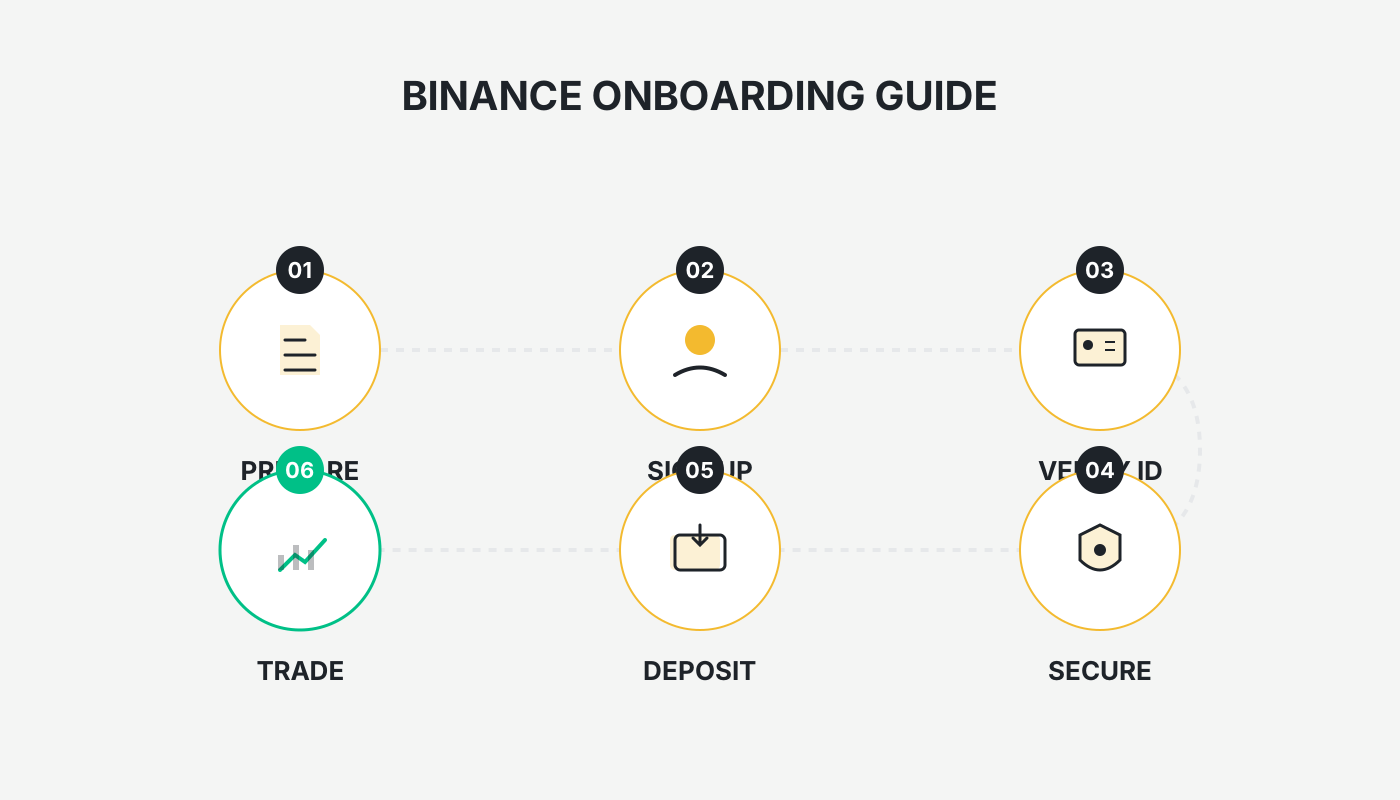
1. Preparations
- Device & Network: Use a secure computer or smartphone.
- Official registration link: <https://accounts.binance.com/register?ref=B2345> (copy into your browser).
- Android app download: <https://www.bitaigen.com/binance/download>
- Referral code: `B2345` (eligible for a 20 % fee rebate).
- Download & installation tutorials (Android / iOS): *How can users outside mainland China download the Binance app?*
- Identity documents: KYC verification is essential for raising account limits and enhancing security. You will need front‑ and back‑side photos of an ID card, passport or driver’s licence, plus a selfie holding the document. Verification is usually completed within 24 hours.
- Email or phone number: Used to receive verification codes. It is advisable to use an overseas email (e.g., Gmail) or a non‑Chinese phone number.
2. Registration Steps
- Switch IP: Change your network IP to Taiwan or South Korea. Avoid IPs from the United States, Canada, Singapore, Japan, etc., and enable “global mode” in your VPN client.
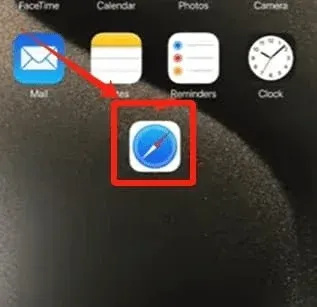
- Open the registration link: In a mobile browser (iPhone users are recommended to use the native Safari), click the link below to start registration: Binance: <https://accounts.binance.com/register?ref=B2345>
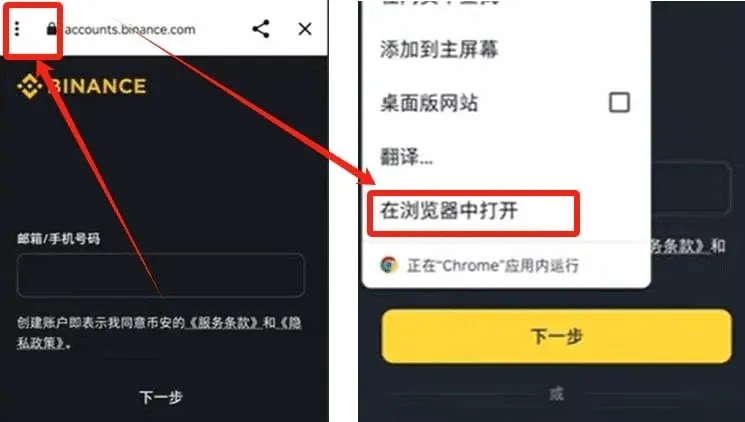
- Download and launch the app: Android users should tap the link, then select the three‑dot menu in the upper‑left corner → Open in Browser.
App Registration Flow
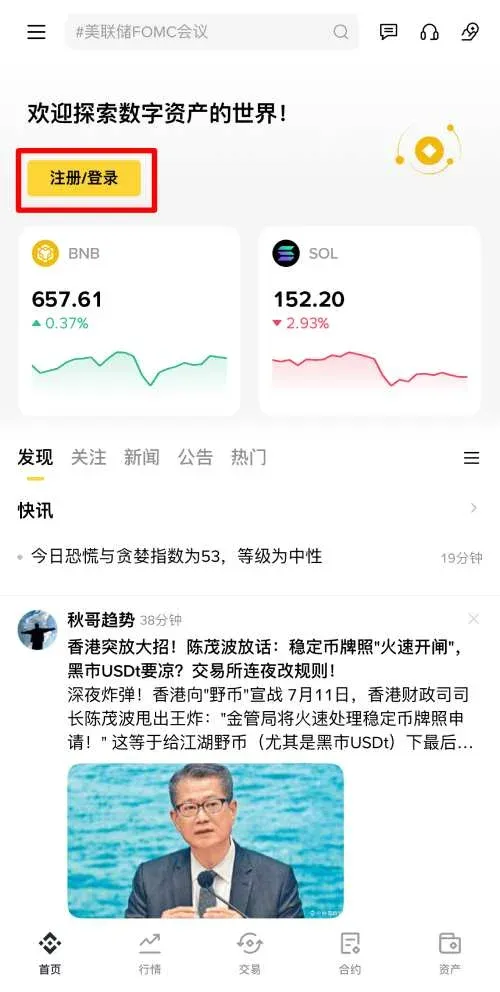
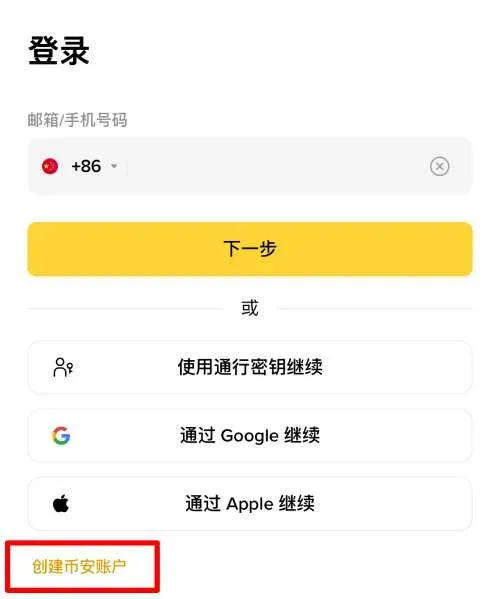
- Tap the [Register / Login] button on the home screen, then choose [Create Binance Account] at the lower‑left corner.
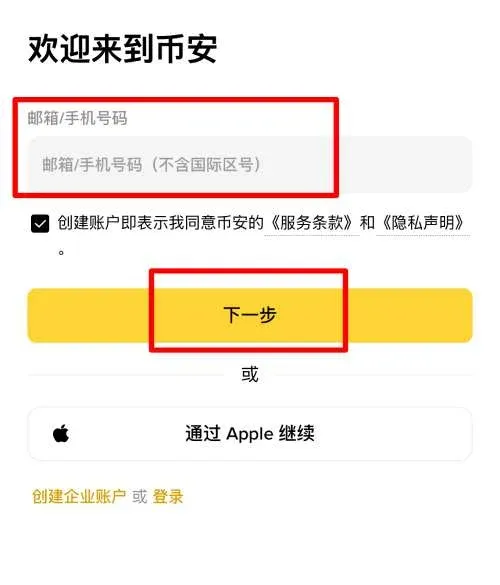
- Choose email or phone number for registration (email is recommended), enter the chosen identifier and tap [Next].
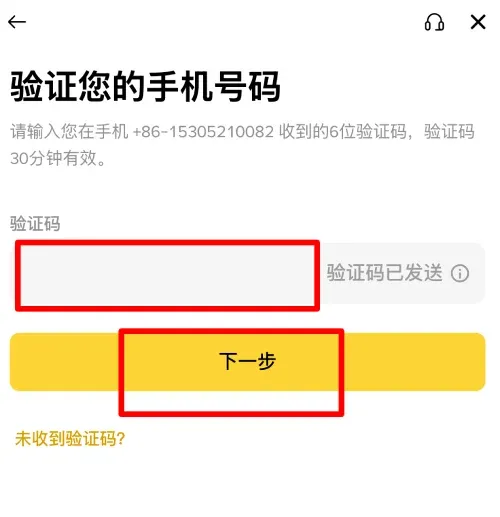
- Binance will send a 6‑digit verification code to your email. Enter it to continue.
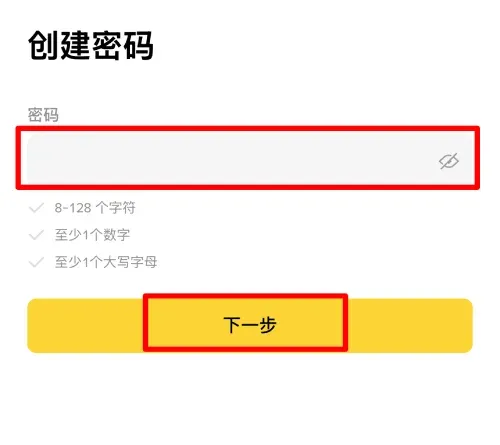
- Set a login password. The password must be at least 8 characters, contain numbers and an uppercase letter.
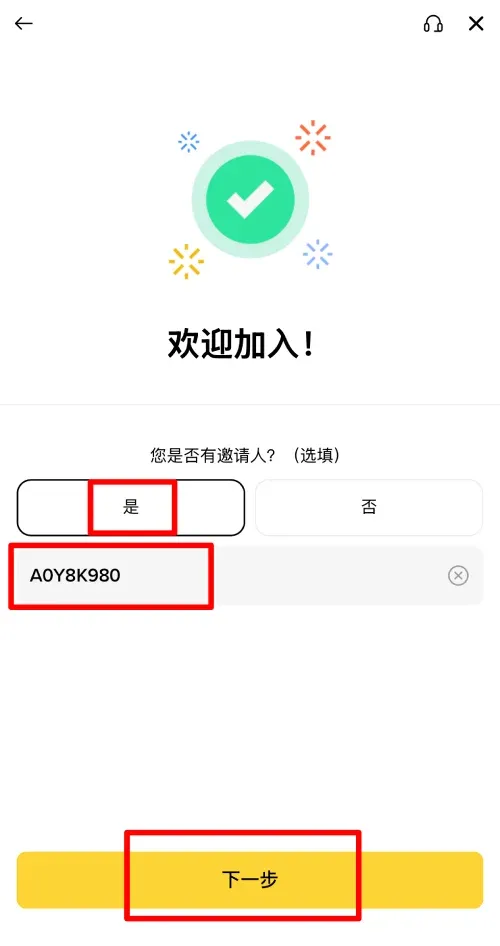
- If you used the referral link above, the referral code is auto‑filled; otherwise, manually enter the uppercase code `B2345`. After submission you will receive the 20 % fee‑rebate.
3. Completing Identity Verification (KYC)
KYC is required to raise deposit/withdrawal limits and unlock leveraged, futures and other advanced features.
- Required materials
- Front‑ and back‑side photos of an ID card, passport or driver’s licence.
- A selfie holding the document, with a clear, unobstructed view.
- Verification steps
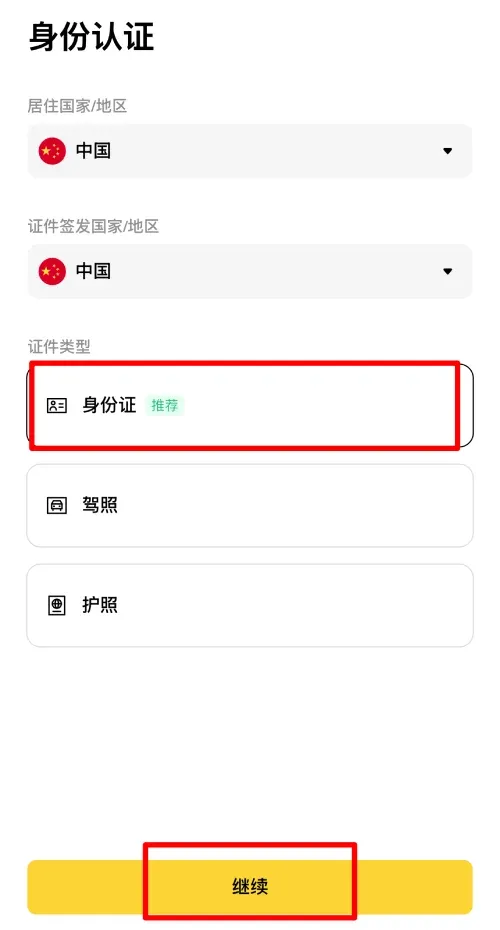
- On the verification page select your country/region of residence (provide truthful information).
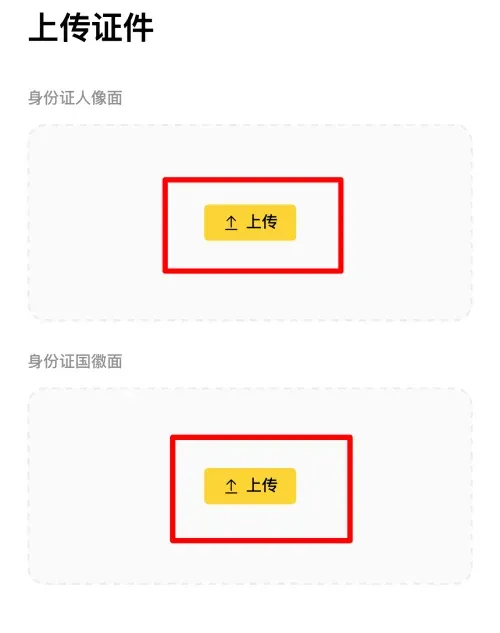
- Choose the document type (the screenshot below shows ID card) and click [Continue].
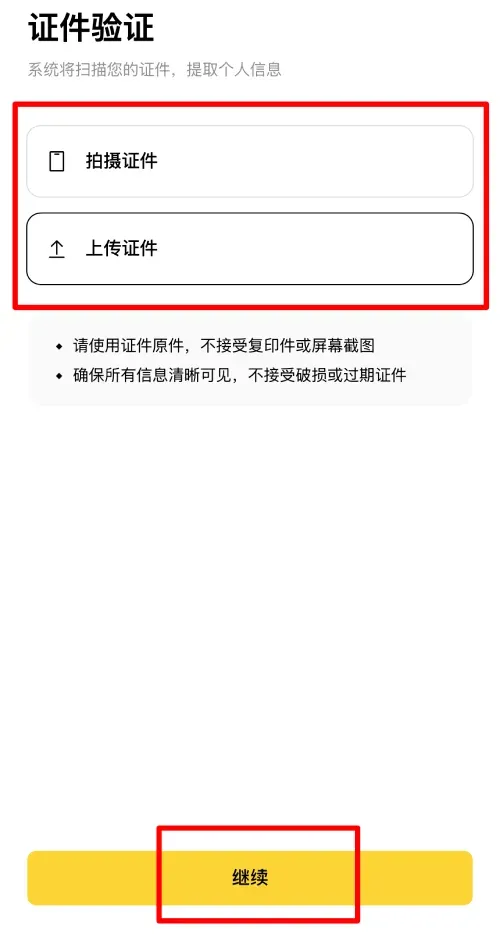
- Upload the front and back photos of the selected document.
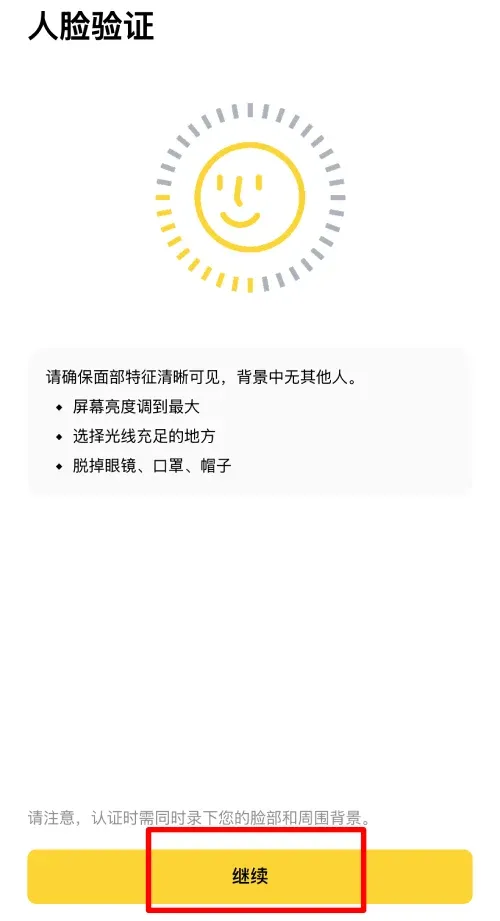
- Perform facial recognition (blink, turn head, etc.) as prompted.
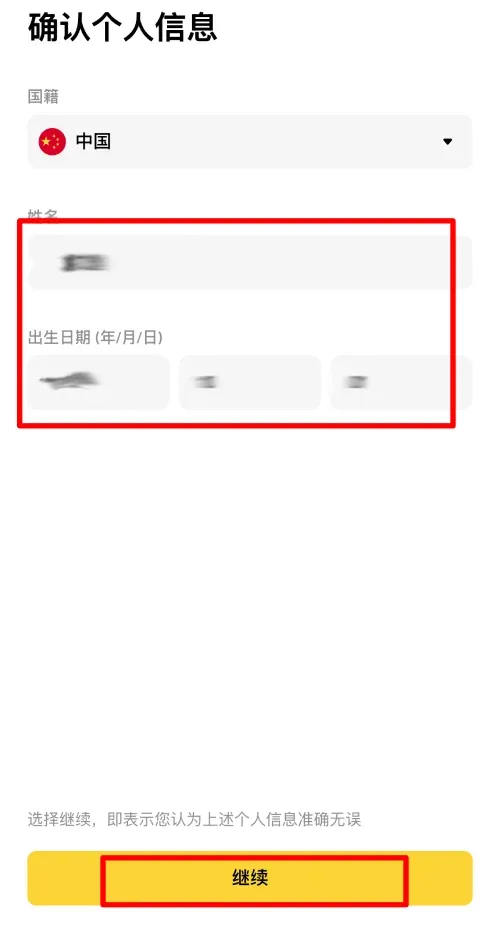
- Review the displayed name, nationality, date of birth and other details; confirm they are accurate before submitting.
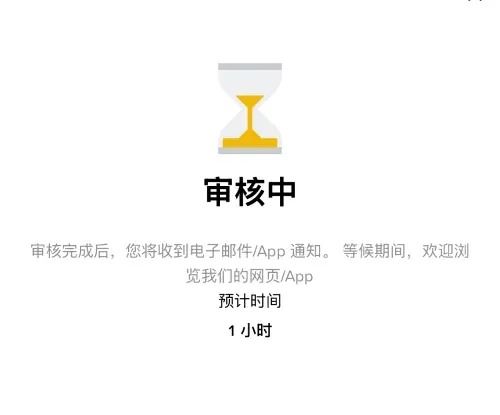
Once verification is approved, higher deposit/withdrawal limits are unlocked and you can enable margin, futures and other advanced trading functions.
3. Binance Usage Guide
1. Interface & Features
- Spot Trading: Buy and sell cryptocurrencies such as BTC/USDT, ETH/USDT.
- Derivatives Trading: Offers US‑margin contracts and coin‑margin contracts, suited for high‑risk appetite traders.
- Binance Earn: Stake or purchase financial products to earn passive yields.
- NFT Marketplace: Trade non‑fungible tokens.
- Binance Academy: Educational resources on blockchain and trading.
2. Basic Operations
- Deposit: Go to Wallet → Deposit, select the desired coin, copy the deposit address, and transfer assets from another exchange or wallet.
- Trade: Tap Trade → Spot, choose a trading pair, input the amount and price, then confirm to execute.
- Withdraw: Navigate to Wallet → Withdraw, enter the destination address, amount, and pay the network fee (e.g., Bitcoin “gas” fee).
- BNB Utility: Holding BNB grants up to a 25 % discount on trading fees and provides access to various platform promotions.
3. Security Recommendations
- Enable Two‑Factor Authentication (2FA) and change passwords regularly.
- Avoid conducting transactions over public Wi‑Fi networks.
- Periodically review login activity to spot any unusual behavior promptly.
4. Deposits & Withdrawals on Binance
The table below contrasts Binance’s primary deposit and withdrawal methods and the scenarios they suit:
| Category | Main Methods | Core Characteristics | Typical Use‑Case |
|---|---|---|---|
| **Fiat Deposit** | C2C, platform‑escrow, instant buy, bank wire (SEPA/SWIFT) | Supports Alipay, WeChat Pay, bank cards; platform guarantees; works for small or large amounts | Purchase USDT, BTC or other crypto assets |
| **Crypto Deposit** | On‑chain transfer | Low cost, must match the correct blockchain network | Move existing assets between exchanges or wallets |
| **Fiat Withdrawal** | C2C – sell crypto to a buyer, receive funds via Alipay, bank card, etc. | Direct conversion to fiat (USD, EUR, etc.) | Cash out to a local bank account |
| **Crypto Withdrawal** | On‑chain transfer to external wallet | Miner fee applies; network congestion can affect speed | Long‑term storage or participation in DeFi protocols |
4.1 Binance Deposit Tutorial
Binance deposits mainly comprise on‑chain funding, C2C (peer‑to‑peer) purchases, and Binance Pay receipts.
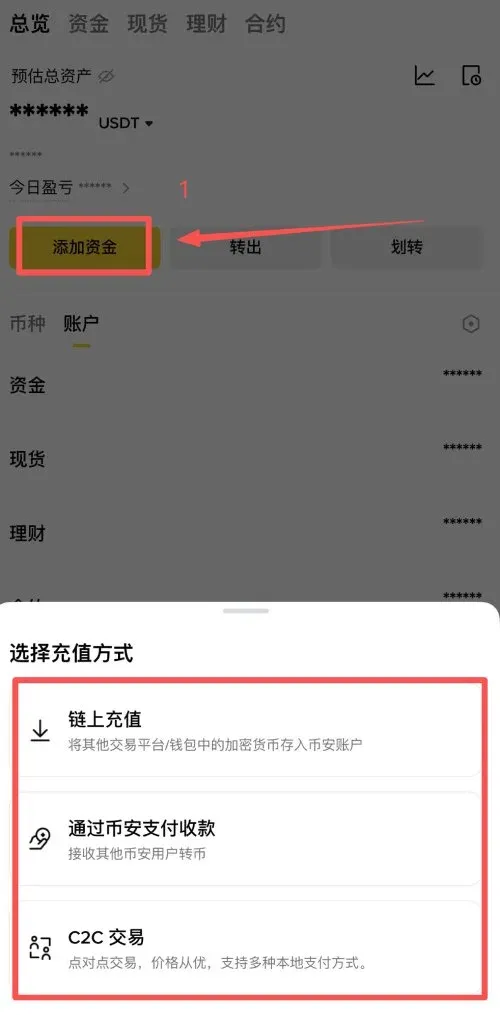
(1) C2C Trading
- On the home screen tap [Add Funds] → [C2C Trading].
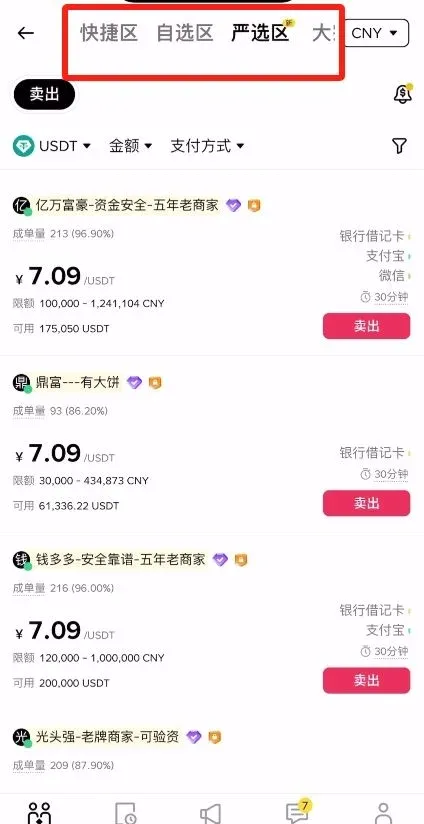
- Four sections are displayed: Quick, Custom, Premium, and Bulk.
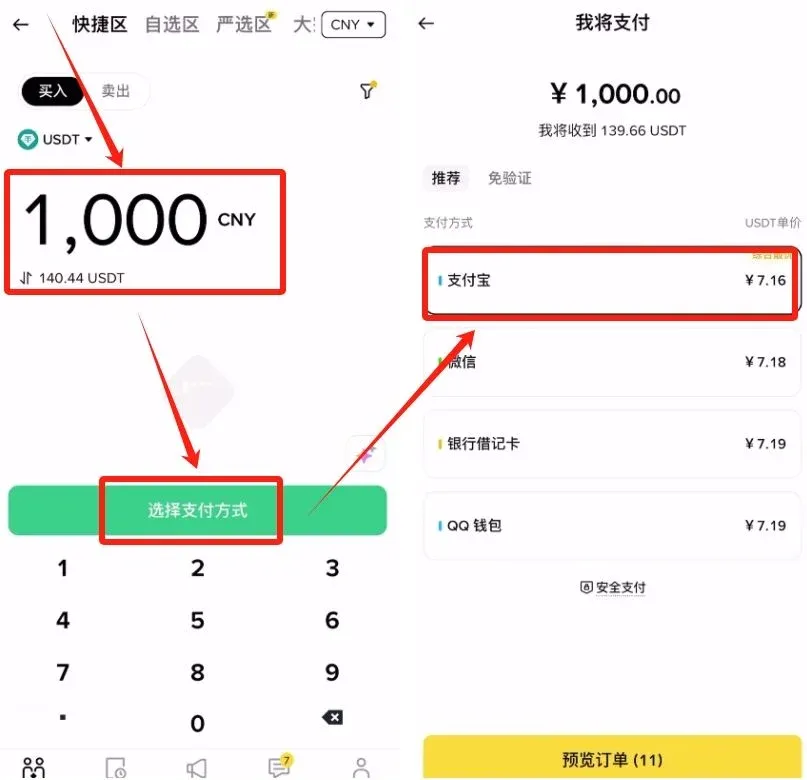
- Quick: Ideal for small amounts and speed; the system auto‑matches the best‑priced seller.
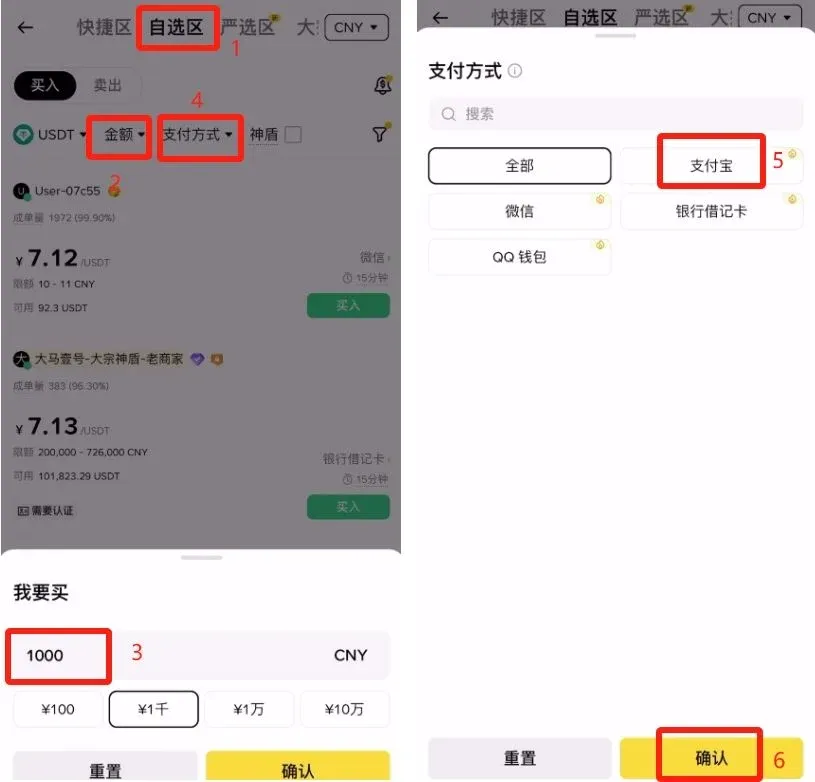
- Custom: Allows you to filter sellers and payment methods manually; suited for experienced users.
- Premium: Shows only “Shielded” sellers that are platform‑guaranteed, offering higher security.
- Bulk: Designed for institutional or high‑net‑worth users conducting large‑volume trades.
- Example – buying USDT: enter the desired amount, select a payment method (e.g., Alipay), and Binance will match you with the seller offering the best price.
- To hand‑pick a seller, go to the Custom tab, filter for sellers that accept Alipay, and enable the “Shielded” filter.
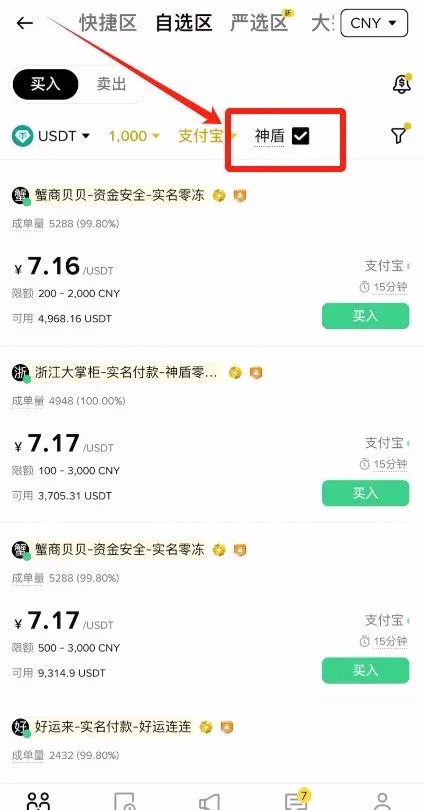
- After selecting a seller, review their trade volume, fulfillment rate and account age (preferably ≥ 6 months). Click [Buy] to proceed.
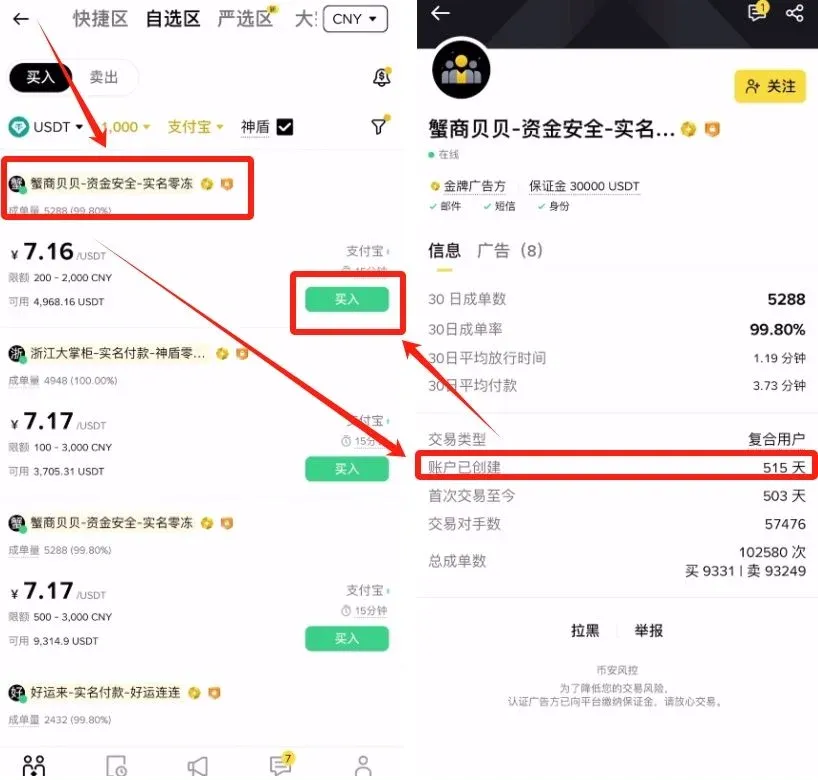
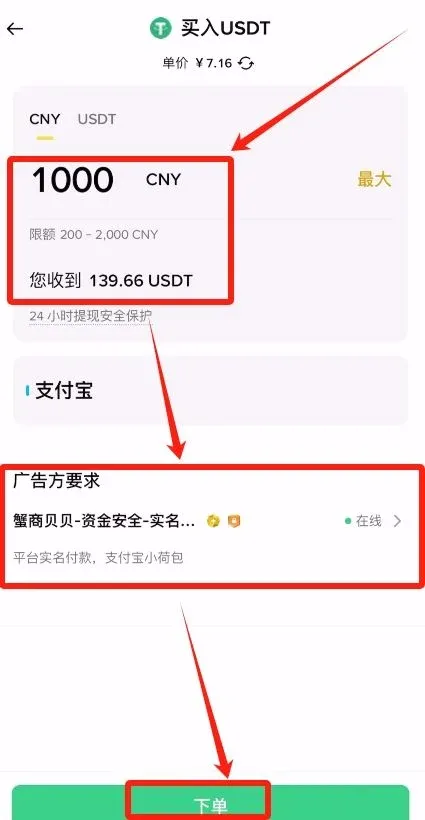
- Input the purchase amount, verify the seller’s payment requirements (e.g., real‑name verification), then click [Place Order].
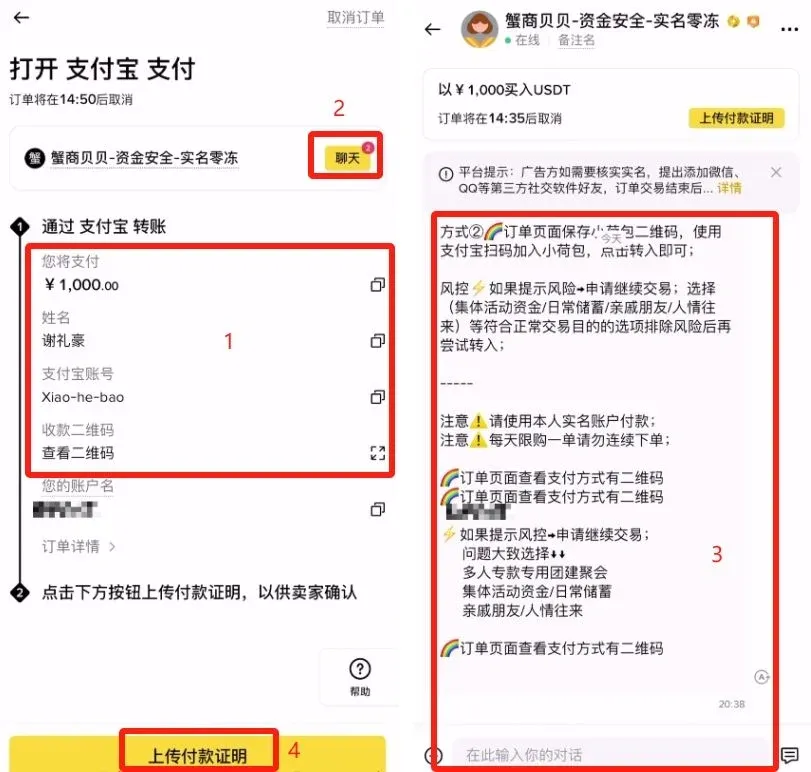
- Once the transfer is complete, upload the payment receipt and wait for the seller to confirm the release of the USDT.
(2) On‑Chain Deposit
Definition: Directly transfer cryptocurrency from an external wallet or another exchange into your Binance account.
- In the Binance app, tap [Wallet] → [Add Funds] → [On‑Chain Deposit], then select the coin you wish to deposit (e.g., USDT).
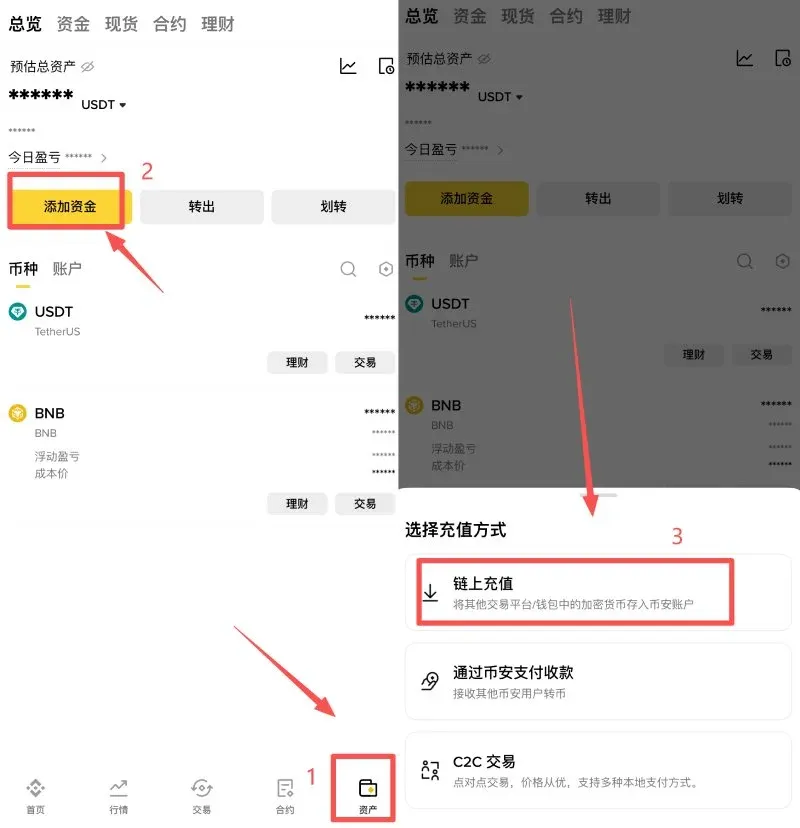
- Choose the correct network (e.g., TRC‑20). The network must match the one used on the sending platform; otherwise the assets
Related Reading
- Sell USDT Safely on Binance & OKX: KYC, Payouts & AML Guide
- On‑Chain Earning on OKX: Step‑by‑Step Staking & DeFi Guide
- Bitget Crypto Copy‑Trading: Register & Download Guide
💡 Register on Binance with referral code B2345 for the maximum trading fee discount. See Binance complete guide.



