
 Bitaigen Research
 Binance Spot Trading
Binance spot trading refers to the method of buying and selling cryptocurrencies on the Binance platform at the current market price, with the transaction settled instantly—“pay cash, receive coins” in one step.
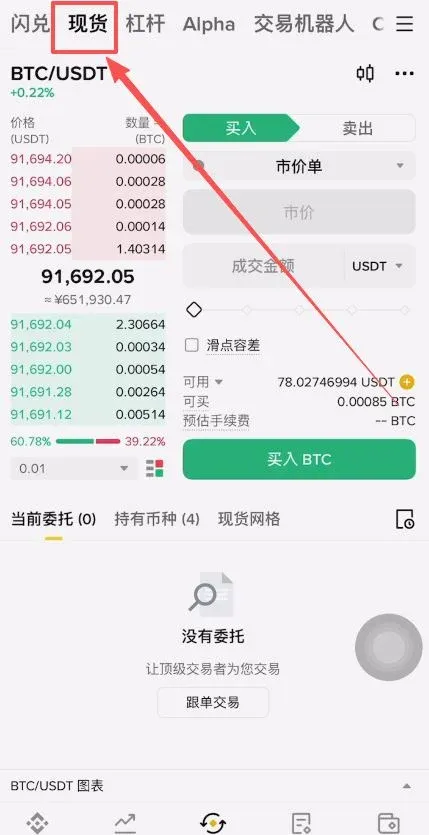
In addition to traditional limit order trading, Binance spot trading also offers a Fast Convert (flash swap) feature that lets users switch between coins within seconds. The quoted price is slightly higher than the best limit order price, but the process is more convenient.
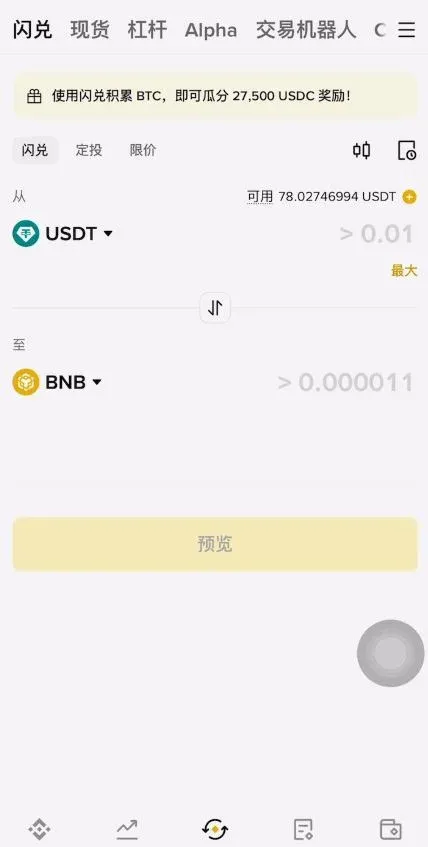
This article systematically explains the core concepts of Binance spot trading and, using the mobile app as an example, walks through the entire workflow from depositing funds, placing orders, to checking trade history. It also provides a brief introduction to using the Fast Convert service.
In this guide we outline the key steps of Binance spot trading—from funding your account, placing orders on a mobile device, to reviewing your transaction records. Each operation is demonstrated in detail, and the convenient entry point for Fast Convert is highlighted. After reading, you’ll be able to start trading quickly, avoid unnecessary trial‑and‑error, and improve your execution efficiency.
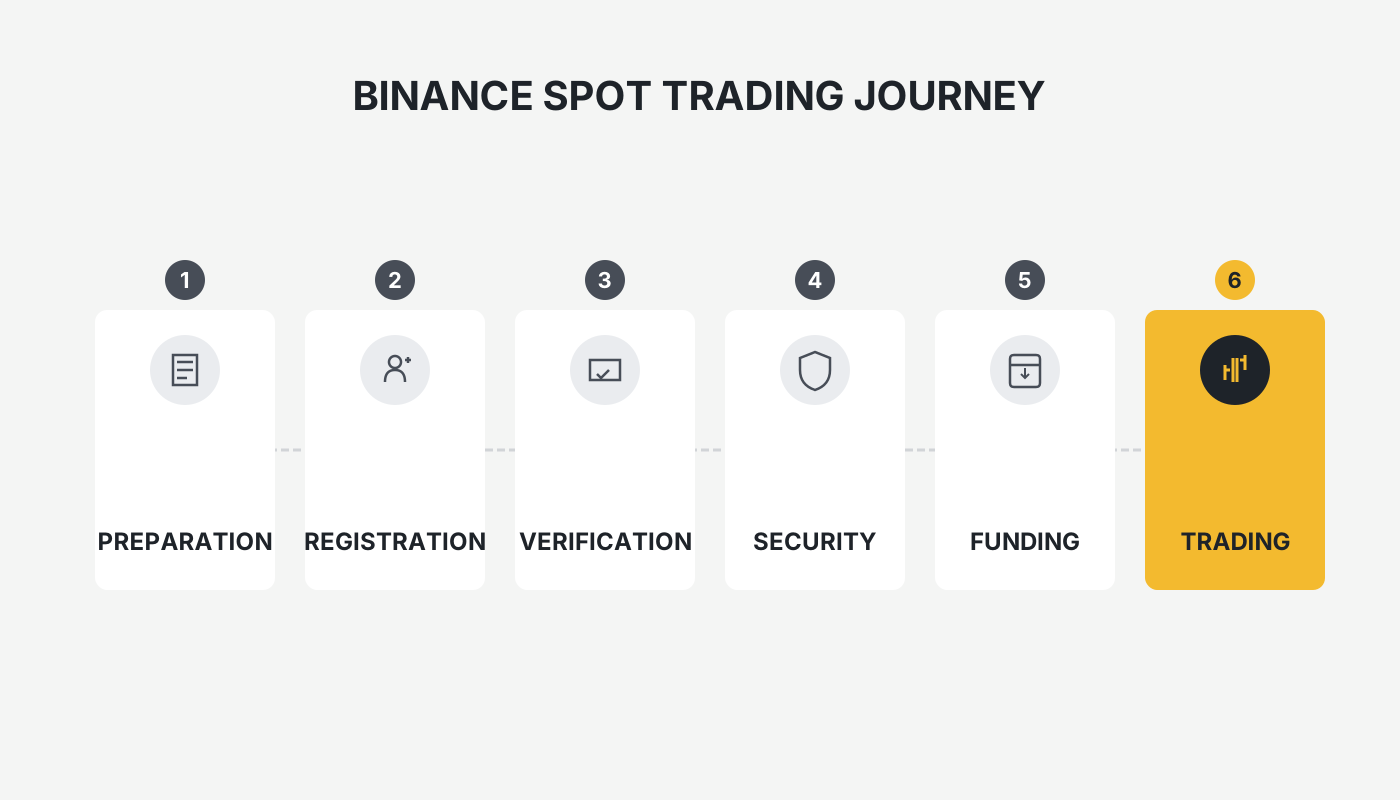
What Is Spot Trading?
Spot trading is a method of buying or selling assets for immediate delivery. Settlement occurs at the exact moment the order is matched.
- Immediate settlement: After a purchase, the asset appears instantly in your Binance account; after a sale, the proceeds are credited immediately.
- Two‑way trading: You can use a fiat‑backed stablecoin such as USDT to buy Bitcoin (BTC), or sell your BTC back to USDT.
In short, spot trading is “pay cash (or coin) and receive the asset in one hand.” Once the trade is completed, the asset belongs to the buyer or seller right away.
Preparations (Including Registration Process)
Before you execute any trade, make sure you have completed the following steps:
- Create a Binance account
- Official registration link: <https://accounts.binance.com/register?ref=B2345> (copy the link into your browser)
- Android app download: <https://www.bitaigen.com/binance/download>
- Complete identity verification (KYC)
Follow the prompts to upload front‑ and back‑side photos of your national ID and a selfie of yourself, then finish the real‑name verification.
- Prepare tradable assets
- Use USDT purchased via the “Buy Crypto instantly” feature with fiat money.
- Or transfer cryptocurrencies from another exchange or wallet into your Binance account.
For detailed instructions, refer to the “Binance App Full Registration Guide,” which covers downloading the app, setting up account security, and the complete deposit/withdrawal workflow.
What Is Binance Spot Trading?
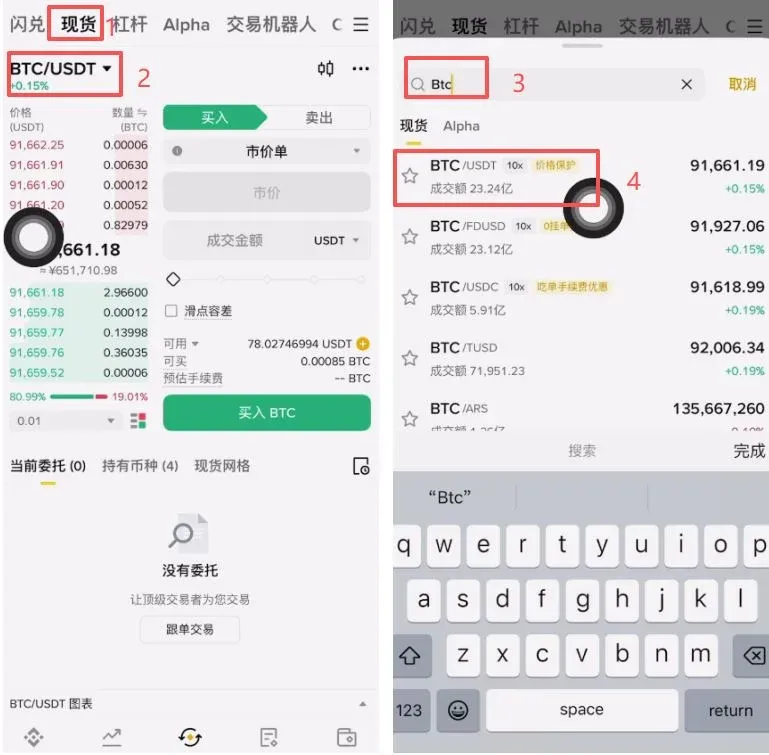
Binance spot trading means that the delivery of the cryptocurrency is completed the instant the order is matched, satisfying the immediate trading needs of both parties. Open the Binance app, type the desired trading pair (e.g., “BTC/USDT”) into the search bar at the top, and you will be taken to the corresponding trading page.
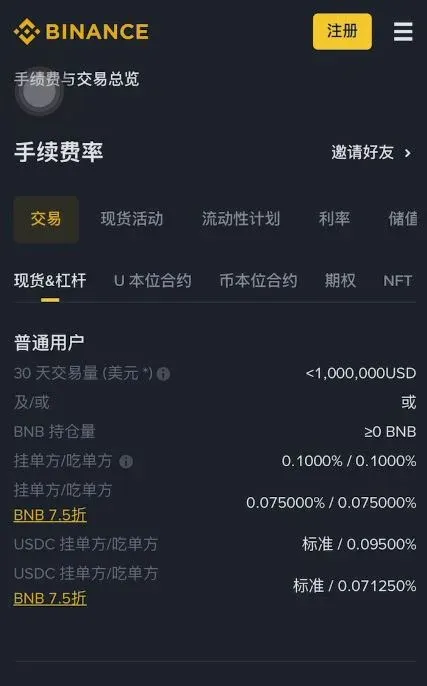
Fee Overview
- Standard fee: Determined by your user tier, with a maximum of 0.1 % per trade.
- Taker: Orders that are executed immediately (market orders) incur a slightly higher fee.
- Maker: Orders that sit on the order book before being filled (limit orders) enjoy a slightly lower fee.
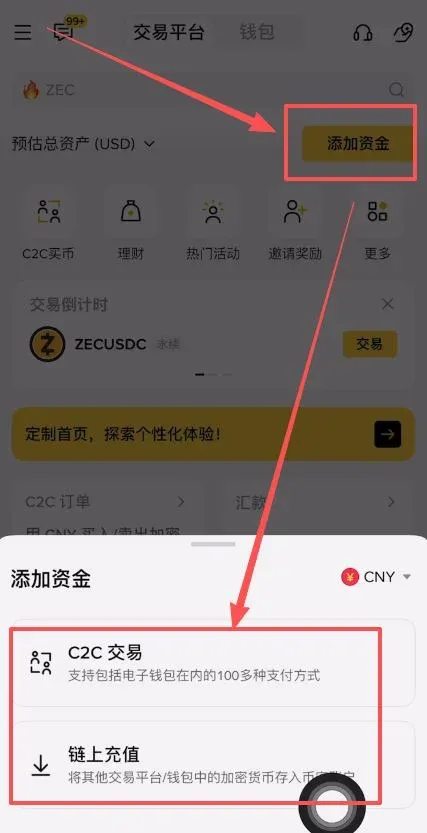
Before you can trade spot, you must first deposit funds. Whether you are depositing fiat or crypto, the assets need to be transferred into your Binance account before they become tradable.
How to Buy Cryptocurrency on the Binance App
- Open the Binance app home screen and tap Add Funds.
- Choose either C2C Trading (peer‑to‑peer fiat purchase) or On‑Chain Deposit to complete the deposit.
- After the deposit succeeds, return to the home screen and navigate to the trading interface.
Spot Trading Workflow
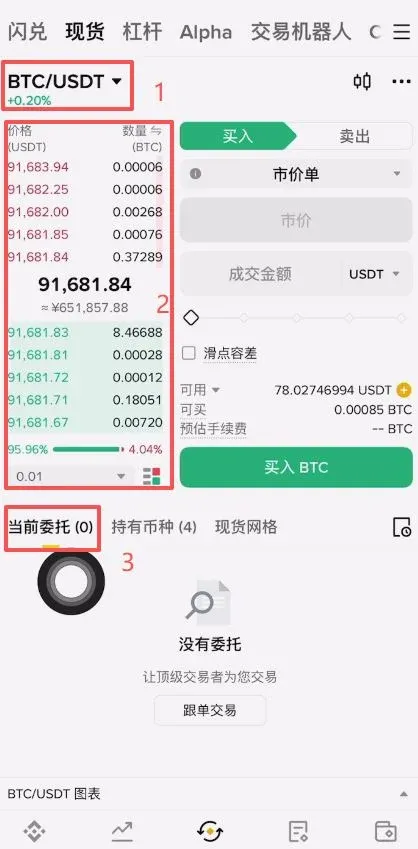
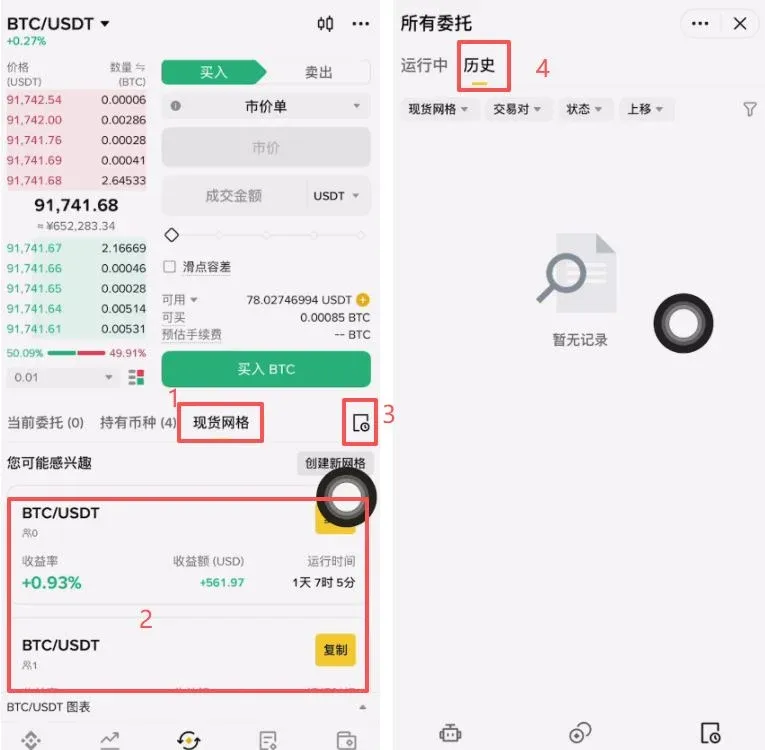
- Select the pair: Use the search bar at the top to pick the desired market (e.g., BTC/USDT).
- View the order book: The left side shows sell orders (red) and buy orders (green); the center displays the latest trade price.
- Submit an order: The “Current Orders” section lists any open orders that have not yet been filled.
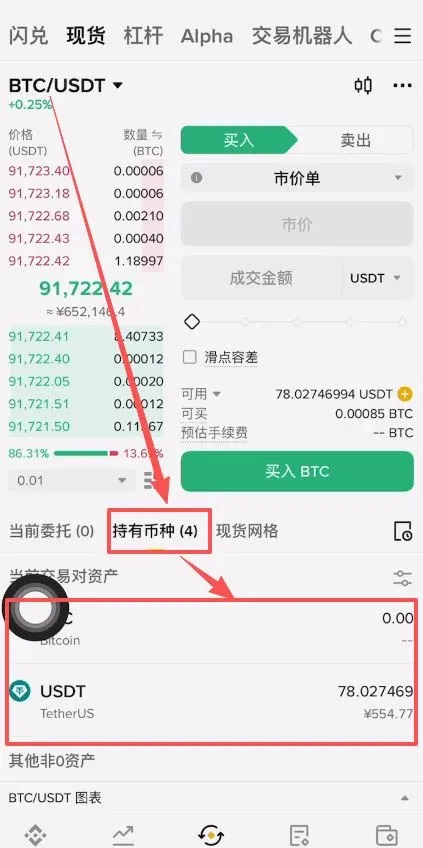
- Holdings: Assets you have purchased appear in the Holdings list.
- Spot Grid: You can set up grid trading strategies from this screen.
- Trade History: Tap the small notebook icon to view past transaction records.
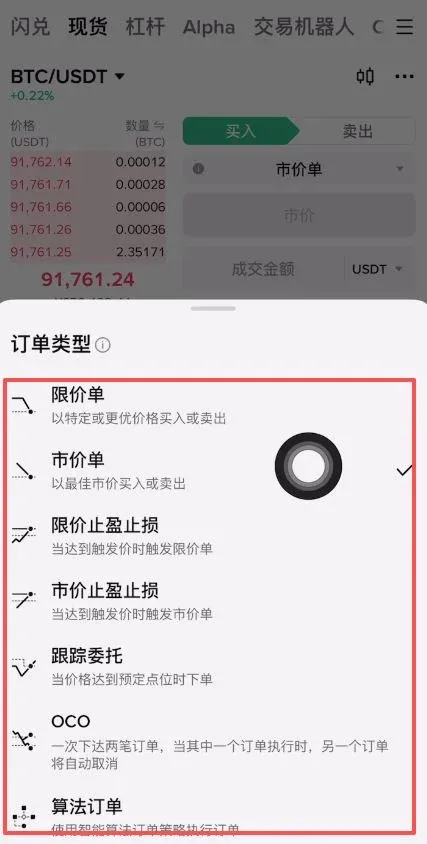
Common Order Types
| Order Type | Description |
|---|---|
| **Limit Order** | Set a specific buy or sell price; the order only executes when the market reaches that price (Maker). |
| **Market Order** | Executes immediately at the best available price (Taker). |
| **Limit Take‑Profit / Stop‑Loss** | When the trigger price is reached, a limit order is placed. |
| **Market Take‑Profit / Stop‑Loss** | When the trigger price is reached, a market order is placed. |
| **Trailing Order** | Automatically places an order when the price moves a predefined distance from its peak. |
| **OCO (One‑Cancels‑the‑Other)** | Simultaneously sets a limit order and a stop‑loss/take‑profit order; if one fills, the other is cancelled. |
| **Algorithmic Order** | Advanced strategy orders designed for professional traders. |
Among these, limit orders and market orders are the two most frequently used by beginners.
Overview of the Fast Convert Feature
Fast Convert is an alternative entry point for spot trading on Binance that emphasizes “one‑click conversion, no fees.” However, the quoted price is typically a few basis points above the best limit order price, meaning buyers usually pay a slightly higher rate.
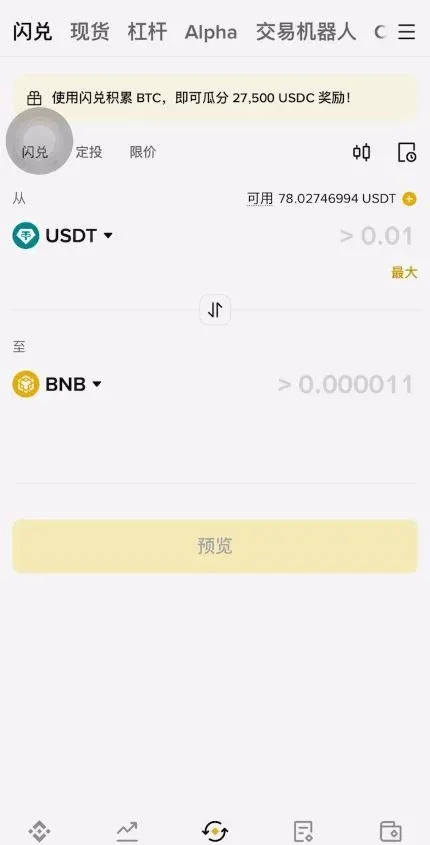
Because cryptocurrency prices can move sharply, a Fast Convert quote is only valid for 5 seconds; after that you must refresh the offer. Spot trading remains the foundational method for learning crypto investment—e.g., a “buy‑and‑hold” approach—making it suitable for investors who intend to keep assets for the long term.
Complete Guide to Optimising Binance Spot Trading Fees
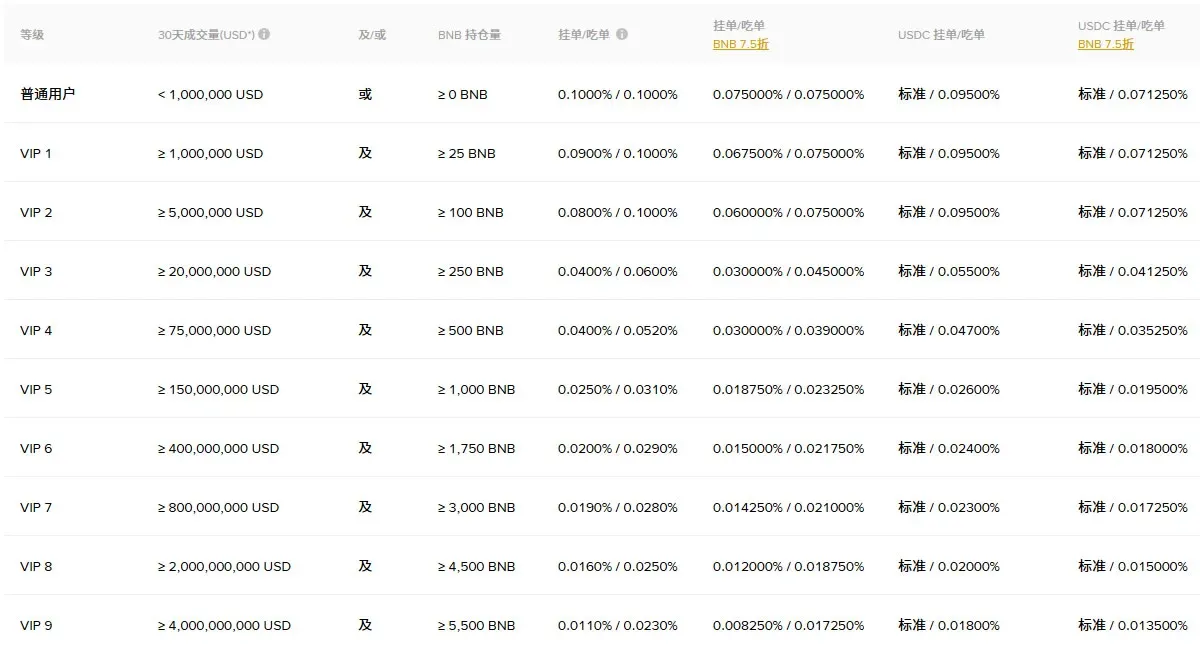
Binance generates revenue by charging a small fee on each successful transaction. The fee structure varies with trading volume and BNB (Binance Coin) holdings.
- Regular users (30‑day trading volume ≤ USD 1 million and BNB holdings ≤ 25 BNB) have a default maker/taker fee of 0.1 %.
- BNB discount: Enable the BNB‑pay option to receive a 25 % discount on fees.
💡 When trading with USDC on a market order, the taker fee is 0.095 %, which is 0.005 % lower than the fee for USDT.
1️⃣ Deep Dive into the Fee Structure
(a) Base Rate Model
- Maker / Taker mechanism
- Makers (limit orders) enjoy a lower rate than takers (market orders); the standard spot rate is 0.10 %.
- Takers incur a slightly higher cost, especially in high‑frequency trading.
- Hidden cost – Funding rate
- Settled every 8 hours to balance long and short positions in certain leveraged products.
(b) VIP Tier Discount Ladder
| VIP Level | 30‑Day Trading Volume | BNB Holding | Discount on Taker Fee |
|---|---|---|---|
| VIP 1 | ≥ USD 15 million | ≥ 25 BNB | 0.040 % |
| VIP 3 | ≥ USD 100 million | ≥ 250 BNB | 0.035 % |
2️⃣ Six Proven Ways to Reduce Fees
- BNB Discount: Go to Profile → Preferences and enable “Pay with BNB.”
- Accelerate VIP Level: Holding ≥ 25 BNB automatically upgrades you to VIP 1, unlocking lower fees as your volume grows.
- Order‑type optimisation: Prioritise limit (maker) orders to minimise fee expenditure.
- Official promotions: Keep an eye on zero‑fee or rebate campaigns for additional discounts.
- Trade‑frequency risk control: Set a minimum price‑movement trigger (e.g., ≥ 1 %) to avoid unnecessary order churn.
- Referral rebate: Register through a personal referral link or invitation code to earn a 20 % rebate on spot and futures trades.
Tips for New Traders
- Activate the BNB fee discount feature to benefit from lower fees.
- Conduct a thorough risk assessment before committing capital; avoid chasing price spikes blindly.
- Start with a modest amount to get comfortable with the interface, then gradually increase your position size as you gain confidence.
Summary
Binance spot trading offers a secure, beginner‑friendly entry point that helps users acquire hands‑on experience and progressively sharpen their trading skills. By mastering the correct order placement procedures and fee‑optimisation techniques, spot trading can serve as a solid foundation for exploring more advanced strategies later on.
The above constitutes the entire “How to Use Binance Spot Trading? Full Step‑by‑Step Guide” tutorial. For additional Binance spot trading resources, follow Bitaigen (比特根) and explore the other related articles.
Note for U.S. residents: Use Binance.US for spot trading instead of the global Binance platform.
Fiat deposits: When depositing fiat currency, you may use USD transfers via SEPA (for Euro‑zone banks) or SWIFT for international wires.
Tax reminder: Cryptocurrency gains may be taxable in your jurisdiction; please consult a tax professional to ensure compliance.
Related Reading
- Binance Spot Trading Guide: Basics, Interfaces & How to Start
- Binance Desktop Client & Mobile App Download Guide 2026
- Binance Tutorial: Deposit USDT, Spot Trade, Withdraw to Fiat
💡 Register on Binance with referral code B2345 for the maximum trading fee discount. See Binance complete guide.



