
 Bitaigen Research
 What Is Binance Copy‑Trading?
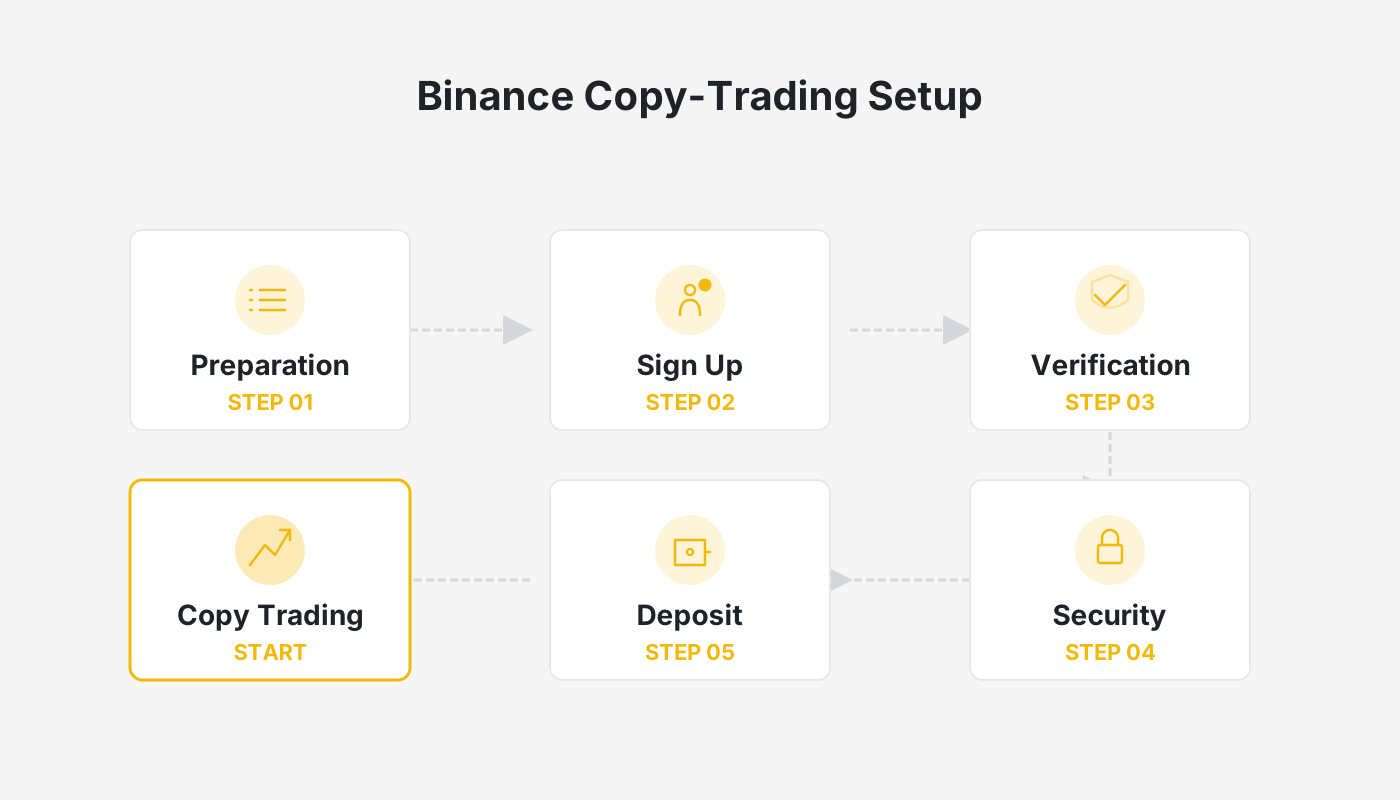
Binance’s copy‑trading feature lets users on the platform select high‑performing traders and mirror their buy‑sell actions in real time. Compared with traditional funds, copy‑traders only pay a share of the profit when the signal provider makes money; if the provider incurs a loss, no performance fee is charged, which reduces extra costs for investors during losing periods. The platform supports both spot and futures (contract) assets, and users can set their own trading pairs, leverage, and stop‑loss thresholds according to their risk tolerance to control overall exposure.
Binance Copy‑Trading Fees
Three types of fees are involved in the copy‑trading process:
- Trading fees
Fees vary according to the asset class (futures or spot) and order type (limit or market).
- Futures copy‑trading: 0.02 % ~ 0.05 %
- Spot copy‑trading: 0.10 %
- Profit share
The signal provider usually takes 10 % of the follower’s profit as a performance share; if the provider ends the period with a net loss, this fee is waived.
- Funding rate
When copying futures positions, the applicable funding fees (or receipts) for the open position are also applied.
Binance Copy‑Trading Rules
According to the official description, signal providers enjoy the following incentives:
- 10 % of the follower‑generated profit
- 10 % rebate on trading fees
These incentives are calculated once a week, from 08:00 Monday to 23:59 Sunday (Taiwan time), and profit‑share is settled only when the provider has no open positions (the rebate is independent of open positions). The entry barrier for becoming a signal provider is relatively low; a minimum account balance of USD 1,000 (or the equivalent in other fiat via SEPA/SWIFT) is sufficient to start.
How to Choose High‑Quality Signal Providers and Boost Returns
When newcomers select a provider, they can evaluate the following dimensions:
- Return on Investment (ROI) – A higher ROI generally indicates better potential returns; if other factors are similar, prioritize the higher ROI.
- Maximum drawdown – Smaller drawdowns suggest more stable profitability.
- Trading history – Review past orders to avoid providers who open positions too frequently or display abnormal risk preferences.
- Comprehensive assessment – Even if a provider shows a high ROI and many followers, watch out for suspicious data or possible manipulation; always cross‑check with historical performance.
Note: Copy‑trading can improve operational efficiency, but over‑reliance may erode your own market‑analysis skills. It is advisable not to allocate all of your capital to this method.
Binance Copy‑Trading Workflow (Step‑by‑Step)
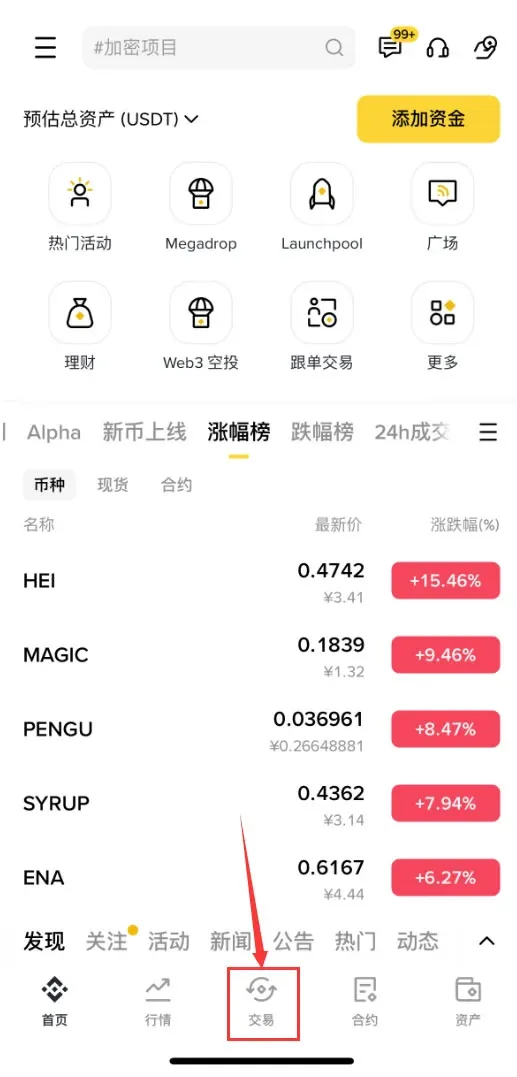
- Launch the Binance app (global Binance for non‑U.S. users; U.S. residents must use Binance.US). Register via the official sign‑up page or download the app from the official download link. Tap the Trade option in the bottom navigation bar.
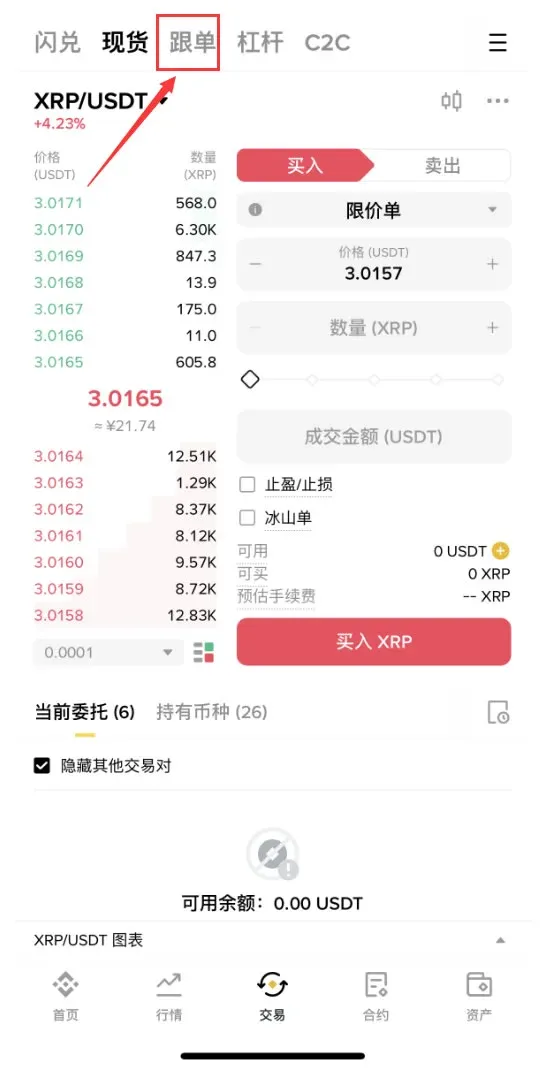
- Switch to the Copy‑Trading tab at the top of the screen.
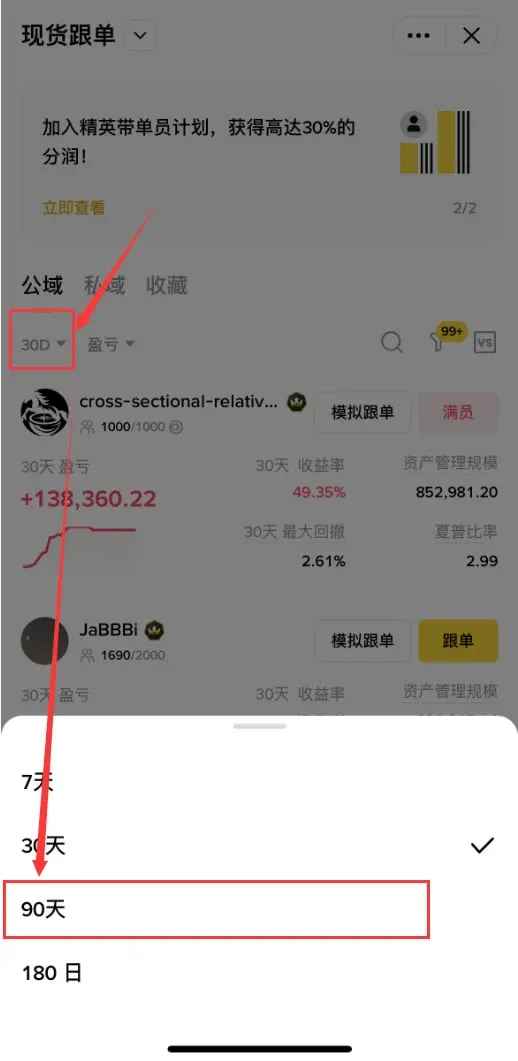
- Set the statistical period to 90 days to evaluate a trader’s stability over a longer horizon.
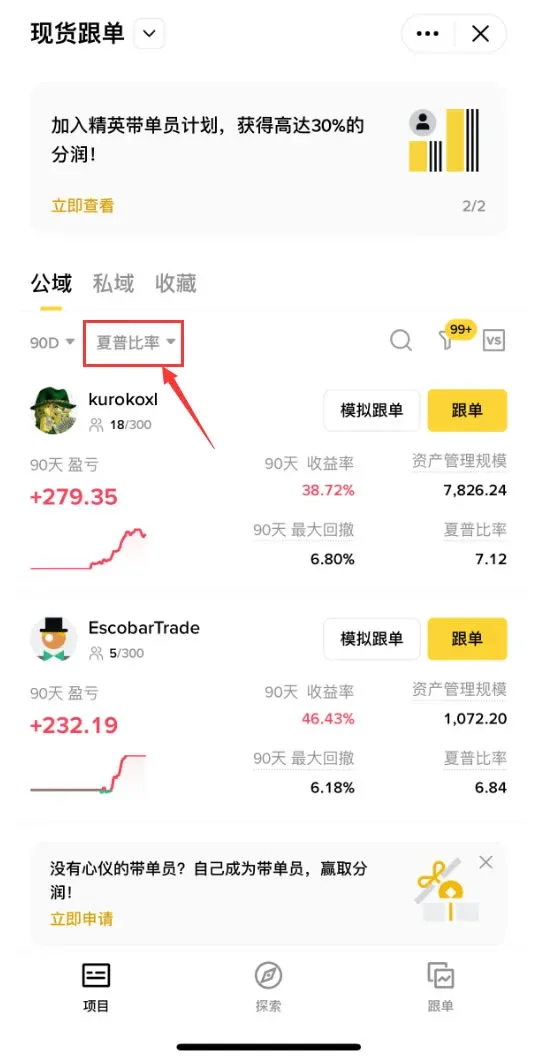
- The default filter metric is the Sharpe Ratio, which reflects the balance between profit and volatility; a higher ratio indicates a more attractive risk‑adjusted return.
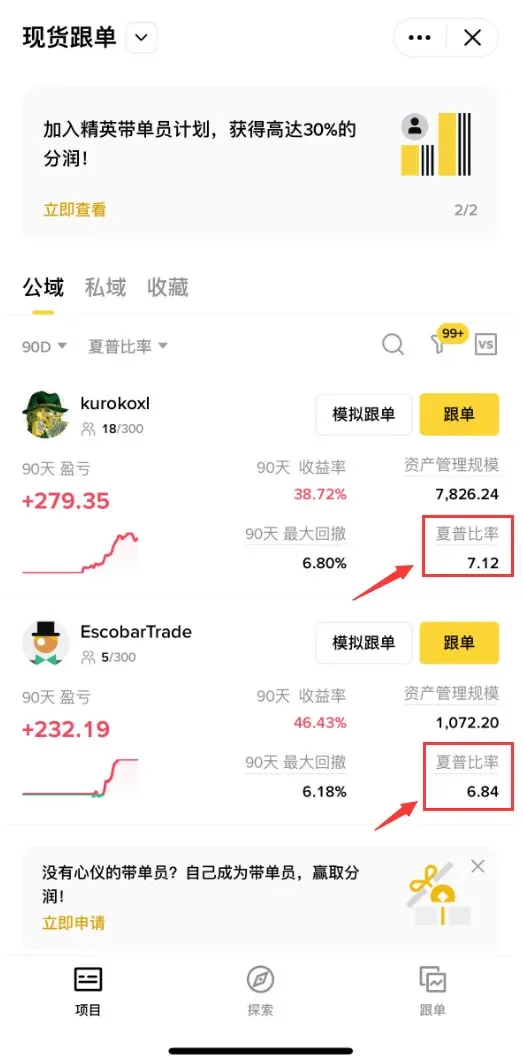
- In the example, the first trader’s Sharpe Ratio is 7.12, while the second’s is 6.84.
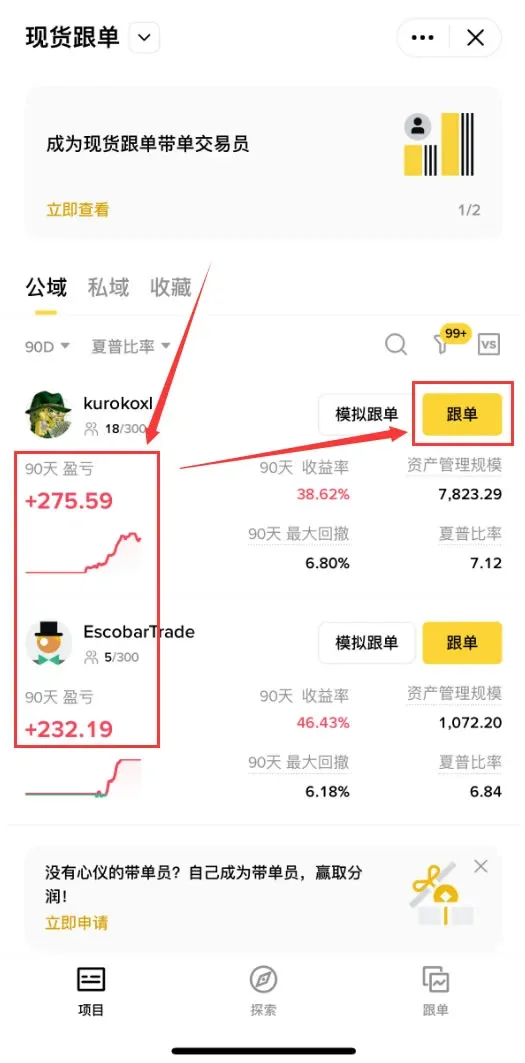
- Examine the 90‑day profit‑loss figures: the first trader earned a cumulative USD 275.59, the second USD 232.19. Consequently, the first trader is the preferred candidate for copying.
- Choose Proportional Copy‑Trading. In this mode the system replicates the provider’s position size proportionally: if the provider opens a position using 1 % of their margin, your account will also allocate 1 % of its margin, achieving a 1:1 replication. Set the amount you wish to allocate and configure a project stop‑loss. If cumulative losses reach the defined threshold (e.g., 20 %), the system automatically stops copying. After confirming the settings, tap Confirm to activate the copy‑trade.
Why Does My Copy‑Trade Fail?
Copy‑trades can fail for several common reasons:
- Insufficient available margin.
- The provider’s limit, take‑profit, or stop‑loss order does not fill completely.
- Market slippage exceeds the system’s maximum tolerance.
- The provider opens a reverse position that conflicts with your direction.
Frequently Asked Questions About Binance Copy‑Trading
Q: Does Binance support copy‑trading?
A: Yes. Binance offers both spot copy‑trading and futures (contract) copy‑trading.
Q: Is Binance trading safe?
A: As the world’s largest centralized exchange by market cap, Binance provides a relatively robust set of fund‑security measures. Nevertheless, users are encouraged to diversify assets and avoid keeping all holdings on a single platform.
Q: Do I need to close positions manually when copying?
A: In most cases, followers can decide when to close a copied position.
Q: Can copy‑trading guarantee profit? Is it a scam?
A: Copy‑trading does not guarantee profit. If the signal provider’s strategy incurs losses, followers will experience the same losses, potentially amplified by leverage.
Tax reminder: Cryptocurrency gains may be subject to tax in your local jurisdiction. Consult a tax professional to understand your reporting obligations, whether you receive profits via spot or futures copy‑trading.
---
This guide provides a complete walkthrough of how to participate in Binance’s copy‑trading, including the full process on the Binance app, key considerations, and answers to common concerns. For more practical tutorials, stay tuned to Bitaigen’s future articles.
Related Reading
- Binance Copy‑Trading Test: Find Trustworthy Signal Providers
- Binance Copy Trading Guide: How to Replicate Top Traders
- Binance Copy Trading: Mirror Top Traders & Control Risk
💡 Register on Binance with referral code B2345 for the maximum trading fee discount. See Binance complete guide.



